window CHEVROLET BOLT EV 2023 Owner's Manual
[x] Cancel search | Manufacturer: CHEVROLET, Model Year: 2023, Model line: BOLT EV, Model: CHEVROLET BOLT EV 2023Pages: 308, PDF Size: 5.18 MB
Page 40 of 308
Chevrolet BOLT EV Owner Manual (GMNA-Localizing-U.S./Canada-
16404388) - 2023 - CRC - 3/7/22
Seats and Restraints 39
Sedan models may have the following
airbags:
.Seat-mounted side impact airbags for the
second row outboard passengers
All vehicle airbags have the word AIRBAG on
the trim or on a label near the deployment
opening.
For frontal airbags, the word AIRBAG is on
the center of the steering wheel for the
driver and on the instrument panel for the
front outboard passenger.
For knee airbags, the word AIRBAG is on the
lower part of the instrument panel.
For seat-mounted side impact airbags, the
word AIRBAG is on the side of the seatback
or side of the seat closest to the door.
For roof-rail airbags, the word AIRBAG is on
the ceiling or trim.
Airbags are designed to supplement the
protection provided by seat belts. Even
though today's airbags are also designed to
help reduce the risk of injury from the force
of an inflating bag, all airbags must inflate
very quickly to do their job.
Here are the most important things to know
about the airbag system:
{Warning
You can be severely injured or killed in a
crash if you are not wearing your seat
belt, even with airbags. Airbags are
designed to work with seat belts, not
replace them. Also, airbags are not
designed to inflate in every crash. In
some crashes seat belts are the only
restraint. See When Should an Airbag
Inflate? 041.
Wearing your seat belt during a crash
helps reduce your chance of hitting
things inside the vehicle or being ejected
from it. Airbags are “supplemental
restraints” to the seat belts. Everyone in
the vehicle should wear a seat belt
properly, whether or not there is an
airbag for that person.
{Warning
Because airbags inflate with great force
and faster than the blink of an eye,
anyone who is up against, or very close
to, any airbag when it inflates can be
seriously injured or killed. Do not sit
(Continued)
Warning (Continued)
unnecessarily close to any airbag, as you
would be if sitting on the edge of the
seat or leaning forward. Seat belts help
keep you in position before and during a
crash. Always wear a seat belt, even with
airbags. The driver should sit as far back
as possible while still maintaining control
of the vehicle. The seat belts and the
front outboard passenger airbags are
most effective when you are sitting well
back and upright in the seat with both
feet on the floor.
Occupants should not lean on or sleep
against the door or side windows in
seating positions with seat-mounted side
impact airbags and/or roof-rail airbags.
{Warning
Children who are up against, or very
close to, any airbag when it inflates can
be seriously injured or killed. Always
secure children properly in the vehicle. To
read how, seeOlder Children 049 or
Infants and Young Children 050.
Page 41 of 308
Chevrolet BOLT EV Owner Manual (GMNA-Localizing-U.S./Canada-
16404388) - 2023 - CRC - 3/7/22
40 Seats and Restraints
There is an airbag readiness light on the
instrument cluster, which shows the airbag
symbol. The system checks the airbag
electrical system for malfunctions. The light
tells you if there is an electrical problem.
SeeAirbag Readiness Light 083 for more
information.
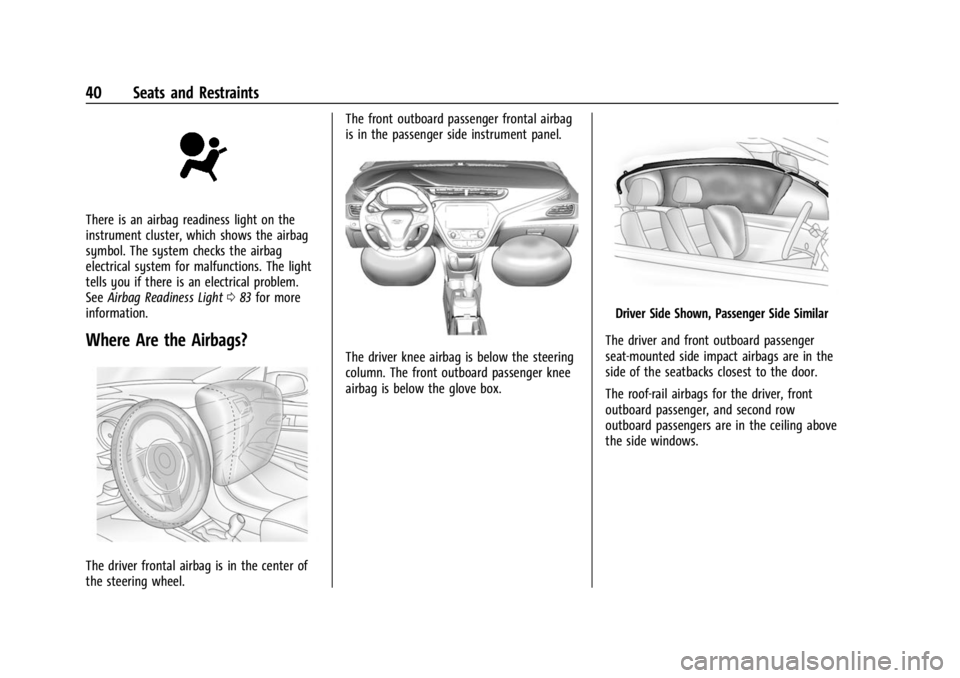
Where Are the Airbags?
The driver frontal airbag is in the center of
the steering wheel. The front outboard passenger frontal airbag
is in the passenger side instrument panel.
The driver knee airbag is below the steering
column. The front outboard passenger knee
airbag is below the glove box.
Driver Side Shown, Passenger Side Similar
The driver and front outboard passenger
seat-mounted side impact airbags are in the
side of the seatbacks closest to the door.
The roof-rail airbags for the driver, front
outboard passenger, and second row
outboard passengers are in the ceiling above
the side windows.
Page 42 of 308
Chevrolet BOLT EV Owner Manual (GMNA-Localizing-U.S./Canada-
16404388) - 2023 - CRC - 3/7/22
Seats and Restraints 41
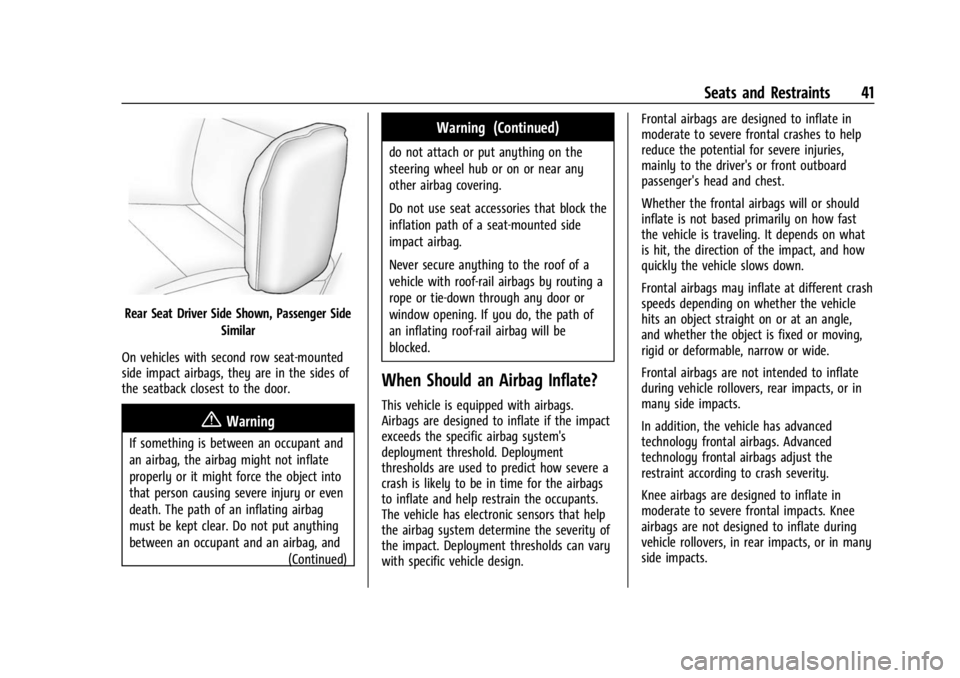
Rear Seat Driver Side Shown, Passenger SideSimilar
On vehicles with second row seat-mounted
side impact airbags, they are in the sides of
the seatback closest to the door.
{Warning
If something is between an occupant and
an airbag, the airbag might not inflate
properly or it might force the object into
that person causing severe injury or even
death. The path of an inflating airbag
must be kept clear. Do not put anything
between an occupant and an airbag, and (Continued)
Warning (Continued)
do not attach or put anything on the
steering wheel hub or on or near any
other airbag covering.
Do not use seat accessories that block the
inflation path of a seat-mounted side
impact airbag.
Never secure anything to the roof of a
vehicle with roof-rail airbags by routing a
rope or tie‐down through any door or
window opening. If you do, the path of
an inflating roof-rail airbag will be
blocked.
When Should an Airbag Inflate?
This vehicle is equipped with airbags.
Airbags are designed to inflate if the impact
exceeds the specific airbag system's
deployment threshold. Deployment
thresholds are used to predict how severe a
crash is likely to be in time for the airbags
to inflate and help restrain the occupants.
The vehicle has electronic sensors that help
the airbag system determine the severity of
the impact. Deployment thresholds can vary
with specific vehicle design. Frontal airbags are designed to inflate in
moderate to severe frontal crashes to help
reduce the potential for severe injuries,
mainly to the driver's or front outboard
passenger's head and chest.
Whether the frontal airbags will or should
inflate is not based primarily on how fast
the vehicle is traveling. It depends on what
is hit, the direction of the impact, and how
quickly the vehicle slows down.
Frontal airbags may inflate at different crash
speeds depending on whether the vehicle
hits an object straight on or at an angle,
and whether the object is fixed or moving,
rigid or deformable, narrow or wide.
Frontal airbags are not intended to inflate
during vehicle rollovers, rear impacts, or in
many side impacts.
In addition, the vehicle has advanced
technology frontal airbags. Advanced
technology frontal airbags adjust the
restraint according to crash severity.
Knee airbags are designed to inflate in
moderate to severe frontal impacts. Knee
airbags are not designed to inflate during
vehicle rollovers, in rear impacts, or in many
side impacts.
Page 44 of 308
Chevrolet BOLT EV Owner Manual (GMNA-Localizing-U.S./Canada-
16404388) - 2023 - CRC - 3/7/22
Seats and Restraints 43
deflated airbags. Airbag inflation does not
prevent the driver from seeing out of the
windshield or being able to steer the
vehicle, nor does it prevent people from
leaving the vehicle.
{Warning
When an airbag inflates, there may be
dust in the air. This dust could cause
breathing problems for people with a
history of asthma or other breathing
trouble. To avoid this, everyone in the
vehicle should get out as soon as it is
safe to do so. If you have breathing
problems but cannot get out of the
vehicle after an airbag inflates, then get
fresh air by opening a window or a door.
If you experience breathing problems
following an airbag deployment, you
should seek medical attention.
The vehicle has a feature that may
automatically unlock the doors, turn on the
interior lamps and hazard warning flashers
after the airbags inflate. The feature may
also activate, without airbag inflation, after
an event that exceeds a predetermined
threshold. After turning the vehicle off and
then on again, the doors can be locked, the interior lamps can be turned off, and the
hazard warning flashers can be turned off
using the controls for those features. If any
of these systems are damaged in the crash
they may not operate as normal.
{Warning
A crash severe enough to inflate the
airbags may have also damaged
important functions in the vehicle, such
as the brake and steering systems, etc.
Even if the vehicle appears to be drivable
after a moderate crash, there may be
concealed damage that could make it
difficult to safely operate the vehicle.
Use caution if attempting to restart the
vehicle after a crash has occurred.
If an airbag inflates or the vehicle has been
in a crash, the sensing system may shut
down the high voltage system. When this
occurs, the high voltage battery is
disconnected and the vehicle will not start.
Before the vehicle can be operated again, it
must be serviced at your dealer. In many crashes severe enough to inflate
the airbag, windshields are broken by
vehicle deformation. Additional windshield
breakage may also occur from the front
outboard passenger airbag.
.Airbags are designed to inflate only once.
After an airbag inflates, you will need
some new parts for the airbag system.
If you do not get them, the airbag
system will not be there to help protect
you in another crash. A new system will
include airbag modules and possibly other
parts. The service manual for the vehicle
covers the need to replace other parts.
.The vehicle has a crash sensing and
diagnostic module which records
information after a crash. See
Vehicle
Data Recording and Privacy 0287 and
Event Data Recorders 0287.
.Let only qualified technicians work on the
airbag systems. Improper service can
mean that an airbag system will not work
properly. See your dealer for service.
Page 73 of 308

Chevrolet BOLT EV Owner Manual (GMNA-Localizing-U.S./Canada-
16404388) - 2023 - CRC - 3/7/22
72 Instruments and Controls
Instruments and Controls
Controls
Steering Wheel Adjustment . . . . . . . . . . . . . 73
Heated Steering Wheel . . . . . . . . . . . . . . . . . 73
Horn . . . . . . . . . . . . . . . . . . . . . . . . . . . . . . . . . . . . 73
Pedestrian Safety Signal . . . . . . . . . . . . . . . . 73
Windshield Wiper/Washer . . . . . . . . . . . . . . 74
Rear Window Wiper/Washer . . . . . . . . . . . 75
Compass . . . . . . . . . . . . . . . . . . . . . . . . . . . . . . . 76
Clock . . . . . . . . . . . . . . . . . . . . . . . . . . . . . . . . . . . 76
Power Outlets . . . . . . . . . . . . . . . . . . . . . . . . . . 76
Wireless Charging . . . . . . . . . . . . . . . . . . . . . . 76
Warning Lights, Gauges, and Indicators
Warning Lights, Gauges, andIndicators . . . . . . . . . . . . . . . . . . . . . . . . . . . . . 79
Instrument Cluster . . . . . . . . . . . . . . . . . . . . . 79
Speedometer . . . . . . . . . . . . . . . . . . . . . . . . . . . 81
Odometer . . . . . . . . . . . . . . . . . . . . . . . . . . . . . . 81
Trip Odometer . . . . . . . . . . . . . . . . . . . . . . . . . . 81
Battery Gauge (High Voltage) . . . . . . . . . . 81
Driver Efficiency Gauge . . . . . . . . . . . . . . . . . 82
Power Indicator Gauge . . . . . . . . . . . . . . . . . 82
Seat Belt Reminders . . . . . . . . . . . . . . . . . . . . 82
Airbag Readiness Light . . . . . . . . . . . . . . . . . 83
Passenger Airbag Status Indicator . . . . . . 84
Charging System Light (12-Volt Battery) . . . . . . . . . . . . . . . . . . . . . . . . . . . . . . 84
Service Vehicle Soon Light . . . . . . . . . . . . . . 85 Brake System Warning Light . . . . . . . . . . . 85
Electric Parking Brake Light . . . . . . . . . . . . . 85
Service Electric Parking Brake Light . . . . . 85
Antilock Brake System (ABS) Warning
Light . . . . . . . . . . . . . . . . . . . . . . . . . . . . . . . . . 86
Sport Mode Light . . . . . . . . . . . . . . . . . . . . . . 86
Lane Keep Assist (LKA) Light . . . . . . . . . . . 86
Vehicle Ahead Indicator . . . . . . . . . . . . . . . . 87
Pedestrian Ahead Indicator . . . . . . . . . . . . . 87
Traction Off Light . . . . . . . . . . . . . . . . . . . . . . . 87
StabiliTrak OFF Light . . . . . . . . . . . . . . . . . . . . 87
Traction Control System (TCS)/StabiliTrak Light . . . . . . . . . . . . . . . . . . . . . . . . . . . . . . . . . 88
Tire Pressure Light . . . . . . . . . . . . . . . . . . . . . 88
Security Light . . . . . . . . . . . . . . . . . . . . . . . . . . 88
Vehicle Ready Light . . . . . . . . . . . . . . . . . . . . 88
One-Pedal Driving Light . . . . . . . . . . . . . . . . 89
High-Beam On Light . . . . . . . . . . . . . . . . . . . . 89
Lamps On Reminder . . . . . . . . . . . . . . . . . . . . 89
Cruise Control Light . . . . . . . . . . . . . . . . . . . . 89
Door Ajar Light . . . . . . . . . . . . . . . . . . . . . . . . . 90
Information Displays
Power Flows . . . . . . . . . . . . . . . . . . . . . . . . . . . 90
Programmable Charging . . . . . . . . . . . . . . . . 90
Energy Information . . . . . . . . . . . . . . . . . . . . . 97
Charging Options . . . . . . . . . . . . . . . . . . . . . . 99
Driver Information Center (DIC) . . . . . . . . 99
Vehicle Messages
Vehicle Messages . . . . . . . . . . . . . . . . . . . . . . 101
Propulsion Power Messages . . . . . . . . . . . . 101
Vehicle Speed Messages . . . . . . . . . . . . . . . 102
Page 75 of 308
Chevrolet BOLT EV Owner Manual (GMNA-Localizing-U.S./Canada-
16404388) - 2023 - CRC - 3/7/22
74 Instruments and Controls
Windshield Wiper/Washer
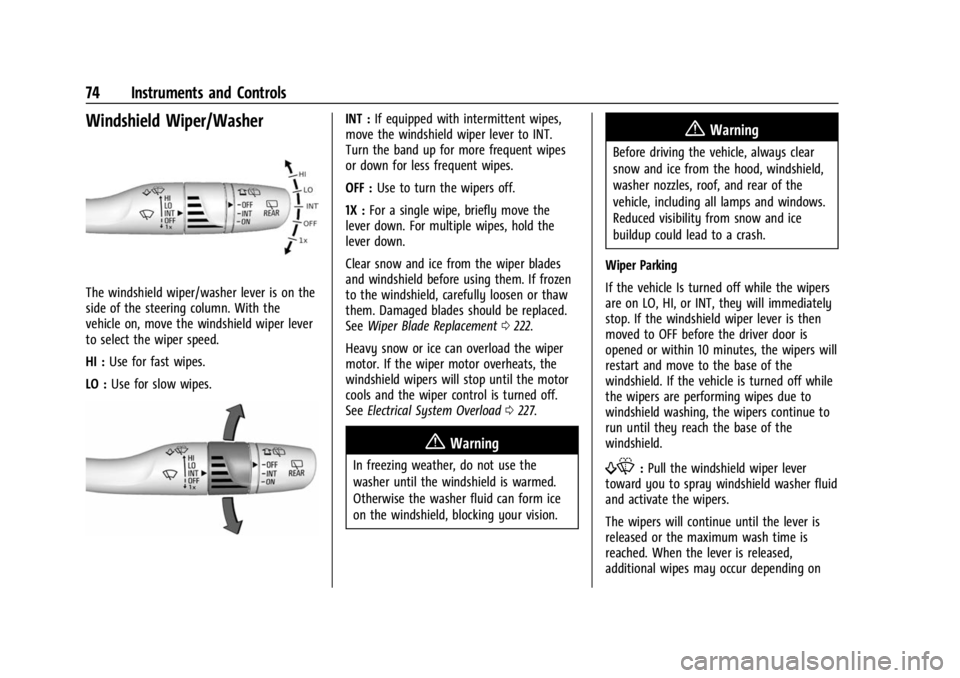
The windshield wiper/washer lever is on the
side of the steering column. With the
vehicle on, move the windshield wiper lever
to select the wiper speed.
HI :Use for fast wipes.
LO : Use for slow wipes.
INT : If equipped with intermittent wipes,
move the windshield wiper lever to INT.
Turn the band up for more frequent wipes
or down for less frequent wipes.
OFF : Use to turn the wipers off.
1X : For a single wipe, briefly move the
lever down. For multiple wipes, hold the
lever down.
Clear snow and ice from the wiper blades
and windshield before using them. If frozen
to the windshield, carefully loosen or thaw
them. Damaged blades should be replaced.
See Wiper Blade Replacement 0222.
Heavy snow or ice can overload the wiper
motor. If the wiper motor overheats, the
windshield wipers will stop until the motor
cools and the wiper control is turned off.
See Electrical System Overload 0227.
{Warning
In freezing weather, do not use the
washer until the windshield is warmed.
Otherwise the washer fluid can form ice
on the windshield, blocking your vision.
{Warning
Before driving the vehicle, always clear
snow and ice from the hood, windshield,
washer nozzles, roof, and rear of the
vehicle, including all lamps and windows.
Reduced visibility from snow and ice
buildup could lead to a crash.
Wiper Parking
If the vehicle Is turned off while the wipers
are on LO, HI, or INT, they will immediately
stop. If the windshield wiper lever is then
moved to OFF before the driver door is
opened or within 10 minutes, the wipers will
restart and move to the base of the
windshield. If the vehicle is turned off while
the wipers are performing wipes due to
windshield washing, the wipers continue to
run until they reach the base of the
windshield.
f: Pull the windshield wiper lever
toward you to spray windshield washer fluid
and activate the wipers.
The wipers will continue until the lever is
released or the maximum wash time is
reached. When the lever is released,
additional wipes may occur depending on
Page 76 of 308
Chevrolet BOLT EV Owner Manual (GMNA-Localizing-U.S./Canada-
16404388) - 2023 - CRC - 3/7/22
Instruments and Controls 75
how long the windshield washer had been
activated. SeeWasher Fluid0218 for
information on filling the windshield washer
fluid reservoir.
Rear Window Wiper/Washer
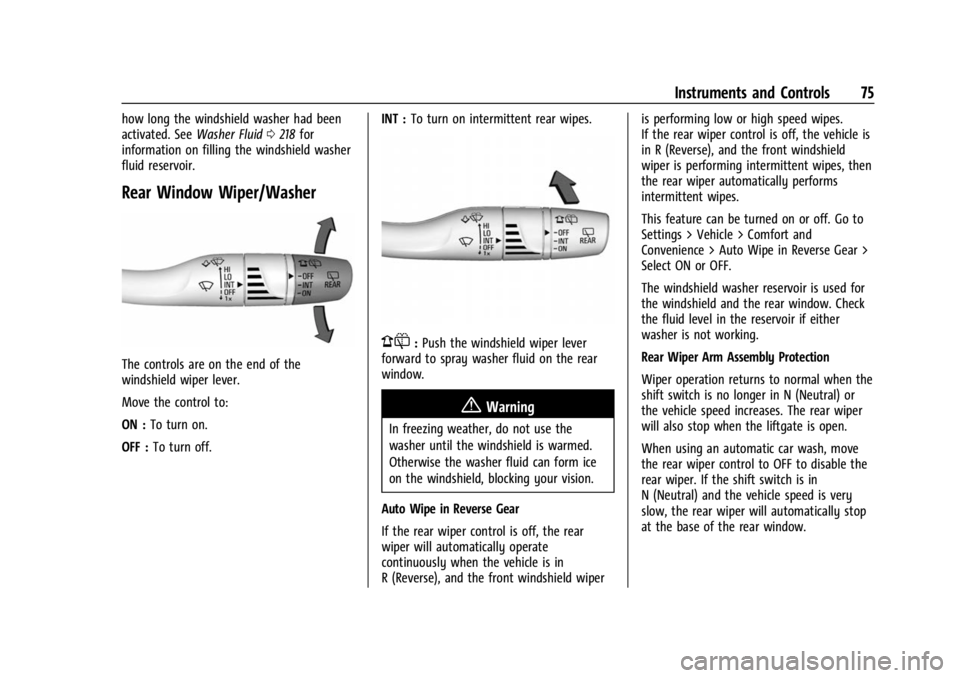
The controls are on the end of the
windshield wiper lever.
Move the control to:
ON : To turn on.
OFF : To turn off. INT :
To turn on intermittent rear wipes.
1:Push the windshield wiper lever
forward to spray washer fluid on the rear
window.
{Warning
In freezing weather, do not use the
washer until the windshield is warmed.
Otherwise the washer fluid can form ice
on the windshield, blocking your vision.
Auto Wipe in Reverse Gear
If the rear wiper control is off, the rear
wiper will automatically operate
continuously when the vehicle is in
R (Reverse), and the front windshield wiper is performing low or high speed wipes.
If the rear wiper control is off, the vehicle is
in R (Reverse), and the front windshield
wiper is performing intermittent wipes, then
the rear wiper automatically performs
intermittent wipes.
This feature can be turned on or off. Go to
Settings > Vehicle > Comfort and
Convenience > Auto Wipe in Reverse Gear >
Select ON or OFF.
The windshield washer reservoir is used for
the windshield and the rear window. Check
the fluid level in the reservoir if either
washer is not working.
Rear Wiper Arm Assembly Protection
Wiper operation returns to normal when the
shift switch is no longer in N (Neutral) or
the vehicle speed increases. The rear wiper
will also stop when the liftgate is open.
When using an automatic car wash, move
the rear wiper control to OFF to disable the
rear wiper. If the shift switch is in
N (Neutral) and the vehicle speed is very
slow, the rear wiper will automatically stop
at the base of the rear window.
Page 93 of 308
Chevrolet BOLT EV Owner Manual (GMNA-Localizing-U.S./Canada-
16404388) - 2023 - CRC - 3/7/22
92 Instruments and Controls
12 amp setting at a specified Home location.
See“Location Based Charging” later in this
section.
The Level 1-120V Cord Limit setting can be
changed at any time while the infotainment
display is operable.
{Warning
Using a charge level that exceeds the
electrical circuit or electrical outlet
capacity may start a fire or damage the
electrical circuit. Use the lowest charge
level until a qualified electrician inspects
the electrical circuit capacity. Use the
lowest charge level if the electrical circuit
or electrical outlet capacity is not known.
Target Charge Level
This mode allows the charging range for the
vehicle to be set based on what is needed.
When at a public pay station and a full
charge is not needed, the target charge level
can be set to only get as much range as
needed. If driving on a hill, the target charge level
can be set to stop the charge before the
battery is full to allow space for energy
from regenerative braking when going down
a hill.
There is a minimum target charge level.
Once this level is reached, the
–will not
allow the target charge level bar move
down further.
Target Charge Level can also be set
separately for Location-Based Home and
Away locations. If available, the Home and
Away buttons will appear on the screen.
When Location Based Charging is active, the
Target Charge Level on the Charging Status
screen will automatically update to the
Home or Away setting based on the current
location.
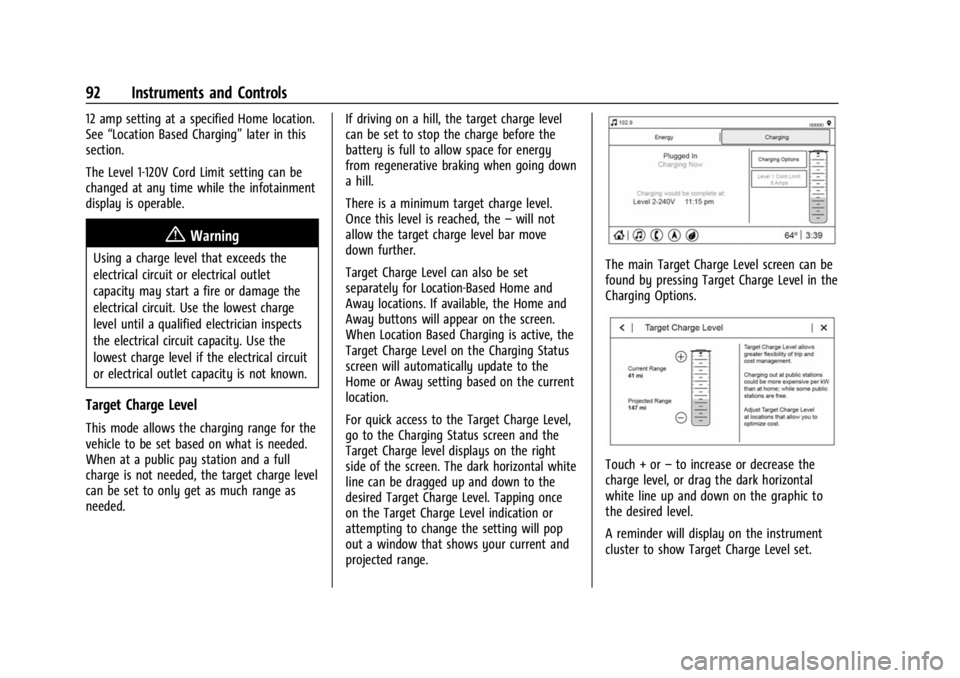
For quick access to the Target Charge Level,
go to the Charging Status screen and the
Target Charge level displays on the right
side of the screen. The dark horizontal white
line can be dragged up and down to the
desired Target Charge Level. Tapping once
on the Target Charge Level indication or
attempting to change the setting will pop
out a window that shows your current and
projected range.
The main Target Charge Level screen can be
found by pressing Target Charge Level in the
Charging Options.
Touch + or –to increase or decrease the
charge level, or drag the dark horizontal
white line up and down on the graphic to
the desired level.
A reminder will display on the instrument
cluster to show Target Charge Level set.
Page 102 of 308
Chevrolet BOLT EV Owner Manual (GMNA-Localizing-U.S./Canada-
16404388) - 2023 - CRC - 3/7/22
Instruments and Controls 101
Timer :This display can be used as a timer.
To start the timer, press the thumbwheel
while this display is active. The display will
show the amount of time that has passed
since the timer was last reset. To stop the
timer, press the thumbwheel briefly while
this display is active and the timer is
running. To reset the timer to zero, press
and hold the thumbwheel while this display
is active.
Driver Assistance : If equipped, shows
information for ACC, Follow Distance, Lane
Keep Assist (LKA) and Forward Collision
Alert (FCA).
Blank Page : The Blank Page display allows
for no information to be displayed in the
cluster info display areas.
Vehicle Messages
Messages displayed on the DIC indicate the
status of the vehicle or some action that
may be needed to correct a condition.
Multiple messages may appear one after
another.
The messages that do not require
immediate action can be acknowledged and
cleared by pressing the thumbwheel. The messages that require immediate action
cannot be cleared until that action is
performed.
All messages should be taken seriously;
clearing the message does not correct the
problem.
If a SERVICE message appears, see your
dealer.
Follow the instructions given in the
messages. The system displays messages
regarding the following topics:
.Service Messages
.Fluid Levels
.Vehicle Security
.Brakes
.Ride Control Systems
.Driver Assistance Systems
.Cruise Control
.Lighting and Bulb Replacement
.Wiper/Washer Systems
.Doors and Windows
.Seat Belts
.Airbag Systems
.Propulsion and Transmission
.Tire Pressure
.Battery
Propulsion Power Messages
PROPULSION POWER IS REDUCED
This message displays when the vehicle's
propulsion power is reduced. A reduction in
propulsion power can affect the vehicle's
ability to accelerate. If this message is on,
but there is no observed reduction in
performance, proceed to your destination.
Under certain conditions the performance
may be reduced the next time the vehicle is
driven. The vehicle may be driven while this
message is on, but maximum acceleration
and speed may be reduced. Anytime this
message stays on, or displays repeatedly,
the vehicle should be taken to your dealer
for service as soon as possible.
Under certain operating conditions
propulsion will be disabled. Try restarting
after the vehicle has been off for
30 seconds.
PROPULSION POWER REDUCED DUE TO
TEMPERATURE
This message displays when the vehicle is
on, the battery temperature is low, and
when the vehicle’s performance is limited.
The duration of the limited vehicle
performance depends, in part, on the high
Page 115 of 308
Chevrolet BOLT EV Owner Manual (GMNA-Localizing-U.S./Canada-
16404388) - 2023 - CRC - 3/7/22
114 Infotainment System
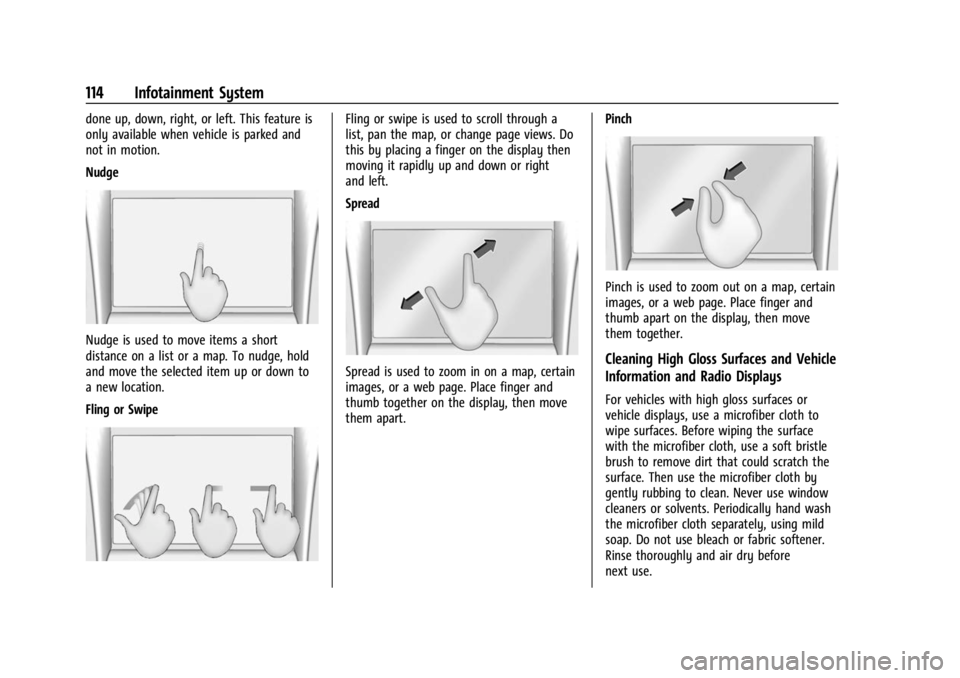
done up, down, right, or left. This feature is
only available when vehicle is parked and
not in motion.
Nudge
Nudge is used to move items a short
distance on a list or a map. To nudge, hold
and move the selected item up or down to
a new location.
Fling or Swipe
Fling or swipe is used to scroll through a
list, pan the map, or change page views. Do
this by placing a finger on the display then
moving it rapidly up and down or right
and left.
Spread
Spread is used to zoom in on a map, certain
images, or a web page. Place finger and
thumb together on the display, then move
them apart.Pinch
Pinch is used to zoom out on a map, certain
images, or a web page. Place finger and
thumb apart on the display, then move
them together.
Cleaning High Gloss Surfaces and Vehicle
Information and Radio Displays
For vehicles with high gloss surfaces or
vehicle displays, use a microfiber cloth to
wipe surfaces. Before wiping the surface
with the microfiber cloth, use a soft bristle
brush to remove dirt that could scratch the
surface. Then use the microfiber cloth by
gently rubbing to clean. Never use window
cleaners or solvents. Periodically hand wash
the microfiber cloth separately, using mild
soap. Do not use bleach or fabric softener.
Rinse thoroughly and air dry before
next use.