window CHEVROLET BOLT EV 2023 Owner's Guide
[x] Cancel search | Manufacturer: CHEVROLET, Model Year: 2023, Model line: BOLT EV, Model: CHEVROLET BOLT EV 2023Pages: 308, PDF Size: 5.18 MB
Page 145 of 308
Chevrolet BOLT EV Owner Manual (GMNA-Localizing-U.S./Canada-
16404388) - 2023 - CRC - 3/7/22
144 Climate Controls
Climate Controls
Climate Control Systems
Automatic Climate Control System . . . . 144
Air Vents
Air Vents . . . . . . . . . . . . . . . . . . . . . . . . . . . . . . 147
Maintenance
Air Intake . . . . . . . . . . . . . . . . . . . . . . . . . . . . . 148
Passenger Compartment Air Filter . . . . . 148
Air Conditioning Regular Operation . . . . 149
Service . . . . . . . . . . . . . . . . . . . . . . . . . . . . . . . . 150
Climate Control Systems
Automatic Climate Control System
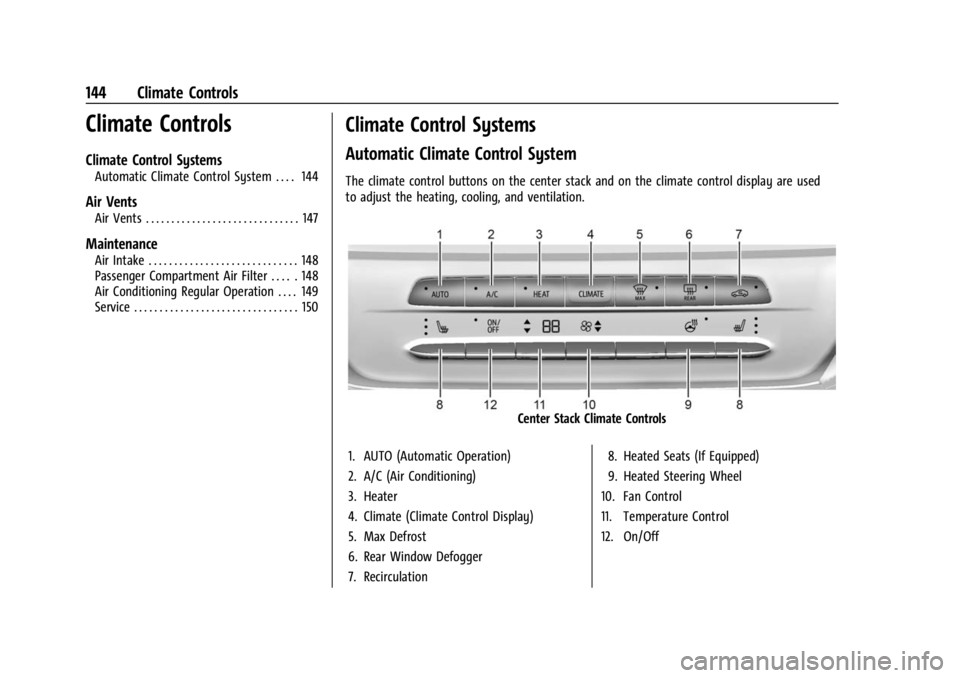
The climate control buttons on the center stack and on the climate control display are used
to adjust the heating, cooling, and ventilation.
Center Stack Climate Controls
1. AUTO (Automatic Operation)
2. A/C (Air Conditioning)
3. Heater
4. Climate (Climate Control Display)
5. Max Defrost
6. Rear Window Defogger
7. Recirculation 8. Heated Seats (If Equipped)
9. Heated Steering Wheel
10. Fan Control
11. Temperature Control
12. On/Off
Page 147 of 308
Chevrolet BOLT EV Owner Manual (GMNA-Localizing-U.S./Canada-
16404388) - 2023 - CRC - 3/7/22
146 Climate Controls
return to automatic operation. PressON/OFF
to turn off the fan and the climate control
system.
Q/R: Press to increase or decrease the
temperature.Press and hold to rapidly
increase or decrease the temperature.
The temperatures can also be adjusted by
touching the buttons on the climate control
display.
Air Delivery Mode Control : When the
climate information is displayed, touch the
desired air delivery mode on the climate
control display to change the direction of
the airflow. The selected air delivery mode
button is lit. Touching any of the air
delivery buttons cancels automatic air
delivery control and the direction of the
airflow can be controlled manually. Press
AUTO to return to automatic operation.
To change the current mode, select one of
the following:
Y: Air is directed to the instrument panel
outlets.
\: Air is divided between the instrument
panel outlets and the floor outlets.
[: Air is directed to the floor outlets.
-:Clears the windows of fog or moisture.
Air is directed to the windshield and floor
outlets.
1MAX : Air is directed to the windshield
and the fan runs at a higher speed. Fog or
frost is cleared from the windshield more
quickly. When the button is pressed again,
the system returns to the previous mode
setting. For best results, clear all snow and
ice from the windshield before defrosting.
A/C : Press A/C Mode on the climate control
display to turn the automatic air
conditioning on or off. If the fan is turned
off or the outside temperature falls below
freezing, the air conditioner will not run.
Press AUTO to return to automatic operation
and the air conditioner runs as needed.
Automatic Air Recirculation : When the
AUTO indicator light is on, the air is
automatically recirculated as needed to help
quickly cool the inside of the vehicle.
L: Press to turn on recirculation. Using
air conditioning and recirculation together
for long periods of time may cause the air
inside the vehicle to become too dry. To
prevent this from happening, after the air in
the vehicle has cooled, turn the recirculation
mode off. Pressing this button cancels automatic
recirculation. Press AUTO to return to
automatic operation; recirculation runs
automatically as needed. Manual
recirculation mode is not recommended
when in Defrost or Defog modes.
HEAT :
Press to turn the heater on when the
fan is on.
A/C : Press to turn the air conditioning on
when the fan is on.
Auto Defog : The system will monitor high
humidity inside the vehicle. When high
humidity is detected, the climate control
system may adjust to outside air supply and
turn on the air conditioner or the heater.
The fan speed may slightly increase to help
prevent fogging. When high humidity is no
longer detected, the system will return to
its prior operation. To turn Auto Defog off
or on, select Settings > Climate and Air
Quality > Auto Defog > Select ON or OFF.Rear Window Defogger
K: Press to turn the rear window defogger
on or off. An indicator light on the button
comes on to show that the rear window
defogger is on.
Page 148 of 308
Chevrolet BOLT EV Owner Manual (GMNA-Localizing-U.S./Canada-
16404388) - 2023 - CRC - 3/7/22
Climate Controls 147
The defogger only works when the vehicle is
on. The defogger will turn off if the vehicle
is turned off.
Caution
Do not try to clear frost or other material
from the inside of the front windshield
and rear window with a razor blade or
anything else that is sharp. This may
damage the rear window defogger grid
and affect the radio's ability to pick up
stations clearly. The repairs would not be
covered by the vehicle warranty.
Heated Seats (If Equipped)
Liftxoryto heat the driver or
passenger seat cushion. See Heated Front
Seats 029.
Remote Start Climate Control Operation
If equipped with the remote start feature,
the climate control system may run when
the vehicle is started remotely. The system
uses the driver’s previous settings to heat or
cool the inside of the vehicle. The rear defog
may come on during remote start based on
cold ambient conditions. The rear defog
indicator light does not come on during a
remote start. If equipped, the heated seats will turn on if
it is cold outside. The heated seat indicator
lights may not come on during a remote
start. See
Heated Front Seats 029.
Remote Start : The climate control system
may be started by using the remote key.
The climate control system will default to
an appropriate heating or cooling mode. See
Remote Start 014.
The rear window defogger turns on if it is
cold outside.
Sensors
Indicator Light and Solar Sensor (ILSS)
The ILSS is on top of the instrument panel,
near the windshield, where it monitors solar
intensity.
The climate control system uses the sensor
information to adjust the temperature, fan
speed, recirculation, and air delivery mode
for best comfort.
Do not cover the sensor; otherwise the
automatic climate control system may not
work properly. Humidity Sensor
The humidity sensor is near the base of the
inside rearview mirror. The climate control
system uses the sensor information to
adjust the temperature and recirculation for
best comfort.
Outside Air Temperature Sensor
The outside air temperature sensor is behind
the front grille of the vehicle. The vehicle
uses the sensor information to display
outside air temperature. The climate control
system uses the information to adjust the
climate system operation.
Afterblow Feature
If equipped, under certain conditions, the
fan may stay on or may turn on and off
several times after you turn off and lock the
vehicle. This is normal.
Air Vents
Adjustable air vents are in the center and on
the side of the instrument panel.
Page 149 of 308
Chevrolet BOLT EV Owner Manual (GMNA-Localizing-U.S./Canada-
16404388) - 2023 - CRC - 3/7/22
148 Climate Controls
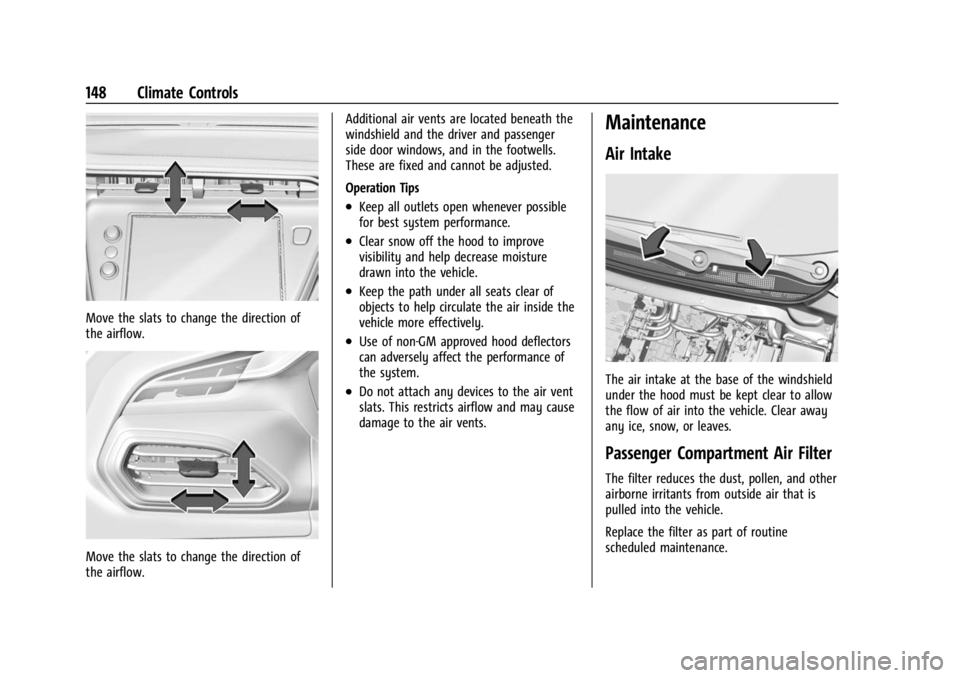
Move the slats to change the direction of
the airflow.
Move the slats to change the direction of
the airflow.Additional air vents are located beneath the
windshield and the driver and passenger
side door windows, and in the footwells.
These are fixed and cannot be adjusted.
Operation Tips
.Keep all outlets open whenever possible
for best system performance.
.Clear snow off the hood to improve
visibility and help decrease moisture
drawn into the vehicle.
.Keep the path under all seats clear of
objects to help circulate the air inside the
vehicle more effectively.
.Use of non-GM approved hood deflectors
can adversely affect the performance of
the system.
.Do not attach any devices to the air vent
slats. This restricts airflow and may cause
damage to the air vents.
Maintenance
Air Intake
The air intake at the base of the windshield
under the hood must be kept clear to allow
the flow of air into the vehicle. Clear away
any ice, snow, or leaves.
Passenger Compartment Air Filter
The filter reduces the dust, pollen, and other
airborne irritants from outside air that is
pulled into the vehicle.
Replace the filter as part of routine
scheduled maintenance.
Page 153 of 308
Chevrolet BOLT EV Owner Manual (GMNA-Localizing-U.S./Canada-
16404388) - 2023 - CRC - 3/7/22
152 Driving and Operating
Driving Information
Driving for Better Energy
Efficiency
Use the following tips to help maximize
energy efficiency and driving range.
In colder temperatures, while these
efficiency tips will help, the electric vehicle
driving range will be lower due to higher
energy usage including energy spent
heating the cabin.
The Range Impacts screen estimates the
influence of the main factors impacting
vehicle range. After charging is complete,
this information is reset. See“Range
Impacts” under. See Energy Information
0 97.
Acceleration/Braking/Coasting
Avoid rapid accelerations and decelerations.
Driving range is maximized at 89 km/h
(55 mph) and less.
Use cruise control when appropriate.
Plan ahead for decelerations and coast
whenever possible. Do not rush to traffic
signals. Do not shift to N (Neutral) to coast. The vehicle recovers more energy while
coasting and braking with One-Pedal mode
turned on. See
One-Pedal Driving 0167.
Using the Regen on Demand paddle during
deceleration recovers more energy. See
Regenerative Braking 0170.
Terrain and Vehicle Speed
Higher speeds and grade changes use more
energy and can significantly reduce driving
range.
Climate Setting
Using the heat and air conditioning systems
decreases the energy available for electric
driving.
Optimal energy efficiency is achieved when
the heat, air conditioning, and fan are
turned off.
Use the heated seat features instead of
climate control system. Heating the seat
uses less energy than heating and cooling
the interior.
Use remote start to heat or cool the interior
when the vehicle is plugged in to maximize
the driving range by utilizing electricity from
the electrical outlet. In hot weather, avoid parking in direct
sunlight or use sunshades inside the vehicle.
Keep the inside of the windows clean to
reduce fogging. Turn off the front defroster
and rear defogger when they are not
needed.
Avoid driving with the windows open at
highway speeds.
Use the Enhanced Battery Gauge on the
Instrument Cluster to view the effect of
climate control settings on your estimated
driving range. See
Battery Gauge (High
Voltage) 081.
Outside Temperature
On colder days, it is best to plug in the
vehicle overnight, then remote start the
vehicle.
Allow the vehicle to warm up for
20 minutes before driving.
If possible, use a level 2 (240 volt) high
power charge station for best results.
This allows the interior of the vehicle and
high voltage battery to warm to the optimal
temperature.
Page 158 of 308
Chevrolet BOLT EV Owner Manual (GMNA-Localizing-U.S./Canada-
16404388) - 2023 - CRC - 3/7/22
Driving and Operating 157
{Warning
Coasting downhill in N (Neutral) or with
the vehicle turned off is dangerous. The
brakes will have to do all the work of
slowing down the vehicle and could
become too hot. Hot brakes may not be
able to slow the vehicle enough to
maintain speed and control. You could
crash. Always have the vehicle running
and in gear when going downhill. This
will allow the electric drive unit to assist
in slowing and maintaining speed.
.Drive at speeds to keep the vehicle in its
own lane. Do not swing wide or cross the
center line.
.Be alert on top of hills. Something could
be in your lane (e.g., stalled car, crash).
.Pay attention to special road signs (e.g.,
falling rocks area, winding roads, long
grades, passing or no-passing zones) and
take appropriate action.
Winter Driving
Driving on Snow or IceCaution
To avoid damage to the wheels and
brake components, always clear snow and
ice from inside the wheels and
underneath the vehicle before driving.
Snow or ice between the tires and the road
creates less traction or grip, so drive
carefully. Wet ice can occur at about 0 °C
(32 °F) when freezing rain begins to fall.
Avoid driving on wet ice or in freezing rain
until roads can be treated.
For Slippery Road Driving:
.Turn off One-Pedal Driving.
.Accelerate gently. Accelerating too quickly
causes the wheels to spin and makes the
surface under the tires slick.
.Turn on the Traction Control
System (TCS).
.The Antilock Brake System (ABS) improves
vehicle stability during hard stops, but
the brakes should be applied sooner than
when on dry pavement.
.Allow greater following distance and
watch for slippery spots. Icy patches can
occur on otherwise clear roads in shaded
areas. The surface of a curve or an
overpass can remain icy when the
surrounding roads are clear. Avoid sudden
steering maneuvers and braking while
on ice.
.Turn off cruise control.
.Avoid using Regen on Demand paddle.
Blizzard Conditions
Being stuck in snow can be a serious
situation. Stay with the vehicle unless there
is help nearby. If possible, use Roadside
Assistance. See Roadside Assistance Program
0 281. To get help and keep everyone in the
vehicle safe:
.Turn on the hazard warning flashers.
.Tie a red cloth to an outside mirror.
To save energy, run the vehicle for only
short periods as needed to warm the vehicle
and then shut the vehicle off and partially
close the window. Moving about to keep
warm also helps.
Page 164 of 308
Chevrolet BOLT EV Owner Manual (GMNA-Localizing-U.S./Canada-
16404388) - 2023 - CRC - 3/7/22
Driving and Operating 163
The remote key must be in the vehicle.
Press the brake pedal, then press and
release POWER
O.
If the remote key is not in the vehicle or
something is interfering with the key, a
message displays in the Driver Information
Center (DIC).
If the vehicle will not start due to a low
remote key battery, the vehicle can still be
driven. See Remote Key Operation 07.
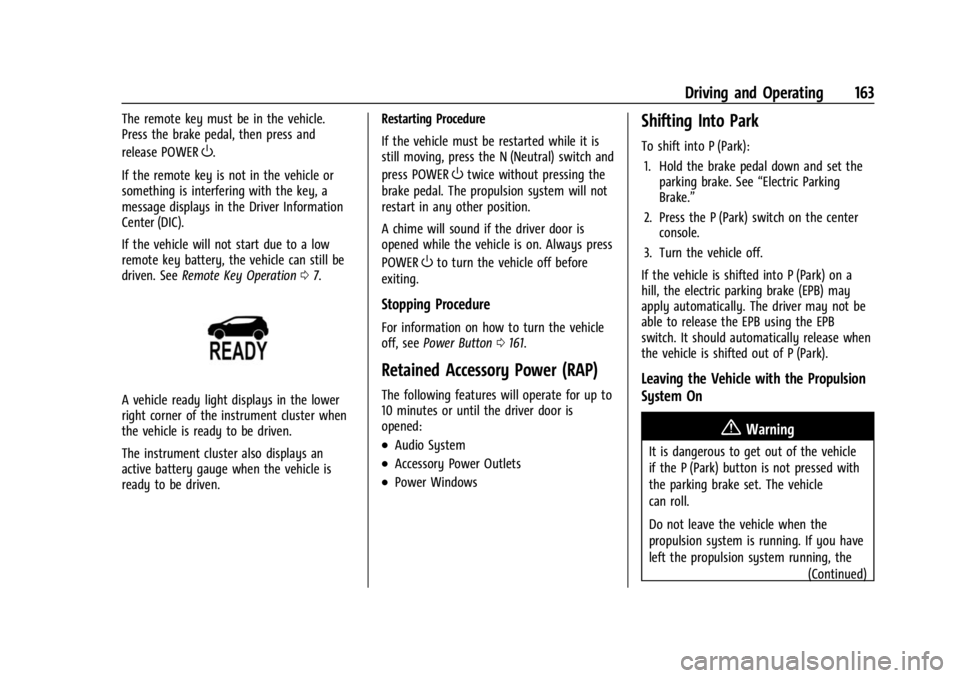
A vehicle ready light displays in the lower
right corner of the instrument cluster when
the vehicle is ready to be driven.
The instrument cluster also displays an
active battery gauge when the vehicle is
ready to be driven. Restarting Procedure
If the vehicle must be restarted while it is
still moving, press the N (Neutral) switch and
press POWER
Otwice without pressing the
brake pedal. The propulsion system will not
restart in any other position.
A chime will sound if the driver door is
opened while the vehicle is on. Always press
POWER
Oto turn the vehicle off before
exiting.
Stopping Procedure
For information on how to turn the vehicle
off, see Power Button 0161.
Retained Accessory Power (RAP)
The following features will operate for up to
10 minutes or until the driver door is
opened:
.Audio System
.Accessory Power Outlets
.Power Windows
Shifting Into Park
To shift into P (Park):
1. Hold the brake pedal down and set the parking brake. See “Electric Parking
Brake.”
2. Press the P (Park) switch on the center console.
3. Turn the vehicle off.
If the vehicle is shifted into P (Park) on a
hill, the electric parking brake (EPB) may
apply automatically. The driver may not be
able to release the EPB using the EPB
switch. It should automatically release when
the vehicle is shifted out of P (Park).
Leaving the Vehicle with the Propulsion
System On
{Warning
It is dangerous to get out of the vehicle
if the P (Park) button is not pressed with
the parking brake set. The vehicle
can roll.
Do not leave the vehicle when the
propulsion system is running. If you have
left the propulsion system running, the (Continued)
Page 222 of 308
Chevrolet BOLT EV Owner Manual (GMNA-Localizing-U.S./Canada-
16404388) - 2023 - CRC - 3/7/22
Vehicle Care 221
Warning (Continued)
structure or anything that can burn.
Ventilate the vehicle by opening a
window or a door.
Contact Customer Assistance as soon as
possible to determine whether an
inspection is needed. SeeCustomer
Assistance Offices 0279.
If the vehicle is in a crash, the sensing
system may shut down the high voltage
system. When this occurs, the high voltage
battery is disconnected and the vehicle will
not start. The SERVICE VEHICLE SOON
message in the Driver Information Center
(DIC) will display. Before the vehicle can
operate again, it must be serviced at your
dealer. If a crash occurs or an airbag(s)
inflates, see “If a Crash Occurs” under
Collision Damage Repair 0283 and
What Will You See after an Airbag Inflates?
0 42 for additional information.
Keep the vehicle plugged in, even when fully
charged, to keep the high voltage battery
temperature ready for the next drive. This is
important when outside temperatures are
extremely hot or cold. Propulsion power may be reduced in
extremely cold temperatures, or if the high
voltage battery is too cold. The message
BATTERY TOO COLD, PLUG IN TO WARM will
display.
A vehicle cover, which can reduce sun
loading on the vehicle and improve high
voltage battery life, is available from your
dealer.
See
Radio Frequency Statement 0286.
Vehicle Storage
The best way to store the vehicle for any
length of time is to plug in the charge cord
and leave it plugged in. The vehicle
monitors and maintains the 12-volt battery
daily. It is okay to leave the vehicle plugged
in for extended periods of time. Once
charged to full, very little energy is required
to maintain the 12-volt battery and high
voltage battery.
If it is not possible to charge the vehicle
with the charge cord left plugged in, be sure
to fully charge the high voltage battery
before storing. The vehicle will stop
maintenance of the 12-volt battery if the
high voltage battery state of charge gets
too low. When storing the vehicle on a long-term
basis:
‐
Keep the high voltage battery state of
charge at 30%.
‐ Attach an AGM/VRLA compatible battery
tender or trickle charger to the 12-volt
battery.
‐ Keep the remote key more than 3 m
(10 ft) away from the vehicle.
12–volt Battery{Warning
Batteries have acid that can burn you and
gas that can explode. You can be badly
hurt if you are not careful. Always wear
eye protection. See Jump Starting - North
America 0256 for tips on working around
a battery without getting hurt.
A trickle charger may be attached to the
12-volt battery terminals or trickle charge
from the underhood remote positive (+) and
negative (–) terminals. See Jump Starting -
North America 0256 for location of these
terminals.
Page 232 of 308
Chevrolet BOLT EV Owner Manual (GMNA-Localizing-U.S./Canada-
16404388) - 2023 - CRC - 3/7/22
Vehicle Care 231
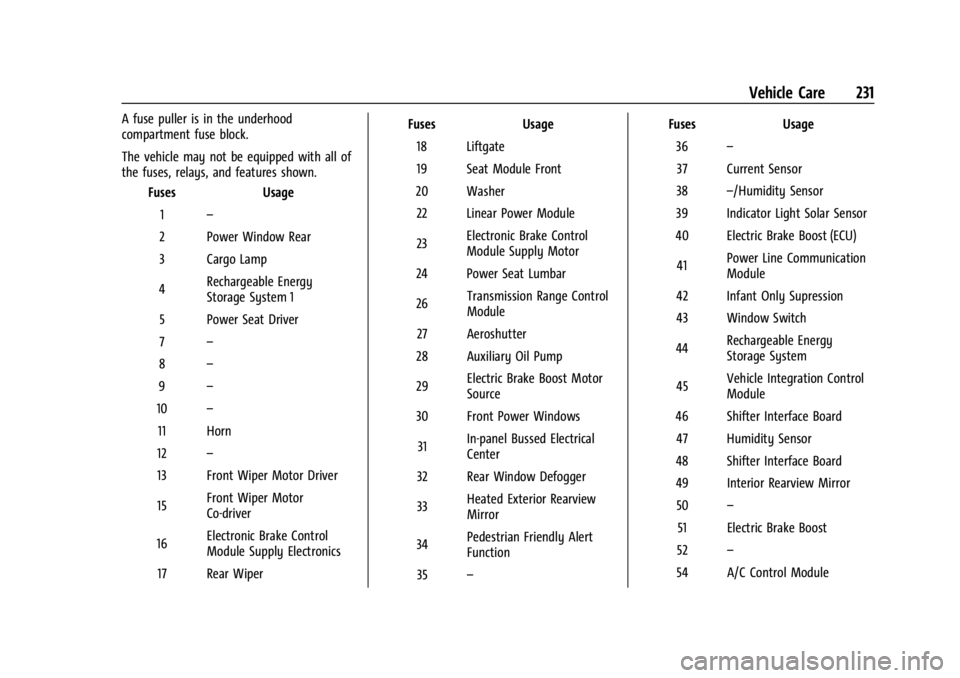
A fuse puller is in the underhood
compartment fuse block.
The vehicle may not be equipped with all of
the fuses, relays, and features shown.Fuses Usage
1 –
2 Power Window Rear
3 Cargo Lamp
4 Rechargeable Energy
Storage System 1
5 Power Seat Driver
7 –
8 –
9 –
10 –
11 Horn
12 –
13 Front Wiper Motor Driver
15 Front Wiper Motor
Co-driver
16 Electronic Brake Control
Module Supply Electronics
17 Rear Wiper Fuses
Usage
18 Liftgate
19 Seat Module Front
20 Washer 22 Linear Power Module
23 Electronic Brake Control
Module Supply Motor
24 Power Seat Lumbar
26 Transmission Range Control
Module
27 Aeroshutter
28 Auxiliary Oil Pump
29 Electric Brake Boost Motor
Source
30 Front Power Windows
31 In-panel Bussed Electrical
Center
32 Rear Window Defogger
33 Heated Exterior Rearview
Mirror
34 Pedestrian Friendly Alert
Function
35 – Fuses
Usage
36 –
37 Current Sensor
38 –/Humidity Sensor
39 Indicator Light Solar Sensor
40 Electric Brake Boost (ECU)
41 Power Line Communication
Module
42 Infant Only Supression
43 Window Switch
44 Rechargeable Energy
Storage System
45 Vehicle Integration Control
Module
46 Shifter Interface Board 47 Humidity Sensor
48 Shifter Interface Board
49 Interior Rearview Mirror 50 –
51 Electric Brake Boost
52 –
54 A/C Control Module
Page 233 of 308
Chevrolet BOLT EV Owner Manual (GMNA-Localizing-U.S./Canada-
16404388) - 2023 - CRC - 3/7/22
232 Vehicle Care
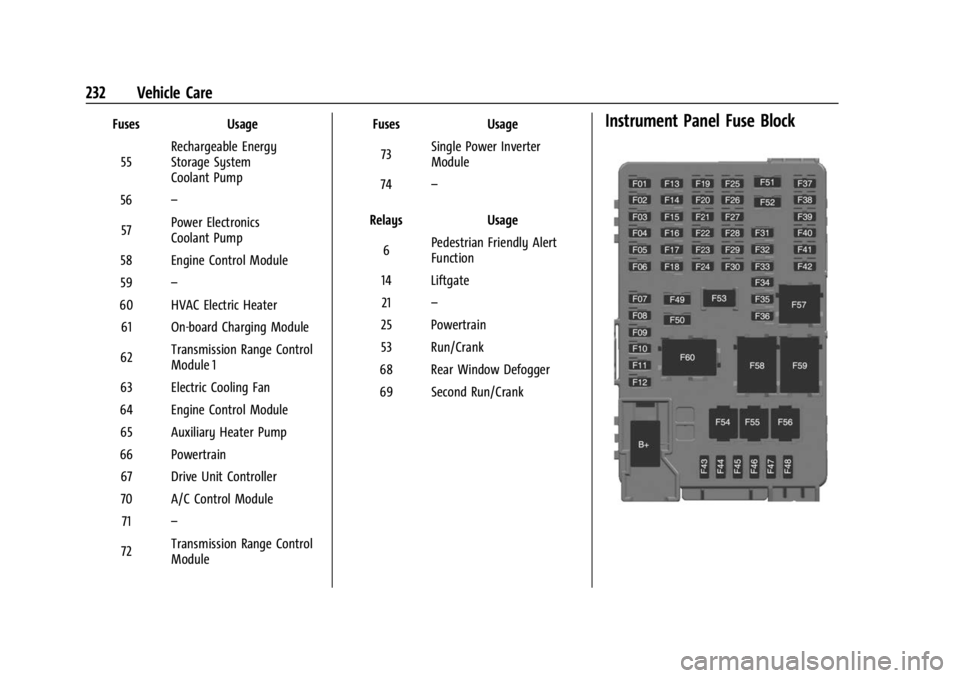
FusesUsage
55 Rechargeable Energy
Storage System
Coolant Pump
56 –
57 Power Electronics
Coolant Pump
58 Engine Control Module
59 –
60 HVAC Electric Heater 61 On-board Charging Module
62 Transmission Range Control
Module 1
63 Electric Cooling Fan
64 Engine Control Module 65 Auxiliary Heater Pump
66 Powertrain 67 Drive Unit Controller
70 A/C Control Module 71 –
72 Transmission Range Control
Module Fuses
Usage
73 Single Power Inverter
Module
74 –
Relays Usage
6 Pedestrian Friendly Alert
Function
14 Liftgate 21 –
25 Powertrain
53 Run/Crank
68 Rear Window Defogger
69 Second Run/CrankInstrument Panel Fuse Block