brake CHEVROLET COLORADO 2018 Workshop Manual
[x] Cancel search | Manufacturer: CHEVROLET, Model Year: 2018, Model line: COLORADO, Model: CHEVROLET COLORADO 2018Pages: 421, PDF Size: 5.58 MB
Page 263 of 421
Chevrolet Colorado Owner Manual (GMNA-Localizing-U.S./Canada/Mexico-
11349743) - 2018 - crc - 10/12/17
262 Driving and Operating
Warning (Continued)
or the trailer brakes are
inadequate for the load, the
vehicle may not stop as expected.
The driver and passengers could
be seriously injured. The vehicle
may also be damaged; the
resulting repairs would not be
covered by the vehicle warranty.
Pull a trailer only if all the steps in
this section have been followed.
Ask your dealer for advice and
information about towing a trailer
with the vehicle.
See Vehicle Load Limits 0210 for
more information about the vehicle's
maximum load capacity.
To identify the trailering capacity of
the vehicle, read the information in
“Weight of the Trailer” later in this
section.
Trailering is different than just
driving the vehicle by itself.
Trailering means changes in
handling, acceleration, braking, durability, and fuel economy.
Successful, safe trailering takes
correct equipment, and it has to be
used properly.
The following information has many
time-tested, important trailering tips
and safety rules. Many of these are
important for your safety and that of
your passengers. Read this section
carefully before pulling a trailer.
Weight of the Trailer
Safe trailering requires monitoring
the weight, speed, altitude, road
grades, outside temperature, the
dimensions of the front of the trailer,
and how frequently the vehicle is
used to pull a trailer. Take into
consideration any special equipment
on the vehicle, and the amount of
tongue weight the vehicle can carry.
See
“Weight of the Trailer Tongue”
later in this section for more
information.
Trailer Weight Rating (TWR) is
calculated assuming the tow vehicle
has the driver, a front seat
passenger, and all required trailering
equipment. Weight of additional optional equipment, passengers,
and cargo in the tow vehicle must
be subtracted from the trailer weight
rating.
Use the following chart to determine
how much the vehicle can weigh,
based upon the vehicle model and
options.
Page 266 of 421
Chevrolet Colorado Owner Manual (GMNA-Localizing-U.S./Canada/Mexico-
11349743) - 2018 - crc - 10/12/17
Driving and Operating 265
Weight-Distributing Hitch
Adjustment
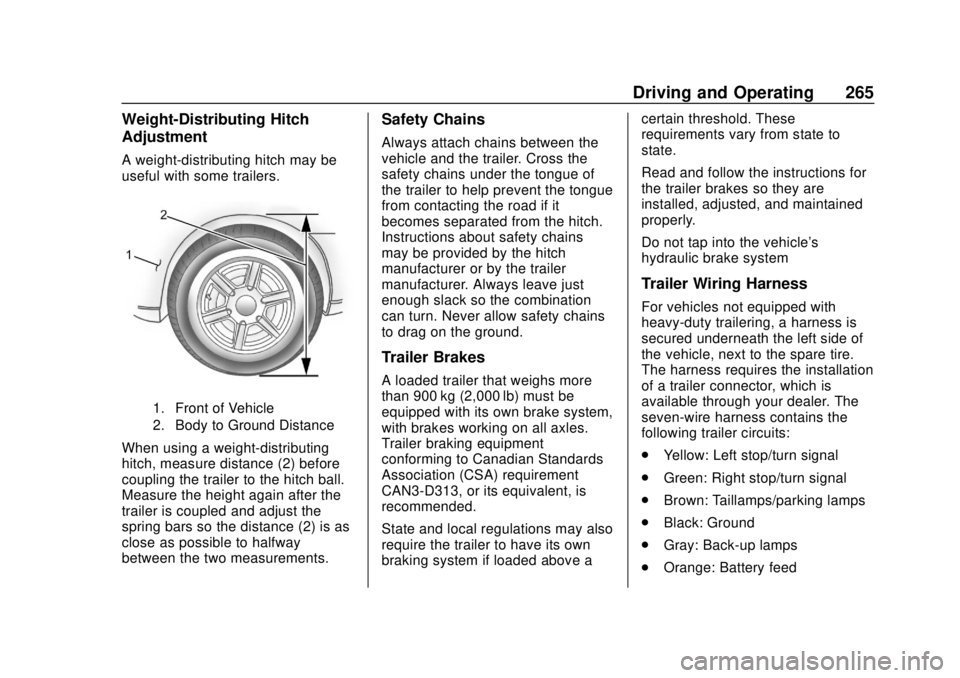
A weight-distributing hitch may be
useful with some trailers.
1. Front of Vehicle
2. Body to Ground Distance
When using a weight-distributing
hitch, measure distance (2) before
coupling the trailer to the hitch ball.
Measure the height again after the
trailer is coupled and adjust the
spring bars so the distance (2) is as
close as possible to halfway
between the two measurements.
Safety Chains
Always attach chains between the
vehicle and the trailer. Cross the
safety chains under the tongue of
the trailer to help prevent the tongue
from contacting the road if it
becomes separated from the hitch.
Instructions about safety chains
may be provided by the hitch
manufacturer or by the trailer
manufacturer. Always leave just
enough slack so the combination
can turn. Never allow safety chains
to drag on the ground.
Trailer Brakes
A loaded trailer that weighs more
than 900 kg (2,000 lb) must be
equipped with its own brake system,
with brakes working on all axles.
Trailer braking equipment
conforming to Canadian Standards
Association (CSA) requirement
CAN3-D313, or its equivalent, is
recommended.
State and local regulations may also
require the trailer to have its own
braking system if loaded above acertain threshold. These
requirements vary from state to
state.
Read and follow the instructions for
the trailer brakes so they are
installed, adjusted, and maintained
properly.
Do not tap into the vehicle's
hydraulic brake system
Trailer Wiring Harness
For vehicles not equipped with
heavy-duty trailering, a harness is
secured underneath the left side of
the vehicle, next to the spare tire.
The harness requires the installation
of a trailer connector, which is
available through your dealer. The
seven-wire harness contains the
following trailer circuits:
.
Yellow: Left stop/turn signal
. Green: Right stop/turn signal
. Brown: Taillamps/parking lamps
. Black: Ground
. Gray: Back-up lamps
. Orange: Battery feed
Page 267 of 421
Chevrolet Colorado Owner Manual (GMNA-Localizing-U.S./Canada/Mexico-
11349743) - 2018 - crc - 10/12/17
266 Driving and Operating
.Blue: Trailer brake
To help charge a remote
(non-vehicle) battery, press the Tow/
Haul Mode button on the center
stack. If the trailer is too light for
Tow/Haul Mode, turn on the
headlamps to help charge the
battery.
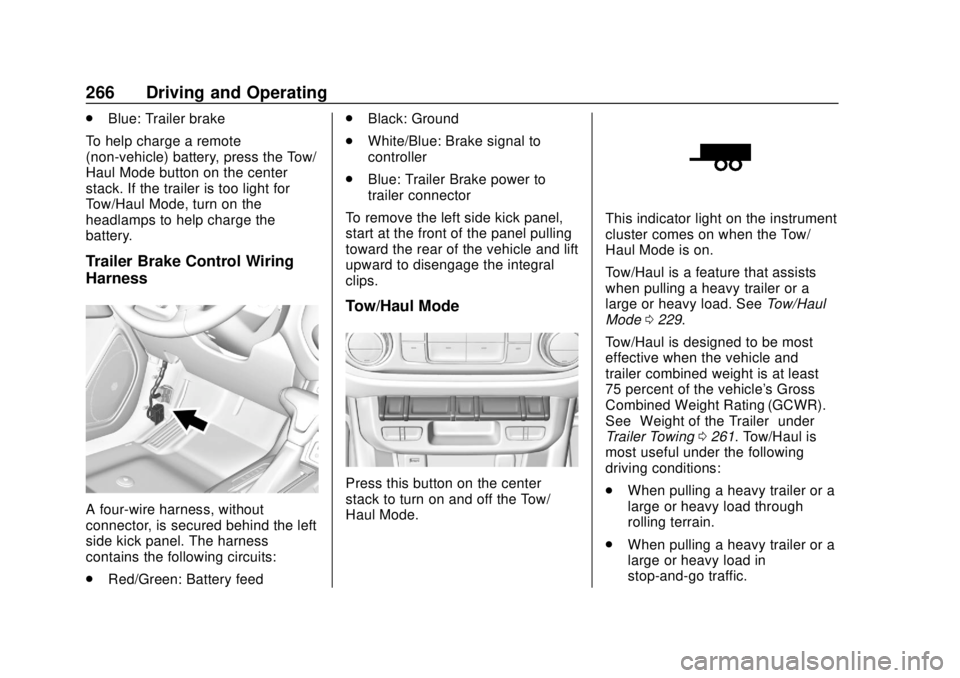
Trailer Brake Control Wiring
Harness
A four-wire harness, without
connector, is secured behind the left
side kick panel. The harness
contains the following circuits:
. Red/Green: Battery feed .
Black: Ground
. White/Blue: Brake signal to
controller
. Blue: Trailer Brake power to
trailer connector
To remove the left side kick panel,
start at the front of the panel pulling
toward the rear of the vehicle and lift
upward to disengage the integral
clips.
Tow/Haul Mode
Press this button on the center
stack to turn on and off the Tow/
Haul Mode.
This indicator light on the instrument
cluster comes on when the Tow/
Haul Mode is on.
Tow/Haul is a feature that assists
when pulling a heavy trailer or a
large or heavy load. See Tow/Haul
Mode 0229.
Tow/Haul is designed to be most
effective when the vehicle and
trailer combined weight is at least
75 percent of the vehicle's Gross
Combined Weight Rating (GCWR).
See “Weight of the Trailer” under
Trailer Towing 0261. Tow/Haul is
most useful under the following
driving conditions:
. When pulling a heavy trailer or a
large or heavy load through
rolling terrain.
. When pulling a heavy trailer or a
large or heavy load in
stop-and-go traffic.
Page 268 of 421
Chevrolet Colorado Owner Manual (GMNA-Localizing-U.S./Canada/Mexico-
11349743) - 2018 - crc - 10/12/17
Driving and Operating 267
.When pulling a heavy trailer or a
large or heavy load in busy
parking lots where improved low
speed control of the vehicle is
desired.
Operating the vehicle in Tow/Haul
when lightly loaded or with no trailer
at all will not cause damage.
However, there is no benefit to the
selection of Tow/Haul when the
vehicle is unloaded. Such a
selection when unloaded may result
in unpleasant engine and
transmission driving characteristics
and reduced fuel economy. Tow/
Haul is recommended only when
pulling a heavy trailer or a large or
heavy load.
If the vehicle has a diesel engine,
the Tow/Haul button activates the
exhaust brake system
simultaneously. See “Exhaust
Brake” in the Duramax diesel
supplement.Integrated Trailer Brake
Control System
The vehicle may have an Integrated
Trailer Brake Control (ITBC) system
for use with electric trailer brakes or
most electric over hydraulic trailer
brakes.
This symbol is on the Trailer Brake
Control Panel on vehicles with an
ITBC system. The power output to
the trailer brakes is based on the
amount of brake pressure being
applied by the vehicle’s brake
system, and on the type of trailer
brakes detected. This available
power output to the trailer brakes
can be adjusted to a wide range of
trailering situations.
The ITBC system is integrated with
the vehicle’ s brake, antilock brake,
and StabiliTrak systems. In trailering
conditions that cause the vehicle’s antilock brake or StabiliTrak
systems to activate, power sent to
the trailer's brakes will be
automatically adjusted to minimize
trailer wheel lock-up. This does not
imply that the trailer has StabiliTrak.
If the vehicle’s brake, antilock brake,
or StabiliTrak systems are not
functioning properly, the ITBC
system may not be fully functional
or may not function at all. Make sure
all of these systems are fully
operational to ensure full
functionality of the ITBC system.
The ITBC system is powered
through the vehicle's electrical
system. Turning the ignition off will
also turn off the ITBC system. The
ITBC system is fully functional only
when the ignition is in ON/RUN.
{Warning
Connecting a trailer that has an
air brake system may result in
reduced or complete loss of trailer
braking. There may be an
(Continued)
Page 269 of 421
Chevrolet Colorado Owner Manual (GMNA-Localizing-U.S./Canada/Mexico-
11349743) - 2018 - crc - 10/12/17
268 Driving and Operating
Warning (Continued)
increase in stopping distance or
trailer instability which could
result in personal injury or
damage to the vehicle, trailer,
or other property. Use the ITBC
system only with electric or
electric over hydraulic trailer
brakes.
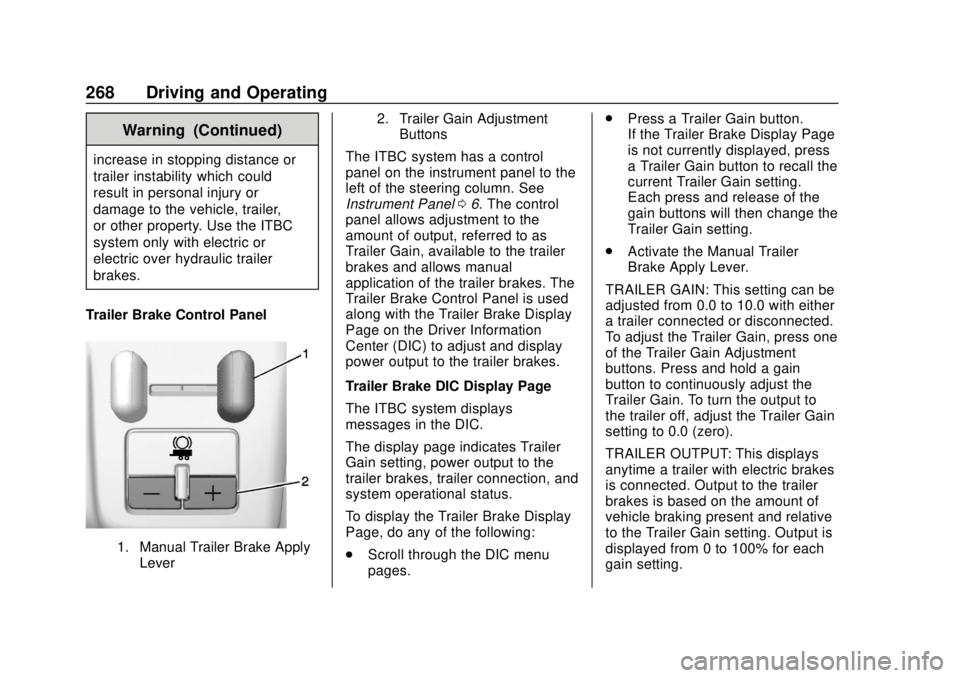
Trailer Brake Control Panel
1. Manual Trailer Brake Apply Lever 2. Trailer Gain Adjustment
Buttons
The ITBC system has a control
panel on the instrument panel to the
left of the steering column. See
Instrument Panel 06. The control
panel allows adjustment to the
amount of output, referred to as
Trailer Gain, available to the trailer
brakes and allows manual
application of the trailer brakes. The
Trailer Brake Control Panel is used
along with the Trailer Brake Display
Page on the Driver Information
Center (DIC) to adjust and display
power output to the trailer brakes.
Trailer Brake DIC Display Page
The ITBC system displays
messages in the DIC.
The display page indicates Trailer
Gain setting, power output to the
trailer brakes, trailer connection, and
system operational status.
To display the Trailer Brake Display
Page, do any of the following:
. Scroll through the DIC menu
pages. .
Press a Trailer Gain button.
If the Trailer Brake Display Page
is not currently displayed, press
a Trailer Gain button to recall the
current Trailer Gain setting.
Each press and release of the
gain buttons will then change the
Trailer Gain setting.
. Activate the Manual Trailer
Brake Apply Lever.
TRAILER GAIN: This setting can be
adjusted from 0.0 to 10.0 with either
a trailer connected or disconnected.
To adjust the Trailer Gain, press one
of the Trailer Gain Adjustment
buttons. Press and hold a gain
button to continuously adjust the
Trailer Gain. To turn the output to
the trailer off, adjust the Trailer Gain
setting to 0.0 (zero).
TRAILER OUTPUT: This displays
anytime a trailer with electric brakes
is connected. Output to the trailer
brakes is based on the amount of
vehicle braking present and relative
to the Trailer Gain setting. Output is
displayed from 0 to 100% for each
gain setting.
Page 270 of 421
Chevrolet Colorado Owner Manual (GMNA-Localizing-U.S./Canada/Mexico-
11349743) - 2018 - crc - 10/12/17
Driving and Operating 269
The Trailer Output will indicate“- - -
- - -” on the Trailer Brake Display
Page whenever the following occur:
. No trailer is connected.
. A trailer without electric brakes
is connected (no DIC message
will display).
. A trailer with electric brakes has
become disconnected (a
CHECK TRAILER WIRING
message will also display on
the DIC).
. There is a fault present in the
wiring to the trailer brakes (a
CHECK TRAILER WIRING
message will also display on
the DIC).
. The ITBC system is not working
due to a fault (a SERVICE
TRAILER BRAKE SYSTEM
message will also display in
the DIC).
Manual Trailer Brake Apply
The Manual Trailer Brake Apply
Lever is used to apply the trailer ’s
electric brakes independent of the
vehicle’s brakes. Sliding the lever to the left will apply only the trailer
brakes. Use this lever to adjust
Trailer Gain to properly adjust the
power output to the trailer brakes.
The trailer's and the vehicle's brake
lamps will come on when either
vehicle brakes or manual trailer
brakes are applied.
Trailer Gain Adjustment Procedure
Trailer Gain should be set for a
specific trailering condition and must
be adjusted anytime vehicle loading,
trailer loading, or road surface
conditions change.
{Warning
Trailer brakes that are
over-gained or under-gained may
not stop the vehicle and the trailer
as intended and can result in a
crash. Always follow the
instructions to set the Trailer Gain
for the proper trailer stopping
performance.
Use the following to adjust Trailer
Gain for each towing condition:
1. Drive the vehicle with the trailer attached on a level road
surface representative of the
towing condition and free of
traffic at about 32 to 40 km/h
(20 to 25 mph) and fully apply
the Manual Trailer Brake Apply
Lever.
Adjusting Trailer Gain at
speeds lower than 32 to
40 km/h (20 to 25 mph) may
result in an incorrect gain
setting.
2. Adjust the Trailer Gain, using the Trailer Gain Adjustment
Buttons, to just below the point
of trailer wheel lock-up,
indicated by trailer wheel
squeal or tire smoke when a
trailer wheel locks.
Trailer wheel lock-up may not
occur if towing a heavily loaded
trailer. In this case, adjust the
Trailer Gain to the highest
allowable setting for the towing
condition.
Page 271 of 421
Chevrolet Colorado Owner Manual (GMNA-Localizing-U.S./Canada/Mexico-
11349743) - 2018 - crc - 10/12/17
270 Driving and Operating
3. Readjust Trailer Gain anytimevehicle loading, trailer loading,
or road surface conditions
change or if trailer wheel
lock-up is noticed at any time
while towing.
Other ITBC-Related DIC Messages
In addition to displaying TRAILER
GAIN and OUTPUT through the
DIC, trailer connection and ITBC
system status are displayed on
the DIC.
TRAILER CONNECTED: This
message will briefly display when a
trailer with electric brakes is first
connected to the vehicle. This
message will automatically turn off
in about 10 seconds. This message
can be acknowledged before it
automatically turns off.
CHECK TRAILER WIRING: This
message will display if:
. The ITBC system first
determines connection to a
trailer with electric brakes and
then the trailer harness becomes
disconnected from the vehicle. If the disconnect occurs while
the vehicle is stationary, this
message will automatically turn
off in about 30 seconds. This
message will also turn off if it is
acknowledged or if the trailer
harness is reconnected.
If the disconnect occurs while
the vehicle is moving, this
message will continue until the
ignition is turned off. This
message will also turn off if it is
acknowledged or if the trailer
harness is reconnected.
. There is an electrical fault in the
wiring to the trailer brakes. This
message will continue as long
as there is an electrical fault in
the trailer wiring. This message
will also turn off if it is
acknowledged.
To determine if the electrical fault is
on the vehicle side or trailer side of
the trailer wiring harness
connection: 1. Disconnect the trailer wiring harness from the vehicle.
2. Turn the ignition off. 3. Wait 10 seconds, then turn the
ignition back to RUN.
4. If the CHECK TRAILER WIRING message reappears,
the electrical fault is on the
vehicle side.
If the CHECK TRAILER
WIRING message only
reappears when connecting the
trailer wiring harness to the
vehicle, the electrical fault is on
the trailer side.
SERVICE TRAILER BRAKE
SYSTEM: This message will display
when there is a problem with the
ITBC system. If this message
continues over multiple ignition
cycles, there is a problem with the
ITBC system. Have the vehicle
serviced.
If either the CHECK TRAILER
WIRING or SERVICE TRAILER
BRAKE SYSTEM message displays
while driving, the ITBC system may
not be fully functional or may not
function at all. When traffic
conditions allow, carefully pull the
vehicle over to the side of the road
Page 272 of 421
Chevrolet Colorado Owner Manual (GMNA-Localizing-U.S./Canada/Mexico-
11349743) - 2018 - crc - 10/12/17
Driving and Operating 271
and turn the ignition off. Check the
wiring connection to the trailer and
turn the ignition back on. If either of
these messages continues, either
the vehicle or trailer needs service.
A GM dealer may be able to
diagnose and repair problems with
the trailer. However, any diagnosis
and repair of the trailer is not
covered under the vehicle warranty.
Contact your trailer dealer for
assistance with trailer repairs and
trailer warranty information.
Trailer Sway
Control (TSC)
Vehicles with StabiliTrak have a
Trailer Sway Control (TSC) feature.
Trailer sway is unintended
side-to-side motion of a trailer while
being towed. If the vehicle is towing
a trailer and the TSC detects that
sway is increasing, the vehicle
brakes are selectively applied at
each wheel, to help reduce
excessive trailer sway. If the vehicle
is equipped with the Integrated
Trailer Brake Control (ITBC) system,and the trailer has the electric
actuated brake system, StabiliTrak
may also apply the trailer brakes.
If TSC is enabled, the Traction
Control System (TCS)/StabiliTrak
warning light will flash on the
instrument cluster. Vehicle speed
must be reduced. If trailer sway
continues, StabiliTrak can reduce
engine torque to help slow the
vehicle. See
Traction Control/
Electronic Stability Control 0240.
{Warning
Even if the vehicle is equipped
with TSC, trailer sway could result
in loss of control and the vehicle
could crash. If excessive trailer
sway is detected, slow down to a
safe speed. Check the trailer and
vehicle to help correct possible
causes. These could include an
improperly or overloaded trailer,
unrestrained cargo, improper
trailer hitch configuration,
excessive vehicle-trailer speed,
(Continued)
Warning (Continued)
or improperly inflated or incorrect
vehicle or trailer tires. See Towing
Equipment 0264 for trailer ratings
and hitch setup
recommendations.
Adding non-dealer accessories can
affect the vehicle performance. See
Accessories and Modifications
0 276.
Electronic Trailer Sway Control
Devices
Some trailers may come equipped
with an electronic device designed
to reduce or control trailer sway.
Aftermarket equipment
manufacturers also offer similar
devices that connect to the wiring
between the trailer and the vehicle.
These devices may interfere with
the vehicle’ s trailer brake or other
systems, including integrated
anti-sway systems, if equipped.
Messages related to trailer
connections or trailer brakes could
Page 273 of 421
Chevrolet Colorado Owner Manual (GMNA-Localizing-U.S./Canada/Mexico-
11349743) - 2018 - crc - 10/12/17
272 Driving and Operating
appear on the Driver Information
Center (DIC). The effect that these
devices may have on vehicle
handling or trailer brake
performance is unknown.
{Warning
Use of electronic trailer sway
control devices could result in
reduced trailer brake
performance, loss of trailer
brakes, or other malfunctions, and
could cause a crash. You or
others could be injured or killed.
Before using one of these
devices:. Ask the device or trailer
manufacturer if the device
has been thoroughly tested
for compatibility with the
make, model, and year of
the vehicle as well as
optional equipment installed
on the vehicle.
(Continued)
Warning (Continued)
.Before driving on the open
roads, check that the trailer
brakes are working properly.
Drive the vehicle with the
trailer attached on a level
road surface that is free of
traffic at about 32-40 km/h
(20-25 mph) and fully apply
the manual trailer brake
apply lever. Also check that
the trailer brake lamps and
other lamps are functioning
correctly.
. If the trailer brakes are not
operating properly at any
time, or if a DIC message
indicates problems with the
trailer connections or trailer
brakes, carefully pull the
vehicle over to the side of
the road when traffic
conditions allow.
Conversions and
Add-Ons
Add-On Electrical
Equipment
{Warning
The Data Link Connector (DLC)
is used for vehicle service
and Emission Inspection/
Maintenance testing. See
Malfunction Indicator Lamp
(Check Engine Light) 0120.
A device connected to the DLC —
such as an aftermarket fleet or
driver-behavior tracking device —
may interfere with vehicle
systems. This could affect vehicle
operation and cause a crash.
Such devices may also access
information stored in the vehicle’s
systems.
Page 275 of 421
Chevrolet Colorado Owner Manual (GMNA-Localizing-U.S./Canada/Mexico-
11349743) - 2018 - crc - 10/12/17
274 Vehicle Care
Vehicle Care
General Information
General Information . . . . . . . . . . 275
California Proposition65 Warning . . . . . . . . . . . . . . . . . 275
California Perchlorate Materials Requirements . . . . . 276
Accessories and Modifications . . . . . . . . . . . . . . . . 276
Vehicle Checks
Doing Your OwnService Work . . . . . . . . . . . . . . . 276
Hood . . . . . . . . . . . . . . . . . . . . . . . . . 277
Engine Compartment Overview . . . . . . . . . . . . . . . . . . . . 278
Engine Oil . . . . . . . . . . . . . . . . . . . . 281
Engine Oil Life System . . . . . . . 283
Automatic Transmission Fluid . . . . . . . . . . . . . . . . . . . . . . . . 285
Manual Transmission Fluid . . . 285
Hydraulic Clutch . . . . . . . . . . . . . . 285
Engine Air Cleaner/Filter . . . . . . 286
Cooling System . . . . . . . . . . . . . . 287
Engine Overheating . . . . . . . . . . 291
Engine Fan . . . . . . . . . . . . . . . . . . . 292
Washer Fluid . . . . . . . . . . . . . . . . . 293
Brakes . . . . . . . . . . . . . . . . . . . . . . . 293 Brake Fluid . . . . . . . . . . . . . . . . . . . 294
Battery - North America . . . . . . 295
Four-Wheel Drive . . . . . . . . . . . . . 296
Front Axle . . . . . . . . . . . . . . . . . . . . 297
Rear Axle . . . . . . . . . . . . . . . . . . . . 298
Starter Switch Check . . . . . . . . . 298
Automatic Transmission Shift
Lock Control Function
Check . . . . . . . . . . . . . . . . . . . . . . . 299
Ignition Transmission Lock Check . . . . . . . . . . . . . . . . . . . . . . . 299
Park Brake and P (Park) Mechanism Check . . . . . . . . . . 300
Wiper Blade Replacement . . . . 300
Windshield Replacement . . . . . 301
Gas Strut(s) . . . . . . . . . . . . . . . . . . 301
Headlamp Aiming
Headlamp Aiming . . . . . . . . . . . . 302
Bulb Replacement
Bulb Replacement . . . . . . . . . . . . 302
Halogen Bulbs . . . . . . . . . . . . . . . . 302
Headlamps, Front Turn Signal, Sidemarker, and Parking
Lamps . . . . . . . . . . . . . . . . . . . . . . 303
Taillamps, Turn Signal, Stoplamps, and Back-Up
Lamps . . . . . . . . . . . . . . . . . . . . . . 303 Center High-Mounted
Stoplamp (CHMSL) and
Cargo Lamp . . . . . . . . . . . . . . . . . 304
Electrical System
Electrical System Overload . . . 305
Fuses and Circuit Breakers . . . 305
Engine Compartment FuseBlock . . . . . . . . . . . . . . . . . . . . . . . . 306
Instrument Panel Fuse Block . . . . . . . . . . . . . . . . . . . . . . . . 310
Wheels and Tires
Tires . . . . . . . . . . . . . . . . . . . . . . . . . . 312
All-Season Tires . . . . . . . . . . . . . . 313
Winter Tires . . . . . . . . . . . . . . . . . . 313
All-Terrain Tires . . . . . . . . . . . . . . . 314
Tire Sidewall Labeling . . . . . . . . 314
Tire Designations . . . . . . . . . . . . . 316
Tire Terminology andDefinitions . . . . . . . . . . . . . . . . . . 317
Tire Pressure . . . . . . . . . . . . . . . . . 320
Tire Pressure Monitor System . . . . . . . . . . . . . . . . . . . . . . 321
Tire Pressure Monitor Operation . . . . . . . . . . . . . . . . . . . 322
Tire Inspection . . . . . . . . . . . . . . . . 325
Tire Rotation . . . . . . . . . . . . . . . . . 325
When It Is Time for New Tires . . . . . . . . . . . . . . . . . . . . . . . . 326
Buying New Tires . . . . . . . . . . . . . 327