garage door opener CHEVROLET CORVETTE 2011 6.G Owners Manual
[x] Cancel search | Manufacturer: CHEVROLET, Model Year: 2011, Model line: CORVETTE, Model: CHEVROLET CORVETTE 2011 6.GPages: 428, PDF Size: 6.63 MB
Page 162 of 428
Black plate (42,1)Chevrolet Corvette Owner Manual - 2011
5-42 Instruments and Controls
LOW FUEL
This message displays when the
fuel tank is less than 10 percent
full and the display is turned off.
A sound will be heard when this
message is displayed. Refill the fuel
tank as soon as possible. SeeFuel
Gauge on page 5‑11.
SERVICE FUEL SYSTEM
This message displays if the
Powertrain Control Module (PCM)
has detected a problem within
the fuel system. Have the vehicle
serviced by your dealer. This
message also displays when the
cluster is not getting fuel information
from the PCM.
Key and Lock Messages
FOB AUTOLEARN WAIT
XX MINUTES
See “Matching Transmitter(s) to
Your Vehicle” underRemote
Keyless Entry (RKE) System
Operation on page 2‑3.
FOB BATTERY LOW
See “Battery Replacement” under
Remote Keyless Entry (RKE)
System Operation on page 2‑3.
KNOWN FOB
See “Matching Transmitter(s) to
Your Vehicle” underRemote
Keyless Entry (RKE) System
Operation on page 2‑3.
MAXIMUM NUMBER OF FOBS
LEARNED
See “Matching Transmitter(s) to
Your Vehicle” underRemote
Keyless Entry (RKE) System
Operation on page 2‑3.
NO FOBS DETECTED
This message displays if the vehicle
does not detect the presence of a
keyless access transmitter when
you have attempted to start the
vehicle or a vehicle door has just
closed. The following conditions
may cause this message to appear:
.Driver-added equipment plugged
into the accessory power outlet
on the center console is causing
interference. Examples of these
devices are cell phones and cell
phone chargers, two-way radios,
power inverters, or similar items.
Try moving the keyless access
transmitter away from these
devices when starting the
vehicle. In addition, PDA devices
and remote garage and gate
openers may also generate
Electromagnetic Interference
(EMI) that may interfere with
the keyless access transmitter.
Do not carry the keyless access
transmitter in the same pocket or
bag as these devices.
Page 184 of 428
Black plate (64,1)Chevrolet Corvette Owner Manual - 2011
5-64 Instruments and Controls
Universal Remote
System
SeeRadio Frequency Statement on
page 13‑19 for information
regarding Part 15 of the Federal
Communications Commission
(FCC) rules and Industry Canada
Standards RSS-210/220/310.
The FCC Grant of Equipment
Authorization Certificate number
is KOBFTE05A.
The Canadian Registration
ID number is 3521A-FTE05A.
Universal Remote System
Programming
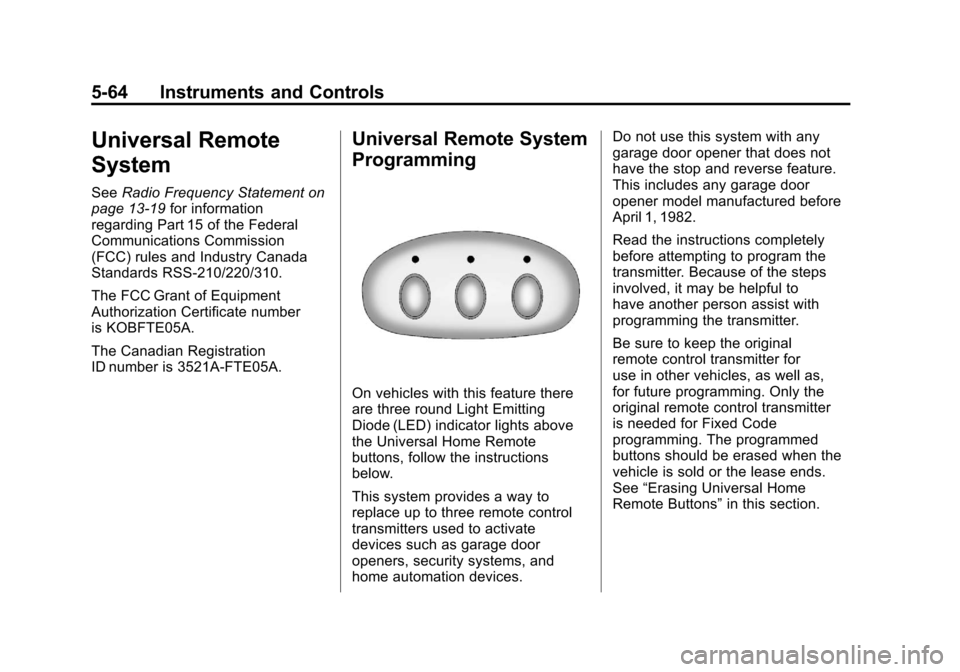
On vehicles with this feature there
are three round Light Emitting
Diode (LED) indicator lights above
the Universal Home Remote
buttons, follow the instructions
below.
This system provides a way to
replace up to three remote control
transmitters used to activate
devices such as garage door
openers, security systems, and
home automation devices. Do not use this system with any
garage door opener that does not
have the stop and reverse feature.
This includes any garage door
opener model manufactured before
April 1, 1982.
Read the instructions completely
before attempting to program the
transmitter. Because of the steps
involved, it may be helpful to
have another person assist with
programming the transmitter.
Be sure to keep the original
remote control transmitter for
use in other vehicles, as well as,
for future programming. Only the
original remote control transmitter
is needed for Fixed Code
programming. The programmed
buttons should be erased when the
vehicle is sold or the lease ends.
See
“Erasing Universal Home
Remote Buttons” in this section.
Page 185 of 428
Black plate (65,1)Chevrolet Corvette Owner Manual - 2011
Instruments and Controls 5-65
Park the vehicle outside of the
garage when programming a garage
door. Be sure that people and
objects are clear of the garage door
or gate that is being programmed.
Programming Universal Home
Remote—Rolling Code
For questions or help programming
the Universal Home Remote
System, call 1-866-572-2728
or go to learcar2u.com.
Most garage door openers sold
after 1996 are Rolling Code units.
Programming a garage door opener
involves time-sensitive actions, so
read the entire procedure before
starting. Otherwise, the device will
time out and the procedure will have
to be repeated. To program up to three devices:
1. Press START or put the vehicle
in accessory mode. See Ignition
Positions on page 9‑20 for
additional information.
Programming can only occur
when the vehicle is running or
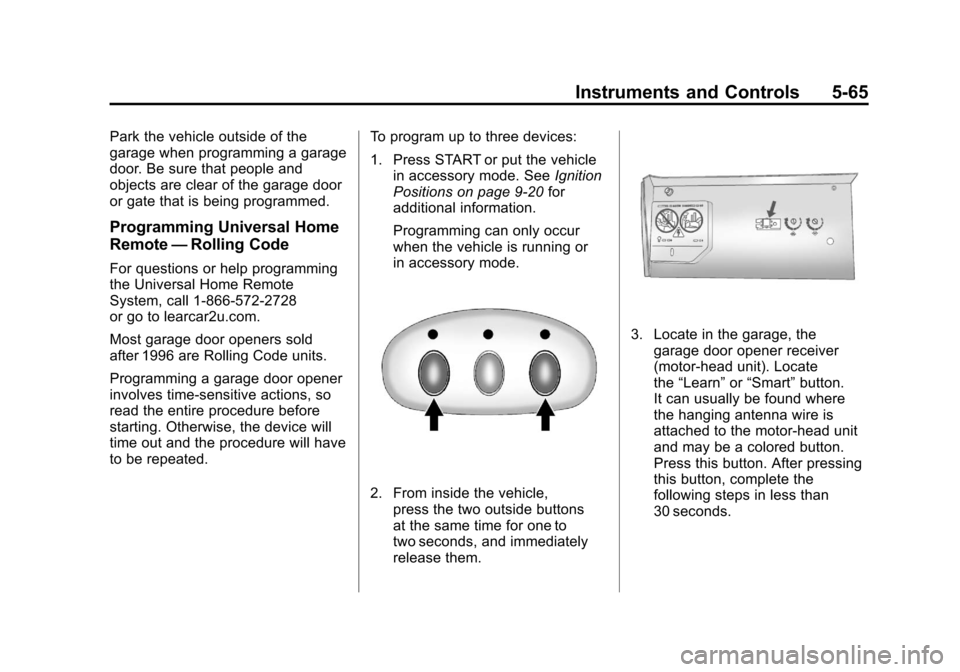
in accessory mode.
2. From inside the vehicle, press the two outside buttons
at the same time for one to
two seconds, and immediately
release them.
3. Locate in the garage, thegarage door opener receiver
(motor-head unit). Locate
the “Learn” or“Smart” button.
It can usually be found where
the hanging antenna wire is
attached to the motor-head unit
and may be a colored button.
Press this button. After pressing
this button, complete the
following steps in less than
30 seconds.
Page 186 of 428
Black plate (66,1)Chevrolet Corvette Owner Manual - 2011
5-66 Instruments and Controls
4. Immediately return to thevehicle. Press and hold the
Universal Home Remote button
that will be used to control the
garage door until the garage
door moves. The indicator light,
above the selected button,
should slowly blink. This button
may need to be held for up to
20 seconds.
5. Immediately, within one second, release the button when
the garage door moves.
The indicator light blinks rapidly
until programming is complete.
6. Press and release the same button again. The garage door
should move, confirming that
programming is successful and
complete. To program another Rolling Code
device such as an additional garage
door opener, a security device,
or home automation device, repeat
Steps 1-6, choosing a different
function button in Step 4 than
what was used for the garage
door opener.
If these instructions do not work,
the garage door opener is probably
a Fixed Code unit. Follow the
Programming instructions that follow
for a Fixed Code garage door
opener.
Programming Universal Home
Remote
—Fixed Code
For questions or help programming
the Universal Home Remote
System, call 1-866-572-2728
or go to learcar2u.com. Most garage door openers sold
before 1996 are Fixed Code units.
Programming a garage door opener
involves time-sensitive actions, so
read the entire procedure before
starting. Otherwise, the device will
time out and the procedure will have
to be repeated.
To program up to three devices:
1. Press START or put the vehicle
in accessory mode. See Ignition
Positions on page 9‑20 for
additional information.
Programming can only occur
when the vehicle is running or in
accessory mode.
Page 187 of 428
Black plate (67,1)Chevrolet Corvette Owner Manual - 2011
Instruments and Controls 5-67
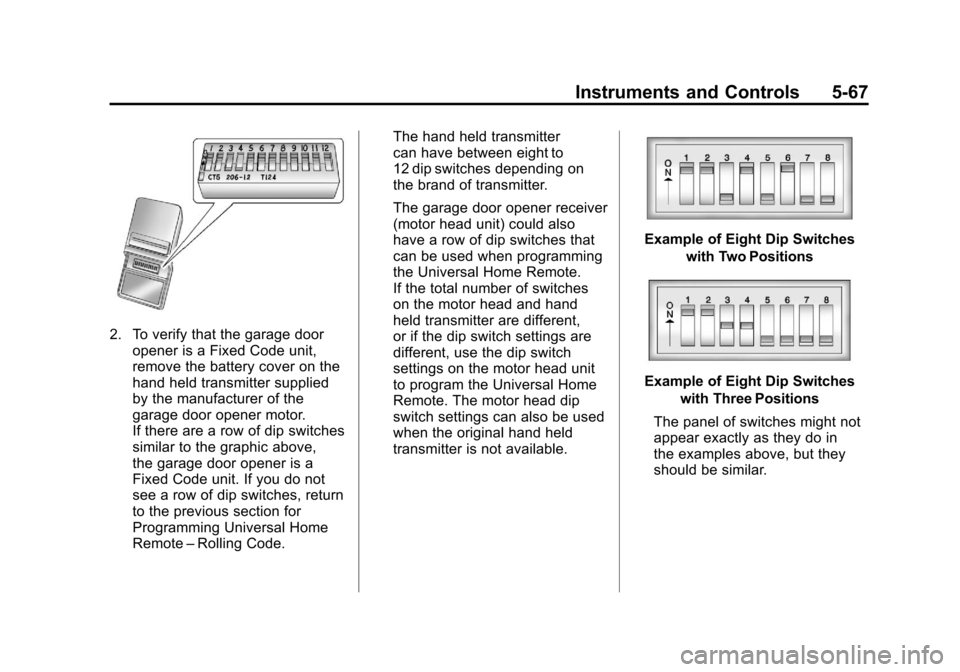
2. To verify that the garage dooropener is a Fixed Code unit,
remove the battery cover on the
hand held transmitter supplied
by the manufacturer of the
garage door opener motor.
If there are a row of dip switches
similar to the graphic above,
the garage door opener is a
Fixed Code unit. If you do not
see a row of dip switches, return
to the previous section for
Programming Universal Home
Remote –Rolling Code. The hand held transmitter
can have between eight to
12 dip switches depending on
the brand of transmitter.
The garage door opener receiver
(motor head unit) could also
have a row of dip switches that
can be used when programming
the Universal Home Remote.
If the total number of switches
on the motor head and hand
held transmitter are different,
or if the dip switch settings are
different, use the dip switch
settings on the motor head unit
to program the Universal Home
Remote. The motor head dip
switch settings can also be used
when the original hand held
transmitter is not available.
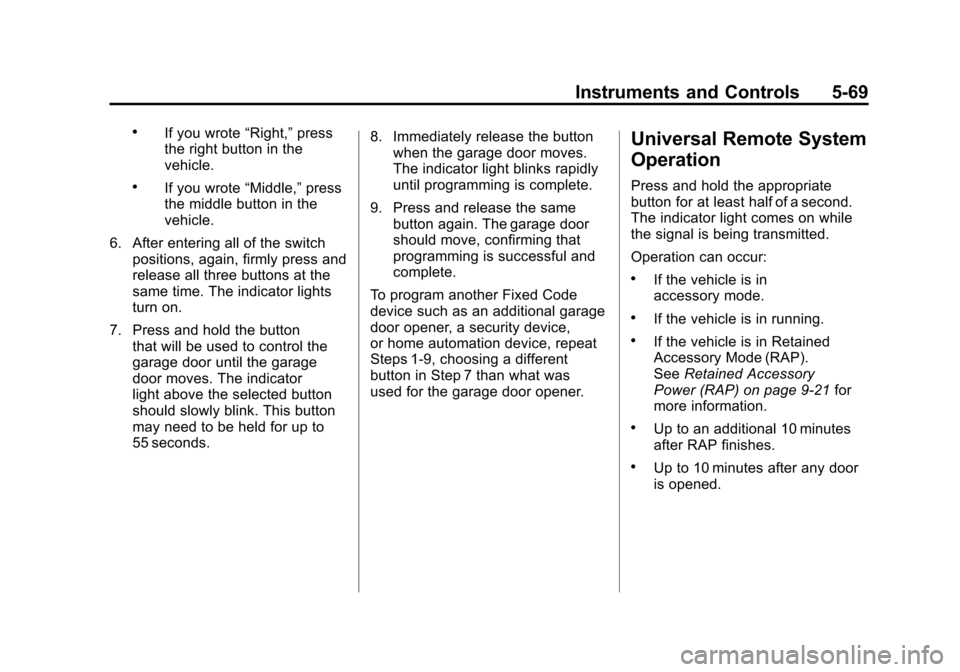
Example of Eight Dip Switches
with Two Positions
Example of Eight Dip Switcheswith Three Positions
The panel of switches might not
appear exactly as they do in
the examples above, but they
should be similar.
Page 189 of 428
Black plate (69,1)Chevrolet Corvette Owner Manual - 2011
Instruments and Controls 5-69
.If you wrote“Right,”press
the right button in the
vehicle.
.If you wrote “Middle,”press
the middle button in the
vehicle.
6. After entering all of the switch positions, again, firmly press and
release all three buttons at the
same time. The indicator lights
turn on.
7. Press and hold the button that will be used to control the
garage door until the garage
door moves. The indicator
light above the selected button
should slowly blink. This button
may need to be held for up to
55 seconds. 8. Immediately release the button
when the garage door moves.
The indicator light blinks rapidly
until programming is complete.
9. Press and release the same button again. The garage door
should move, confirming that
programming is successful and
complete.
To program another Fixed Code
device such as an additional garage
door opener, a security device,
or home automation device, repeat
Steps 1-9, choosing a different
button in Step 7 than what was
used for the garage door opener.
Universal Remote System
Operation
Press and hold the appropriate
button for at least half of a second.
The indicator light comes on while
the signal is being transmitted.
Operation can occur:
.If the vehicle is in
accessory mode.
.If the vehicle is in running.
.If the vehicle is in Retained
Accessory Mode (RAP).
See Retained Accessory
Power (RAP) on page 9‑21 for
more information.
.Up to an additional 10 minutes
after RAP finishes.
.Up to 10 minutes after any door
is opened.
Page 415 of 428
Black plate (19,1)Chevrolet Corvette Owner Manual - 2011
Customer Information 13-19
Radio Frequency
Identification (RFID)
RFID technology is used in some
vehicles for functions such as tire
pressure monitoring and ignition
system security, as well as in
connection with conveniences
such as key fobs for remote door
locking/unlocking and starting, and
in-vehicle transmitters for garage
door openers. RFID technology in
GM vehicles does not use or record
personal information or link with
any other GM system containing
personal information.
Radio Frequency
Statement
This vehicle has systems that
operate on a radio frequency that
comply with Part 15 of the Federal
Communications Commission (FCC)
rules and with Industry Canada
Standards RSS‐210/220/310.
Operation is subject to the following
two conditions:
1. The device may not causeinterference.
2. The device must accept any interference received, including
interference that may cause
undesired operation of the
device.
Changes or modifications to any of
these systems by other than an
authorized service facility could void
authorization to use this equipment.
Page 421 of 428

Black plate (5,1)Chevrolet Corvette Owner Manual - 2011
INDEX i-5
Fuel EconomyDriving for Better . . . . . . . 1-22, 1-23
Fuses Engine CompartmentFuse Block . . . . . . . . . . . . . . . . 10-52
Fuses and Circuit Breakers . . . . . . . . . . . . . . . . . . 10-51
Instrument Panel Fuse Block . . . . . . . . . . . . . . . . . . . . . . 10-55
G
Garage Door Opener . . . . . . . . . . 5-64Programming . . . . . . . . . . . . . . . . . 5-64
Gasoline Specifications . . . . . . . . . . . . . . . . . 9-49
Gauges Boost . . . . . . . . . . . . . . . . . . . . . . . . . 5-12
Engine CoolantTemperature . . . . . . . . . . . . . . . . 5-15
Engine Oil Pressure . . . . . . . . . . 5-13
Fuel . . . . . . . . . . . . . . . . . . . . . . . . . . 5-11
Odometer . . . . . . . . . . . . . . . . . . . . . 5-11
Speedometer . . . . . . . . . . . . . . . . . 5-11 Gauges (cont.)
Tachometer . . . . . . . . . . . . . . . . . . . 5-11
Voltmeter . . . . . . . . . . . . . . . . . . . . . 5-15
Warning Lights and
Indicators . . . . . . . . . . . . . . . . . . . . 5-8
General Information Service and Maintenance . . . . . 11-1
Towing . . . . . . . . . . . . . . . . . . . . . . . . 9-54
Vehicle Care . . . . . . . . . . . . . . . . . . 10-3
Glove Box . . . . . . . . . . . . . . . . . . . . . . 4-1
GM Mobility Reimbursement Program . . . . . . . . . . . . . . . . . . . . . . 13-7
H
Halogen Bulbs . . . . . . . . . . . . . . . . 10-48
Hatch . . . . . . . . . . . . . . . . . . . . . . . . . . 2-10
Hazard Warning Flashers . . . . . . . 6-4
Head Restraints . . . . . . . . . . . . . . . . 3-2
Head-Up Display (HUD) . . . . . . . 5-31
HeadlampsAiming . . . . . . . . . . . . . . . . . . . . . . 10-48
Bulb Replacement . . . . . . . . . . 10-48
Daytime RunningLamps (DRL) . . . . . . . . . . . . . . . . . 6-2
Flash-to-Pass . . . . . . . . . . . . . . . . . . 6-2 Headlamps (cont.)
High Intensity Discharge
(HID) Lighting . . . . . . . . . . . . . 10-48
High-Beam On Light . . . . . . . . . . 5-25
High/Low Beam Changer . . . . . . 6-2
Lamps On Reminder . . . . . . . . . 5-25
Twilight Sentinel . . . . . . . . . . . . . . . 6-3
Heated Front Seats . . . . . . . . . . . . . 3-8
Heated Mirrors . . . . . . . . . . . . . . . . . 2-16
High-Beam On Light . . . . . . . . . . . 5-25
High-Speed Operation . . . . . . . . 10-67
Highway Hypnosis . . . . . . . . . . . . . 9-10
Hill and Mountain Roads . . . . . . . 9-10
Hood . . . . . . . . . . . . . . . . . . . . . . . . . . 10-9
Horn . . . . . . . . . . . . . . . . . . . . . . . . . . . . 5-4
How to Wear Safety Belts Properly . . . . . . . . . . . . . . . . . . . . . . 3-13
Hydraulic Clutch . . . . . . . . . . . . . . 10-24