door lock CHEVROLET SONIC 2013 2.G Owner's Manual
[x] Cancel search | Manufacturer: CHEVROLET, Model Year: 2013, Model line: SONIC, Model: CHEVROLET SONIC 2013 2.GPages: 382, PDF Size: 6.71 MB
Page 121 of 382
Black plate (27,1)Chevrolet Sonic Owner Manual - 2013 - 2nd PrintReady - 10/11/12
Instruments and Controls 5-27
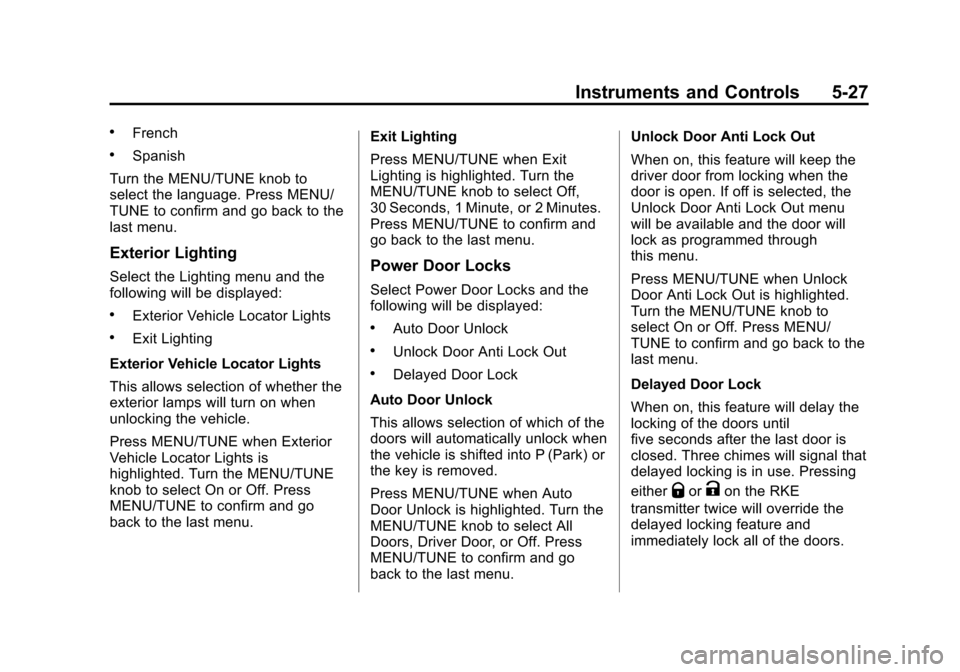
.French
.Spanish
Turn the MENU/TUNE knob to
select the language. Press MENU/
TUNE to confirm and go back to the
last menu.
Exterior Lighting
Select the Lighting menu and the
following will be displayed:
.Exterior Vehicle Locator Lights
.Exit Lighting
Exterior Vehicle Locator Lights
This allows selection of whether the
exterior lamps will turn on when
unlocking the vehicle.
Press MENU/TUNE when Exterior
Vehicle Locator Lights is
highlighted. Turn the MENU/TUNE
knob to select On or Off. Press
MENU/TUNE to confirm and go
back to the last menu. Exit Lighting
Press MENU/TUNE when Exit
Lighting is highlighted. Turn the
MENU/TUNE knob to select Off,
30 Seconds, 1 Minute, or 2 Minutes.
Press MENU/TUNE to confirm and
go back to the last menu.
Power Door Locks
Select Power Door Locks and the
following will be displayed:
.Auto Door Unlock
.Unlock Door Anti Lock Out
.Delayed Door Lock
Auto Door Unlock
This allows selection of which of the
doors will automatically unlock when
the vehicle is shifted into P (Park) or
the key is removed.
Press MENU/TUNE when Auto
Door Unlock is highlighted. Turn the
MENU/TUNE knob to select All
Doors, Driver Door, or Off. Press
MENU/TUNE to confirm and go
back to the last menu. Unlock Door Anti Lock Out
When on, this feature will keep the
driver door from locking when the
door is open. If off is selected, the
Unlock Door Anti Lock Out menu
will be available and the door will
lock as programmed through
this menu.
Press MENU/TUNE when Unlock
Door Anti Lock Out is highlighted.
Turn the MENU/TUNE knob to
select On or Off. Press MENU/
TUNE to confirm and go back to the
last menu.
Delayed Door Lock
When on, this feature will delay the
locking of the doors until
five seconds after the last door is
closed. Three chimes will signal that
delayed locking is in use. Pressing
either
QorKon the RKE
transmitter twice will override the
delayed locking feature and
immediately lock all of the doors.
Page 122 of 382
Black plate (28,1)Chevrolet Sonic Owner Manual - 2013 - 2nd PrintReady - 10/11/12
5-28 Instruments and Controls
Press MENU/TUNE when Delayed
Door Lock is highlighted. Turn the
MENU/TUNE knob to select On or
Off. Press MENU/TUNE to confirm
and go back to the last menu.
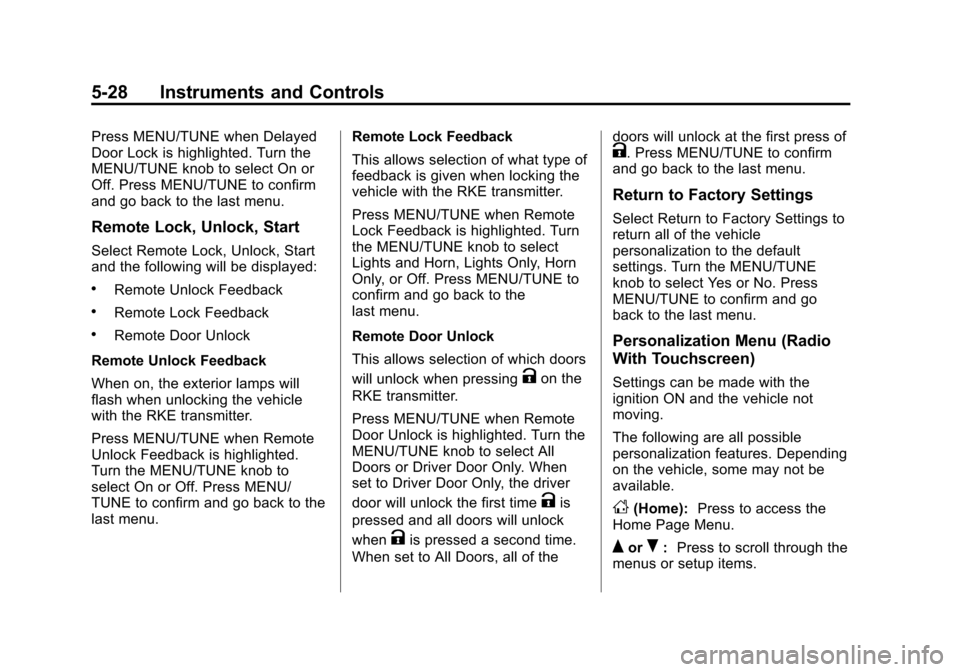
Remote Lock, Unlock, Start
Select Remote Lock, Unlock, Start
and the following will be displayed:
.Remote Unlock Feedback
.Remote Lock Feedback
.Remote Door Unlock
Remote Unlock Feedback
When on, the exterior lamps will
flash when unlocking the vehicle
with the RKE transmitter.
Press MENU/TUNE when Remote
Unlock Feedback is highlighted.
Turn the MENU/TUNE knob to
select On or Off. Press MENU/
TUNE to confirm and go back to the
last menu. Remote Lock Feedback
This allows selection of what type of
feedback is given when locking the
vehicle with the RKE transmitter.
Press MENU/TUNE when Remote
Lock Feedback is highlighted. Turn
the MENU/TUNE knob to select
Lights and Horn, Lights Only, Horn
Only, or Off. Press MENU/TUNE to
confirm and go back to the
last menu.
Remote Door Unlock
This allows selection of which doors
will unlock when pressing
Kon the
RKE transmitter.
Press MENU/TUNE when Remote
Door Unlock is highlighted. Turn the
MENU/TUNE knob to select All
Doors or Driver Door Only. When
set to Driver Door Only, the driver
door will unlock the first time
Kis
pressed and all doors will unlock
when
Kis pressed a second time.
When set to All Doors, all of the doors will unlock at the first press of
K. Press MENU/TUNE to confirm
and go back to the last menu.
Return to Factory Settings
Select Return to Factory Settings to
return all of the vehicle
personalization to the default
settings. Turn the MENU/TUNE
knob to select Yes or No. Press
MENU/TUNE to confirm and go
back to the last menu.
Personalization Menu (Radio
With Touchscreen)
Settings can be made with the
ignition ON and the vehicle not
moving.
The following are all possible
personalization features. Depending
on the vehicle, some may not be
available.
D(Home): Press to access the
Home Page Menu.
QorR: Press to scroll through the
menus or setup items.
Page 124 of 382
Black plate (30,1)Chevrolet Sonic Owner Manual - 2013 - 2nd PrintReady - 10/11/12
5-30 Instruments and Controls
Radio Factory Settings
Select to restore the radio to the
factory settings. Press
4.
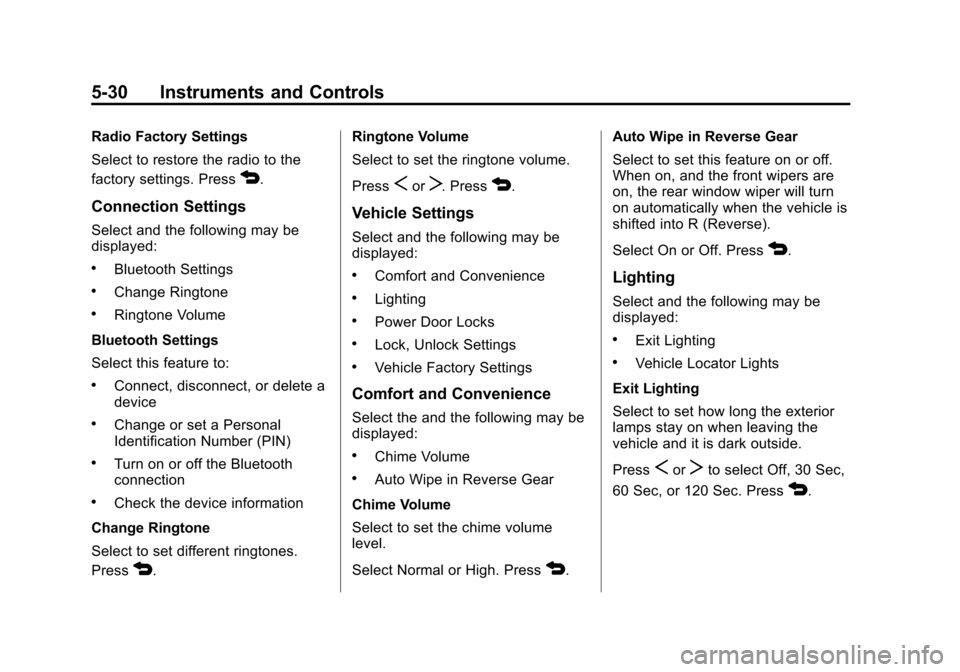
Connection Settings
Select and the following may be
displayed:
.Bluetooth Settings
.Change Ringtone
.Ringtone Volume
Bluetooth Settings
Select this feature to:
.Connect, disconnect, or delete a
device
.Change or set a Personal
Identification Number (PIN)
.Turn on or off the Bluetooth
connection
.Check the device information
Change Ringtone
Select to set different ringtones.
Press
4. Ringtone Volume
Select to set the ringtone volume.
Press
SorT. Press4.
Vehicle Settings
Select and the following may be
displayed:
.Comfort and Convenience
.Lighting
.Power Door Locks
.Lock, Unlock Settings
.Vehicle Factory Settings
Comfort and Convenience
Select the and the following may be
displayed:
.Chime Volume
.Auto Wipe in Reverse Gear
Chime Volume
Select to set the chime volume
level.
Select Normal or High. Press
4. Auto Wipe in Reverse Gear
Select to set this feature on or off.
When on, and the front wipers are
on, the rear window wiper will turn
on automatically when the vehicle is
shifted into R (Reverse).
Select On or Off. Press
4.
Lighting
Select and the following may be
displayed:
.Exit Lighting
.Vehicle Locator Lights
Exit Lighting
Select to set how long the exterior
lamps stay on when leaving the
vehicle and it is dark outside.
Press
SorTto select Off, 30 Sec,
60 Sec, or 120 Sec. Press
4.
Page 125 of 382
Black plate (31,1)Chevrolet Sonic Owner Manual - 2013 - 2nd PrintReady - 10/11/12
Instruments and Controls 5-31
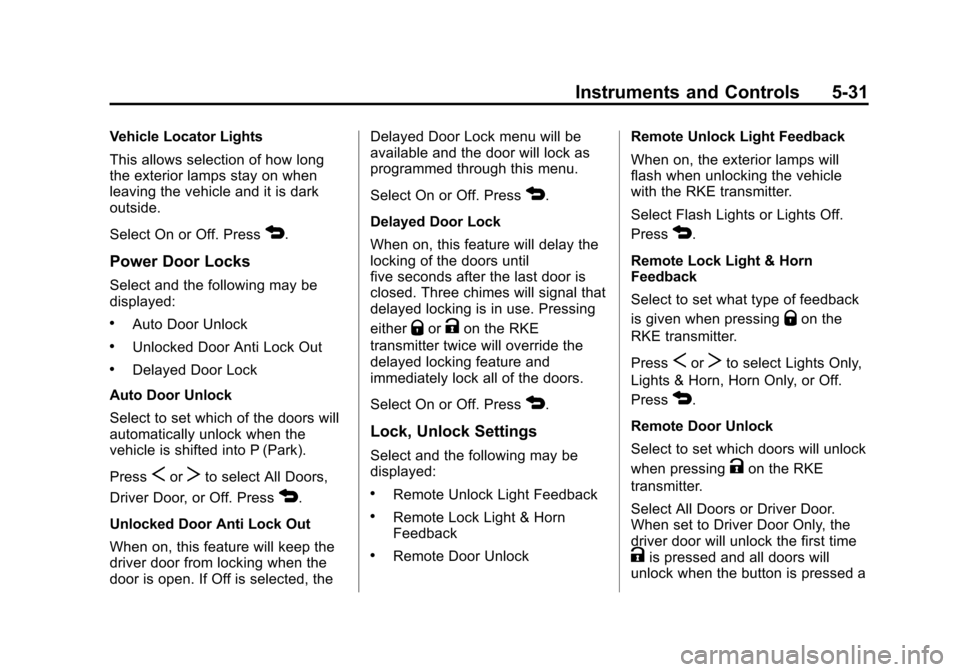
Vehicle Locator Lights
This allows selection of how long
the exterior lamps stay on when
leaving the vehicle and it is dark
outside.
Select On or Off. Press
4.
Power Door Locks
Select and the following may be
displayed:
.Auto Door Unlock
.Unlocked Door Anti Lock Out
.Delayed Door Lock
Auto Door Unlock
Select to set which of the doors will
automatically unlock when the
vehicle is shifted into P (Park).
Press
SorTto select All Doors,
Driver Door, or Off. Press
4.
Unlocked Door Anti Lock Out
When on, this feature will keep the
driver door from locking when the
door is open. If Off is selected, the Delayed Door Lock menu will be
available and the door will lock as
programmed through this menu.
Select On or Off. Press
4.
Delayed Door Lock
When on, this feature will delay the
locking of the doors until
five seconds after the last door is
closed. Three chimes will signal that
delayed locking is in use. Pressing
either
QorKon the RKE
transmitter twice will override the
delayed locking feature and
immediately lock all of the doors.
Select On or Off. Press
4.
Lock, Unlock Settings
Select and the following may be
displayed:
.Remote Unlock Light Feedback
.Remote Lock Light & Horn
Feedback
.Remote Door Unlock Remote Unlock Light Feedback
When on, the exterior lamps will
flash when unlocking the vehicle
with the RKE transmitter.
Select Flash Lights or Lights Off.
Press
4.
Remote Lock Light & Horn
Feedback
Select to set what type of feedback
is given when pressing
Qon the
RKE transmitter.
Press
SorTto select Lights Only,
Lights & Horn, Horn Only, or Off.
Press
4.
Remote Door Unlock
Select to set which doors will unlock
when pressing
Kon the RKE
transmitter.
Select All Doors or Driver Door.
When set to Driver Door Only, the
driver door will unlock the first time
Kis pressed and all doors will
unlock when the button is pressed a
Page 126 of 382

Black plate (32,1)Chevrolet Sonic Owner Manual - 2013 - 2nd PrintReady - 10/11/12
5-32 Instruments and Controls
second time. When set to All Doors,
all of the doors will unlock at the first
press of
K. Press4.
Vehicle Factory Settings
Select to return all of the vehicle
personalization to the default
settings. Select Yes or No.
Press
4.
Language
Select and the following may be
displayed:
.English
.French
.Spanish
Select the language desired.
Press
4.
Text Scroll
When on, if there is long text
displayed on the audio screen, the
text is scrolled. When off, the text is
scrolled once and displayed in
truncated form. Select On or Off. Press
4.
Touch Beep Volume
When on, a beep will be heard
when pressing the screen. When
off, the beep is canceled.
Select On or Off. Press
4.
Max Startup Volume
This allows the startup volume of
the infotainment system to be set.
Press
SorTto select the desired
volume between 9-21. Press
4.
System Version
Press to view the version of the
infotainment system. Press
4.
DivX VOD
Press DivX VOD.
.DIVX VIDEO: DivX is a digital
video format created by DivX,
LLC, a subsidiary of Rovi
Corporation. This is an official
DivX Certified
®device that plays DivX video. See divx.com for
more information and software
tools on how to convert files into
DivX videos.
.DIVX VIDEO-ON DEMAND: This
DivX Certified device must be
registered in order to play
purchased DivX
Video-on-Demand (VOD)
movies. To obtain a registration
code, locate the DivX VOD
section in the device setup
menu. See vod.divx.com for
more information on how to
complete the registration.
Press
4.
Page 211 of 382
Black plate (15,1)Chevrolet Sonic Owner Manual - 2013 - 2nd PrintReady - 10/11/12
Driving and Operating 9-15
2 (ACC/ACCESSORY):This is the
position in which things like the
radio and the windshield wipers can
be operated when the engine is off.
3 (ON/RUN): This position can be
used to operate the electrical
accessories and to display some
instrument cluster warning and
indicator lights. This position can
also be used for service and
diagnostics, and to verify the proper
operation of the malfunction
indicator lamp as may be required
for emission inspection purposes.
The switch stays in this position
when the engine is running.
If you leave the key in the ACC/
ACCESSORY or ON/RUN position
with the engine off, the battery could
be drained. You may not be able to
start the vehicle if the battery is
allowed to drain for an extended
period of time. 4 (START):
This is the position that
starts the engine. When the engine
starts, release the key. The ignition
switch returns to ON/RUN for
driving.
A warning tone will sound when the
driver door is opened, the ignition is
in ACC/ACCESSORY or LOCK/
OFF, and the key is in the ignition.
If the ignition becomes difficult to
turn, see Keys on page 2‑1.
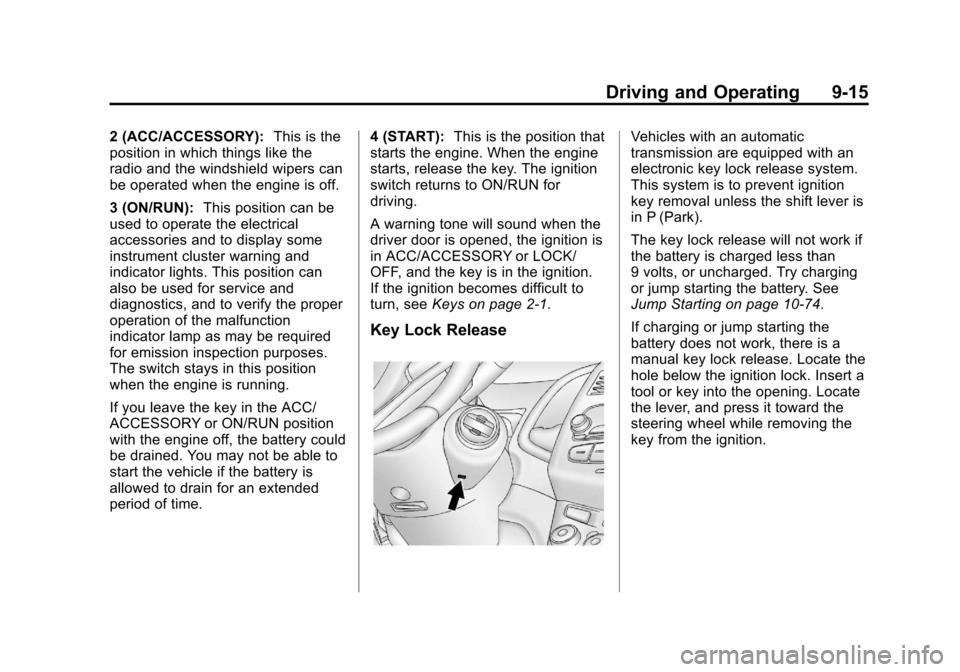
Key Lock Release
Vehicles with an automatic
transmission are equipped with an
electronic key lock release system.
This system is to prevent ignition
key removal unless the shift lever is
in P (Park).
The key lock release will not work if
the battery is charged less than
9 volts, or uncharged. Try charging
or jump starting the battery. See
Jump Starting on page 10‑74.
If charging or jump starting the
battery does not work, there is a
manual key lock release. Locate the
hole below the ignition lock. Insert a
tool or key into the opening. Locate
the lever, and press it toward the
steering wheel while removing the
key from the ignition.
Page 214 of 382
Black plate (18,1)Chevrolet Sonic Owner Manual - 2013 - 2nd PrintReady - 10/11/12
9-18 Driving and Operating
Retained Accessory
Power (RAP)
These vehicle accessories may be
used for up to 10 minutes after the
engine is turned off:
.Audio System
.Power Windows
.Sunroof
The power windows and sunroof will
continue to work for up to
10 minutes or until any door is
opened.
The radio will work when the key is
in ON/RUN or ACC/ACCESSORY.
Once the key is turned from ON/
RUN to LOCK/OFF, the radio will
continue to work for 10 minutes after
the last input (button press, knob
turn) to the radio is detected.
It is possible to turn the radio back
on at any time after it has timed out
using the Power knob. The radio will
be functional for 10 minutes after the
last input (button press, knob turn)
to the radio is detected.
Shifting Into Park
(Automatic Transmission)
1. Hold the brake pedal down and set the parking brake. See
Parking Brake on page 9‑26.
2. Move the shift lever into P (Park) by pressing the button on the
shift lever and pushing the lever
all the way toward the front of
the vehicle.
3. Turn the ignition key to LOCK/OFF.
4. Remove the key and take it with you. If you can leave the vehicle
with the ignition key in your
hand, the vehicle is in P (Park).
Leaving the Vehicle with the
Engine Running (Automatic
Transmission)
{WARNING
It can be dangerous to leave the
vehicle with the engine running.
It could overheat and catch fire.
It is dangerous to get out of the
vehicle if the shift lever is not fully
in P (Park) with the parking brake
firmly set. The vehicle can roll.
Do not leave the vehicle when the
engine is running. If you have left
the engine running, the vehicle
can move suddenly. You or others
could be injured. To be sure the
vehicle will not move, even when
you are on fairly level ground,
always set the parking brake and
move the shift lever to P (Park).
See Shifting Into Park (Automatic
Transmission) on page 9‑18.
Page 216 of 382
Black plate (20,1)Chevrolet Sonic Owner Manual - 2013 - 2nd PrintReady - 10/11/12
9-20 Driving and Operating
If you still cannot move the shift
lever from P (Park), consult your
dealer or a professional towing
service.
The doors may lock when shifting
from P (Park). SeeAutomatic Door
Locks on page 2‑7.
Parking
If the vehicle has a manual
transmission, before getting out of
the vehicle, move the shift lever into
R (Reverse) if parking on a downhill
slope. On a level surface or an
uphill slope, use 1 (First) gear.
Firmly apply the parking brake. Turn
the wheels toward the curb for a
downhill slope, or away from the
curb for an uphill slope. Once the
shift lever has been placed into gear
with the clutch pedal pressed in,
turn the ignition key to LOCK/OFF,
remove the key, and release the
clutch.
Parking over Things
That Burn
{WARNING
Things that can burn could touch
hot exhaust parts under the
vehicle and ignite. Do not park
over papers, leaves, dry grass,
or other things that can burn.
Engine Exhaust
{WARNING
Engine exhaust contains carbon
monoxide (CO) which cannot be
seen or smelled. Exposure to CO
can cause unconsciousness and
even death.
Exhaust may enter the vehicle if:
.The vehicle idles in areas
with poor ventilation (parking
garages, tunnels, deep snow
that may block underbody
airflow or tail pipes).
.The exhaust smells or
sounds strange or different.
.The exhaust system leaks
due to corrosion or damage.
.The vehicle exhaust system
has been modified, damaged,
or improperly repaired.
(Continued)
Page 232 of 382
Black plate (36,1)Chevrolet Sonic Owner Manual - 2013 - 2nd PrintReady - 10/11/12
9-36 Driving and Operating
Filling the Tank
{WARNING
Fuel vapors and fuel fires burn
violently and can cause injury or
death.
.To help avoid injuries to you
and others, read and follow
all the instructions on the fuel
pump island.
.Turn off the engine when
refueling.
.Keep sparks, flames, and
smoking materials away
from fuel.
.Do not leave the fuel pump
unattended.
.Do not reenter the vehicle
while pumping fuel.
.Keep children away from the
fuel pump and never let
children pump fuel.(Continued)
WARNING (Continued)
.Fuel can spray out if the fuel
cap is opened too quickly.
This spray can happen if the
tank is nearly full, and is
more likely in hot weather.
Open the fuel cap slowly and
wait for any hiss noise to stop
then unscrew the cap all
the way
The tethered fuel cap is located
behind a hinged fuel door on the
passenger side of the vehicle.
To remove the fuel cap, turn it
slowly counterclockwise. The fuel
cap has a spring in it; if the cap is
released too soon, it will spring back
to the right.
Be careful not to spill fuel. Do not
top off or overfill the tank. Wait a
few seconds after you have finished
pumping before removing the
nozzle. Clean fuel from painted surfaces as soon as possible. See
“Washing the Vehicle”
inExterior
Care on page 10‑80.
When replacing the fuel cap, turn it
clockwise until it clicks. Make sure
the cap is fully installed. The
diagnostic system can determine if
the fuel cap has been left off or
improperly installed. This would
allow fuel to evaporate into the
atmosphere. See Malfunction
Indicator Lamp on page 5‑12.
{WARNING
If a fire starts while you are
refueling, do not remove the
nozzle. Shut off the flow of fuel by
shutting off the pump or by
notifying the station attendant.
Leave the area immediately.
Notice: If a new fuel cap is
needed, be sure to get the right
type of cap from your dealer. The
wrong type of fuel cap might not
fit properly, might cause the
Page 298 of 382
Black plate (64,1)Chevrolet Sonic Owner Manual - 2013 - 2nd PrintReady - 10/11/12
10-64 Vehicle Care
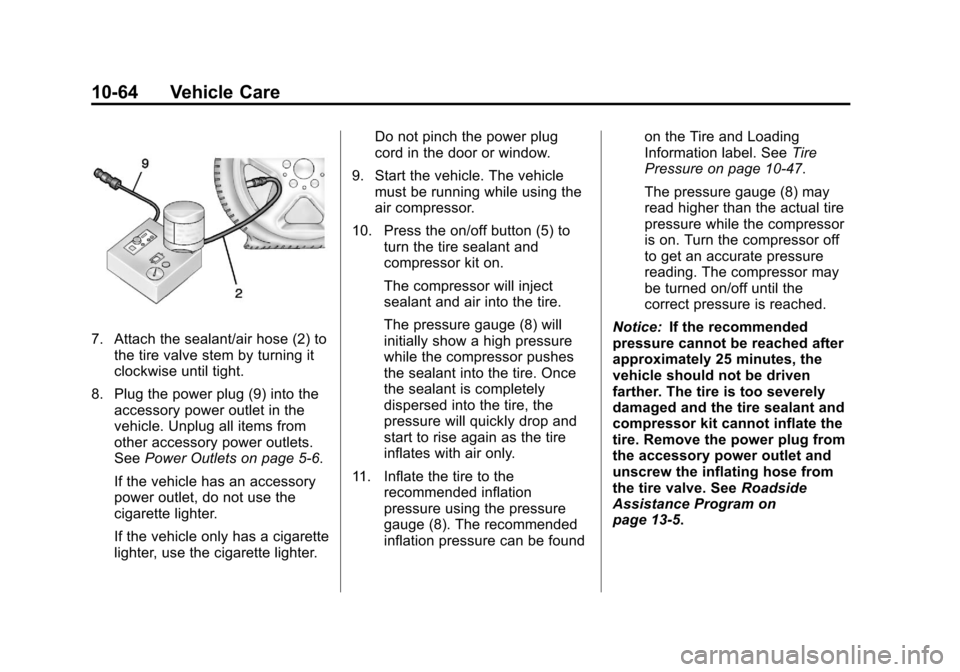
7. Attach the sealant/air hose (2) tothe tire valve stem by turning it
clockwise until tight.
8. Plug the power plug (9) into the accessory power outlet in the
vehicle. Unplug all items from
other accessory power outlets.
See Power Outlets on page 5‑6.
If the vehicle has an accessory
power outlet, do not use the
cigarette lighter.
If the vehicle only has a cigarette
lighter, use the cigarette lighter. Do not pinch the power plug
cord in the door or window.
9. Start the vehicle. The vehicle must be running while using the
air compressor.
10. Press the on/off button (5) to turn the tire sealant and
compressor kit on.
The compressor will inject
sealant and air into the tire.
The pressure gauge (8) will
initially show a high pressure
while the compressor pushes
the sealant into the tire. Once
the sealant is completely
dispersed into the tire, the
pressure will quickly drop and
start to rise again as the tire
inflates with air only.
11. Inflate the tire to the recommended inflation
pressure using the pressure
gauge (8). The recommended
inflation pressure can be found on the Tire and Loading
Information label. See
Tire
Pressure on page 10‑47.
The pressure gauge (8) may
read higher than the actual tire
pressure while the compressor
is on. Turn the compressor off
to get an accurate pressure
reading. The compressor may
be turned on/off until the
correct pressure is reached.
Notice: If the recommended
pressure cannot be reached after
approximately 25 minutes, the
vehicle should not be driven
farther. The tire is too severely
damaged and the tire sealant and
compressor kit cannot inflate the
tire. Remove the power plug from
the accessory power outlet and
unscrew the inflating hose from
the tire valve. See Roadside
Assistance Program on
page 13‑5.