turn signal CHEVROLET SONIC 2013 2.G Owner's Manual
[x] Cancel search | Manufacturer: CHEVROLET, Model Year: 2013, Model line: SONIC, Model: CHEVROLET SONIC 2013 2.GPages: 382, PDF Size: 6.71 MB
Page 263 of 382
Black plate (29,1)Chevrolet Sonic Owner Manual - 2013 - 2nd PrintReady - 10/11/12
Vehicle Care 10-29
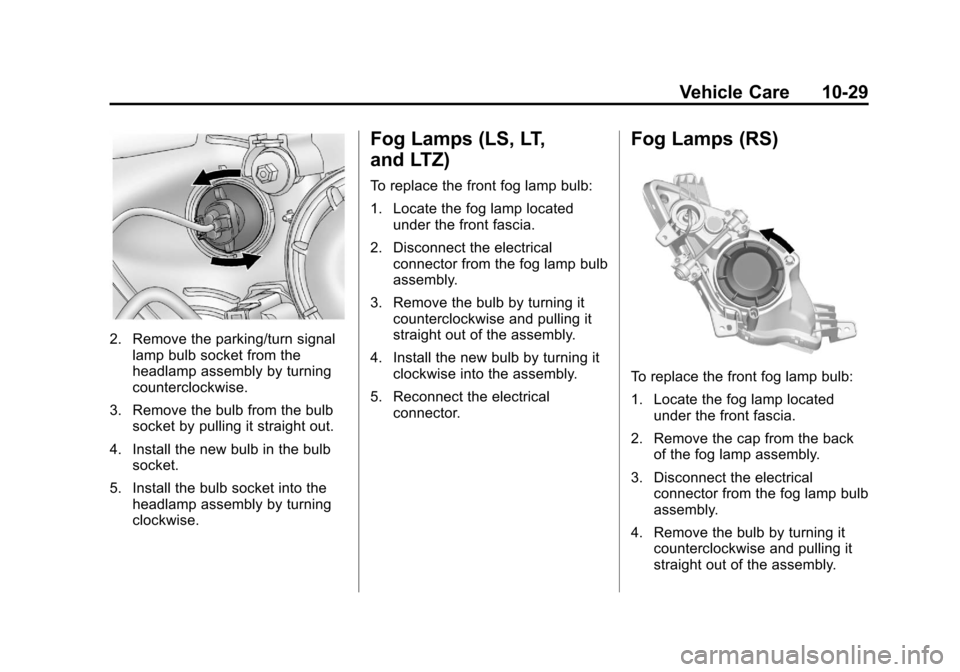
2. Remove the parking/turn signallamp bulb socket from the
headlamp assembly by turning
counterclockwise.
3. Remove the bulb from the bulb socket by pulling it straight out.
4. Install the new bulb in the bulb socket.
5. Install the bulb socket into the headlamp assembly by turning
clockwise.
Fog Lamps (LS, LT,
and LTZ)
To replace the front fog lamp bulb:
1. Locate the fog lamp locatedunder the front fascia.
2. Disconnect the electrical connector from the fog lamp bulb
assembly.
3. Remove the bulb by turning it counterclockwise and pulling it
straight out of the assembly.
4. Install the new bulb by turning it clockwise into the assembly.
5. Reconnect the electrical connector.
Fog Lamps (RS)
To replace the front fog lamp bulb:
1. Locate the fog lamp locatedunder the front fascia.
2. Remove the cap from the back of the fog lamp assembly.
3. Disconnect the electrical connector from the fog lamp bulb
assembly.
4. Remove the bulb by turning it counterclockwise and pulling it
straight out of the assembly.
Page 264 of 382
Black plate (30,1)Chevrolet Sonic Owner Manual - 2013 - 2nd PrintReady - 10/11/12
10-30 Vehicle Care
5. Install the new bulb by turning itclockwise into the assembly.
6. Reconnect the electrical connector.
7. Replace the cap on the back of the fog lamp assembly.
Taillamps, Turn Signal,
Stoplamps, and Back-Up
Lamps
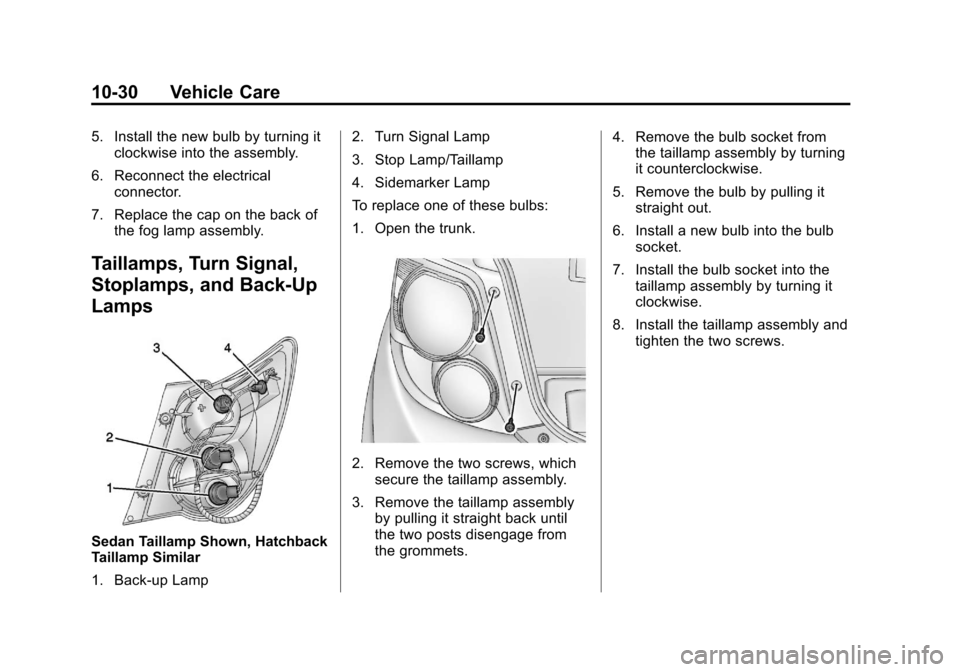
Sedan Taillamp Shown, Hatchback
Taillamp Similar
1. Back-up Lamp 2. Turn Signal Lamp
3. Stop Lamp/Taillamp
4. Sidemarker Lamp
To replace one of these bulbs:
1. Open the trunk.
2. Remove the two screws, which
secure the taillamp assembly.
3. Remove the taillamp assembly by pulling it straight back until
the two posts disengage from
the grommets. 4. Remove the bulb socket from
the taillamp assembly by turning
it counterclockwise.
5. Remove the bulb by pulling it straight out.
6. Install a new bulb into the bulb socket.
7. Install the bulb socket into the taillamp assembly by turning it
clockwise.
8. Install the taillamp assembly and tighten the two screws.
Page 265 of 382
Black plate (31,1)Chevrolet Sonic Owner Manual - 2013 - 2nd PrintReady - 10/11/12
Vehicle Care 10-31
License Plate Lamp
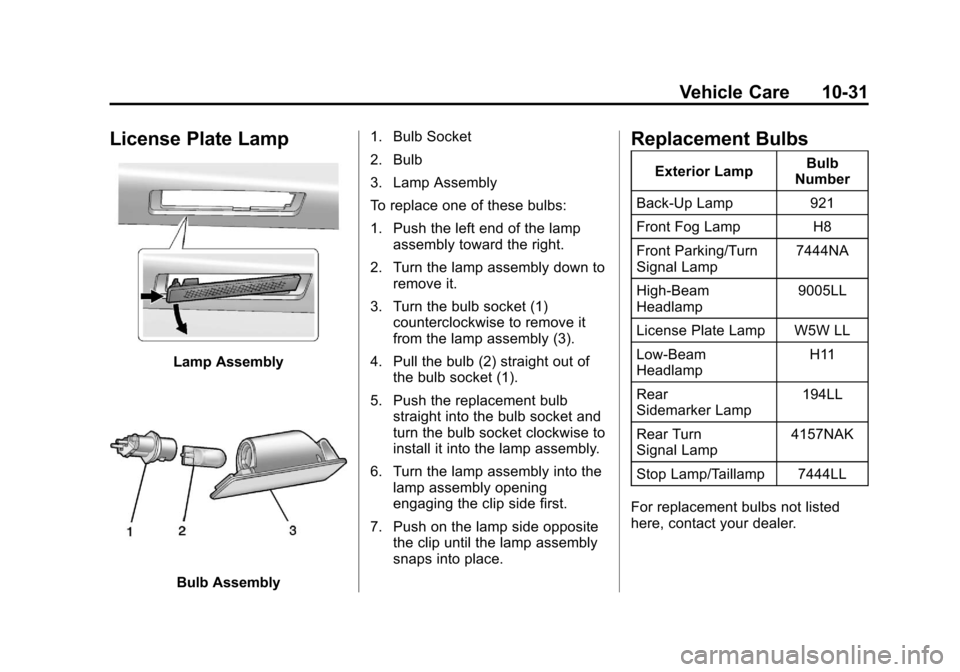
Lamp Assembly
Bulb Assembly1. Bulb Socket
2. Bulb
3. Lamp Assembly
To replace one of these bulbs:
1. Push the left end of the lamp
assembly toward the right.
2. Turn the lamp assembly down to remove it.
3. Turn the bulb socket (1) counterclockwise to remove it
from the lamp assembly (3).
4. Pull the bulb (2) straight out of the bulb socket (1).
5. Push the replacement bulb straight into the bulb socket and
turn the bulb socket clockwise to
install it into the lamp assembly.
6. Turn the lamp assembly into the lamp assembly opening
engaging the clip side first.
7. Push on the lamp side opposite the clip until the lamp assembly
snaps into place.
Replacement Bulbs
Exterior Lamp Bulb
Number
Back-Up Lamp 921
Front Fog Lamp H8
Front Parking/Turn
Signal Lamp 7444NA
High-Beam
Headlamp 9005LL
License Plate Lamp W5W LL
Low-Beam
Headlamp H11
Rear
Sidemarker Lamp 194LL
Rear Turn
Signal Lamp 4157NAK
Stop Lamp/Taillamp 7444LL
For replacement bulbs not listed
here, contact your dealer.
Page 283 of 382
Black plate (49,1)Chevrolet Sonic Owner Manual - 2013 - 2nd PrintReady - 10/11/12
Vehicle Care 10-49
The TPMS malfunction indicator is
combined with the low tire pressure
telltale. When the system detects a
malfunction, the telltale will flash for
approximately one minute and then
remain continuously illuminated.
This sequence will continue upon
subsequent vehicle start-ups as
long as the malfunction exists.
When the malfunction indicator is
illuminated, the system may not be
able to detect or signal low tire
pressure as intended. TPMS
malfunctions may occur for a variety
of reasons, including the installation
of replacement or alternate tires or
wheels on the vehicle that prevent
the TPMS from functioning properly.
Always check the TPMS malfunction
telltale after replacing one or more
tires or wheels on your vehicle to
ensure that the replacement or
alternate tires and wheels allow the
TPMS to continue to function
properly.
SeeTire Pressure Monitor
Operation on page 10‑49.Federal Communications
Commission (FCC) Rules and
with Industry Canada
Standards
See Radio Frequency Statement on
page 13‑15 for information
regarding Part 15 of the Federal
Communications Commission (FCC)
Rules and with Industry Canada
Standards RSS-GEN/210/220/310.
Tire Pressure Monitor
Operation
This vehicle may have a Tire
Pressure Monitor System (TPMS).
The TPMS is designed to warn the
driver when a low tire pressure
condition exists. TPMS sensors are
mounted onto each tire and wheel
assembly, excluding the spare tire
and wheel assembly. The TPMS
sensors monitor the air pressure in
the tires and transmit the tire
pressure readings to a receiver
located in the vehicle.
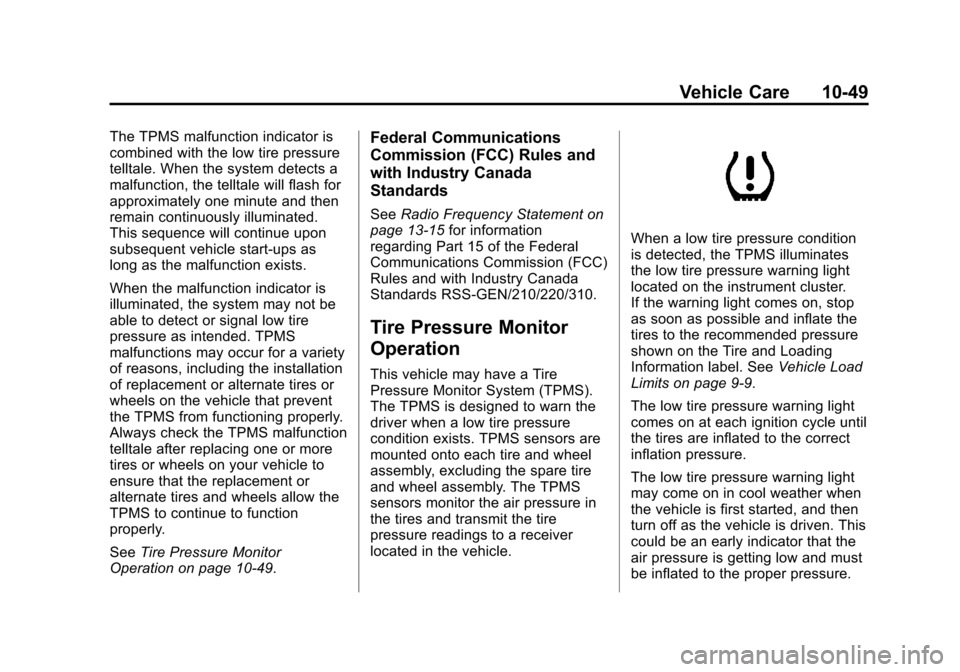
When a low tire pressure condition
is detected, the TPMS illuminates
the low tire pressure warning light
located on the instrument cluster.
If the warning light comes on, stop
as soon as possible and inflate the
tires to the recommended pressure
shown on the Tire and Loading
Information label. See Vehicle Load
Limits on page 9‑9.
The low tire pressure warning light
comes on at each ignition cycle until
the tires are inflated to the correct
inflation pressure.
The low tire pressure warning light
may come on in cool weather when
the vehicle is first started, and then
turn off as the vehicle is driven. This
could be an early indicator that the
air pressure is getting low and must
be inflated to the proper pressure.
Page 285 of 382
Black plate (51,1)Chevrolet Sonic Owner Manual - 2013 - 2nd PrintReady - 10/11/12
Vehicle Care 10-51
could prevent the TPMS from
functioning properly. SeeBuying
New Tires on page 10‑54.
.Operating electronic devices or
being near facilities using radio
wave frequencies similar to the
TPMS could cause the TPMS
sensors to malfunction.
If the TPMS is not functioning
properly, it cannot detect or signal a
low tire condition. See your dealer
for service if the TPMS malfunction
light comes on and stays on.
TPMS Sensor Matching
Process
Each TPMS sensor has a unique
identification code. The identification
code needs to be matched to a new
tire/wheel position after rotating the
tires or replacing one or more of the
TPMS sensors. The TPMS sensor
matching process should also be
performed after replacing a spare
tire with a road tire containing the
TPMS sensor. The malfunction light
should go off at the next ignition
cycle. The sensors are matched to the tire/wheel positions, using a
TPMS relearn tool, in the following
order: driver side front tire,
passenger side front tire, passenger
side rear tire, and driver side rear.
See your dealer for service or to
purchase a relearn tool.
There are two minutes to match the
first tire/wheel position, and
five minutes overall to match all four
tire/wheel positions. If it takes
longer, the matching process stops
and must be restarted.
The TPMS sensor matching
process is:
1. Set the parking brake.
2. Turn the ignition to ON/RUN with
the engine off.
3. Press the MENU button to display the menu items in the
Driver Information Center (DIC).
4. Use the thumbwheel to scroll to the Tire Learn menu item
screen. 5. Press and hold the SET/CLR
button to begin the sensor
matching process.
6. The horn sounds twice to signal the receiver is in relearn mode
and the TIRE LEARN message
displays on the DIC screen.
7. Start with the driver side front tire.
8. Place the relearn tool against the tire sidewall, near the valve
stem. Then press the button to
activate the TPMS sensor.
A horn chirp confirms that the
sensor identification code has
been matched to this tire and
wheel position.
9. Proceed to the passenger side front tire, and repeat the
procedure in Step 8.
10. Proceed to the passenger side rear tire, and repeat the
procedure in Step 8.
11. Proceed to the driver side rear tire, and repeat the procedure
in Step 8. The horn sounds two
Page 366 of 382
Black plate (6,1)Chevrolet Sonic Owner Manual - 2013 - 2nd PrintReady - 10/18/12
14-6 OnStar
OnStar services require a vehicle
electrical system, wireless service,
and GPS satellite technologies to be
available and operating for features
to function properly. These systems
may not operate if the battery is
discharged or disconnected.
OnStar service cannot work unless
your vehicle is in a place where
OnStar has an agreement with a
wireless service provider for service
in that area, and the wireless
service provider has coverage,
network capacity, reception, and
technology compatible with OnStar
service. Service involving location
information about the vehicle cannot
work unless GPS signals are
available, unobstructed, and
compatible with the OnStar
hardware. OnStar service may not
work if the OnStar equipment is not
properly installed or it has not been
properly maintained. If equipment or
software is added, connected,
or modified, OnStar service may not
work. Other problems beyond the
control of OnStar may preventservice such as hills, tall buildings,
tunnels, weather, electrical system
design and architecture of the
vehicle, damage to the vehicle in a
crash, or wireless phone network
congestion or jamming.
See
Radio Frequency Statement on
page 13‑15 for information
regarding Part 15 of the Federal
Communications Commission (FCC)
rules and Industry Canada
Standards RSS-GEN/210/220/310.
Services for People with
Disabilities
Advisors provide services to help
subscribers with physical disabilities
and medical conditions.
Press
Qfor help with:
.Locating a gas station with an
attendant to pump gas.
.Finding a hotel, restaurant, etc.,
that meets accessibility needs.
.Providing directions to the
closest hospital or pharmacy in
urgent situations.
TTY Users
OnStar has the ability to
communicate to the deaf,
hard-of-hearing, or speech-impaired
customers while in the vehicle. The
available dealer-installed TTY
system can provide in-vehicle
access to all of the OnStar services,
except Virtual Advisor and OnStar
Turn-by-Turn Navigation.
OnStar.com (U.S.) or OnStar.ca
(Canada)
The website provides access to
account information, allows
management of the OnStar
subscription, and viewing of videos
of each service. Get subscription
plan pricing and sign up for OnStar
Vehicle Diagnostics. Click on the
“My Account” tab on the home
page. The website navigation and
services provided may vary by
country.
Page 367 of 382
Black plate (7,1)Chevrolet Sonic Owner Manual - 2013 - 2nd PrintReady - 10/18/12
OnStar 14-7
OnStar Personal Identification
Number (PIN)
A PIN is needed to access some of
the OnStar services, like Remote
Door Unlock and Stolen Vehicle
Assistance. You will be prompted to
change the PIN the first time when
speaking with an Advisor. To
change the OnStar PIN, call OnStar
and provide the Advisor with the
current number.
Warranty
OnStar equipment may be
warranted as part of the New
Vehicle Limited Warranty. The
manufacturer of the vehicle
furnishes detailed warranty
information.
Languages
The vehicle can be programmed to
respond in English, French or
Spanish. Press
Qand ask an
Advisor. Advisors can speak
English, French or Spanish.
Potential Issues
OnStar cannot perform Remote
Door Unlock or Stolen Vehicle
Assistance after the vehicle has
been off continuously for five days.
After five days, OnStar can contact
Roadside Assistance and a
locksmith to help gain access to the
vehicle.
Global Positioning
System (GPS)
.Obstruction of the GPS can
occur in a large city with tall
buildings; in parking garages;
around airports; in tunnels,
underpasses, or parking
garages; or in an area with very
dense trees. If GPS signals are
not available, the OnStar system
should still operate to call
OnStar. However, OnStar could
have difficulty identifying the
exact location.
.In emergency situations, OnStar
can use the last stored GPS
location to send to emergency
responders.
.A temporary loss of GPS can
cause loss of the ability to send
a Turn-by-Turn Navigation route.
The Advisor may give a verbal
route or may ask for a call back
after the vehicle is driven into an
open area.
Cellular and GPS Antennas
Avoid placing items over or near the
antenna to prevent blocking cellular
and GPS signal reception. Cellular
reception is required for OnStar to
send remote signals to the vehicle.
Unable to Connect to OnStar
Message
If there is limited cellular coverage
or the cellular network has reached
maximum capacity, this message
may come on. Press
Qto try the
call again or try again after driving a
few miles into another cellular area.
Page 372 of 382

Black plate (2,1)Chevrolet Sonic Owner Manual - 2013 - 2nd PrintReady - 10/11/12
i-2 INDEX
B
Battery . . . . . . . . . . . . . . . . . . . . . . . 10-23Jump Starting . . . . . . . . . . . . . . . 10-74
Load Management . . . . . . . . . . . . . 6-6
Power Protection . . . . . . . . . . . . . . 6-6
Blade Replacement, Wiper . . . 10-26
Blind Spot Mirrors . . . . . . . . . . . . . 2-13
Bluetooth . . . . . . . . . . 7-26, 7-28, 7-37
Bluetooth Audio . . . . . . . . . . . . . . . 7-25
Brake System Warning Light . . . . . . . . 5-15
Brakes . . . . . . . . . . . . . . . . . . . . . . . . 10-21 Antilock . . . . . . . . . . . . . . . . . . . . . . . 9-25
Assist . . . . . . . . . . . . . . . . . . . . . . . . . 9-27
Fluid . . . . . . . . . . . . . . . . . . . . . . . . 10-22
Parking . . . . . . . . . . . . . . . . . . . . . . . 9-26
Braking . . . . . . . . . . . . . . . . . . . . . . . . . 9-3
Break-In, New Vehicle . . . . . . . . . 9-13
Bulb Replacement . . . . . . . . . . . . 10-31 Fog Lamps . . . . . . . . . . . . . 10-29, 6-4
Halogen Bulbs . . . . . . . . . . . . . . 10-27
Headlamp Aiming . . . . . . . . . . . 10-27
Headlamps . . . . . . . . . . . . . . . . . 10-27 Bulb Replacement (cont'd)
Headlamps, Front Turn
Signal, and Parking
Lamps . . . . . . . . . . . . . . . . . . . . 10-28
License Plate Lamps . . . . . . . 10-31
Taillamps, Turn Signal, Stoplamps, and
Back-up Lamps . . . . . . . . . . . 10-30
Buying New Tires . . . . . . . . . . . . . 10-54
C
Calibration . . . . . . . . . . . . . . . . . . . . . . 5-4
California
Fuel Requirements . . . . . . . . . . . 9-34
Perchlorate MaterialsRequirements . . . . . . . . . . . . . . . 10-3
Warning . . . . . . . . . . . . . . . . . . . . . . 10-2
Canadian Vehicle Owners . . . . . . . . iii
Capacities and Specifications . . . . . . . . . . . . . . . . 12-2
Carbon Monoxide Engine Exhaust . . . . . . . . . . . . . . . 9-20
Liftgate . . . . . . . . . . . . . . . . . . . . . . . . 2-9
Trunk . . . . . . . . . . . . . . . . . . . . . . . . . . 2-8
Winter Driving . . . . . . . . . . . . . . . . . 9-7 Cargo
Cover . . . . . . . . . . . . . . . . . . . . . . . . . . 4-2
Cautions, Danger, and Warnings . . . . . . . . . . . . . . . . . . . . . . . . iii
CD Player . . . . . . . . . . . . . . . . . . . . . 7-18
Central Locking System . . . . . . . . 2-7
Chains, Tire . . . . . . . . . . . . . . . . . . 10-59
Charging System Light . . . . . . . . 5-12
Check Engine Light . . . . . . . . . . . . . . . . . . 5-12
IgnitionTransmission Lock . . . . . . . . 10-25
Child Restraints Infants and YoungChildren . . . . . . . . . . . . . . . . . . . . . 3-32
Lower Anchors and
Tethers for Children . . . . . . . . . 3-37
Older Children . . . . . . . . . . . . . . . . 3-30
Securing . . . . . . . . . . . . . . . . 3-43, 3-45
Systems . . . . . . . . . . . . . . . . . . . . . . 3-34
Cigarette Lighter . . . . . . . . . . . . . . . . 5-6
Circuit Breakers . . . . . . . . . . . . . . 10-32
Cleaning
Exterior Care . . . . . . . . . . . . . . . 10-80
Interior Care . . . . . . . . . . . . . . . . 10-83
Page 376 of 382

Black plate (6,1)Chevrolet Sonic Owner Manual - 2013 - 2nd PrintReady - 10/11/12
i-6 INDEX
K
Keyless EntryRemote (RKE) System . . . . . . . . 2-3
Keys . . . . . . . . . . . . . . . . . . . . . . . . . . . . 2-1
L
Labeling, Tire Sidewall . . . . . . . . 10-41
Lamps Courtesy . . . . . . . . . . . . . . . . . . . . . . . 6-5
Daytime Running (DRL) . . . . . . . 6-2
Dome . . . . . . . . . . . . . . . . . . . . . . . . . . 6-5
Exterior Controls . . . . . . . . . . . . . . . 6-1
Headlamps, Front Turn
Signal, and Parking
Lamps . . . . . . . . . . . . . . . . . . . . 10-28
License Plate . . . . . . . . . . . . . . . 10-31
Malfunction Indicator . . . . . . . . . 5-12
On Reminder . . . . . . . . . . . . . . . . . 5-21
Reading . . . . . . . . . . . . . . . . . . . . . . . 6-5
Lap-Shoulder Belt . . . . . . . . . . . . . 3-11
LATCH System Replacing Parts after aCrash . . . . . . . . . . . . . . . . . . . . . . . 3-43
LATCH, Lower Anchors and Tethers for Children . . . . . . . . . . 3-37 Liftgate
Carbon Monoxide . . . . . . . . . . . . . . 2-9
Lighter, Cigarette . . . . . . . . . . . . . . . 5-6
Lighting Illumination Control . . . . . . . . . . . . 6-5
Lights Airbag Readiness . . . . . . . . . . . . . 5-11
Antilock Brake System
(ABS) Warning . . . . . . . . . . . . . . 5-16
Brake System Warning . . . . . . . 5-15
Charging System . . . . . . . . . . . . . 5-12
Cruise Control . . . . . . . . . . . . . . . . 5-21
Daytime Running Lamps (DRL) . . . . . . . . . . . . . . . . 5-21
Door Ajar . . . . . . . . . . . . . . . . . . . . . 5-21
Engine Coolant Temperature Warning . . . . . . . 5-18
Engine Oil Pressure . . . . . . . . . . 5-19
Flash-to-Pass . . . . . . . . . . . . . . . . . . 6-2
Front Fog Lamp . . . . . . . . . . . . . . 5-21
High-Beam On . . . . . . . . . . . . . . . . 5-20
High/Low Beam Changer . . . . . . 6-2
Immobilizer . . . . . . . . . . . . . . . . . . . 5-20
Low Fuel Warning . . . . . . . . . . . . 5-19 Lights (cont'd)
Reduced Engine Power . . . . . . 5-20
Safety Belt Reminders . . . . . . . . 5-10
Service Vehicle Soon . . . . . . . . . 5-15
StabiliTrak
®OFF . . . . . . . . . . . . . 5-17
Tire Pressure . . . . . . . . . . . . . . . . . 5-18
Traction Control System (TCS)/StabiliTrak
®. . . . . . . . . . 5-17
Traction Off . . . . . . . . . . . . . . . . . . . 5-17
Up-Shift . . . . . . . . . . . . . . . . . . . . . . 5-16
Warning, Power Steering . . . . . 5-16
Link Smartphone . . . . . . 7-45, 7-47, 7-48
Load Compartment . . . . . . . . . . . . . 4-1
Locks
Automatic Door . . . . . . . . . . . . . . . . 2-7
Central Locking System . . . . . . . 2-7
Delayed Locking . . . . . . . . . . . . . . . 2-7
Door . . . . . . . . . . . . . . . . . . . . . . . . . . . 2-6
Safety . . . . . . . . . . . . . . . . . . . . . . . . . 2-7
Loss of Control . . . . . . . . . . . . . . . . . 9-4
Low Fuel Warning Light . . . . . . . . 5-19
Lower Anchors and Tethers for Children (LATCH
System) . . . . . . . . . . . . . . . . . . . . . . 3-37
Page 379 of 382

Black plate (9,1)Chevrolet Sonic Owner Manual - 2013 - 2nd PrintReady - 10/11/12
INDEX i-9
Roadside AssistanceProgram . . . . . . . . . . . . . . . . . . . . . . 13-5
Roof Sunroof . . . . . . . . . . . . . . . . . . . . . . . 2-17
Rotation, Tires . . . . . . . . . . . . . . . . 10-52
Routing, Engine Drive Belt . . . . . 12-3
Running the Vehicle While Parked . . . . . . . . . . . . . . . . . . . . . . . 9-21
S
Safety Belts . . . . . . . . . . . . . . . . . . . . 3-8Care . . . . . . . . . . . . . . . . . . . . . . . . . . 3-16
Extender . . . . . . . . . . . . . . . . . . . . . . 3-15
How to Wear Safety BeltsProperly . . . . . . . . . . . . . . . . . . . . . 3-10
Lap-Shoulder Belt . . . . . . . . . . . . 3-11
Reminders . . . . . . . . . . . . . . . . . . . . 5-10
Replacing after a Crash . . . . . . 3-16
Use During Pregnancy . . . . . . . . 3-15
Safety Defects Reporting Canadian Government . . . . . . 13-13
General Motors . . . . . . . . . . . . . 13-13
U.S. Government . . . . . . . . . . . 13-12
Safety Locks . . . . . . . . . . . . . . . . . . . . 2-7 Safety System Check . . . . . . . . . . 3-16
Satellite Radio . . . . . . . . . . . . . . . . . 7-16
Scheduling Appointments . . . . . . 13-7
Sealant Kit, Tire . . . . . . . . . . . . . . 10-61
Seats
Adjustment, Front . . . . . . . . . . . . . . 3-3
Head Restraints . . . . . . . . . . . . . . . 3-2
Heated Front . . . . . . . . . . . . . . . . . . 3-6
Rear . . . . . . . . . . . . . . . . . . . . . . . . . . . 3-7
Reclining Seatbacks . . . . . . . . . . . 3-4
Securing Child
Restraints . . . . . . . . . . . . . . 3-43, 3-45
Security OnStar
®. . . . . . . . . . . . . . . . . . . . . . 14-2
Vehicle . . . . . . . . . . . . . . . . . . . . . . . 2-10
Vehicle Alarm . . . . . . . . . . . . . . . . . 2-10
Service Accessories andModifications . . . . . . . . . . . . . . . . 10-3
Doing Your Own Work . . . . . . . . 10-3
Engine Soon Light . . . . . . . . . . . . 5-12
Maintenance Records . . . . . . .11-15
Maintenance, General Information . . . . . . . . . . . . . . . . . . 11-1
Parts Identification Label . . . . . 12-1 Service (cont'd)
Publications Ordering
Information . . . . . . . . . . . . . . . . .13-11
Scheduling Appointments . . . . . 13-7
Vehicle Soon Light . . . . . . . . . . . . 5-15
Servicing the Airbag . . . . . . . . . . . 3-28
Shift Lock Control Function Check, Automatic
Transmission . . . . . . . . . . . . . . . . 10-25
Shifting Into Park . . . . . . . . . . . . . . . . . . . . . . 9-18
Out of Park . . . . . . . . . . . . . . . . . . . 9-19
Signals, Turn and Lane-Change . . . . . . . . . . . . . . . . . 6-4
Smartphone Link . . . . . . . . . . . . . . 7-45, 7-47, 7-48
Spare Tire Compact . . . . . . . . . . . . . . . . . . . . 10-73
Specifications and Capacities . . . . . . . . . . . . . . . . . . . . 12-2
Speedometer . . . . . . . . . . . . . . . . . . . 5-9
StabiliTrak OFF Light . . . . . . . . . . . . . . . . . . . . . 5-17
System . . . . . . . . . . . . . . . . . . . . . . . 9-29
Start Assist, Hills . . . . . . . . . . . . . . 9-27