tow CHEVROLET SS 2017 1.G Owner's Manual
[x] Cancel search | Manufacturer: CHEVROLET, Model Year: 2017, Model line: SS, Model: CHEVROLET SS 2017 1.GPages: 400, PDF Size: 7.31 MB
Page 154 of 400
Chevrolet SS Sedan Owner Manual (GMNA-Localizing-U.S.-10122752) -2017 - crc - 8/31/16
Infotainment System 153
If the connection is lost between theapplication and device, a message“Please unlock your phone or restartthe phone app and try again”willdisplay. Touch OK to retry.
If touching OK does not clear theissue on the phone, see“PleaseUnlock Your Phone or RestartPhone App and Try Again”under"Common Pandora Messages"following.
Common Pandora Messages
Please See Device :When notlogged in or when authenticationfailed, see the device. Touch OK tocontinue.
Paused or Audio Paused :Playback is paused on the radio or
the device. TouchJor play on the
device.
No Stations Found :Logged in butno stations have been created.To u c h O K t o c o n t i n u e .
Please Unlock Your Phone orRestart Phone App and TryAgain :Communication failurebetween the radio and the phoneapplication, or the device is locked.
Devices that allow multitasking mayrequire an extra step to quit thePandora application. Close Pandoraon the device and launch again.
Unlock the phone and check thatHome Page is displayed on thephone/device.
See the cell phone manufacturer'suser guide.
See www.pandora.com/help formore information. If the service willnot work, see your dealer forassistance.
Stitcher Internet Radio
Stitcher SmartRadio®is an Internetradio service that streams news,sports, and entertainment showsthrough the audio system. Createpersonalized, on-demand stations ordiscover new shows throughStitcher's preset stations. To set upan account, download theapplication from the Android Marketor iTunes Store, or go towww.stitcher.com.
AphoneortabletwithInternetconnection is required for thisapplication. Personal cell phonedata plans are used. Make sure thelatest version is installed on thedevice and the volume on thedevice is turned up.
BlackBerry phones are notsupported for this application.
To i n s t a l l S t i t c h e r :
.On an Android phone or Tabletwith Internet connection, go tothe Android Play Store, searchfor Stitcher, and install to thephone, not to the SD card.
.On an iPhone, iPad, or iPodtouch, go to the iTunes Storeand search for Stitcher.
Launching Stitcher
Connect the iPhone, iPad, or iPodtouch to the USB port, or connectAndroid through Bluetooth. SeeUSB0158orBluetooth0195.Forfirst-time use, set up the stationsbefore connecting to the vehicle.The Stitcher icon will be availableon the Home Page and source
Page 217 of 400
Chevrolet SS Sedan Owner Manual (GMNA-Localizing-U.S.-10122752) -2017 - crc - 8/31/16
216 Driving and Operating
Driving and
Operating
Driving Information
Distracted Driving . . . . . . . . . . . . 217Defensive Driving . . . . . . . . . . . . . 217Drunk Driving . . . . . . . . . . . . . . . . . 218Control of a Vehicle . . . . . . . . . . . 218Braking . . . . . . . . . . . . . . . . . . . . . . . 218Steering . . . . . . . . . . . . . . . . . . . . . . 218Off-Road Recovery . . . . . . . . . . . 219Loss of Control . . . . . . . . . . . . . . . 219Track Events and CompetitiveDriving . . . . . . . . . . . . . . . . . . . . . . 220Driving on Wet Roads . . . . . . . . 222Hill and Mountain Roads . . . . . 223Winter Driving . . . . . . . . . . . . . . . . 224If the Vehicle Is Stuck . . . . . . . . 225Vehicle Load Limits . . . . . . . . . . . 226
Starting and Operating
New Vehicle Break-In . . . . . . . . . 229Ignition Positions . . . . . . . . . . . . . 229Starting the Engine . . . . . . . . . . . 231Retained AccessoryPower (RAP) . . . . . . . . . . . . . . . . 232Shifting Into Park (AutomaticTransmission) . . . . . . . . . . . . . . . 232Shifting out of Park . . . . . . . . . . . 233
Parking . . . . . . . . . . . . . . . . . . . . . . . 234Parking over ThingsThat Burn . . . . . . . . . . . . . . . . . . . 234Extended Parking . . . . . . . . . . . . 235
Engine Exhaust
Engine Exhaust . . . . . . . . . . . . . . 235Running the Vehicle WhileParked . . . . . . . . . . . . . . . . . . . . . . 236
Automatic Transmission
Automatic Transmission . . . . . . 236Manual Mode . . . . . . . . . . . . . . . . . 238
Manual Transmission
Manual Transmission . . . . . . . . . 240
Brakes
Antilock BrakeSystem (ABS) . . . . . . . . . . . . . . . 241Electric Parking Brake . . . . . . . . 242Brake Assist . . . . . . . . . . . . . . . . . . 244Hill Start Assist (HSA) . . . . . . . . 244
Ride Control Systems
Traction Control/ElectronicStability Control . . . . . . . . . . . . . 245Driver Mode Control . . . . . . . . . . 247Track Driver Mode . . . . . . . . . . . . 249Limited-Slip Rear Axle . . . . . . . . 251
Cruise Control
Cruise Control . . . . . . . . . . . . . . . . 251
Driver Assistance Systems
Driver Assistance Systems . . . 253Assistance Systems forParking or Backing . . . . . . . . . . 254Assistance Systems forDriving . . . . . . . . . . . . . . . . . . . . . . 259Forward Collision Alert (FCA)System . . . . . . . . . . . . . . . . . . . . . . 259Side Blind ZoneAlert (SBZA) . . . . . . . . . . . . . . . . 261Lane DepartureWarning (LDW) . . . . . . . . . . . . . 263
Fuel
Fuel . . . . . . . . . . . . . . . . . . . . . . . . . . 264California FuelRequirements . . . . . . . . . . . . . . . 265Fuels in Foreign Countries . . . 266Fuel Additives . . . . . . . . . . . . . . . . 266Filling the Tank . . . . . . . . . . . . . . . 266Filling a Portable FuelContainer . . . . . . . . . . . . . . . . . . . 267
Trailer Towing
Trailer Towing . . . . . . . . . . . . . . . . 268
Conversions and Add-Ons
Add-On ElectricalEquipment . . . . . . . . . . . . . . . . . . 268
Page 226 of 400
Chevrolet SS Sedan Owner Manual (GMNA-Localizing-U.S.-10122752) -2017 - crc - 8/31/16
Driving and Operating 225
Warning (Continued)
the fan speed to the highestsetting. See“ClimateControl Systems.”
For more information about CO,
seeEngine Exhaust0235.
To s a v e f u e l , r u n t h e e n g i n e f o rshort periods to warm the vehicleand then shut the engine off andpartially close the window. Movingabout to keep warm also helps.
If it takes time for help to arrive,when running the engine, push theaccelerator pedal slightly so theengine runs faster than the idlespeed. This keeps the batterycharged to restart the vehicle and tosignal for help with the headlamps.Do this as little as possible, tosave fuel.
If the Vehicle Is Stuck
Slowly and cautiously spin thewheels to free the vehicle whenstuck in sand, mud, ice, or snow.
If stuck too severely for the tractionsystem to free the vehicle, turn thetraction system off and use therocking method. SeeTr a c t i o nControl/Electronic Stability Control0245.
{Warning
If the vehicle's tires spin at high
speed, they can explode, and you
or others could be injured. The
vehicle can overheat, causing an
engine compartment fire or other
damage. Spin the wheels as little
as possible and avoid going
above 56 km/h (35 mph).
Rocking the Vehicle to Get
it Out
Turn the steering wheel left andright to clear the area around thefront wheels. Turn off any tractionsystem. Shift back and forthbetween R (Reverse) and a lowforward gear, spinning the wheelsas little as possible. To preventtransmission wear, wait until thewheels stop spinning before shiftinggears. Release the acceleratorpedal while shifting, and presslightly on the accelerator pedalwhen the transmission is in gear.Slowly spinning the wheels in theforward and reverse directionscauses a rocking motion that couldfree the vehicle. If that does not getthe vehicle out after a few tries, itmight need to be towed out. If thevehicle does need to be towed out,seeTo w i n g t h e V e h i c l e0337.
Page 228 of 400
Chevrolet SS Sedan Owner Manual (GMNA-Localizing-U.S.-10122752) -2017 - crc - 8/31/16
Driving and Operating 227
never exceed XXX kg or
XXX lbs." on your vehicle’s
placard.
2.Determine the combined
weight of the driver and
passengers that will be
riding in your vehicle.
3.Subtract the combined
weight of the driver and
passengers from XXX kg or
XXX lbs.
4.The resulting figure equals
the available amount of
cargo and luggage load
capacity. For example, if the
"XXX" amount equals
1400 lbs. and there will be
five 150 lb passengers in
your vehicle, the amount of
available cargo and luggage
load capacity is 650 lbs.
(1400-750 (5 x 150) =
650 lbs.)
5.Determine the combined
weight of luggage and cargo
being loaded on the vehicle.
That weight may not safely
exceed the available cargo
and luggage load capacity
calculated in Step 4.
6.If your vehicle will be towing
atrailer,loadfromyour
trailer will be transferred to
your vehicle. Consult this
manual to determine how
this reduces the available
cargo and luggage load
capacity of your vehicle.”
SeeTr a i l e r To w i n g0268for
important information on towing
atrailer,towingsafetyrules,and
trailering tips.
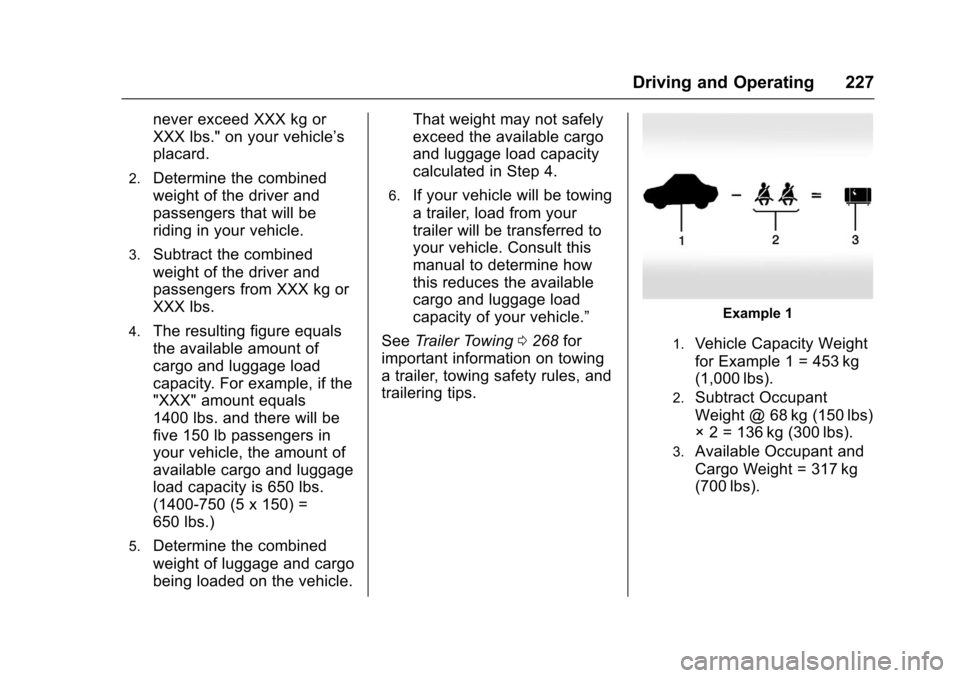
Example 1
1.Vehicle Capacity Weight
for Example 1 = 453 kg
(1,000 lbs).
2.Subtract Occupant
Weight @ 68 kg (150 lbs)
◊2=136kg(300lbs).
3.Available Occupant and
Cargo Weight = 317 kg
(700 lbs).
Page 233 of 400
Chevrolet SS Sedan Owner Manual (GMNA-Localizing-U.S.-10122752) -2017 - crc - 8/31/16
232 Driving and Operating
amanualtransmission.Whenthe engine begins cranking, letgo of the button.
The idle speed will go down asthe engine gets warm. Do notrace the engine immediatelyafter starting it.
If the RKE transmitter is not inthe vehicle, if there isinterference, or the RKEbattery is low, a DriverInformation Center (DIC)message will display. SeeDriver Information Center (DIC)0108andRemote KeylessEntry (RKE) System Operation025.
Caution
Cranking the engine for long
periods of time, by returning the
ignition to the START position
immediately after cranking has
ended, can overheat and damage
the cranking motor, and drain the
battery. Wait at least 15 seconds
between each try, to let the
cranking motor cool down.
2. If the engine does not startafter five to 10 seconds,especially in very cold weather(below✓18 °C or 0 °F), it couldbe flooded with too muchgasoline. Try pushing theaccelerator pedal all the way tothe floor and holding it there asyou press ENGINE START/STOP, for up to a maximum of15 seconds. Wait at least15 seconds between each try,to allow the cranking motor tocool down. When the enginestarts, let go of the button, andthe accelerator. If the vehiclestarts briefly but then stopsagain, do the same thing. Thisclears the extra gasoline fromthe engine. Do not race theengine immediately afterstarting it. Operate the engineand transmission gently untilthe oil warms up and lubricatesall moving parts.
Retained Accessory
Power (RAP)
The power windows will operatewhen the ignition is in the ON/RUNor ACC/ACCESSORY positions.
Once the ignition is turned off,Retained Accessory Power (RAP)allows the power windows tocontinue to operate for up to10 minutes. If a door is openedduring this time, they will bedeactivated.
The audio system will bedeactivated only if the driver door isopened.
Shifting Into Park
(Automatic Transmission)
1. Hold the brake pedal down andset the parking brake.
SeeElectric Parking Brake0242.
2. Hold the button on the shiftlever and push the lever towardthe front of the vehicle intoP(Park).
Page 235 of 400
Chevrolet SS Sedan Owner Manual (GMNA-Localizing-U.S.-10122752) -2017 - crc - 8/31/16
234 Driving and Operating
2. Hold the brake pedal down andpress the shift lever buttonagain.
3. Move the shift lever to thedesired position.
If you are still having a problemshifting, see your dealer.
Shift Lock Manual Release
If jump starting the vehicle did notwork, the shift lock manual releasemust be used.
To a c c e s s t h e s h i f t l o c k m a n u a lrelease:
1. Apply the parking brake.
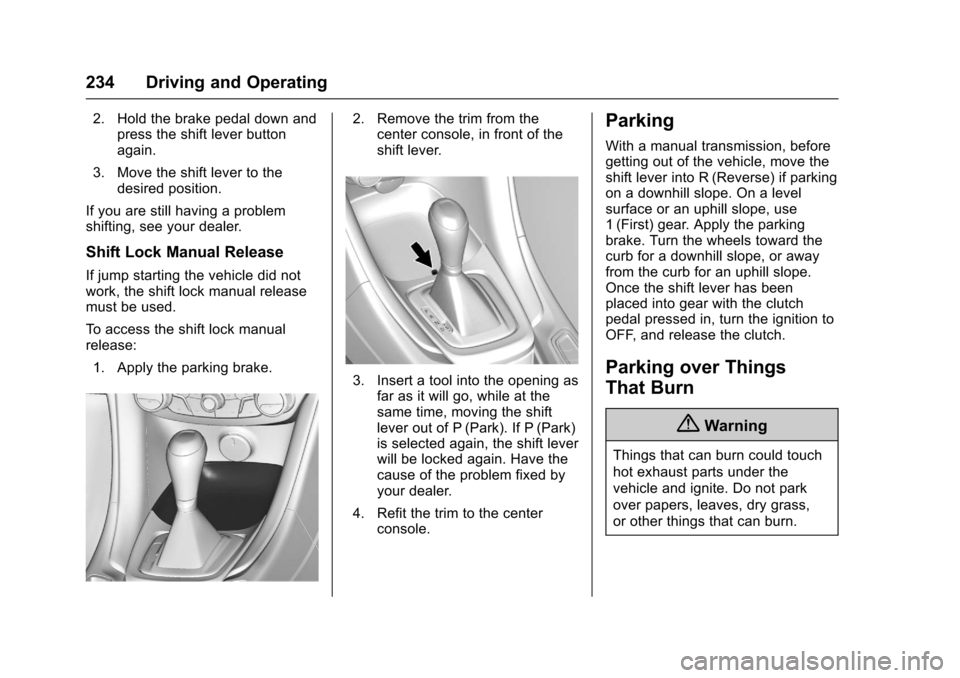
2. Remove the trim from thecenter console, in front of theshift lever.
3. Insert a tool into the opening asfar as it will go, while at thesame time, moving the shiftlever out of P (Park). If P (Park)is selected again, the shift leverwill be locked again. Have thecause of the problem fixed byyour dealer.
4. Refit the trim to the centerconsole.
Parking
With a manual transmission, beforegetting out of the vehicle, move theshift lever into R (Reverse) if parkingon a downhill slope. On a levelsurface or an uphill slope, use1(First) gear. Apply the parkingbrake. Turn the wheels toward thecurb for a downhill slope, or awayfrom the curb for an uphill slope.Once the shift lever has beenplaced into gear with the clutchpedal pressed in, turn the ignition toOFF, and release the clutch.
Parking over Things
That Burn
{Warning
Things that can burn could touch
hot exhaust parts under the
vehicle and ignite. Do not park
over papers, leaves, dry grass,
or other things that can burn.
Page 239 of 400
Chevrolet SS Sedan Owner Manual (GMNA-Localizing-U.S.-10122752) -2017 - crc - 8/31/16
238 Driving and Operating
Sport Shift mode can be selectedwhere maximum responsiveness isrequired.
When operated in Sport Shift mode,the transmission will delay upshiftsand allow earlier downshifts.
Performance Mode
In addition, the transmission cansense aggressive driving, at whichpoint it may delay upshifting anddownshift earlier when braking. Thisis designed to maximize vehicleperformance. SeeTr a n s m i s s i o nMessages011 9
To a c t i v a t e S p o r t S h i f t m o d e :
1. Move the shift lever toD(Drive).
2. Push the shift lever to the right.
Sport Mode On is displayed onthe DIC.
Do not move the shift lever to+(Plus) or✓(Minus), otherwiseActive Select mode will beenabled.
3. To return to Normal Shift mode,move the shift lever left, toD(Drive). Sport Mode Off isdisplayed on the DIC.
On the bottom of the display, Sappears as long as Sport Shiftmode is selected.
Normal Shift Mode
Normal shift mode is recommendedfor normal or freeway driving, as itprovides optimum fuel economy.
When the shift lever is moved toD(Drive), normal shift mode isselected.
Manual Mode
Active Select (A/S) Mode
A/S mode allows gears to beselected manually.
It can also provide engine brakingby selecting the appropriate lowergear on a steep downhill grade.
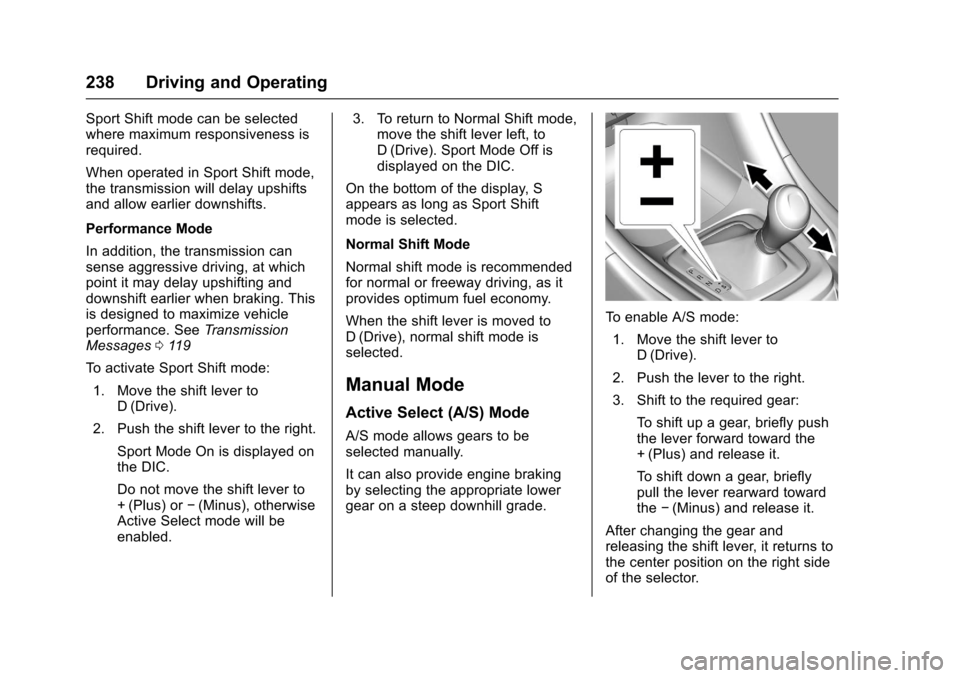
To e n a b l e A / S m o d e :
1. Move the shift lever toD(Drive).
2. Push the lever to the right.
3. Shift to the required gear:
To s h i f t u p a g e a r, b r i e f l y p u s hthe lever forward toward the+(Plus) and release it.
To s h i f t d o w n a g e a r, b r i e f l ypull the lever rearward towardthe✓(Minus) and release it.
After changing the gear andreleasing the shift lever, it returns tothe center position on the right sideof the selector.
Page 240 of 400
Chevrolet SS Sedan Owner Manual (GMNA-Localizing-U.S.-10122752) -2017 - crc - 8/31/16
Driving and Operating 239
On the bottom of the display, M andthe currently selected gear appearas long as A/S mode is selected.
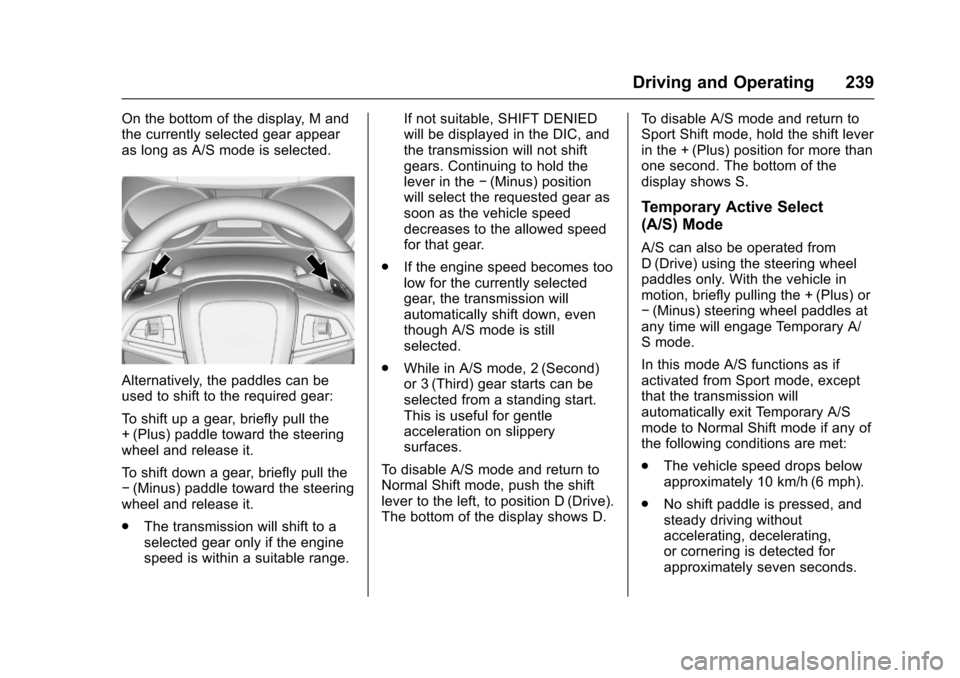
Alternatively, the paddles can beused to shift to the required gear:
To s h i f t u p a g e a r, b r i e f l y p u l l t h e+(Plus) paddle toward the steeringwheel and release it.
To s h i f t d o w n a g e a r, b r i e f l y p u l l t h e✓(Minus) paddle toward the steeringwheel and release it.
.The transmission will shift to aselected gear only if the enginespeed is within a suitable range.
If not suitable, SHIFT DENIEDwill be displayed in the DIC, andthe transmission will not shiftgears. Continuing to hold thelever in the✓(Minus) positionwill select the requested gear assoon as the vehicle speeddecreases to the allowed speedfor that gear.
.If the engine speed becomes toolow for the currently selectedgear, the transmission willautomatically shift down, eventhough A/S mode is stillselected.
.While in A/S mode, 2 (Second)or 3 (Third) gear starts can beselected from a standing start.This is useful for gentleacceleration on slipperysurfaces.
To d i s a b l e A / S m o d e a n d r e t u r n t oNormal Shift mode, push the shiftlever to the left, to position D (Drive).The bottom of the display shows D.
To d i s a b l e A / S m o d e a n d r e t u r n t oSport Shift mode, hold the shift leverin the + (Plus) position for more thanone second. The bottom of thedisplay shows S.
Temporary Active Select
(A/S) Mode
A/S can also be operated fromD(Drive) using the steering wheelpaddles only. With the vehicle inmotion, briefly pulling the + (Plus) or✓(Minus) steering wheel paddles atany time will engage Temporary A/Smode.
In this mode A/S functions as ifactivated from Sport mode, exceptthat the transmission willautomatically exit Temporary A/Smode to Normal Shift mode if any ofthe following conditions are met:
.The vehicle speed drops belowapproximately 10 km/h (6 mph).
.No shift paddle is pressed, andsteady driving withoutaccelerating, decelerating,or cornering is detected forapproximately seven seconds.
Page 253 of 400
Chevrolet SS Sedan Owner Manual (GMNA-Localizing-U.S.-10122752) -2017 - crc - 8/31/16
252 Driving and Operating
hold upwards to accelerate. If cruisecontrol is already active, use toincrease vehicle speed.
SET/✓:Move the thumbwheel downbriefly to set the speed and activatecruise control. If cruise control isalready active, use to decreasespeed.
The speedometer reading can bedisplayed in either English or metricunits. SeeDriver Information Center(DIC)0108.Theincrementvalueused depends on the unitsdisplayed.
Setting Cruise Control
If1is on when not in use, SET/- or
RES/+ could get bumped and gointo cruise when not desired. Keep1off when cruise control is notbeing used.
To s e t a s p e e d :
1. Press1.
2. Get to the speed desired.
3. Move the thumbwheel downtoward SET/✓and release it.
4. Remove foot from theaccelerator.
The cruise control indicator on theinstrument cluster turns green aftercruise control has been set to thedesired speed. SeeInstrumentCluster096.
Resuming a Set Speed
If the cruise control is set at adesired speed and then the brakes
are applied or*is pressed, the
cruise control is disengaged withouterasing the set speed from memory.
Once the vehicle reaches about40 km/h (25 mph) or more, move thethumbwheel up toward RES/+briefly. The vehicle returns to theprevious set speed.
Increasing Speed While UsingCruise Control
If the cruise control system isalready activated:
.Move the thumbwheel up towardRES/+ and hold it until thedesired speed is reached, thenrelease it.
.To i n c r e a s e t h e s p e e d i n s m a l lincrements, move thethumbwheel up toward RES/+briefly. For each press, thevehicle goes about 1.6 km/h(1 mph) faster.
Reducing Speed While UsingCruise Control
If the cruise control system isalready activated:
.Move the thumbwheel towardSET/✓and hold until the desiredlower speed is reached, thenrelease it.
.To d e c r e a s e t h e v e h i c l e s p e e d i nsmall increments, move thethumbwheel toward SET/✓briefly. For each press, thevehicle goes about 1.6 km/h(1 mph) slower.
Passing Another Vehicle WhileUsing Cruise Control
Use the accelerator pedal toincrease the vehicle speed. Whenyou take your foot off the pedal, thevehicle slows down to the previouslyset cruise control speed. Whilepressing the accelerator pedal or
Page 254 of 400
Chevrolet SS Sedan Owner Manual (GMNA-Localizing-U.S.-10122752) -2017 - crc - 8/31/16
Driving and Operating 253
shortly following the release tooverride cruise control, brieflymoving the thumbwheel towardSET/–will result in cruise control setto the current vehicle speed.
Using Cruise Control on Hills
How well the cruise control workson hills depends upon the vehiclespeed, load, and the steepness ofthe hills. When going up steep hills,you might have to step on theaccelerator pedal to maintain thevehicle speed. When goingdownhill, you might have to brake orshift to a lower gear to keep yourspeed down. If the brake pedal isapplied, cruise control willdisengage.
Ending Cruise Control
There are four ways to disengagecruise control:
.Step lightly on the brake pedalor clutch for a manualtransmission.
.Press*.
.Shift the transmission toN(Neutral).
.To t u r n o f f t h e c r u i s e c o n t r o l ,
press1.
Erasing Speed Memory
The cruise control set speed is
erased from memory if1is pressed
or if the vehicle is turned off.
Driver Assistance
Systems
This vehicle may have features thatwork together to help avoid crashesor reduce crash damage whiledriving, backing, and parking. Readthis entire section before usingthese systems.
{Warning
Do not rely on the Driver
Assistance Systems. These
systems do not replace the need
for paying attention and driving
safely. You may not hear or see
alerts or warnings provided by
these systems. Failure to use
proper care when driving may
result in injury, death, or vehicle
damage. SeeDefensive Driving
0217.
(Continued)