trailer CHEVROLET TAHOE 2010 3.G Owner's Manual
[x] Cancel search | Manufacturer: CHEVROLET, Model Year: 2010, Model line: TAHOE, Model: CHEVROLET TAHOE 2010 3.GPages: 608, PDF Size: 6.53 MB
Page 274 of 608

Trip Odometer
Press the trip odometer reset stem until TRIP displays.
This display shows the current distance traveled in
either miles (mi) or kilometers (km) since the last reset
for the trip odometer.
The trip odometer can be reset to zero by pressing and
holding the trip odometer reset stem while the trip
odometer is displayed.
The trip odometer has a feature called the retro-active
reset. This can be used to set the trip odometer to the
number of miles (kilometers) driven since the ignition
was last turned on. This can be used if the trip
odometer is not reset at the beginning of the trip.
To use the retro-active reset feature, press and hold the
trip odometer reset stem for at least four seconds. The
trip odometer will display the number of miles (mi) or
kilometers (km) driven since the ignition was last turned
on and the vehicle was moving. Once the vehicle
begins moving, the trip odometer will accumulate
mileage. For example, if the vehicle was driven
5 miles (8 km) before it is started again, and then the
retro-active reset feature is activated, the display will
show 5 miles (8 km). As the vehicle begins moving, the
display will then increase to 5.1 miles (8.2 km), 5.2 miles
(8.4 km), etc.
Transmission Temperature
Press the trip odometer reset stem until TRANS TEMP
displays. This display shows the temperature of the
automatic transmission fluid in either degrees
Fahrenheit (°F) or degrees Celsius (°C).
Trailer Gain and Output
On vehicles with the Integrated Trailer Brake Control
(ITBC) system, the trailer brake display appears in the
DIC. Press the trip odometer reset stem until TRAILER
GAIN and OUTPUT display.
TRAILER GAIN shows the trailer gain setting. This
setting can be adjusted from 0.0 to 10.0 with either a
trailer connected or disconnected. To adjust this setting,
see“Integrated Trailer Brake Control System” under
Towing a Trailer
on page 5‑47for more information.
OUTPUT shows the power output to the trailer anytime
a trailer with electric brakes is connected. Output is
displayed in 0 to 10 bars. Dashes may appear in the
OUTPUT display. See “Integrated Trailer Brake Control
System” underTowing a Trailer
on page 5‑47for more
information.
Compass Zone Setting
This display allows for setting the compass zone. See
DIC Compasson page 4‑58for more information.
4-56
Page 280 of 608
CHECK TRAILER WIRING
On vehicles with the Integrated Trailer Brake Control
(ITBC) system, this message may display and a chime
may sound when one of the following conditions exists:
.A trailer with electric brakes becomes
disconnected from the vehicle.
‐If the disconnect occurs while the vehicle is
stopped, this message clears itself after a
short time.
‐ If the disconnect occurs while the vehicle is
moving, this message stays on until the ignition
is turned off.
.There is a short in the wiring to the electric trailer
brakes.
When this message displays, power is no longer
available to the trailer brakes.
As soon as it is safe to do so, carefully pull your vehicle
over to the side of the road and turn the ignition off.
Check the wiring connection to the trailer and turn the
ignition back on. This message clears if the trailer
is reconnected. This message also clears if you
acknowledge it. If this message still displays, either your
vehicle or the trailer needs service. See your dealer.
See “Integrated Trailer Brake Control System” under
Towing a Trailer
on page 5‑47for more information.
DRIVER DOOR OPEN
This message displays and a chime sounds if the driver
door is not fully closed and the vehicle is shifted out of
P (Park). Stop and turn off the vehicle, check the door
for obstructions, and close the door again. Check to see
if the message still appears on the DIC.
ENGINE HOT A/C (Air Conditioning)
TURNED OFF
This message displays when the engine coolant
becomes hotter than the normal operating temperature.
See Engine Coolant Temperature Gauge
on
page 4‑38. To avoid added strain on a hot engine, the
air conditioning compressor automatically turns off.
When the coolant temperature returns to normal, the
air conditioning compressor turns back on. You can
continue to drive your vehicle.
If this message continues to appear, have the system
repaired by your dealer as soon as possible to avoid
damage to the engine.
ENGINE OIL HOT IDLE ENGINE
This message displays when the engine oil becomes
hotter than the normal operating temperature. Stop and
allow the vehicle to idle until it cools down. See Engine
Coolant Temperature Gauge
on page 4‑38.
4-62
Page 286 of 608
SERVICE TRAILER BRAKE SYSTEM
On vehicles with the Integrated Trailer Brake Control
(ITBC) system, this message displays and a chime
sounds when there is a problem with the ITBC system.
When this message displays, power is no longer
available to the trailer brakes.
As soon as it is safe to do so, carefully pull your vehicle
over to the side of the road and turn the ignition off.
Check the wiring connection to the trailer and turn the
ignition back on. If this message still displays, either
your vehicle or the trailer needs service. See your
dealer.
See“Integrated Trailer Brake Control System” under
Towing a Trailer
on page 5‑47for more information.
SIDE BLIND ZONE ALERT
SYSTEM OFF
If your vehicle has the Side Blind Zone Alert (SBZA)
system, this message displays when the SBZA system
has been turned off. See Side Blind Zone Alert (SBZA)
on page 3‑58andDIC Operation and Displays (With
DIC Buttons)on page 4‑47or DIC Operation and
Displays (Without DIC Buttons)on page 4‑55for more
information.
SIDE BLIND ZONE SYSTEM
UNAVAILABLE
If your vehicle has the Side Blind Zone Alert (SBZA)
system, this message displays when the SBZA system
is disabled because the sensor is blocked and cannot
detect vehicles in your blind zone. The sensor may be
blocked by mud, dirt, snow, ice, or slush. This message
may also display during heavy rain or due to road
spray. It may also come on when driving in isolated
areas with no guardrails, trees, or road signs and light
traffic. Your vehicle does not need service. For cleaning
instructions, see Washing Your Vehicle
on page 6‑111.
See Side Blind Zone Alert (SBZA)on page 3‑58for
more information.
STABILITRAK OFF
If your vehicle has StabiliTrak, this message displays
when you turn off StabiliTrak, or when the stability
control has been automatically disabled. To limit
wheel spin and realize the full benefits of the stability
enhancement system, you should normally leave
StabiliTrak on. However, you should turn StabiliTrak off
if your vehicle gets stuck in sand, mud, ice, or snow and
you want to rock your vehicle to attempt to free it, or if you are driving in extreme off-road conditions and
require more wheel spin. See If Your Vehicle is Stuck in
Sand, Mud, Ice, or Snow
on page 5‑27. To turn the
StabiliTrak system on or off, see StabiliTrak®Systemon page 5‑6.
4-68
Page 288 of 608
TIRE LOW ADD AIR TO TIRE
On vehicles with the Tire Pressure Monitor System
(TPMS), this message displays when the pressure in
one or more of the vehicle's tires needs to be checked.
This message also displays LEFT FRT (left front),
RIGHT FRT (right front), LEFT RR (left rear), or RIGHT
RR (right rear) to indicate the location of the low tire.
The low tire pressure warning light will also come on.
SeeTire Pressure Light
on page 4‑38. You can receive
more than one tire pressure message at a time. To read
the other messages that may have been sent at the
same time, press the set/reset button or the trip
odometer reset stem. If a tire pressure message
appears on the DIC, stop as soon as you can. Have
the tire pressures checked and set to those shown
on the Tire Loading Information label. See Tires
on
page 6‑63, Loading the Vehicleon page 5‑29, and
Inflation - Tire Pressureon page 6‑72. The DIC also
shows the tire pressure values. See “DIC Operation and
Displays (With DIC Buttons)” earlier in this section.
TRACTION CONTROL OFF
If your vehicle has StabiliTrak, this message displays
when the Traction Control System (TCS) is turned off.
Adjust your driving accordingly. See StabiliTrak
®
Systemon page 5‑6for more information.
TRAILER CONNECTED
On vehicles with the Integrated Trailer Brake Control
(ITBC) system, this message displays briefly when a
trailer with electric brakes is first connected to the
vehicle.
This message clears itself after several seconds. This
message also clears if you acknowledge it. After this
message clears, the TRAILER GAIN/OUTPUT display
appears in the DIC.
See“TRAILER GAIN/OUTPUT” underDIC Operation
and Displays (With DIC Buttons)
on page 4‑47or DIC
Operation and Displays (Without DIC Buttons)on
page 4‑55and “Integrated Trailer Brake Control
System” underTowing a Traileron page 5‑47for more
information.
4-70
Page 359 of 608
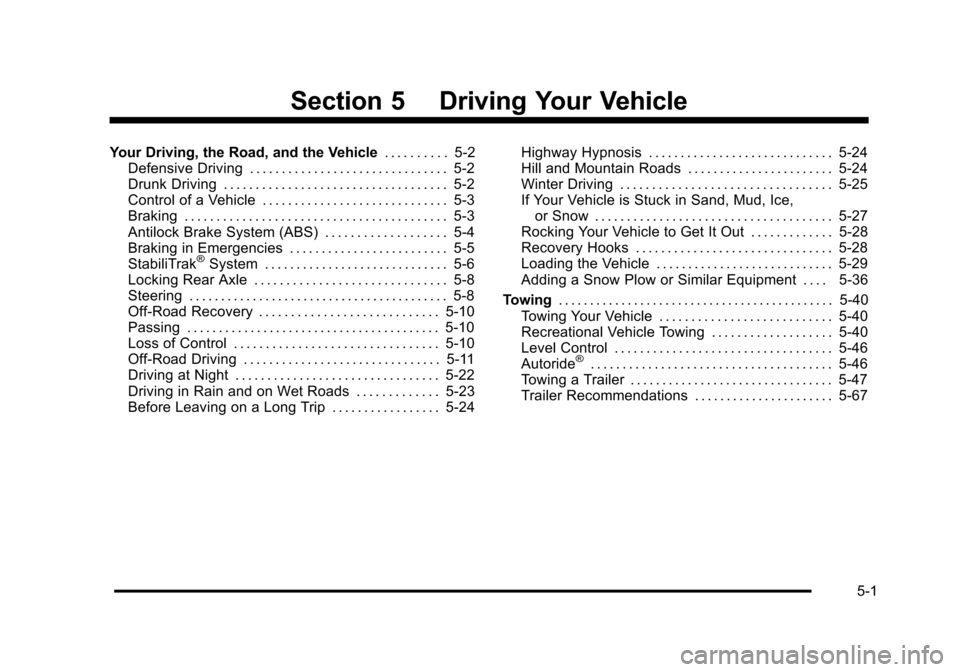
Section 5 Driving Your Vehicle
Your Driving, the Road, and the Vehicle. . . . . . . . . . 5-2
Defensive Driving . . . . . . . . . . . . . . . . . . . . . . . . . . . . . . . 5-2
Drunk Driving . . . . . . . . . . . . . . . . . . . . . . . . . . . . . . . . . . . 5-2
Control of a Vehicle . . . . . . . . . . . . . . . . . . . . . . . . . . . . . 5-3
Braking . . . . . . . . . . . . . . . . . . . . . . . . . . . . . . . . . . . . . . . . . 5-3
Antilock Brake System (ABS) . . . . . . . . . . . . . . . . . . . 5-4
Braking in Emergencies . . . . . . . . . . . . . . . . . . . . . . . . . 5-5
StabiliTrak
®System . . . . . . . . . . . . . . . . . . . . . . . . . . . . . 5-6
Locking Rear Axle . . . . . . . . . . . . . . . . . . . . . . . . . . . . . . 5-8
Steering . . . . . . . . . . . . . . . . . . . . . . . . . . . . . . . . . . . . . . . . . 5-8
Off-Road Recovery . . . . . . . . . . . . . . . . . . . . . . . . . . . . 5-10
Passing . . . . . . . . . . . . . . . . . . . . . . . . . . . . . . . . . . . . . . . . 5-10
Loss of Control . . . . . . . . . . . . . . . . . . . . . . . . . . . . . . . . 5-10
Off-Road Driving . . . . . . . . . . . . . . . . . . . . . . . . . . . . . . . 5-11
Driving at Night . . . . . . . . . . . . . . . . . . . . . . . . . . . . . . . . 5-22
Driving in Rain and on Wet Roads . . . . . . . . . . . . . 5-23
Before Leaving on a Long Trip . . . . . . . . . . . . . . . . . 5-24 Highway Hypnosis . . . . . . . . . . . . . . . . . . . . . . . . . . . . . 5-24
Hill and Mountain Roads . . . . . . . . . . . . . . . . . . . . . . . 5-24
Winter Driving . . . . . . . . . . . . . . . . . . . . . . . . . . . . . . . . . 5-25
If Your Vehicle is Stuck in Sand, Mud, Ice,
or Snow . . . . . . . . . . . . . . . . . . . . . . . . . . . . . . . . . . . . . 5-27
Rocking Your Vehicle to Get It Out . . . . . . . . . . . . . 5-28
Recovery Hooks . . . . . . . . . . . . . . . . . . . . . . . . . . . . . . . 5-28
Loading the Vehicle . . . . . . . . . . . . . . . . . . . . . . . . . . . . 5-29
Adding a Snow Plow or Similar Equipment . . . . 5-36
Towing . . . . . . . . . . . . . . . . . . . . . . . . . . . . . . . . . . . . . . . . . . . . 5-40
Towing Your Vehicle . . . . . . . . . . . . . . . . . . . . . . . . . . . 5-40
Recreational Vehicle Towing . . . . . . . . . . . . . . . . . . . 5-40
Level Control . . . . . . . . . . . . . . . . . . . . . . . . . . . . . . . . . . 5-46
Autoride
®. . . . . . . . . . . . . . . . . . . . . . . . . . . . . . . . . . . . . . 5-46
Towing a Trailer . . . . . . . . . . . . . . . . . . . . . . . . . . . . . . . . 5-47
Trailer Recommendations . . . . . . . . . . . . . . . . . . . . . . 5-67
5-1
Page 389 of 608

Steps for Determining Correct Load Limit
1.Locate the statement“The combined weight
of occupants and cargo should never exceed
XXX kg or XXX lbs” on your vehicle's placard.
2.Determine the combined weight of the driver
and passengers that will be riding in your
vehicle.
3.Subtract the combined weight of the driver
and passengers from XXX kg or XXX lbs.
4.The resulting figure equals the available
amount of cargo and luggage load capacity.
For example, if the“XXX”amount equals
1400 lbs and there will be five 150 lb
passengers in your vehicle, the amount of
available cargo and luggage load capacity is
650 lbs (1400 −750 (5 x 150) = 650 lbs).
5.Determine the combined weight of luggage
and cargo being loaded on the vehicle. That
weight may not safely exceed the available
cargo and luggage load capacity calculated in
Step 4.
6.If your vehicle will be towing a trailer, the load
from your trailer will be transferred to your
vehicle. Consult this manual to determine
how this reduces the available cargo and
luggage load capacity of your vehicle. See
Towing a Trailer
on page 5‑47for important
information on towing a trailer, towing safety
rules and trailering tips.
5-31
Page 398 of 608
Towing
Towing Your Vehicle
To avoid damage, the disabled vehicle should be towed
with all four wheels off the ground. Consult your dealer
or a professional towing service if the disabled vehicle
must be towed. SeeRoadside Assistance Program
on
page 8‑7.
To tow the vehicle behind another vehicle for
recreational purposes, such as behind a motorhome,
see “Recreational Vehicle Towing” following.
Recreational Vehicle Towing
If the vehicle has a two–mode hybrid engine, see the
Two–mode Hybrid manual for more information.
Recreational vehicle towing means towing the vehicle
behind another vehicle–such as behind a motorhome.
The two most common types of recreational vehicle
towing are known as dinghy towing and dolly towing.
Dinghy towing is towing the vehicle with all four wheels
on the ground. Dolly towing is towing the vehicle with
two wheels on the ground and two wheels up on a
device known as a dolly. Here are some important things to consider before
recreational vehicle towing:
.What is the towing capacity of the towing vehicle?
Be sure to read the tow vehicle manufacturer's
recommendations.
.What is the distance that will be travelled? Some
vehicles have restrictions on how far and how long
they can tow.
.Is the proper towing equipment going to be used?
See your dealer or trailering professional for
additional advice and equipment
recommendations.
.Is the vehicle ready to be towed? Just as preparing
the vehicle for a long trip, make sure the vehicle is
prepared to be towed. See
Before Leaving on a
Long Trip on page 5‑24.
5-40
Page 405 of 608
Autoride also interacts with the tow/haul mode that,
when activated, will provide additional control of the
shock absorbers. This additional control results in better
ride and handling characteristics when the vehicle is
loaded or towing a trailer. See“Tow/Haul Mode”under
Towing a Trailer
on page 5‑47for more information.
Towing a Trailer
If the vehicle has a two–mode hybrid engine, see the
Two–mode Hybrid manual for more information.
Do not tow a trailer during break‐in. See New Vehicle
Break-In
on page 3‑26for more information.
{WARNING:
The driver can lose control when pulling a trailer if
the correct equipment is not used or the vehicle is
not driven properly. For example, if the trailer is
too heavy, the brakes may not work well —or
even at all. The driver and passengers could be
seriously injured. The vehicle may also be
damaged; the resulting repairs would not be
covered by the vehicle warranty. Pull a trailer only
if all the steps in this section have been followed.
Ask your dealer for advice and information about
towing a trailer with the vehicle. Notice:
Pulling a trailer improperly can damage the
vehicle and result in costly repairs not covered by
the vehicle warranty. To pull a trailer correctly,
follow the advice in this section and see your dealer
for important information about towing a trailer with
the vehicle.
To identify the trailering capacity of the vehicle, read the
information in “Weight of the Trailer” that appears later
in this section.
Trailering is different than just driving the vehicle
by itself. Trailering means changes in handling,
acceleration, braking, durability and fuel economy.
Successful, safe trailering takes correct equipment,
and it has to be used properly.
The following information has many time-tested,
important trailering tips and safety rules. Many of
these are important for your safety and that of your
passengers. So please read this section carefully before
pulling a trailer.
5-47
Page 406 of 608
Pulling A Trailer
Here are some important points:
.There are many different laws, including speed
limit restrictions, having to do with trailering. Make
sure the rig will be legal, not only where you live
but also where you will be driving. A good source
for this information can be state or provincial
police.
.Consider using a sway control. See“Hitches”later
in this section.
.Do not tow a trailer at all during the first 500 miles
(800 km) the new vehicle is driven. The engine,
axle or other parts could be damaged.
.Then, during the first 500 miles (800 km) that a
trailer is towed, do not drive over 50 mph (80 km/h)
and do not make starts at full throttle. This helps
the engine and other parts of the vehicle wear in at
the heavier loads.
.Vehicles can tow in D (Drive). Shift the
transmission to a lower gear if the transmission
shifts too often under heavy loads and/or hilly
conditions.
.If the vehicle has the Side Blind Zone Alert (SBZA)
system and it doesn't seem to be working properly
while pulling a trailer, turn the system off. See Side
Blind Zone Alert (SBZA)
on page 3‑58for more
information. Important considerations that have to do with weight:
.The weight of the trailer
.The weight of the trailer tongue
.The weight on the vehicle's tires
.And the weight of the trailering combination
Weight of the Trailer
How heavy can a trailer safely be?
It depends on how the rig is used. Speed, altitude, road
grades, outside temperature and how much the vehicle
is used to pull a trailer are all important. It can depend
on any special equipment on the vehicle, and the
amount of tongue weight the vehicle can carry. See
“Weight of the Trailer Tongue”
later in this section for
more information.
Trailer weight rating (TWR) is calculated assuming the
tow vehicle has only the driver but all required trailering
equipment. Weight of additional optional equipment,
passengers and cargo in the tow vehicle must be
subtracted from the trailer weight rating.
5-48
Page 407 of 608
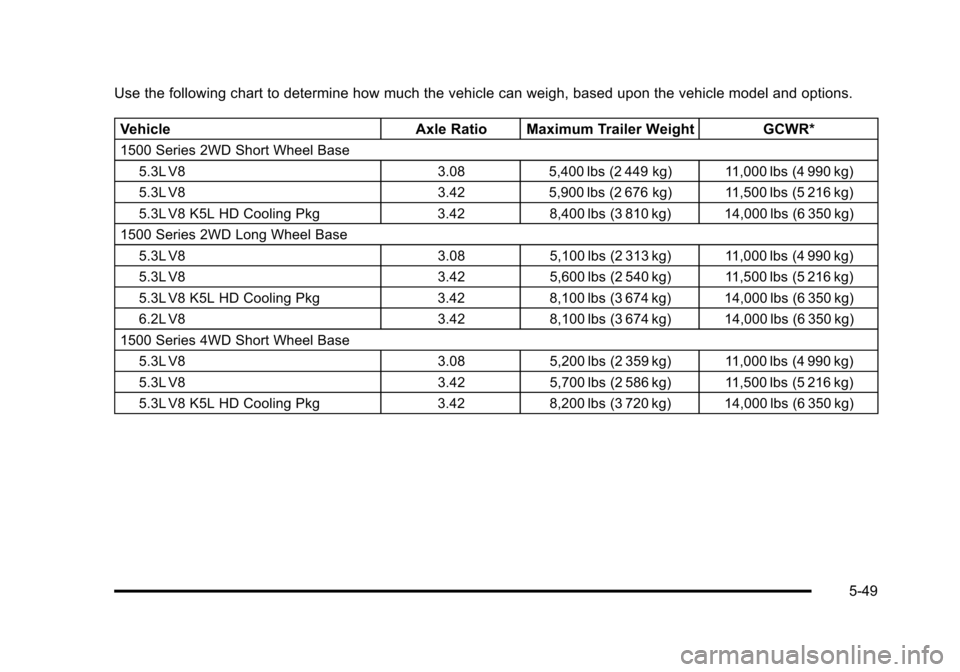
Use the following chart to determine how much the vehicle can weigh, based upon the vehicle model and options.Vehicle Axle Ratio Maximum Trailer Weight GCWR*
1500 Series 2WD Short Wheel Base
5.3L V8 3.085,400 lbs (2 449 kg) 11,000 lbs (4 990 kg)
5.3L V8 3.425,900 lbs (2 676 kg) 11,500 lbs (5 216 kg)
5.3L V8 K5L HD Cooling Pkg 3.428,400 lbs (3 810 kg) 14,000 lbs (6 350 kg)
1500 Series 2WD Long Wheel Base
5.3L V8 3.085,100 lbs (2 313 kg) 11,000 lbs (4 990 kg)
5.3L V8 3.425,600 lbs (2 540 kg) 11,500 lbs (5 216 kg)
5.3L V8 K5L HD Cooling Pkg 3.428,100 lbs (3 674 kg) 14,000 lbs (6 350 kg)
6.2L V8 3.428,100 lbs (3 674 kg) 14,000 lbs (6 350 kg)
1500 Series 4WD Short Wheel Base 5.3L V8 3.085,200 lbs (2 359 kg) 11,000 lbs (4 990 kg)
5.3L V8 3.425,700 lbs (2 586 kg) 11,500 lbs (5 216 kg)
5.3L V8 K5L HD Cooling Pkg 3.428,200 lbs (3 720 kg) 14,000 lbs (6 350 kg)
5-49