Rear seat CHEVROLET TRAX 2024 Workshop Manual
[x] Cancel search | Manufacturer: CHEVROLET, Model Year: 2024, Model line: TRAX, Model: CHEVROLET TRAX 2024Pages: 328, PDF Size: 7.3 MB
Page 173 of 328
Chevrolet TRAX Owner Manual (GMNA-Localizing-U.S./Canada/Mexico-
17041293) - 2024 - CRC - 12/6/22
172 Driving and Operating
Warning (Continued)
Rating (GAWR). This can cause
systems to break and change the
way the vehicle handles. This could
cause loss of control and a crash.
Overloading can also reduce stopping
performance, damage the tires, and
shorten the life of the vehicle.
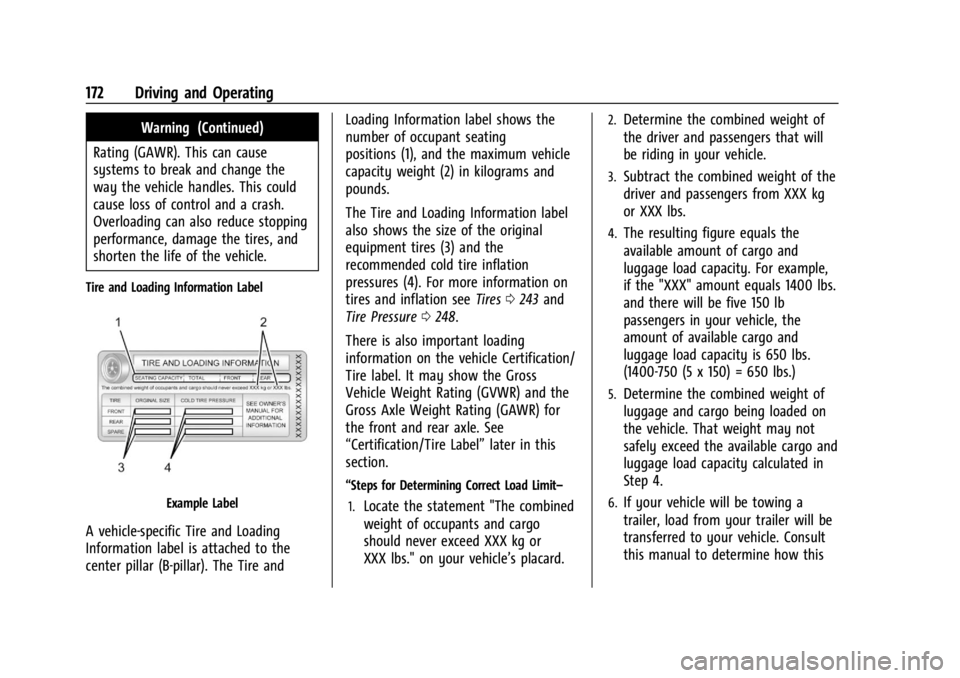
Tire and Loading Information Label
Example Label
A vehicle-specific Tire and Loading
Information label is attached to the
center pillar (B-pillar). The Tire and Loading Information label shows the
number of occupant seating
positions (1), and the maximum vehicle
capacity weight (2) in kilograms and
pounds.
The Tire and Loading Information label
also shows the size of the original
equipment tires (3) and the
recommended cold tire inflation
pressures (4). For more information on
tires and inflation see
Tires0243 and
Tire Pressure 0248.
There is also important loading
information on the vehicle Certification/
Tire label. It may show the Gross
Vehicle Weight Rating (GVWR) and the
Gross Axle Weight Rating (GAWR) for
the front and rear axle. See
“Certification/Tire Label” later in this
section.
“Steps for Determining Correct Load Limit–
1.
Locate the statement "The combined
weight of occupants and cargo
should never exceed XXX kg or
XXX lbs." on your vehicle’s placard.
2.Determine the combined weight of
the driver and passengers that will
be riding in your vehicle.
3.Subtract the combined weight of the
driver and passengers from XXX kg
or XXX lbs.
4.The resulting figure equals the
available amount of cargo and
luggage load capacity. For example,
if the "XXX" amount equals 1400 lbs.
and there will be five 150 lb
passengers in your vehicle, the
amount of available cargo and
luggage load capacity is 650 lbs.
(1400-750 (5 x 150) = 650 lbs.)
5.Determine the combined weight of
luggage and cargo being loaded on
the vehicle. That weight may not
safely exceed the available cargo and
luggage load capacity calculated in
Step 4.
6.If your vehicle will be towing a
trailer, load from your trailer will be
transferred to your vehicle. Consult
this manual to determine how this
Page 175 of 328
Chevrolet TRAX Owner Manual (GMNA-Localizing-U.S./Canada/Mexico-
17041293) - 2024 - CRC - 12/6/22
174 Driving and Operating
Refer to your vehicle's Tire and Loading
Information label for specific
information about your vehicle's
capacity weight and seating positions.
The combined weight of the driver,
passengers, and cargo should never
exceed your vehicle's capacity weight.
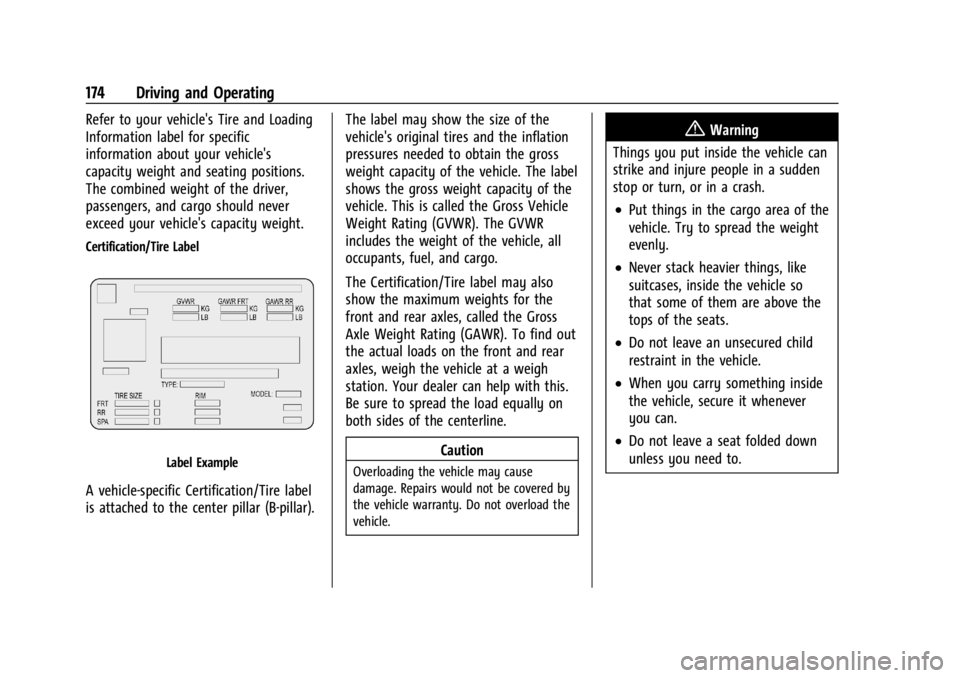
Certification/Tire Label
Label Example
A vehicle-specific Certification/Tire label
is attached to the center pillar (B-pillar).The label may show the size of the
vehicle's original tires and the inflation
pressures needed to obtain the gross
weight capacity of the vehicle. The label
shows the gross weight capacity of the
vehicle. This is called the Gross Vehicle
Weight Rating (GVWR). The GVWR
includes the weight of the vehicle, all
occupants, fuel, and cargo.
The Certification/Tire label may also
show the maximum weights for the
front and rear axles, called the Gross
Axle Weight Rating (GAWR). To find out
the actual loads on the front and rear
axles, weigh the vehicle at a weigh
station. Your dealer can help with this.
Be sure to spread the load equally on
both sides of the centerline.
Caution
Overloading the vehicle may cause
damage. Repairs would not be covered by
the vehicle warranty. Do not overload the
vehicle.
{Warning
Things you put inside the vehicle can
strike and injure people in a sudden
stop or turn, or in a crash.
.Put things in the cargo area of the
vehicle. Try to spread the weight
evenly.
.Never stack heavier things, like
suitcases, inside the vehicle so
that some of them are above the
tops of the seats.
.Do not leave an unsecured child
restraint in the vehicle.
.When you carry something inside
the vehicle, secure it whenever
you can.
.Do not leave a seat folded down
unless you need to.
Page 194 of 328
Chevrolet TRAX Owner Manual (GMNA-Localizing-U.S./Canada/Mexico-
17041293) - 2024 - CRC - 12/6/22
Driving and Operating 193
Warning (Continued)
the camera’s view; or when the
vehicle in front or oncoming traffic
causes additional environmental
obstructions, such as road spray. ACC
performance is limited under these
conditions.
.On slippery roads where fast changes
in tire traction can cause excessive
wheel slip.
.With extremely heavy cargo loaded in
the cargo area or rear seat.
.When towing a trailer.
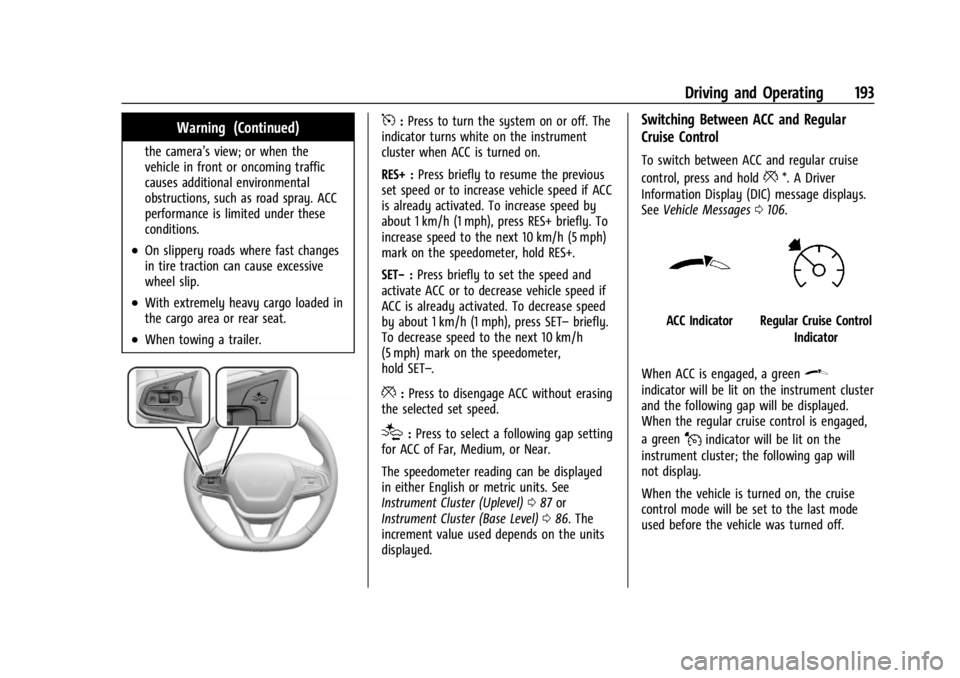
5:Press to turn the system on or off. The
indicator turns white on the instrument
cluster when ACC is turned on.
RES+ : Press briefly to resume the previous
set speed or to increase vehicle speed if ACC
is already activated. To increase speed by
about 1 km/h (1 mph), press RES+ briefly. To
increase speed to the next 10 km/h (5 mph)
mark on the speedometer, hold RES+.
SET− :Press briefly to set the speed and
activate ACC or to decrease vehicle speed if
ACC is already activated. To decrease speed
by about 1 km/h (1 mph), press SET– briefly.
To decrease speed to the next 10 km/h
(5 mph) mark on the speedometer,
hold SET–.
*: Press to disengage ACC without erasing
the selected set speed.
[: Press to select a following gap setting
for ACC of Far, Medium, or Near.
The speedometer reading can be displayed
in either English or metric units. See
Instrument Cluster (Uplevel) 087 or
Instrument Cluster (Base Level) 086. The
increment value used depends on the units
displayed.
Switching Between ACC and Regular
Cruise Control
To switch between ACC and regular cruise
control, press and hold
**. A Driver
Information Display (DIC) message displays.
See Vehicle Messages 0106.
ACC IndicatorRegular Cruise Control
Indicator
When ACC is engaged, a green
\
indicator will be lit on the instrument cluster
and the following gap will be displayed.
When the regular cruise control is engaged,
a green
Jindicator will be lit on the
instrument cluster; the following gap will
not display.
When the vehicle is turned on, the cruise
control mode will be set to the last mode
used before the vehicle was turned off.
Page 197 of 328
Chevrolet TRAX Owner Manual (GMNA-Localizing-U.S./Canada/Mexico-
17041293) - 2024 - CRC - 12/6/22
196 Driving and Operating
Approaching and Following a Vehicle
The vehicle ahead indicator is in the
instrument cluster. It only displays when a
vehicle is detected in your vehicle’s path
moving in the same direction. If this symbol
is not displaying, ACC will not respond to or
brake for vehicles ahead.
ACC automatically slows the vehicle down
and adjusts vehicle speed to follow a
detected vehicle ahead at the selected
following gap. The vehicle speed increases or
decreases to follow a detected vehicle in
front of your vehicle when that vehicle is
traveling slower than your vehicle set speed.
It may apply limited braking, if necessary.
When braking is active, the brake lamps will
come on. The automatic braking may feel or
sound different than if the brakes were
applied manually. This is normal.
Stationary or Very Slow-Moving Objects
{Warning
ACC may not detect and react to stopped
or slow-moving vehicles ahead of you. For
example, the system may not brake for a
vehicle it has never detected moving. This
can occur in stop-and-go traffic or when a
vehicle suddenly appears due to a vehicle
ahead changing lanes. Your vehicle may
not stop and could cause a crash. Use
caution when using ACC. Your complete
attention is always required while driving
and you should be ready to take action
and apply the brakes.
Irregular Objects Affecting ACC
ACC may have difficulty detecting the
following objects:
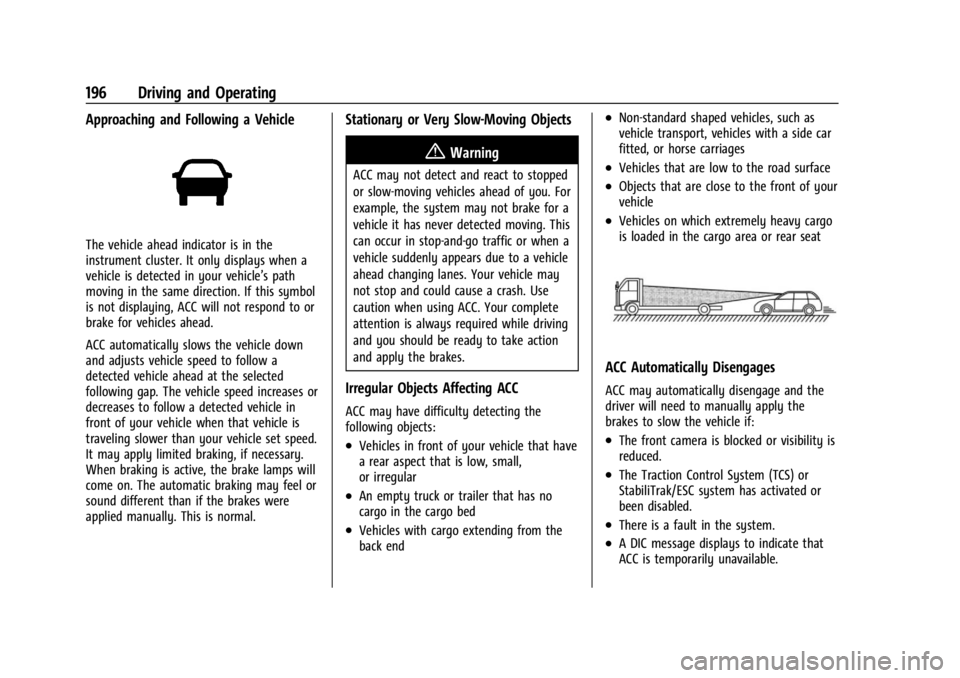
.Vehicles in front of your vehicle that have
a rear aspect that is low, small,
or irregular
.An empty truck or trailer that has no
cargo in the cargo bed
.Vehicles with cargo extending from the
back end
.Non-standard shaped vehicles, such as
vehicle transport, vehicles with a side car
fitted, or horse carriages
.Vehicles that are low to the road surface
.Objects that are close to the front of your
vehicle
.Vehicles on which extremely heavy cargo
is loaded in the cargo area or rear seat
ACC Automatically Disengages
ACC may automatically disengage and the
driver will need to manually apply the
brakes to slow the vehicle if:
.The front camera is blocked or visibility is
reduced.
.The Traction Control System (TCS) or
StabiliTrak/ESC system has activated or
been disabled.
.There is a fault in the system.
.A DIC message displays to indicate that
ACC is temporarily unavailable.
Page 241 of 328
Chevrolet TRAX Owner Manual (GMNA-Localizing-U.S./Canada/Mexico-
17041293) - 2024 - CRC - 12/6/22
240 Vehicle Care
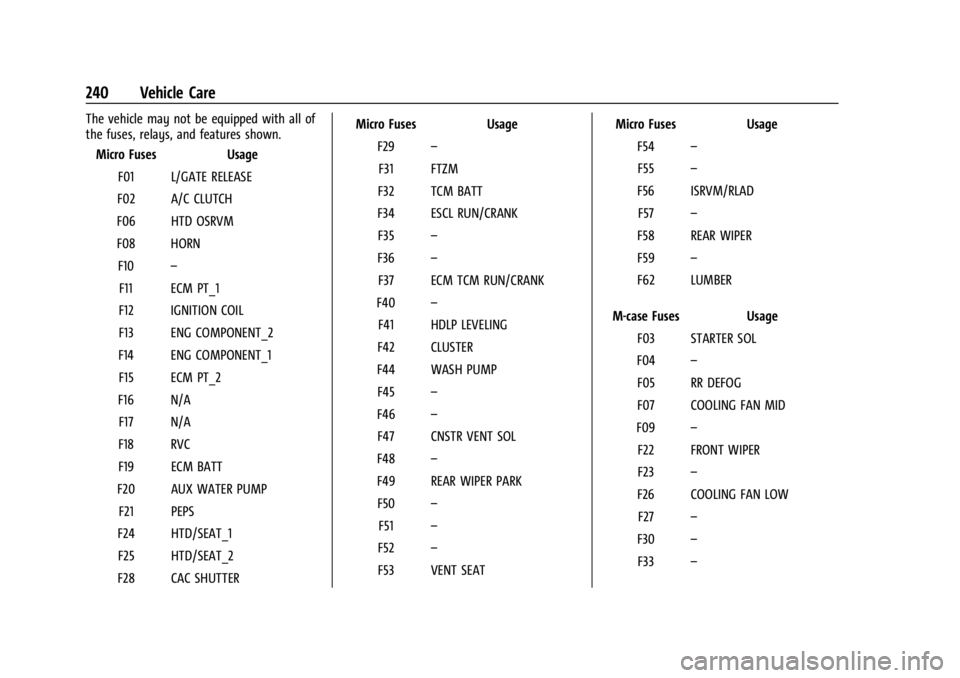
The vehicle may not be equipped with all of
the fuses, relays, and features shown.Micro Fuses Usage
F01 L/GATE RELEASE
F02 A/C CLUTCH
F06 HTD OSRVM
F08 HORN F10 –
F11 ECM PT_1
F12 IGNITION COIL
F13 ENG COMPONENT_2
F14 ENG COMPONENT_1 F15 ECM PT_2
F16 N/A F17 N/A
F18 RVC
F19 ECM BATT
F20 AUX WATER PUMP F21 PEPS
F24 HTD/SEAT_1 F25 HTD/SEAT_2
F28 CAC SHUTTER Micro Fuses Usage
F29 –
F31 FTZM
F32 TCM BATT
F34 ESCL RUN/CRANK F35 –
F36 –
F37 ECM TCM RUN/CRANK
F40 –
F41 HDLP LEVELING
F42 CLUSTER
F44 WASH PUMP F45 –
F46 –
F47 CNSTR VENT SOL
F48 –
F49 REAR WIPER PARK F50 –
F51 –
F52 –
F53 VENT SEAT Micro Fuses Usage
F54 –
F55 –
F56 ISRVM/RLAD F57 –
F58 REAR WIPER
F59 –
F62 LUMBER
M-case Fuses Usage F03 STARTER SOL
F04 –
F05 RR DEFOG
F07 COOLING FAN MID
F09 –
F22 FRONT WIPER
F23 –
F26 COOLING FAN LOW F27 –
F30 –
F33 –
Page 243 of 328
Chevrolet TRAX Owner Manual (GMNA-Localizing-U.S./Canada/Mexico-
17041293) - 2024 - CRC - 12/6/22
242 Vehicle Care
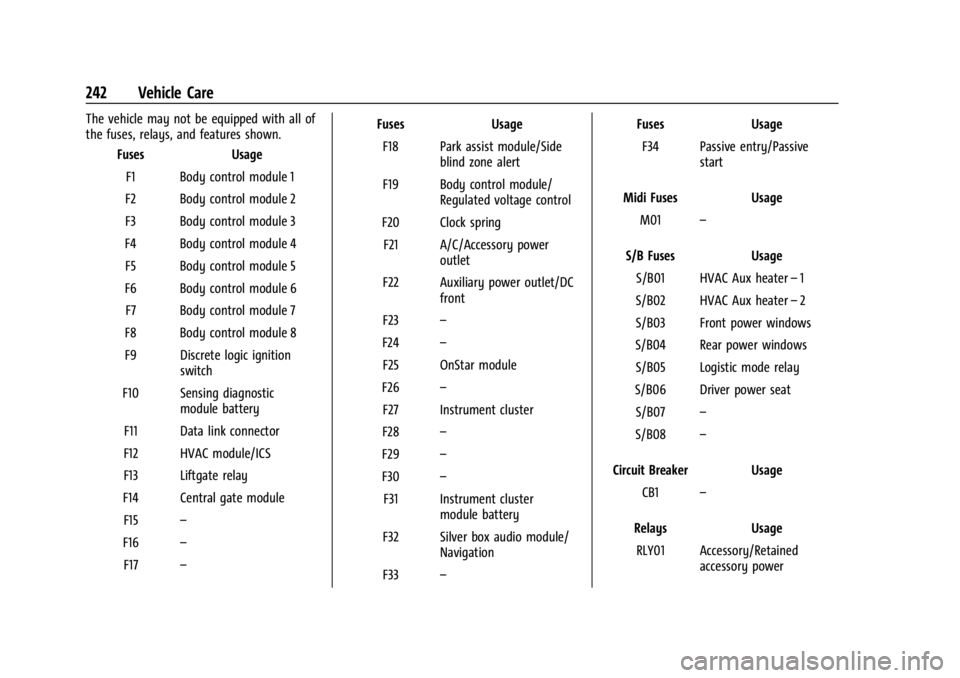
The vehicle may not be equipped with all of
the fuses, relays, and features shown.Fuses Usage
F1 Body control module 1
F2 Body control module 2
F3 Body control module 3
F4 Body control module 4 F5 Body control module 5
F6 Body control module 6 F7 Body control module 7
F8 Body control module 8
F9 Discrete logic ignition switch
F10 Sensing diagnostic module battery
F11 Data link connector
F12 HVAC module/ICS
F13 Liftgate relay
F14 Central gate module F15 –
F16 –
F17 – Fuses Usage
F18 Park assist module/Side blind zone alert
F19 Body control module/ Regulated voltage control
F20 Clock spring F21 A/C/Accessory power outlet
F22 Auxiliary power outlet/DC front
F23 –
F24 –
F25 OnStar module
F26 –
F27 Instrument cluster
F28 –
F29 –
F30 –
F31 Instrument cluster module battery
F32 Silver box audio module/ Navigation
F33 – Fuses Usage
F34 Passive entry/Passive start
Midi Fuses Usage M01 –
S/B Fuses Usage S/B01 HVAC Aux heater –1
S/B02 HVAC Aux heater –2
S/B03 Front power windows
S/B04 Rear power windows S/B05 Logistic mode relay
S/B06 Driver power seat S/B07 –
S/B08 –
Circuit Breaker Usage CB1 –
Relays Usage RLY01 Accessory/Retained accessory power
Page 248 of 328
Chevrolet TRAX Owner Manual (GMNA-Localizing-U.S./Canada/Mexico-
17041293) - 2024 - CRC - 12/6/22
Vehicle Care 247
DOT Markings:A code molded into the
sidewall of a tire signifying that the tire
is in compliance with the U.S.
Department of Transportation (DOT)
Motor Vehicle Safety Standards. The
DOT code includes the Tire Identification
Number (TIN), an alphanumeric
designator which can also identify the
tire manufacturer, production plant,
brand, and date of production.
GVWR
:Gross Vehicle Weight Rating.
See Vehicle Load Limits 0171.
GAWR FRT
:Gross Axle Weight Rating
for the front axle. See Vehicle Load
Limits 0171.
GAWR RR
:Gross Axle Weight Rating
for the rear axle. See Vehicle Load
Limits 0171.
Intended Outboard Sidewall
:The side
of an asymmetrical tire, that must
always face outward when mounted on
a vehicle.
Kilopascal (kPa)
:The metric unit for air
pressure. Light Truck (LT-Metric) Tire
:A tire used
on light duty trucks and some
multipurpose passenger vehicles.
Load Index
:An assigned number
ranging from 1 to 279 that corresponds
to the load carrying capacity of a tire.
Maximum Inflation Pressure
:The
maximum air pressure to which a cold
tire can be inflated. The maximum air
pressure is molded onto the sidewall.
Maximum Load Rating
:The load rating
for a tire at the maximum permissible
inflation pressure for that tire.
Occupant Distribution
:Designated
seating positions.
Outward Facing Sidewall
:The side of
an asymmetrical tire that has a
particular side that faces outward when
mounted on a vehicle. The side of the
tire that contains a whitewall, bears
white lettering, or bears manufacturer,
brand, and/or model name molding
that is higher or deeper than the same
moldings on the other sidewall of
the tire. Passenger (P-Metric) Tire
:A tire used
on passenger cars and some light duty
trucks and multipurpose vehicles.
Recommended Inflation Pressure
:
Vehicle manufacturer's recommended
tire inflation pressure as shown on the
tire placard. See Tire Pressure0248 and
Vehicle Load Limits 0171.
Radial Ply Tire
:A pneumatic tire in
which the ply cords that extend to the
beads are laid at 90 degrees to the
centerline of the tread.
Rim
:A metal support for a tire and
upon which the tire beads are seated.
Sidewall
:The portion of a tire between
the tread and the bead.
Speed Rating
:An alphanumeric code
assigned to a tire indicating the
maximum speed at which a tire can
operate.
Traction
:The friction between the tire
and the road surface. The amount of
grip provided.
Tread
:The portion of a tire that comes
into contact with the road.
Page 317 of 328

Chevrolet TRAX Owner Manual (GMNA-Localizing-U.S./Canada/Mexico-
17041293) - 2024 - CRC - 12/2/22
316 Index
IndexA
About Driving the Vehicle . . . . . . . . . . . . . . . . . .2
Accessories and Modifications . . . . . . . . . . . 216
Accessory Power . . . . . . . . . . . . . . . . . . . . . . . . . . 181
AdaptiveCruise Control . . . . . . . . . . . . . . . . . . . . 100, 192
Add-On Electrical Equipment . . . . . . . . . . . . . .214
Additional OnStar Information . . . . . . . . . . . . . . . . . . . . 310
Adjustments
Lumbar, Front Seats . . . . . . . . . . . . . . . . . . . . 34
Advanced Driver Assistance Systems . . . . . . . . . . . . . 200
Agreements
Trademarks and License . . . . . . . . . . . 133, 155
Air Cleaner/Filter, Engine . . . . . . . . . . . . . . . . . . 223
Conditioning . . . . . . . . . . . . . . . . . . . . . . . . . . . 160
Filter Life System . . . . . . . . . . . . . . . . . . . . . . 223
Filter, Passenger Compartment . . . . . . . . 163
Vents . . . . . . . . . . . . . . . . . . . . . . . . . . . . . . . . . . 162
Air Conditioning . . . . . . . . . . . . . . . . . . . . . . . . . .158
Airbag System . . . . . . . . . . . . . . . . . . . . . . . . . . . . 45 Check . . . . . . . . . . . . . . . . . . . . . . . . . . . . . . . . . . . 54
How Does an Airbag Restrain? . . . . . . . . . . 48
Passenger Sensing System . . . . . . . . . . . . . . 49
What Makes an Airbag Inflate? . . . . . . . . . 48 Airbag System (cont'd)
What Will You See after an Airbag
Inflates? . . . . . . . . . . . . . . . . . . . . . . . . . . . . . . 48
When Should an Airbag Inflate? . . . . . . . . 47
Where Are the Airbags? . . . . . . . . . . . . . . . . 46
Airbags Adding Equipment to the Vehicle . . . . . . . 53
Passenger Status Indicator . . . . . . . . . . . . . . 92
Readiness Light . . . . . . . . . . . . . . . . . . . . . . . . . 91
Replacing System Parts after a
Crash . . . . . . . . . . . . . . . . . . . . . . . . . . . . . . . . . 54
Servicing Airbag-Equipped Vehicles . . . . . . 53
Alarm Vehicle Security . . . . . . . . . . . . . . . . . . . . . . . . 24
Alert Lane Change (LCA) . . . . . . . . . . . . . . . . . . . . . 208
Rear Cross Traffic . . . . . . . . . . . . . . . . . . . . . . 202
Side Blind Zone (SBZA) . . . . . . . . . . . . . . . . . 208
All-Season Tires . . . . . . . . . . . . . . . . . . . . . . . . . . 243
AM-FM Radio . . . . . . . . . . . . . . . . . . . . . . . . 119, 138
Antenna Multi-band . . . . . . . . . . . . . . . . . . . . . . . . . 121, 141
Antilock Brake System (ABS) . . . . . . . . . . . . . 186 Warning Light . . . . . . . . . . . . . . . . . . . . . . . . . . 95
Appearance Care Exterior . . . . . . . . . . . . . . . . . . . . . . . . . . . . . . . . 277
Interior . . . . . . . . . . . . . . . . . . . . . . . . . . . . . . . . 281
Apple CarPlay and Android Auto . . . . . 127, 149
Page 322 of 328

Chevrolet TRAX Owner Manual (GMNA-Localizing-U.S./Canada/Mexico-
17041293) - 2024 - CRC - 12/2/22
Index 321
Indicator (cont'd)Vehicle Ahead . . . . . . . . . . . . . . . . . . . . . . . . . . 96
Indicators Warning Lights and Gauges . . . . . . . . . . . . . 85
Infants and Young Children, Restraints . . . . 56
Information Publication Ordering . . . . . . . . . . . . . . . . . . . 304
Infotainment Using the System . . . . . . . . . . . . . . . . . . . . . . . 118
Inspection Multi-Point Vehicle . . . . . . . . . . . . . . . . . . . . 289
Instrument Cluster . . . . . . . . . . . . . . . . . . . . 86, 87
Instrument Panel
Storage Area . . . . . . . . . . . . . . . . . . . . . . . . . . . . 74
Instrument Panel Overview . . . . . . . . . . . . . . . . .5
Interior Rearview Mirrors . . . . . . . . . . . . . . . . . .27
Introduction . . . . . . . . . . . . . . . . . . . . . . . 2, 116, 135
J
Jump Starting - North America . . . . . . . . . . . . . . . 272
K
Keys . . . . . . . . . . . . . . . . . . . . . . . . . . . . . . . . . . . . . 7, 8Remote . . . . . . . . . . . . . . . . . . . . . . . . . . . . . . . . . 10
Remote Operation . . . . . . . . . . . . . . . . . . . 10, 15
L
Labeling, Tire Sidewall . . . . . . . . . . . . . . . . . . . 244
LampsCourtesy . . . . . . . . . . . . . . . . . . . . . . . . . . . . . . . . 112
Daytime Running (DRL) . . . . . . . . . . . . . . . . 110
Dome . . . . . . . . . . . . . . . . . . . . . . . . . . . . . . . . . . . 112
Exterior Controls . . . . . . . . . . . . . . . . . . . . . . . 108
Exterior Lighting Battery Saver . . . . . . . . . 114
Flash-to-Pass . . . . . . . . . . . . . . . . . . . . . . . . . . . 110
High/Low Beam Changer . . . . . . . . . . . . . . 110
Malfunction Indicator (CheckEngine) . . . . . . . . . . . . . . . . . . . . . . . . . . . . . . . 93
On Reminder . . . . . . . . . . . . . . . . . . . . . . . . . . 100
Lane
Keep Assist Light . . . . . . . . . . . . . . . . . . . . . . . 96
Lap-Shoulder Belt . . . . . . . . . . . . . . . . . . . . . . . . . .41
LATCH System Replacing Parts after a Crash . . . . . . . . . . . 68
LATCH, Lower Anchors and Tethers for
Children . . . . . . . . . . . . . . . . . . . . . . . . . . . . . . . . . 60
LED Lighting . . . . . . . . . . . . . . . . . . . . . . . . . . . . . 235
Liftgate . . . . . . . . . . . . . . . . . . . . . . . . . . . . . . . . . . . .23
Lighting Entry . . . . . . . . . . . . . . . . . . . . . . . . . . . . . . . . . . . 113
Exit . . . . . . . . . . . . . . . . . . . . . . . . . . . . . . . . . . . . . 113
Illumination Control . . . . . . . . . . . . . . . . . . . . 112
LED . . . . . . . . . . . . . . . . . . . . . . . . . . . . . . . . . . . . 235 Lights
Adaptive Cruise Control . . . . . . . . . . . . . . . . 100
Airbag Readiness . . . . . . . . . . . . . . . . . . . . . . . 91
Antilock Brake System (ABS)
Warning . . . . . . . . . . . . . . . . . . . . . . . . . . . . . . 95
Automatic Emergency Braking (AEB) Disabled . . . . . . . . . . . . . . . . . . . . . . . . . . . . . . 96
Brake System Warning . . . . . . . . . . . . . . . . . 94
Charging System . . . . . . . . . . . . . . . . . . . . . . . 92
Check Engine (Malfunction Indicator) . . . . . . . . . . . . . . . . . . . . . . . . . . . . . 93
Cruise Control Light . . . . . . . . . . . . . . . . . . . . 100
Door Ajar . . . . . . . . . . . . . . . . . . . . . . . . . . . . . . 100
Electric Parking Brake . . . . . . . . . . . . . . . . . . . 95
Electronic Stability Control (ESC), Off . . . 97
Engine Coolant Temperature Warning . . . . . . . . . . . . . . . . . . . . . . . . . . . . . . 98
Engine Oil Pressure . . . . . . . . . . . . . . . . . . . . . 98
Gauges and Indicators . . . . . . . . . . . . . . . . . . 85
High-Beam On . . . . . . . . . . . . . . . . . . . . . . . . . . 99
Lane Keep Assist . . . . . . . . . . . . . . . . . . . . . . . . 96
Low Fuel Warning . . . . . . . . . . . . . . . . . . . . . . 99
Seat Belt Reminders . . . . . . . . . . . . . . . . . . . . 91
Security . . . . . . . . . . . . . . . . . . . . . . . . . . . . . . . . . 99
Service Electric Parking Brake . . . . . . . . . . . 95
Tire Pressure . . . . . . . . . . . . . . . . . . . . . . . . . . . . 98
Page 323 of 328

Chevrolet TRAX Owner Manual (GMNA-Localizing-U.S./Canada/Mexico-
17041293) - 2024 - CRC - 12/2/22
322 Index
Lights (cont'd)Traction Control System
(TCS)/Electronic Stability Control
Light . . . . . . . . . . . . . . . . . . . . . . . . . . . . . . . . . . 97
Traction Off . . . . . . . . . . . . . . . . . . . . . . . . . . . . . 97
Locks Automatic Door . . . . . . . . . . . . . . . . . . . . . . . . . . 21
Delayed Locking . . . . . . . . . . . . . . . . . . . . . . . . . 21
Door . . . . . . . . . . . . . . . . . . . . . . . . . . . . . . . . . . . . 19
Lockout Protection . . . . . . . . . . . . . . . . . . . . . . 22
Power Door . . . . . . . . . . . . . . . . . . . . . . . . . . . . . . 21
Safety . . . . . . . . . . . . . . . . . . . . . . . . . . . . . . . . . . 22
Loss of Control . . . . . . . . . . . . . . . . . . . . . . . . . . 168
Low Fuel Warning Light . . . . . . . . . . . . . . . . . . 99
Lower Anchors and Tethers for Children (LATCH System) . . . . . . . . . . . . . . . . 60
Lumbar Adjustment . . . . . . . . . . . . . . . . . . . . . . . 34 Front Seats . . . . . . . . . . . . . . . . . . . . . . . . . . . . . 34
M
MaintenanceRecords . . . . . . . . . . . . . . . . . . . . . . . . . . . . . . . . 293
Maintenance Schedule . . . . . . . . . . . . . . . . . . . 287 Recommended Fluids andLubricants . . . . . . . . . . . . . . . . . . . . . . . . . . . . 291
Malfunction Indicator Lamp . . . . . . . . . . . . . . . 93
Manual
Mode . . . . . . . . . . . . . . . . . . . . . . . . . . . . . . . . . . 185 Media
Avoiding Untrusted Devices . . . . . . . . 122, 141
Messages Engine Power . . . . . . . . . . . . . . . . . . . . . . . . . . 107
Vehicle . . . . . . . . . . . . . . . . . . . . . . . . . . . . . . . . 106
Vehicle Speed . . . . . . . . . . . . . . . . . . . . . . . . . . 107
Mirrors
Automatic Dimming Rearview . . . . . . . . . . 27
Convex . . . . . . . . . . . . . . . . . . . . . . . . . . . . . . . . . 26
Folding . . . . . . . . . . . . . . . . . . . . . . . . . . . . . . . . . 26
Heated . . . . . . . . . . . . . . . . . . . . . . . . . . . . . . . . . 26
Interior Rearview . . . . . . . . . . . . . . . . . . . . . . . 27
Manual Rearview . . . . . . . . . . . . . . . . . . . . . . . 27
Power . . . . . . . . . . . . . . . . . . . . . . . . . . . . . . . . . . 26
Monitor System, Tire Pressure . . . . . . . . . . . 249
Multi-band Antenna . . . . . . . . . . . . . . . . . .121, 141
Multi-Point Vehicle Inspection (MPVI) . . . . 289
N
Navigation Connected Services . . . . . . . . . . . . . . . . . . . . 313
New Vehicle Break-In . . . . . . . . . . . . . . . . . . . . . 175
O
Odometer . . . . . . . . . . . . . . . . . . . . . . . . . . . . . . . . 88 Trip . . . . . . . . . . . . . . . . . . . . . . . . . . . . . . . . . . . . . 88
Off-Road
Recovery . . . . . . . . . . . . . . . . . . . . . . . . . . . . . . . 168 Oil
Engine . . . . . . . . . . . . . . . . . . . . . . . . . . . . . . . . . 220
Engine Oil Life System . . . . . . . . . . . . . . . . . 222
Pressure Light . . . . . . . . . . . . . . . . . . . . . . . . . . 98
Older Children, Restraints . . . . . . . . . . . . . . . . . 54
Online Account . . . . . . . . . . . . . . . . . . . . . . . . . . 299
OnStar . . . . . . . . . . . . . . . . . . . . . . . . . . . . . . . . . . . 307 Additional Information . . . . . . . . . . . . . . . . . 310
Overview . . . . . . . . . . . . . . . . . . . . . . . . . . . . . . 308
OnStar Emergency . . . . . . . . . . . . . . . . . . . . . . . 309
OnStar Security . . . . . . . . . . . . . . . . . . . . . . . . . . 309
Outlets Power . . . . . . . . . . . . . . . . . . . . . . . . . . . . . . . . . . 82
Overheating, Engine . . . . . . . . . . . . . . . . . . . . . 227
Overview . . . . . . . . . . . . . . . . . . . . . . . . . . . . 116, 135 Instrument Panel . . . . . . . . . . . . . . . . . . . . . . . . 5
P
Park
Assist . . . . . . . . . . . . . . . . . . . . . . . . . . . . . 201, 202
Shifting Into . . . . . . . . . . . . . . . . . . . . . . . . . . . . 181
Shifting Out of . . . . . . . . . . . . . . . . . . . . . . . . 182
Parking Brake and P (Park) MechanismCheck . . . . . . . . . . . . . . . . . . . . . . . . . . . . . . . . 232
Extended . . . . . . . . . . . . . . . . . . . . . . . . . . . . . . 183
Over Things That Burn . . . . . . . . . . . . . . . . . 183