change time CHEVROLET VOLT 2011 User Guide
[x] Cancel search | Manufacturer: CHEVROLET, Model Year: 2011, Model line: VOLT, Model: CHEVROLET VOLT 2011Pages: 516, PDF Size: 6.61 MB
Page 186 of 516

Black plate (2,1)Chevrolet Volt Owner Manual - 2011
6-2 Lighting
Headlamp High/
Low-Beam Changer
2 3
Headlamp High/Low‐Beam
Changer: Push the turn signal/lane
change lever away from you and
release, to turn the high beams on.
To return to low beams, push the
lever again or pull it toward you
and release.
This indicator light turns on in
the instrument cluster when the
high‐beam headlamps are on.
Flash-to-Pass
The flash‐to‐pass feature works with
the low beams or Daytime Running
Lamps (DRL) on or off.
To flash the high beams, pull the
turn signal/lane change lever toward
you momentarily and then release it.
The Pedestrian Friendly Alert will
also sound if the vehicle is moving
less than 64 km/h (40 mph).
Pedestrian Friendly Alert
While driving at low speeds, such
as in parking lots, use this feature
to alert people who may not hear
your vehicle approaching.
The pedestrian alert is only
available when the vehicle is
moving at less than 64 km/h
(40 mph) or is stopped and is
not in P (Park). To use the pedestrian friendly alert:
Pull the turn signal/lane change
lever all the way toward you
momentarily. See
Exterior
Lamp Controls on page 6‑1 and
Headlamp High/Low-Beam Changer
on page 6‑2. The high‐beam
headlamps and indicator light
will turn on, and a soft‐note
alert will momentarily sound.
When the turn signal/lane change
lever is released, the high‐beam
headlamps and indicator light will
turn off.
Repeat for additional activations of
the pedestrian friendly alert.
Page 188 of 516
Black plate (4,1)Chevrolet Volt Owner Manual - 2011
6-4 Lighting
Hazard Warning Flashers
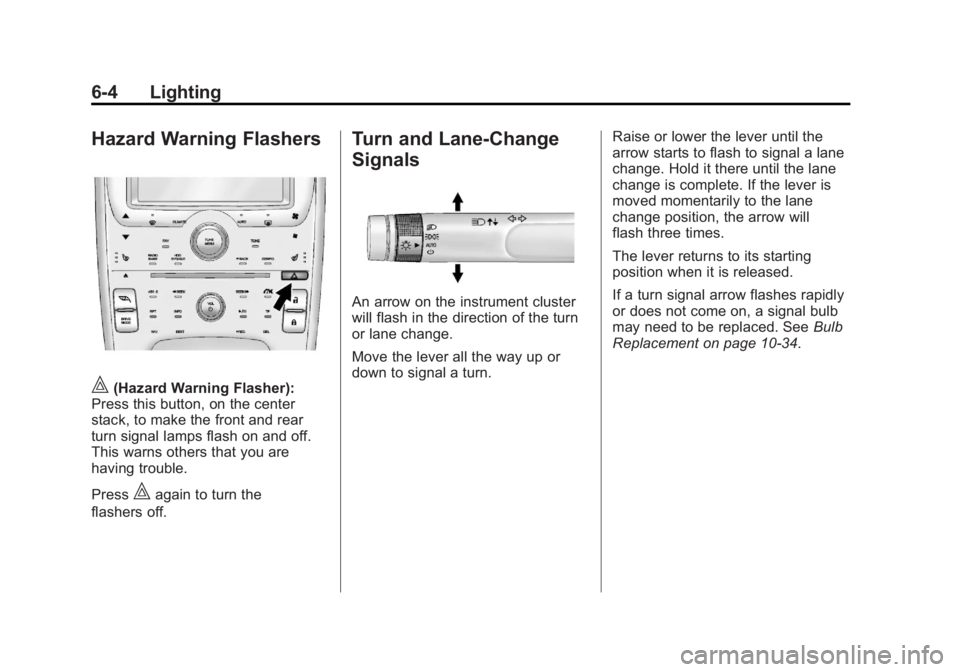
|(Hazard Warning Flasher):
Press this button, on the center
stack, to make the front and rear
turn signal lamps flash on and off.
This warns others that you are
having trouble.
Press
|again to turn the
flashers off.
Turn and Lane-Change
Signals
An arrow on the instrument cluster
will flash in the direction of the turn
or lane change.
Move the lever all the way up or
down to signal a turn. Raise or lower the lever until the
arrow starts to flash to signal a lane
change. Hold it there until the lane
change is complete. If the lever is
moved momentarily to the lane
change position, the arrow will
flash three times.
The lever returns to its starting
position when it is released.
If a turn signal arrow flashes rapidly
or does not come on, a signal bulb
may need to be replaced. See
Bulb
Replacement on page 10‑34.
Page 195 of 516

Black plate (5,1)Chevrolet Volt Owner Manual - 2011
Infotainment System 7-5
S. AS1-2 (Autostore)
T.
X(Eject)
NAV (Navigation) Menu
Use the Navigation Menu screen
to access the navigation system
settings. SeeUsing the Navigation
System on page 7‑39 for more
information.
.Press the NAV button to view
the navigation map screen.
The map and the current
vehicle location display.
.Press the NAV button to change
between a map/audio split view
or a full map view.
Config Setup Menu
Press the CONFIG button to display
the Config Menu. The Config Menu
is used for changing the settings for
the audio, navigation display, phone,
vehicle configuration, and time
features.
Turn the TUNE/MENU knob to scroll
through the available setup features.
Once the desired feature displays,
press the TUNE/MENU knob or
press the desired feature on the
screen, to display more options
within that feature.
Page 204 of 516
Black plate (14,1)Chevrolet Volt Owner Manual - 2011
7-14 Infotainment System
To scroll through the pages, press
the FAV button. The current page
number displays above the preset
buttons. The stored stations for
each list display on the preset
buttons at the bottom of the screen.
The number of preset FAV lists can
be changed.
To store a radio station to a
mixed-band preset list:
1. Press the RADIO BAND button,then press AM, FM, or XM,
if equipped, to select the
desired band.
2. Tune to the station.
3. Press the FAV button to scroll to the list. 4. Press and hold one of the
preset buttons for more than
two seconds. The station
frequency appears on the
preset button at the bottom
of the display.
5. Repeat the steps for each preset in each page.
To recall a preset station from a
FAV page:
1. Press the FAV button to scroll to the page.
2. Press the preset button. The stored preset station
is recalled.Timeshift
The timeshift feature automatically
begins recording the audio when
listening to the radio.
The recording allows playback of
content that was missed.
Timeshift stores up to 20 minutes
of content. After 20 minutes, it
removes the oldest content and
continues recording new content.
While listening to the radio, press
k(Play/Pause) to stop hearing the
information through the speaker.
During this paused time, timeshift
keeps recording. A status bar
displays the length of the recording.
Page 205 of 516
Black plate (15,1)Chevrolet Volt Owner Manual - 2011
Infotainment System 7-15
To resume listening to the broadcast
at the point left off, press
kagain.
Timeshift stops recording and
erases the buffer when the vehicle
is turned off or the station or source
is changed.
Before turning the vehicle off, press
kso that timeshift keeps recording
for 20 minutes. If the vehicle is still
off after 20 minutes, the system
stops recording and all information
is lost. If a low 12-volt battery
condition occurs, timeshift stops
recording and all information is
erased.
Radio Data System (RDS)
The audio system has a Radio
Data System (RDS). RDS features
are available for use only on
FM stations that broadcast
RDS information. With RDS,
the radio can:
.Seek to stations broadcasting
the selected type of
programming.
.Receive announcements
concerning local and national
emergencies.
.Display messages from radio
stations. This system relies on receiving
specific information from these
stations and only works when
the information is available.
In rare cases, a radio station could
broadcast incorrect information
that causes the radio features to
work improperly. If this happens,
contact the radio station.
The RDS system is always on.
When information is broadcast from
the current FM station, the station
name or call letters display on the
audio screen. RDS can provide a
program type (PTY) for current
programming and the name of
the program being broadcasted.
Page 211 of 516
Black plate (21,1)Chevrolet Volt Owner Manual - 2011
Infotainment System 7-21
Playing an Audio and
Video DVD
To view the DVD video, the vehicle
must be in P (Park) or the parking
brake must be engaged.
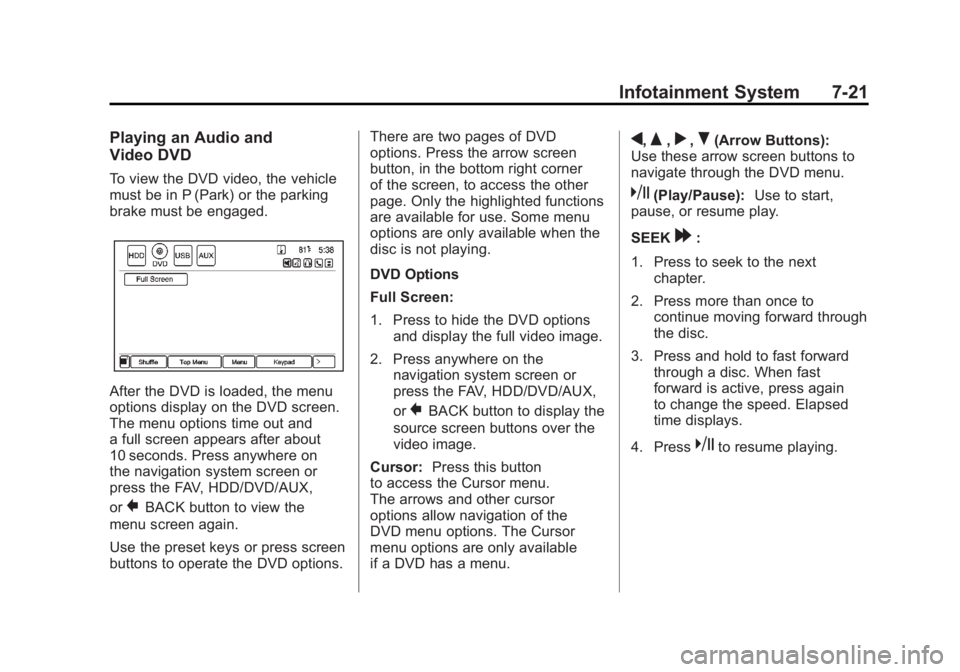
After the DVD is loaded, the menu
options display on the DVD screen.
The menu options time out and
a full screen appears after about
10 seconds. Press anywhere on
the navigation system screen or
press the FAV, HDD/DVD/AUX,
or
}BACK button to view the
menu screen again.
Use the preset keys or press screen
buttons to operate the DVD options. There are two pages of DVD
options. Press the arrow screen
button, in the bottom right corner
of the screen, to access the other
page. Only the highlighted functions
are available for use. Some menu
options are only available when the
disc is not playing.
DVD Options
Full Screen:
1. Press to hide the DVD options
and display the full video image.
2. Press anywhere on the navigation system screen or
press the FAV, HDD/DVD/AUX,
or
}BACK button to display the
source screen buttons over the
video image.
Cursor: Press this button
to access the Cursor menu.
The arrows and other cursor
options allow navigation of the
DVD menu options. The Cursor
menu options are only available
if a DVD has a menu.
q,Q,r,R(Arrow Buttons):
Use these arrow screen buttons to
navigate through the DVD menu.
k(Play/Pause): Use to start,
pause, or resume play.
SEEK
[:
1. Press to seek to the next chapter.
2. Press more than once to continue moving forward through
the disc.
3. Press and hold to fast forward through a disc. When fast
forward is active, press again
to change the speed. Elapsed
time displays.
4. Press
kto resume playing.
Page 212 of 516
Black plate (22,1)Chevrolet Volt Owner Manual - 2011
7-22 Infotainment System
rSEEK:
1. Press to seek to the beginning of the current or previous chapter.
If the chapter has played for
less than five seconds, it goes
to the previous chapter. If the
chapter has played longer than
five seconds, the current chapter
is restarted. More than one
press continues moving back
through the disc.
2. Press and hold to fast reverse through a disc. When fast
reverse is active, press again
to change the speed. Elapsed
time displays.
3. Press
kto resume playing.
TUNE/MENU: Press
rSEEK/
SEEK
[to go to the next or
previous chapter. You can also
change chapters by turning the
TUNE/MENU knob after touching
the screen. Stop:
1. Press on the display screen
to show the available buttons.
Press the stop button to stop
the DVD.
2. To resume playing the DVD from where it stopped, press
k.
3. Press
ktwice to start the DVD
from the beginning.
Z(Shuffle):
1. Press to play the tracks randomly rather than in
sequence.
2. Press again to play sequentially. This button is available for DVD
audio discs.
Top Menu: Press to display the
first menu of the DVD. Availability
of this feature is dependent on
the DVD. Menu:
Press to display the menu
for the part of the DVD currently
playing. Availability of this feature
is dependent on the DVD and is
not available for audio DVDs.
Keypad: Press to display and
search through the chapter, track,
or menu number screen. On the
keypad, enter the title/chapter
number or the group/track number.
Search: Press to perform a title
search.
Angle: Press to adjust the viewing
angle of the DVD, depending on
the DVD, while the DVD is playing.
Continue pressing to cycle through
the viewing angles.
Audio: Press to change the audio
stream and the audio language
heard, while the DVD is playing.
Continue pressing to cycle through
the available audio streams or
languages, depending on the DVD.
Page 230 of 516
Black plate (40,1)Chevrolet Volt Owner Manual - 2011
7-40 Infotainment System
Always be alert and obey traffic
and roadway laws and instructions,
regardless of the guidance from
the navigation system. Because
the navigation system uses street
map information that does not
include all traffic restrictions or
the latest road changes, it may
suggest using a road that is now
closed for construction or a turn
that is prohibited by signs at the
intersection. Because the system
uses limited information, always
evaluate whether following the
system's directions is safe and
legal for the current conditions.
Use the buttons on the navigation
system and the available screen
buttons on the navigation screen to
operate the system. SeeOverview
on page 7‑3.
Various functions are disabled when
the vehicle is moving.Infotainment Control Buttons
The buttons on the faceplate are
used to start primary functions
while using the infotainment system.
See Overview on page 7‑3. These
buttons are:
RADIO BAND: Press to select AM,
FM, or XM, if equipped.
HDD/DVD/AUX (Source): Change
to the Hard Drive, CD, DVD, USB,
or AUX by pressing the HDD/DVD/
AUX button until the desired source
is selected.
The audio sources can also be
changed by using the steering
wheel controls. See Steering Wheel
Controls on page 5‑6 for more
information.
FAV (Favorites): Press to display
the current page number above the
preset buttons. The stored stations
for each list display on the preset
buttons at the bottom of the touch
screen. The number of preset FAV
lists can be changed. TUNE/MENU:
Turn to highlight
a feature. Press to activate the
highlighted feature.
}BACK: Press to return to
the previous screen in a menu.
The
}BACK button does not work
in primary screens, such as the
map, audio, leaf, or climate screens.
TONE: Press to open the tone
menu for sound adjustment.
CONFIG (Configure): Press to
adjust features for radio, navigation,
display, phone, vehicle, and time.
See Configure Menu on page 7‑66
for more information.
SEEK
[:
1. Press to seek to the next track or chapter.
2. Press and hold to advance quickly through playback.
3. Release the button to return to playing speed. Elapsed time
displays.
Page 233 of 516
Black plate (43,1)Chevrolet Volt Owner Manual - 2011
Infotainment System 7-43
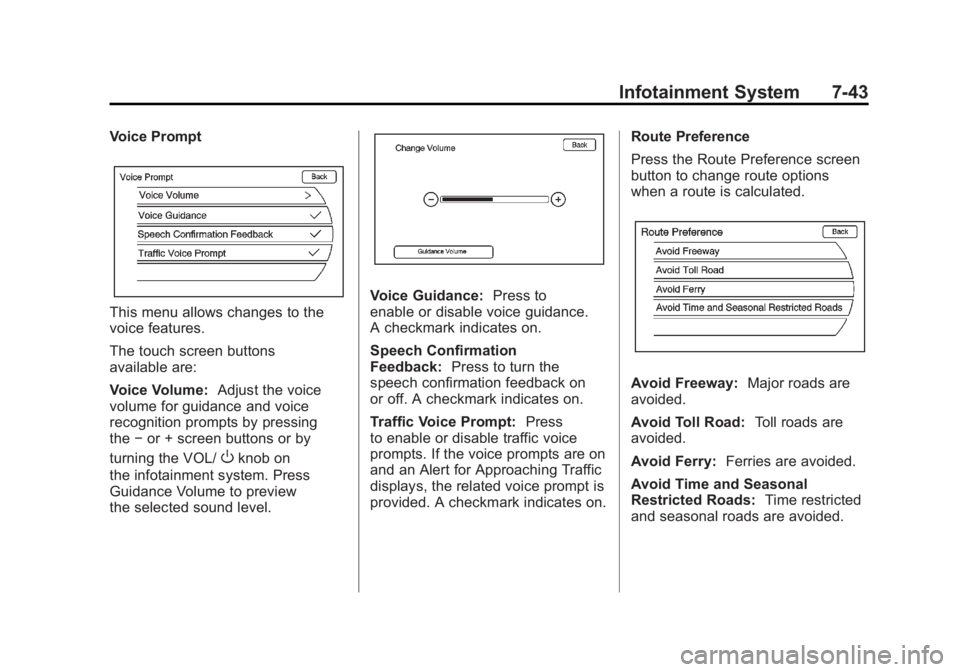
Voice Prompt
This menu allows changes to the
voice features.
The touch screen buttons
available are:
Voice Volume:Adjust the voice
volume for guidance and voice
recognition prompts by pressing
the −or + screen buttons or by
turning the VOL/
Oknob on
the infotainment system. Press
Guidance Volume to preview
the selected sound level.
Voice Guidance: Press to
enable or disable voice guidance.
A checkmark indicates on.
Speech Confirmation
Feedback: Press to turn the
speech confirmation feedback on
or off. A checkmark indicates on.
Traffic Voice Prompt: Press
to enable or disable traffic voice
prompts. If the voice prompts are on
and an Alert for Approaching Traffic
displays, the related voice prompt is
provided. A checkmark indicates on. Route Preference
Press the Route Preference screen
button to change route options
when a route is calculated.
Avoid Freeway:
Major roads are
avoided.
Avoid Toll Road: Toll roads are
avoided.
Avoid Ferry: Ferries are avoided.
Avoid Time and Seasonal
Restricted Roads: Time restricted
and seasonal roads are avoided.
Page 236 of 516
Black plate (46,1)Chevrolet Volt Owner Manual - 2011
7-46 Infotainment System
Map Adjustments
The scale of view on the map can
be adjusted.
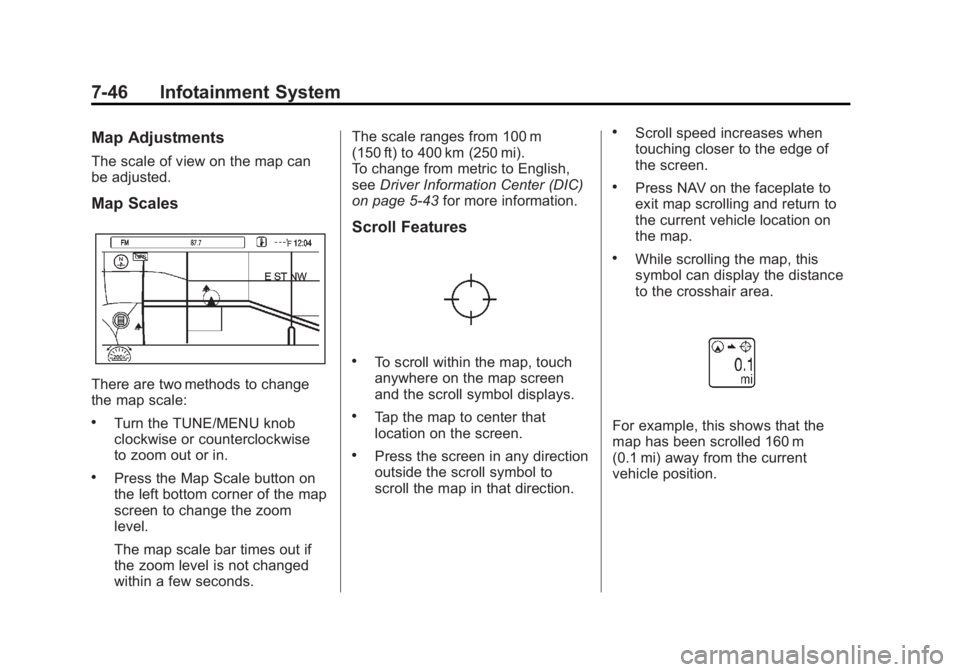
Map Scales
There are two methods to change
the map scale:
.Turn the TUNE/MENU knob
clockwise or counterclockwise
to zoom out or in.
.Press the Map Scale button on
the left bottom corner of the map
screen to change the zoom
level.
The map scale bar times out if
the zoom level is not changed
within a few seconds.The scale ranges from 100 m
(150 ft) to 400 km (250 mi).
To change from metric to English,
see
Driver Information Center (DIC)
on page 5‑43 for more information.
Scroll Features
.To scroll within the map, touch
anywhere on the map screen
and the scroll symbol displays.
.Tap the map to center that
location on the screen.
.Press the screen in any direction
outside the scroll symbol to
scroll the map in that direction.
.Scroll speed increases when
touching closer to the edge of
the screen.
.Press NAV on the faceplate to
exit map scrolling and return to
the current vehicle location on
the map.
.While scrolling the map, this
symbol can display the distance
to the crosshair area.
For example, this shows that the
map has been scrolled 160 m
(0.1 mi) away from the current
vehicle position.