remote start CHEVROLET VOLT 2011 Owner's Guide
[x] Cancel search | Manufacturer: CHEVROLET, Model Year: 2011, Model line: VOLT, Model: CHEVROLET VOLT 2011Pages: 516, PDF Size: 6.61 MB
Page 355 of 516
Black plate (53,1)Chevrolet Volt Owner Manual - 2011
Driving and Operating 9-53
The system may be thermally
conditioning the battery during
any of the states above, requiring
electrical energy to be transferred
to the vehicle.
If the vehicle is plugged in and
vehicle power is on, the CSI will be
on solid green. The same is true
during a remote start if the vehicle
is plugged in.
If the vehicle is plugged in and the
CSI is off, a charging fault has been
detected. See“Charge Cord Status
Indicators” later in this section.
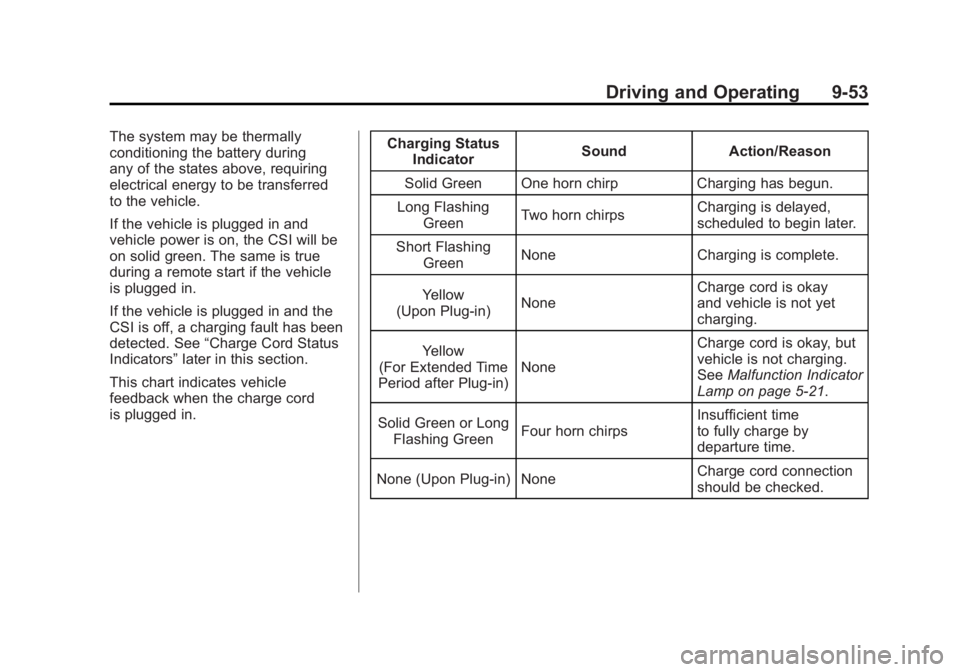
This chart indicates vehicle
feedback when the charge cord
is plugged in. Charging Status
Indicator Sound Action/Reason
Solid Green One horn chirp Charging has begun.
Long Flashing Green Two horn chirps Charging is delayed,
scheduled to begin later.
Short Flashing Green None Charging is complete.
Yellow
(Upon Plug‐in) None Charge cord is okay
and vehicle is not yet
charging.
Yellow
(For Extended Time
Period after Plug‐in) None Charge cord is okay, but
vehicle is not charging.
See
Malfunction Indicator
Lamp on page 5‑21.
Solid Green or Long Flashing Green Four horn chirps Insufficient time
to fully charge by
departure time.
None (Upon Plug‐in) None Charge cord connection
should be checked.
Page 377 of 516
Black plate (11,1)Chevrolet Volt Owner Manual - 2011
Vehicle Care 10-11
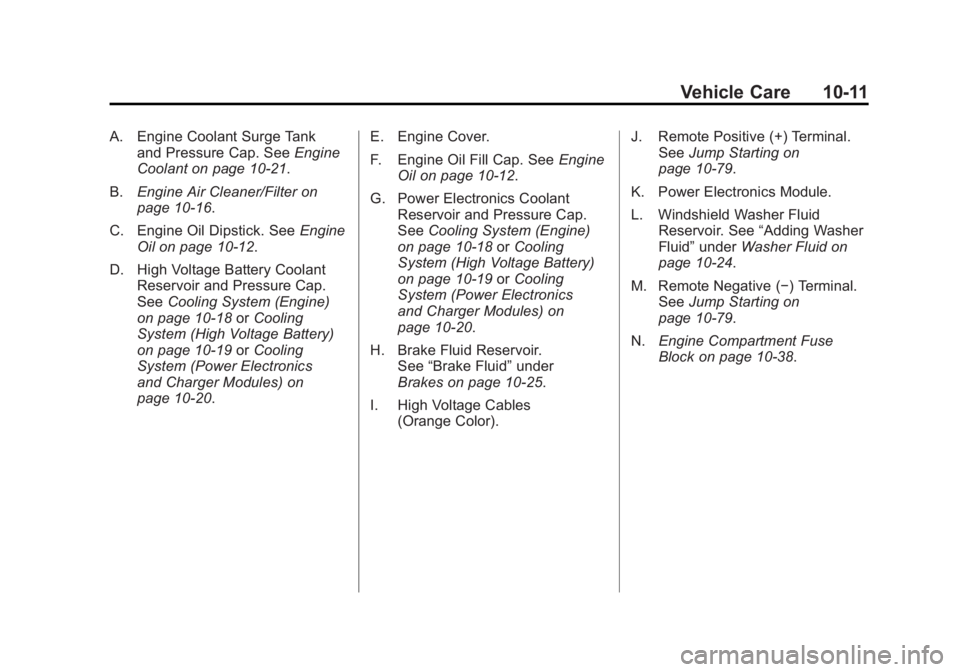
A. Engine Coolant Surge Tankand Pressure Cap. See Engine
Coolant on page 10‑21.
B. Engine Air Cleaner/Filter on
page 10‑16.
C. Engine Oil Dipstick. See Engine
Oil on page 10‑12.
D. High Voltage Battery Coolant Reservoir and Pressure Cap.
See Cooling System (Engine)
on page 10‑18 orCooling
System (High Voltage Battery)
on page 10‑19 orCooling
System (Power Electronics
and Charger Modules) on
page 10‑20. E. Engine Cover.
F. Engine Oil Fill Cap. See
Engine
Oil on page 10‑12.
G. Power Electronics Coolant Reservoir and Pressure Cap.
See Cooling System (Engine)
on page 10‑18 orCooling
System (High Voltage Battery)
on page 10‑19 orCooling
System (Power Electronics
and Charger Modules) on
page 10‑20.
H. Brake Fluid Reservoir. See “Brake Fluid” under
Brakes on page 10‑25.
I. High Voltage Cables (Orange Color). J. Remote Positive (+) Terminal.
See Jump Starting on
page 10‑79.
K. Power Electronics Module.
L. Windshield Washer Fluid Reservoir. See “Adding Washer
Fluid” under Washer Fluid on
page 10‑24.
M. Remote Negative (−) Terminal. See Jump Starting on
page 10‑79.
N. Engine Compartment Fuse
Block on page 10‑38.
Page 446 of 516
Black plate (80,1)Chevrolet Volt Owner Manual - 2011
10-80 Vehicle Care
Jump Starting the Volt
If the Volt won't start, the 12‐volt
battery may be run down. To jump
start the Volt use the underhood
remote positive (+) and negative (−)
terminals.
1. The other vehicle used to jumpstart the Volt must have a 12‐volt
battery with a negative ground
system.
Notice: Only use a vehicle
that has a 12-volt system with
a negative ground for jump
starting. If the other vehicle does
not have a 12-volt system with a
negative ground, both vehicles
can be damaged.
2. Park both vehicles close enough so that the jumper cables can
reach both vehicles' positive (+)
and negative (−) terminals.
The vehicles must not touch
each other. It could cause an
unwanted ground connection
that could damage both vehicles'
electrical systems. Put both vehicles in P (Park) for
an automatic transmission or
electric drive unit. For a manual
transmission, place the vehicle
in N (Neutral) and set the
parking brake.
Notice: If the radio or other
accessories are left on during
the jump starting procedure, they
could be damaged. The repairs
would not be covered by the
warranty. Always turn off the
radio and other accessories
when jump starting the vehicle.
3. Turn off the ignition on the other vehicle. Turn off the radio,
all lamps, and accessories that
are not needed in both vehicles.
Unplug accessories from the
cigarette lighter or the accessory
power outlets. This avoids
sparks and helps save both
batteries and accessories.
4. Locate the positive (+) and negative (−) terminals on the
other vehicle.
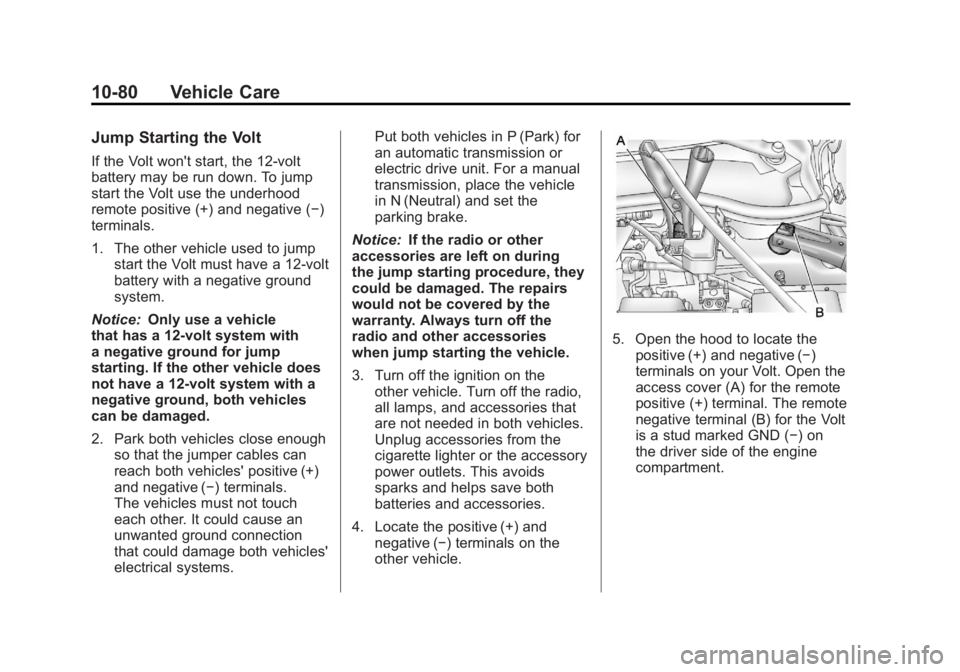
5. Open the hood to locate thepositive (+) and negative (−)
terminals on your Volt. Open the
access cover (A) for the remote
positive (+) terminal. The remote
negative terminal (B) for the Volt
is a stud marked GND (−) on
the driver side of the engine
compartment.
Page 447 of 516
Black plate (81,1)Chevrolet Volt Owner Manual - 2011
Vehicle Care 10-81
6. Check that the jumper cablesdo not have loose or missing
insulation or a shock could
result and the vehicles could
be damaged.
Before connecting the jumper
cables, here are some basic
things to know. Positive (+)
jumper cable goes to positive (+)
battery terminal or a remote
positive (+) terminal if available.
Negative (−) jumper cable goes
to negative (−) battery terminal
or a remote negative (−) terminal
if available. Do not connect
positive (+) to negative (−) or
there will be a short that may
damage the battery and other
parts of the vehicle. Notice:
If the jumper cables
are connected or removed in
the wrong order, electrical
shorting may occur and damage
the vehicle. The repairs would
not be covered by the vehicle
warranty. Always connect and
remove the jumper cables in the
correct order, making sure that
the cables do not touch each
other or other metal.
Connecting the Jumper Cables
1. Connect the red positive (+) jumper cable to the remote
positive (+) terminal (A) of your
Volt. Do not let the other end
of the cable touch metal.
2. Connect the other end of the red positive (+) jumper cable to the
positive (+) terminal of the other
vehicle. 3. Connect the black negative (−)
jumper cable to the negative (−)
battery terminal of the other
vehicle battery. Do not let the
other end touch anything until
the next step.
4. Connect the other end of the black negative (−) jumper cable
to the remote negative (−)
terminal of your Volt.
5. Push the POWER
Obutton
to start. This will wake up the
electronics on the Volt. After the
instrument cluster initializes,
the Volt will use power from
the high voltage battery to
charge the 12‐volt battery.
The jumper cables can then
be disconnected. If the Volt
does not start, call your dealer
or Roadside Assistance.
See Roadside Assistance
Program on page 13‑6.
Page 448 of 516
Black plate (82,1)Chevrolet Volt Owner Manual - 2011
10-82 Vehicle Care
Disconnecting the Jumper Cables
1. Disconnect the blacknegative (−) jumper cable
from the Volt. Do not let the
other end of the cable touch
anything until after the next step.
2. Disconnect the black negative (−) jumper cable
from the other vehicle with
the good battery.
3. Disconnect the red positive (+) jumper cable from the other
vehicle. Do not let the other
end of the cable touch anything
until after the next step.
4. Disconnect the red positive (+) jumper cable from the Volt.
5. Return the positive (+) and negative (−) terminal covers
to their original positions.Jump Starting Another Vehicle
When using the Volt to jump
start another vehicle with a
run‐down battery, jumper cables
are connected directly to the
positive (+) and negative (−)
terminals on the 12‐volt battery in
the rear cargo area. Do not use the
remote terminals under the hood.
This could cause a fuse to overload
in the Volt.
1. Check the other vehicle. It must
have a 12‐volt battery with a
negative ground system.
Notice: Only use a vehicle
that has a 12-volt system with
a negative ground for jump
starting. If the other vehicle does
not have a 12-volt system with a
negative ground, both vehicles
can be damaged.
2. Park both vehicles close enough so that the jumper cables can
reach both vehicles' positive (+)
and negative (−) terminals.
The vehicles must not touch
each other. It could cause an unwanted ground connection
that could damage both vehicles'
electrical systems.
Put both vehicles in P (Park) for
an automatic transmission or
electric drive unit. For a manual
transmission, place the vehicle
in N (Neutral) and set the
parking brake.
Notice: If the radio or other
accessories are left on during
the jump starting procedure, they
could be damaged. The repairs
would not be covered by the
warranty. Always turn off the
radio and other accessories
when jump starting the vehicle.
3. Turn off both vehicles. Turn off the radio, all lamps,
and accessories that are not
needed in both vehicles. Unplug
accessories from the cigarette
lighter or the accessory power
outlets. This avoids sparks and
helps save both batteries and
accessories.
Page 450 of 516
Black plate (84,1)Chevrolet Volt Owner Manual - 2011
10-84 Vehicle Care
3. Connect the black negative (−)jumper cable to the negative (−)
battery terminal of the Volt.
Do not let the other end touch
anything until the next step.
4. Make the final connection to a heavy, unpainted metal engine
part or to the remote negative (−)
terminal on the other vehicle
with the run‐down battery.
5. Press the POWER
Obutton
to start the Volt. This will wake
up the electronics on the Volt.
The engine will only start if it is
needed.
6. Try to start the other vehicle that had the run‐down battery.
If it will not start after a few tries,
it probably needs service. Disconnecting the Jumper Cables
1. Disconnect the black
negative (−) jumper cable
from the other vehicle that had
the run‐down battery. Do not let
the other end of the cable touch
anything until after the next step.
2. Disconnect the black negative (−) jumper cable
from the Volt.
3. Disconnect the red positive (+) jumper cable from the Volt.
Do not let the other end of the
cable touch anything until after
the next step.
4. Disconnect the red positive (+) jumper cable from the other
vehicle.
5. Return the positive (+) and negative (−) terminal covers
to their original positions.
Towing
Towing the Vehicle
Notice: Incorrectly towing
a disabled vehicle may
cause damage to the vehicle.
The disabled vehicle should be
towed on a flatbed car carrier.
Use care when there is low
ground clearance and/or
special equipment.
Attempting to pull the vehicle
onto a flatbed without following
the proper steps could damage
the vehicle.
Consult your dealer or a
professional towing service if the
disabled vehicle must be towed.
See Roadside Assistance Program
on page 13‑6.
Page 503 of 516
Black plate (27,1)Chevrolet Volt Owner Manual - 2011
Customer Information 13-27
GM will not access this data or
share it with others except: with the
consent of the vehicle owner or,
if the vehicle is leased, with the
consent of the lessee; in response
to an official request by police or
similar government office; as part of
GM's defense of litigation through
the discovery process; or, as
required by law. Data that GM
collects or receives may also be
used for GM research needs or
may be made available to others for
research purposes, where a need is
shown and the data is not tied to a
specific vehicle or vehicle owner.OnStar®
If the vehicle is equipped with an
active OnStar system, that system
may also record data in crash
or near crash‐like situations.
The OnStar Terms and Conditions
provides information on data
collection and use and is available
in the OnStar glove box kit,
at www.onstar.com (U.S.) or
www.onstar.ca (Canada), or
by pressing the
Qbutton and
speaking to an advisor.
Navigation System
If the vehicle has a navigation
system, use of the system may
result in the storage of destinations,
addresses, telephone numbers, and
other trip information. See Using the
Navigation System on page 7‑39 for
information on stored data and for
deletion instructions.
Radio Frequency
Identification (RFID)
RFID technology is used in some
vehicles for functions such as tire
pressure monitoring and ignition
system security, as well as in
connection with conveniences
such as key fobs for remote door
locking/unlocking and starting, and
in-vehicle transmitters for garage
door openers. RFID technology in
GM vehicles does not use or record
personal information or link with
any other GM system containing
personal information.
Page 510 of 516
Black plate (6,1)Chevrolet Volt Owner Manual - 2011
i-6 INDEX
I
Immobilizer . . . . . . . . . . . . . . . . . . . . 2-14
Infants and Young Children,Restraints . . . . . . . . . . . . . . . . . . . . 3-43
Information Energy . . . . . . . . . . . . . . . . . . . . . . . 5-41
Open Source . . . . . . . . . . . . . . . 13-24
Infotainment . . . . . . . . . . . . . . . . . . . . 7-2
Instrument Cluster . . . . . . . . . . . . . . 5-9
Instrument Panel Storage Area . . . . . . . . . . . . . . . . . . 4-1
Introduction . . . . . . . . . . . . . . . . . . . . . . . iii
J
Jump Starting . . . . . . . . . . . . . . . . . 10-79
K
Key and Lock Messages . . . . . . . 5-48
Keyless Entry Remote (RKE) System . . . . . . . . 2-3
Keys . . . . . . . . . . . . . . . . . . . . . . . . . . . . 2-2
L
Labeling, Tire Sidewall . . . . . . . . 10-49
Lamp Messages . . . . . . . . . . . . . . . 5-49
Lamps Daytime Running (DRL) . . . . . . . 6-3
Dome . . . . . . . . . . . . . . . . . . . . . . . . . . 6-5
Exterior Controls . . . . . . . . . . . . . . . 6-1
License Plate . . . . . . . . . . . . . . . 10-36
Malfunction Indicator . . . . . . . . . 5-21
On Reminder . . . . . . . . . . . . . . . . . 5-29
Reading . . . . . . . . . . . . . . . . . . . . . . . 6-5
Lap-Shoulder Belt . . . . . . . . . . . . . 3-19
LATCH System Replacing Parts after aCrash . . . . . . . . . . . . . . . . . . . . . . . 3-57
LATCH, Lower Anchors and
Tethers for Children . . . . . . . . . . 3-49
Lifting the Vehicle, Tires . . . . . . . 10-5
Lighting Entry . . . . . . . . . . . . . . . . . . . . . . . . . . 6-5
Exit . . . . . . . . . . . . . . . . . . . . . . . . . . . . 6-6
Illumination Control . . . . . . . . . . . . 6-5 Lights
Airbag Readiness . . . . . . . . . . . . . 5-19
Antilock Brake System
(ABS) Warning . . . . . . . . . . . . . . 5-26
Brake System Warning . . . . . . . 5-24
Charging System . . . . . . . . . . . . . 5-21
Cruise Control . . . . . . . . . . . . . . . . 5-29
Electric Parking Brake . . . . . . . . 5-25
Engine Coolant Temperature Warning . . . . . . . 5-27
Engine Oil Pressure . . . . . . . . . . 5-28
Flash-to-Pass . . . . . . . . . . . . . . . . . . 6-2
High-Beam On . . . . . . . . . . . . . . . . 5-29
High/Low Beam Changer . . . . . . 6-2
Hood, Door, Hatch Open . . . . . 5-30
Low Fuel Warning . . . . . . . . . . . . 5-28
Mountain Mode . . . . . . . . . . . . . . . 5-26
Safety Belt Reminders . . . . . . . . 5-18
Security . . . . . . . . . . . . . . . . . . . . . . 5-29
Service Electric Parking Brake . . . . . . . . . . . . . . . . . . . . . . . 5-25
Sport Mode . . . . . . . . . . . . . . . . . . . 5-26
Tire Pressure . . . . . . . . . . . . . . . . . 5-27
Traction Control System (TCS)/StabiliTrak
®. . . . . . . . . . 5-27
Page 513 of 516
Black plate (9,1)Chevrolet Volt Owner Manual - 2011
INDEX i-9
Proposition 65 Warning,California . . . . . . . . . . . . . . . . . . . . . 10-3
Propulsion Power Messages . . . . . . . . . . . . . . . . . . . . 5-50
Propulsion System Start Check . . . . . . . . . . . . . . . . . . . . . . . 10-29
R
Radio FrequencyIdentification (RFID) . . . . . . . . 13-27
Statement . . . . . . . . . . . . . . . . . . 13-28
Radios AM-FM Radio . . . . . . . . . . . . . . . . . 7-10
CD/DVD Player . . . . . . . . . . . . . . . 7-18
Reception . . . . . . . . . . . . . . . . . . . . 7-17
Satellite . . . . . . . . . . . . . . . . . . . . . . . 7-16
Reading Lamps . . . . . . . . . . . . . . . . . 6-5
Rear Seats . . . . . . . . . . . . . . . . . . . . . 3-8
Rear Vision Camera (RVC) . . . . 9-46
Rearview Mirror Automatic Dimming . . . . . . . . . . . 2-16
Reclining Seatbacks . . . . . . . . . . . . 3-4
Recommended Fluids and Lubricants . . . . . . . . . . . . . . . . . . . . 11-6
Records Maintenance . . . . . . . . . . . . . . . . . . 11-8 Recreational Vehicle
Towing . . . . . . . . . . . . . . . . . . . . . . 10-87
Regenerative Braking . . . . . . . . . . 9-37
Reimbursement Program, GM Mobility . . . . . . . . . . . . . . . . . . 13-5
Remote Keyless Entry (RKE) System . . . . . . . . . . . . . . . . . . . . . . . . 2-3
Remote Start . . . . . . . . . . . . . . . . . . . 2-8
Replacement Bulbs . . . . . . . . . . . 10-37
Replacement Parts Airbags . . . . . . . . . . . . . . . . . . . . . . . 3-40
Maintenance . . . . . . . . . . . . . . . . . . 11-7
Replacing Airbag System . . . . . . 3-40
Replacing LATCH System Parts after a Crash . . . . . . . . . . . 3-57
Replacing Safety Belt
System Parts after a Crash . . . 3-24
Reporting Safety Defects Canadian Government . . . . . . 13-25
General Motors . . . . . . . . . . . . . 13-25
U.S. Government . . . . . . . . . . . 13-24
Requirements Electrical Battery Charging . . . 9-56
Restraints Where to Put . . . . . . . . . . . . . . . . . 3-47 Retained Accessory
Power (RAP) . . . . . . . . . . . . . . . . . 9-22
Ride Control Systems . . . . . . . . . 9-39 Electronic Stability (ESC) . . . . . 9-39
Messages . . . . . . . . . . . . . . . . . . . . 5-50
Roads Driving, Wet . . . . . . . . . . . . . . . . . . . 9-9
Roadside Assistance Program . . . . . . . . . . . . . . . . . . . . . . 13-6
Rotation, Tires . . . . . . . . . . . . . . . . 10-61
Routing, Engine Drive Belt . . . . . 12-3
Running the Vehicle While Parked . . . . . . . . . . . . . . . . . . . . . . . 9-31
S
Safety Belts . . . . . . . . . . . . . . . . . . . 3-10Care . . . . . . . . . . . . . . . . . . . . . . . . . . 3-24
Extender . . . . . . . . . . . . . . . . . . . . . . 3-23
How to Wear Safety BeltsProperly . . . . . . . . . . . . . . . . . . . . . 3-13
Lap-Shoulder Belt . . . . . . . . . . . . 3-19
Reminders . . . . . . . . . . . . . . . . . . . . 5-18
Replacing after a Crash . . . . . . 3-24
Use During Pregnancy . . . . . . . . 3-23
Page 514 of 516

Black plate (10,1)Chevrolet Volt Owner Manual - 2011
i-10 INDEX
Safety Defects ReportingCanadian Government . . . . . . 13-25
General Motors . . . . . . . . . . . . . 13-25
U.S. Government . . . . . . . . . . . 13-24
Safety Locks . . . . . . . . . . . . . . . . . . . 2-12
Safety System Check . . . . . . . . . . 3-23
Satellite Radio . . . . . . . . . . . . . . . . . 7-16
Scheduled Maintenance . . . . . . . 11-2
Scheduling Appointments . . . . . . 13-8
Sealant Kit, Tire . . . . . . . . . . . . . . 10-71
Seats Adjustment, Front . . . . . . . . . . . . . . 3-4
Head Restraints . . . . . . . . . . . . . . . 3-2
Heated Front . . . . . . . . . . . . . . . . . . 3-6
Rear . . . . . . . . . . . . . . . . . . . . . . . . . . . 3-8
Reclining Seatbacks . . . . . . . . . . . 3-4
Securing Child Restraints . . . . . . . . . . . . . . 3-57, 3-60
Security Light . . . . . . . . . . . . . . . . . . . . . . . . . . 5-29
Vehicle . . . . . . . . . . . . . . . . . . . . . . . 2-13
Service Accessories andModifications . . . . . . . . . . . . . . . . 10-4
Doing Your Own Work . . . . . . . . 10-8
Engine Soon Light . . . . . . . . . . . . 5-21 Service (cont.)
Maintenance Records . . . . . . . . 11-8
Maintenance, General
Information . . . . . . . . . . . . . . . . . . 11-1
Parts Identification Label . . . . . 12-1
Publications Ordering Information . . . . . . . . . . . . . . . . 13-12
Scheduling Appointments . . . . . 13-8
Vehicle Messages . . . . . . . . . . . . 5-51
Service Electric Parking Brake Light . . . . . . . . . . . . . . . . . . . 5-25
Servicing the Airbag . . . . . . . . . . . 3-38
Shifting Into Park . . . . . . . . . . . . . . . . . . . . . . 9-22
Out of Park . . . . . . . . . . . . . . . . . . . 9-23
Signals, Turn and Lane-Change . . . . . . . . . . . . . . . . . 6-4
Specifications and
Capacities . . . . . . . . . . . . . . . . . . . . 12-2
Speedometer . . . . . . . . . . . . . . . . . . 5-15
Sport Mode Light . . . . . . . . . . . . . . 5-26
Start Check Propulsion
System . . . . . . . . . . . . . . . . . . . . 10-29
Remote . . . . . . . . . . . . . . . . . . . . . . . . 2-8
Starting and Stopping the Vehicle . . . . . . . . . . . . . . . . . . . . . . . 9-20 Starting the Vehicle
Messsages . . . . . . . . . . . . . . . . . . . 5-52
Status Screens Charging . . . . . . . . . . . . . . . . . . . . . 9-52
Steering . . . . . . . . . . . . . . . . . . . . . . . . 9-6 Fluid, Power . . . . . . . . . . . . . . . . 10-24
Wheel Adjustment . . . . . . . . . . . . . 5-6
Wheel Controls . . . . . . . . . . . . . . . . 5-6
Storage Areas Cargo Cover . . . . . . . . . . . . . . . . . . . 4-2
Floor Console . . . . . . . . . . . . . . . . . 4-1
Glove Box . . . . . . . . . . . . . . . . . . . . . 4-1
Instrument Panel . . . . . . . . . . . . . . 4-1
Umbrella . . . . . . . . . . . . . . . . . . . . . . . 4-2
Storing the Tire Sealant and Compressor Kit . . . . . . . . . 10-78
Stuck Vehicle . . . . . . . . . . . . . . . . . . 9-13
Sun Visors . . . . . . . . . . . . . . . . . . . . . 2-19
Symbols . . . . . . . . . . . . . . . . . . . . . . . . . . iv
Symbols, Navigation . . . . . . . . . . . 7-47
System Infotainment . . . . . . . . . . . . . . . . . . . 7-2
System Needs Service, If . . . . . . 7-76
System Operation . . . . . . . . . . . . . 9-24