horn CHEVROLET VOLT 2016 2.G User Guide
[x] Cancel search | Manufacturer: CHEVROLET, Model Year: 2016, Model line: VOLT, Model: CHEVROLET VOLT 2016 2.GPages: 366, PDF Size: 5.4 MB
Page 211 of 366
Chevrolet VOLT Owner Manual (GMNA-Localizing-U.S/Canada/Mexico-
9159388) - 2016 - crc - 5/20/15
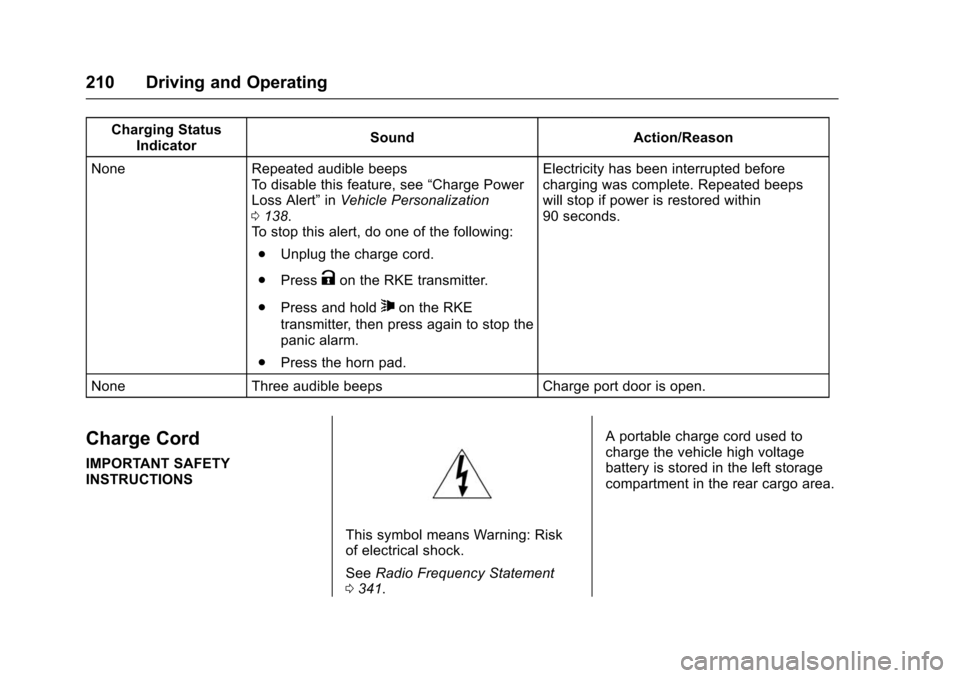
210 Driving and Operating
Charging StatusIndicator Sound Action/Reason
None Repeated audible beeps To disable this feature, see “Charge Power
Loss Alert” inVehicle Personalization
0 138.
To stop this alert, do one of the following:
. Unplug the charge cord.
. Press
Kon the RKE transmitter.
. Press and hold
7on the RKE
transmitter, then press again to stop the
panic alarm.
. Press the horn pad. Electricity has been interrupted before
charging was complete. Repeated beeps
will stop if power is restored within
90 seconds.
None Three audible beeps Charge port door is open.
Charge Cord
IMPORTANT SAFETY
INSTRUCTIONS
This symbol means Warning: Risk
of electrical shock.
See Radio Frequency Statement
0 341. A portable charge cord used to
charge the vehicle high voltage
battery is stored in the left storage
compartment in the rear cargo area.
Page 255 of 366
Chevrolet VOLT Owner Manual (GMNA-Localizing-U.S/Canada/Mexico-
9159388) - 2016 - crc - 5/20/15
254 Vehicle Care
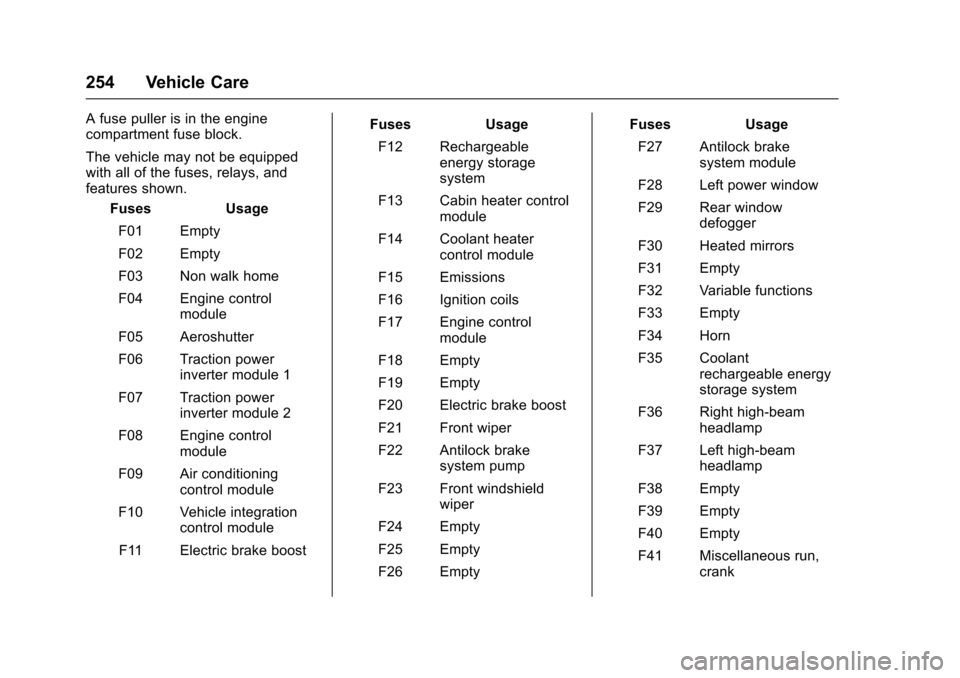
A fuse puller is in the engine
compartment fuse block.
The vehicle may not be equipped
with all of the fuses, relays, and
features shown.Fuses Usage
F01 Empty
F02 Empty
F03 Non walk home
F04 Engine control module
F05 Aeroshutter
F06 Traction power inverter module 1
F07 Traction power inverter module 2
F08 Engine control module
F09 Air conditioning control module
F10 Vehicle integration control module
F11 Electric brake boost Fuses
Usage
F12 Rechargeable energy storage
system
F13 Cabin heater control module
F14 Coolant heater control module
F15 Emissions
F16 Ignition coils
F17 Engine control module
F18 Empty
F19 Empty
F20 Electric brake boost
F21 Front wiper
F22 Antilock brake system pump
F23 Front windshield wiper
F24 Empty
F25 Empty
F26 Empty Fuses
Usage
F27 Antilock brake system module
F28 Left power window
F29 Rear window defogger
F30 Heated mirrors
F31 Empty
F32 Variable functions
F33 Empty
F34 Horn
F35 Coolant rechargeable energy
storage system
F36 Right high-beam headlamp
F37 Left high-beam headlamp
F38 Empty
F39 Empty
F40 Empty
F41 Miscellaneous run, crank
Page 256 of 366
Chevrolet VOLT Owner Manual (GMNA-Localizing-U.S/Canada/Mexico-
9159388) - 2016 - crc - 5/20/15
Vehicle Care 255
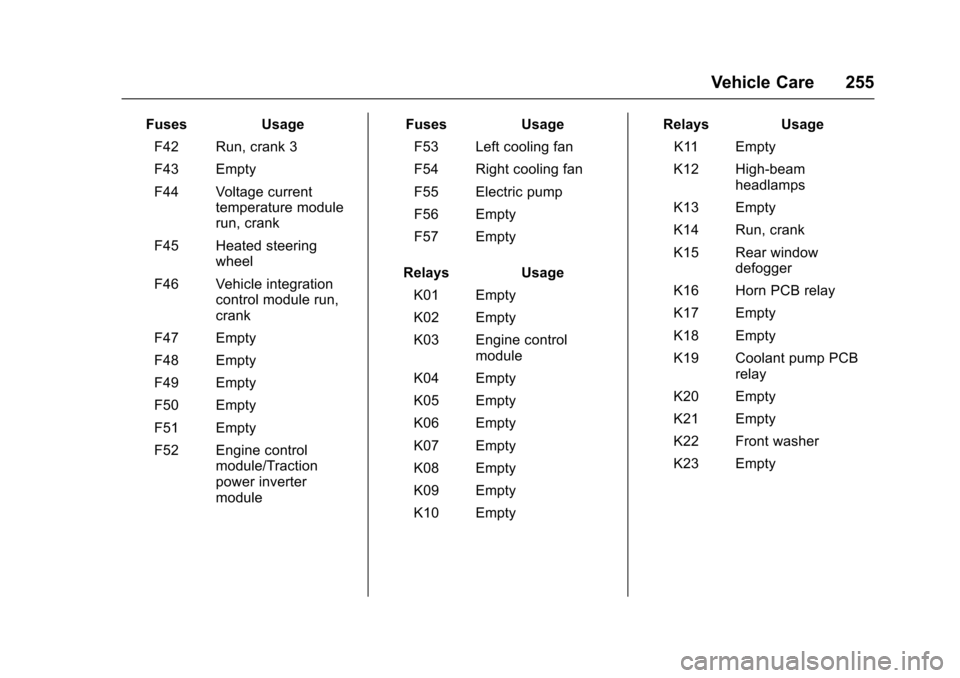
FusesUsage
F42 Run, crank 3
F43 Empty
F44 Voltage current temperature module
run, crank
F45 Heated steering wheel
F46 Vehicle integration control module run,
crank
F47 Empty
F48 Empty
F49 Empty
F50 Empty
F51 Empty
F52 Engine control module/Traction
power inverter
module Fuses
Usage
F53 Left cooling fan
F54 Right cooling fan
F55 Electric pump
F56 Empty
F57 Empty
Relays Usage
K01 Empty
K02 Empty
K03 Engine control module
K04 Empty
K05 Empty
K06 Empty
K07 Empty
K08 Empty
K09 Empty
K10 Empty Relays
Usage
K11 Empty
K12 High-beam headlamps
K13 Empty
K14 Run, crank
K15 Rear window defogger
K16 Horn PCB relay
K17 Empty
K18 Empty
K19 Coolant pump PCB relay
K20 Empty
K21 Empty
K22 Front washer
K23 Empty
Page 274 of 366
Chevrolet VOLT Owner Manual (GMNA-Localizing-U.S/Canada/Mexico-
9159388) - 2016 - crc - 5/20/15
Vehicle Care 273
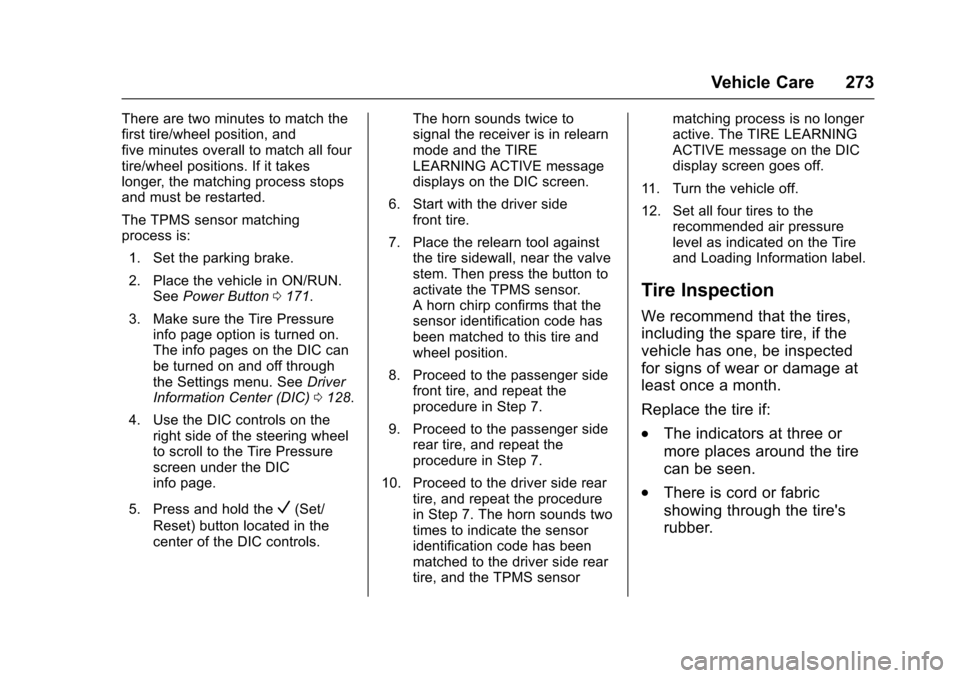
There are two minutes to match the
first tire/wheel position, and
five minutes overall to match all four
tire/wheel positions. If it takes
longer, the matching process stops
and must be restarted.
The TPMS sensor matching
process is:1. Set the parking brake.
2. Place the vehicle in ON/RUN. See Power Button 0171.
3. Make sure the Tire Pressure info page option is turned on.
The info pages on the DIC can
be turned on and off through
the Settings menu. See Driver
Information Center (DIC) 0128.
4. Use the DIC controls on the right side of the steering wheel
to scroll to the Tire Pressure
screen under the DIC
info page.
5. Press and hold the
V(Set/
Reset) button located in the
center of the DIC controls. The horn sounds twice to
signal the receiver is in relearn
mode and the TIRE
LEARNING ACTIVE message
displays on the DIC screen.
6. Start with the driver side front tire.
7. Place the relearn tool against the tire sidewall, near the valve
stem. Then press the button to
activate the TPMS sensor.
A horn chirp confirms that the
sensor identification code has
been matched to this tire and
wheel position.
8. Proceed to the passenger side front tire, and repeat the
procedure in Step 7.
9. Proceed to the passenger side rear tire, and repeat the
procedure in Step 7.
10. Proceed to the driver side rear tire, and repeat the procedure
in Step 7. The horn sounds two
times to indicate the sensor
identification code has been
matched to the driver side rear
tire, and the TPMS sensor matching process is no longer
active. The TIRE LEARNING
ACTIVE message on the DIC
display screen goes off.
11. Turn the vehicle off.
12. Set all four tires to the recommended air pressure
level as indicated on the Tire
and Loading Information label.
Tire Inspection
We recommend that the tires,
including the spare tire, if the
vehicle has one, be inspected
for signs of wear or damage at
least once a month.
Replace the tire if:
.The indicators at three or
more places around the tire
can be seen.
.There is cord or fabric
showing through the tire's
rubber.
Page 349 of 366
Chevrolet VOLT Owner Manual (GMNA-Localizing-U.S/Canada/Mexico-
9159388) - 2016 - crc - 5/20/15
348 OnStar
2. The Wi-Fi settings will displaythe Wi-Fi hotspot name (SSID),
password, and on some
vehicles, the connection type
(no Internet connection, 3G,
4G, 4G LTE), and signal quality
(poor, good, excellent).
3. To change the SSID or password, press
Qor call
1-888-4ONSTAR to connect
with an Advisor.
OnStar RemoteLink
®Mobile App
(If Equipped)
Download the OnStar RemoteLink
mobile app to select Apple
®,
Android™, BlackBerry®,
or Windows®mobile devices.
OnStar Subscribers can access the
following services from a mobile
device:
. Remotely start/stop the vehicle,
if factory-equipped.
. Lock/unlock doors, if equipped
with automatic locks.
. Activate the horn and lamps. .
Check the vehicle’s fuel level, oil
life, or tire pressure,
if factory-equipped with the Tire
Pressure Monitor System.
. Send directions to the vehicle.
. Locate the vehicle on a map
(U.S. market only).
. Turn the vehicle's Wi-Fi hotspot
on/off, manage settings, and
monitor data consumption,
if equipped.
For OnStar RemoteLink information
and compatibility, see
www.onstar.com (U.S.) or
www.onstar.ca (Canada).Remote Services
Contact an OnStar Advisor to
unlock the doors or sound the horn
and flash the lamps.
OnStar AtYourService
OnStar Advisors can provide
savings offers from restaurants and
retailers on your route, help locate
hotels, or book a room.
OnStar Hands-Free Calling
Make and receive calls with the
built-in wireless calling service.
Make a Call
1. Press
=. System responds:
“OnStar ready.”
2. Say “Call.”System responds:
“Call. Please say the name or
number to call.”
3. Say the entire number without pausing, including a “1”and the
area code. System responds:
“OK, calling.”
Calling 911 Emergency
1. Press=. System responds:
“OnStar ready.”
2. Say “Call.”System responds:
“Call. Please say the name or
number to call.”
3. Say “911”without pausing.
System responds: “911.”
4. Say “Call.”System responds:
“OK, dialing 911.”
Page 360 of 366

Chevrolet VOLT Owner Manual (GMNA-Localizing-U.S/Canada/Mexico-
9159388) - 2016 - crc - 5/20/15
Index 359
G
GaugesBattery . . . . . . . . . . . . . . . . . . . . . . . 104
Driver Efficiency . . . . . . . . . . . . . . 105
Fuel . . . . . . . . . . . . . . . . . . . . . . . . . . 104
Odometer . . . . . . . . . . . . . . . . . . . . . 104
Power Indicator . . . . . . . . . . . . . . . 106
Speedometer . . . . . . . . . . . . . . . . . 104
Trip Odometer . . . . . . . . . . . . . . . . 104
Warning Lights andIndicators . . . . . . . . . . . . . . . . . . . 100
General Information Service and Maintenance . . . . . 314
Towing . . . . . . . . . . . . . . . . . . . . . . . . 223
Vehicle Care . . . . . . . . . . . . . . . . . . 226
Glove Box . . . . . . . . . . . . . . . . . . . . . . . 92
GM Mobility Reimbursement Program . . . . . . . . . . . . . . . . . . . . . . . 334
H
Halogen Bulbs . . . . . . . . . . . . . . . . . . 249
Hatch . . . . . . . . . . . . . . . . . . . . . . . . . . . . 41
Hazard Warning Flashers . . . . . . . 149
Head Restraints . . . . . . . . . . . . . . . . . 50
Headlamps . . . . . . . . . . . . . . . . . . . . . 249Aiming . . . . . . . . . . . . . . . . . . . . . . . . 249
Automatic . . . . . . . . . . . . . . . . . . . . . 148
Bulb Replacement . . . . . . . . . . . . 249 Headlamps (cont'd)
Daytime Running
Lamps (DRL) . . . . . . . . . . . . . . . . 148
Flash-to-Pass . . . . . . . . . . . . . . . . . 148
High-Beam On Light . . . . . . . . . . .115
High/Low Beam Changer . . . . . 147
Lamps On Reminder . . . . . . . . . .116
Heated Rear Seats . . . . . . . . . . . . . . . . . . . . . 56
Steering Wheel . . . . . . . . . . . . . . . . . 95
Heated Front Seats . . . . . . . . . . . . . . 53
Heated Mirrors . . . . . . . . . . . . . . . . . . . 45
Heating and Air Conditioning . . . 154
High Voltage Battery Gauge . . . . 104
High Voltage Devices and Wiring . . . . . . . . . . . . . . . . . . . . . . . . . 251
High-Beam On Light . . . . . . . . . . . . 115
Hill and Mountain Roads . . . . . . . . 166
Hill Start Assist (HSA) . . . . . . . . . . 186
Hold Mode Light . . . . . . . . . . . . . . . . 112
Hood . . . . . . . . . . . . . . . . . . . . . . . . . . . 230
Horn . . . . . . . . . . . . . . . . . . . . . . . . . . . . . 96
How to Wear Safety Belts Properly . . . . . . . . . . . . . . . . . . . . . . . . 57
I
Immobilizer . . . . . . . . . . . . . . . . . . . . . . 43
IndicatorVehicle Ahead . . . . . . . . . . . . . . . . .113
Infants and Young Children,
Restraints . . . . . . . . . . . . . . . . . . . . . . 75
Information Energy . . . . . . . . . . . . . . . . . . . . . . . 127
Infotainment . . . . . . . . . . . . . . . . . . . . 153
Infotainment System . . . . . . . . . . . . 344
Instrument Cluster . . . . . . . . . . . . . . 100
Interior Rearview Mirrors . . . . . . . . . 45
Introduction . . . . . . . . . . . . . . . . . . . . . . . 2
J
Jump Starting - North America . . . . . . . . . . . . . . . . . . . . . . . 295
K
Key and Lock Messages . . . . . . . . 133
Keyless EntryRemote (RKE) System . . . . . . . . . 29
Keys . . . . . . . . . . . . . . . . . . . . . . . . . . . . . 28
L
Labeling, Tire Sidewall . . . . . . . . . . 263
Lamps Daytime Running (DRL) . . . . . . 148
Dome . . . . . . . . . . . . . . . . . . . . . . . . . 150
Exterior Controls . . . . . . . . . . . . . . 146