window CHRYSLER PACIFICA HYBRID 2018 Owner's Manual
[x] Cancel search | Manufacturer: CHRYSLER, Model Year: 2018, Model line: PACIFICA HYBRID, Model: CHRYSLER PACIFICA HYBRID 2018Pages: 614, PDF Size: 7.08 MB
Page 125 of 614
Wind Buffeting
Wind buffeting can be described as the perception of
pressure on the ears or a helicopter-type sound in the ears.
Your vehicle may exhibit wind buffeting with the windows
down, or the sunroof (if equipped) in certain open or
partially open positions. This is a normal occurrence and
can be minimized. If the rear windows are open and
buffeting occurs, open the front and rear windows together
to minimize the buffeting. If the buffeting occurs with the
sunroof open, adjust the sunroof opening to minimize the
buffeting.
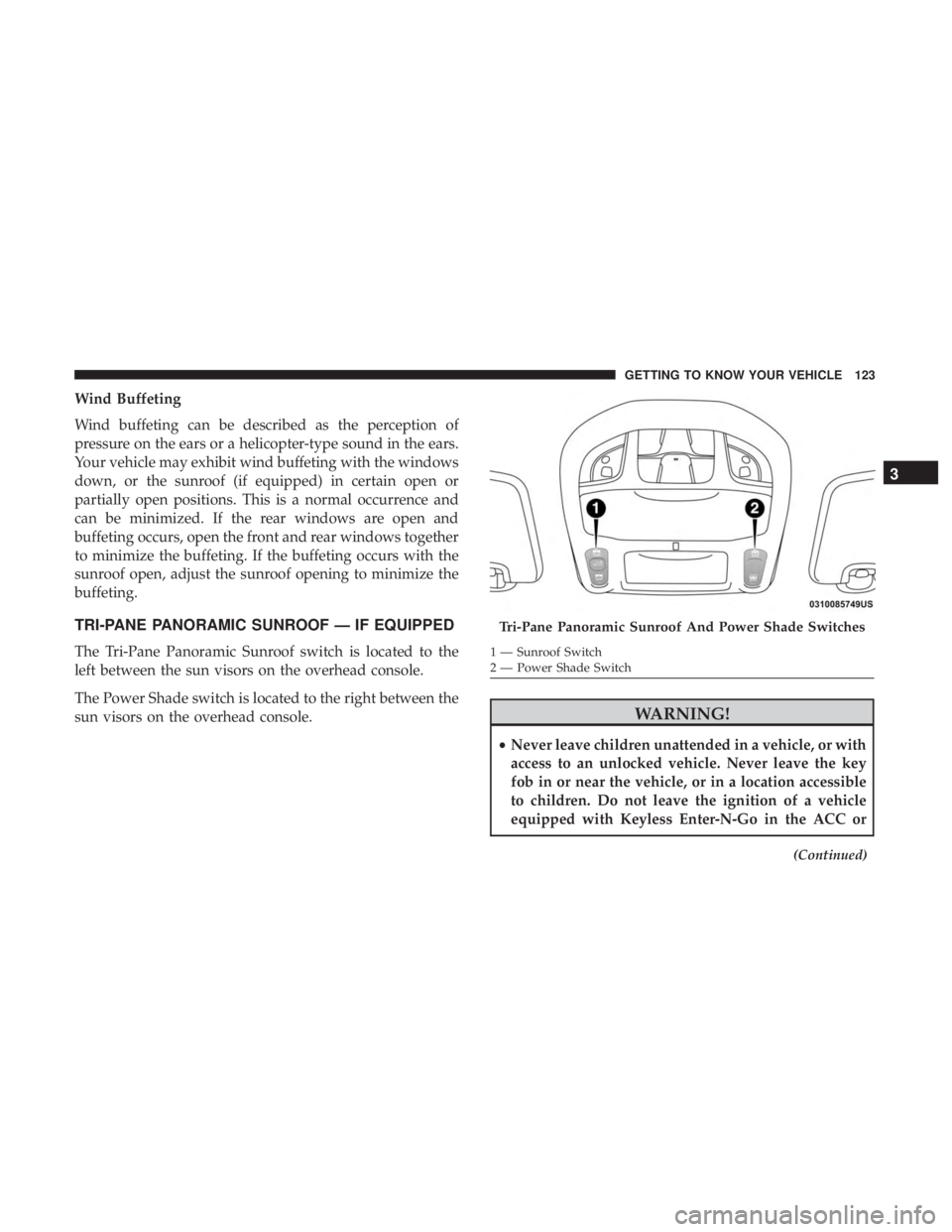
TRI-PANE PANORAMIC SUNROOF — IF EQUIPPED
The Tri-Pane Panoramic Sunroof switch is located to the
left between the sun visors on the overhead console.
The Power Shade switch is located to the right between the
sun visors on the overhead console.
WARNING!
•Never leave children unattended in a vehicle, or with
access to an unlocked vehicle. Never leave the key
fob in or near the vehicle, or in a location accessible
to children. Do not leave the ignition of a vehicle
equipped with Keyless Enter-N-Go in the ACC or
(Continued)
Tri-Pane Panoramic Sunroof And Power Shade Switches
1 — Sunroof Switch
2 — Power Shade Switch
3
GETTING TO KNOW YOUR VEHICLE 123
Page 127 of 614
Closing Sunroof
Express Mode
Push the switch forward and release it within one second
and the sunroof will close automatically from any position.
The sunroof will close fully and stop automatically. This is
called “Express Close.” During Express Close operation,
any other actuation of the switch will stop the sunroof.
Manual Mode
To close the sunroof, push and hold the switch in the
forward position. Any release of the switch will stop the
movement and the sunroof will remain in a partially closed
condition until the sunroof switch is pushed again.
Wind Buffeting
Wind buffeting can be described as the perception of
pressure on the ears or a helicopter-type sound in the ears.
Your vehicle may exhibit wind buffeting with the windows
down, or the sunroof (if equipped) in certain open or
partially open positions. This is a normal occurrence and
can be minimized. If the buffeting occurs with the rear
windows open, open the front and rear windows together
to minimize the buffeting. If the buffeting occurs with the
sunroof open, adjust the sunroof opening to minimize the
buffeting or open any window.
Power Sun Shade — If Equipped
Opening Power Shade — Express Mode
Push the shade switch rearward and release it within one
second and the shade will open automatically from any
position. The shade will open and stop automatically at the
half-open position. Push the shade switch rearward again
and release it within one second and the shade will open
automatically to the full-open position. This is called
“Express Open”. During Express Open operation, any
other actuation of the shade switch will stop the shade.
Opening Power Shade — Manual Mode
To open the shade, push and hold the switch rearward. The
shade will open and stop automatically at the half-open
position. Push and hold the shade switch rearward again
and the shade will open automatically to the full-open
position. Any release of the switch will stop the movement
and the shade will remain in a partially opened condition
until the switch is pushed again.
Closing Power Shade — Express Mode
Push the switch forward and release it within one second
and the shade will close automatically from any position. If
the sunroof is completely closed the shade will close fully
3
GETTING TO KNOW YOUR VEHICLE 125
Page 132 of 614
Closing
To Close The Liftgate
Grasp the liftgate closing handle and initiate lowering the
liftgate. Release the handle when the liftgate takes over the
closing effort.
To Lock The Vehicle
With a valid Passive Entry key fob within 5 ft (1.5 m) of the
liftgate, pushing the passive entry lock button located to
the right of the outside handle will lock the vehicle.
WARNING!
•Driving with the liftgate open can allow poisonous
exhaust gases into your vehicle. You and your pas-
sengers could be injured by these fumes. Keep the
liftgate closed when you are operating the vehicle.
• If you are required to drive with the liftgate open,
make sure that all windows are closed, and the
climate control blower switch is set at high speed. Do
not use the recirculation mode.
Power Liftgate — If Equipped
The power liftgate may be opened or closed in several
ways:
• Overhead console liftgate button
• Key fob
• Outside handle (opens liftgate only)
• Button just inside the liftgate on the upper left trim
(when liftgate is open)
• Hands-Free Liftgate (opens liftgate only) — If Equipped
Using the above ways:
• When the liftgate is fully closed, the liftgate will open
• When the liftgate is fully open, the liftgate will close
• When the liftgate is moving, the liftgate will reverse
Push the Power Liftgate button on the Overhead Console
to open or close the liftgate.
Push the liftgate button on the key fob twice within five
seconds to open or close the liftgate.
130 GETTING TO KNOW YOUR VEHICLE
Page 135 of 614
NOTE:To open the Hands-Free Liftgate requires a valid
Passive Entry key fob within 5 ft (1.5 m) of the door handle.
If a valid Passive Entry key fob is not within 5 ft (1.5 m), the
liftgate will not respond to any kicks.
CAUTION!
The Hands-Free Liftgate feature may be turned on or
off in Uconnect Settings. Refer to “Uconnect Settings”
in “Multimedia” for further information. The Hands-
Free Liftgate feature should be turned off during
Jacking, Tire Changing, and Vehicle Service.
NOTE:
• The Hands-Free Liftgate will only operate when the
transmission is in Park.
• If anything obstructs the Hands-Free liftgate while it is
opening, the liftgate will automatically reverse to the
closed position, provided it meets sufficient resistance.
• There are pinch sensors attached to the side of the
liftgate opening. Light pressure anywhere along these
strips will cause the liftgate to return to the open
position. •
If the power liftgate encounters multiple obstructions
within the same cycle, the system will automatically
stop. If this occurs, the liftgate must be operated manu-
ally.
• The power liftgate will release, but not power open, in
temperatures below 12° F (24° C). Be sure to remove
any buildup of snow or ice from the liftgate before
opening the liftgate.
• If the liftgate is left open for an extended period of time,
the liftgate may need to be closed manually to reset
power liftgate functionality.
WARNING!
• Driving with the liftgate open can allow poisonous
exhaust gases into your vehicle. You and your pas-
sengers could be injured by these fumes. Keep the
liftgate closed when you are operating the vehicle.
• If you are required to drive with the liftgate open,
make sure that all windows are closed, and the
climate control blower switch is set at high speed. Do
not use the recirculation mode.
3
GETTING TO KNOW YOUR VEHICLE 133
Page 213 of 614
will no longer display, and a pressure value will display in
place of the dashes. A system fault can occur due to any of
the following:
•Jamming due to electronic devices or driving next to
facilities emitting the same radio frequencies as the
TPMS sensors.
• Installing some form of aftermarket window tinting that
affects radio wave signals.
• Lots of snow or ice around the wheels or wheel hous-
ings.
• Using tire chains on the vehicle.
• Using wheels/tires not equipped with TPMS sensors.
Vehicles With Compact Spare — If Equipped
1. The compact spare tire does not have a tire pressure monitoring sensor. Therefore, the TPMS will not moni-
tor the pressure in the compact spare tire.
2. If you install the compact spare tire in place of a road tire that has a pressure below the low-pressure warning
limit, upon the next ignition cycle, the “TPM Telltale
Light” will remain on and a chime will sound. In
addition, the graphic in the instrument cluster will still
display a different color pressure value. 3. After driving the vehicle for up to 20 minutes above
15 mph (24 km/h), the “TPM Telltale Light” will flash
on and off for 75 seconds and then remain on solid. In
addition, the instrument cluster will display a “SER-
VICE TPM SYSTEM” message for five seconds and then
display dashes (- -) in place of the pressure value.
4. For each subsequent ignition cycle, a chime will sound, the “TPM Telltale Light” will flash on and off for
75 seconds and then remain on solid, and the instrument
cluster will display a “SERVICE TPM SYSTEM” mes-
sage for five seconds and then display dashes (- -) in
place of the pressure value.
5. Once you repair or replace the original road tire and reinstall it on the vehicle in place of the compact spare,
the TPMS will update automatically. In addition, the
“TPM Telltale Light” will turn off and the graphic in the
instrument cluster will display a new pressure value
instead of dashes (- -), as long as no tire pressure is
below the low-pressure warning limit in any of the four
active road tires. The vehicle may need to be driven for
up to 20 minutes above 15 mph (24 km/h) in order for
the TPMS to receive this information.
5
SAFETY 211
Page 215 of 614
OCCUPANT RESTRAINT SYSTEMS
Some of the most important safety features in your vehicle
are the restraint systems:
Occupant Restraint Systems Features
•Seat Belt Systems
• Supplemental Restraint Systems (SRS) Air Bags
• Child Restraints
Some of the safety features described in this section may be
standard equipment on some models, or may be optional
equipment on others. If you are not sure, ask your autho-
rized dealer.
Important Safety Precautions
Please pay close attention to the information in this section.
It tells you how to use your restraint system properly, to
keep you and your passengers as safe as possible.
Here are some simple steps you can take to minimize the
risk of harm from a deploying air bag:
1. Children 12 years old and under should always ride buckled up in a vehicle with a rear seat.
2. If a child from 2 to 12 years old (not in a rear-facing child restraint) must ride in the front passenger seat, move the seat as far back as possible and use the proper child
restraint (refer to “Child Restraints” in this section for
further information).
3. Children that are not big enough to wear the vehicle seat belt properly (refer to “Child Restraints” in this section
for further information) should be secured in a vehicle
with a rear seat in child restraints or belt-positioning
booster seats. Older children who do not use child
restraints or belt-positioning booster seats should ride
properly buckled up in a vehicle with a rear seat.
4. Never allow children to slide the shoulder belt behind them or under their arm.
5. You should read the instructions provided with your child restraint to make sure that you are using it
properly.
6. All occupants should always wear their lap and shoul- der belts properly.
7. The driver and front passenger seats should be moved back as far as practical to allow the front air bags room
to inflate.
8. Do not lean against the door or window. If your vehicle has side air bags, and deployment occurs, the side air
5
SAFETY 213
Page 243 of 614
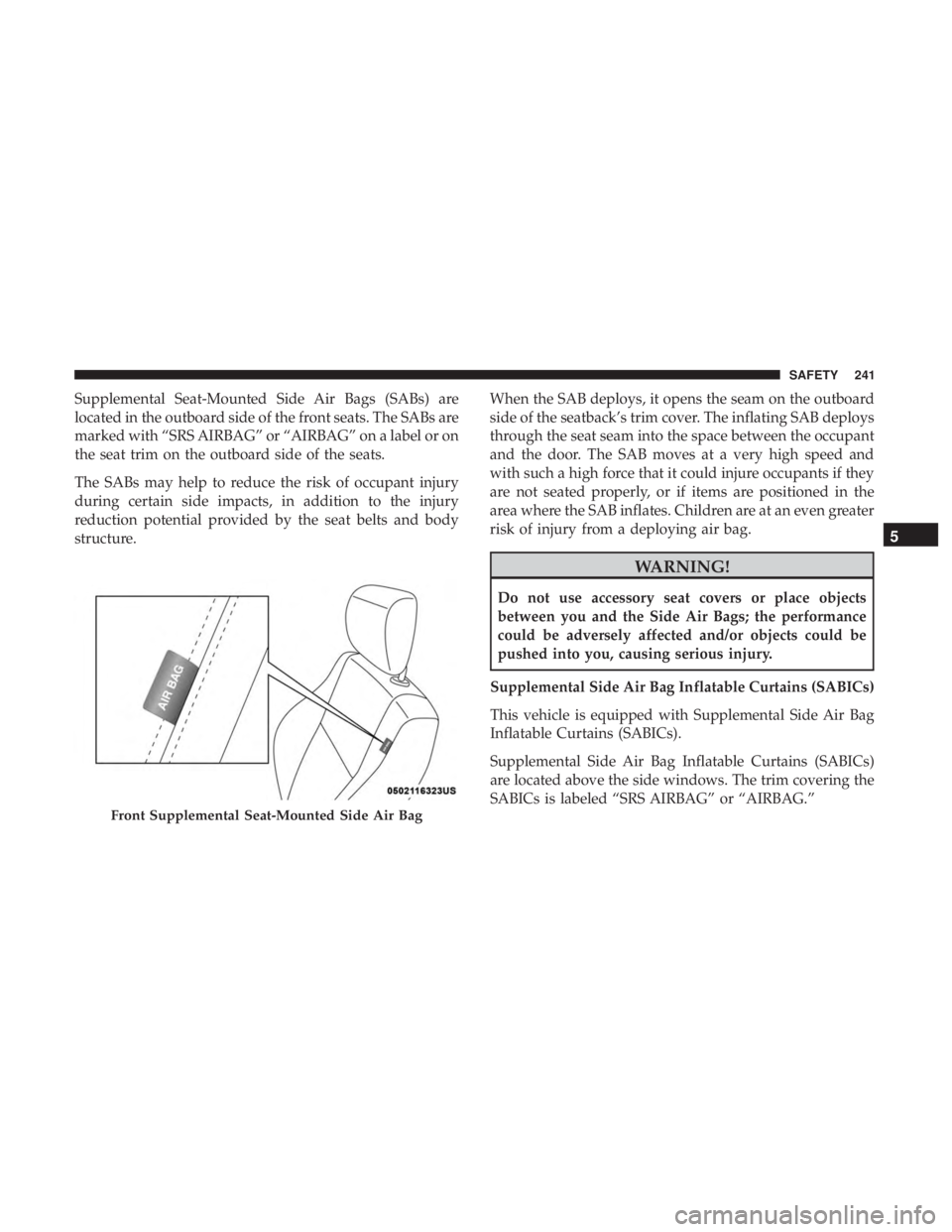
Supplemental Seat-Mounted Side Air Bags (SABs) are
located in the outboard side of the front seats. The SABs are
marked with “SRS AIRBAG” or “AIRBAG” on a label or on
the seat trim on the outboard side of the seats.
The SABs may help to reduce the risk of occupant injury
during certain side impacts, in addition to the injury
reduction potential provided by the seat belts and body
structure.When the SAB deploys, it opens the seam on the outboard
side of the seatback’s trim cover. The inflating SAB deploys
through the seat seam into the space between the occupant
and the door. The SAB moves at a very high speed and
with such a high force that it could injure occupants if they
are not seated properly, or if items are positioned in the
area where the SAB inflates. Children are at an even greater
risk of injury from a deploying air bag.
WARNING!
Do not use accessory seat covers or place objects
between you and the Side Air Bags; the performance
could be adversely affected and/or objects could be
pushed into you, causing serious injury.
Supplemental Side Air Bag Inflatable Curtains (SABICs)
This vehicle is equipped with Supplemental Side Air Bag
Inflatable Curtains (SABICs).
Supplemental Side Air Bag Inflatable Curtains (SABICs)
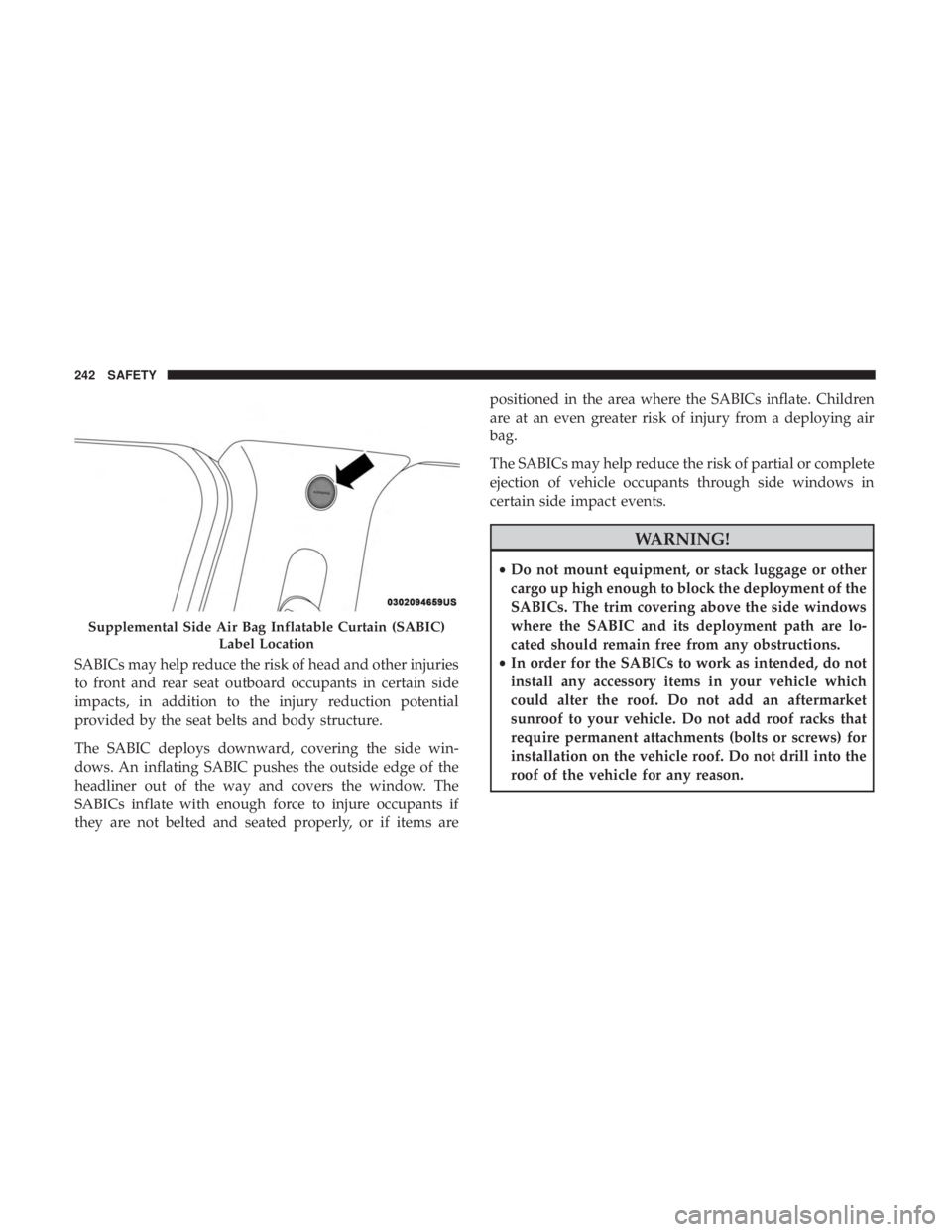
are located above the side windows. The trim covering the
SABICs is labeled “SRS AIRBAG” or “AIRBAG.”
Front Supplemental Seat-Mounted Side Air Bag
5
SAFETY 241
Page 244 of 614
SABICs may help reduce the risk of head and other injuries
to front and rear seat outboard occupants in certain side
impacts, in addition to the injury reduction potential
provided by the seat belts and body structure.
The SABIC deploys downward, covering the side win-
dows. An inflating SABIC pushes the outside edge of the
headliner out of the way and covers the window. The
SABICs inflate with enough force to injure occupants if
they are not belted and seated properly, or if items arepositioned in the area where the SABICs inflate. Children
are at an even greater risk of injury from a deploying air
bag.
The SABICs may help reduce the risk of partial or complete
ejection of vehicle occupants through side windows in
certain side impact events.
WARNING!
•
Do not mount equipment, or stack luggage or other
cargo up high enough to block the deployment of the
SABICs. The trim covering above the side windows
where the SABIC and its deployment path are lo-
cated should remain free from any obstructions.
• In order for the SABICs to work as intended, do not
install any accessory items in your vehicle which
could alter the roof. Do not add an aftermarket
sunroof to your vehicle. Do not add roof racks that
require permanent attachments (bolts or screws) for
installation on the vehicle roof. Do not drill into the
roof of the vehicle for any reason.
Supplemental Side Air Bag Inflatable Curtain (SABIC)
Label Location
242 SAFETY
Page 245 of 614
Side Impacts
The Side Air Bags are designed to activate in certain side
impacts. The Occupant Restraint Controller (ORC) deter-
mines whether the deployment of the Side Air Bags in a
particular impact event is appropriate, based on the sever-
ity and type of collision. The side impact sensors aid the
ORC in determining the appropriate response to impact
events. The system is calibrated to deploy the Side Air Bags
on the impact side of the vehicle during impacts that
require Side Air Bag occupant protection. In side impacts,
the Side Air Bags deploy independently; a left side impact
deploys the left Side Air Bags only and a right-side impact
deploys the right Side Air Bags only. Vehicle damage by
itself is not a good indicator of whether or not Side Air
Bags should have deployed.
The Side Air Bags will not deploy in all side collisions,
including some collisions at certain angles, or some side
collisions that do not impact the area of the passenger
compartment. The Side Air Bags may deploy during angled
or offset frontal collisions where the front air bags deploy.
Side Air Bags are a supplement to the seat belt restraint
system. Side Air Bags deploy in less time than it takes to
blink your eyes.
WARNING!
•Occupants, including children, who are up against or
very close to Side Air Bags can be seriously injured
or killed. Occupants, including children, should
never lean on or sleep against the door, side win-
dows, or area where the side air bags inflate, even if
they are in an infant or child restraint.
• Seat belts (and child restraints where appropriate)
are necessary for your protection in all collisions.
They also help keep you in position, away from an
inflating Side Air Bag. To get the best protection
from the Side Air Bags, occupants must wear their
seat belts properly and sit upright with their backs
against the seats. Children must be properly re-
strained in a child restraint or booster seat that is
appropriate for the size of the child.
WARNING!
• Side Air Bags need room to inflate. Do not lean
against the door or window. Sit upright in the center
of the seat.
(Continued)
5
SAFETY 243
Page 246 of 614
WARNING!(Continued)
•Being too close to the Side Air Bags during deploy-
ment could cause you to be severely injured or
killed.
• Relying on the Side Air Bags alone could lead to
more severe injuries in a collision. The Side Air Bags
work with your seat belt to restrain you properly. In
some collisions, Side Air Bags won’t deploy at all.
Always wear your seat belt even though you have
Side Air Bags.
NOTE: Air bag covers may not be obvious in the interior
trim, but they will open during air bag deployment.
Rollover Events
Side Air Bags are designed to activate in certain rollover
events. The ORC determines whether the deployment of
the Side Air Bags in a particular rollover event is appro-
priate, based on the severity and type of collision. Vehicle
damage by itself is not a good indicator of whether or not
Side Air Bags should have deployed.
The Side Air Bags will not deploy in all rollover events. The
rollover sensing system determines if a rollover event may
be in progress and whether deployment is appropriate. In the event the vehicle experiences a rollover or near rollover
event, and deployment of the Side Air Bags is appropriate,
the rollover sensing system will also deploy the seat belt
pretensioners on both sides of the vehicle.
The SABICs may help reduce the risk of partial or complete
ejection of vehicle occupants through side windows in
certain rollover or side impact events.
Air Bag System Components
NOTE:
The Occupant Restraint Controller (ORC) monitors
the internal circuits and interconnecting wiring associated
with electrical Air Bag System Components listed below:
• Occupant Restraint Controller (ORC)
• Air Bag Warning Light
•Steering Wheel and Column
• Instrument Panel
• Knee Impact Bolsters
• Driver and Front Passenger Air Bags
• Seat Belt Buckle Switch
• Supplemental Side Air Bags
• Supplemental Knee Air Bags
244 SAFETY