window CHRYSLER SEBRING COUPE 2005 2.G User Guide
[x] Cancel search | Manufacturer: CHRYSLER, Model Year: 2005, Model line: SEBRING COUPE, Model: CHRYSLER SEBRING COUPE 2005 2.GPages: 394, PDF Size: 2.47 MB
Page 98 of 394
WARNING!
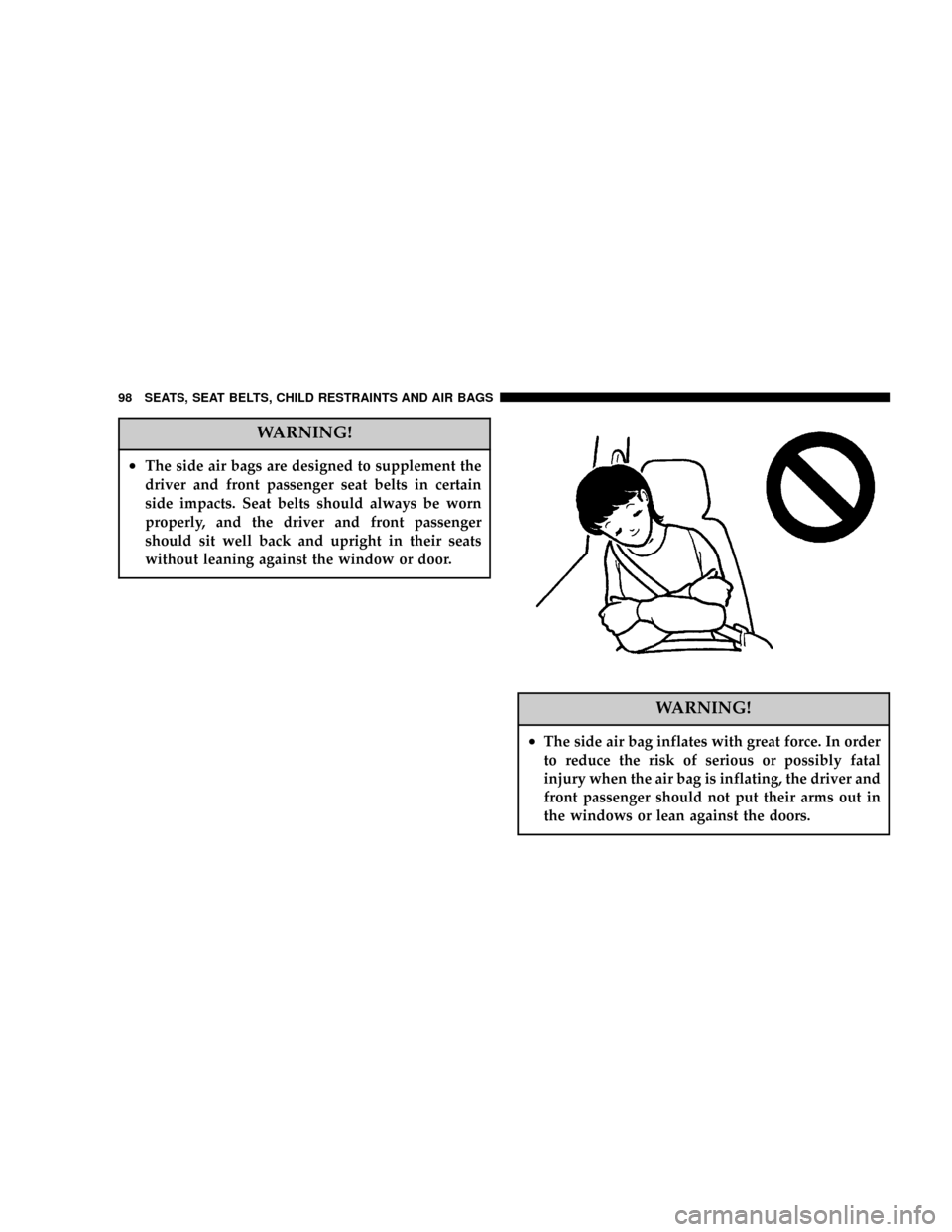
²The side air bags are designed to supplement the
driver and front passenger seat belts in certain
side impacts. Seat belts should always be worn
properly, and the driver and front passenger
should sit well back and upright in their seats
without leaning against the window or door.
WARNING!
²The side air bag inflates with great force. In order
to reduce the risk of serious or possibly fatal
injury when the air bag is inflating, the driver and
front passenger should not put their arms out in
the windows or lean against the doors.
98 SEATS, SEAT BELTS, CHILD RESTRAINTS AND AIR BAGS
Page 104 of 394

NChanging the setting for warning operation . . . 118
NAutomatic transaxle indicator
(if so equipped).......................119
NTraction Control System warning light
(if so equipped).......................119
NWasher fluid level indicator..............119
mCombination headlights, dimmer and
turn signal lever
.......................120
NHeadlights..........................120
NLight auto-cutout feature
(headlights, fog lights, etc.)...............123
NWhen you want to keep the lights on
(time delay)..........................120
NHeadlight reminder chime...............121
NHeadlight flasher (high/low beam).........121
NDimmer (high/low beam change)..........122
NTurn signals..........................122
mFog light switch........................123
mHazard warning flasher switch............124
mInstrument panel light dimmer control.......125
mElectric rear window defroster.............125
mWindshield wipers......................126
mIntermittent wipers.....................127
mWindshield washer.....................128
mPrecautions to observe when using wipers
and washers
..........................128
mDome light...........................129
mLights (dome lights, etc.) auto-cutout
function
.............................130
mReading lights.........................131
mRear personal lights.....................132
mHorn switch..........................132
mGarage door opener (if so equipped)........132
NTraining the Universal Transceiver..........133
104 INSTRUMENTS AND CONTROLS
Page 125 of 394
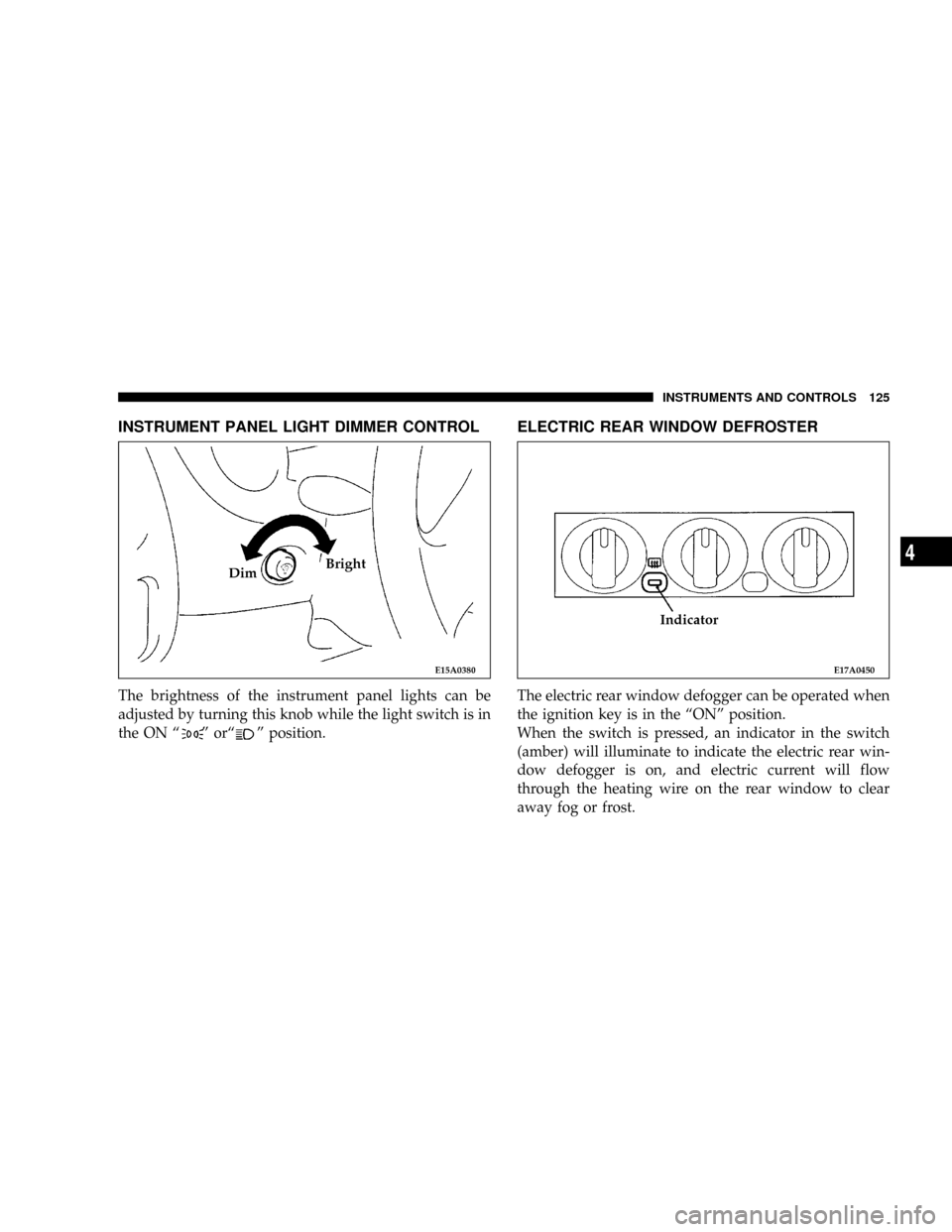
INSTRUMENT PANEL LIGHT DIMMER CONTROL
The brightness of the instrument panel lights can be
adjusted by turning this knob while the light switch is in
the ON ª
º orªº position.
ELECTRIC REAR WINDOW DEFROSTER
The electric rear window defogger can be operated when
the ignition key is in the ªONº position.
When the switch is pressed, an indicator in the switch
(amber) will illuminate to indicate the electric rear win-
dow defogger is on, and electric current will flow
through the heating wire on the rear window to clear
away fog or frost.
E15A0380
DimBright
E17A0450
Indicator
INSTRUMENTS AND CONTROLS 125
4
Page 126 of 394
It will turn off automatically in about 17 minutes.
To turn off the defogger before 17 minutes has lapsed,
push the switch again.
CAUTION!
²The rear window defroster is not designed to melt
snow. Remove snow before use of the rear win-
dow defroster.
²Use the rear window defroster only after the
engine has started and is running.
Be sure to turn the defroster switch off immedi-
ately after the window is clear in order to prevent
excessive battery discharge.
²Do not place stickers, tape or other items that are
attached with adhesive over the grid wires on the
rear window.
²When cleaning the inside rear window from in-
side, use a soft cloth and wipe lightly over the
heating wires.
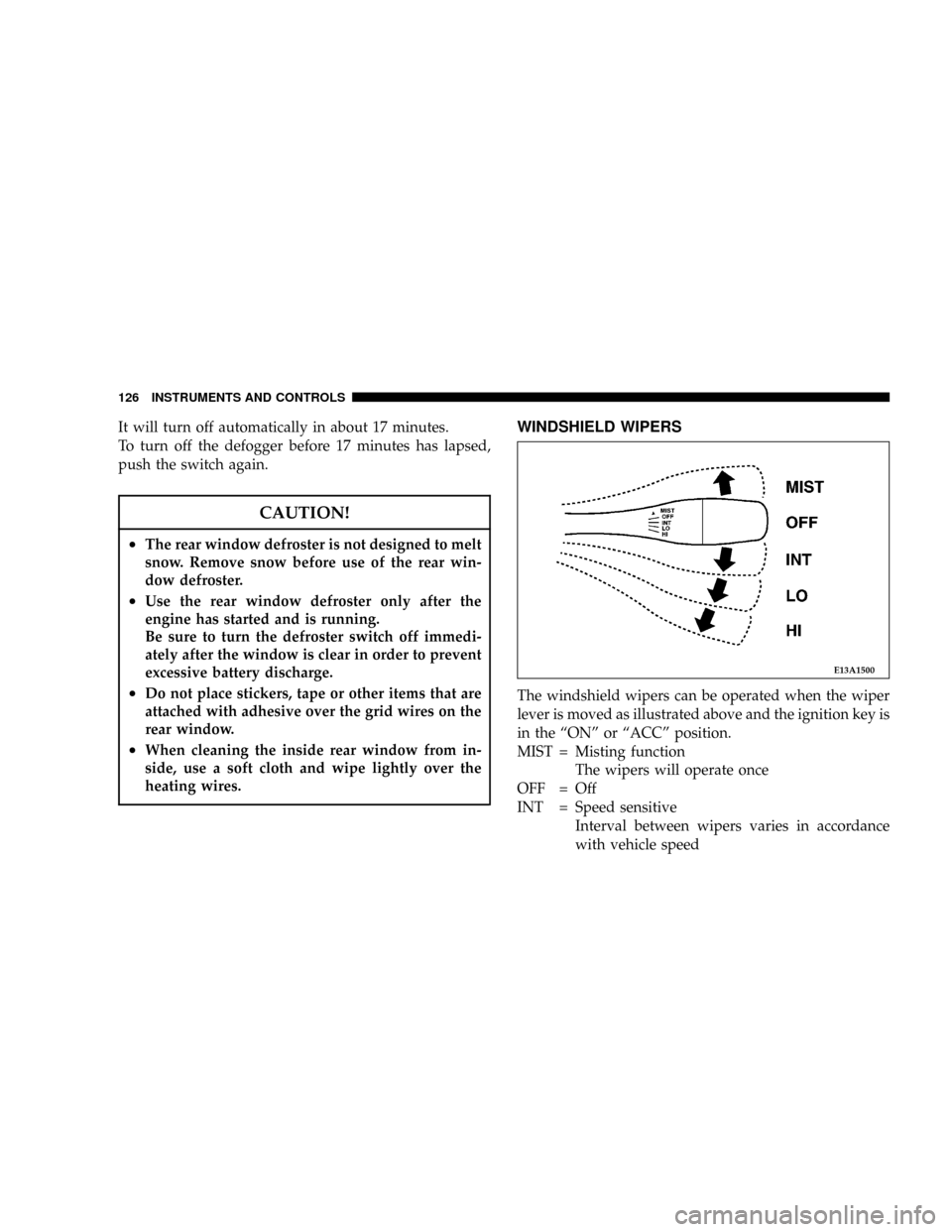
WINDSHIELD WIPERS
The windshield wipers can be operated when the wiper
lever is moved as illustrated above and the ignition key is
in the ªONº or ªACCº position.
MIST = Misting function
The wipers will operate once
OFF = Off
INT = Speed sensitive
Interval between wipers varies in accordance
with vehicle speed
E13A1500
126 INSTRUMENTS AND CONTROLS
Page 171 of 394
You should always apply the parking brake before leav-
ing the vehicle.
WARNING!
²Leaving children in a vehicle unattended is dan-
gerous for a number of reasons. A child or others
could be injured. Children should be warned not
to touch the parking brake or the gear selector.
Don't leave the keys in the ignition. A child could
operate power windows, other controls, or move
the vehicle.
²Be sure the parking brake is fully disengaged
before driving; failure to do so can lead to brake
failure and an accident.
BRAKE PEDAL
Excessive use of the brake can cause fading, resulting in
poor brake response and premature wear of brake lin-
ings.
When driving down a long or steep grade, use engine
braking by shifting the transaxle into a lower gear
(manual transaxle and Autostick A/T) or ª3º (THIRD) or
ª2º (SECOND) or ªLº (LOW) position (except Autostick
A/T).
WARNING!
Do not leave any objects on the floor near the brake
pedal or permit a floor mat to interfere with the
brake pedal. Doing so could prevent proper depres-
sion of the pedal. Make sure that the pedal can be
operated freely at all times.
STARTING AND DRIVING 171
5
Page 177 of 394
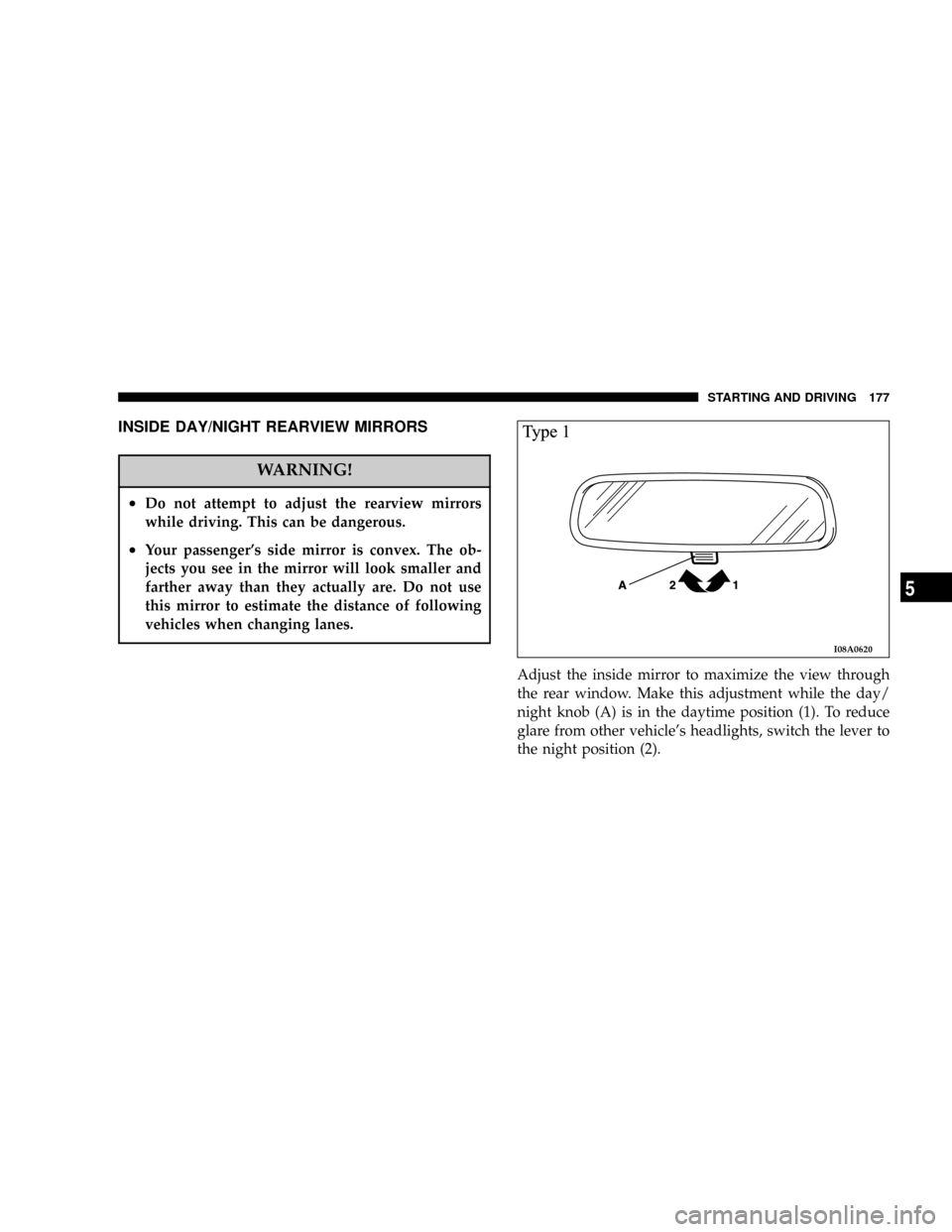
INSIDE DAY/NIGHT REARVIEW MIRRORS
WARNING!
²Do not attempt to adjust the rearview mirrors
while driving. This can be dangerous.
²Your passenger's side mirror is convex. The ob-
jects you see in the mirror will look smaller and
farther away than they actually are. Do not use
this mirror to estimate the distance of following
vehicles when changing lanes.
Adjust the inside mirror to maximize the view through
the rear window. Make this adjustment while the day/
night knob (A) is in the daytime position (1). To reduce
glare from other vehicle's headlights, switch the lever to
the night position (2).
I08A0620
STARTING AND DRIVING 177
5
Page 208 of 394

mVents................................235
NAir flow rate and direction adjustments......235
mAir conditioning.......................236
NControl panel........................236
NChanging the blower speed...............237
NChanging the temperature...............237
NChanging mode selection................238
NChanging air selection..................242
NAir conditioning switch.................243NHow to use the controls.................244
NDefrosting or defogging of the windshield
and door windows.....................244
NImportant operation tips for air conditioning . . 247
NAir conditioning system refrigerant and
lubricant recommendations...............247
NDuring a long period of disuse............248
mInstallation of accessories.................248
208 FOR PLEASANT DRIVING
Page 209 of 394
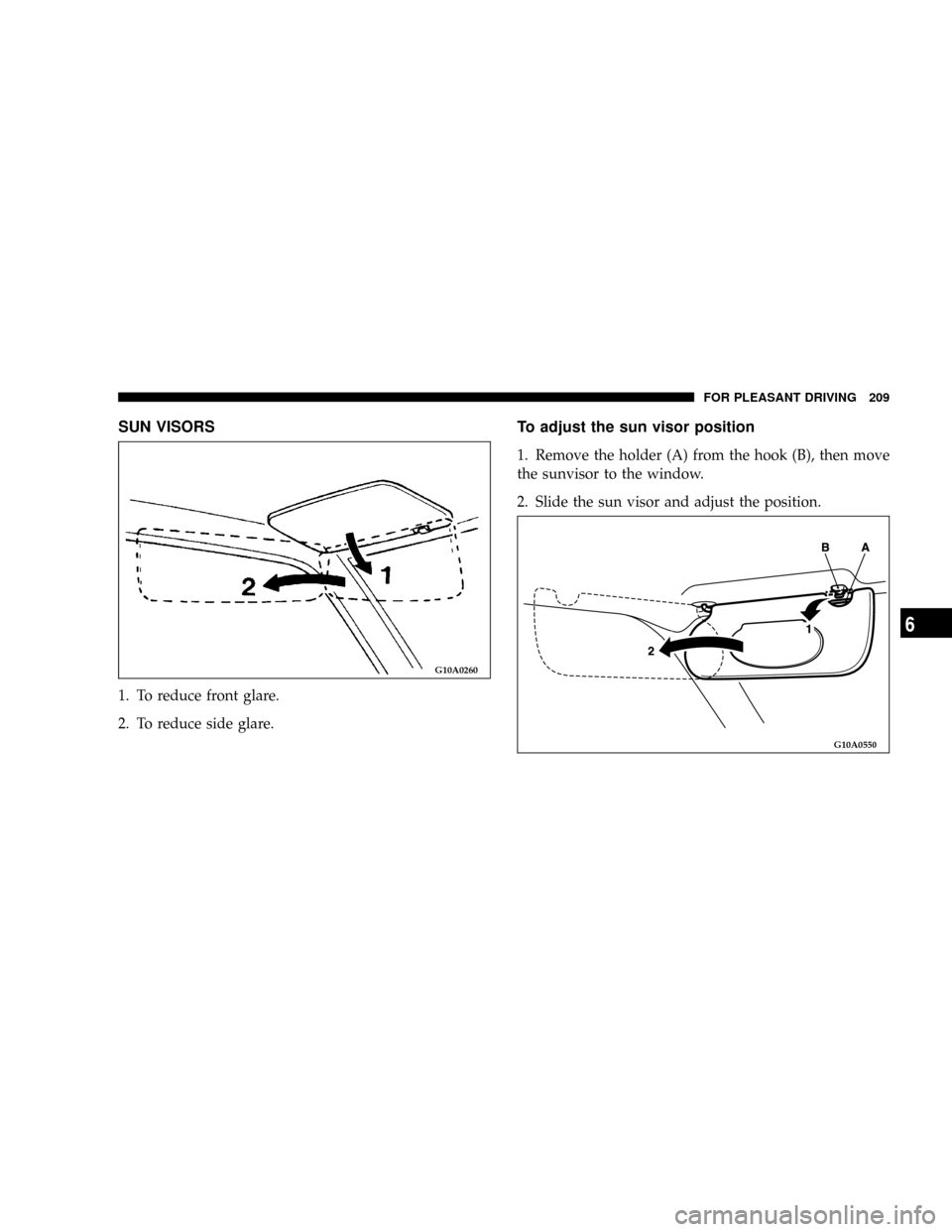
SUN VISORS
1. To reduce front glare.
2. To reduce side glare.
To adjust the sun visor position
1. Remove the holder (A) from the hook (B), then move
the sunvisor to the window.
2. Slide the sun visor and adjust the position.
G10A0260
G10A0550
FOR PLEASANT DRIVING 209
6
Page 221 of 394

To stop the search, press SCAN a second time.
To Set The Radio Pushbutton Memory
When you are receiving a station that you wish to
commit to push-button memory, press the SET button.
SET 1 will show in the display window. Select the
push-button you wish to lock onto this station and press
and release that button. If a station is not selected within
5 seconds after pressing the SET button, the station will
continue to play but will not be locked into push-button
memory.
You may add a second station to each push-button by
repeating the above procedure with this exception: Press
the SET button twice and SET 2 will show in the display
window. Each button can be set for SET 1 and SET 2 in
both AM and FM. This allows a total of 10 AM and 10 FM
stations to be locked into memory. You can recall the
stations stored in SET 2 memory by pressing the push-
button twice.
General Information
This radio complies with Part 15 of FCC rules and with
RS-210 of Industry Canada. Operation is subject to the
following conditions:1. This device may not cause harmful interference,
2. This device must accept any interference received,
including interference that may cause undesired opera-
tion.
NOTE:Changes or modifications not expressively ap-
proved by the party responsible for compliance could
void the user's authority to operate the equipment.
To Change From Clock To Radio Mode
Press the Time button to change the display between
radio frequency and time.
Tape Player Operation
Insert the cassette with the exposed tape side toward the
right and the mechanical action of the player will gently
pull the cassette into the play position.
NOTE:When subjected to extremely cold temperatures,
the tape mechanism may require a few minutes to warm
up for proper operation. Sometimes poor playback may
be experienced due to a defective cassette tape. Clean and
demagnetize the tape heads at least twice a year.
FOR PLEASANT DRIVING 221
6
Page 222 of 394

Seek Button
Press the SEEK button up for the next selection on the
tape and down to return to the beginning of the current
selection.
Press the SEEK button up or down to move the track
number to skip forward or backward 1 to 6 selections.
Press the SEEK button once to move 1 selection, twice to
move 2 selections, etc.
Fast Forward (FF)
Press the FF button up momentarily to advance the tape
in the direction that it is playing. The tape will advance
until the button is pressed again or the end of the tape is
reached. At the end of the tape, the tape will play in the
opposite direction.
Rewind (RW)
Press the RW button momentarily to reverse the tape
direction. The tape will reverse until the button is pressed
again or until the end of the tape is reached. At the end of
the tape, the tape will play in the opposite direction.
Tape Eject
Press the EJT Tape button and the cassette will disengage
and eject from the radio.
Scan Button
Press this button to play 10 seconds of each selection.
Press the scan button a second time to cancel the feature.
Changing Tape Direction
If you wish to change the direction of tape travel (side
being played), press the TIME button. The lighted arrow
in the display window will show the new direction.
Metal Tape Selection
If a standard metal tape is inserted into the player, the
player will automatically select the correct equalization
and the 70 symbol will appear in the display window.
Pinch Roller Release
If ignition power or the radio ON/OFF switch are turned
off, the pinch roller will automatically retract to protect
the tape from any damage. When power is restored to the
tape player, the pinch roller will automatically reengage
and the tape will resume play.
222 FOR PLEASANT DRIVING