mirror CHRYSLER TOWN AND COUNTRY 2004 4.G Owners Manual
[x] Cancel search | Manufacturer: CHRYSLER, Model Year: 2004, Model line: TOWN AND COUNTRY, Model: CHRYSLER TOWN AND COUNTRY 2004 4.GPages: 401
Page 77 of 401

UNDERSTANDING THE FEATURES OF YOUR VEHICLE
CONTENTS
mMirrors...............................81
NInside Day/Night Mirror.................81
NAutomatic Dimming Mirror Ð If Equipped....82
NDriver's Side Outside Mirror Auto Dimmer Ð
If Equipped..........................82
NExterior Mirrors Folding Feature...........82
NOutside Mirror Ð Driver's Side............83
NOutside Mirror Ð Passenger's Side..........83
NPower Remote-Control Mirrors.............84NHeated Remote Control Mirrors Ð
If Equipped..........................84
NIlluminated Vanity Mirrors Ð If Equipped....84
mSeats.................................85
NManual Front Seat Adjuster...............85
N8±Way Driver's Power Seat Ð If Equipped....86
N4±Way Passenger's Power Seat Ð If Equipped . .86
NAdjustable Head Restraints Ð If Equipped....87
NHeated Seats Ð If Equipped..............88
3
Page 81 of 401

MIRRORS
Inside Day/Night Mirror
Adjust the mirror to center on the view through the rear
window. A two point pivot system allows for horizontal
and vertical adjustment of the mirror.Annoying headlight glare can be reduced by moving the
small control under the mirror to the night position
(toward rear of vehicle). The mirror should be adjusted
while set in the day position (toward windshield).
UNDERSTANDING THE FEATURES OF YOUR VEHICLE 81
3
Page 82 of 401
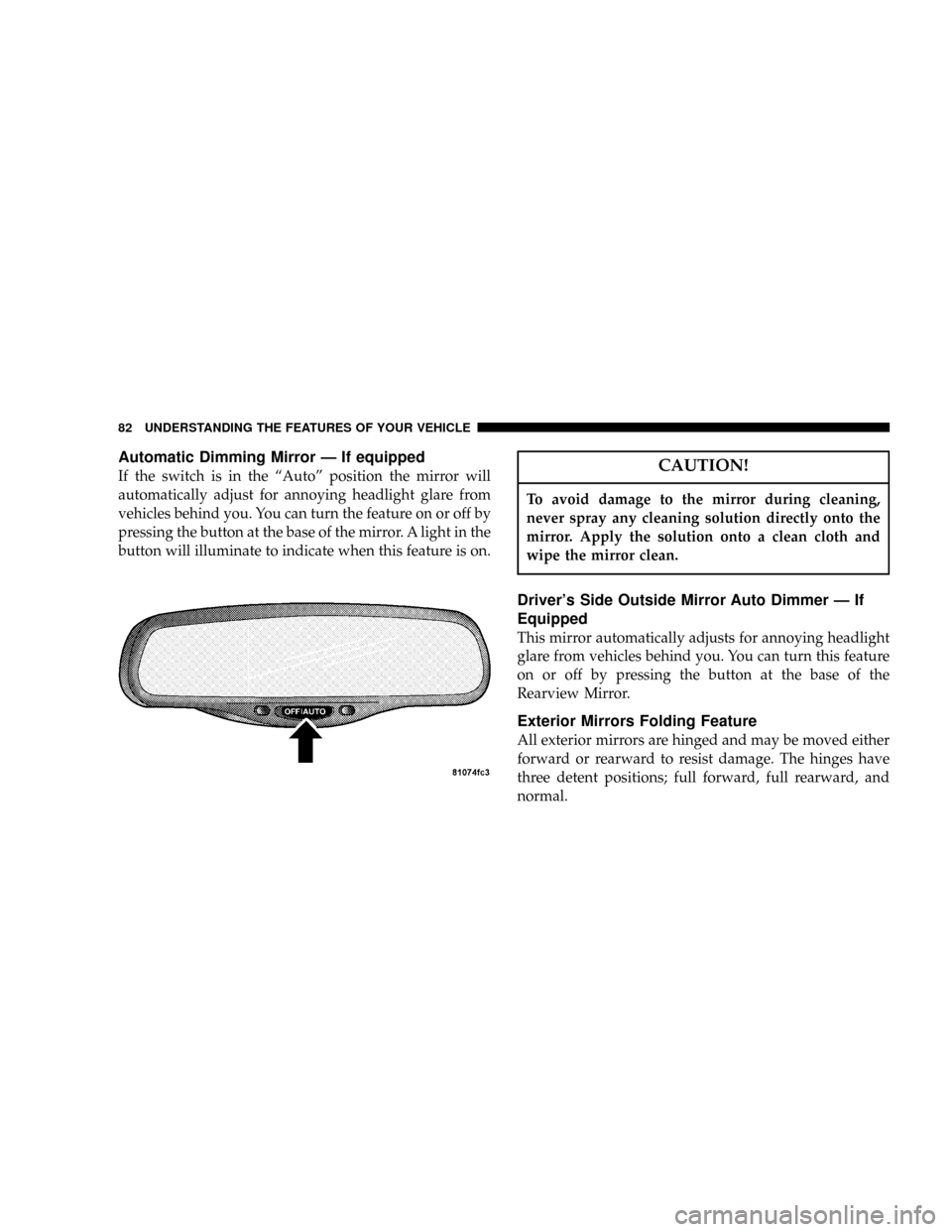
Automatic Dimming Mirror Ð If equipped
If the switch is in the ªAutoº position the mirror will
automatically adjust for annoying headlight glare from
vehicles behind you. You can turn the feature on or off by
pressing the button at the base of the mirror. A light in the
button will illuminate to indicate when this feature is on.CAUTION!
To avoid damage to the mirror during cleaning,
never spray any cleaning solution directly onto the
mirror. Apply the solution onto a clean cloth and
wipe the mirror clean.
Driver's Side Outside Mirror Auto Dimmer Ð If
Equipped
This mirror automatically adjusts for annoying headlight
glare from vehicles behind you. You can turn this feature
on or off by pressing the button at the base of the
Rearview Mirror.
Exterior Mirrors Folding Feature
All exterior mirrors are hinged and may be moved either
forward or rearward to resist damage. The hinges have
three detent positions; full forward, full rearward, and
normal.
82 UNDERSTANDING THE FEATURES OF YOUR VEHICLE
Page 83 of 401
Outside Mirror Ð Driver's Side
Adjust the outside mirror to center on the adjacent lane of
traffic, with a slight overlap of the view obtained on the
inside mirror.
Outside Mirror Ð Passenger's Side
Adjust the convex outside mirror so you can just see the
side of your vehicle in the portion of the mirror closest to
the vehicle. This type of mirror will give a much wider
view to the rear, and especially of the lane next to your
vehicle.
WARNING!
Vehicles and other objects seen in the right side
convex mirror will look smaller and farther away
than they really are. Relying too much on your right
side mirror could cause you to collide with another
vehicle or other object.
Use your inside mirror when judging the size or
distance of a vehicle seen in this convex mirror.
UNDERSTANDING THE FEATURES OF YOUR VEHICLE 83
3
Page 84 of 401

Power Remote-Control Mirrors
Use the mirror select switch, located on the instrument
panel to the left of the steering column, to adjust the view
obtained in the outside mirrors. Press the rocker switch to
the L or R for Left or Right mirror selection. Use the
center off position to guard against accidentally moving
a mirror position.Select a mirror and press one of the four arrows for the
direction you want the mirror to move.
Driver's power mirror preselected positions can be con-
trolled by the optional Memory Seat Feature. Refer to the
Memory Seat paragraph in section 3 of this manual.
Heated Remote Control Mirrors Ð If Equipped
These mirrors are heated to melt frost or ice. This feature
is activated whenever you turn on the Rear Window
Defrost.
Illuminated Vanity Mirrors Ð If Equipped
An illuminated vanity mirror is on the sun visor. To use
the mirror, rotate the sun visor down and swing the
mirror cover upward. The lights turn on automatically.
Closing the mirror cover turns off the lights.
Sun Visor Extension Ð If Equipped
The sun visor features a pull out extension for increased
coverage.
84 UNDERSTANDING THE FEATURES OF YOUR VEHICLE
Page 101 of 401
WARNING!
²Not all head restraints in this vehicle are the same.
Head restraints from one seating position should not
be removed and installed in any other seating posi-
tion. In a collision, serious injury or death may result
if the proper head restraint is not installed on each
seat.
²The cargo area in the rear of the vehicle should not
be used as a play area by children. They could be
seriously injured in a collision. Children should be
seated and using the proper restraint system.
²It is extremely dangerous to ride in a cargo area,
inside or outside of a vehicle. In a collision, people
riding in these areas are more likely to be seriously
injured or killed.
²Do not allow people to ride in any area of your
vehicle that is not equipped with seats and seat belts.
²Be sure everyone in your vehicle is in a seat and
using a seat belt properly.
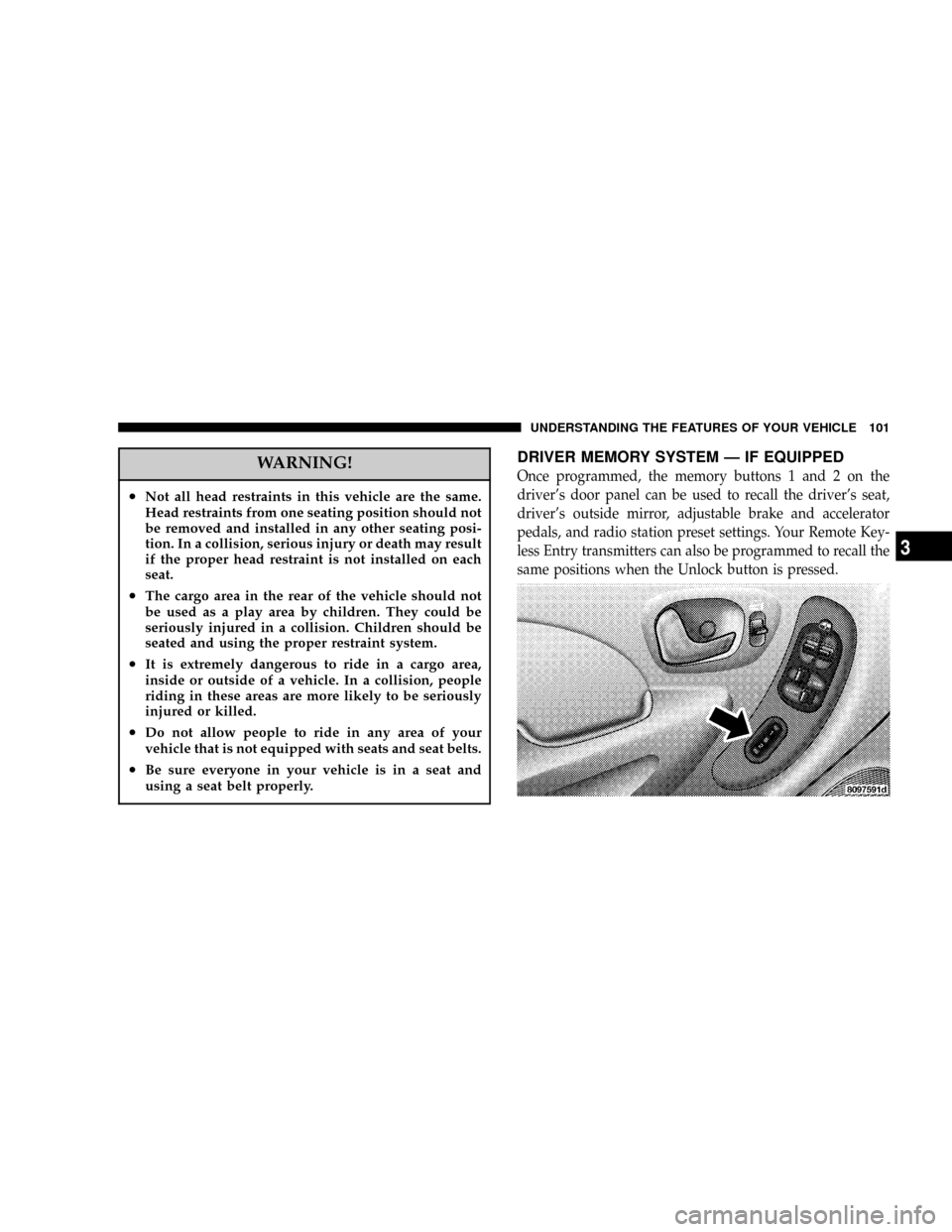
DRIVER MEMORY SYSTEM Ð IF EQUIPPED
Once programmed, the memory buttons 1 and 2 on the
driver's door panel can be used to recall the driver's seat,
driver's outside mirror, adjustable brake and accelerator
pedals, and radio station preset settings. Your Remote Key-
less Entry transmitters can also be programmed to recall the
same positions when the Unlock button is pressed.
UNDERSTANDING THE FEATURES OF YOUR VEHICLE 101
3
Page 102 of 401

Your vehicle may have been delivered with two Remote
Keyless Entry transmitters. One or both transmitters can
be linked to either memory position. The memory system
can accommodate up to four transmitters, each one
linked to either of the two memory positions.
Setting Memory Positions and Linking Remote
Keyless Entry Transmitter to Memory
NOTE:Each time the SET (S) button and a numbered
button (1 or 2) are pressed, you erase the memory settings
for that button and store a new one.
1. Insert the ignition key and turn the ignition switch to
the ON position.
2. Press the driver door memory button number 1 if you
are setting the memory for driver 1, or button number 2
if you are setting the memory for driver 2. The system
will recall any stored settings. Wait for the system to
complete the memory recall before continuing to step 3.3. Adjust the driver's seat, recliner, and driver's side
view mirror to the desired positions.
4. Adjust the brake and accelerator pedals to the desired
positions.
5. Turn on the radio and set the radio station presets (up
to 10 AM and 10 FM stations can be set).
6. Turn the ignition switch to the OFF position and
remove the key.
7. Press and release the SET (S) button located on the
driver's door. A chime will sound signaling that you are
in the memory set mode.
8. Within 5 seconds, press and release memory button 1
or 2 on the driver's door. A chime will sound signaling to
you that the driver memory has been set. The next step
must be performed within 5 seconds if you desire to also
use a Remote Keyless Entry transmitter to recall memory
positions.
102 UNDERSTANDING THE FEATURES OF YOUR VEHICLE
Page 103 of 401

9. Press and release the LOCK button on one of the
transmitters. A chime will sound signaling to you that the
transmitter has been successfully linked to memory.
10. Insert the ignition key and turn the ignition switch to
the ON position.
11. Select9Remote Linked to Memory9in the Electronic
Vehicle Information Center (EVIC) and enter9Ye s9or
select9Use Factory Settings9from the EVIC and enter
9Ye s9. Refer to the Customer Programmable features in
the Electronic Vehicle Information Center (EVIC) section
for more information.
12. Repeat the above steps to set the next memory
position using the other numbered memory button or to
link another Remote Keyless Entry transmitter to
memory.Memory Position Recall
NOTE:The vehicle must be in Park to recall memory
positions. If a recall is attempted when the vehicle is not
in Park, a message will be displayed in the Electronic
Vehicle Information Center (EVIC).
To recall the memory settings for driver one, press
memory button number 1 on the driver's door or the
Unlock button on the Remote Keyless Entry transmitter
linked to memory position 1.
To recall the memory setting for driver two, press
memory button number 2 on the driver's door or the
Unlock button on the Remote Keyless Entry transmitter
linked to memory position 2.
A recall can be cancelled by pressing any of the memory
buttons on the drivers door during a recall (S, 1, or 2).
When a recall is cancelled, the driver's seat, driver's
mirror, and the pedals stop moving. A delay of one
second will occur before another recall can be selected.
UNDERSTANDING THE FEATURES OF YOUR VEHICLE 103
3
Page 128 of 401

Remote Linked To Memory (Available with
Memory Seat and Pedals Only)
When this feature is selected, pressing the Unlock button
on any Remote Keyless Entry transmitter already linked
to memory will return the driver's seat, driver's outside
mirror, adjustable brake and accelerator pedals, and
radio station presets to their memory set positions.
If this feature is not selected, the driver's seat, driver's
mirror, adjustable pedals, and radio settings can only
return to their memory set positions using the memory
recall buttons (1or 2) on the driver's door panel.
Any transmitter linked to memory will remain linked,
but will not recall the memory positions. The transmitter
memory recall function will operate again when this
feature is selected. Refer to Driver Memory System for
more information. Pressing the9STEP9button when in
this mode will select between9Ye s9or9No9.
Sound Horn On Lock
When this feature is selected a short horn sound will
occur when the remote keyless entry ªLockº button is
pressed. This feature may be selected with or without the
flash lights on LOCK/UNLOCK feature. Pressing the
ªSTEPº button when in this display will select ªYesº or
ªNo.º
Flash Lights On Lock/Unlock?
When this feature is selected, the front and rear turn
signals will flash when the doors are locked or unlocked
using the remote keyless entry transmitter. This feature
may be selected with or without the sound horn on lock
feature selected. Pressing the ªSTEPº button when in this
display will select ªYesº or ªNo.º
128 UNDERSTANDING THE FEATURES OF YOUR VEHICLE
Page 233 of 401
Electric Rear Window Defroster Ð If Equipped
Press this button to turn on the rear window
defroster and the optional heated mirrors. A light
will show that the defroster is on. The defroster automati-
cally turns off after about 10 minutes of operation.
If your vehicle is equipped with Infrared Three-Zone
Automatic Temperature Control the rear defroster sym-
bol will show in the display screen when the rear
window defroster is on.CAUTION!
To avoid damaging the electrical conductors of the
rear window defroster, do not use scrapers, sharp
instruments, or abrasive window cleaners on the
interior surface of the window.
Labels can be peeled off after soaking with warm
water.
UNDERSTANDING YOUR INSTRUMENT PANEL 233
4