windshield wipers CHRYSLER VOYAGER 2001 Service Manual
[x] Cancel search | Manufacturer: CHRYSLER, Model Year: 2001, Model line: VOYAGER, Model: CHRYSLER VOYAGER 2001Pages: 4284, PDF Size: 83.53 MB
Page 985 of 4284
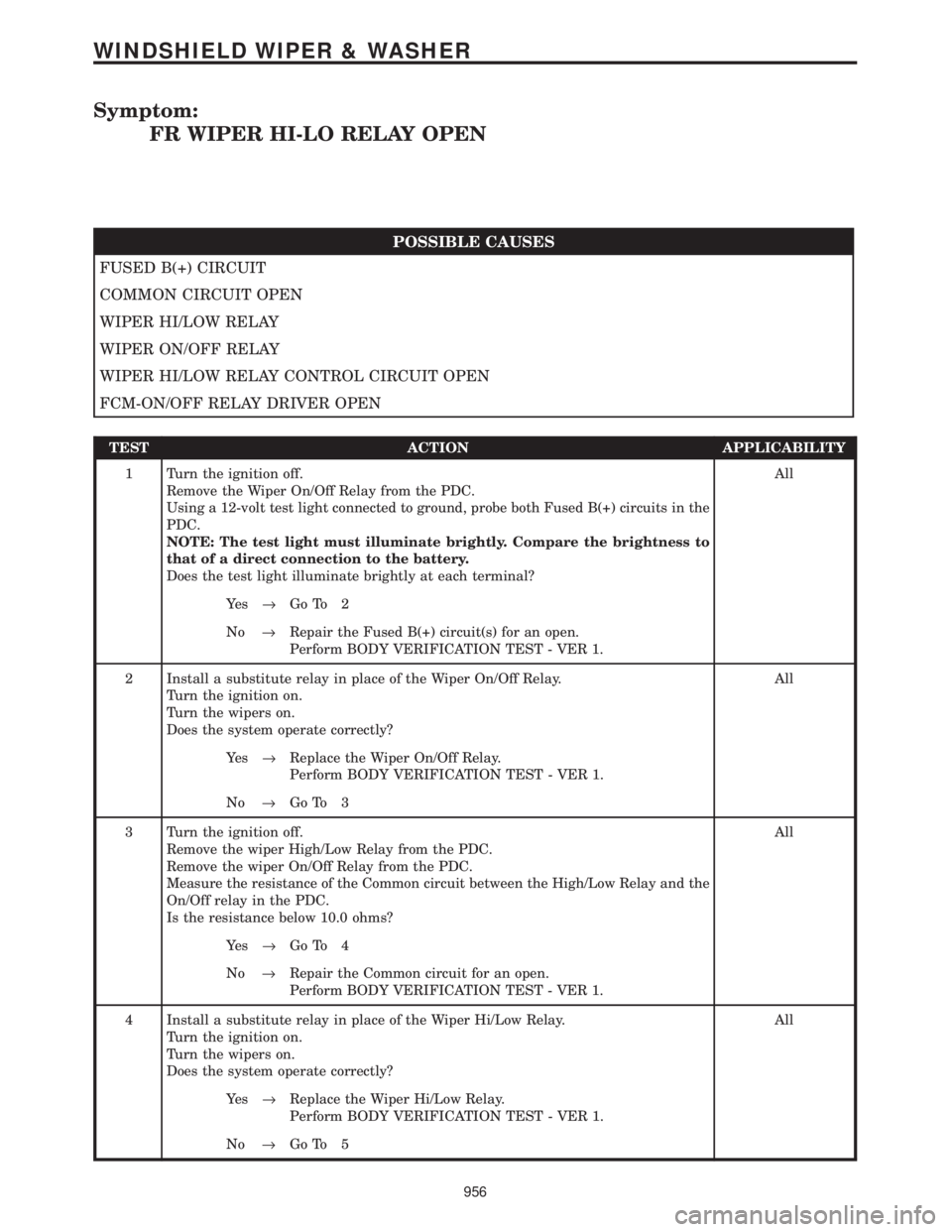
Symptom:
FR WIPER HI-LO RELAY OPEN
POSSIBLE CAUSES
FUSED B(+) CIRCUIT
COMMON CIRCUIT OPEN
WIPER HI/LOW RELAY
WIPER ON/OFF RELAY
WIPER HI/LOW RELAY CONTROL CIRCUIT OPEN
FCM-ON/OFF RELAY DRIVER OPEN
TEST ACTION APPLICABILITY
1 Turn the ignition off.
Remove the Wiper On/Off Relay from the PDC.
Using a 12-volt test light connected to ground, probe both Fused B(+) circuits in the
PDC.
NOTE: The test light must illuminate brightly. Compare the brightness to
that of a direct connection to the battery.
Does the test light illuminate brightly at each terminal?All
Ye s®Go To 2
No®Repair the Fused B(+) circuit(s) for an open.
Perform BODY VERIFICATION TEST - VER 1.
2 Install a substitute relay in place of the Wiper On/Off Relay.
Turn the ignition on.
Turn the wipers on.
Does the system operate correctly?All
Ye s®Replace the Wiper On/Off Relay.
Perform BODY VERIFICATION TEST - VER 1.
No®Go To 3
3 Turn the ignition off.
Remove the wiper High/Low Relay from the PDC.
Remove the wiper On/Off Relay from the PDC.
Measure the resistance of the Common circuit between the High/Low Relay and the
On/Off relay in the PDC.
Is the resistance below 10.0 ohms?All
Ye s®Go To 4
No®Repair the Common circuit for an open.
Perform BODY VERIFICATION TEST - VER 1.
4 Install a substitute relay in place of the Wiper Hi/Low Relay.
Turn the ignition on.
Turn the wipers on.
Does the system operate correctly?All
Ye s®Replace the Wiper Hi/Low Relay.
Perform BODY VERIFICATION TEST - VER 1.
No®Go To 5
956
WINDSHIELD WIPER & WASHER
Page 987 of 4284
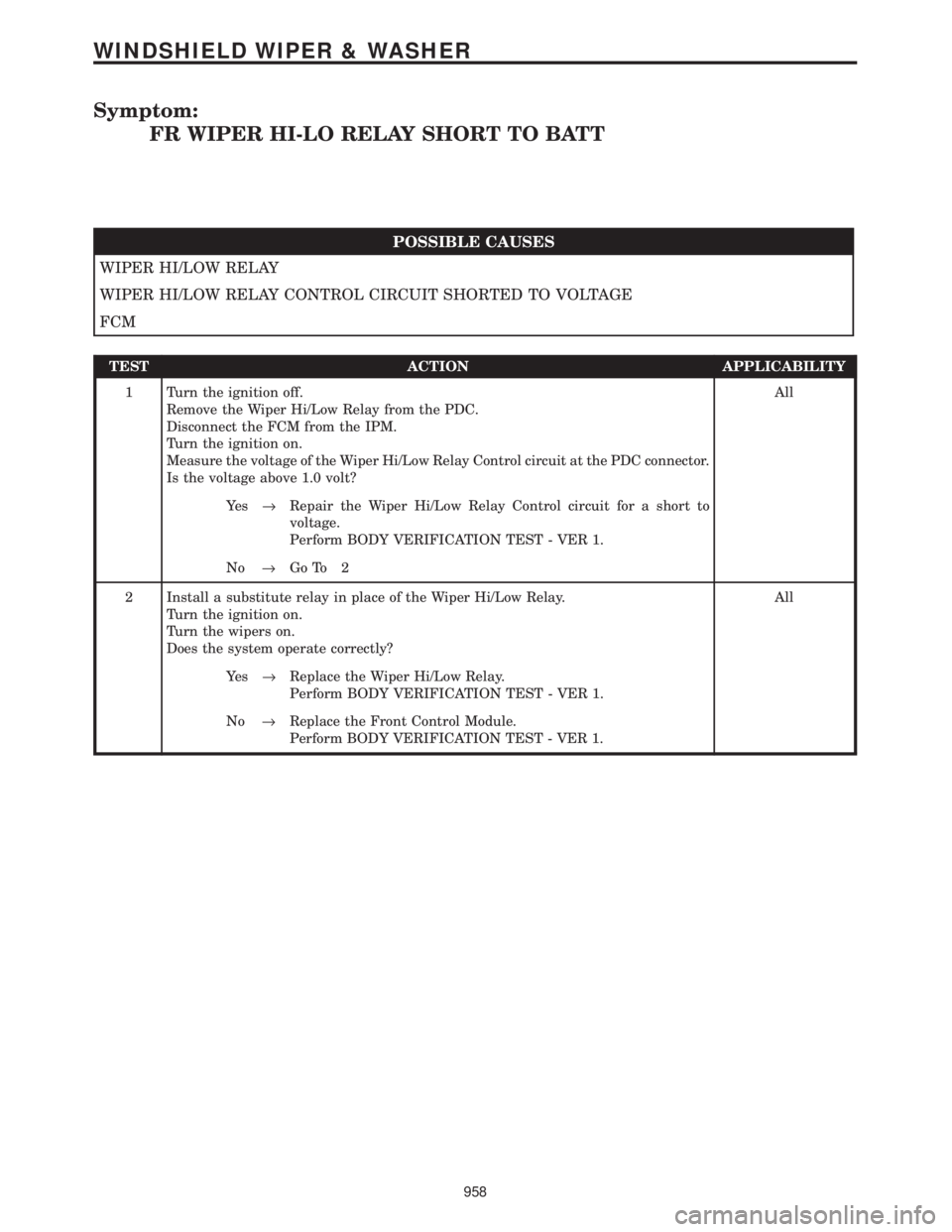
Symptom:
FR WIPER HI-LO RELAY SHORT TO BATT
POSSIBLE CAUSES
WIPER HI/LOW RELAY
WIPER HI/LOW RELAY CONTROL CIRCUIT SHORTED TO VOLTAGE
FCM
TEST ACTION APPLICABILITY
1 Turn the ignition off.
Remove the Wiper Hi/Low Relay from the PDC.
Disconnect the FCM from the IPM.
Turn the ignition on.
Measure the voltage of the Wiper Hi/Low Relay Control circuit at the PDC connector.
Is the voltage above 1.0 volt?All
Ye s®Repair the Wiper Hi/Low Relay Control circuit for a short to
voltage.
Perform BODY VERIFICATION TEST - VER 1.
No®Go To 2
2 Install a substitute relay in place of the Wiper Hi/Low Relay.
Turn the ignition on.
Turn the wipers on.
Does the system operate correctly?All
Ye s®Replace the Wiper Hi/Low Relay.
Perform BODY VERIFICATION TEST - VER 1.
No®Replace the Front Control Module.
Perform BODY VERIFICATION TEST - VER 1.
958
WINDSHIELD WIPER & WASHER
Page 992 of 4284
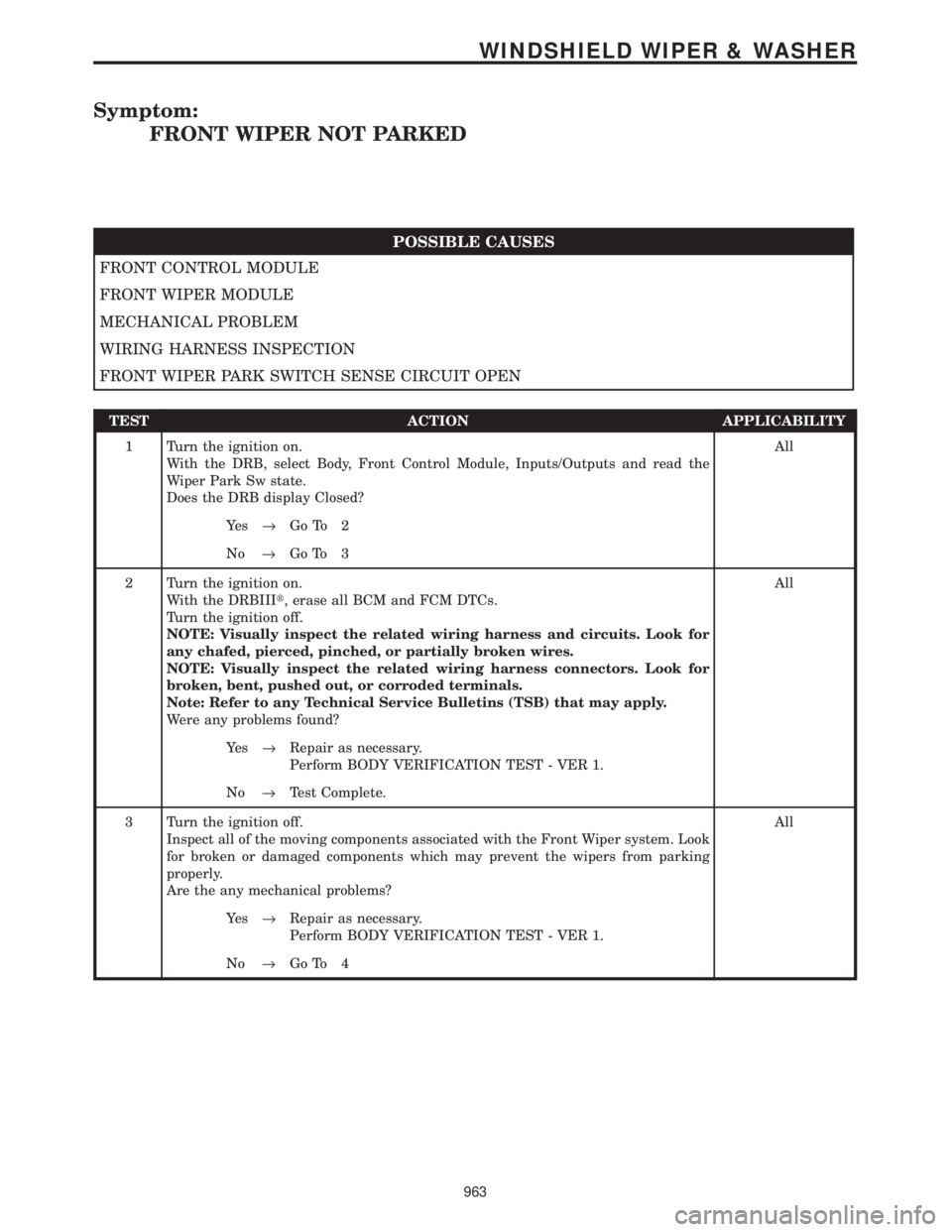
Symptom:
FRONT WIPER NOT PARKED
POSSIBLE CAUSES
FRONT CONTROL MODULE
FRONT WIPER MODULE
MECHANICAL PROBLEM
WIRING HARNESS INSPECTION
FRONT WIPER PARK SWITCH SENSE CIRCUIT OPEN
TEST ACTION APPLICABILITY
1 Turn the ignition on.
With the DRB, select Body, Front Control Module, Inputs/Outputs and read the
Wiper Park Sw state.
Does the DRB display Closed?All
Ye s®Go To 2
No®Go To 3
2 Turn the ignition on.
With the DRBIIIt, erase all BCM and FCM DTCs.
Turn the ignition off.
NOTE: Visually inspect the related wiring harness and circuits. Look for
any chafed, pierced, pinched, or partially broken wires.
NOTE: Visually inspect the related wiring harness connectors. Look for
broken, bent, pushed out, or corroded terminals.
Note: Refer to any Technical Service Bulletins (TSB) that may apply.
Were any problems found?All
Ye s®Repair as necessary.
Perform BODY VERIFICATION TEST - VER 1.
No®Test Complete.
3 Turn the ignition off.
Inspect all of the moving components associated with the Front Wiper system. Look
for broken or damaged components which may prevent the wipers from parking
properly.
Are the any mechanical problems?All
Ye s®Repair as necessary.
Perform BODY VERIFICATION TEST - VER 1.
No®Go To 4
963
WINDSHIELD WIPER & WASHER
Page 994 of 4284
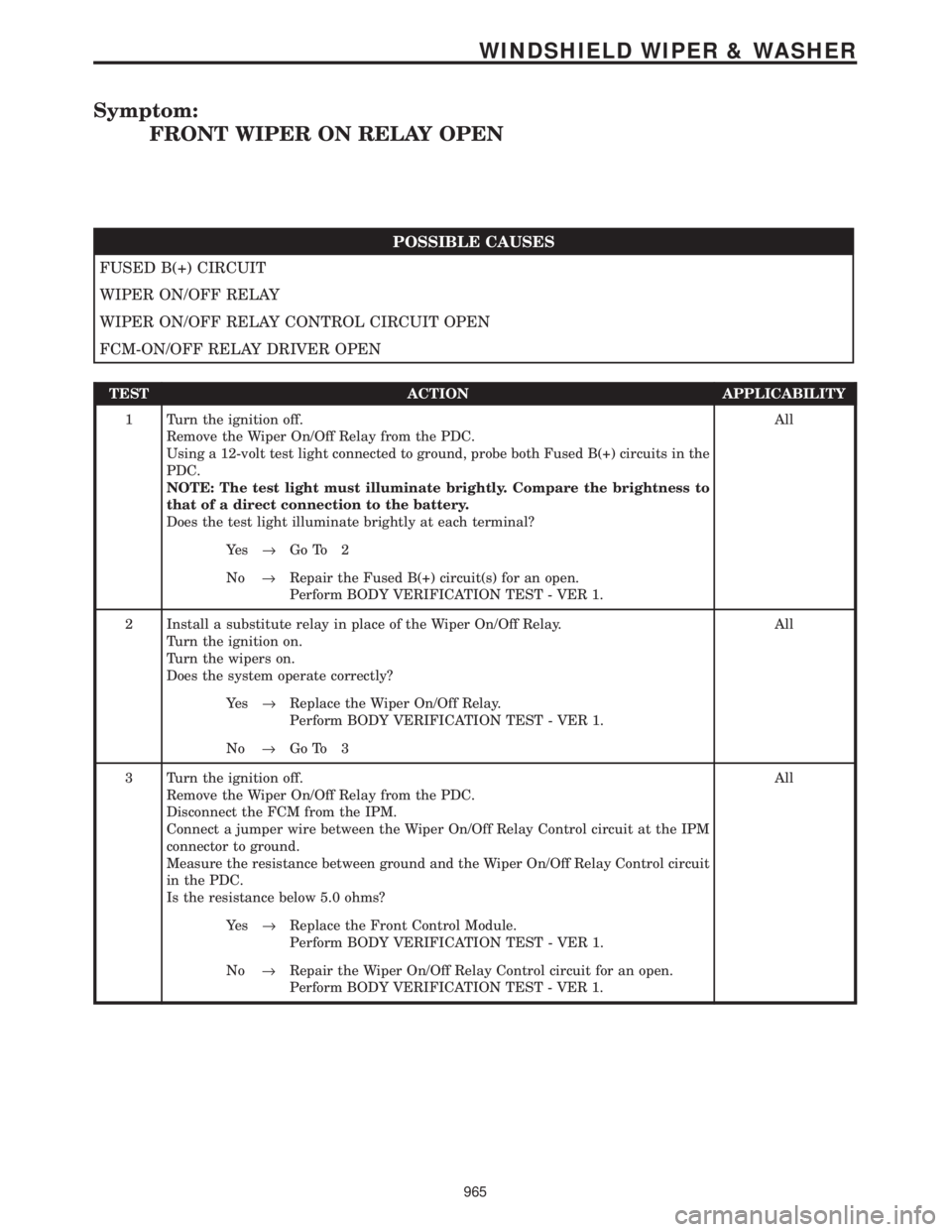
Symptom:
FRONT WIPER ON RELAY OPEN
POSSIBLE CAUSES
FUSED B(+) CIRCUIT
WIPER ON/OFF RELAY
WIPER ON/OFF RELAY CONTROL CIRCUIT OPEN
FCM-ON/OFF RELAY DRIVER OPEN
TEST ACTION APPLICABILITY
1 Turn the ignition off.
Remove the Wiper On/Off Relay from the PDC.
Using a 12-volt test light connected to ground, probe both Fused B(+) circuits in the
PDC.
NOTE: The test light must illuminate brightly. Compare the brightness to
that of a direct connection to the battery.
Does the test light illuminate brightly at each terminal?All
Ye s®Go To 2
No®Repair the Fused B(+) circuit(s) for an open.
Perform BODY VERIFICATION TEST - VER 1.
2 Install a substitute relay in place of the Wiper On/Off Relay.
Turn the ignition on.
Turn the wipers on.
Does the system operate correctly?All
Ye s®Replace the Wiper On/Off Relay.
Perform BODY VERIFICATION TEST - VER 1.
No®Go To 3
3 Turn the ignition off.
Remove the Wiper On/Off Relay from the PDC.
Disconnect the FCM from the IPM.
Connect a jumper wire between the Wiper On/Off Relay Control circuit at the IPM
connector to ground.
Measure the resistance between ground and the Wiper On/Off Relay Control circuit
in the PDC.
Is the resistance below 5.0 ohms?All
Ye s®Replace the Front Control Module.
Perform BODY VERIFICATION TEST - VER 1.
No®Repair the Wiper On/Off Relay Control circuit for an open.
Perform BODY VERIFICATION TEST - VER 1.
965
WINDSHIELD WIPER & WASHER
Page 995 of 4284
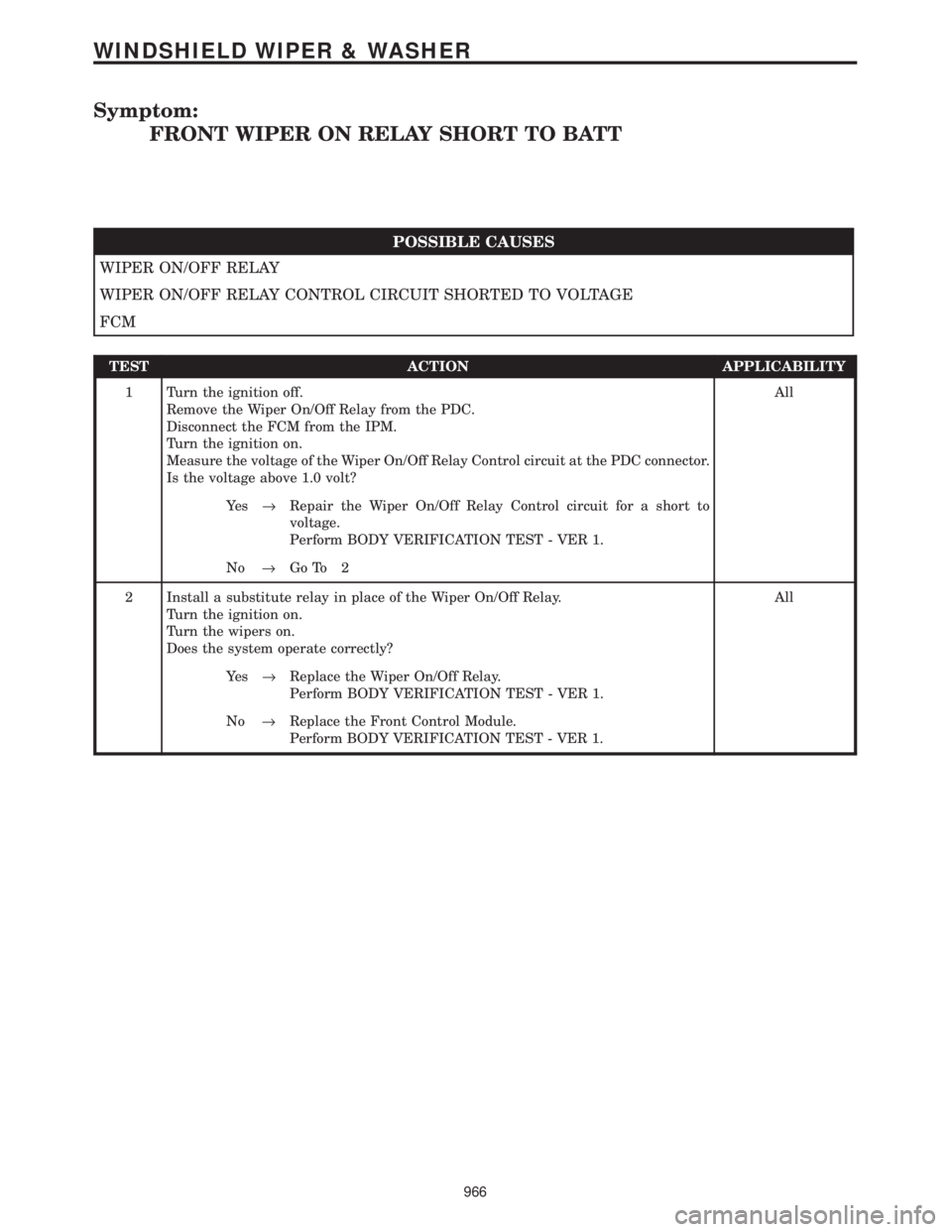
Symptom:
FRONT WIPER ON RELAY SHORT TO BATT
POSSIBLE CAUSES
WIPER ON/OFF RELAY
WIPER ON/OFF RELAY CONTROL CIRCUIT SHORTED TO VOLTAGE
FCM
TEST ACTION APPLICABILITY
1 Turn the ignition off.
Remove the Wiper On/Off Relay from the PDC.
Disconnect the FCM from the IPM.
Turn the ignition on.
Measure the voltage of the Wiper On/Off Relay Control circuit at the PDC connector.
Is the voltage above 1.0 volt?All
Ye s®Repair the Wiper On/Off Relay Control circuit for a short to
voltage.
Perform BODY VERIFICATION TEST - VER 1.
No®Go To 2
2 Install a substitute relay in place of the Wiper On/Off Relay.
Turn the ignition on.
Turn the wipers on.
Does the system operate correctly?All
Ye s®Replace the Wiper On/Off Relay.
Perform BODY VERIFICATION TEST - VER 1.
No®Replace the Front Control Module.
Perform BODY VERIFICATION TEST - VER 1.
966
WINDSHIELD WIPER & WASHER
Page 996 of 4284
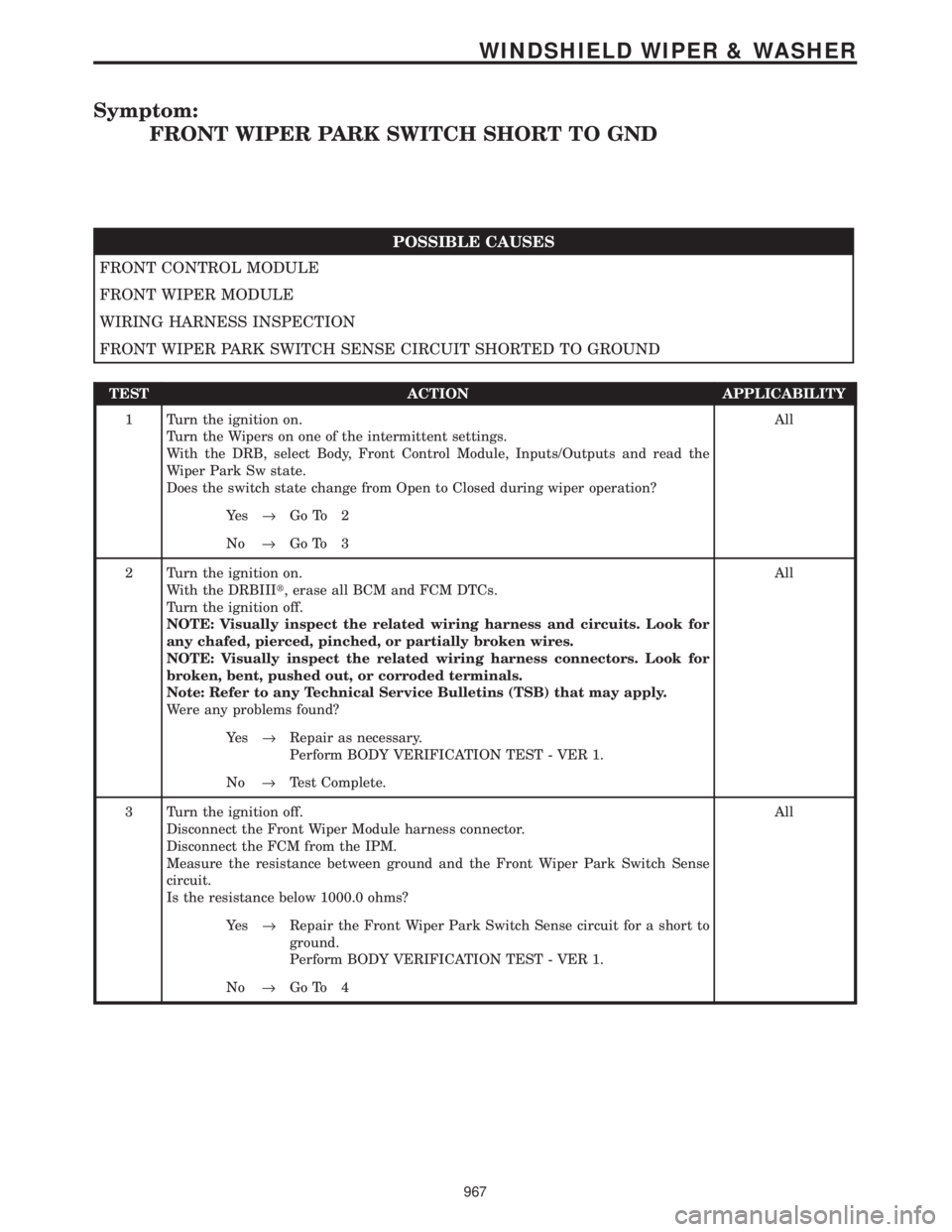
Symptom:
FRONT WIPER PARK SWITCH SHORT TO GND
POSSIBLE CAUSES
FRONT CONTROL MODULE
FRONT WIPER MODULE
WIRING HARNESS INSPECTION
FRONT WIPER PARK SWITCH SENSE CIRCUIT SHORTED TO GROUND
TEST ACTION APPLICABILITY
1 Turn the ignition on.
Turn the Wipers on one of the intermittent settings.
With the DRB, select Body, Front Control Module, Inputs/Outputs and read the
Wiper Park Sw state.
Does the switch state change from Open to Closed during wiper operation?All
Ye s®Go To 2
No®Go To 3
2 Turn the ignition on.
With the DRBIIIt, erase all BCM and FCM DTCs.
Turn the ignition off.
NOTE: Visually inspect the related wiring harness and circuits. Look for
any chafed, pierced, pinched, or partially broken wires.
NOTE: Visually inspect the related wiring harness connectors. Look for
broken, bent, pushed out, or corroded terminals.
Note: Refer to any Technical Service Bulletins (TSB) that may apply.
Were any problems found?All
Ye s®Repair as necessary.
Perform BODY VERIFICATION TEST - VER 1.
No®Test Complete.
3 Turn the ignition off.
Disconnect the Front Wiper Module harness connector.
Disconnect the FCM from the IPM.
Measure the resistance between ground and the Front Wiper Park Switch Sense
circuit.
Is the resistance below 1000.0 ohms?All
Ye s®Repair the Front Wiper Park Switch Sense circuit for a short to
ground.
Perform BODY VERIFICATION TEST - VER 1.
No®Go To 4
967
WINDSHIELD WIPER & WASHER
Page 997 of 4284
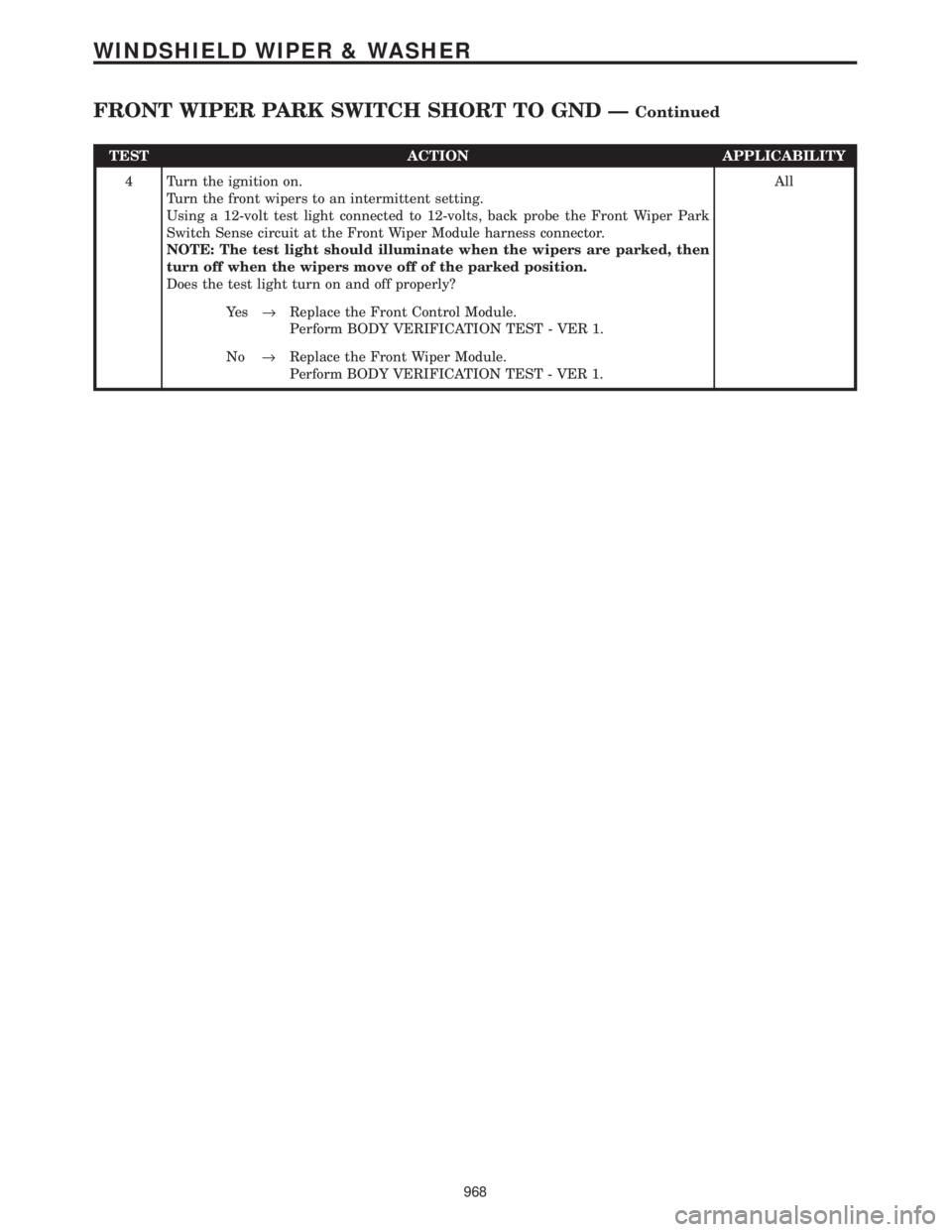
TEST ACTION APPLICABILITY
4 Turn the ignition on.
Turn the front wipers to an intermittent setting.
Using a 12-volt test light connected to 12-volts, back probe the Front Wiper Park
Switch Sense circuit at the Front Wiper Module harness connector.
NOTE: The test light should illuminate when the wipers are parked, then
turn off when the wipers move off of the parked position.
Does the test light turn on and off properly?All
Ye s®Replace the Front Control Module.
Perform BODY VERIFICATION TEST - VER 1.
No®Replace the Front Wiper Module.
Perform BODY VERIFICATION TEST - VER 1.
968
WINDSHIELD WIPER & WASHER
FRONT WIPER PARK SWITCH SHORT TO GND ÐContinued
Page 1731 of 4284
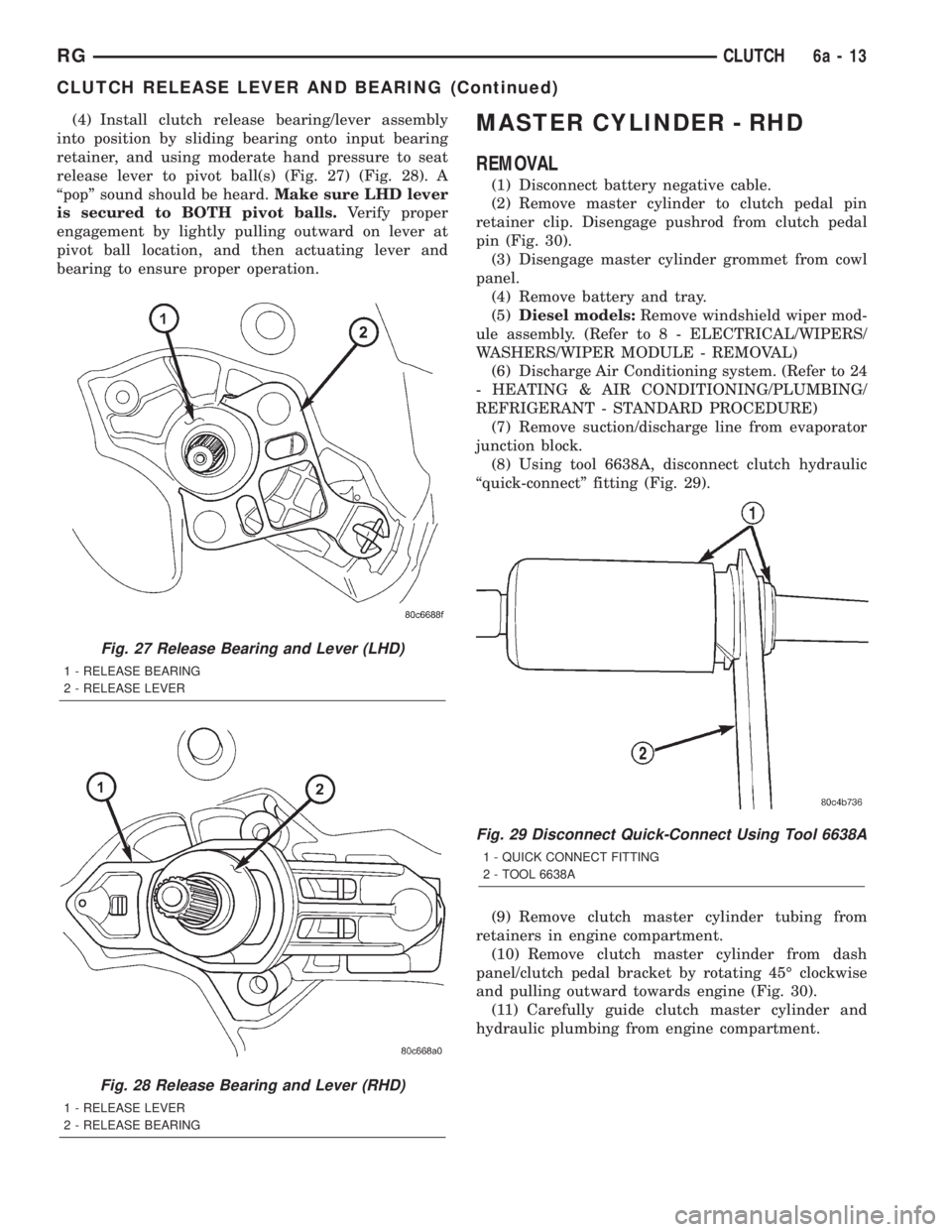
(4) Install clutch release bearing/lever assembly
into position by sliding bearing onto input bearing
retainer, and using moderate hand pressure to seat
release lever to pivot ball(s) (Fig. 27) (Fig. 28). A
ªpopº sound should be heard.Make sure LHD lever
is secured to BOTH pivot balls.Verify proper
engagement by lightly pulling outward on lever at
pivot ball location, and then actuating lever and
bearing to ensure proper operation.MASTER CYLINDER - RHD
REMOVAL
(1) Disconnect battery negative cable.
(2) Remove master cylinder to clutch pedal pin
retainer clip. Disengage pushrod from clutch pedal
pin (Fig. 30).
(3) Disengage master cylinder grommet from cowl
panel.
(4) Remove battery and tray.
(5)Diesel models:Remove windshield wiper mod-
ule assembly. (Refer to 8 - ELECTRICAL/WIPERS/
WASHERS/WIPER MODULE - REMOVAL)
(6) Discharge Air Conditioning system. (Refer to 24
- HEATING & AIR CONDITIONING/PLUMBING/
REFRIGERANT - STANDARD PROCEDURE)
(7) Remove suction/discharge line from evaporator
junction block.
(8) Using tool 6638A, disconnect clutch hydraulic
ªquick-connectº fitting (Fig. 29).
(9) Remove clutch master cylinder tubing from
retainers in engine compartment.
(10) Remove clutch master cylinder from dash
panel/clutch pedal bracket by rotating 45É clockwise
and pulling outward towards engine (Fig. 30).
(11) Carefully guide clutch master cylinder and
hydraulic plumbing from engine compartment.
Fig. 27 Release Bearing and Lever (LHD)
1 - RELEASE BEARING
2 - RELEASE LEVER
Fig. 28 Release Bearing and Lever (RHD)
1 - RELEASE LEVER
2 - RELEASE BEARING
Fig. 29 Disconnect Quick-Connect Using Tool 6638A
1 - QUICK CONNECT FITTING
2 - TOOL 6638A
RGCLUTCH6a-13
CLUTCH RELEASE LEVER AND BEARING (Continued)
Page 1942 of 4284
LAMPS/LIGHTING - EXTERIOR
DESCRIPTION
LAMP SYSTEMS
RS vehicles use lighting on the interior and exte-
rior of the vehicle for illuminating and indicating
purposes. Lighting circuits are protected by fuses.
Lighting circuits require an overload protected power
source, on/off device, lamps and body ground to oper-
ate properly. Plastic lamps require a wire in the har-
ness to supply body ground to the lamp socket.
Replace sockets and bulbs that are corroded.
Some of the interior and exterior lighting functions
are governed by the Body Control Module. The head-
lamp, dome, and the door ajar switches provide sig-
nals to the Body Control Module. The Body Control
Module in turn sends a J1850 message to the Front
Control Module (FCM) to enable the necessary driv-
ers to set the required illumination configuration.
Wire connectors can make intermittent contact or
become corroded. Before coupling wire connectors,
inspect the terminals inside the connector. Male termi-
nals should not be bent or disengaged from the insu-
lator. Female terminals should not be sprung open or
disengaged from the insulator. Bent and sprung termi-
nals can be repaired using needle nose pliers and pick
tool. Corroded terminals appear chalky or green. Cor-
roded terminals should be replaced to avoid recur-
rence of the problem symptoms.
Begin electrical system failure diagnosis by testing
related fuses in the fuse block and intelligent power
module. Verify that bulbs are in good condition and
test continuity of the circuit ground. Refer to the
appropriate wiring information. The wiring informa-
tion includes wiring diagrams, proper wire and con-
nector repair procedures, details of wire harness
routing and retention, connector pin-out information
and location views for the various wire harness con-
nectors, splices and grounds.
AUTOMATIC HEADLAMP SYSTEM
The Automatic Headlamp system turns the instru-
mentation and exterior illumination lamps ON when
the ambient light levels are Night and OFF when
light levels are Day.
DAYTIME RUNNING LAMPS
Operating the high-beam headlamps at reduced
power provides daytime running lamps, which are
required on all new Canadian vehicles.
HEADLAMPS ON WITH WINDSHIELD WIPERS
For vehicles equipped with the Automatic Head-
lamp System, the instrumentation and exterior illu-
mination lamps will be turned ON when theheadlamp switch is in the AUTO position, RPM >
450 and the windshield wipers have been in the
intermittent, low or high mode of operation for more
than ten seconds. When the windshield wipers are
turned OFF the Body Control Module will determine
if the instrumentation and exterior illumination
lamps should remain ON base upon the current
ambient light level.
HEADLAMP SYSTEM
The configuration of the headlamp system of head-
lamps, park lamps and fog lamps is determined by
the BCM. The BCM determines the lighting configu-
ration as a result of the inputs from the ignition
switch, headlamp switch and multifunction switch. A
J1850 is transmitted from the BCM to the FCM to
enable the necessary drivers to set the illumination
configuration. Four wires are connected between the
headlamp switch and the BCM. The first wire con-
tains information regarding the position of the head-
lamp switch (Off, Automatic Headlamps, Automatic
Headlamp switch fog, Park with Fog, Head, or Head
with Fog Lamps). The second wire contains informa-
tion regarding the position of the dimmer switch
(Dome Lamp, Daytime Brightness, Dimming Level or
Off). The third wire is a dedicated signal return
(ground) wire. The fourth wire provides power to the
front fog lamp indicator.
HEADLAMP TIME DELAY SYSTEM
The headlamp time delay system is controlled by
the Body Control Module (BCM) via a J1850 message
transmitted by the BCM to the FCM to turn off the
headlamps.
OPERATION
AUTOMATIC HEADLAMP SYSTEM
Automatic headlamps are controlled by the Body
Control Module (BCM). With the headlamp switch in
the AUTO position, the BCM will control the head-
lamp, parking, side marker, tail and instrumentation
lamps based on ambient light levels. Ambient light
levels are monitored by the BCM using the Day/
Night signal and Electrochromatic Mirror (ECM)
present from the Compass Mini Trip (CMTC) located
on the front windshield in front of the rear view mir-
ror (ECM). Ambient light readings are averaged to
limit cycling the lamps ON and OFF when passing
through areas with varying light levels. The auto-
matic headlamps will only function when the engine
is running with RPM > 450. When the headlamp
switch is in the AUTO position (Automatic mode), the
Headlamp Time Delay system will function when the
ignition switch is placed in any position other than
run/start.
8L - 2 LAMPS/LIGHTING - EXTERIORRS
Page 1977 of 4284

recall memory settings when the Driver 1 or Driver 2
push buttons of the memory switch on the driver side
front door trim panel are depressed.
²SOUND HORN ON LOCK?- The options
include Yes and No. The default is No. When Yes is
selected, a short horn chirp will provide an audible
confirmation when the RKE receiver recognizes a
valid Lock signal from an RKE transmitter. When No
is selected, no horn chirp will occur with the RKE
Lock event. This feature may be selected indepen-
dent of theFLASH LIGHTS WITH LOCKS?pro-
grammable feature.
²FLASH LIGHTS WITH LOCKS?- The options
include Yes and No. The default is Yes. When Yes is
selected, a single flash of the hazard warning lamps
will provide an optical confirmation when the RKE
receiver recognizes a valid Lock signal from an RKE
transmitter, and two flashes of the same lamps will
occur when the RKE receiver recognizes a valid
Unlock signal from an RKE transmitter. When No is
selected, no lamp flash will occur with the RKE Lock
or Unlock event. This feature may be selected inde-
pendent of theSOUND HORN ON LOCK?pro-
grammable feature.
²HEADLAMP DELAY =- The options include
Off, 30 Sec, 60 Sec, and 90 Sec. The default is 90 Sec.
When a time interval is selected, the headlamps will
remain on for that length of time when the head-
lamps are turned off after the ignition is turned off,
or if the Auto mode is selected on vehicles with the
Auto Headlamps option. When Off is selected, the
headlamp delay feature is disabled.
²HEADLAMPS ON WITH WIPERS?- This pro-
grammable feature only applies to vehicles equipped
with the optional Auto Headlamps. The options
include Yes and No. The default is No. When Yes is
selected, the headlamps will turn on automatically
when the windshield wipers are turned on. The head-
lamps will turn off when the wipers are turned off,
as long as the headlamp switch is in the Auto or Off
positions. When No is selected, the headlamps will
only turn on if manually selected or if the Auto mode
is selected and the outside ambient light levels dic-
tate that they should be on.
²POWER ACCESSORY DELAY?- The options
include Yes and No. The default is Yes. When No is
selected, the accessory powered components will turn
off automatically when the ignition key is turned off.
When Yes is selected, the accessory powered compo-
nents will remain on for 45 seconds when the igni-
tion key is turned off.
REMOVAL
(1) Disconnect and isolate the battery negative
cable.(2) Remove overhead console. Refer to Overhead
Console Removal and Installation in this section(Re-
fer to 8 - ELECTRICAL/OVERHEAD CONSOLE -
REMOVAL) .
(3) Remove the ten screws holding the EVIC mod-
ule in the overhead console.
(4) Remove EVIC module from console assembly.
INSTALLATION
(1) Position the EVIC module in the overhead con-
sole.
(2) Install the ten screws holding the EVIC module
in the overhead console.
(3) Install the overhead console. Refer to Overhead
Console Removal and Installation in this section.
(4) Connect the battery negative cable.
NOTE: If a new EVIC module has been installed, the
compass will have to be calibrated and the variance
set. Refer to Compass Variation Adjustment and
Compass Calibration in the Service Procedures sec-
tion of this group for the procedures.
COMPASS/MINI-TRIP
COMPUTER
DESCRIPTION
The Compass Mini-Trip Computer (CMTC) and
Compass Temperature (CT) computer are modules
located in the overhead console. Vehicles are
equipped with either the CMTC or the CT computers
not both. The CMTC is different in the fact that it is
equipped with the mini-trip feature. The CMTC, CT
consists of a electronic control module with a vacuum
fluorescent display (VFD) and function switches. The
CMTC, CT consists of a electronic module that dis-
plays compass, trip computer (CMTC only), and tem-
perature features. Actuating the STEP push button
(CMTC only) will cause the CMTC to change mode of
operation when ignition is ON. Actuating the STEP
push button (CMTC only) will cause the CMTC to
change mode of operation when ignition is ON.
Example:
²Average miles per gallon (ECO)
²Distance to empty (DTE)
²Instant miles per gallon (ECO)
²Trip odometer (ODO)
²Elapsed time (ET)
²Off
Actuating the C/T push button will cause the
CMTC, CT to change to Compass/Temperature dis-
play.
RSOVERHEAD CONSOLE8M-9
ELECTRONIC VEHICLE INFO CENTER (Continued)