change CITROEN C1 2021 Owners Manual
[x] Cancel search | Manufacturer: CITROEN, Model Year: 2021, Model line: C1, Model: CITROEN C1 2021Pages: 269, PDF Size: 7.63 MB
Page 11 of 269
9
C1_en_Chap00c_eco-conduite_ed01-2016
Optimise the use of your gearbox
With a manual gearbox, move off gently and change up without waiting. During acceleration change up early.
With
an ETG electronic gearbox, give preference to automatic (Easy)
m
ode and avoid pressing the accelerator pedal heavily or suddenly.
Control the use of your electrical
equipment
Before moving off, if the passenger compartment is too warm, ventilate it by opening the windows and air vents before using the air conditioning.
Above
30 mph (50 km/h), close the windows and leave the air vents
ope
n.
Remember
to make use of equipment that can help keep the
t
emperature in the passenger compartment down (sunroof and window
b
linds...).
Switch
off the air conditioning, unless it has automatic regulation, as
s
oon as the desired temperature is attained.
Switch
off the demisting and defrosting controls, if not automatic.
Switch
off the heated seat as soon as possible.
Switch
off the headlamps and front foglamps when the level of light
d
oes not require their use.
Avoid
running the engine before moving off, particularly in winter; your
v
ehicle will warm up much faster while driving.
As
a passenger, if you avoid connecting your multimedia devices
(
film, music, video game...), you will contribute towards limiting the
c
onsumption of electrical energy, and so of fuel.
Disconnect
your portable devices before leaving the vehicle.
Eco-driving
Eco-driving is a range of everyday practices that allow the motorist to optimise their fuel consumption and CO2 emissions.
The
gear
shift
indicator
invites
you
to
engage
the
most
suitable
gear:
a
s
soon
as
the
indication
is
displayed
in
the
instrument
panel,
follow
it
s
traight
away.
For
vehicles
fitted
with
an
ETG
electronic
gearbox,
this
indicator
a
ppears
only
in
manual
mode.
Drive smoothly
Maintain a safe distance between vehicles, use engine braking rather t han the brake pedal, and press the accelerator progressively. These
p
ractices contribute towards a reduction in fuel consumption and CO
2
emissions
and
also
helps
reduce
the
background
traffic
noise.
.
Eco-driving
Page 12 of 269
10
C1_en_Chap00c_eco-conduite_ed01-2016
Limit the causes of excess consumption
Spread loads throughout the vehicle; place the heaviest items in the bottom of the boot, as close as possible to the rear seats.
Limit
the loads carried in the vehicle and reduce wind resistance
(roof
bars, roof rack...). Use a roof box in preference.
Remove
roof bars and roof racks after use.
At
the end of winter, remove snow tyres and refit your summer tyres.
Observe the recommendations on
maintenance
Check the tyre pressures regularly, when cold, referring to the label in the door aperture, driver's side.
Carry
out this check in particular:
-
b
efore a long journey,
-
a
t each change of season,
-
a
fter a long period out of use.
Don't
forget the spare wheel and the tyres on any trailer or caravan.
Have
your vehicle serviced regularly (engine oil, oil filter, air filter,
p
assenger compartment filter...) and observe the schedule of
o
perations recommended in the maintenance and warranty guide.
When
refuelling, do not continue after the third cut-off of the nozzle to
a
void any over flow.
At
the wheel of your new vehicle, it is only after the first 1 800 miles
(
3 000 kilometres) that you will see the fuel consumption settle down to
a
consistent average.
Eco-driving
Page 14 of 269
12
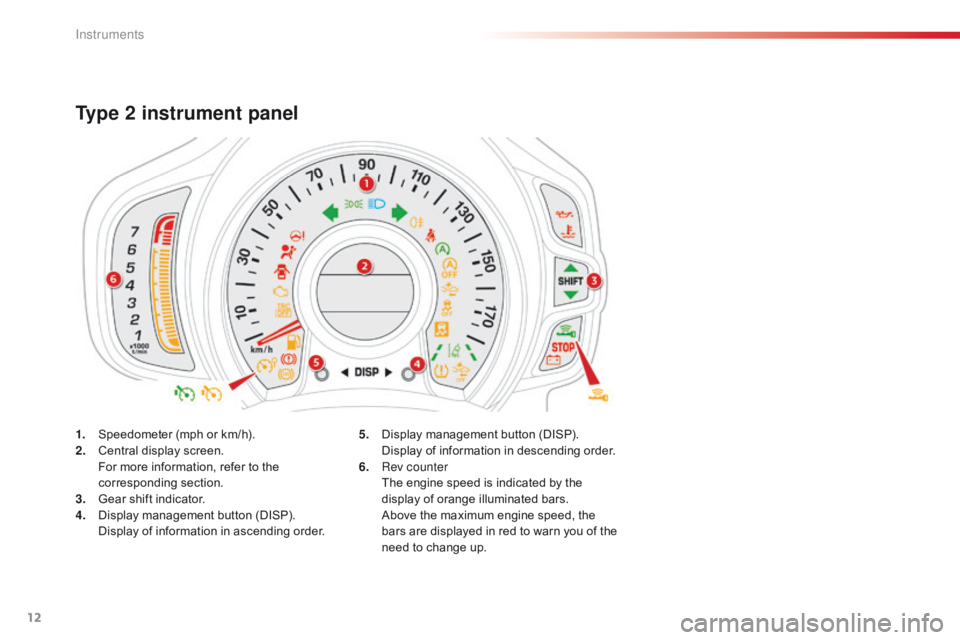
1. Speedometer (mph or km/h).
2. C entral display screen.
F
or more information, refer to the
c
orresponding
s
ection.
3.
G
ear shift indicator.
4.
D
isplay management button (DISP).
D
isplay of information in ascending order.
Type 2 instrument panel
5. Display management button (DISP). D
isplay of information in descending order.
6.
R
ev counter
T
he engine speed is indicated by the
d
isplay of orange illuminated bars.
A
bove the maximum engine speed, the
b
ars are displayed in red to warn you of the
n
eed to change up.
Instruments
Page 22 of 269
20
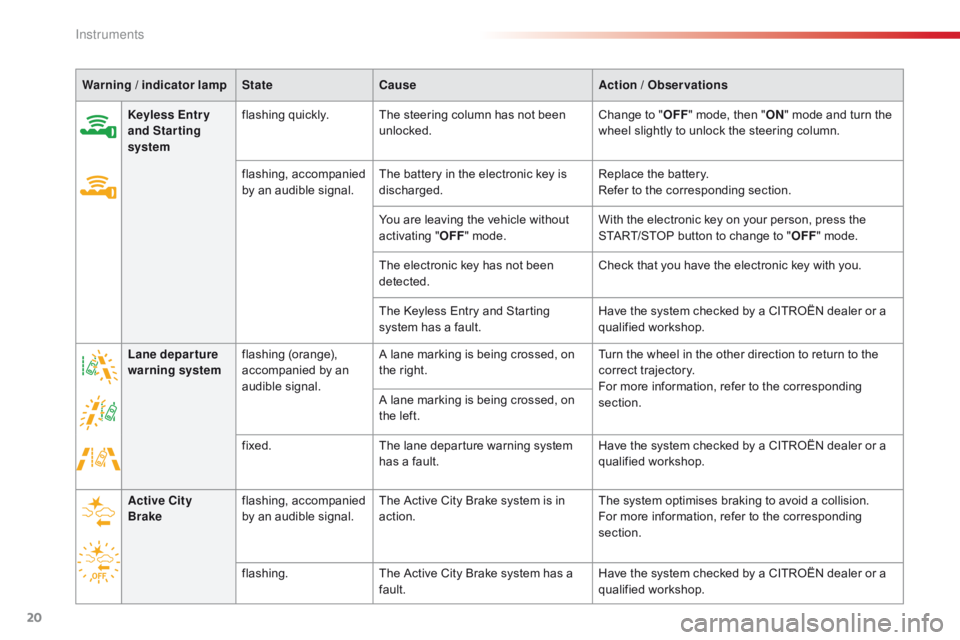
Warning / indicator lamp State Cause Action / Observations
Keyless Entr y
and Starting
system flashing
qu
ickly.The
steering column has not been
u
nlocked.Change
to "OFF "
mode, then "ON "
mode and turn the
w
heel slightly to unlock the steering column.
flashing,
a
ccompanied
b
y an audible signal.The
battery in the electronic key is
d
ischarged.Replace
the battery.
Refer
to the corresponding section.
You
are leaving the vehicle without
a
ctivating "OFF "
mode.With
the electronic key on your person, press the
S
TART/STOP button to change to "OFF "
mode.
The
electronic key has not been
d
etected.Check
that you have the electronic key with you.
The
Keyless Entry and Starting
s
ystem has a fault.Have
the system checked by a CITROËN dealer or a
q
ualified
w
orkshop.
Lane departure
warning system flashing
(
orange),
a
ccompanied by an
a
udible
s
ignal.A
lane marking is being crossed, on
t
he right.Turn
the wheel in the other direction to return to the
c
orrect
t
rajectory.
For
more information, refer to the corresponding
s
ection.
A
lane marking is being crossed, on
t
he left.
fixed. The
lane departure warning system
h
as a fault.Have
the system checked by a CITROËN dealer or a
q
ualified
w
orkshop.
Active City
Brake flashing,
a
ccompanied
b
y an audible signal.The
Active City Brake system is in
a
ction.The
system optimises braking to avoid a collision.
For
more information, refer to the corresponding
s
ection.
flashing. The
Active City Brake system has a
f
ault.Have
the system checked by a CITROËN dealer or a
q
ualified
w
orkshop.
Instruments
Page 25 of 269

23
C1_en_Chap01_instrument- de-bord_ed01-2016
Warning / indicator lamp State Cause Action / Observations
Gear shift
indicator fixed.
You
can change up.For
more information, refer to the corresponding
s
ection.
You
can change down (only for the
V
Ti 68 engine).
Speed limiter
(VTi 68 engine) fixed.
The
speed limiter is active.
Lane departure
warning system fixed.
The
button has been pressed. The lane departure warning system has been
a
ctivated.
For
more information, refer to the corresponding
s
ection.
fixed. The
system is operational: it has detected road
m
arkings to the left and /or right.
For
more information, refer to the corresponding
s
ection.
Active City
Brake fixed.
The
button has been pressed.
The
configuration of the system has
be
en
mo
difiied.The
Active City Brake system has been activated.
For
more information, refer to the corresponding
s
ection.
1
Instruments
Page 30 of 269
28
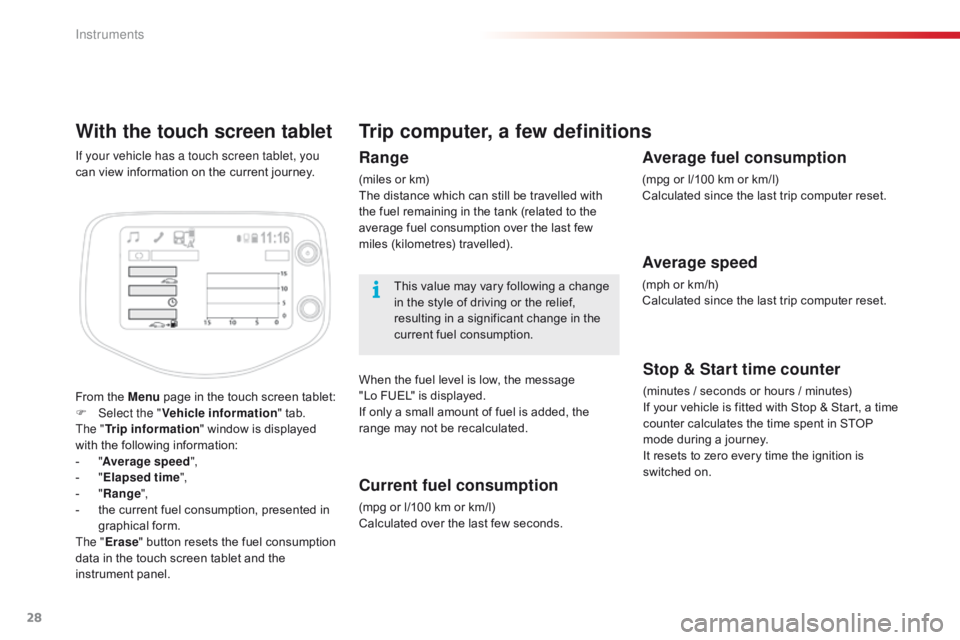
With the touch screen tablet
From the Menu page in the touch screen tablet:
F Sel ect the " Vehicle information "
tab.
The " Trip information "
window is displayed
w
ith the following information:
-
"A
verage speed ",
-
" E
lapsed time ",
-
" R
ange",
-
t
he current fuel consumption, presented in
g
raphical
fo
rm.
The " Erase "
button resets the fuel consumption
d
ata in the touch screen tablet and the
in
strument
pan
el.
If your vehicle has a touch screen tablet, you
can
view information on the current journey.
Trip computer, a few definitions
Range
(miles or km)
T he distance which can still be travelled with
t
he fuel remaining in the tank (related to the
a
verage fuel consumption over the last few
m
iles
(
kilometres)
t
ravelled).
This
value may vary following a change
i
n the style of driving or the relief,
r
esulting in a significant change in the
c
urrent fuel consumption.
When
the fuel level is low, the message
"
Lo FUEL" is displayed.
If
only a small amount of fuel is added, the
r
ange may not be recalculated.
Current fuel consumption
(mpg or l/100 km or km/l)
C alculated over the last few seconds.
Stop & Start time counter
(minutes / seconds or hours / minutes)
I f your vehicle is fitted with Stop & Start, a time
c
ounter calculates the time spent in STOP
m
ode during a journey.
It
resets to zero every time the ignition is
s
witched on.
Average fuel consumption
(mpg or l/100 km or km/l)
C alculated since the last trip computer reset.
Average speed
(mph or km/h)
C alculated since the last trip computer reset.
Instruments
Page 53 of 269
51
C1_en_Chap03_ergonomie-confort_ed01-2016
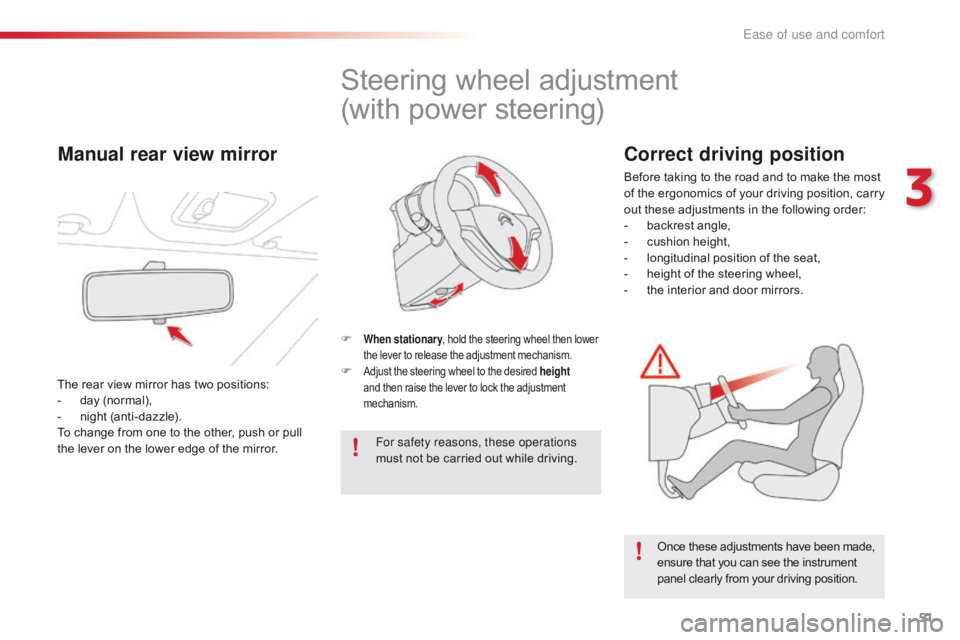
Steering wheel adjustment
(with power steering)
F When stationary , hold the steering wheel then lower t
he lever to release the adjustment mechanism.
F Adjust the steering wheel to the desired height
and then raise the lever to lock the adjustment m
echanism.
For safety reasons, these operations
must not be carried out while driving.
Once
these adjustments have been made,
e
nsure that you can see the instrument
p
anel clearly from your driving position.
Manual rear view mirror
The rear view mirror has two positions:
- d ay (normal),
-
n
ight (anti-dazzle).
To
change from one to the other, push or pull
t
he lever on the lower edge of the mirror.
Correct driving position
Before taking to the road and to make the most of t he e rgonomics o f y our d riving p osition, c arry
o
ut these adjustments in the following order:
-
b
ackrest angle,
-
c
ushion height,
-
l
ongitudinal position of the seat,
-
h
eight of the steering wheel,
-
t
he interior and door mirrors.
3
Ease of use and comfort
Page 55 of 269
53
C1_en_Chap03_ergonomie-confort_ed01-2016
Recommendations for use
If the interior temperature remains very high after a prolonged period parked in the sun, first ventilate the passenger compartment for a few minutes.
For
an even air distribution, make sure that you do not block the outside air inlet grille, the
v
ents, the air passages and the air outlets to the footwells.
Ensure
that the passenger compartment filter, located behind the glove box in the heater
u
nit, is in good condition. Have the filter elements replaced regularly. If you drive in dusty
c
onditions, change them twice as often.
Operate
the air conditioning system for 5 to 10 minutes, once or twice a month, to keep it in
p
er fect working order.
In
order to ensure that your air conditioning system continues to operate correctly, you are
a
dvised to have it checked regularly.
If
the system does not produce cold air, do not use it and contact a CITROËN dealer or a
q
ualified
w
orkshop.
The
air conditioning system does not contain chlorine and does not present any danger to
t
he ozone layer.
The
condensation created by the air conditioning results in a flow of water under the vehicle
w
hen stationary which is per fectly normal.
3
Ease of use and comfort
Page 60 of 269

58
C1_en_Chap03_ergonomie-confort_ed01-2016
For maximum cooling or heating of the cabin, it is possible to go beyond the
m
inimum 14 or maximum 28 value.
F
P
ress the temperature adjustment
b
utton down or up until "LO" or
"HI"
is displayed.
A
setting around 21
gives optimum comfort.
H
owever, depending on your requirements,
a s
etting between 18 and 24 is normal.
On
entering the vehicle, if the interior is very
c
old
or hot, there is no need to change the
v
alue
displayed in order to reach the required
l
evel
of comfort. The system corrects the
t
emperature difference automatically and as
q
uickly as possible.
Temperature adjustment
F Press
this button downward to r
educe the value and upward to
inc
rease
it
.
The
value
indicated in the screen corresponds
t
o
a
level
of comfort and not to a temperature in
d
egrees
Celsius or Fahrenheit.
Air flow adjustment
F Press this button to increase air
f low.
The
air
flow symbol, the fan, fills progressively.
F
P
ress this button to decrease air
f
low.
Air distribution adjustment
- the centre and side air vents,
- t he centre vent, side air vents and
f
ootwells,
-
t
he footwells,
-
t
he windscreen and footwells,
-
t
he centre vent, side air vents and
w
indscreen,
-
t
he windscreen.F
P
ress this button repeatedly to
d
irect the air to:
Air intake / Air recirculation
Avoid prolonged recirculation of interior a
ir (risk of condensation or deterioration
o
f the air quality).
F
P
ressing this buttons isolates the
p
assenger compartment from the
o
utside air.
T
he air recirculation symbol is
d
isplayed.
Air
recirculation enables the passenger
c
ompartment to be isolated from exterior odours
a
nd
smoke.
Press
this button again or press the "AUTO"
button
to resume automatic management of the
i
ntake
of air. The air recirculation symbol goes off.
Ease of use and comfort
Page 74 of 269
72
C1_en_Chap04_conduite_ed01-2016
If you use the ancillaries for a prolonged period, the vehicle will automatically
s
witch to " OFF"
mode after about
20
m
inutes.
Be aware
in order to avoid discharging
t
he battery.
Starting - switching off the engine
w ith the Keyless Entry and Starting
system
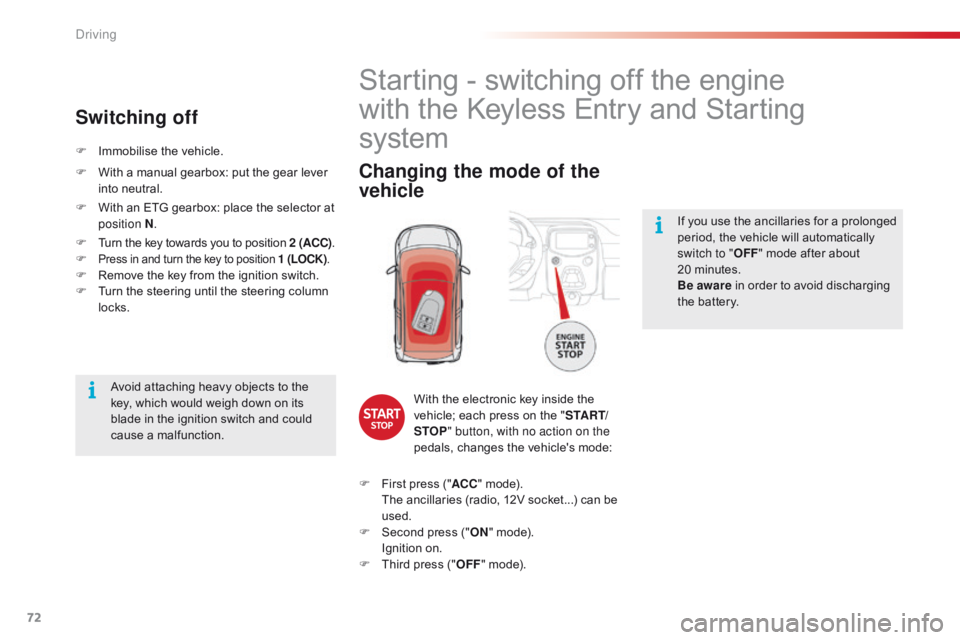
Changing the mode of the
vehicle
With the electronic key inside the v
ehicle; each press on the "S TA R T/
STOP " button, with no action on the
pedals,
changes the vehicle's mode:
F
F
irst
press ("ACC "
mode).
T
he
ancillaries (radio, 12V socket...) can be
u
sed.
F
S
econd press ("ON "
mode).
I
gnition on.
F
T
hird
press ("OFF "
mode).
Avoid
attaching
heavy
objects
to
the
k
ey,
which
would
weigh
down
on
its
b
lade
in
the
ignition
switch
and
could
c
ause
a
malfunction.
F
I
mmobilise
the
vehicle.
Switching off
F With
a manual gearbox: put the gear lever i
nto neutral.
F
W
ith an ETG gearbox: place the selector at
p
osition N .
F
T
urn the key towards you to position 2 (ACC).
F
Press in and turn the key to position 1 (LOCK) .F Remove the key from the ignition switch.
F T urn the steering until the steering column
l
ocks.
Driving