manual radio set CITROEN C4 PICASSO 2011 User Guide
[x] Cancel search | Manufacturer: CITROEN, Model Year: 2011, Model line: C4 PICASSO, Model: CITROEN C4 PICASSO 2011Pages: 352, PDF Size: 10.66 MB
Page 282 of 352

Downloaded from www.Manualslib.com manuals search engine 280
03 GENERAL OPERATION
DISPLAY ACCORDING TO THE CONTEXT
FULL SCREEN MAP:
Abort guidance / Resume guidance
Set destination
POIs nearb
y
Position info
Map settings
Zoom/Scroll
1
1
1
1
1
1
RADIO:
In FM mode
Traffi c info (TA)
RD
S
R
adiotext
Regional prog.
In AM mode
AM
TA
R
efresh AM list
FM
1
2
1
2
2
2
2
2
2
2
MUSIC MEDIA PLAYERS:
Traffi c info (TA)
Play options
Normal order
R
andom track
Re
peat folder
Select musi
c
Scan
1
1
2
2
2
2
1
Page 292 of 352
Downloaded from www.Manualslib.com manuals search engine 290
05
2 1
3
2 1
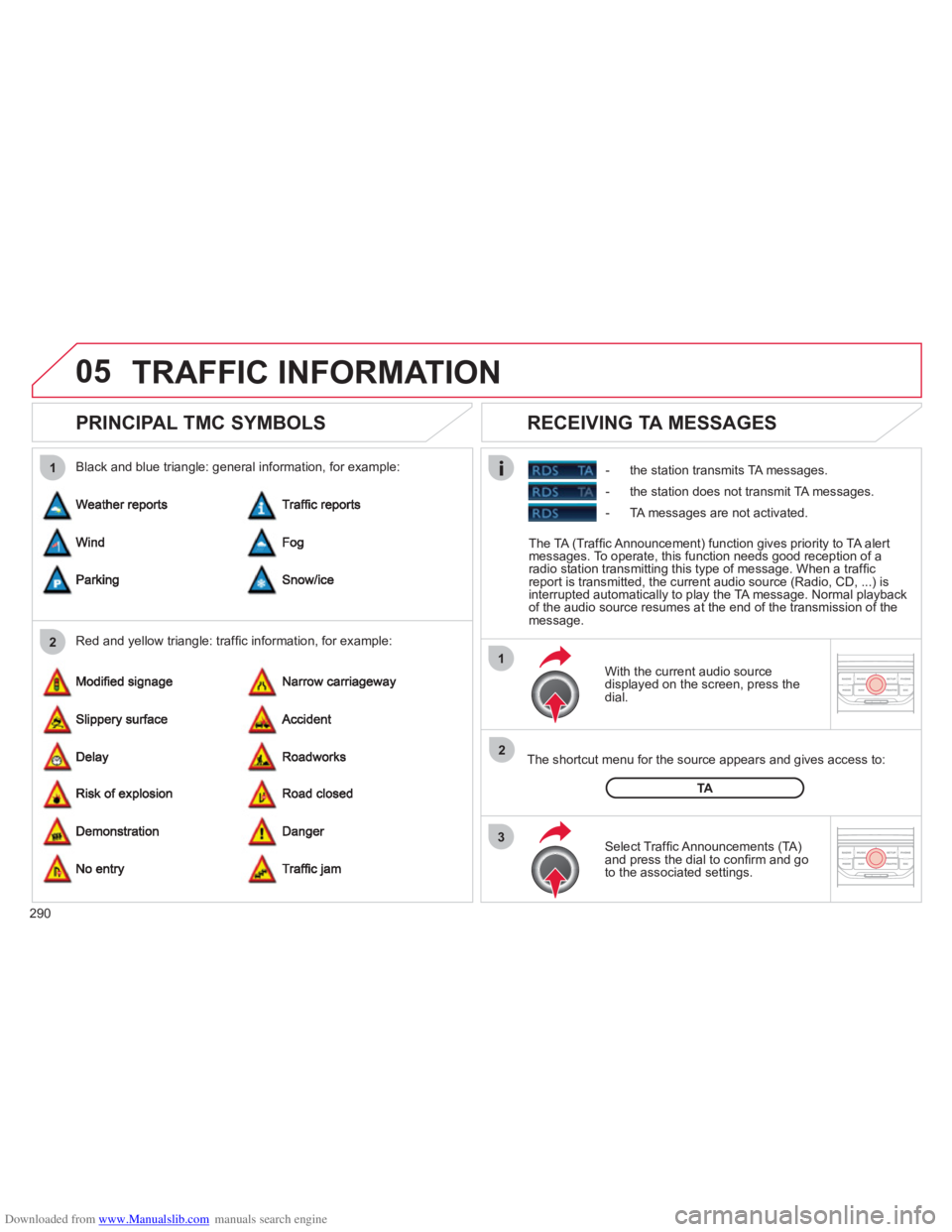
PRINCIPAL TMC SYMBOLS
With the current audio source
displayed on the screen, press the
dial.
The shortcut menu
for the source appears and gives access to:
Select Traffi c Announcements
(TA)and press the dial to confi rm and go
to the associated settings.
TA
- the station transmits TA messages.
RECEIVING TA MESSAGES
Red and yellow triangle: traffi c information, for example: Black and blue triangle: general in
formation, for example:
TRAFFIC INFORMATION
The TA (Traffi c Announcement) function gives priority to TA alert messages. To operate, this function needs good reception of a
radio station transmitting this type of message. When a traffi c
report is transmitted, the current audio source (Radio, CD, ...) is
interrupted automatically to play the TA message. Normal playbackof the audio source resumes at the end of the transmission of themessage.
- the station does not transmit TA messa
ges.
-
TA messages are not activated.
Page 293 of 352
Downloaded from www.Manualslib.com manuals search engine 291
06
3 2 1 1
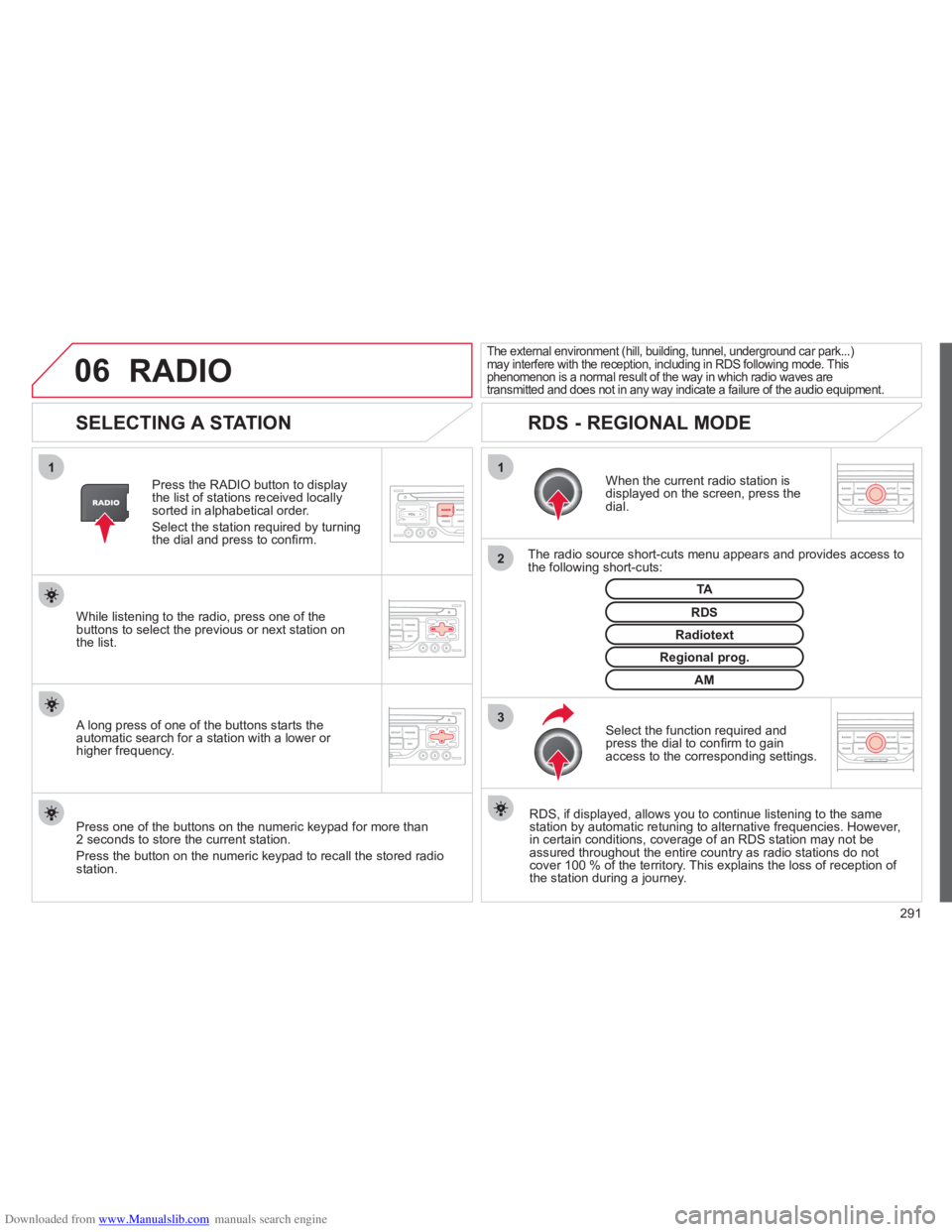
SELECTING A STATION
When the current radio station isdisplayed on the screen, press thedial.
The radio source short-cuts menu appears and provides access to
the following short-cuts:
Select the function re
quired and press the dial to confi rm to gain
access to the corresponding settings.
TA
RDS, if displayed, allows you to continue listening to the same station by automatic retuning to alternative frequencies. However,
in certain conditions, coverage of an RDS station may not be
assured throughout the entire country as radio stations do notcover 100 % of the territory. This explains the loss of reception of
the station during a journey.
The external environment (hill, building, tunnel, underground car park...)may interfere with the reception, including in RDS following mode. This phenomenon is a normal result of the way in which radio waves are
transmitted and does not in any way indicate a failure of the audio equipment.
RDS - REGIONAL MODE
Press the RADIO button to display
the list of stations received locally sorted in alphabetical order.
Select the station required by turningthe dial and press to confi rm.
Re
gional prog.
Radiotext
RDSWhile listening to the radio, press one of the
buttons to select the previous or next station on
the list.
Press one o
f the buttons on the numeric keypad for more than
2 seconds to store the current station.
Press the button on the numeric keypad to recall the stored radio
station.
AM
A long press of one of the buttons starts theautomatic search for a station with a lower or
higher frequency.
RADIO
Page 301 of 352
Downloaded from www.Manualslib.com manuals search engine 299
10
RADIO
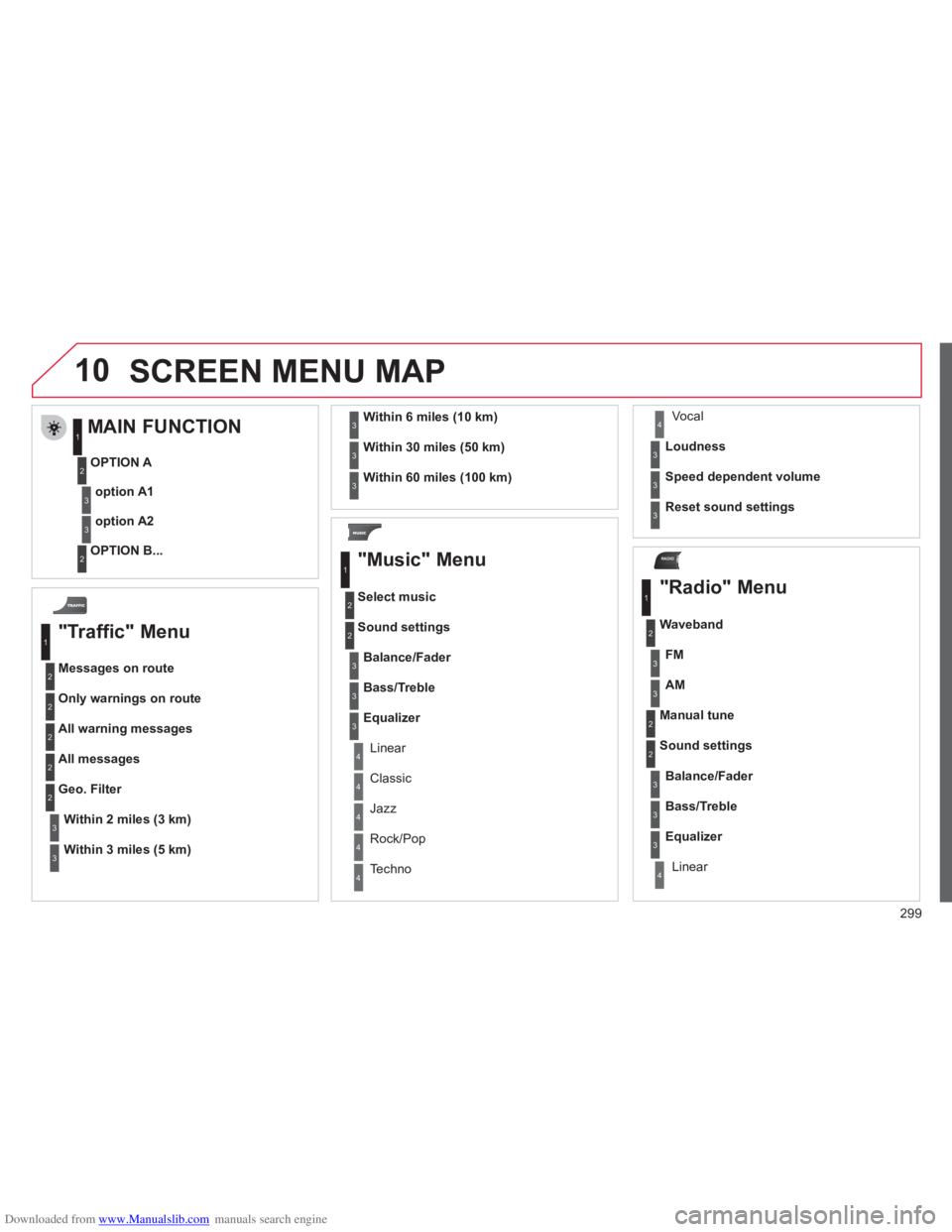
SCREEN MENU MAP
"Traffic" Menu
Messages on route
Onl
y warnings on route
All warning messages
All messages
Within2 miles (3 km)
Geo. Filter
Within
3 miles (5 km)
Within6 miles (10 km)
Within30 miles (50 km)
Within 60 miles (100 km)
"Music" Menu
Select music
Sound settin
gs
Balance/Fade
r
Bass/Treble
Linear
Equalizer
Classic
Jazz
Rock/Po
p
Techno
Vocal
Loudness
S
peed dependent volume
Reset sound settings
"Radio" Menu
Waveband
A
M
Linear F
M
Manual tune
Sound settin
gs
Balance
/Fader
Bass
/Treble
Equalizer
MAIN FUNCTION
OPTION A
option A1
option A2
OPTION B...
1
2
3
1
2
4
1
2
3
4
3
3
3
3
2
2
2
2
4
4
4
4
4
3
3
3
3
3
2
3
2
2
3
3
3
3
1
2
3
2
3
Page 305 of 352
Downloaded from www.Manualslib.com manuals search engine 303
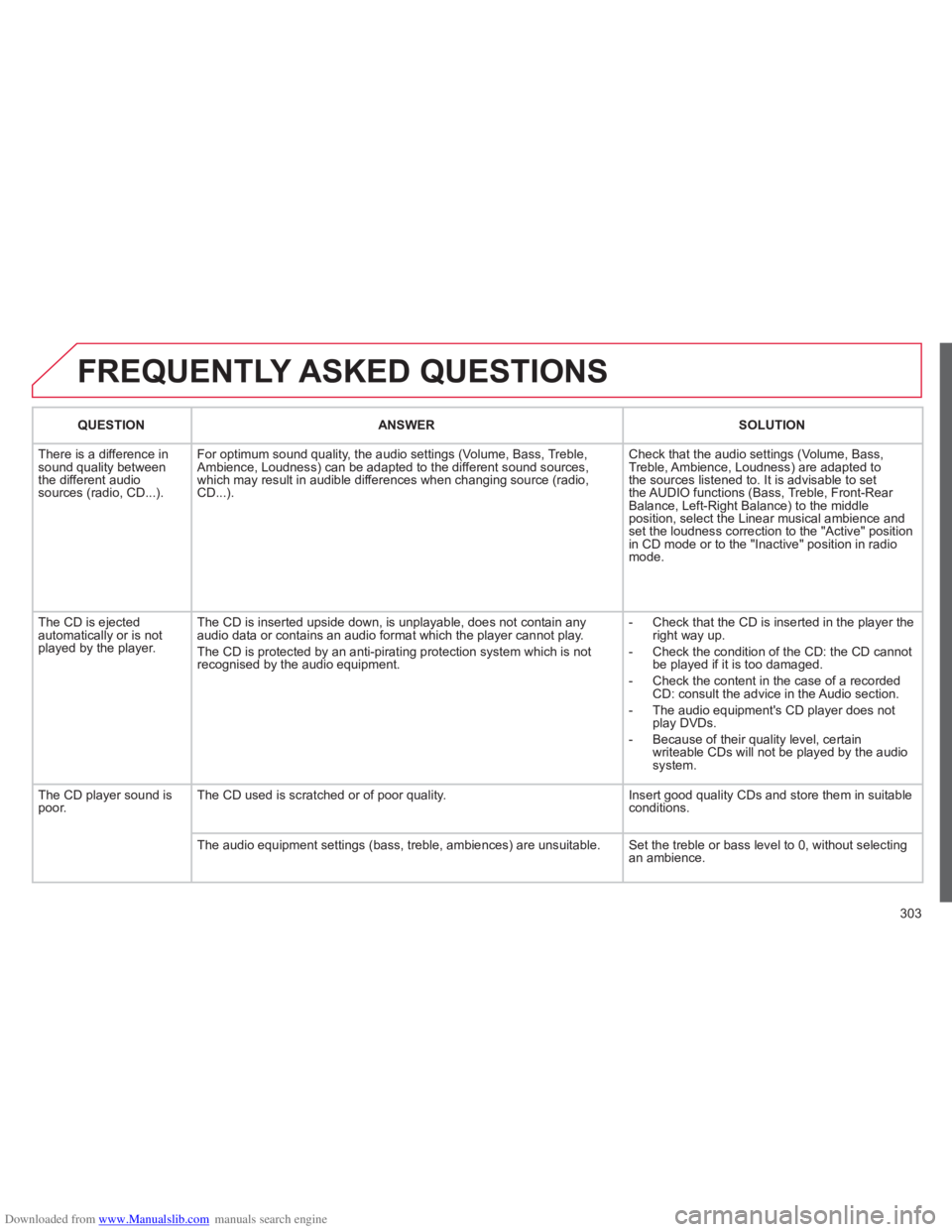
FREQUENTLY ASKED QUESTIONS
QUESTIONANSWER SOLUTION
There is a difference in sound quality between
the different audiosources (radio, CD...). For optimum sound qualit
y, the audio settings (Volume, Bass, Treble,
Ambience, Loudness) can be adapted to the different sound sources,
which may result in audible differences when changing source (radio,CD...). Check that the audio settin
gs (Volume, Bass,
Treble, Ambience, Loudness) are adapted to
the sources listened to. It is advisable to set
the AUDIO functions (Bass, Treble, Front-Rear
Balance, Left-Right Balance) to the middle position, select the Linear musical ambience andset the loudness correction to the "Active" position
in CD mode or to the "Inactive" position in radio mode.
The
CD is ejected
automatically or is not played by the player. The
CD is inserted upside down, is unplayable, does not contain any audio data or contains an audio format which the player cannot play.
The CD is protected b
y an anti-pirating protection system which is not recognised by the audio equipment.
-
Check that the CD is inserted in the player the
right way up.
-
Check the condition of the CD: the CD cannot
be played if it is too damaged.
-
Check the content in the case of a recordedCD: consult the advice in the Audio section.
- The audio equipment's
CD player does not
play DVDs.
- Because o
f their quality level, certain
writeable CDs will not be played by the audio
system.
The CD pla
yer sound ispoor.The CD used is scratched or of poor quality. Insert good quality CDs and store them in suitable conditions.
The audio equipment settings
(bass, treble, ambiences) are unsuitable. Set the treble or bass level to 0, without selectingan ambience.
Page 310 of 352
Downloaded from www.Manualslib.com manuals search engine 308
01
11
22
10101111
133144155
33445566778899
122
FIRST STEPS
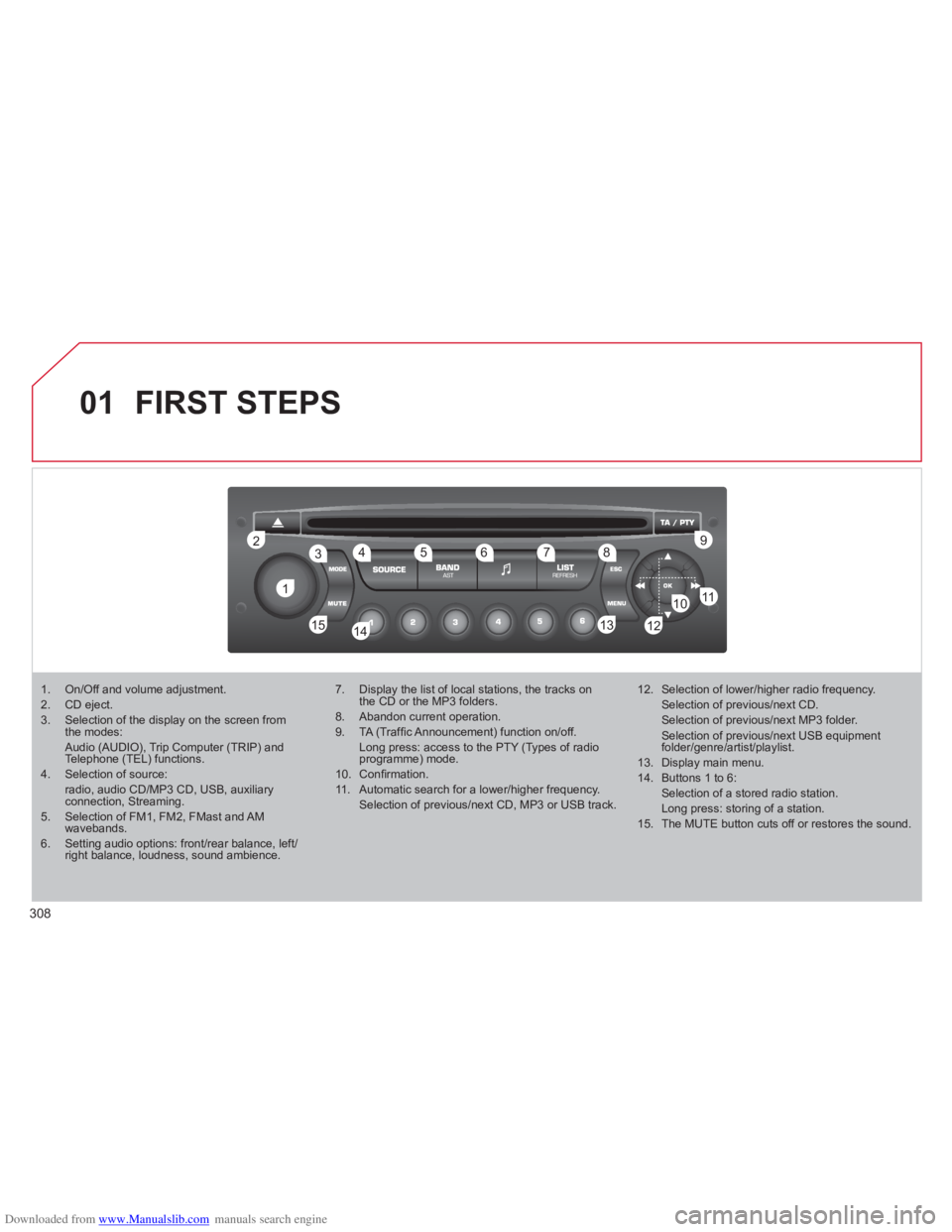
1. On/Off and volume adjustment. 2. CD eject. 3. Selection of the display on the screen fromthe modes:Audio (AUDIO), Trip Computer (TRIP) andTelephone (TEL) functions.4. Selection of source: radio, audio CD/MP3 CD, USB, auxiliaryconnection, Streaming.5. Selection of FM1, FM2, FMast and AMwavebands.6. Setting audio options: front/rear balance, left/right balance, loudness, sound ambience.
7. Display the list of local stations, the tracks onthe CD or the MP3 folders.
8. Abandon current operation.
9. TA (Traffi c Announcement) function on/off. Long press: access to the PTY (Types of radioprogramme) mode.
10. Confi rmation.
11. Automatic search for a lower/higher frequency. Selection of previous/next CD, MP3 or USB track.
12. Selection of lower/higher radio frequency. Selection of previous/next CD. Selection of previous/next MP3 folder. Selection of previous/next USB equipment folder/genre/artist/playlist.
13. Display main menu.
14. Buttons 1 to 6: Selection of a stored radio station. Long press: storing of a station.
15. The MUTE button cuts off or restores the sound.
Page 329 of 352

Downloaded from www.Manualslib.com manuals search engine 327
FREQUENTLY ASKED QUESTIONS
QUESTIONANSWERSOLUTION
There is a difference in sound quality betweenthe different audiosources (radio, CD...).
For optimum sound quality, the audio settings (Volume, Bass, Treble, Ambience, Loudness) can be adapted to the different sound sources,which may result in audible differences when changing source(radio, CD...).
Check that the audio settings (Volume, Bass, Treble, Ambience, Loudness) are adapted tothe sources listened to. It is advisable to setthe AUDIO functions (Bass, Treble, Front-Rear Balance, Left-Right Balance) to the middle position, select the musical ambience "None" and set the loudness correction to the "Active" position in CD mode or to the "Inactive" position in radio mode.
The CD is ejected automatically or is not played by the player.
The CD is inserted upside down, is unplayable, does not contain any audio data or contains an audio format which the player cannot play.
The CD is protected by an anti-pirating protection system which is not recognised by the audio equipment.
- Check that the CD is inserted in the playerthe right way up.
- Check the condition of the CD: the CD cannot be played if it is too damaged.
- Check the content in the case of a recordedCD: consult the advice in the "Audio" section.
- The audio equipment's CD player does notplay DVDs.
- Due to their quality level, certain writeableCDs will not be played by the audio system.
The message "USB peripheral error" isdisplayed on the screen.
The Bluetooth connectionis cut.
The battery of the peripheral may not be suffi ciently charged.
Recharge the battery of the peripheral device.
The USB memory stick is not recognised.
The memory stick may be corrupt.
Reformat the memory stick.
The CD player sound ispoor.The CD used is scratched or of poor quality.
Insert good quality CDs and store them in suitable conditions.
The audio equipment settings (bass, treble, ambiences) are unsuitable. Set the treble or bass level to 0, without selectingan ambience.
Page 347 of 352
Downloaded from www.Manualslib.com manuals search engine 345
ALPHABETICAL INDEX
Port,
USB .....108,253,254, 314,316Priming the fuel system ......... 175Protectingchildren......... 117, 120,122-124Puncture........................ 183,186
Reversing lamp ..............194, 195Rigid panel ...............................72Risk areas (update).......244, 288Roof bars...............................210Routine checks..............181, 182Running out of fuel (Diesel)....175
Short-cut menus ............ 279,280Sidelamps ...94, 96,190,192-195Side repeater.........................r192Spare wheel ........................... 186Speed limiter..........................r162Speedometer.....................r31, 32Spotlamps, side.......................98Stability control (ESP)............ 129Starting the vehicle ..................81Steering lock............................81Steering mounted controls ................233, 277,309Steering wheel,fixed centred controls.......... 160Stopping the vehicle ................81Stop & Start......................55,63,92,153,174, 181,203Storage .................................. 109Storage compartments .......... 106Storing driving positions ...........69Sun visor................................r105Sun visor flap ......................... 105Synchronising
the remote control..................82Synthesiser, voice .................. 242System, navigation................ 281Systems, ASR and ESP......... 129
PRS
Radio............................. 291,311Reading lamps, rear......r104,109Rear foglamp.........................193Rear screen, opening..............90Recharging the battery ..........203Regeneration of the particleemissions filter.....................r181Reinitialising the electric
windows.................................86Reinitialising
the remote control..................82Remote control ....78, 79,83,331Removable screen (snow shield).......................210Removing a wheel.................188Removing the mat .................. 108Repair kit, puncture ................183Replacing bulbs.....190, 194,195Replacing fuses.....................197Replacing the air filter............r181Replacing the oil filter............r181Replacing the passenger compartment filter................r181Replacing wiper blades ..........102Resetting
the service indicator...............43Resetting the trip recorder.......r44Rev counter.......................r31,32
RSafety for children............86, 125Scented air freshener..............r65Screen, colour 16/9...........50, 52,236, 265,278, 299Screen,monochrome........310,322, 324Screen, monochrome A...........A45Screen, monochrome C ...........47Screen,multifunction........45, 47, 50,52Screen, rear video.........333, 334Screen-wash reservoir...........r180Screen menumap......265, 299, 322,324, 335Screenwash, front..................101Screenwash fluid level ...........180Seat adjustment ...........67, 68,70Seat belts.......................131, 134Seat configurations..................75Seats, rear...................r70, 72,74Security bolts.........................188Serial number, vehicle...........226Service indicator................r42, 43Servicing......................29, 42, 43Settings (Menus) ....................332Setting
the clock ......264, 298,320, 321Shelf.........................................f70
S
Table of weights.....213, 215,221
Tables of engines...........213,215
Tables of fuses.......................197
Technical
data..............213,215, 221,223
Telephone ..............229,260-262,
295,296
T