ECU Citroen C4 PICASSO RHD 2014.5 1.G Owner's Manual
[x] Cancel search | Manufacturer: CITROEN, Model Year: 2014.5, Model line: C4 PICASSO RHD, Model: Citroen C4 PICASSO RHD 2014.5 1.GPages: 428, PDF Size: 10.03 MB
Page 35 of 428
33
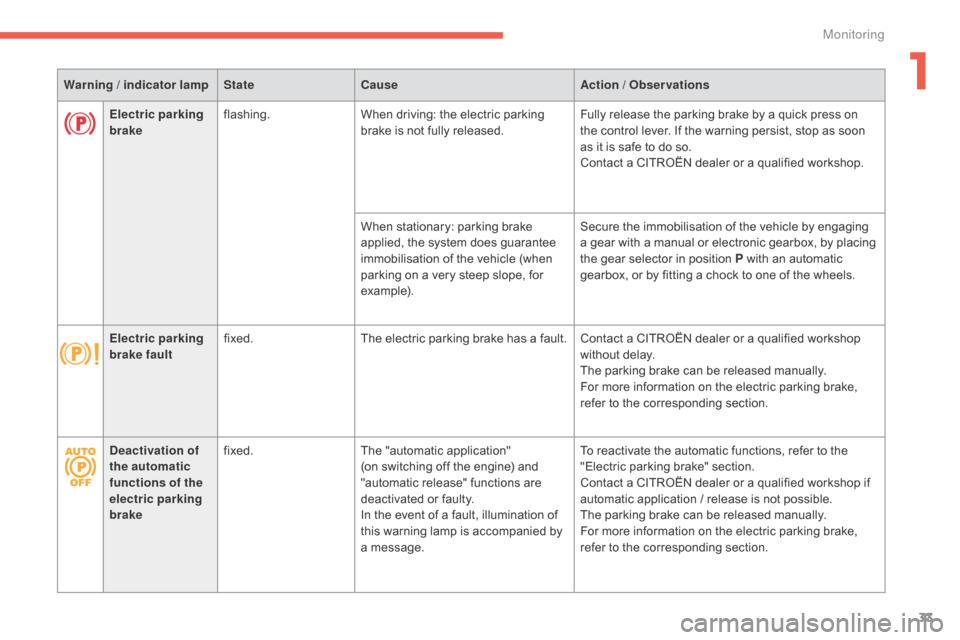
Warning / indicator lampStateCause Action / Observations
Deactivation of
the automatic
functions of the
electric parking
brake fixed.
The
"automatic application"
(on
switching off the engine) and
"
automatic release" functions are
d
eactivated or faulty.
In
the event of a fault, illumination of
t
his warning lamp is accompanied by
a
message.To
reactivate the automatic functions, refer to the
"
Electric parking brake" section.
Contact
a CITROËN dealer or a qualified workshop if
a
utomatic application / release is not possible.
The
parking brake can be released manually.
For
more information on the electric parking brake,
r
efer to the corresponding section.
Electric parking
brake
flashing.
When
driving: the electric parking
b
rake is not fully released.Fully
release the parking brake by a quick press on
t
he control lever. If the warning persist, stop as soon
a
s it is safe to do so.
Contact
a CITROËN dealer or a qualified workshop.
When
stationary: parking brake
a
pplied, the system does guarantee
i
mmobilisation of the vehicle (when
p
arking on a very steep slope, for
e
xample).Secure
the immobilisation of the vehicle by engaging
a
gear with a manual or electronic gearbox, by placing
t
he gear selector in position P with an automatic
g
earbox, or by fitting a chock to one of the wheels.
Electric parking
brake fault fixed.
The
electric parking brake has a fault. Contact a CITROËN dealer or a qualified workshop
w
ithout delay.
The
parking brake can be released manually.
For
more information on the electric parking brake,
r
efer to the corresponding section.
1
Monitoring
Page 64 of 428
62
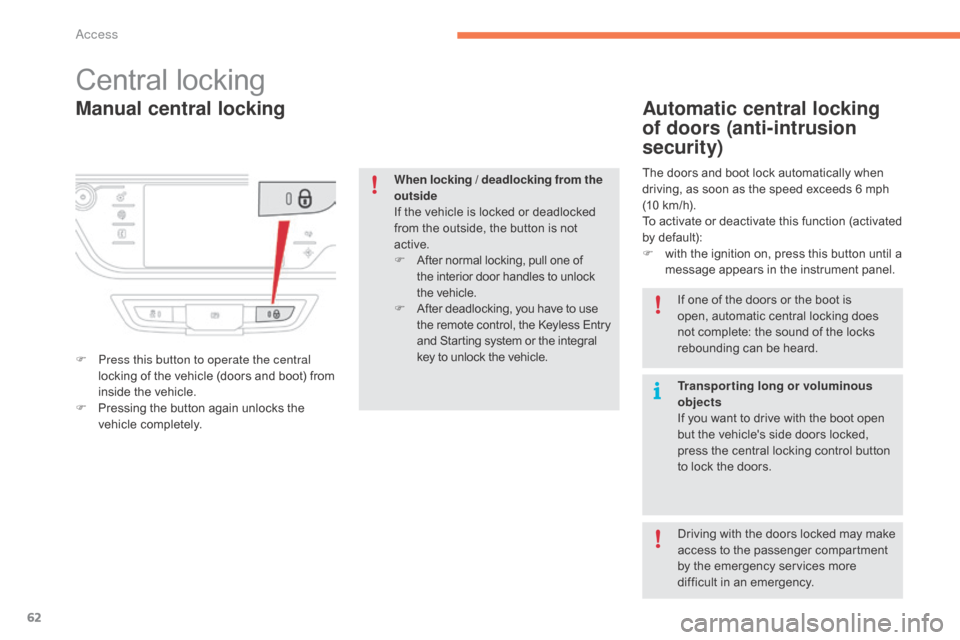
Manual central locking
Central locking
F Press this button to operate the central locking of the vehicle (doors and boot) from
i
nside the vehicle.
F
P
ressing the button again unlocks the
v
ehicle
c
ompletely.
Automatic central locking
of doors (anti-intrusion
security)
The doors and boot lock automatically when driving, as soon as the speed exceeds 6 mph
(
10 km/h).
To
activate or deactivate this function (activated
b
y default):
F
w
ith the ignition on, press this button until a
m
essage appears in the instrument panel.
When locking / deadlocking from the
outside
If
the
vehicle
is
locked
or
deadlocked
f
rom
the
outside,
the
button
is
not
a
ctive.
F
A
fter
normal
locking,
pull
one
of
t
he
interior
door
handles
to
unlock
t
he vehicle.
F
A
fter
deadlocking,
you
have
to
use
t
he
remote
control,
the
Keyless
Entry
a
nd
Starting
system
or
the
integral
k
ey
to
unlock
the
vehicle. If
one of the doors or the boot is
o
pen, automatic central locking does
n
ot complete: the sound of the locks
r
ebounding can be heard.
Transporting long or voluminous
objects
If
you want to drive with the boot open
b
ut the vehicle's side doors locked,
p
ress the central locking control button
t
o lock the doors.
Driving
with the doors locked may make
a
ccess to the passenger compartment
b
y the emergency services more
d
ifficult in an emergency.
Access
Page 112 of 428
110
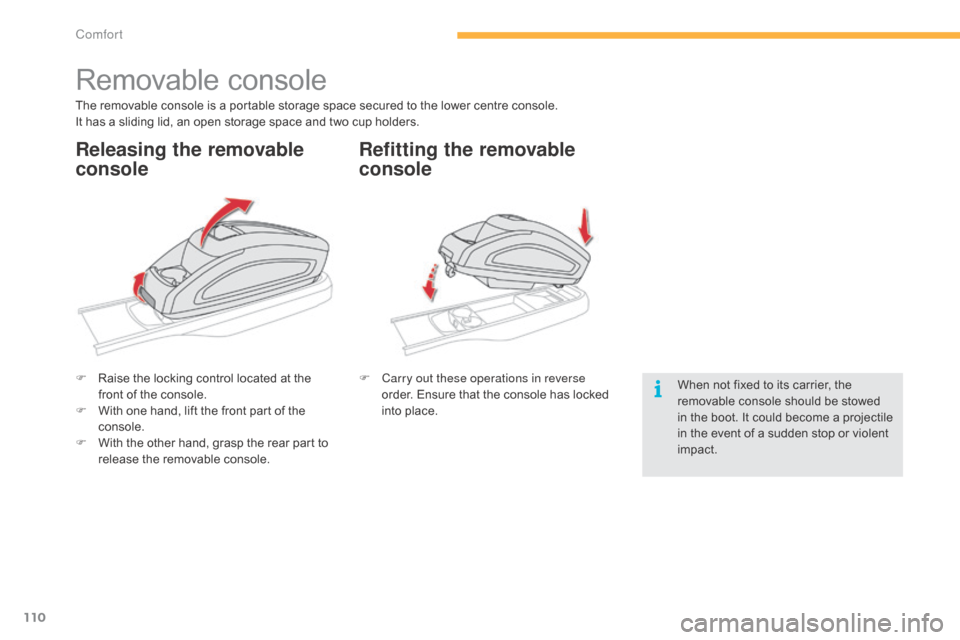
Removable console
The removable console is a portable storage space secured to the lower centre console.
I t has a sliding lid, an open storage space and two cup holders.
F
R
aise the locking control located at the
f
ront of the console.
F
W
ith one hand, lift the front part of the
c
onsole.
F
W
ith the other hand, grasp the rear part to
r
elease the removable console.F
C
arry out these operations in reverse
order.
Ensure that the console has locked
i
nto place.When
not fixed to its carrier, the
r
emovable console should be stowed
i
n the boot. It could become a projectile
i
n the event of a sudden stop or violent
im
pact.
Releasing the removable
consoleRefitting the removable
console
Comfort
Page 115 of 428
113
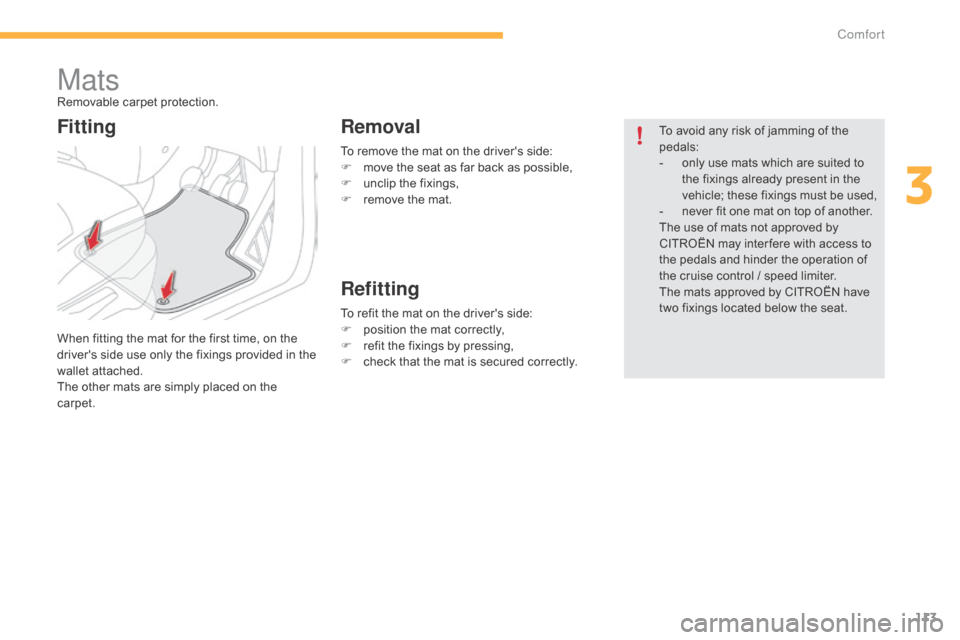
To remove the mat on the driver's side:
F m ove the seat as far back as possible,
F
u
nclip the fixings,
F
r
emove the mat.
MatsRemovable carpet protection.
W hen fitting the mat for the first time, on the
d
river's side use only the fixings provided in the
w
allet attached.
The
other mats are simply placed on the
c
arpet. To
avoid any risk of jamming of the
ped
als:
-
o
nly use mats which are suited to
t
he fixings already present in the
v
ehicle; these fixings must be used,
-
n
ever fit one mat on top of another.
The
use of mats not approved by
C
ITROËN may inter fere with access to
t
he pedals and hinder the operation of
t
he cruise control / speed limiter.
The
mats approved by CITROËN have
t
wo fixings located below the seat.
To
refit the mat on the driver's side:
F
p
osition the mat correctly,
F
r
efit the fixings by pressing,
F
c
heck that the mat is secured correctly.
FittingRemoval
Refitting
3
Comfort
Page 122 of 428
120
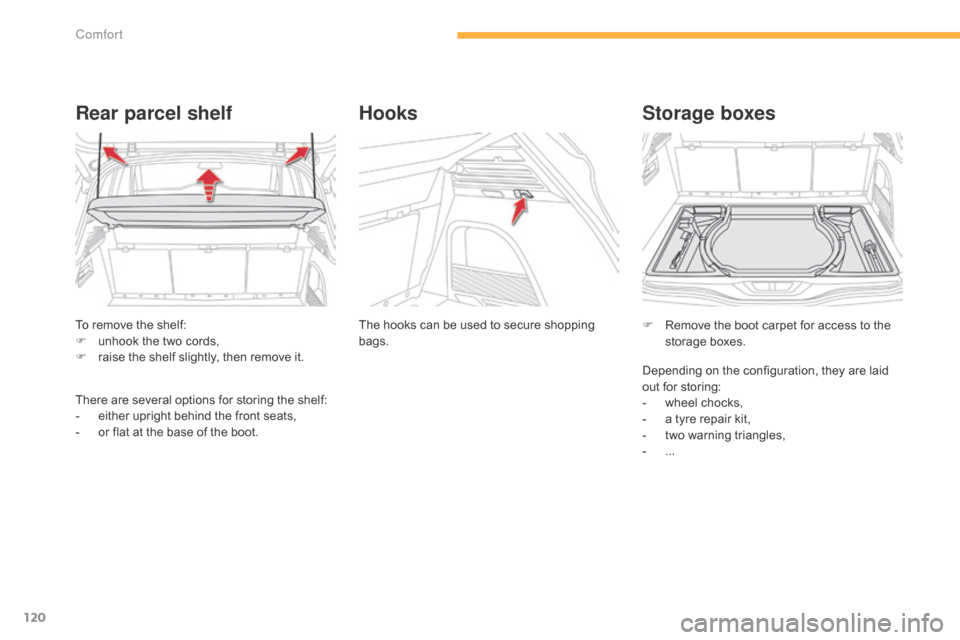
To remove the shelf:
F u nhook the two cords,
F
r
aise the shelf slightly, then remove it.
Rear parcel shelf
There are several options for storing the shelf:
- e ither upright behind the front seats,
-
o
r flat at the base of the boot.The
hooks can be used to secure shopping
b
ags.
Hooks
F Remove
the boot carpet for access to the s
torage bo xes.
Storage boxes
Depending on the configuration, they are laid out for storing:
-
w
heel chocks,
-
a
tyre repair kit,
-
t
wo warning triangles,
-
...
Comfort
Page 123 of 428
121
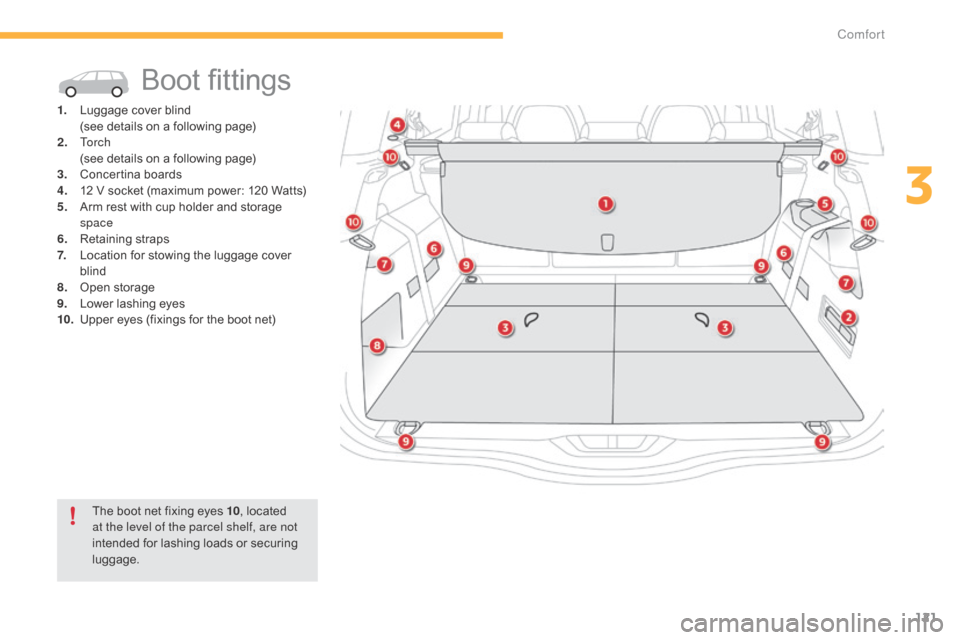
Boot fittings
1. Luggage cover blind (
see details on a following page)
2.
T
o r c h
(
see details on a following page)
3.
C
oncertina
b
oards
4.
1
2 V socket (maximum power: 120 Watts)
5.
A
rm rest with cup holder and storage
spa
ce
6.
R
etaining
s
traps
7.
L
ocation for stowing the luggage cover
b
lind
8.
O
pen
s
torage
9.
L
ower lashing eyes
10.
U
pper eyes (fixings for the boot net)
The
boot net fixing eyes 10,
located
a
t the level of the parcel shelf, are not
intended
for lashing loads or securing
l
uggage.
3
Comfort
Page 134 of 428

132
Electric parking brake
In the event of a battery failure, the
electric parking brake no longer works.
As
a safety measure, if the parking
b
rake is not applied, immobilise the
v
ehicle by engaging a gear or placing a
c
hock at one of the wheels.
Contact
a CITROËN dealer or a
q
ualified
w
orkshop.
Indicator lamp
This indicator lamp comes on in the instrument panel and in the control
l
ever to confirm the application of the
par
king
b
rake.
The
system
provides,
in
automatic
operation,
t
he
application
of
the
parking
brake
on
s
witching
off
the
engine
and
release
as
the
v
ehicle
moves
off.
The
driver
can
take
over
at
any
time
to
apply
o
r
release
the
parking
brake,
by
operating
the
c
ontrol
lever:
-
b
y
briefly
pulling the control lever to apply
the
brake,
-
b
y
briefly
pushing the control lever, while
pressing
the
foot
brake,
to
release.
Automatic
mode
is
activated
by
default.
The
technology
adopted
for
the
electric
p
arking
brake
does
not
allow
the
fitment
o
f
wheels
smaller
than
16
inches. It
goes
off
to confirm the release of the parking
b
rake.
The
indicator lamp in the control lever flashes
d
uring
manual application or release.
After
the
parking brake has been applied, the
s
imultaneous flashing of the two indicator
l
amps
in
the instrument panel and the control
l
ever
alerts you to the need to fully secure your
v
ehicle
by
engaging a gear (with a manual
o
r
electronic gearbox) or by placing the gear
s
elector in position P with an automatic
g
earbox,
or by fitting a chock to one of the
w
heels.
(E.g.: parking on a very steep slope or
o
n
a
slope with a low battery).
driving
Page 140 of 428

138
SituationsConsequences
Display
of
the
message
" Parking brake fault "
and of the
fo
llowing
w
arning
lam
ps: The
Parking Brake is faulty, the manual and automatic functions may not operate.
When stationary ,
to immobilise your vehicle:
-
P
ull and hold the control lever for about 7 to 15 seconds, until the warning lamp
c
omes on in the instrument panel.
If
this procedure does not work, you should make your vehicle safe:
-
P
ark on a level sur face.
-
E
ngage a gear with a manual or electronic gearbox, or place the gear selector in
p
osition P with an automatic gearbox.
-
I
f possible, fit a wheel chock.
Call
on a CITROËN dealer or a qualified workshop.
Display
of
the
message
" Parking brake fault "
and of the
fo
llowing
w
arning
lam
ps: -
T
he parking brake does not have its full per formance to securely hold the vehicle
i
n all situations.
You
should make your vehicle safe:
-
P
ark on a level sur face.
-
E
ngage a gear with a manual or electronic gearbox, or place the gear selector in
p
osition P with an automatic gearbox.
-
I
f possible, fit a wheel chock.
Call
on a CITROËN dealer or a qualified workshop.
The
flashing of the P warning lamps on starting the vehicle indicates that the parking
b
rake is not correctly applied.
As
soon as possible, stop the vehicle and try to completely release the parking brake,
u
sing the control lever, with your foot on the brake pedal.
Display
of
the
message
" Battery fault "
and the following
w
arning
lam
p: -
T
he state of charge of the battery is very low and requires immobilisation of the
v
ehicle in a safe place: engage a gear with a manual gearbox or fit a chock to
o
ne of the wheels.
-
O
nce the battery is completely discharged, the controls do not operate: to
r
elease the parking brake, call on a CITROËN dealer or a qualified workshop.
Driving
Page 163 of 428
161
on sharp acceleration, as when
descending a steep hill, the speed
l
imiter will not be able to prevent
t
he vehicle from exceeding the
pro
grammed
s
peed.
The
limiter is temporarily deactivated
a
nd the displayed programmed speed
f
lashes.
An
audible signal accompanies the
f
lashing of the programmed speed
w
hen exceeding the speed is not due to
a
n action by the driver.
The
use of mats not approved by
C
ITROËN may inter fere with the
o
peration of the speed limiter.
To
avoid any risk of jamming of the
ped
als:
-
e
nsure that the mat is secured
c
o r r e c t l y,
-
d
o not fit one mat on top of another.
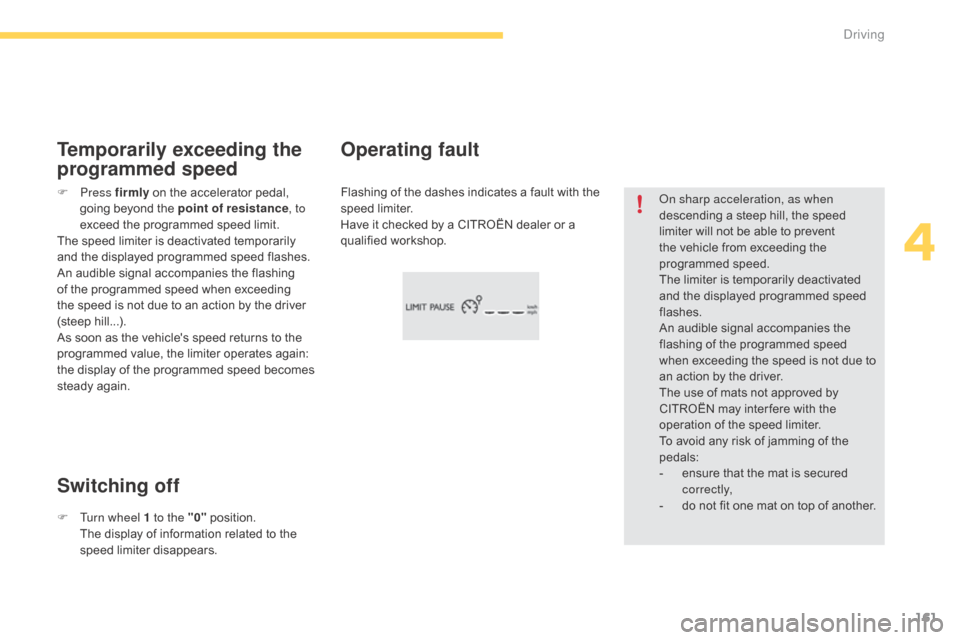
Flashing
of
the
dashes
indicates
a
fault
with
the
sp
eed l
imiter.
Have
it
checked
by
a
CITROËN
dealer
or
a
q
ualified
w
orkshop.
Operating fault
F Press f irmly on the accelerator pedal, g
oing beyond the point of resistance,
to
exceed
the programmed speed limit.
The
speed limiter is deactivated temporarily
a
nd the displayed programmed speed flashes.
An
audible signal accompanies the flashing
o
f the programmed speed when exceeding
t
he speed is not due to an action by the driver
(
steep
h
ill...).
As
soon as the vehicle's speed returns to the
p
rogrammed value, the limiter operates again:
t
he display of the programmed speed becomes
s
teady again.
Switching off Temporarily exceeding the
programmed speed
F Turn wheel 1 to the "0" p osition. T
he display of information related to the
sp
eed
l
imiter
d
isappears.
4
driving
Page 166 of 428

164
Flashing of the dashes indicates a fault with the cruise control.
Have
it checked by a CITROËN dealer or a
q
ualified
w
orkshop.
Operating fault
Exceeding the programmed
speed
If the cruise speed setting is exceeded, the displayed speed flashes.
The
display becomes steady again once the
v
ehicle returns to the cruise speed setting.
Switching off
F Turn wheel 1 to the "0" position. T
he display of information related to the
c
ruise control disappears. When
the cruise control is switched on,
b
e careful if you maintain the pressure
o
n one of the programmed speed
c
hanging buttons: this may result in
a
very rapid change in the speed of
y
our vehicle.
do n
ot use the cruise control on
slippery roads or in heavy traffic.
On a steep descent, the cruise control
w
ill not be able to prevent the vehicle
from exceeding the programmed speed.
On steep climbs or when towing, the
p
rogrammed speed may not be reached
o
r maintained.
The
use of mats not approved by
C
ITROËN may inter fere with the
o
peration of the cruise control.
To
avoid any risk of jamming of the
ped
als:
-
e
nsure that the mat is secured
c
o r r e c t l y,
-
n
ever fit one mat on top of another.
Driving