battery Citroen C5 RHD 2015 (RD/TD) / 2.G User Guide
[x] Cancel search | Manufacturer: CITROEN, Model Year: 2015, Model line: C5 RHD, Model: Citroen C5 RHD 2015 (RD/TD) / 2.GPages: 344, PDF Size: 12.96 MB
Page 54 of 344

52
boot (Saloon)
F Press upwards on lever 1 and lift up the boot lid. With the vehicle stationary, this is carried out
using:
-
T
he remote control.
-
T
he key in a door lock.
-
T
he interior central locking/ unlocking control.
The boot automatically locks when the vehicle
is moving at a speed of over 6 mph (10 km/h),
even if automatic central locking is deactivated.
It is unlocked when a door is opened or when
the central locking button is pressed (speed
lower than 6 mph (10 km/h)).
Opening Locking/unlocking Emergency boot release
Unlocking
F Fold back the rear seats to gain access to
the lock from inside the boot.
F
I
nsert a small screwdriver into hole A of the
lock to unlock the tailgate.
F
P
ush the white part, located inside the
lock, to the left to unlock the boot.
System for mechanical unlocking of the boot
in the event of a battery or central locking
malfunction.
access
Page 57 of 344
55
Panoramic sunroof (Saloon)
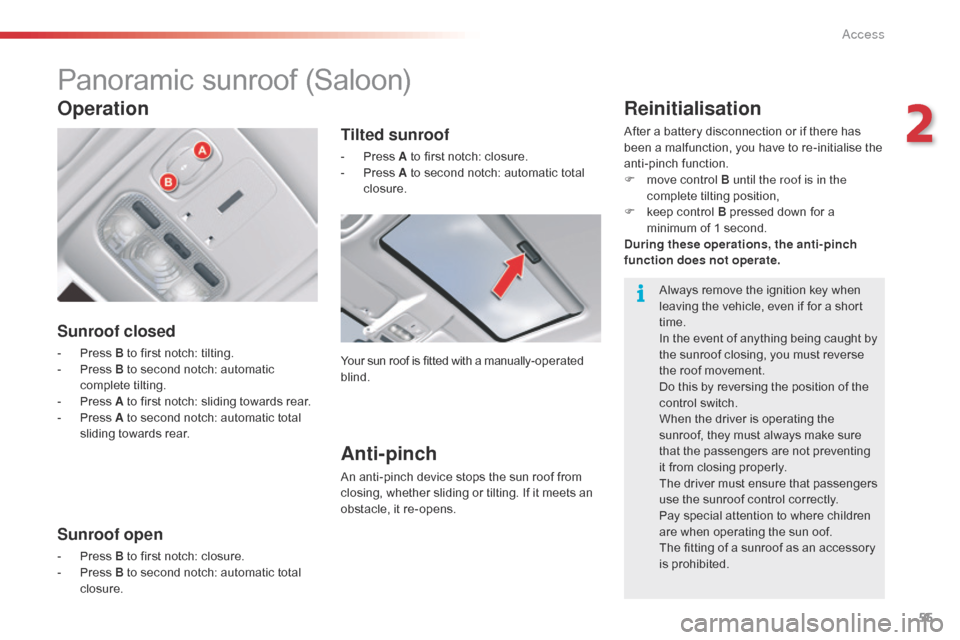
Sunroof closed
- Press B to first notch: tilting.
- P ress B to second notch: automatic
complete tilting.
-
P
ress A to first notch: sliding towards rear.
-
P
ress A to second notch: automatic total
sliding towards rear.
Sunroof open
- Press B to first notch: closure.
- P ress B to second notch: automatic total
closure.
Operation
Tilted sunroof
- Press A to first notch: closure.
- P ress A to second notch: automatic total
closure.
Your sun roof is fitted with a manually-operated
blind.
Anti-pinch
An anti-pinch device stops the sun roof from
closing, whether sliding or tilting. If it meets an
obstacle, it re-opens.
Reinitialisation
After a battery disconnection or if there has
been a malfunction, you have to re-initialise the
anti-pinch function.
F
m
ove control B until the roof is in the
complete tilting position,
F
k
eep control B pressed down for a
minimum of 1 second.
During these operations, the anti-pinch
function does not operate .
Always remove the ignition key when
leaving the vehicle, even if for a short
time.
In the event of anything being caught by
the sunroof closing, you must reverse
the roof movement.
Do this by reversing the position of the
control switch.
When the driver is operating the
sunroof, they must always make sure
that the passengers are not preventing
it from closing properly.
The driver must ensure that passengers
use the sunroof control correctly.
Pay special attention to where children
are when operating the sun oof.
The fitting of a sunroof as an accessory
is prohibited.
2
Access
Page 59 of 344

57
Anti-pinch
If the blind meets an obstacle whilst closing, it
stops and opens partially again.
You must re-initialise the anti-pinch function
within 5 seconds of the blind stopping:
F
p
ress control B until the blind is fully closed
(closing in steps of a few centimetres).
After a battery disconnection, or if there has
been a malfunction, you have to re-initialise the
anti-pinch function:
F
p
ress control B to the 2nd notch (fully
closed),
F
w
ait until the blind is fully closed,
F
p
ress control B for at least 3 seconds.
If the blind opens randomly during a closing
operation, and straight after the blind stops:
F
P
ress control B until the blind closes fully.
During these operations, the anti-pinch
function does not operate. In the event of anything being caught
when the blind is moving, you must
reverse the movement of the blind.
To do so, reverse the position of the
control.
When the driver is operating the blind,
he or she must always make sure that
the passengers are not preventing it
from closing properly.
The driver must ensure that passengers
use the blind correctly.
Pay particular attention to children
when operating the blind.
2
Access
Page 63 of 344

61
Storing driving positions
System which stores the settings of the driver's
seat. Up to two positions can be stored using
the buttons on the side of the driver's seat.
When storing a driving position, the air
conditioning settings are also memorised.
Storing a position
Using buttons M / 1 / 2
F Switch on the ignition.
F A djust your seat.
F
P
ress button M , then press button 1 or 2
within four seconds.
A
n audible signal confirms that the settings
have been stored.
Storing a new position cancels the previous
position.
Welcome function
The welcome function assists entry and leaving
the vehicle.
After switching off the ignition and opening
the driver’s door, the seat moves back
automatically and then stays in this position,
ready for the next entry to the vehicle.
When switching on the ignition, the seat moves
for ward to the memorised driving position.
When moving the seat, take care that no
person or object hinders the automatic
movement of the seat.
This function is deactivated by default. You may
activate or deactivate this function using the
"Main Menu" on the instrument panel screen.
To do so, select " Vehicle parameters/Comfort /
Driver welcome".
To adjust the air conditioning, refer to
the "Air conditioning" section.For your safety, avoid storing a driving
position while driving.
Recalling a stored position
Ignition on or engine running
F briefly press button 1 or 2 to recall the
corresponding position.
A
n audible signal indicates the end of the
adjustment.
When the ignition is on, after a few consecutive
position recalls, the function will be deactivated
until the engine is started, to prevent
discharging of the battery.
3
Ease of use and comfort
Page 83 of 344

81
Switching off the heating
Press button 5 (ON).The symbol "HTM" remains on.
Changing the level of heating
The system offers 5 levels of heating (from the
lowest level C1 to the highest level C5 ).
Once the level of heating has been displayed
by means of the buttons
1, press buttons 4 and
5 simultaneously.
The letter "C" flashes.
Set the level of heating by pressing the
buttons 1 .
Press buttons 4 and 5 simultaneously to save
the level selected. The letter "C" is displayed
(fixed). The factory pre-sets are replaced by the
new settings entered. The programmed
times are stored until the next time they
are changed.
When the departure time is activated,
the level of heating cannot be changed.
The departure time must be deactivated
first.
Changing the battery
The remote control is supplied by a
6V-28L battery, which is supplied.
Information on the display indicates when it is
time to replace this battery.
Unclip the casing then replace the battery.
The remote control must then be reinitialised,
see below.
Do not discard the used batteries, take
them to an approved collection point.
3
Ease of use and comfort
Page 84 of 344

82
Reinitialising the remote control
If the vehicle's battery is disconnected or the
remote control's battery is replaced, the remote
control must be reinitialised.
After switching on the power, press button 4
(OFF) for 1 second within the next 5 seconds.
If the operation has taken place correctly the
message "OK" is displayed on the remote
control screen.
If a problem occurs, the message " F A I L"
appears. Repeat the operation. Always switch off the programmable
heating while filling with fuel to avoid
any risk of fire or explosion.
To avoid any risk of poisoning and
asphyxiation, the programmable
heating must not be used, even for
short periods, in an enclosed space
such as a garage or workshop which
is not equipped with an exhaust gas
extraction system.
Do not park the vehicle on an
inflammable sur face (dry grass, dead
leaves, paper…), there is a risk of fire.
The programmable heating system
is supplied by the vehicle's fuel tank.
Before use, ensure that the quantity
of fuel remaining is sufficient. If the
fuel tank is at the reserve, we strongly
advise that you do not programme the
heating.
The interior volumetric protection alarm
movement sensor may be disturbed by
the flow of air from the programmable
heating when it is in operation.
To avoid any unexpected triggering
of the alarm during use of the
programmable heating, it is advisable
to deactivate the interior volumetric
protection.
An adaptation of your programmable
heating allows you to pre-heat your
vehicle's passenger compartment.
Contact a CITROËN dealer or a
qualified workshop.
Ease of use and comfort
Page 99 of 344

97
Anti-theft protection
Electronic engine immobiliser
The key contains an electronic chip which has
a special code. When the ignition is switched
on, this code must be recognised in order for
starting to be possible.In the event of a fault, you are
informed by illumination of this
warning lamp, an audible signal and
a message in the screen.
In this case, your vehicle will not start; contact
a CITROËN dealer as soon as possible.
Starting-switching off the engine
Keep safely, away from your vehicle,
the label attached to the keys given to
you on acquisition of the vehicle.
Ignition switch
It has 3 positions:
- p osition 1 (Stop) : insert and removing
the
key,
-
p
osition 2 (Ignition on) : steering column
unlocked, ignition on, Diesel preheating,
engine running,
-
p
osition 3 (Starting) .
Ignition on position
It allows the use of the vehicle's electric
equipment or portable devices to be charged.
Avoid attaching heavy objects to the
key, which would weigh down on its
blade in the ignition switch and could
cause a malfunction.
This electronic engine immobiliser locks the
engine management system a few minutes
after the ignition is switched off and prevents
starting of the engine by anyone who does not
have the key.
Once the state of charge of the battery drops
to the reserve level, the system switches to
energy economy mode: the power supply is
cut off automatically to preserve the remaining
battery charge.
4
Driving
Page 106 of 344

104
Maximum application
If necessary, you can make a maximum
application of the parking brake. It is obtained
by means of a long pull on control lever A,
until you see the message "Max application of
the parking brake" and a beep is heard.
Maximum application is essential:
-
i
n the case of a vehicle towing a caravan
or a trailer, if the automatic functions are
activated but you are applying the parking
brake manually,
-
w
hen the effective gradient you are parked
on is variable (e.g. on a ferry, in a lorry,
during towing).
-
i
n the case of towing, a loaded vehicle or
parking on a gradient, turn the front wheels
towards the pavement and engage a gear
when you park.
-
a
fter a maximum application, the release
time will be longer.
Particular situations
In certain situations (starting the engine...), the
parking brake can automatically alter its level of
application. This is normal operation.
To advance your vehicle a few centimetres
without starting the engine, but with the ignition
on, press on the brake pedal and release the
parking brake by pushing then releasing
control lever A .
The full release of the parking brake is
confirmed by the warning lamp P in the control
lever and the warning lamp in the instrument
panel going off and the display of a message
"Parking brake off " in the instrument panel
screen.
To ensure correct operation of the parking
brake and therefore your safety, the number of
successive application/release operations is
limited to eight.
If this number is exceeded, you are warned
by the message "Parking brake faulty" and a
warning lamp flashes. In the event of a battery failure, it will
not be possible to operate the electric
parking brake.
As a safety measure if the parking
brake is not applied, immobilise the
vehicle by engaging a gear or by
placing a chock against one of the
wheels.
Contact a CITROËN dealer or a
qualified workshop.
Driving
Page 109 of 344

107
SITUATIONCONSEQUENCES
4 Display of messages "
Parking brake faulty" and "Anti
roll-back fault" and of the following warning lamps:
and/or
f
lashing-
T
he automatic functions are deactivated.
-
T
he hill start assist is not available.
To apply the electric parking brake:
F
I
mmobilise the vehicle and switch off the ignition
F
P
ull the control lever for at least 5 seconds or until maximum application.
F
S
witch on the ignition and check that the electric parking brake warning lamps
are on.
-
A
pplication may take longer than in normal operation.
-
I
f warning lamp (!) flashes or if the warning lamps do not come on when the
ignition is switched on, this method does not work. Have it checked by a
CITROËN dealer or a qualified workshop.
To release the electric parking brake:
F
S
witch on the ignition.
F
P
ush the control lever and hold it for approximately 3 seconds.
5 Display of message "
Parking brake control faulty –
automatic mode activated " and the following warning
lamps:
and/or
f
lashing-
O
nly the functions for automatic application on switching off the engine and
automatic release on acceleration are available.
-
M
anual application/release of the electric parking brake and dynamic
emergency braking are unavailable.
6 Display of message "
Parking brake faulty " and of the
following warning lamp:
flashing -
A
pplication of the parking brake is not guaranteed.
-
T
he parking brake is temporarily unavailable.
It this situation arises:
F
W
ait approximately 3 minutes.
F
A
fter 3 minutes, if the warning lamp is still flashing, try to reinitialise the parking
brake, either by pushing and releasing the control A while pressing the brake
pedal or by means of a long pull on control lever A .
7 Battery problem
-
I
llumination of the battery warning lamp makes it essential to stop the vehicle
as soon as traffic allows. Stop and immobilise your vehicle.
-
A
pply the electric parking brake before switching off the engine.
4
Driving
Page 123 of 344

121
Stop & Start
Operation
- with an electronic gearbox, at speeds
below 4 mph (6 km/h), press the brake
pedal or put the gear lever in position N .
Going into engine STOP
mode
The "ECO" warning lamp comes
on in the instrument panel and the
engine goes into standby:
If your vehicle is fitted with the
system, a time counter calculates
the sum of the periods in STOP
mode during a journey. It rests itself
to zero every time the ignition is
switched on with the key.
Special cases: STOP mode not
available
In this case, the "ECO" warning
lamp flashes for a few seconds then
goes
off.
This operation is perfectly normal. STOP mode is not invoked when:
-
t
he driver's door is open,
-
t
he driver's seat belt is not fastened,
-
t
he vehicle has not exceeded 6 mph
(10 km/h) since the last engine start using
the key,
-
t
he electric parking brake is applied or
being applied,
-
t
he engine is needed to maintain a
comfortable temperature in the passenger
compartment,
-
d
emisting is active,
-
s
ome special conditions (battery charge,
engine temperature, braking assistance,
ambient temperature...) where the engine is
needed to assure control of a system.
The Stop & Start
system puts the engine temporarily into standby - STOP mode - during stops in the traffic (red lights, traffic jams, or other...).
The
engine restarts automatically - START mode - as soon as you want to move off. The restart takes place instantly, quickly and silently.
Per fect for urban use, the Stop & Start system reduces fuel consumption and exhaust emissions as well as the noise level when stationary.
Never refuel with the engine in STOP
mode; you must switch off the ignition
with the key. For your comfort, during parking
maoeuvres, STOP mode is not
available for a few seconds after
coming out of reverse gear.
STOP mode does not affect the
functionality of the vehicle, such as for
example, braking, power steering...
4
driving