lights CITROEN C6 2012 Handbook (in English)
[x] Cancel search | Manufacturer: CITROEN, Model Year: 2012, Model line: C6, Model: CITROEN C6 2012Pages: 216, PDF Size: 10.23 MB
Page 76 of 216
74
II
BRAKES
ABS system
The ABS system enhances your safety by preventing the wheels from locking in the event of sudden brakingor in conditions of poor road adherence. It enables you to retain control of the steering.
The
functioning capability of all the electrical components essential to the ABS is monitored electronically before and
during your journey. The ABS warning lamp lights up when you switch on the ignition: it should go out after a fewseconds.
If the monitoring warning lamp does not go out, that means that the ABS has disconnected because there is a fault.Also, the fact that the monitoring warning lamp comes on during the journey shows that the ABS system is inactive.
In both cases, the normal braking system remains effi cient, exactly as on a vehicle without ABS. However, to restorethe level of safety provided by correct operation of the ABS, the vehicle should be inspected as soon as possible bya CITROÀN dealer or a qualifi ed workshop.yp y p
On roads with poor adherence (chippings, snow, ice etc.), it is always imperative to drive with prudence.
SYSTEM OF EMERGENCY BRAKING ASSISTANCE
The emergency braking assistance system helps you to attain the required braking pressure more rapidly, thus
to reduce the stopping distance. It operates depending on the speed of action on the brake pedal, decreasing theresistance to this action. To prolong this action of the emergency braking assistance system, simply keep your foot
on the brake pedal.
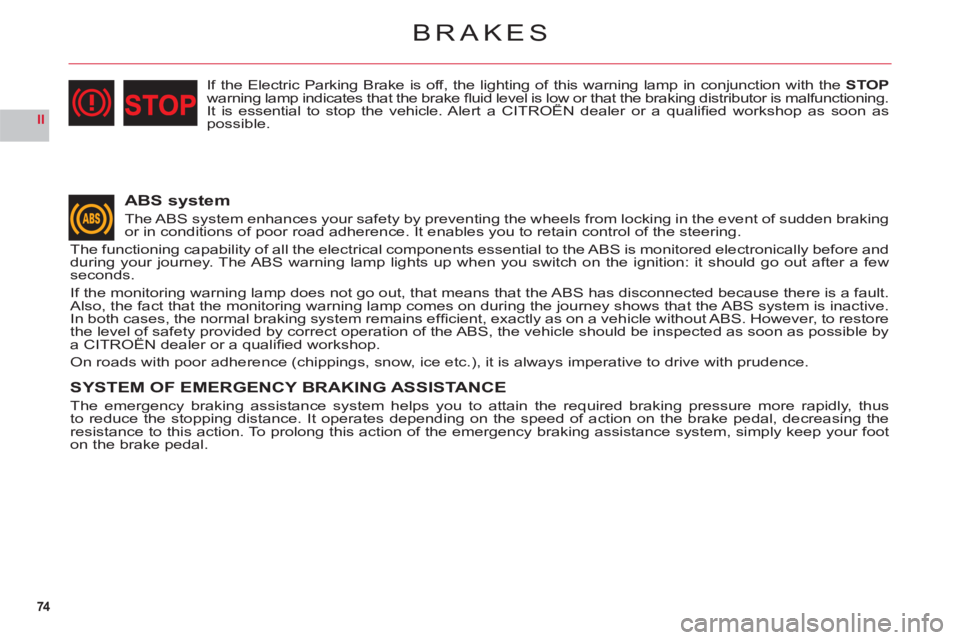
If the Electric Parking Brake is off, the lighting of this warning lamp in conjunction with the STOPwarning lamp indicates that the brake fl uid level is low or that the braking distributor is malfunctioning.It is essential to stop the vehicle. Alert a CITROËN dealer or a qualifi ed workshop as soon asgpgg
possible.
Page 81 of 216
79
II
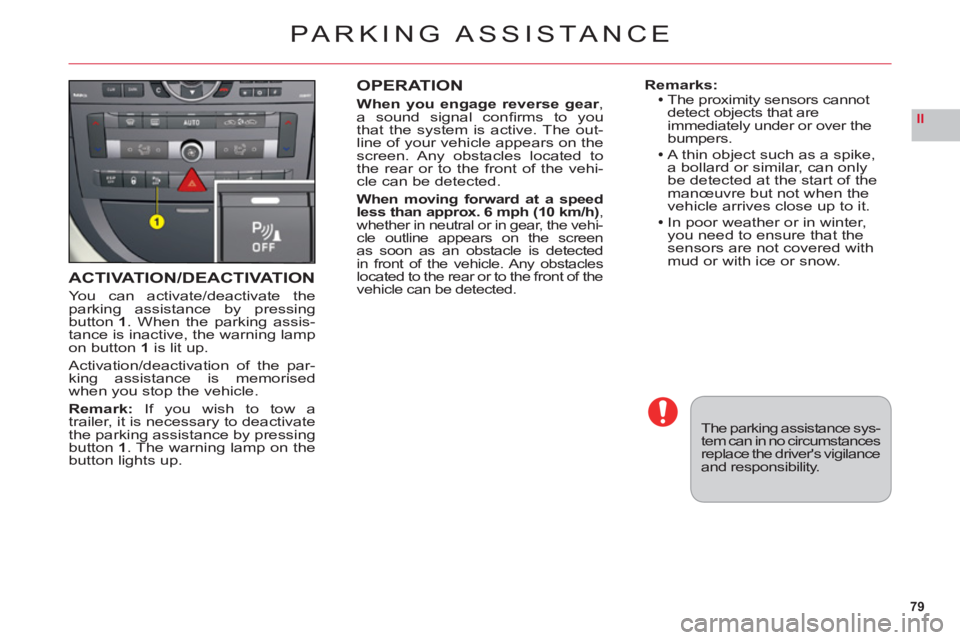
ACTIVATION/DEACTIVATION
You can activate/deactivate theparking assistance by pressingbutton 1. When the parking assis-
tance is inactive, the warning lampon button1is lit up.
Activation/deactivation of the par-king assistance is memorisedwhen you stop the vehicle.
Remark: If you wish to tow a
trailer, it is necessary to deactivate
the parking assistance by pressing
button 1. The warning lamp on the
button lights up.
OPERATION
When you engage reverse gear,
a sound signal confi rms to you
that the system is active. The out-line of your vehicle appears on the
screen. Any obstacles located to
the rear or to the front of the vehi-cle can be detected.
When moving forward at a speed less than approx. 6 mph (10 km/h),
whether in neutral or in gear, the vehi-cle outline appears on the screen as soon as an obstacle is detected
in front of the vehicle. Any obstacles located to the rear or to the front of the
vehicle can be detected.
Remarks:The proximity sensors cannot
detect objects that are
immediatel
y under or over the
bumpers.
A thin object such as a spike,
a bollard or similar, can only be detected at the start of themanœuvre but not when the
vehicle arrives close up to it.
In poor weather or in winter,you need to ensure that the sensors are not covered with
mud or with ice or snow.
PARKING ASSISTA NCE
The parking assistance sys-tem can in no circumstancesreplace the driver's vigilanceand responsibility.
Page 82 of 216
80
II
LANE DEPARTURE WARNING SYSTEM
This driving assistance device warns you when you unwittingly cross a lane marking (either a continuous or a dotted line on the road surface). It is desi-gned for use on motorways and dual carriageways, operating onlyabove
speeds of approx.50 mph (80 km/h).
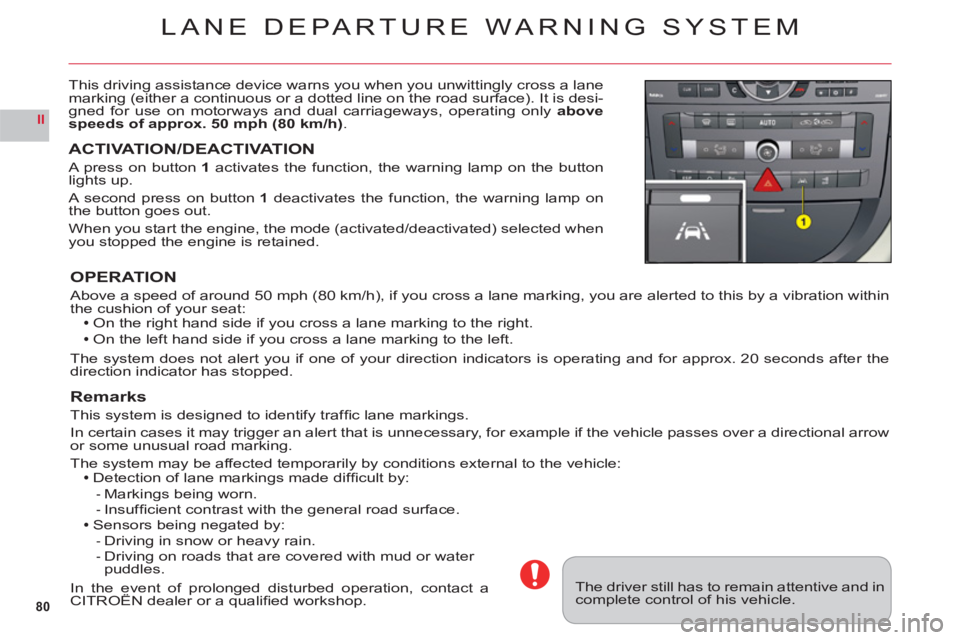
ACTIVATION/DEACTIVATION
A press on button 1activates the function, the warning lamp on the button lights up.
A second press on button 1 deactivates the function, the warning lamp on
the button goes out.
When you start the engine, the mode (activated/deactivated) selected when you stopped the engine is retained.
OPERATION
Above a speed of around 50 mph (80 km/h), if you cross a lane marking, you are alerted to this by a vibration within
the cushion of your seat:On the right hand side if you cross a lane marking to the right.
On the left hand side if you cross a lane marking to the left.
The system does not alert you if one of your direction indicators is operating and for approx. 20 seconds after the
direction indicator has stopped.
Remarks
This system is designed to identify traffi c lane markings.
In certain cases it ma
y trigger an alert that is unnecessary, for example if the vehicle passes over a directional arrow
or some unusual road marking.
The system may be affected temporarily by conditions external to the vehicle:Detection of lane markings made diffi cult by:
Markings being worn.Insuffi cient contrast with the general road surface.Sensors being negated by:
Driving in snow or heavy rain.Driving on roads that are covered with mud or water puddles.
In the event of prolonged disturbed operation, contact aCITROÀN dealer or a qualifi ed workshop.pg p
--
--
The driver still has to remain attentive and in complete control of his vehicle.
Page 84 of 216
82
III
LOCKING/UNLOCKING
FROM THE INSIDE
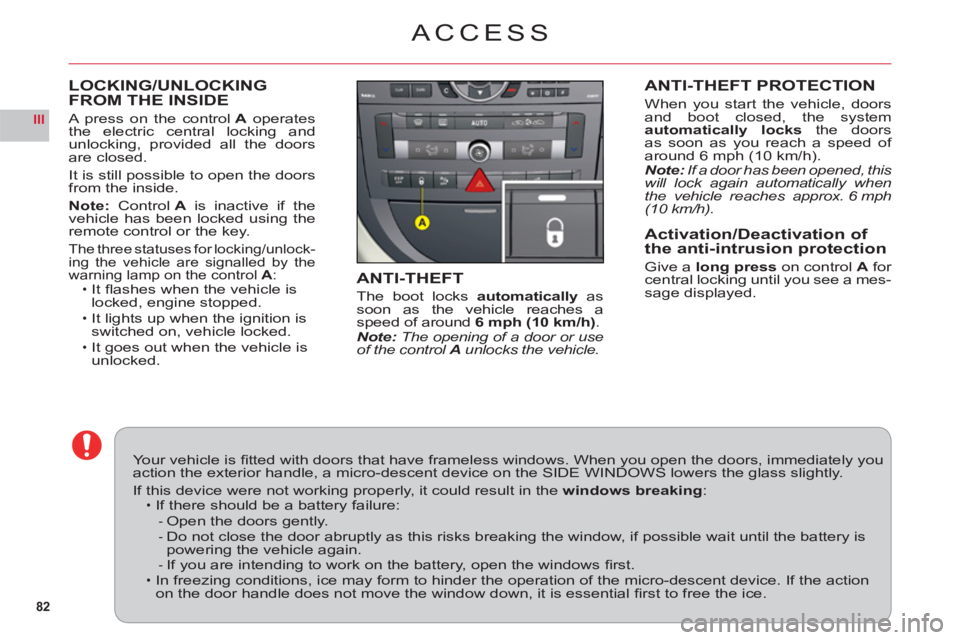
A press on the controlA operates
the electric central locking andunlocking, provided all the doorsare closed.
It is still possible to open the doorsfrom the inside.
Note: ControlAis inactive if thevehicle has been locked using theremote control or the key.
The three statuses for locking/unlock-ing the vehicle are signalled by the
warning lamp on the control A:It fl ashes when the vehicle is
locked, engine stopped.
It lights up when the ignition is switched on, vehicle locked.It goes out when the vehicle is unlocked.
ï
ï
ï
ACCESS
ANTI-THEFT PROTECTION
When you start the vehicle, doors
and boot closed, the system
automatically locksthe doorsas soon as you reach a speed of
around 6 mph (10 km/h).Note: If a door has been opened, this will lock again automatically whenthe vehicle reaches approx. 6 mph(10 km/h).
Activation/Deactivation of
the anti-intrusion protection
Give a long press on control Afor central locking until you see a mes-sage displayed.ANTI-THEFT
The boot locks automatically as soon as the vehicle reaches a
speed of around6 mph (10 km/h).Note: The opening of a door or use of the control A unlocks the vehicle.
Your vehicle is fi tted with doors that have frameless windows. When you open the doors, immediately youaction the exterior handle, a micro-descent device on the SIDE WINDOWS lowers the glass slightly.
If this device were not working properly, it could result in thewindows breaking:If there should be a battery failure:
Open the doors gently.Do not close the door abruptly as this risks breaking the window, if possible wait until the battery ispowering the vehicle again.If you are intending to work on the battery, open the windows fi rst.In freezing conditions, ice may form to hinder the operation of the micro-descent device. If the actionon the door handle does not move the window down, it is essential fi rst to free the ice.
ï
--
-ï
Page 92 of 216

90
III
5
6
7
AUTOMATIC AIR CONDITIONING
5. FRONT DEMISTING - DEICING
Press button 5 for rapidclear windows. The warning lamp comes on. This system controls the air condi-
tioning, the air fl ow and the entry of air from outside. It sends the ventilation towards the windscreen and side
windows.
A press on the 1 button returns you to "AUTO"mode.
6. REAR DEMISTING - DEICING
Press button 6, with the engine running, to start a rapid
deicing or demisting of the rear screen and rear view mirrors. The warning lamp comes on.
This mode stops automatically depending on the out-side temperature. It can be paused by pressing again on button6or by stopping the engine.
In the latter case, demisting will resume when the engine is switched on again.Note:The heated rear screen operates independently of the automatic air conditioning.
7. AIR RECIRCULATION – ENTRY OF AIR
FROM OUTSIDE
Press repeatedly on button7 to select the air entrymode. The corresponding warning lamp lights up:Air intake in automatic pollution control mode (on by default, with automatic comfort regulation).
The automatic mode makes use of an air quality sen-sor. It analyses the air and isolates the cabin from theexterior if the presence of pollutants is detected. In thiscase it automatically activates recirculation of the cabinair.
Please note: this function does not detect and there-fore protect the cabin from unpleasant odours. It is not
active when the ambient temperature is below +5 °C so
as to avoid the risk of misting the vehicle’s windows.
Closing the exterior air intake
Press button 7to close the intake of air from the exterior.
While maintaining the other settings, this position allows
the driver to avoid unpleasant odours and smoke out-
side the vehicle at any time.
It should be cancelled as soon as possible to allowexchange of the cabin air and to avoid misting of
the vehicle’s windows.
Exterior air intake
Press button7once to open the exterior air intake.
•
•
•
Page 94 of 216
92
III
A
B
C
D
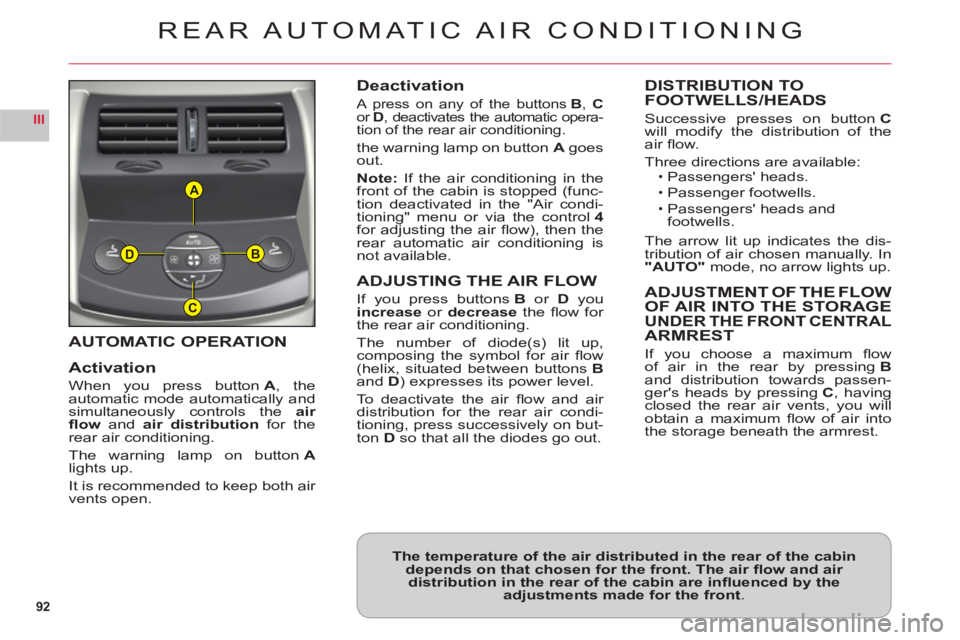
AUTOMATIC OPERATION
Activation
When you press buttonA, the
automatic mode automatically andsimultaneously controls theair
fl ow andair distribution for therear air conditioning.
The warning lamp on buttonAlights up.
It is recommended to kee
p both air
vents open.
Deactivation
A press on any of the buttons B, Cor D, deactivates the automatic opera-
tion of the rear air conditioning.
the warning lamp on button Agoes out.
Note: If the air conditioning in the front of the cabin is stopped (func-
tion deactivated in the "Air condi-
tioning" menu or via the control4for adjusting the air fl ow), then the
rear automatic air conditioning is
not available.
ADJUSTING THE AIR FLOW
If you press buttons Bor Dyou increase or decrease the fl ow for
the rear air conditioning.
The number of diode
(s) lit up, composing the symbol for air fl ow (helix, situated between buttons Band D) expresses its power level.
To deactivate the air fl ow and air distribution for the rear air condi-
tioning, press successively on but-
ton Dso that all the diodes go out.
DISTRIBUTION TO
FOOTWELLS/HEADS
Successive presses on buttonCwill modify the distribution of theair fl ow.
Three directions are available:Passengers' heads.
Passenger footwells.
Passengers' heads and
footwells.
The arrow lit up indicates the dis-
tribution of air chosen manually. In"AUTO"mode, no arrow lights up.
ADJUSTMENT OF THE FLOW
OF AIR INTO THE STORAGEUNDER THE FRONT CENTRALARMREST
If you choose a maximum fl ow
of air in the rear by pressingBand distribution towards passen-ger's heads by pressingC, havingclosed the rear air vents, you willobtain a maximum fl ow of air intothe storage beneath the armrest.
ï
ï
ï
REAR AUTOMATIC AIR CONDITIONING
The temperature of the air distributed in the rear of the cabindepends on that chosen for the front. The air fl ow and air distribution in the rear of the cabin are infl uenced by the adjustments made for the front.
Page 103 of 216
101
IIIA
AIRBAGS
AIRBAG EQUIPMENT
Yo ur vehicle has:A driver's front airbag.
A driver's knees airbag.
A front passenger's airbag
which can be deactivated.
Front lateral airba
gs.
Front and rear curtain airbags.
Rear lateral airbags.
Deplo
yment of your airbags is
dependent on the degree of vio-lence of the collision.
•
•
•
••
•
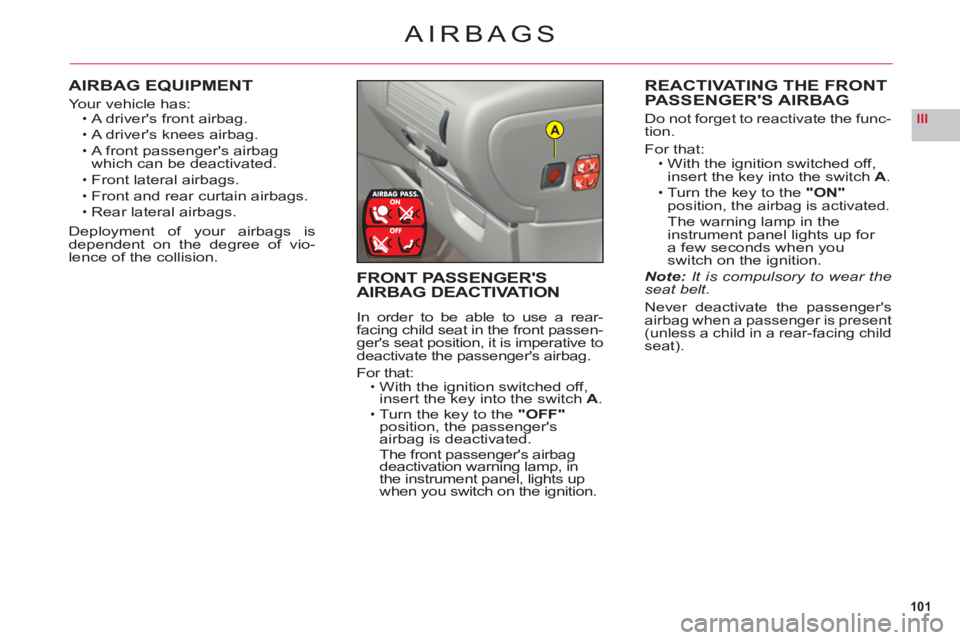
REACTIVATING THE FRONTPASSENGER'S AIRBAG
Do not forget to reactivate the func-
tion.
For that:With the ignition switched off, insert the key into the switch A.Turn the key to the"ON"position, the airbag is activated.
The warning lamp in the
instrument panel lights up for
a few seconds when youswitch on the ignition.Note: It is compulsory to wear theseat belt.
Never deactivate the passenger'sairbag when a passenger is present(unless a child in a rear-facing child
seat).
•
•
FRONT PASSENGER'SAIRBAG DEACTIVATION
In order to be able to use a rear-facing child seat in the front passen-ger's seat position, it is imperative to
deactivate the passenger's airbag.
For that:With the ignition switched off,
insert the key into the switchA.Turn the key to the "OFF"
position, the passenger's airbag is deactivated.The front passenger's airbag deactivation warning lamp, in
the instrument panel, lights up
when you switch on the ignition.
•
•
Page 108 of 216
106
III
A
SUSPENSION WITH ELECTRONICALLY
CONTROLLED SPRINGING AND DAMPING
Active suspension with piloted damp-
ing and fl exibility automatically and
instantaneously adjusts the damp-ers to your driving style, as well as
to the condition of the road surface,
t
o achieve the maximum comfort for you and your passengers, as well asimproved roadholding.
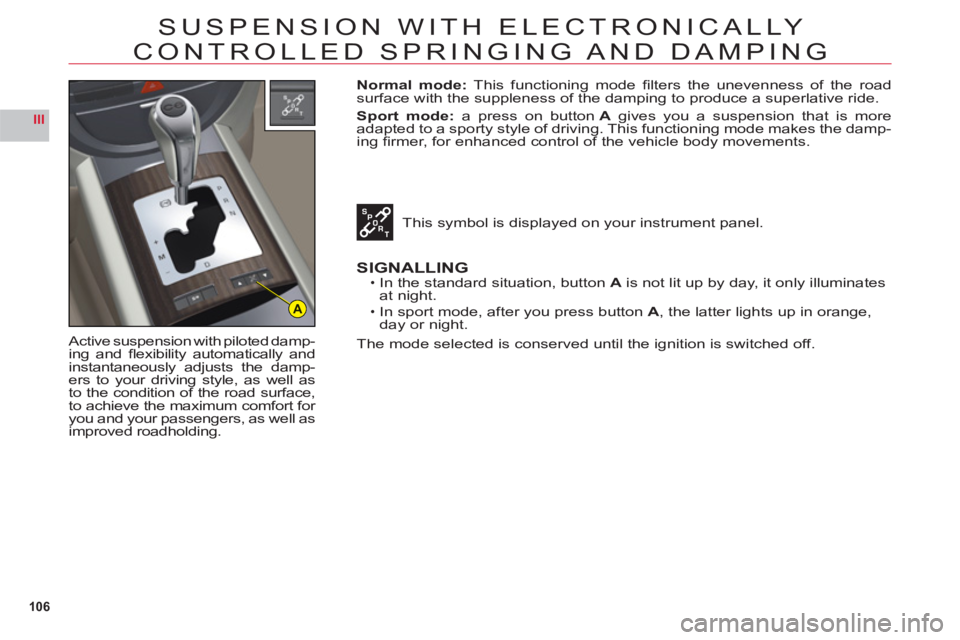
Normal mode: This functioning mode fi lters the unevenness of the road
surface with the suppleness of the damping to produce a superlative ride.
S
port mode: a press on buttonA gives you a suspension that is more
adapted to a sporty style of driving. This functioning mode makes the damp-
ing fi rmer, for enhanced control of the vehicle body movements.
This s
ymbol is displayed on your instrument panel.
SIGNALLINGIn the standard situation, buttonA is not lit up by day, it only illuminates at night.
In sport mode, after
you press button A, the latter lights up in orange,
day or night.
The mode selected is conserved until the ignition is switched off.
•
•
Page 112 of 216
110
III
C
D
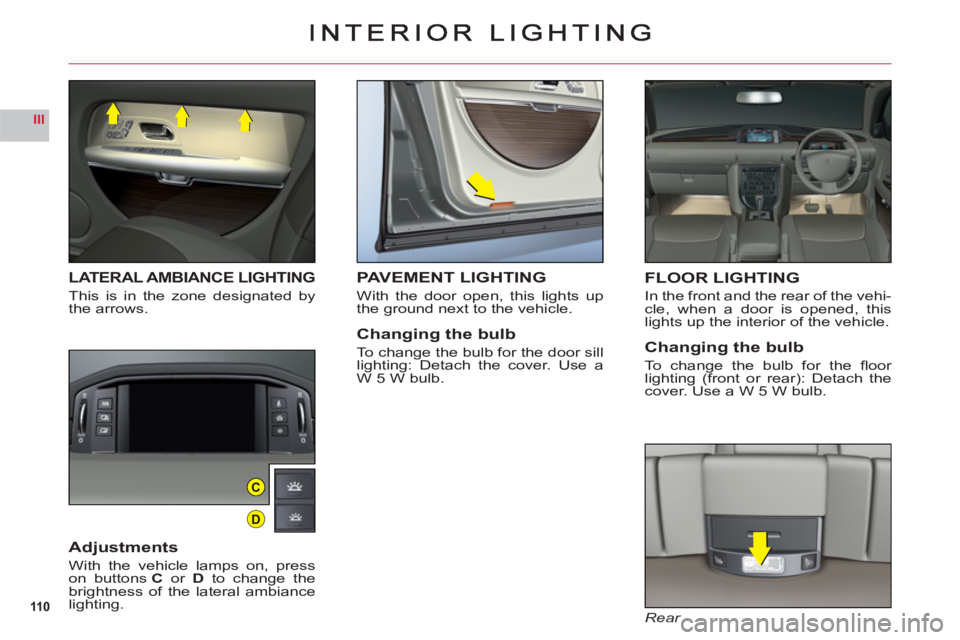
LATERAL AMBIANCE LIGHTING
This is in the zone designated bythe arrows.
Adjustments
With the vehicle lamps on, presson buttonsC or D to change the
brightness of the lateral ambiancelighting.
FLOOR LIGHTING
In the front and the rear of the vehi-cle, when a door is opened, thislights up the interior of the vehicle.
Changing the bulb
To change the bulb for the fl oor lighting (front or rear): Detach thecover. Use a W 5 W bulb.
Rear
PAVEMENT LIGHTING
With the door open, this lights up
the ground next to the vehicle.
Changing the bulb
To change the bulb for the door sill lighting: Detach the cover. Use a
W 5 W bulb.
Page 182 of 216
7.32
2 1
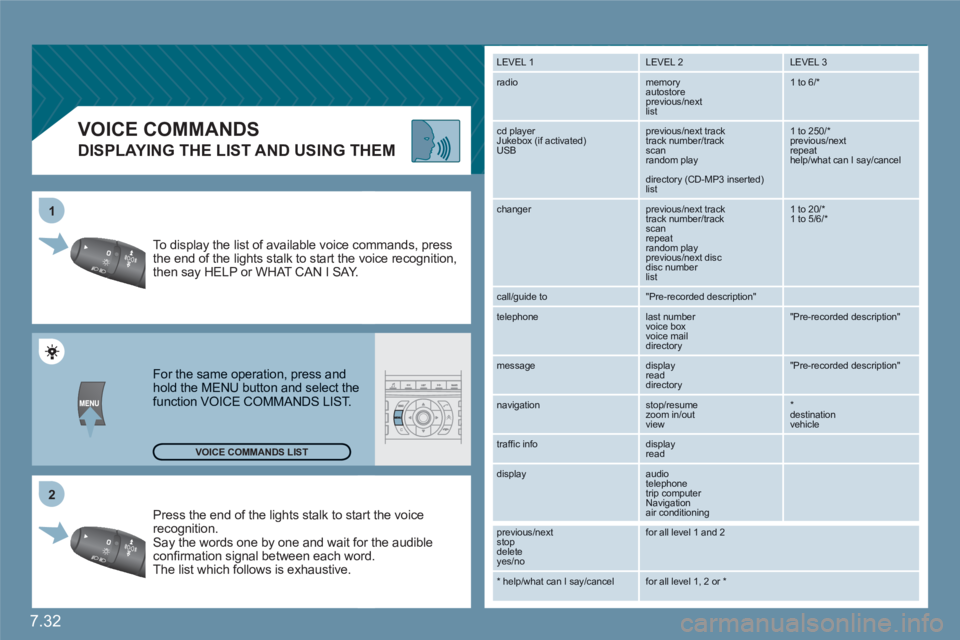
VOICE COMMANDS
DISPLAYING THE LIST AND USING THEM
Press the end of the lights stalk to staart the voicerecognition. Say the words one by one and wait foor the audibleconfi rmation signal between each woord.
The list which follows is exhaustive.
To display the list of available voice coommands, press the end of the lights stalk to start the vvoice recognition,then say HELP or WHAT CAN I SAY.
For the same operation, press and hold the MENU button and select the function VOICE COMMANDS LIST.
LEVEL 1
LEVEL 2 LEVEL 3
radio memory autostore
previous/next list
1 to 6/*
cd player
Jukebox (if activated) USB
previous/next track
track number/track scan
random play
directory (CD-MP3 inserted) list
1 to 250/* previous/next repeat help/what can I say/cancel
changer
previous/next track
track number/track scan
repeat
random play previous/next disc disc number list
1 to 20/* 1 to 5/6/*
call/guide to
"Pre-recorded description"
telephone
last number
voice box
voice mail
directory
"Pre-recorded description"
message
display
read directory
"Pre-recorded description"
navigation
stop/resume
zoom in/out
view
*destination vehicle
traffi c info display
read
display audio
telephone
trip computer
Navigation
air conditioning
previous/next
stop delete
yes/no
for all level 1 and 2
* help/what can I say/cancel for all level 1, 2 or * VOICE COMMANDS LIST