service CITROEN C6 2012 Handbook (in English)
[x] Cancel search | Manufacturer: CITROEN, Model Year: 2012, Model line: C6, Model: CITROEN C6 2012Pages: 216, PDF Size: 10.23 MB
Page 83 of 216
81
II
DIESEL PARTICULATE FILTER SYSTEM
In addition to the catalytic converter, this fi lter contributes actively to the preserving of air quality, by collecting thepolluting particles that have not been burnt off. Black exhaust fumes are thus eliminated.
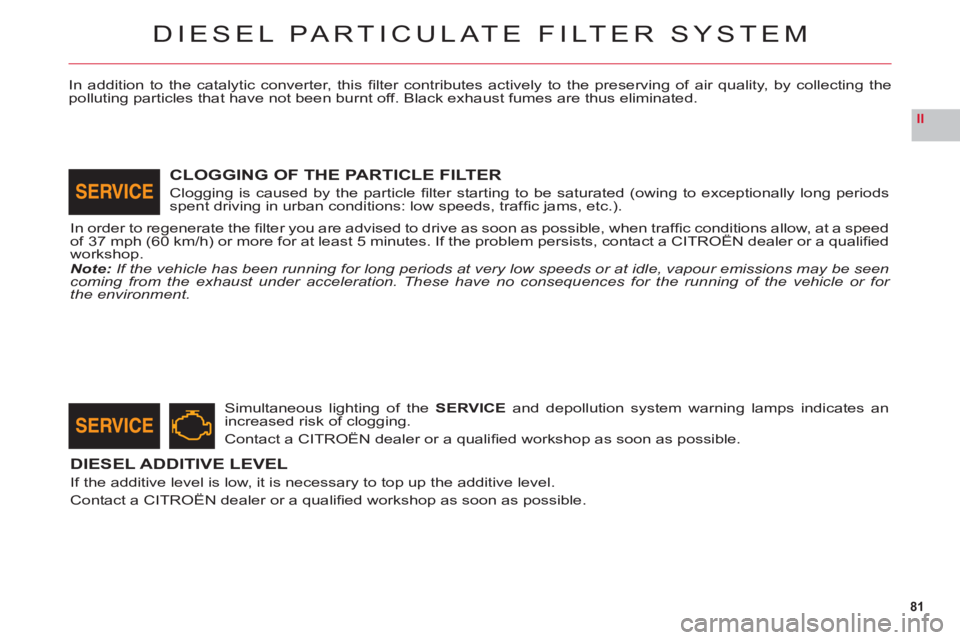
Simultaneous lighting of the SERVICEand depollution system warning lamps indicates an
increased risk of clogging.
Contact a CITROËN dealer or a qualifi ed workshop as soon as possible.
DIESEL ADDITIVE LEVEL
If the additive level is low, it is necessary to top up the additive level.
Contact a CITROËN dealer or a qualifi ed workshop as soon as possible.
CLOGGING OF THE PARTICLE FILTER
Clogging is caused by the particle fi lter starting to be saturated (owing to exceptionally long periodsspent driving in urban conditions: low speeds, traffi c jams, etc.).
In order to re
generate the fi lter you are advised to drive as soon as possible, when traffi c conditions allow, at a speedof 37 mph (60 km/h) or more for at least 5 minutes. If the problem persists, contact a CITROÀN dealer or a qualifi edgyp,,p
workshop.Note: If the vehicle has been running for long periods at very low speeds or at idle, vapour emissions may be seencoming from the exhaust under acceleration. These have no consequences for the running of the vehicle or for the environment.
Page 123 of 216
121
IVA
B
C
D
LEVELS
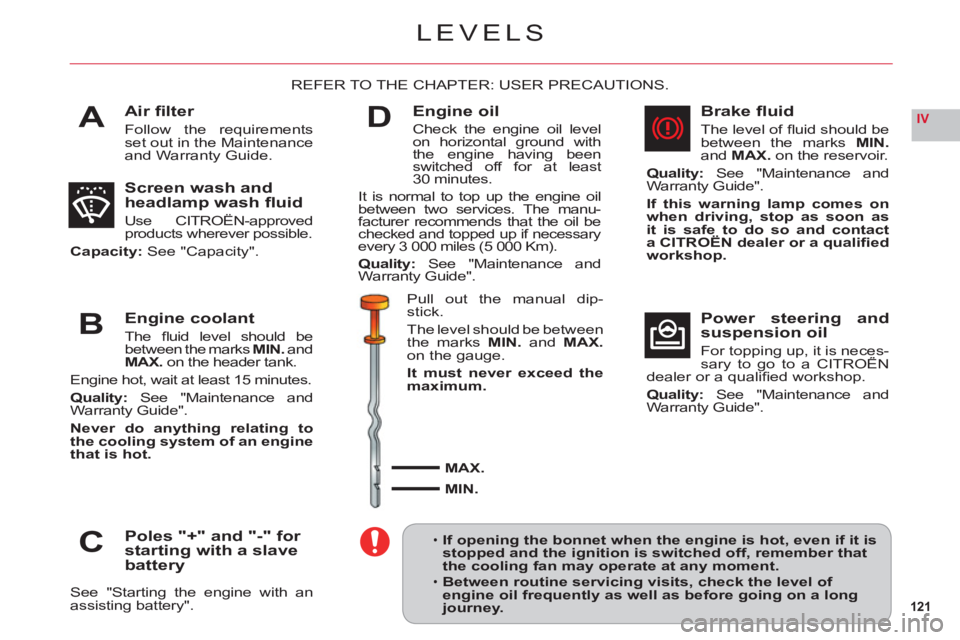
Air fi lter
Follow the requirements set out in the Maintenance and Warranty Guide.
REFER TO THE CHAPTER: USER PRECAUTIONS.
Screen wash and
headlamp wash fl uid
Use CITROËN-approved products wherever possible.
Capacity: See "Capacity".
Engine coolant
The fl uid level should be between the marks MIN.and
MAX. on the header tank.
Engine hot, wait at least
15 minutes.
Qualit
y: See "Maintenance and
Warranty Guide".
Never do anything relating to
the cooling system of an engine
that is hot.
Poles "+" and "-" for
starting with a slave battery
See "Starting the engine with an assisting battery".
Engine oil
Check the engine oil level
on horizontal ground withthe engine having beenswitched off for at least30 minutes.
It is normal to top up the engine oilbetween two services. The manu-
facturer recommends that the oil bechecked and topped up if necessaryevery 3 000 miles (5 000 Km).
Qualit
y:See "Maintenance and
Warranty Guide".
Pull out the manual dip-
stick.
Th
e level should be between
the marks MIN.and MAX.on the gauge.
It must never exceed the maximum.
MAX.
MIN.
Brake fl uid
The level of fl uid should be between the marks MIN.andMAX. on the reservoir.
Quality: See "Maintenance and
Warranty Guide".
If this warning lamp comes on
when driving, stop as soon as it is safe to do so and contact a CITROËN dealer or a qualifi ed
workshop.
Power steering and
suspension oil
For topping up, it is neces-sary to go to a CITROËN pp g p,
dealer or a qualifi ed workshop.
Quality: See "Maintenance and
Warranty Guide".
If opening the bonnet when the engine is hot, even if it is stopped and the ignition is switched off, remember thatthe cooling fan may operate at any moment.
Between routine servicing visits, check the level of engine oil frequently as well as before going on a longjourney.
•
•
Page 152 of 216
7.2
11
2020
88
99
55
44
3322
199
1661111
1001818
122
6677
1313
155
144
177
01
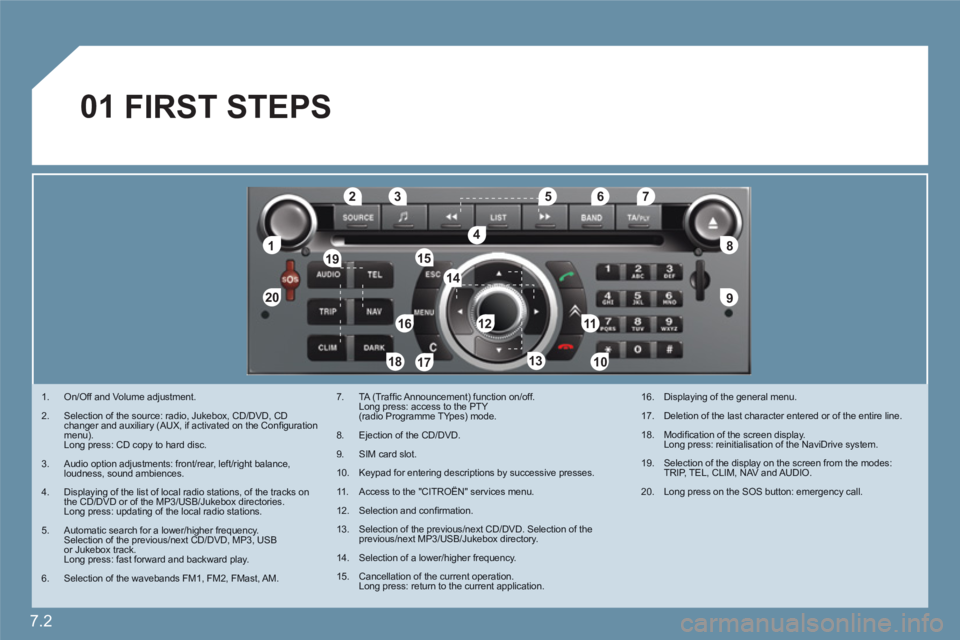
1. On/Off and Volume adjustment.
2. Selection of the source: radio, Jukebox, CD/DVD, CD changer and auxiliary (AUX, if activated on the Confi gurationmenu).Long press: CD copy to hard disc.
3. Audio option adjustments: front/rear, left/right balance,loudness, sound ambiences.
4. Displaying of the list of local radio stations, of the tracks onthe CD/DVD or of the MP3/USB/Jukebox directories.Long press: updating of the local radio stations.
5. Automatic search for a lower/higher frequency.Selection of the previous/next CD/DVD, MP3, USBor Jukebox track. Long press: fast forward and backward play.
6. Selection of the wavebands FM1, FM2, FMast, AM.
7. TA (Traffi c Announcement) function on/off. Long press: access to the PTY(radio Programme TYpes) mode.
8. Ejection of the CD/DVD.
9. SIM card slot.
10. Keypad for entering descriptions by successive presses.
11 . Access to the "CITROÀN" services menu.
12. Selection and confi rmation.
13. Selection of the previous/next CD/DVD. Selection of the previous/next MP3/USB/Jukebox directory.
14. Selection of a lower/higher frequency.
15. Cancellation of the current operation.Long press: return to the current application.
16. Displaying of the general menu.
17. Deletion of the last character entered or of the entire line.
18. Modifi cation of the screen display. Long press: reinitialisation of the NaviDrive system.
19. Selection of the display on the screen from the modes:TRIP, TEL, CLIM, NAV and AUDIO.
20. Long press on the SOS button: emergency call.
FIRST STEPS
Page 153 of 216
7.3
02
°
> COLOUR SCREEN
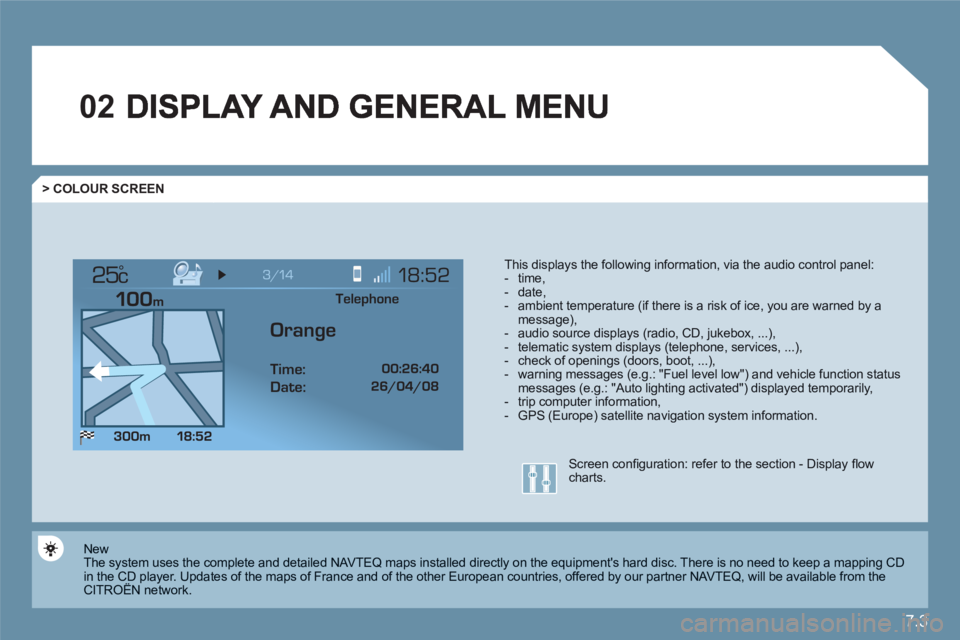
This displays the following information, via the audio control panel: - time,- date, - ambient temperature (if there is a risk of ice, you are warned by amessage),- audio source displays (radio, CD, jukebox, ...), - telematic system displays (telephone, services, ...),- check of openings (doors, boot, ...),- warning messages (e.g.: "Fuel level low") and vehicle function statusmessages (e.g.: "Auto lighting activated") displayed temporarily,- trip computer information,- GPS (Europe) satellite navigation system information.
New
The system uses the complete and detailed NAVTEQ maps installed directly on the equipment's hard disc. There is no need to keep a mapping CD in the CD player. Updates of the maps of France and of the other European countries, offered by our partner NAVTEQ, will be available from theCITROËN network. y
Screen confi guration: refer to the section - Display fl owcharts.
Telephone
Orange
Time:
Date:
Page 157 of 216
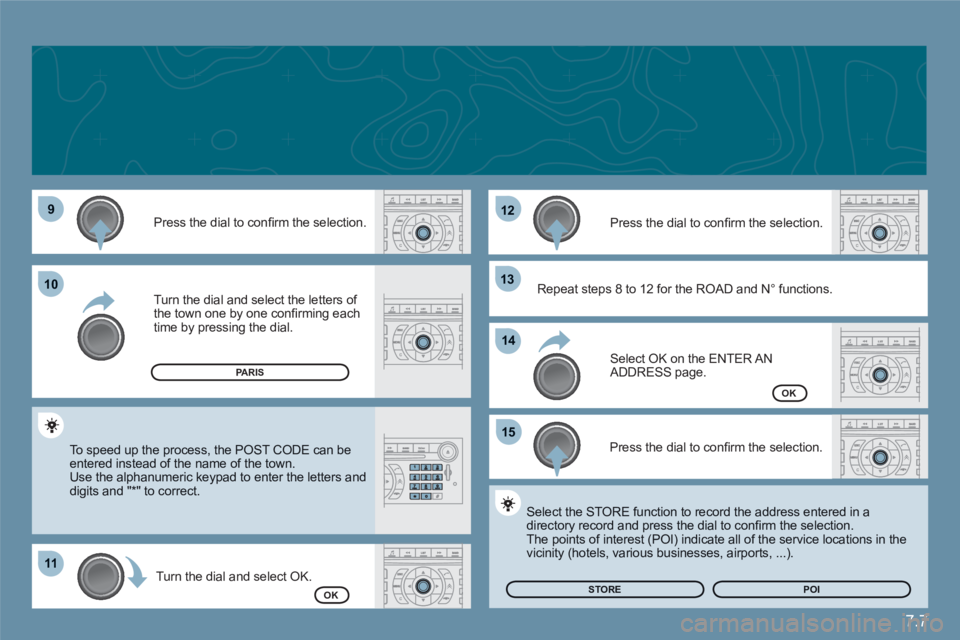
7.7
99
1111
1212
1313
1515
1010
1414
Press the dial to confi rm the selection.
Turn the dial and select the letters of the town one by one confi rming eachtime by pressing the dial.
Turn the dial and select OK.
Press the dial to confi rm the selection.
To speed up the process, the POST CODE can beentered instead of the name of the town. Use the alphanumeric keypad to enter the letters and digits and "*" to correct.
Press the dial to confi rm the selection.
Select OK on the ENTER ANADDRESS page.
Repeat steps 8 to 12 for the ROAD and N∞ functions.
OK
OK
Select the STORE function to record the address entered in adirectory record and press the dial to confi rm the selection.
The points of interest (POI) indicate all of the service locations in thevicinity (hotels, various businesses, airports, ...).
STORE
PARIS
POI
Page 161 of 216
7.11
03
11
22
33
44
55
66
77
44
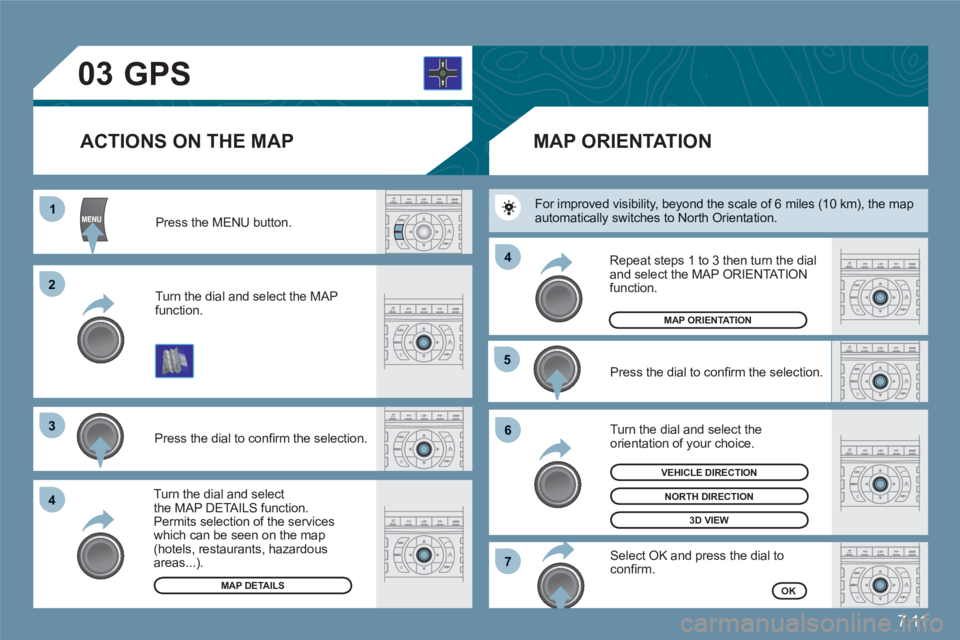
Press the MENU button.
Turn the dial and select the MAP function.
Press the dial to confi rm the selection.
Turn the dial and selectthe MAP DETAILS function.Permits selection of the services which can be seen on the map(hotels, restaurants, hazardous areas...).
ACTIONS ON THE MAP
MAP DETAILS
GPS
Press the dial to confi rm the selection.
Turn the dial and select the orientation of your choice.
Select OK and press the dial toconfi rm.
Repeat steps 1 to 3 then turn the dial and select the MAP ORIENTATIONfunction.
MAP ORIENTATION
MAP ORIENTATION
3D VIEW
OK
NORTH DIRECTION
VEHICLE DIRECTION
For improved visibility, beyond the scale of 6 miles (10 km), the mapautomatically switches to North Orientation.
Page 175 of 216
7.25
33
22
11
44
06
The services offered by the telephone depend on the network, the SIM card and the compatibility of the Bluetooth equipment used. Refer to your telephone's manual and your operator to check which services you have access to. A list of mobile telephones which offer the best range of services is available from dealers.
BLUETOOTH TELEPHONE
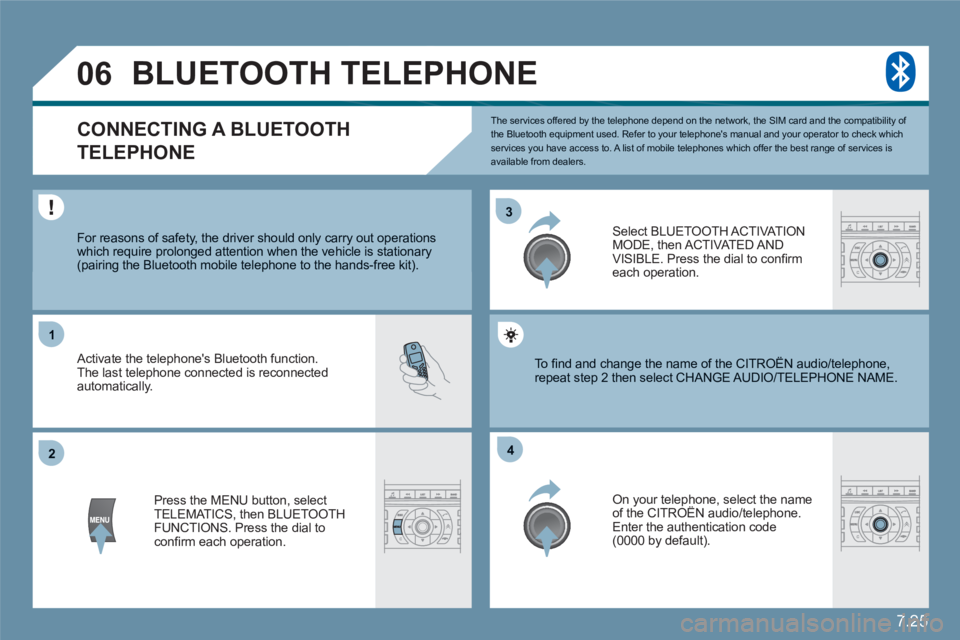
CONNECTING A BLUETOOTH
TELEPHONE
For reasons of safety, the driver should only carry out operations which require prolonged attention when the vehicle is stationary (pairing the Bluetooth mobile telephone to the hands-free kit).
Activate the telephone's Bluetooth function. The last telephone connected is reconnected automatically.
Select BLUETOOTH ACT I VAT IONMODE, then ACTIVATED AND VISIBLE. Press the dial to confi rm each operation.
Press the MENU button, select TELEMATICS, then BLUETOOTH FUNCTIONS. Press the dial to confi rm each operation.
On your telephone, select the nameof the CITROËN audio/telephone. y
Enter the authentication code (0000 by default).
To fi nd and change the name of the CITROËN audio/ttelephone, repeat step 2 then select CHANGE AUDIO/TELEPHOONE NAME.
Page 178 of 216
7.28
11
22
33
CITROËN ASSISTANCE
379.2
CUSTOMER CALL
*
These services and options are subject to conditions and availability.
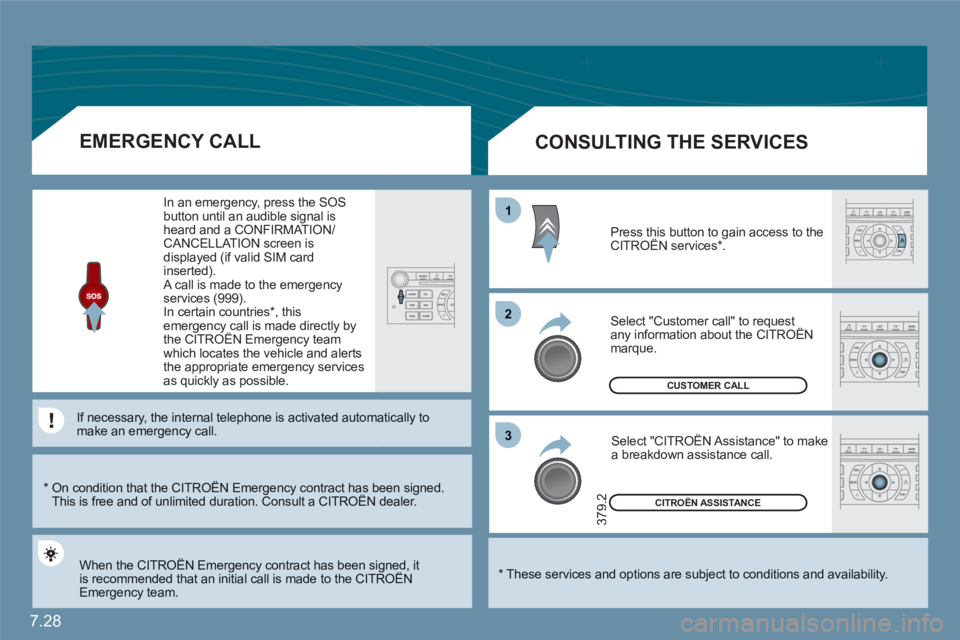
CONSULTING THE SERVICES
Press this button to gain access to theCITROËN services * . g
Select "Customer call" to request any information about the CITROËN marque.
Select "CITROËN Assistance" to make a breakdown assistance call.
*
On condition that the CITROËN Emergency contract has been signed. This is free and of unlimited duration. Consult a CITROËN dealer. gy g
EMERGENCY CALL
When the CITROËN Emergency contract has been signed, it is recommended that an initial call is made to the CITROËNgy g
Emergency team.
In an emergency, press the SOS button until an audible signal isheard and a CONFIRMATION/CANCELLATION screen is displayed (if valid SIM card inserted). A call is made to the emergencyservices (999).
In certain countries * , thisemergency call is made directly bythe CITROËN Emergency teamgy y
which locates the vehicle and alerts the appropriate emergency servicesas quickly as possible.
If necessary, the internal telephone is activated autommatically tomake an emergency call.
Page 185 of 216
7.35
4
4
3
1
2
3
4
4
3
4
4
4
4
4
1
2
3
3
3
3
3
3
3
3
2
3
2
3
3
2
4
4
2
4
4
4
3
3
4
4
4
4
4
4
4
3
3
4
4
4
4
3
3
2
2
2
3
4
4
4
4
2
3
5
5
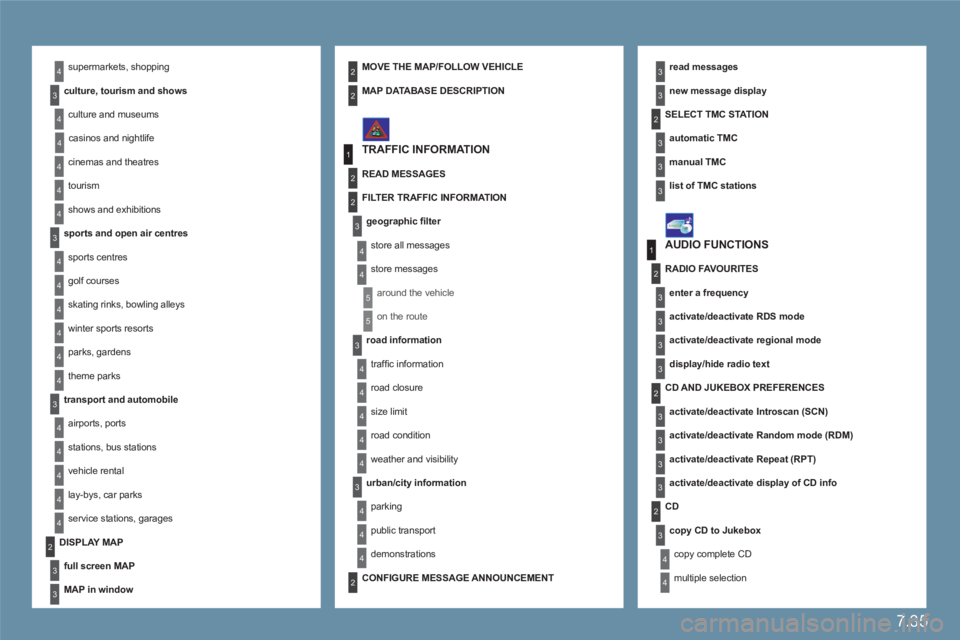
supermarkets, shopping
culture, tourism and shows
culture and museums
casinos and nightlife
cinemas and theatres
tourism
shows and exhibitions
sports and open air centres
sports centres
golf courses
skating rinks, bowling alleys
winter sports resorts
parks, gardens
theme parks
transport and automobile
airports, ports
stations, bus stations
vehicle rental
lay-bys, car parks
service stations, garages
read messages
new message display
TRAFFIC INFORMATION
SELECT TMC STAT I O N
automatic TMC
manual TMC
list of TMC stations
MOVE THE MAP/FOLLOW VEHICLE
DISPLAY MAP
full screen MAP
MAP in window
MAP DATABASE DESCRIPTION
READ MESSAGES
FILTER TRAFFIC INFORMATION
geographic fi lter
store all messages
store messages
around the vehicle
on the route
road information
traffi c information
road closure
size limit
road condition
weather and visibility
urban/city information
parking
public transport
demonstrations
AUDIO FUNCTIONS
RADIO FAVOURITES
enter a frequency
activate/deactivate RDS mode
activate/deactivate regional mode
display/hide radio text
CD AND JUKEBOX PREFERENCES
activate/deactivate Introscan (SCN)
activate/deactivate Random mode (RDM)
activate/deactivate Repeat (RPT)
activate/deactivate display of CD info
CD
copy CD to Jukebox
copy complete CD
multiple selection
CONFIGURE MESSAGE ANNOUNCEMENT
Page 186 of 216
7.36
1
4
2
3
3
3
4
4
4
4
3
3
3
3
4
4
3
3
3
3
2
3
3
2
4
3
4
3
3
2
3
4
5
5
5
4
5
5
4
2
3
4
4
4
4
4
3
5
4
4
4
3
5
4
4
4
5
5
4
6
5
5
3
3
3
3
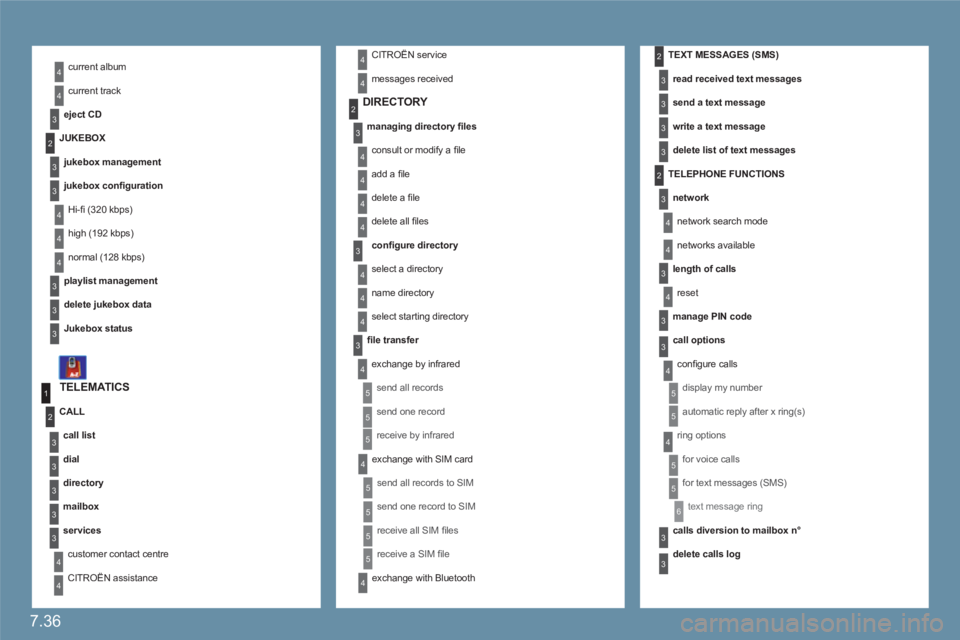
current album
current track
eject CD
TELEMATICS
call list
dial
directory
mailbox
services
customer contact centre
CITROËN assistance
CALL
DIRECTORY
managing directory fi les
consult or modify a fi le
add a fi le
delete a fi le
delete all fi les
confi gure directory
select a directory
name directory
select starting directory
fi le transfer
exchange by infrared
send all records
send one record
receive by infrared
exchange with SIM card
send all records to SIM
send one record to SIM
receive all SIM fi les
receive a SIM fi le
exchange with Bluetooth
TEXT MESSAGES (SMS)
read received text messages
send a text message
write a text message
delete list of text messages
TELEPHONE FUNCTIONS
network
network search mode
networks available
length of calls
reset
manage PIN code
call options
confi gure calls
display my number
automatic reply after x ring(s)
ring options
for voice calls
for text messages (SMS)
text message ring
calls diversion to mailbox n°
delete calls log
JUKEBOX
jukebox management
jukebox confi guration
Hi-fi (320 kbps)
high (192 kbps)
normal (128 kbps)
playlist management
delete jukebox data
Jukebox status
CITROËN service
messages received