service CITROEN C6 2012 Handbook (in English)
[x] Cancel search | Manufacturer: CITROEN, Model Year: 2012, Model line: C6, Model: CITROEN C6 2012Pages: 216, PDF Size: 10.23 MB
Page 187 of 216
7.37
1
2
2
1
2
1
2
2
2
3
3
4
4
4
3
2
2
2
3
4
4
4
3
3
3
3
4
4
4
4
1
2
2
1
2
2
2
1
1
1
3
3
3
3
3
3
3
3
2
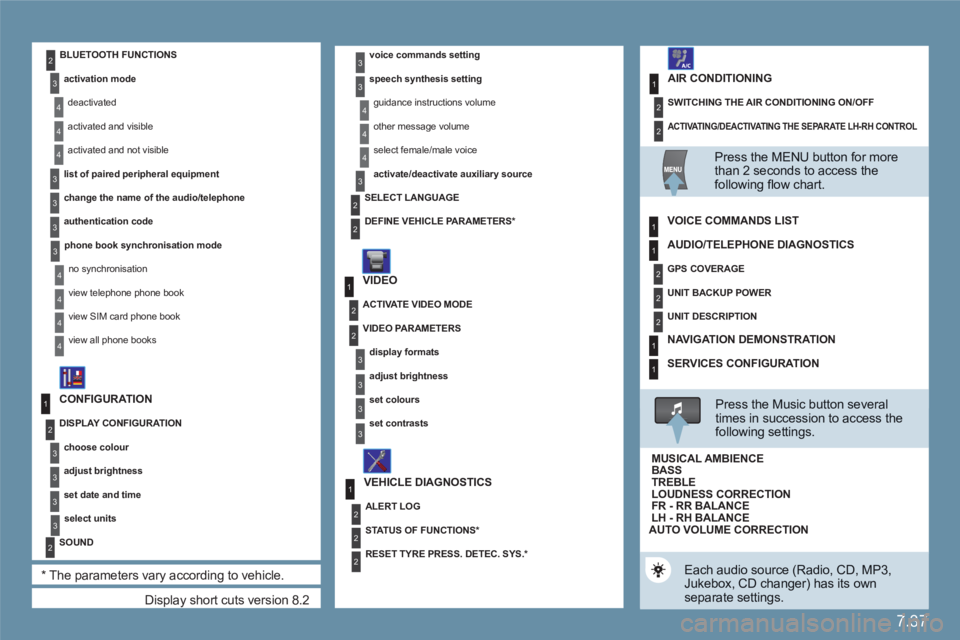
Display short cuts version 8.2
CONFIGURATION
DISPLAY CONFIGURATION
choose colour
adjust brightness
set date and time
select units
SOUND
*
The parameters vary according to vehicle.
voice commands setting
speech synthesis setting
guidance instructions volume
other message volume
select female/male voice
activate/deactivate auxiliary source
VIDEO
VEHICLE DIAGNOSTICS
SELECT LANGUAGE
DEFINE VEHICLE PARAMETERS
*
ACTIVATE VIDEO MODE
VIDEO PARAMETERS
display formats
adjust brightness
set colours
set contrasts
ALERT LOG
STATUS OF FUNCTIONS *
RESET TYRE PRESS. DETEC. SYS. *
BLUETOOTH FUNCTIONS
activation mode
deactivated
activated and visible
activated and not visible
list of paired peripheral equipment
change the name of the audio/telephone
authentication code
phone book synchronisation mode
no synchronisation
view telephone phone book
view SIM card phone book
view all phone books
ACTIVATING/DEACTIVATING THE SEPARATE LH-RH CONTROL
SWITCHING THE AIR CONDITIONING ON/OFF
AIR CONDITIONING
Press the MENU button for more than 2 seconds to access thefollowing fl ow chart.
VOICE COMMANDS LIST
Press the Music button severaltimes in succession to access the following settings.
AUTO VOLUME CORRECTION
Each audio source (Radio, CD, MP3,Jukebox, CD changer) has its own separate settings.
AUDIO/TELEPHONE DIAGNOSTICS
GPS COVERAGE
UNIT BACKUP POWER
UNIT DESCRIPTION
NAVIGATION DEMONSTRATION
SERVICES CONFIGURATION
LOUDNESS CORRECTION TREBLEBASS MUSICAL AMBIENCE
FR - RR BALANCE LH - RH BALANCE
Page 198 of 216
7.48
11
22
33
11
22
4411
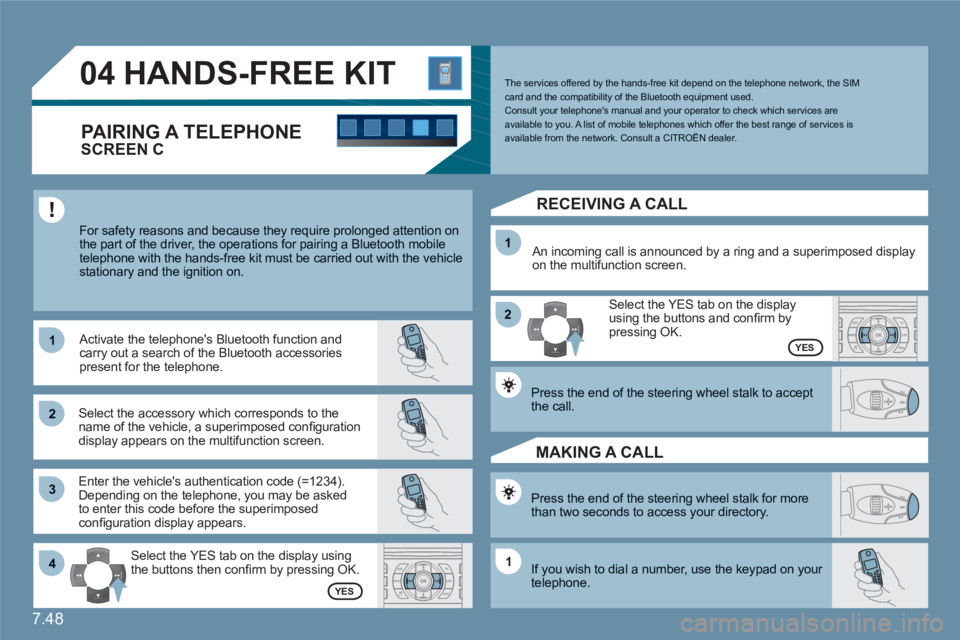
04HANDS-FREE KIT
For safety reasons and because they require prolonged attention on the part of the driver, the operations for pairing a Bluetooth mobile telephone with the hands-free kit must be carried out with the vehiclestationary and the ignition on.
Select the accessory which corresponds to the name of the vehicle, a superimposed confi guration display appears on the multifunction screen.
Activate the telephone's Bluetooth function andcarry out a search of the Bluetooth accessories present for the telephone.
Select the YES tab on the display using the buttons then confi rm by pressing OK.
Enter the vehicle's authentication code (=1234).Depending on the telephone, you may be asked to enter this code before the superimposed confi guration display appears.
YES
YES
The services offered by the hands-free kit depend on the telephone network, the SIM card and the compatibility of the Bluetooth equipment used. Consult your telephone's manual and your operator to check which services areavailable to you. A list of mobile telephones which offer the best range of services is available from the network. Consult a CITROËN dealer.
RECEIVING A CALL
An incoming call is announced by a ring and a superimposed display on the multifunction screen.
Select the YES tab on the display using the buttons and confi rm bypressing OK.
Press the end of the steering wheel stalk to acceptthe call.
Press the end of the steering wheel stalk for morethan two seconds to access your directory.
If you wish to dial a number, use the keypad on your telephone.
MAKING A CALL
SCREEN C
PAIRING A TELEPHONE
Page 201 of 216

7.51
11
66
22
77
44
99
55
101
33
88
06
Saisir code authentification
01
OK Del23456789 _
BLUETOOTH FUNCTIONS
For safety reasons and because they require prolonged attention on the part of the driver, the operations for pairing of the Bluetooth mobile telephone with the Bluetooth hands-free system of your audioequipment must be carried out with the vehicle stationary and the ignition on.
Activate the telephone's Bluetooth function.
A window is displayed with "Searching...".
Press the MENU button.
In the menu, select:
- Bluetooth telephone function - Audio
- Bluetooth confi guration
- Perform a Bluetooth search
The services offered depend on the network, the SIM card and thecompatibility of the Bluetooth equipment used.
Consult your telephone's manual and your operator to fi nd out whichservices are available to you. A list of mobile telephones which offer thebest range of services is available from the network. Consult a CITROËN dealer. BLUETOOTH TELEPHONE
SCREEN C
The TELEPHONE menu permits access to the following functions inparticular: Directory *
, Call list, Pairing management.
The fi rst 4 telephones recognised are displayed in this window.
A virtual keypad is displayed on the screen: enter a code with at least 4 digits. Confi rm by pressing OK.
"Pairing of Name_telephone successful" appears on the screen.
Select the telephone to be connected from the list. Only onetelephone can be connected at a time.
A message is displayed on the screen of thetelephone chosen: to accept the pairing, enter the same code on the telephone, then confi rm bypressing OK. If pairing fails, the number of attempts is not limited.
The automatic connection authorised is only active after the telephone has been confi gured.The directory and the call list can be accessed after thesynchronisation period.
OK
PAIRING A TELEPHONE
The pairing can also be initiated from the telephone.
*
if your telephone hardware is fully compatible.