air conditioning Citroen C6 RHD 2011 1.G User Guide
[x] Cancel search | Manufacturer: CITROEN, Model Year: 2011, Model line: C6 RHD, Model: Citroen C6 RHD 2011 1.GPages: 216, PDF Size: 10.19 MB
Page 88 of 216
86
III
AUTOMATIC AIR CONDITIONING
AIR CONDITIONING
This system automatically adjusts the temperature, the fl ow of air and the distribution of air inside the cabin,
depending on your desired comfort level.
Provided
you retain automatic mode (by pressing button "AUTO") and all the air vents are open, you will main-
tain an optimum comfort level, also removing humidity
and misting, whatever the ambient climatic conditions.
The temperature inside the cabin cannot be lower than
the temperature outside if the air conditioning is not
operating.
To be e
ffective, the air conditioning should only be used
with the windows closed. If after a lengthy stop in bright sunlight the interior temperature is excessive, air the passenger compartment by opening the windows for a
few moments, then close them again.
To keep the air conditioning compressor well sealed, it
is essential to operate the air conditioning at least once every month.
The air conditioning operates by using power from the engine. This results in a slight increase in fuel con-sumption.
Sensors
The automatic regulation of the air conditioning inside
the cabin makes use of a number of sensors, relieving you of the need to make adjustments, other than the desired cabin temperature.
Take care not to obstruct sensor A.
Air inlet
Check that the exterior grille for the air inlet, at the bot-
tom of the windscreen, is clean and free of dead leaves,snow, etc.
If washing the vehicle with a high pressure jet, avoid
targeting the air inlet zone.
Air circulation
For your comfort we advise you to maintain a proper
distribution of air within the cabin, both at the front andat the rear.
The air vents to the
face have thumbwheels so that you can
adjust the fl ow of air, and grilles to orient the direction.
Th
ere are air vents on the fl oor underneath the frontseats and on the rear control panel, for enhancedheating of the rear seat positions.
Do not obstruct the air outlets located in the boot area.
Dust/pollen fi lter
There is a fi lter for excluding pollen and dust.
This
fi lter has to be changed according to the vehicle
maintenance schedule. See "Maintenance and WarrantyGuide".
Page 89 of 216
87
III
1
2a2b1
3a3b4
765
AUTOMATIC AIR CONDITIONING
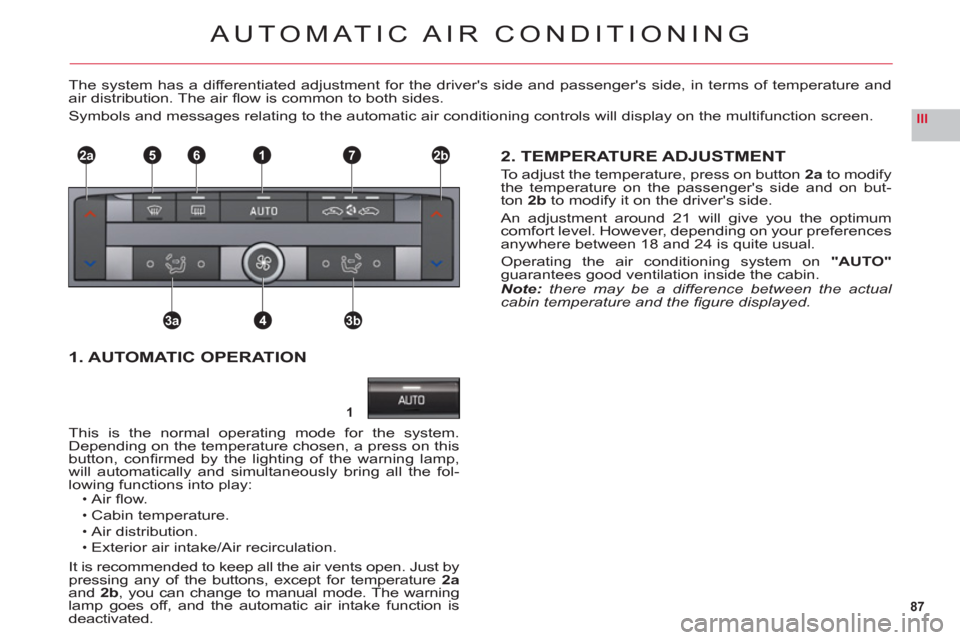
The system has a differentiated adjustment for the driver's side and passenger's side, in terms of temperature andair distribution. The air fl ow is common to both sides.
Symbols and messages relating to the automatic air conditioning controls will display on the multifunction screen.
2. TEMPERATURE ADJUSTMENT
To adjust the temperature, press on button2ato modifythe temperature on the passenger's side and on but-
ton 2b to modify it on the driver's side.
An ad
justment around 21 will give you the optimumcomfort level. However, depending on your preferences
anywhere between 18 and 24 is quite usual.
Operating the air conditioning system on"AUTO"guarantees good ventilation inside the cabin.Note:there may be a difference between the actual
cabin temperature and the fi gure displayed.
This is the normal operatin
g mode for the system. Depending on the temperature chosen, a press on this
button, confi rmed by the lighting of the warning lamp,
will automatically and simultaneously bring all the fol-lowing functions into play:Air fl ow.
Cabin temperature.
Air distribution.Exterior air intake/Air recirculation.
It is recommended to keep all the air vents open. Just by pressing any of the buttons, except for temperature 2aand 2b, you can change to manual mode. The warning lamp goes off, and the automatic air intake function is deactivated.
•
•
••
1. AUTOMATIC OPERATION
Page 90 of 216
88
III
AUTOMATIC AIR CONDITIONING
Remarks:When starting from cold, in order to prevent
unwanted cold air, the air fl ow will increase onlygradually to its optimum level.
If you enter the vehicle after a fairly prolongedstop and the temperature inside the vehicle is
uncomfortable, it serves no purpose to modify
the temperature that is displayed as an attempt
to go immediately to the desired comfort level.
The system automatically uses all of its power tocompensate the temperature gap as quickly as possible.
Remarks:Water arising from the condensation in the air conditioning drains out through a hole provided for this purpose; a pool of water may thus form
underneath the vehicle when stationary.
Whatever the time of year, even in cool weather the
air conditioning is useful in removing humidity and
misting.
You are advised to have the air conditioning system checked on a regular basis. See
"Maintenance and Warranty Guide".
If you are towing a heavy trailer and outside
temperatures are high, the air conditioning may
be temporarily paused if the engine cooling
requires this.
•
•
•
•
•
•
Manual mode
One or more functions can be adjusted manually, whilestill retaining the other functions in automatic mode.
To return to"AUTO" mode, press button 1.
Stopping the air conditioning
Turn the control4to the left until the air fl ow stops com-pletely. The symbol "OFF"appears on the screen.
The display and the warning lamps go out, indicatingdeactivation of all the functions, except for rear screen
demisting.
The com
fort level (temperature, humidity, odour, misting)is no longer controlled.
To reactivate the air conditioning, press button 1.
Avoid travelling for too long with the air conditioningdeactivated.
Page 91 of 216

89
III
3a3b
4
AUTOMATIC AIR CONDITIONING
3. ADJUSTING THE AIR DISTRIBUTION
Successive or continuous presses on buttons3aand 3b direct the fl ow of air to the passenger' side or to the driver's side.
The s
ymbol (arrows) corresponding to the direction chosen is displayed on the multifunction screen:Windscreen and side windows.
Central, lateral and soft diffusion air conditioning
vents (if open).
Passenger footwells."AUTO"automatic distribution.
•
•
••
Rotate the control to increase or decrease the fl ow of air.
The symbol for air fl ow (helix) is displayed on the multifunction screen and fi lls in as the required fl ow increases.
To prevent misting and poor air quality in the passenger compartment, take care to maintain a suffi cient fl ow of air.
4. ADJUSTING THE AIR FLOW
Soft diffusion system
The soft diffusion air conditioning unit situated at thecentre of the front console guaranteesoptimum diffu-sion of air for the front seat positions.r
This unit eliminates annoying draughts and guarantees
an optimum temperature inside the cabin.
Adjusting the air fl ow with soft diffusion air conditioning
The driver and the passenger can adjust the air fl ow for
the soft diffusion air conditioning unit independently.
To a djust the air fl ow, rotate the control to the desiredposition.
To close off the soft diffusion air conditioning, rotate thecontrol as far down as it will go.
In very hot weather, to improve the central and lateralventilation, closing off the soft diffusion air conditioning
is recommended.
Page 92 of 216

90
III
5
6
7
AUTOMATIC AIR CONDITIONING
5. FRONT DEMISTING - DEICING
Press button 5 for rapidclear windows. The warning lamp comes on. This system controls the air condi-
tioning, the air fl ow and the entry of air from outside. It sends the ventilation towards the windscreen and side
windows.
A press on the 1 button returns you to "AUTO"mode.
6. REAR DEMISTING - DEICING
Press button 6, with the engine running, to start a rapid
deicing or demisting of the rear screen and rear view mirrors. The warning lamp comes on.
This mode stops automatically depending on the out-side temperature. It can be paused by pressing again on button6or by stopping the engine.
In the latter case, demisting will resume when the engine is switched on again.Note:The heated rear screen operates independently of the automatic air conditioning.
7. AIR RECIRCULATION – ENTRY OF AIR
FROM OUTSIDE
Press repeatedly on button7 to select the air entrymode. The corresponding warning lamp lights up:Air intake in automatic pollution control mode (on by default, with automatic comfort regulation).
The automatic mode makes use of an air quality sen-sor. It analyses the air and isolates the cabin from theexterior if the presence of pollutants is detected. In thiscase it automatically activates recirculation of the cabinair.
Please note: this function does not detect and there-fore protect the cabin from unpleasant odours. It is not
active when the ambient temperature is below +5 °C so
as to avoid the risk of misting the vehicle’s windows.
Closing the exterior air intake
Press button 7to close the intake of air from the exterior.
While maintaining the other settings, this position allows
the driver to avoid unpleasant odours and smoke out-
side the vehicle at any time.
It should be cancelled as soon as possible to allowexchange of the cabin air and to avoid misting of
the vehicle’s windows.
Exterior air intake
Press button7once to open the exterior air intake.
•
•
•
Page 93 of 216

91
III
AUTOMATIC AIR CONDITIONING
To activate/deactivate
the air conditioningsystem
Press on the control"CLIM"to go into the "air conditioning" mode. Then press button"OK"or on the control to bring up
the "Air Conditioning menu" on the multifunction screen.
This menu allows you:To deactivate the air conditioning:"Cut aircon (A/C OFF)".
Press button"OK", or on the control, to validate the offer to activate or deactivate the air conditioning.The symbol"A/C OFF"displays on the multifunctionscreen in the case of deactivation.
Note
:Your temperature adjustment value may not bereached and you risk having the windows misted up.You can cancel deactivation of the air conditioning,by pressing the control 1"AUTO".
•
-
-
To activate/deactivate the differentiation of the air conditioning adjustment on the driver's side and on
the passenger's side.
A
fter making your selection using the arrow keys,press on "OK"or on the control, to validate the offer to activate or deactivate the air conditioning.
Activation of this function makes the adjust-
ments on the passenger's side identical to thosechosen by the driver.Note:any manual action on button 2b or 3b returns you to the independent adjustments.
•
A press on the "Menu" button brings up the
"Main menu" for access to choices similar to
those offered by the"CLIM" button. See "Mul-
tifunction displays".
Page 94 of 216
92
III
A
B
C
D
AUTOMATIC OPERATION
Activation
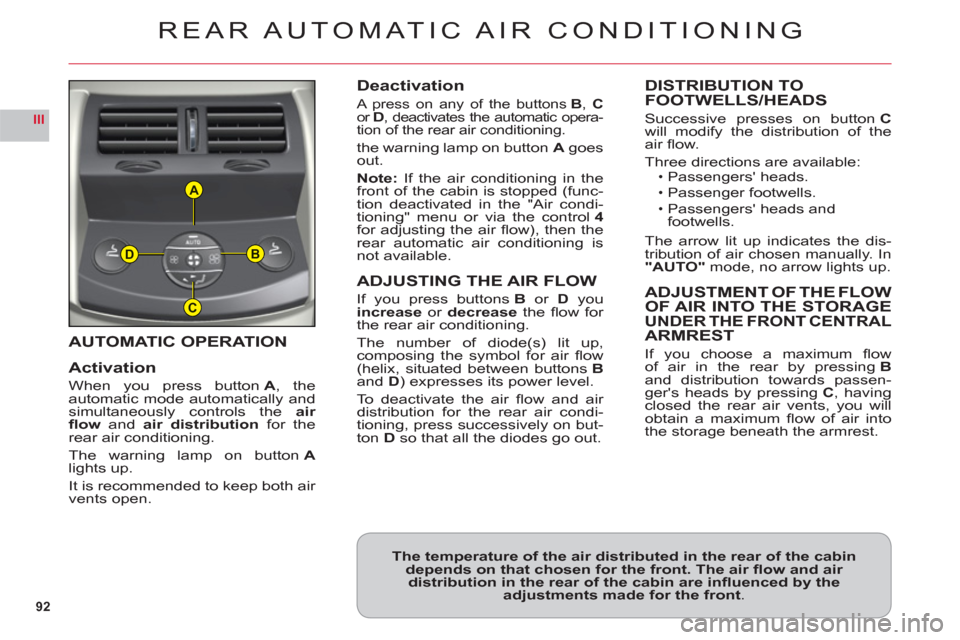
When you press buttonA, the
automatic mode automatically andsimultaneously controls theair
fl ow andair distribution for therear air conditioning.
The warning lamp on buttonAlights up.
It is recommended to kee
p both air
vents open.
Deactivation
A press on any of the buttons B, Cor D, deactivates the automatic opera-
tion of the rear air conditioning.
the warning lamp on button Agoes out.
Note: If the air conditioning in the front of the cabin is stopped (func-
tion deactivated in the "Air condi-
tioning" menu or via the control4for adjusting the air fl ow), then the
rear automatic air conditioning is
not available.
ADJUSTING THE AIR FLOW
If you press buttons Bor Dyou increase or decrease the fl ow for
the rear air conditioning.
The number of diode
(s) lit up, composing the symbol for air fl ow (helix, situated between buttons Band D) expresses its power level.
To deactivate the air fl ow and air distribution for the rear air condi-
tioning, press successively on but-
ton Dso that all the diodes go out.
DISTRIBUTION TO
FOOTWELLS/HEADS
Successive presses on buttonCwill modify the distribution of theair fl ow.
Three directions are available:Passengers' heads.
Passenger footwells.
Passengers' heads and
footwells.
The arrow lit up indicates the dis-
tribution of air chosen manually. In"AUTO"mode, no arrow lights up.
ADJUSTMENT OF THE FLOW
OF AIR INTO THE STORAGEUNDER THE FRONT CENTRALARMREST
If you choose a maximum fl ow
of air in the rear by pressingBand distribution towards passen-ger's heads by pressingC, havingclosed the rear air vents, you willobtain a maximum fl ow of air intothe storage beneath the armrest.
ï
ï
ï
REAR AUTOMATIC AIR CONDITIONING
The temperature of the air distributed in the rear of the cabindepends on that chosen for the front. The air fl ow and air distribution in the rear of the cabin are infl uenced by the adjustments made for the front.
Page 117 of 216
115
IIIABC
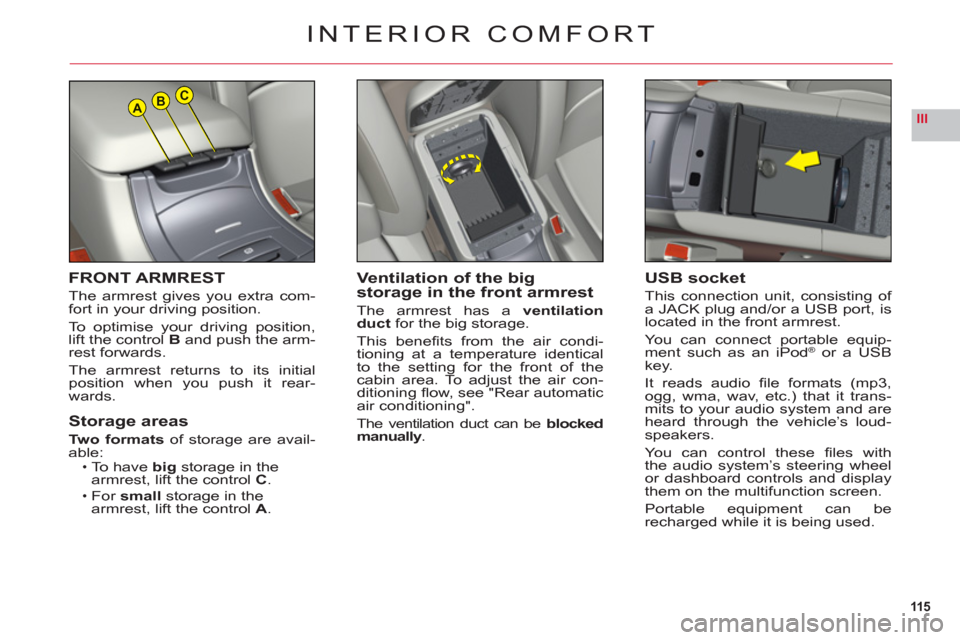
FRONT ARMREST
The armrest gives you extra com-
fort in your driving position.
To optimise
your driving position,lift the control B and push the arm-rest forwards.
Th
e armrest returns to its initialposition when you push it rear-
wards.
Storage areas
Two formatsof storage are avail-able:To have bigstorage in the
armrest, lift the controlC.For smallstorage in the
armrest, lift the controlA.
•
•
Ventilation of the bigstorage in the front armrest
The armrest has aventilation
duct for the big storage.
This benefi ts from the air condi-
tioning at a temperature identical
to the setting for the front of the cabin area. To adjust the air con-
ditioning fl ow, see "Rear automatic
air conditioning".
The ventilation duct can beblocked manually.
INTERIOR COMFORT
USB socket
This connection unit, consisting of
a JACK plug and/or a USB port, islocated in the front armrest.
You can connect portable equip-ment such as an iPod®or a USB®
key.
It reads audio fi le formats (mp3,
ogg, wma, wav, etc.) that it trans-mits to your audio system and areheard through the vehicle’s loud-speakers.
Yo u can control these fi les with
the audio system’s steering wheel
or dashboard controls and displaythem on the multifunction screen.
Portable equipment can berecharged while it is being used.
Page 131 of 216
129
IV
TABLE OF FUSES
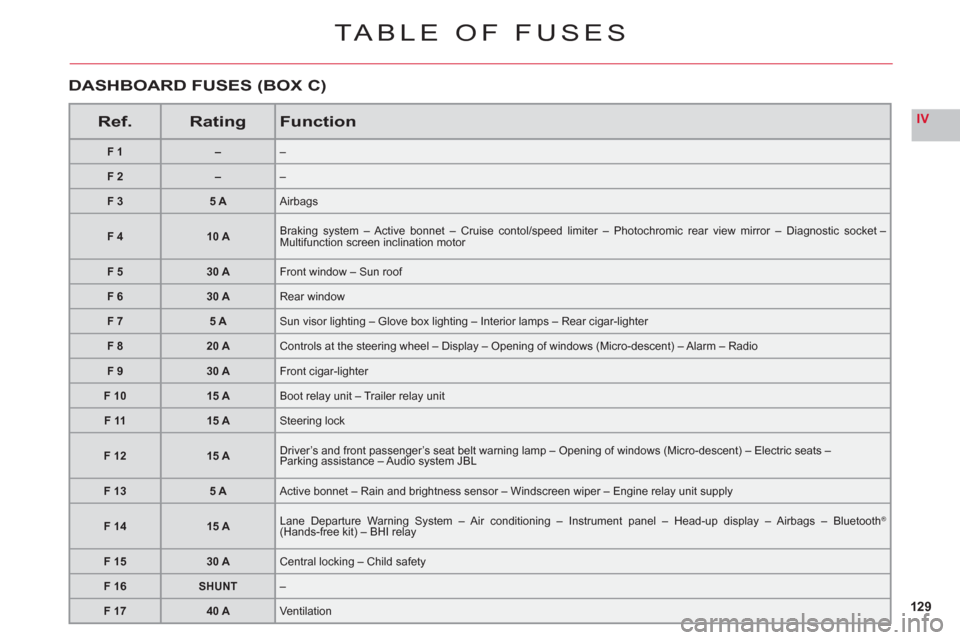
Ref.RatingFunction
F1––
F2––
F 35 AAirbags
F 410 ABraking system – Active bonnet – Cruise contol/speed limiter – Photochromic rear view mirror – Diagnostic socket – Multifunction screen inclination motor
F 530 AFront window – Sun roof
F 630 ARear window
F 75 ASun visor lighting – Glove box lighting – Interior lamps – Rear cigar-lighter
F 820 AControls at the steering wheel – Display – Opening of windows (Micro-descent) – Alarm – Radio
F 930 AFront cigar-lighter
F 1015 ABoot relay unit – Trailer relay unit
F 1115 ASteering lock
F1215 ADriver’s and front passenger’s seat belt warning lamp – Opening of windows (Micro-descent) – Electric seats –Parking assistance – Audio system JBL
F 135 AActive bonnet – Rain and brightness sensor – Windscreen wiper – Engine relay unit supply
F 1415 ALane Departure Warning System – Air conditioning – Instrument panel – Head-up display – Airbags – Bluetooth® (Hands-free kit) – BHI relaygg
F 1530 ACentral locking – Child safety
F 16SHUNT–
F 1740 AVentilation
DASHBOARD FUSES (BOX C)
Page 132 of 216
130
IV
FUSES
UNDER THE BONNET
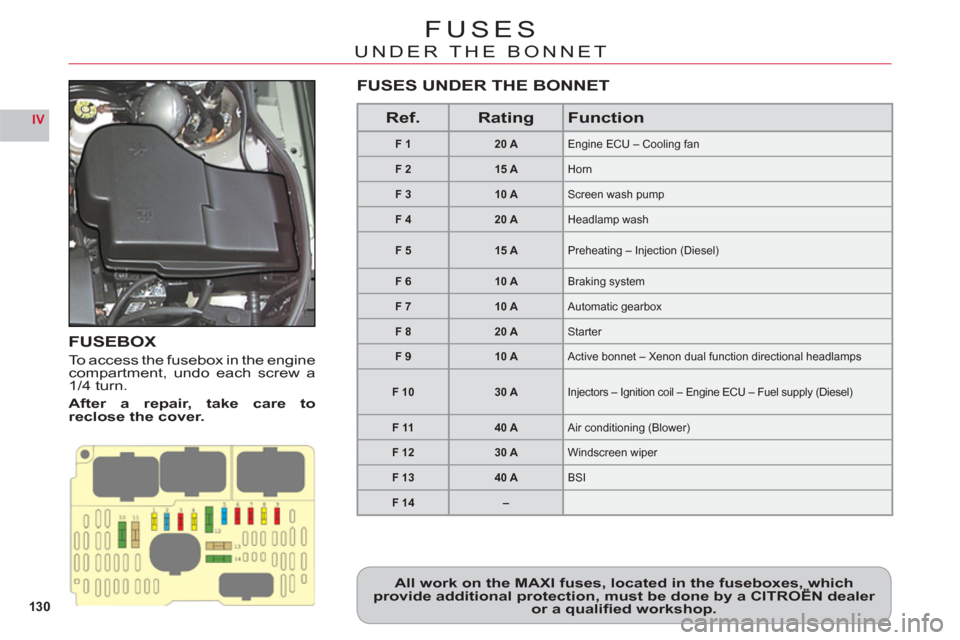
FUSEBOX
To access the fusebox in the enginecompartment, undo each screw a
1/4 turn.
After a re
pair, take care toreclose the cover.
All work on the MAXI fuses, located in the fuseboxes, whichprovide additional protection, must be done by a CITROËN dealer ,,
or a qualifi ed workshop.
Ref.RatingFunction
F120 AEngine ECU – Cooling fan
F215 AHorn
F 310 AScreen wash pump
F 420 AHeadlamp wash
F 515 APreheating – Injection (Diesel)
F 610 ABraking system
F710 AAutomatic gearbox
F 820 AStarter
F 910 AActive bonnet – Xenon dual function directional headlamps
F 1030 AInjectors – Ignition coil – Engine ECU – Fuel supply (Diesel)
F 1140 AAir conditioning (Blower)
F 1230 AWindscreen wiper
F 1340 ABSI
F 14–
FUSES UNDER THE BONNET