bluetooth CITROEN DS3 CABRIO 2013 Handbook (in English)
[x] Cancel search | Manufacturer: CITROEN, Model Year: 2013, Model line: DS3 CABRIO, Model: CITROEN DS3 CABRIO 2013Pages: 421, PDF Size: 12.86 MB
Page 299 of 421
297
06
1
2
3
4
5
6
7
8
9
MENU
OK
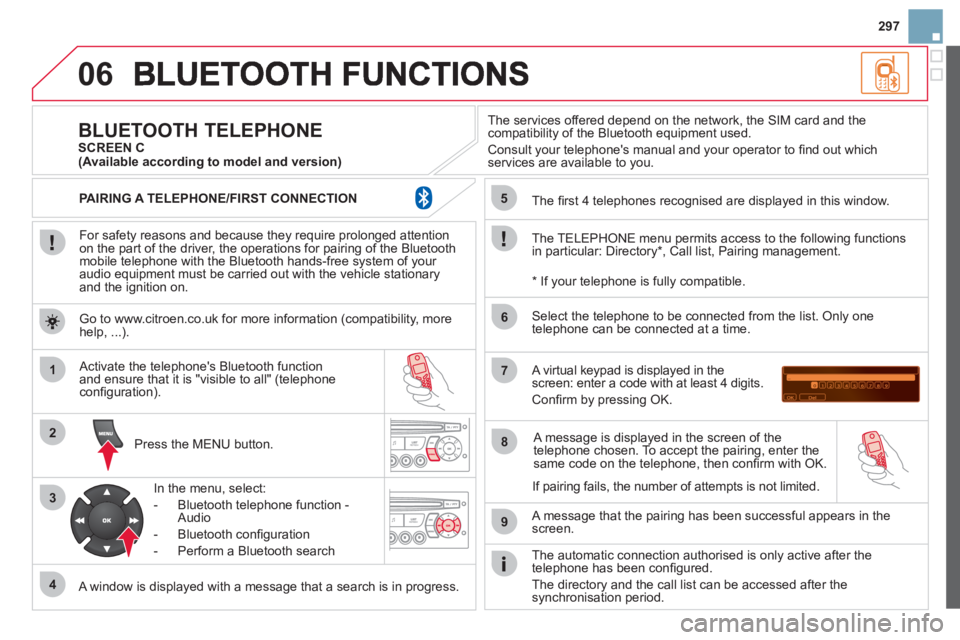
For safety reasons and because they require prolonged attentionon the part of the driver, the operations for pairing of the Bluetooth mobile telephone with the Bluetooth hands-free system of your
audio equipment must be carried out with the vehicle stationary
and the ignition on.
Pr
ess the MENU button.
A window is displayed with a message that a search is in progress.
Activate the telephone's Bluetooth
function
and ensure that it is "visible to all" (telephone confi guration).
In the menu, select:
- Bluetooth telephone
function -
Audio
- Bluetooth confi
guration
- P
erform a Bluetooth search
The services o
ffered depend on the network, the SIM card and thecompatibility of the Bluetooth equipment used.
Consult your telephone's manual and your operator to fi nd out which
services are available to you.
BLUETOOTH TELEPHONE SCREEN C
The TELEPH
ONE menu permits access to the following functions
in particular: Directory * , Call list, Pairing management.
The
fi rst 4 telephones recognised are displayed in this window.
A virtual ke
ypad is displayed in thescreen: enter a code with at least 4 digits.
Confi rm by pressing OK.
A messa
ge that the pairing has been successful appears in thescreen.
Select the telephone to be connected from the list. Only one
telephone can be connected at a time.
A messa
ge is displayed in the screen of the
telephone chosen. To accept the pairing, enter the same code on the telephone, then confi rm with OK.
The automatic connection authorised is onl
y active after the
telephone has been confi gured.
The directory and the call list can be accessed a
fter thesynchronisation period.
(Available according to model and version)
*
If your telephone is fully compatible.
I
f pairing fails, the number of attempts is not limited. Go to www.citroen.co.uk for more information
(compatibility, more help, ...).
PAIRING A TELEPHONE/FIR
ST CONNECTION
Page 300 of 421
06
2
1
2
1
OK
RECEIVING A CALL
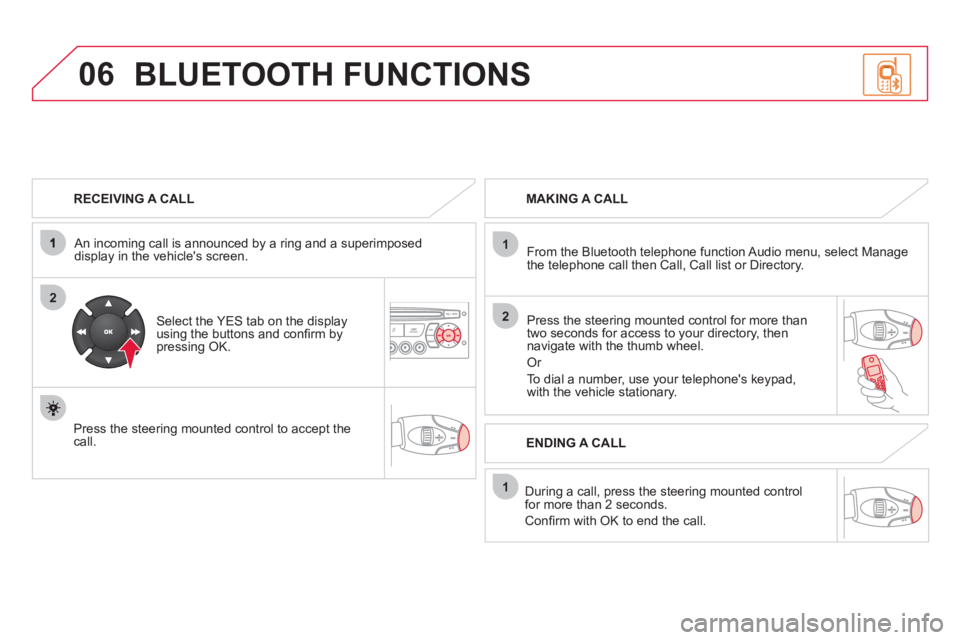
An incomin
g call is announced by a ring and a superimposed
display in the vehicle's screen.
Select the YES tab on the display
using the buttons and confi rm bypressing OK.
Press the steering mounted control to accept thecall.
MAKING A CALL
From the Bluetooth telephone
function Audio menu, select Manage
the telephone call then Call, Call list or Directory.
Press the steerin
g mounted control for more than
two seconds for access to your directory, then navigate with the thumb wheel.
Or
To dial a number, use your telephone's keypad,with the vehicle stationary.
Durin
g a call, press the steering mounted control
for more than 2 seconds.
Confi rm with OK to end the call.
BLUETOOTH FUNCTIONS
ENDING A CALL
Page 301 of 421
299
1
2
3
SOURCE
06
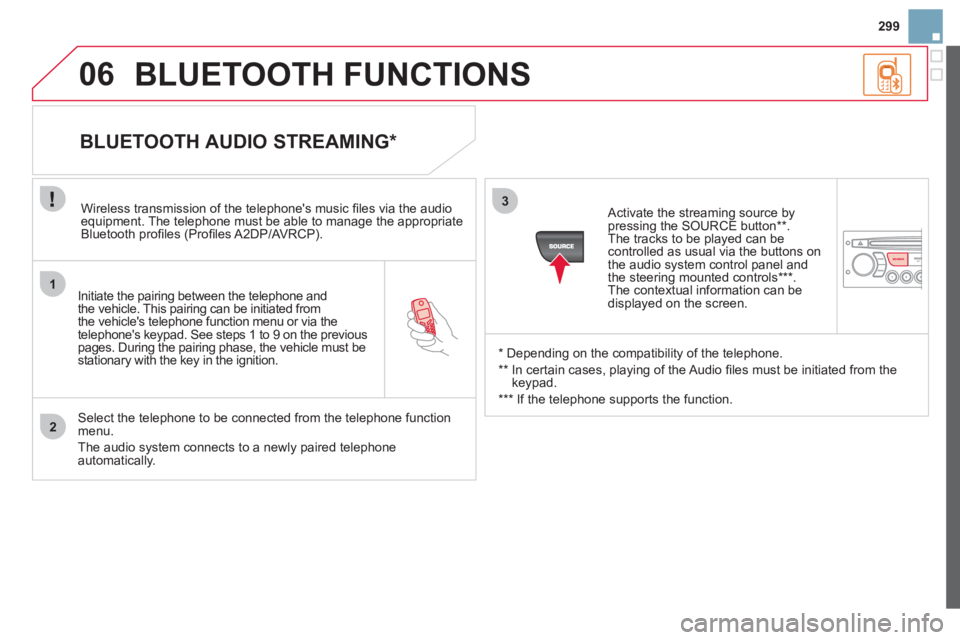
Initiate the pairing between the telephone and
the vehicle. This pairing can be initiated from
the vehicle's telephone function menu or via the
telephone's ke
ypad. See steps 1 to 9 on the previouspages. During the pairing phase, the vehicle must bestationary with the key in the ignition.
Select the telephone to be connected from the telephone function
menu.
The audio system connects to a newly paired telephone automatically.
BLUETOOTH AUDIO STREAMING *
Wireless transmission of the telephone's music fi les via the audioequipment. The telephone must be able to manage the appropriate
Bluetooth profi les (Profi les A2DP/AV RCP).
*
Depending on the compatibility of the telephone.
**
In certain cases, playing of the Audio fi les must be initiated from the
keypad.
***
If the tele
phone supports the function.
Activate the streamin
g source by
pressing the SOURCE button ** .The tracks to be played can becontrolled as usual via the buttons on
the audio system control panel andthe steering mounted controls *** .
The contextual information can bedisplayed on the screen.
BLUETOOTH FUNCTIONS
Page 308 of 421
08SCREEN MENU MAP
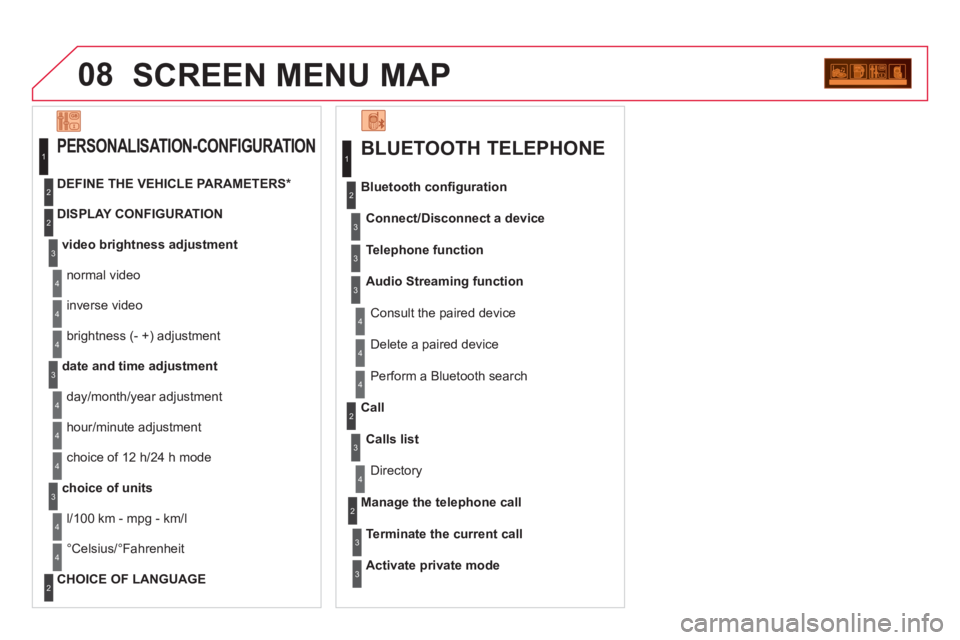
BLUETOOTH TELEPHONE
Connect/Disconnect a device
Consult the paired device
Bluetooth confi
guration
Telephone function
Audio Streamin
g function
Delete a
paired device
P
erform a Bluetooth search
Calls lis
t
Call
Directory
Terminate the current call
Manage the telephone call
Activate private mode
1
2
3
3
3
4
4
4
2
3
4
2
3
3
video brightness adjustment
DISPLAY CONFIGURATION
DEFINE THE VEHICLE PARAMETERS *
PERSONALISATION-CONFIGURATION
normal video
inverse video
bri
ghtness (- +) adjustment
date and time adjustment
day/month/year adjustment
hour
/minute adjustment
choice of 12 h/24 h mode
choice of units
l/100 km - mpg - km/l
°
Celsius/°Fahrenheit
CHOICE OF LANGUAGE
1
2
4
3
2
4
4
3
4
4
2
3
4
4
4
Page 309 of 421
307
FREQUENTLY ASKED QUESTIONS
QUESTIONANSWERSOLUTION
There is a difference in sound quality betweenthe different audiosources (radio, CD...).
For optimum sound quality, the audio settings (Volume, Bass, Treble, Ambience, Loudness) can be adapted to the different sound sources,which may result in audible differences when changing source(radio, CD...).
Check that the audio settings (Volume, Bass, Treble, Ambience, Loudness) are adapted to the sources listened to. It is advisable to set the AUDIOfunctions (Bass, Treble, Front-Rear Balance,Left-Right Balance) to the middle position, select the musical ambience "None" and set the loudness correction to the "Active" position in CD mode or tothe "Inactive" position in radio mode.
The CD is ejected automatically or is not played by the player.
The CD is inserted upside down, is unplayable, does not contain any audio data or contains an audio format which the player cannot play.
The CD is protected by an anti-pirating protection system which is not recognised by the audio equipment.
- Check that the CD is inserted in the playerthe right way up.
- Check the condition of the CD: the CD cannot be played if it is too damaged.
- Check the content in the case of a recordedCD: consult the advice in the "Audio" section.
- The audio equipment's CD player does notplay DVDs.
- Due to their quality level, certain writeableCDs will not be played by the audio system.
The message "USB peripheral error" isdisplayed on the screen.
The Bluetooth connectionis cut.
The battery of the peripheral may not be suffi ciently charged.
Recharge the battery of the peripheral device.
The USB memory stick is not recognised.
The memory stick may be corrupt.
Reformat the memory stick.
The CD player sound ispoor.The CD used is scratched or of poor quality.
Insert good quality CDs and store them in suitable conditions.
The audio equipment settings (bass, treble, ambiences) are unsuitable. Set the treble or bass level to 0, without selectingan ambience.
Page 318 of 421
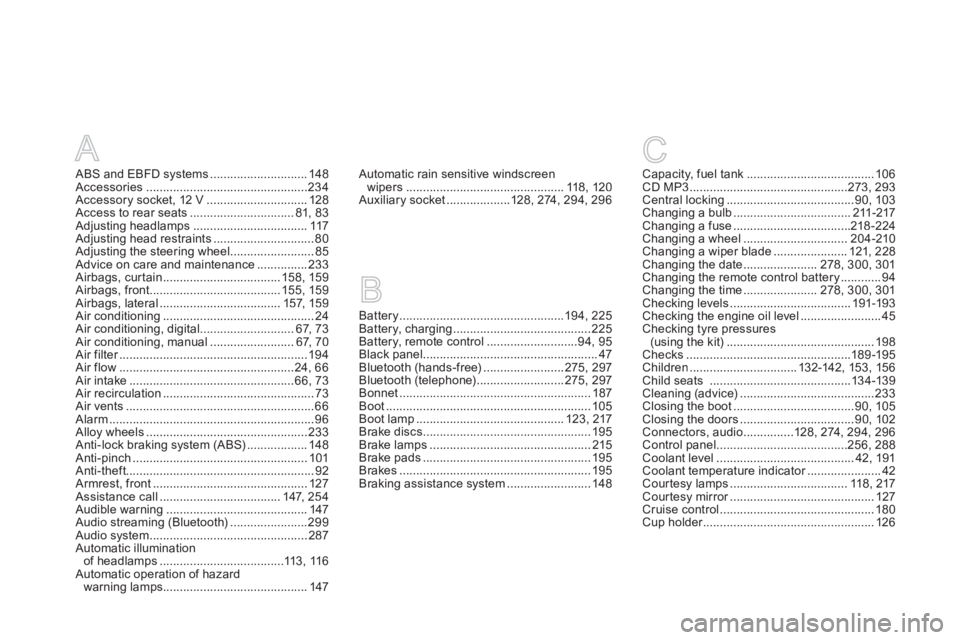
A
ABS and EBFD systems.............................148Accessories................................................234Accessory socket, 12 V ..............................128Access to rear seats...............................81, 83Adjusting headlamps ..................................117Adjusting head restraints ..............................80Adjusting the steering wheel.........................85Advice on care and maintenance...............233Airbags, curtain...................................158, 159Airbags, front.......................................155, 159Airbags, lateral....................................157, 159Air conditioning.............................................24Air conditioning, digital ............................67,73Air conditioning, manual .........................67, 70Air filter........................................................r194Air flow....................................................24, 66Air intake.................................................66,73Air recirculation.............................................73Air vents........................................................66Alarm.............................................................96Alloy wheels ................................................233Anti-lock braking system (ABS)..................148Anti-pinch ....................................................101Anti-theft........................................................92Armrest, front.............................................. 127Assistance call....................................147, 254Audible warning..........................................147Audio streaming (Bluetooth).......................299Audio system...............................................287Automatic illumination
of headlamps .....................................113,116Automatic operation of hazard
warning lamps...........................................147
Battery.................................................194,225Battery, charging.........................................225Battery, remote control...........................94,95Black panel....................................................47Bluetooth (hands-free)........................275,297Bluetooth (telephone)..........................275,297Bonnet.........................................................187Boot.............................................................105Boot lamp............................................123, 217Brake discs ..................................................195Brake lamps................................................215Brake pads ..................................................195Brakes .........................................................195Braking assistance system .........................148
Capacity, fuel tank......................................106CD MP3...............................................273,293Central locking......................................90, 103Changing a bulb...................................211-217Changing a fuse...................................218-224Changing a wheel...............................204-210Changing a wiper blade...................... 121, 228Changing the date......................278, 300,301Changing the remote control battery............94Changing the time......................278, 300,301Checking levels....................................191-193Checking the engine oil level........................45Checking tyre pressures(using the kit)............................................198Checks .................................................189-195Children................................ 132-142, 153, 156Child seats ..........................................134-139Cleaning (advice)........................................233Closing the boot....................................90,105Closing the doors..................................90,102Connectors, audio ...............128, 274, 294, 296Control panel .......................................256, 288Coolant level.........................................42,191Coolant temperature indicator......................r42Cour tesy lamps ................................... 118, 217Courtesy mirror...........................................r127Cruise control..............................................180Cup holder...................................................r126
BC
Automatic rain sensitive windscreen
wipers...............................................118, 120Auxiliary socket...................128,274, 294,296
Page 364 of 421
1
The system is protected in such a way that it will onlyoperate in your vehicle.
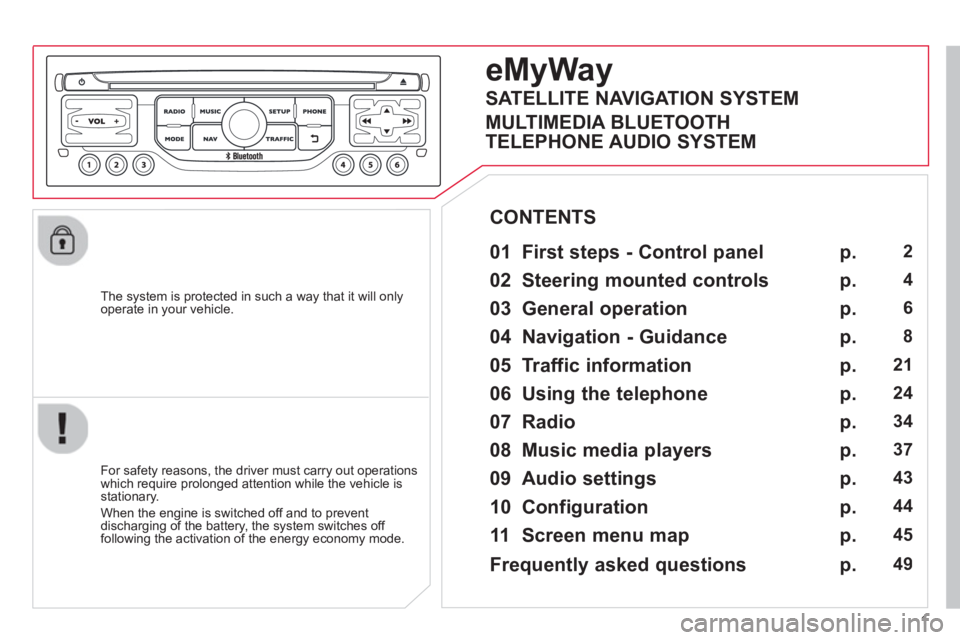
eMyWay
01 First steps - Control panel
For safety reasons, the driver must carry out operations
which require prolonged attention while the vehicle is stationary.
When the en
gine is switched off and to prevent
discharging of the battery, the system switches off following the activation of the energy economy mode.
CONTENTS
02 Steerin
g mounted controls
03 General o
peration
04 Navi
gation - Guidance
05 Traffic information
06 Usin
g the telephone
07 Radio
08 Music media pla
yers
09 Audio settin
gs
10 Confi
guration
11 Screen menu ma
p
p.
p.
p.
p.
p.
p.
p.
p.
p.
p.
p.
2
4
6
8
21
24
34
37
43
44
45
SATELLITE NAVIGATION SYSTEM
MULTIMEDIA BLUETOOTH
TELEPHONE AUDIO SYSTEM
Frequentl
y asked questions p. 49
Page 388 of 421
25
06
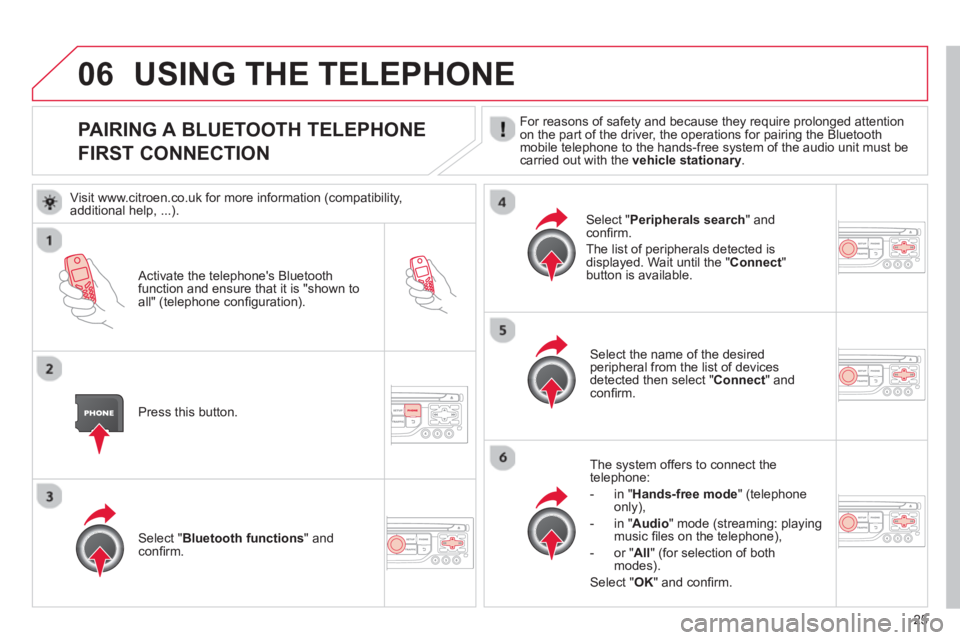
PAIRING A BLUETOOTH TELEPHONE
FIRST CONNECTION For reasons of safety and because they require prolonged attention
on the part of the driver, the operations for pairing the Bluetoothmobile telephone to the hands-free system of the audio unit must be carried out with the vehicle stationary.
Activate the telephone's Bluetoothfunction and ensure that it is "shown to all" (telephone confi guration).
Pr
ess this button.
Select the name of the desired
peripheral from the list of devices detected then select "Connect
" and confi rm.
The s
ystem offers to connect the
telephone:
-
in"Hands-free mode" (telephoneonly),
-
in "Audio" mode (streaming: playingmusic fi les on the telephone),
-
or "All
" (for selection of both
modes).
Select " OK
" and confi rm.
Select " Bluetooth functions " and confi rm.
Select "Peripherals search" andconfi rm.
The list of peripherals detected is
displayed. Wait until the " Connect"button is available.
USING THE TELEPHONE
Visit www.citroen.co.uk for more information (compatibility,
additional help, ...).
Page 389 of 421
26
06
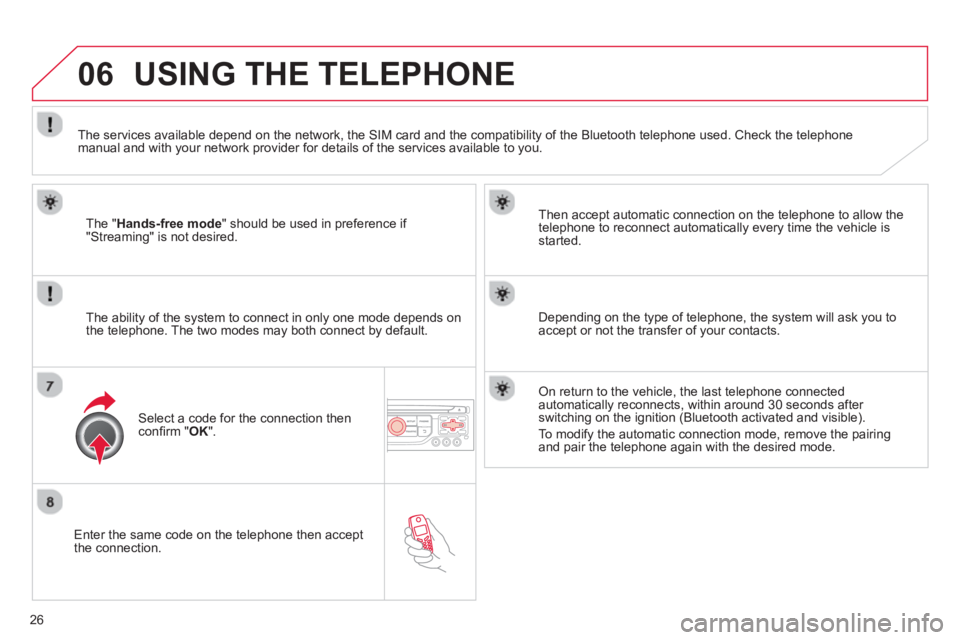
Enter the same code on the telephone then accept
the connection.
Then accept automatic connection on the telephone to allow the
te
lephone to reconnect automatically every time the vehicle is started.
The abilit
y of the system to connect in only one mode depends on
the telephone. The two modes may both connect by default.
USING THE TELEPHONE
The "Hands-free mode
" should be used in preference if "Streaming" is not desired.
The services available depend on the network, the
SIM card and the compatibility of the Bluetooth telephone used. Check the telephone manual and with your network provider for details of the services available to you.
Select a code for the connection thenconfi rm "OK".
Depending on the type of telephone, the system will ask you to
accept or not the transfer of your contacts.
On return to the vehicle, the last telephone connected
automatically reconnects, within around 30 seconds after switching on the ignition (Bluetooth activated and visible).
To modi
fy the automatic connection mode, remove the pairingand pair the telephone again with the desired mode.
Page 391 of 421
28
06
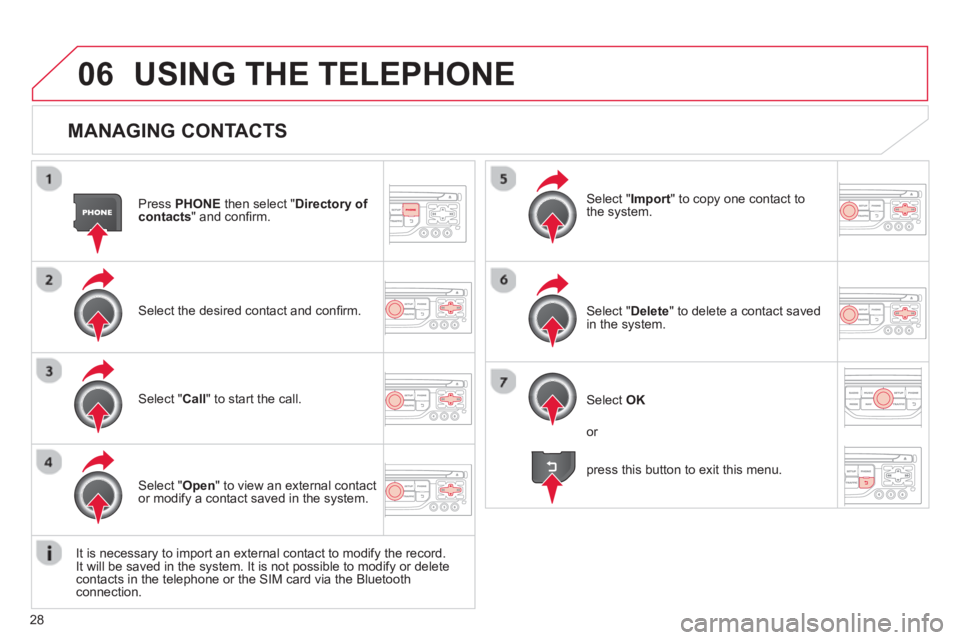
MANAGING CONTACTS
Press PHONEthen select "Directory of contacts" and confi rm.
Select the desired contact and confi rm.
Select " Import" to copy one contact to
the system.
Select " Call" to start the call.
Select " Open
" to view an external contact
or modify a contact saved in the system.
Select OK
Select " Delete" to delete a contact savedin the system.
It is necessar
y to import an external contact to modify the record.
It will be saved in the system. It is not possible to modify or delete contacts in the telephone or the SIM card via the Bluetoothconnection.
USING THE TELEPHONE
or
press this button to exit this menu.