phone CITROEN DS3 CABRIO 2013 Handbook (in English)
[x] Cancel search | Manufacturer: CITROEN, Model Year: 2013, Model line: DS3 CABRIO, Model: CITROEN DS3 CABRIO 2013Pages: 421, PDF Size: 12.86 MB
Page 301 of 421
299
1
2
3
SOURCE
06
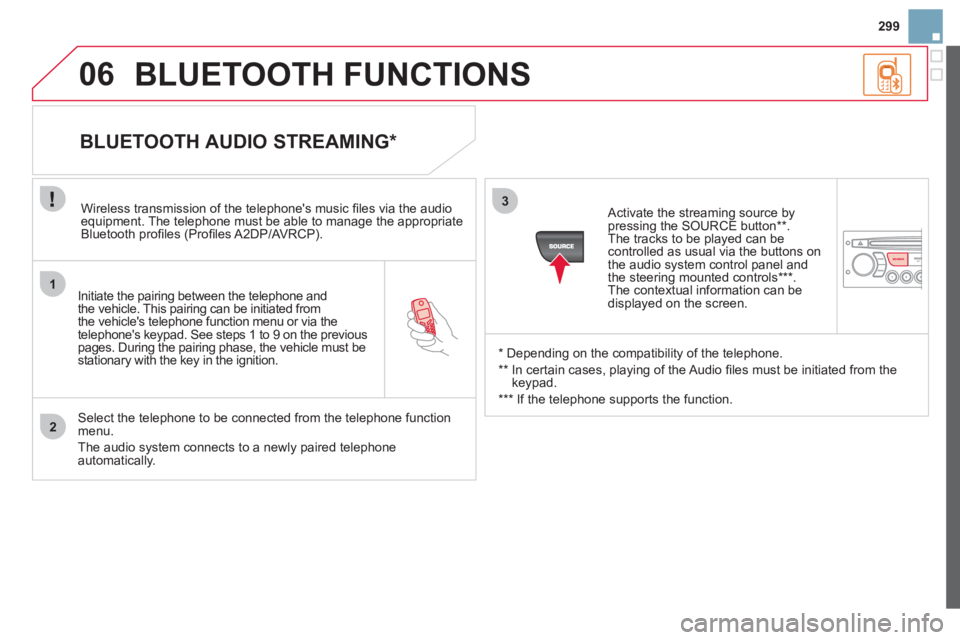
Initiate the pairing between the telephone and
the vehicle. This pairing can be initiated from
the vehicle's telephone function menu or via the
telephone's ke
ypad. See steps 1 to 9 on the previouspages. During the pairing phase, the vehicle must bestationary with the key in the ignition.
Select the telephone to be connected from the telephone function
menu.
The audio system connects to a newly paired telephone automatically.
BLUETOOTH AUDIO STREAMING *
Wireless transmission of the telephone's music fi les via the audioequipment. The telephone must be able to manage the appropriate
Bluetooth profi les (Profi les A2DP/AV RCP).
*
Depending on the compatibility of the telephone.
**
In certain cases, playing of the Audio fi les must be initiated from the
keypad.
***
If the tele
phone supports the function.
Activate the streamin
g source by
pressing the SOURCE button ** .The tracks to be played can becontrolled as usual via the buttons on
the audio system control panel andthe steering mounted controls *** .
The contextual information can bedisplayed on the screen.
BLUETOOTH FUNCTIONS
Page 308 of 421
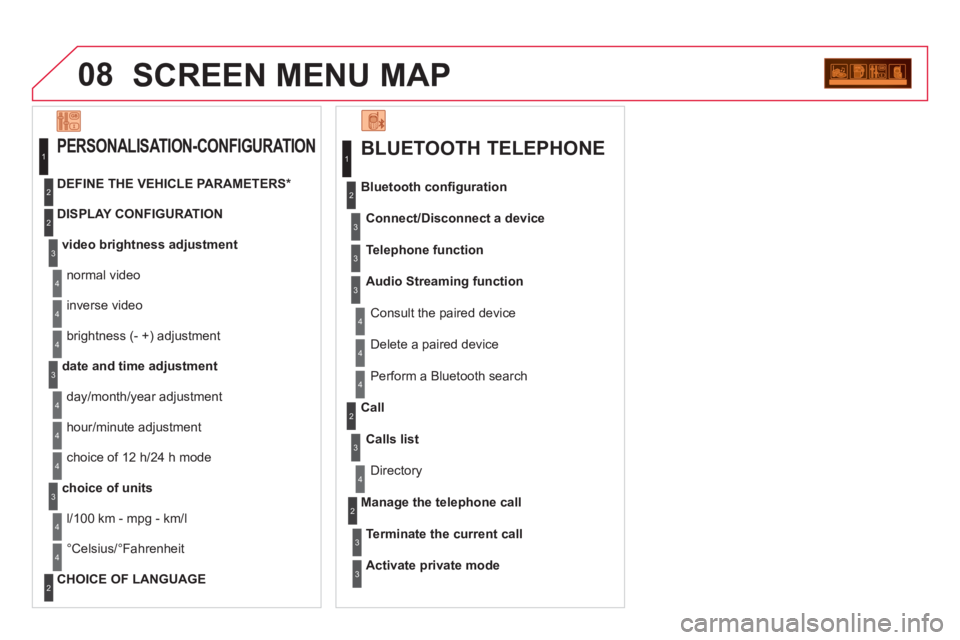
08SCREEN MENU MAP
BLUETOOTH TELEPHONE
Connect/Disconnect a device
Consult the paired device
Bluetooth confi
guration
Telephone function
Audio Streamin
g function
Delete a
paired device
P
erform a Bluetooth search
Calls lis
t
Call
Directory
Terminate the current call
Manage the telephone call
Activate private mode
1
2
3
3
3
4
4
4
2
3
4
2
3
3
video brightness adjustment
DISPLAY CONFIGURATION
DEFINE THE VEHICLE PARAMETERS *
PERSONALISATION-CONFIGURATION
normal video
inverse video
bri
ghtness (- +) adjustment
date and time adjustment
day/month/year adjustment
hour
/minute adjustment
choice of 12 h/24 h mode
choice of units
l/100 km - mpg - km/l
°
Celsius/°Fahrenheit
CHOICE OF LANGUAGE
1
2
4
3
2
4
4
3
4
4
2
3
4
4
4
Page 318 of 421
A
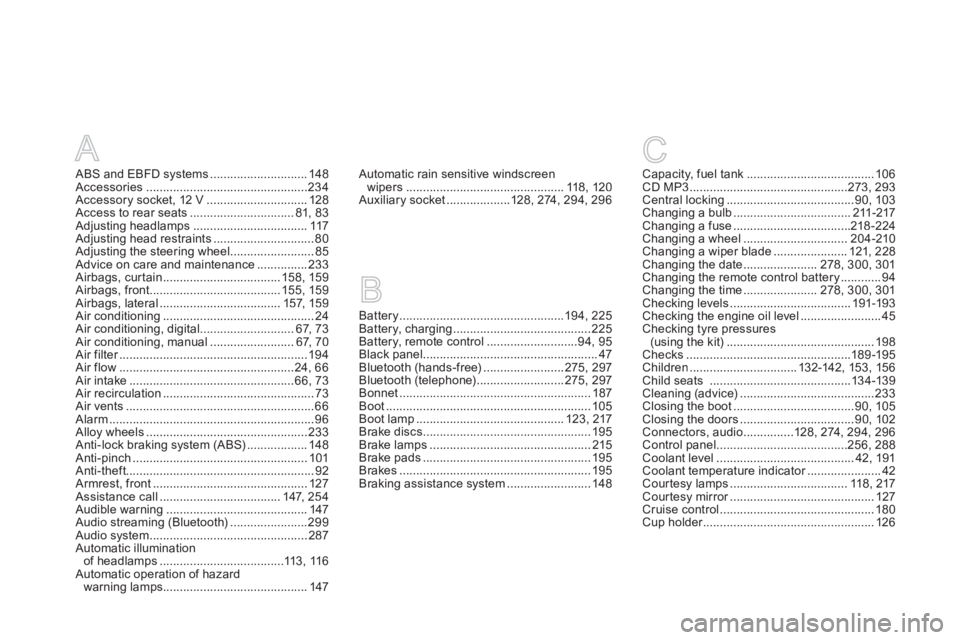
ABS and EBFD systems.............................148Accessories................................................234Accessory socket, 12 V ..............................128Access to rear seats...............................81, 83Adjusting headlamps ..................................117Adjusting head restraints ..............................80Adjusting the steering wheel.........................85Advice on care and maintenance...............233Airbags, curtain...................................158, 159Airbags, front.......................................155, 159Airbags, lateral....................................157, 159Air conditioning.............................................24Air conditioning, digital ............................67,73Air conditioning, manual .........................67, 70Air filter........................................................r194Air flow....................................................24, 66Air intake.................................................66,73Air recirculation.............................................73Air vents........................................................66Alarm.............................................................96Alloy wheels ................................................233Anti-lock braking system (ABS)..................148Anti-pinch ....................................................101Anti-theft........................................................92Armrest, front.............................................. 127Assistance call....................................147, 254Audible warning..........................................147Audio streaming (Bluetooth).......................299Audio system...............................................287Automatic illumination
of headlamps .....................................113,116Automatic operation of hazard
warning lamps...........................................147
Battery.................................................194,225Battery, charging.........................................225Battery, remote control...........................94,95Black panel....................................................47Bluetooth (hands-free)........................275,297Bluetooth (telephone)..........................275,297Bonnet.........................................................187Boot.............................................................105Boot lamp............................................123, 217Brake discs ..................................................195Brake lamps................................................215Brake pads ..................................................195Brakes .........................................................195Braking assistance system .........................148
Capacity, fuel tank......................................106CD MP3...............................................273,293Central locking......................................90, 103Changing a bulb...................................211-217Changing a fuse...................................218-224Changing a wheel...............................204-210Changing a wiper blade...................... 121, 228Changing the date......................278, 300,301Changing the remote control battery............94Changing the time......................278, 300,301Checking levels....................................191-193Checking the engine oil level........................45Checking tyre pressures(using the kit)............................................198Checks .................................................189-195Children................................ 132-142, 153, 156Child seats ..........................................134-139Cleaning (advice)........................................233Closing the boot....................................90,105Closing the doors..................................90,102Connectors, audio ...............128, 274, 294, 296Control panel .......................................256, 288Coolant level.........................................42,191Coolant temperature indicator......................r42Cour tesy lamps ................................... 118, 217Courtesy mirror...........................................r127Cruise control..............................................180Cup holder...................................................r126
BC
Automatic rain sensitive windscreen
wipers...............................................118, 120Auxiliary socket...................128,274, 294,296
Page 364 of 421
1
The system is protected in such a way that it will onlyoperate in your vehicle.
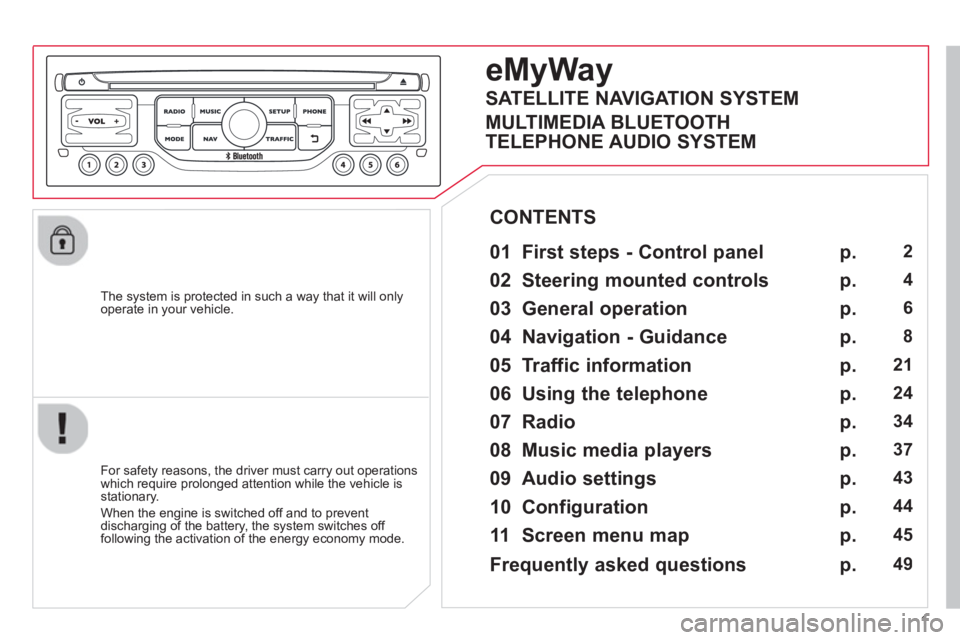
eMyWay
01 First steps - Control panel
For safety reasons, the driver must carry out operations
which require prolonged attention while the vehicle is stationary.
When the en
gine is switched off and to prevent
discharging of the battery, the system switches off following the activation of the energy economy mode.
CONTENTS
02 Steerin
g mounted controls
03 General o
peration
04 Navi
gation - Guidance
05 Traffic information
06 Usin
g the telephone
07 Radio
08 Music media pla
yers
09 Audio settin
gs
10 Confi
guration
11 Screen menu ma
p
p.
p.
p.
p.
p.
p.
p.
p.
p.
p.
p.
2
4
6
8
21
24
34
37
43
44
45
SATELLITE NAVIGATION SYSTEM
MULTIMEDIA BLUETOOTH
TELEPHONE AUDIO SYSTEM
Frequentl
y asked questions p. 49
Page 366 of 421
3
01
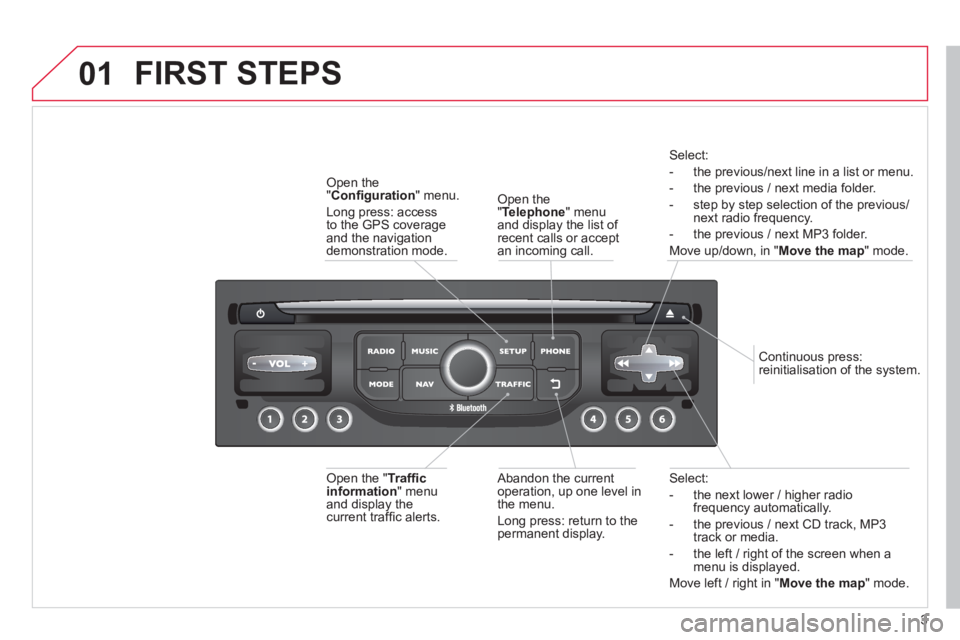
Select:
- the next lower / hi
gher radiofrequency automatically.
- the previous
/ next CD track, MP3
track or media.
- the le
ft / right of the screen when a menu is displayed.
Move left / ri
ght in "Move the map
" mode.
Abandon the current
operation, up one level in
t
he menu.
Long press: return to the permanent display.
Continuous
press:
reinitialisation of the system.
Open the" Telephone" menu
and display the list of recent calls or accept
an incoming call.
Open the
"Confi guration
" menu.
Lon
g press: access
to the GPS coverageand the navigation demonstration mode.
Open the "Traffi c information " menuand display thecurrent traffi c alerts.
Select:
- the previous
/next line in a list or menu.
- the previous
/ next media folder.
- step b
y step selection of the previous/next radio frequency.
- the previous / next MP3 folder.
Move up/down, in "
Move the map " mode.
FIRST STEPS
Page 367 of 421
4
02STEERING MOUNTED CONTROLS (according to vehicle)
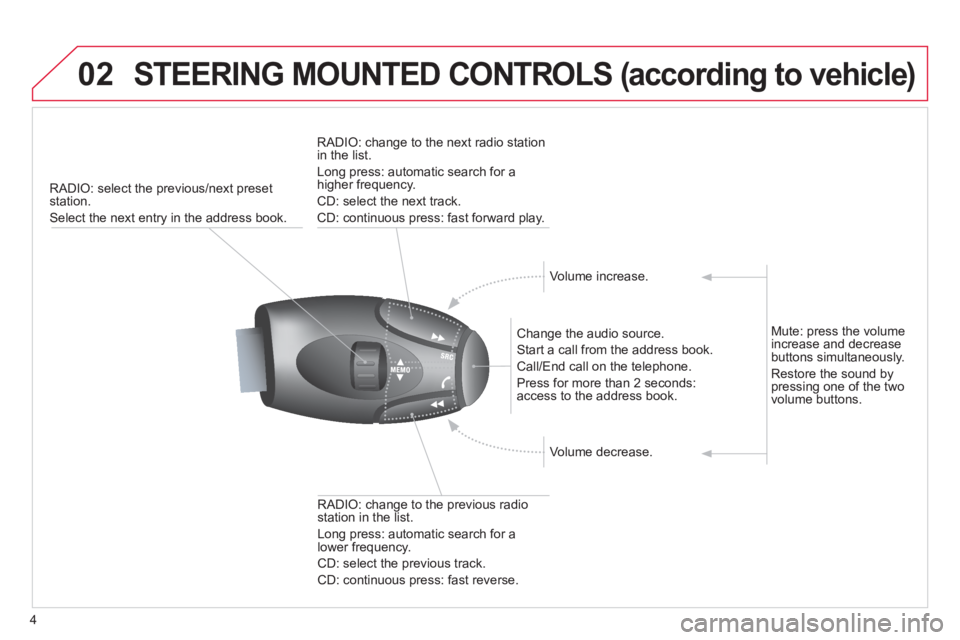
RADIO: select the previous/next preset station.
Select the next entry in the address book.
Chan
ge the audio source.
Start a call from the address book.
Call/End call on the telephone.
Pr
ess for more than 2 seconds: access to the address book.
RADI
O: change to the previous radio station in the list.
Lon
g press: automatic search for a
lower frequency.
CD: select the previous track.
CD: continuous press: fast reverse.
RADI
O: change to the next radio station
in the list.
Lon
g press: automatic search for ahigher frequency.
CD: select the next track.
CD: continuous press: fast forward play.
V
olume increase.
V
olume decrease.
Mute: press the volume increase and decrease buttons simultaneously.
Restore the sound by
pressing one of the two
volume buttons.
Page 368 of 421
5
02
32
15
4
132
15
4
2
3
STEERING MOUNTED CONTROLS (according to vehicle)
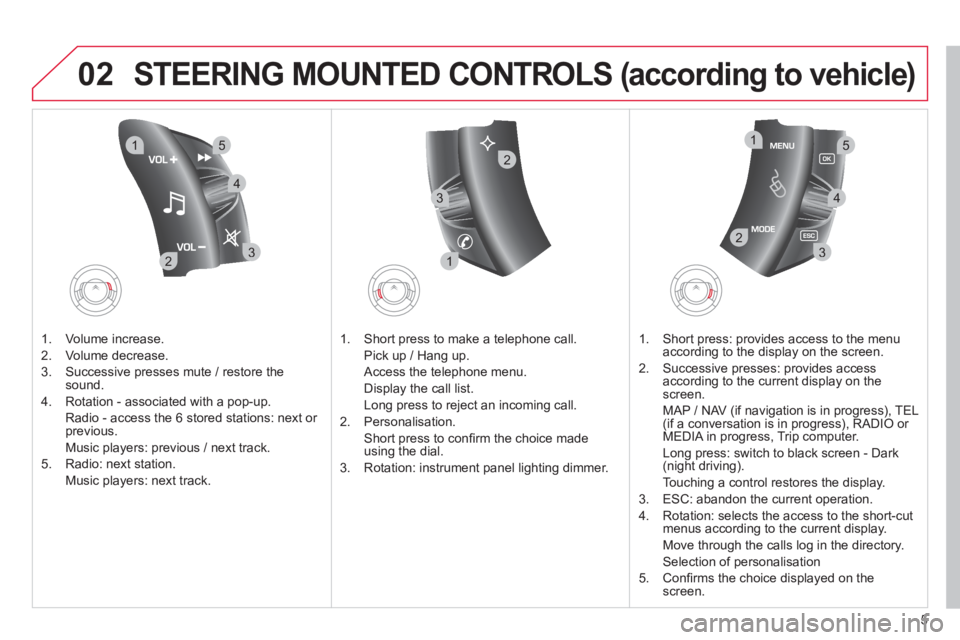
1. Volume increase.
2. V
olume decrease.
3.
Successive presses mute / restore thesound.
4. Rotation - associated with a pop-up.
Radio - access the
6 stored stations: next or previous.
Music pla
yers: previous / next track.
5. Radio: next station.
Music players: next track.
1. Short press to make a telephone call.
Pick up
/ Hang up.
Access the telephone menu.
Displa
y the call list.
Lon
g press to reject an incoming call.
2. P
ersonalisation.
Short
press to confi rm the choice made using the dial.
3. Rotation: instrument panel li
ghting dimmer.
1. Short press: provides access to the menu
accor
ding to the display on the screen.
2.
Successive presses: provides access
according to the current display on the
screen.
MAP
/ NAV (if navigation is in progress), TEL (if a conversation is in progress), RADIO or MEDIA in progress, Trip computer.
Lon
g press: switch to black screen - Dark (night driving).
Touching a control restores the display.
3. E
SC: abandon the current operation.
4. R
otation: selects the access to the short-cutmenus according to the current display.
Move throu
gh the calls log in the directory.
Selection of personalisation
5. Confi rms the choice displa
yed on thescreen.
Page 369 of 421
6
03
For a detailed global view of the menus available, refer to the
"Screen menu map" section.
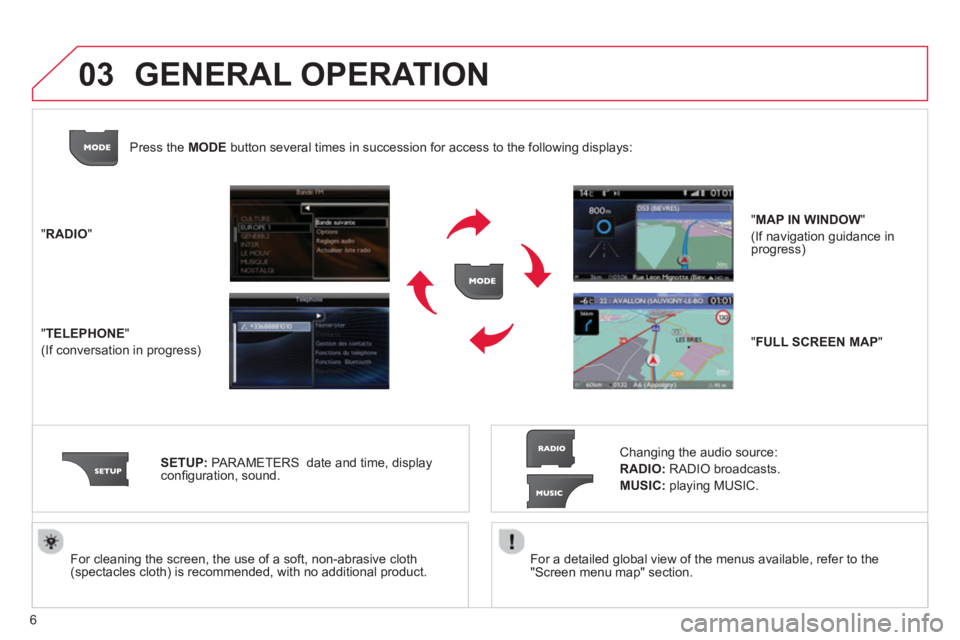
For cleaning the screen, the use of a soft, non-abrasive cloth (spectacles cloth) is recommended, with no additional product. "RADIO
"
"
TELEPHONE"
(If conversation in progress)
SETUP
: PARAMETERS
date and time, displayconfi guration, sound.
Changing the audio source:
RADIO:RADIO broadcasts.
MUSIC:playing MUSIC. Pr
ess the MODE button several times in succession for access to the following displays:
GENERAL OPERATION
"FULL SCREEN MAP"
"MAP IN WINDOW"
(If navigation guidance in progress)
Page 370 of 421
7
03
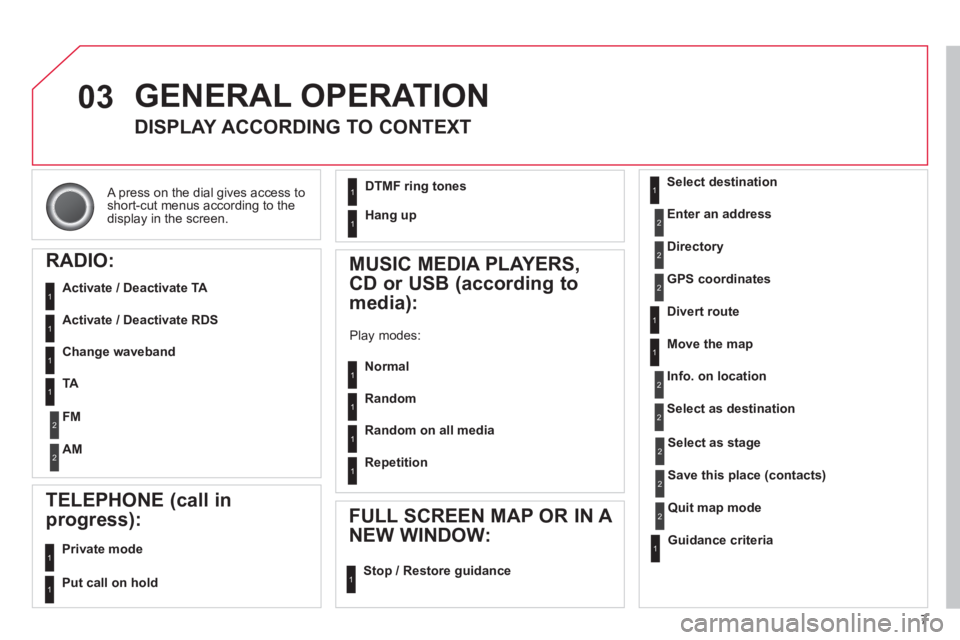
A press on the dial gives access to short-cut menus according to thedisplay in the screen.
GENERAL OPERATION
DISPLAY ACCORDING TO CONTEXT
RADIO:
Activate / Deactivate TA
Activate / Deactivate RDS
MUSIC MEDIA PLAYERS,
CD or USB
(according to
media):
Play modes:
Normal
Random
Random on all media
Repetition
TELEPHONE (call in
pro
gress):
Private mode
FULL SCREEN MAP OR IN A
NEW WINDOW:
Stop / Restore guidance Select destination
Enter an address
Directory
GPS coordinates
Divert route
Move the map
Info. on location
Select as destination
Select as sta
ge
Save this place (contacts)
Quit map mode
Guidance criteria
Put call on hold
DTMF ring tones
Hang up
1
1
1
1
1
1
1
1
2
2
2
2
2
1
2
2
2
1
1
1
1
1
1
Change waveband
F
M
AM
2
2
1
TA 1
Page 373 of 421
10
04
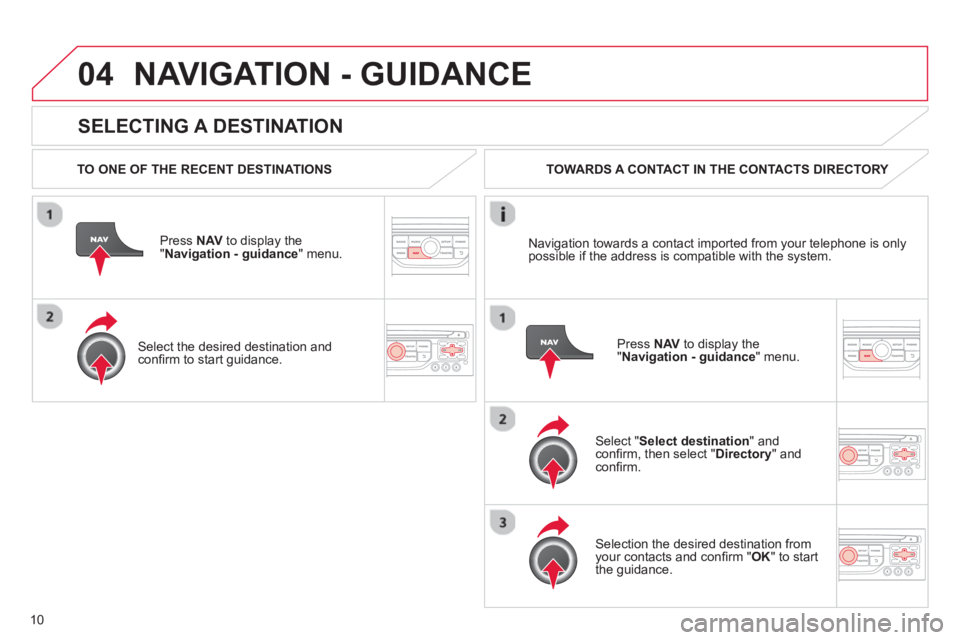
SELECTING A DESTINATION
NAVIGATION - GUIDANCE
TO ONE OF THE RECENT DESTINATIONS
Press NAV
to display the"Navigation - guidance" menu.
Select the desired destination and confi rm to start guidance. TOWARDS A CONTACT IN THE CONTACTS DIRECTORY
Select " Select destination" andconfi rm, then select " Directory " and confi rm.
Selection the desired destination from your contacts and confi rm " OK
" to start
the guidance.
Pr
ess NAVto display the"Navigation - guidance
" menu. Navi
gation towards a contact imported from your telephone is only
possible if the address is compatible with the system.