radio CITROEN DS3 CABRIO 2013 Handbook (in English)
[x] Cancel search | Manufacturer: CITROEN, Model Year: 2013, Model line: DS3 CABRIO, Model: CITROEN DS3 CABRIO 2013Pages: 421, PDF Size: 12.86 MB
Page 293 of 421
291
04
1
2
3
4
1
2
3
4
SOURCE
BANDAST
LISTREFRESH
MENU
AUDIO
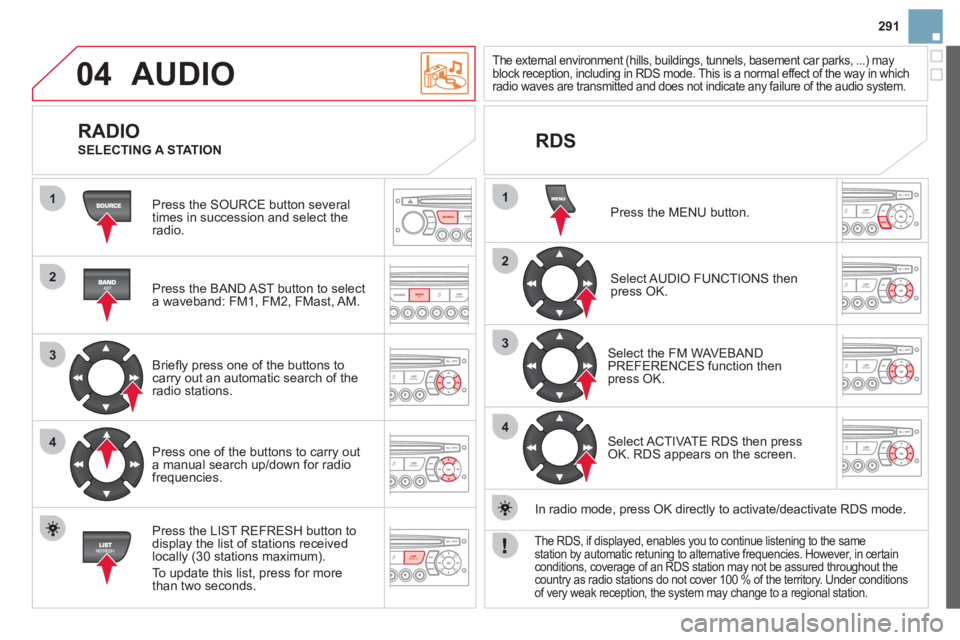
Press the SOURCE button several
times in succession and select theradio.
Press the BAND A
ST button to select
a waveband: FM1, FM2, FMast, AM.
Briefl
y press one of the buttons tocarry out an automatic search of theradio stations.
Press one o
f the buttons to carry out
a manual search up/down for radiofrequencies.
Press the LI
ST REFRESH button to
display the list of stations received
locally (30 stations maximum).
To update this list, press for more
t
han two seconds.
The external environment (hills, buildings, tunnels, basement car parks, ...) mayblock reception, including in RDS mode. This is a normal effect of the way in which
radio waves are transmitted and does not indicate any failure of the audio system.
RDS
RADIO
SELECTING A STATION
Press the MENU button.
Select AUDIO FUNCTIONS thenpress OK.
Select the FM WAVEBANDPREFERENCES function thenpress OK.
Select ACTIVATE RDS then pressOK. RDS appears on the screen.
In radio mode, press
OK directly to activate/deactivate RDS mode.
The RDS, if displayed, enables you to continue listening to the samestation by automatic retuning to alternative frequencies. However, in certainconditions, coverage of an RDS station may not be assured throughout thecountry as radio stations do not cover 100 % of the territory. Under conditions
of very weak reception, the system may change to a regional station.
Page 294 of 421
04
1
2
3
SOURCE
AUDIO
Insert circular compact discs only.
Some anti-pirating systems, on original discs or CDs copied using a
personal recorder, may cause faults which are no refl ection on the quality of the original player.
Without pressin
g the EJECT button, insert a CD in the player, playbegins automatically.
CD
PLAYING A CD
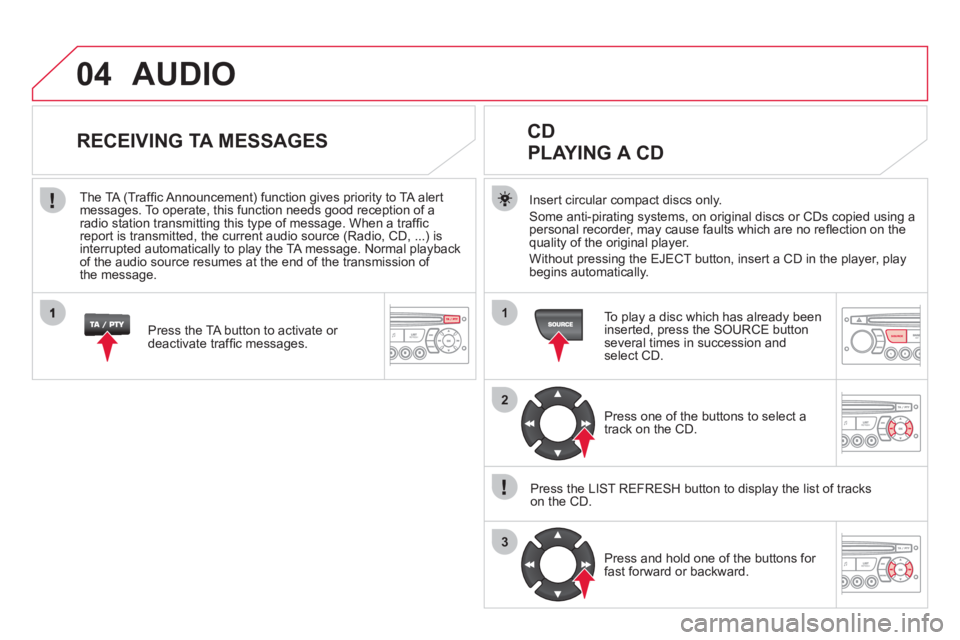
To play a disc which has already been
inserted, press the SOURCE buttonseveral times in succession andselect CD.
Pr
ess one of the buttons to select a
track on the CD.
Press the LI
ST REFRESH button to display the list of trackson the CD.
Pr
ess and hold one of the buttons for
fast forward or backward.
RECEIVING TA MESSAGES
Press the TA button to activate or
deactivate traffi c messages.
The TA
(Traffi c Announcement) function gives priority to TA alert messages. To operate, this function needs good reception of a
radio station transmitting this type of message. When a traffi c
report is transmitted, the current audio source (Radio, CD, ...) is
interrupted automatically to play the TA message. Normal playbackof the audio source resumes at the end of the transmission of
the message.
Page 304 of 421
08 SCREEN MENU MAP
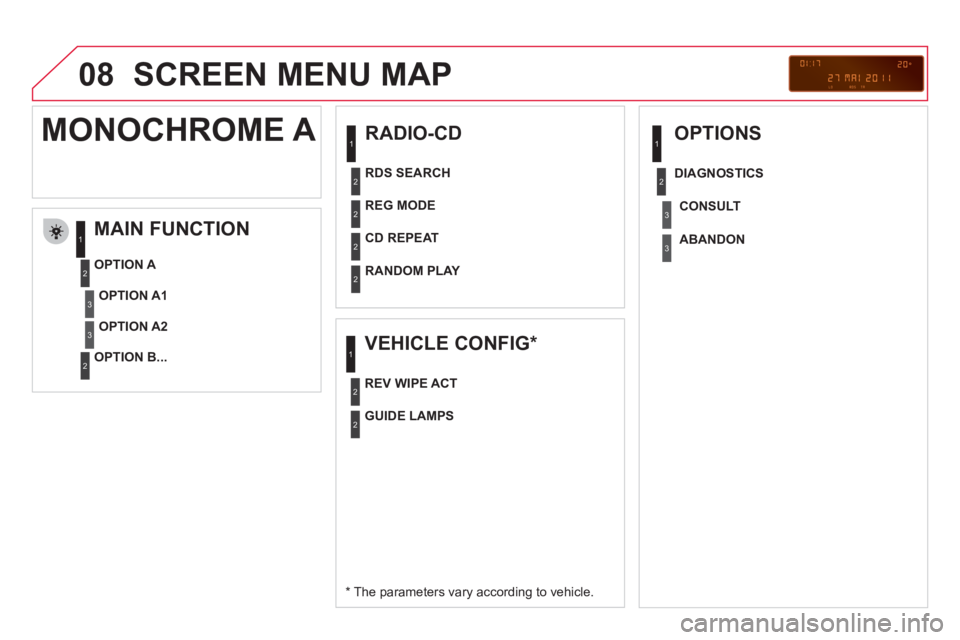
RADIO-CD
MAIN FUNCTION
*
The parameters vary according to vehicle.
OPTION
A
OPTION B...
MONOCHROME A
OPTION A1
OPTION A2
REG MODE
CD REPEAT
RANDOM PLAY
VEHICLE CONFIG *
REV WIPE ACT
OPTIONS
GUIDE LAMPS
DIAGNO
STICS
RDS SEARCH
CONSUL
T
ABANDON
1
2
3
3
1
2
2
2
21
2
3
2
3
1
2
2
Page 306 of 421
08
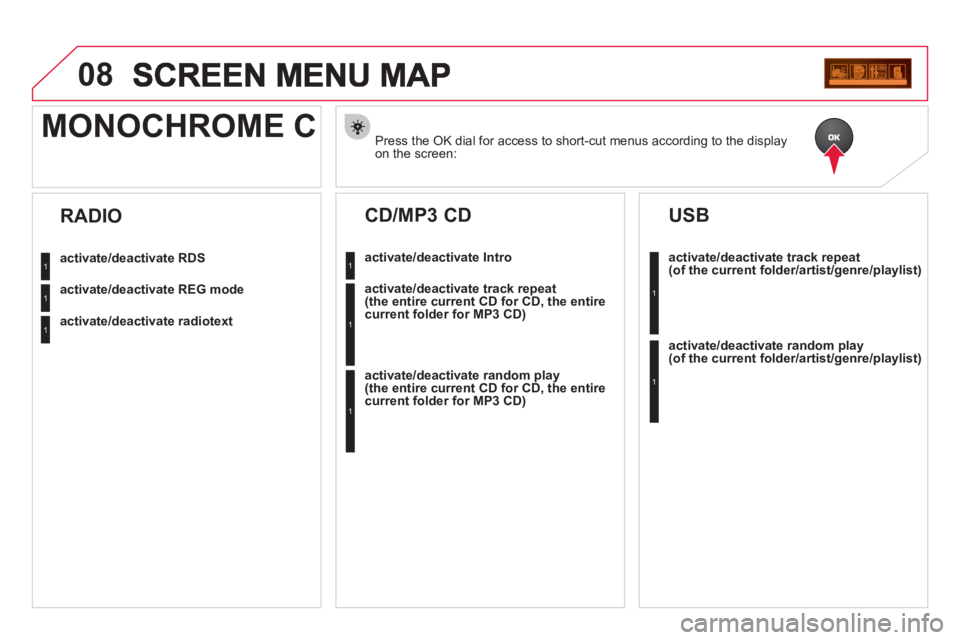
Press the OK dial for access to short-cut menus according to the displayon the screen:
MONOCHROME C
activate/deactivate RDS
activate/deactivate REG mode
activate/deactivate radiotext
RADIO
activate/deactivate Intro
CD/MP3 CD
activate/deactivate track repeat (the entire current CD for CD, the entire current folder for MP3 CD)
activate/deactivate random play (the entire current CD for CD, the entire current folder for MP3 CD)
activate/deactivate track repeat (of the current folder/artist/genre/playlist)
USB
activate/deactivate random play(of the current folder/artist/genre/playlist)
1
1
1
1
1
1
1
1
Page 307 of 421
305
08
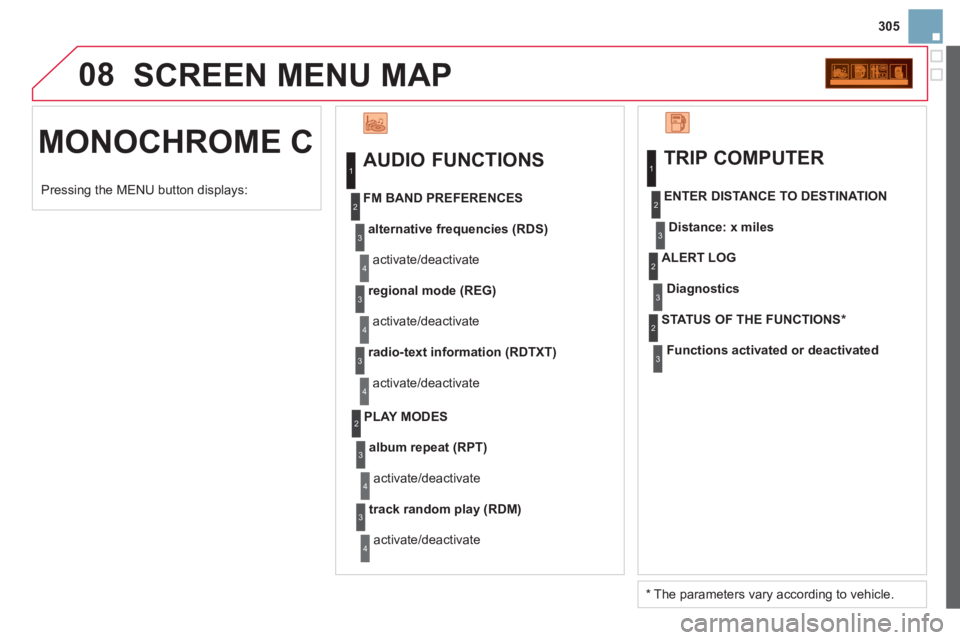
MONOCHROME C SCREEN MENU MA
P
AUDIO FUNCTIONS
alternative frequencies (RDS)
activate/deactivate
FM BAND PREFERENCE
S
regional mode (REG)
activate/deactivate
radio-text information (RDTXT)
activate/deactivate
1
2
3
4
3
4
3
4
PLAY MODES
album repeat (RPT)
activate/deactivate
track random play (RDM)
activate/deactivate
2
3
4
3
4
TRIP COMPUTER
Distance: x miles
ENTER DISTANCE TO DESTINATION
Diagnostic s
ALERT LOG
Functions activated or deactivated
STAT US OF THE FUNCTIONS *
1
2
3
3
2
3
2
Pressing the MENU button displays:
*
The parameters vary according to vehicle.
Page 309 of 421
307
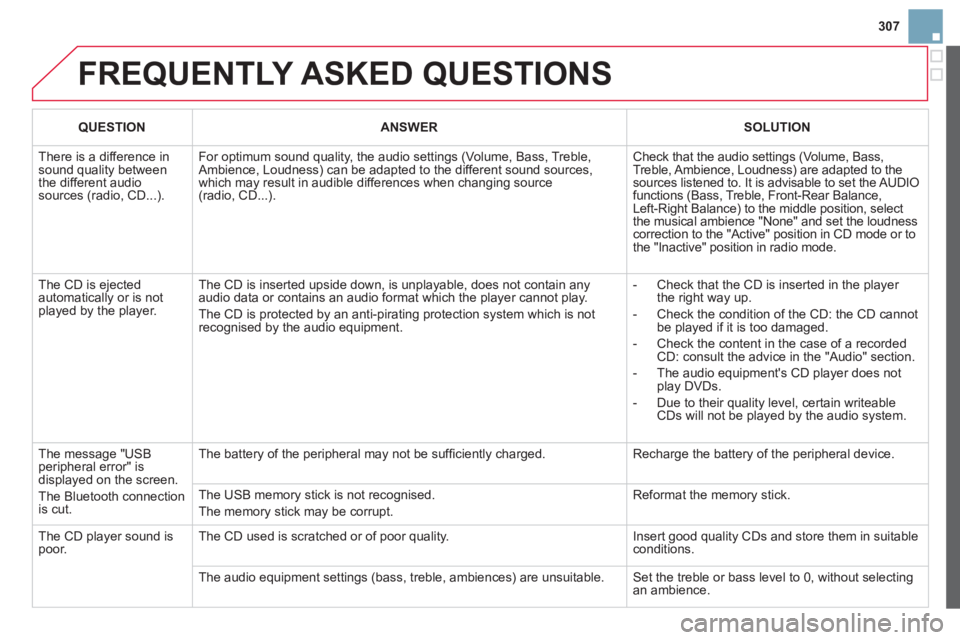
FREQUENTLY ASKED QUESTIONS
QUESTIONANSWERSOLUTION
There is a difference in sound quality betweenthe different audiosources (radio, CD...).
For optimum sound quality, the audio settings (Volume, Bass, Treble, Ambience, Loudness) can be adapted to the different sound sources,which may result in audible differences when changing source(radio, CD...).
Check that the audio settings (Volume, Bass, Treble, Ambience, Loudness) are adapted to the sources listened to. It is advisable to set the AUDIOfunctions (Bass, Treble, Front-Rear Balance,Left-Right Balance) to the middle position, select the musical ambience "None" and set the loudness correction to the "Active" position in CD mode or tothe "Inactive" position in radio mode.
The CD is ejected automatically or is not played by the player.
The CD is inserted upside down, is unplayable, does not contain any audio data or contains an audio format which the player cannot play.
The CD is protected by an anti-pirating protection system which is not recognised by the audio equipment.
- Check that the CD is inserted in the playerthe right way up.
- Check the condition of the CD: the CD cannot be played if it is too damaged.
- Check the content in the case of a recordedCD: consult the advice in the "Audio" section.
- The audio equipment's CD player does notplay DVDs.
- Due to their quality level, certain writeableCDs will not be played by the audio system.
The message "USB peripheral error" isdisplayed on the screen.
The Bluetooth connectionis cut.
The battery of the peripheral may not be suffi ciently charged.
Recharge the battery of the peripheral device.
The USB memory stick is not recognised.
The memory stick may be corrupt.
Reformat the memory stick.
The CD player sound ispoor.The CD used is scratched or of poor quality.
Insert good quality CDs and store them in suitable conditions.
The audio equipment settings (bass, treble, ambiences) are unsuitable. Set the treble or bass level to 0, without selectingan ambience.
Page 310 of 421
QUESTIONANSWERSOLUTION
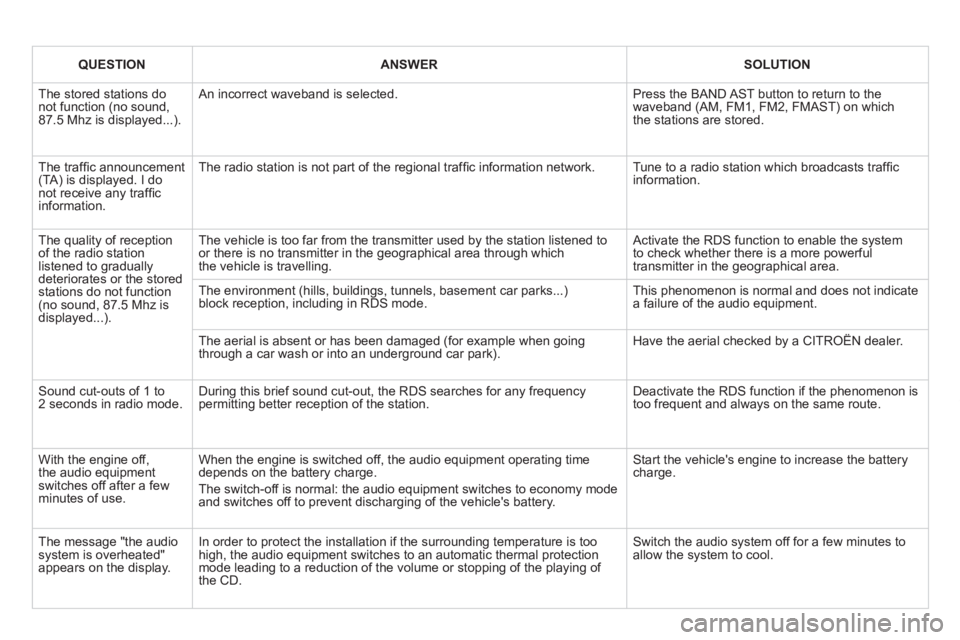
The stored stations donot function (no sound, 87.5 Mhz is displayed...).
An incorrect waveband is selected.
Press the BAND AST button to return to the waveband (AM, FM1, FM2, FMAST) on whichthe stations are stored.
The traffi c announcement(TA) is displayed. I donot receive any traffi c information.
The radio station is not part of the regional traffi c information network.
Tune to a radio station which broadcasts traffi c information.
The quality of receptionof the radio station listened to graduallydeteriorates or the stored stations do not function(no sound, 87.5 Mhz is displayed...).
The vehicle is too far from the transmitter used by the station listened to or there is no transmitter in the geographical area through whichthe vehicle is travelling.
Activate the RDS function to enable the system to check whether there is a more powerful transmitter in the geographical area.
The environment (hills, buildings, tunnels, basement car parks...)block reception, including in RDS mode. This phenomenon is normal and does not indicate a failure of the audio equipment.
The aerial is absent or has been damaged (for example when goingthrough a car wash or into an underground car park).
Have the aerial checked by a CITROËN dealer.
Sound cut-outs of 1 to2 seconds in radio mode.During this brief sound cut-out, the RDS searches for any frequency permitting better reception of the station.
Deactivate the RDS function if the phenomenon is too frequent and always on the same route.
With the engine off, the audio equipment switches off after a few minutes of use.
When the engine is switched off, the audio equipment operating timedepends on the battery charge.
The switch-off is normal: the audio equipment switches to economy mode and switches off to prevent discharging of the vehicle's battery.
Start the vehicle's engine to increase the batterycharge.
The message "the audio system is overheated" appears on the display.
In order to protect the installation if the surrounding temperature is toohigh, the audio equipment switches to an automatic thermal protectionmode leading to a reduction of the volume or stopping of the playing of the CD.
Switch the audio system off for a few minutes toallow the system to cool.
Page 321 of 421

319Alphabetical index
Paint colour code........................................248Paintwork, matt...........................................233Parcel shelf, rear.........................................r131Parking brake......................................162,195Parking sensors, rear..................................r182Particle emission filter........................r193, 194Passenger compartment filter....................r194Player, CD MP3...................................273,293Port, USB...........................128, 280,294, 296Priming the fuel system..............................188Protecting children...............132-142, 15 3, 15 6
Puncture......................................................198
Radio ...................................................271, 291Rear foglamp .......................................114, 215Rear screen (demisting) ................................76Recharging the battery............................... 226Reduction of electrical load........................228Regeneration of the particleemissions filter..........................................r194Reinitialising the electric windows..............101Reinitialising the remote control ...................94Remote control ........................................90-95Removing a wheel......................................207Removing the mat....................................... 129Repair kit, puncture ..................................... 198Replacing bulbs...................................211-217
R
Replacing fuses...................................218-224Replacing the air filter.................................r194Replacing the oil filter.................................r194
Replacing the passenger compartment filter....................................r194
Replacing wiper blades .......................121, 228Resetting the service indicator.....................r44Resetting the trip recorder............................r46Rev counter.............................................r28,30Reversing lamp...........................................215Risk areas (update).....................................268Routine checks...................................194, 195Running out of fuel (Diesel) ........................188
Serial number, vehicle................................248Ser vice indicator...........................................r43Servicing.......................................................24Setting the clock........................278, 300,301Shor t-cut menus .................................259, 260Sidelamps ...................................112,213, 215Side repeater...............................................213Spare wheel................................................204Speed limiter...............................................r178Speedometer..........................................r28, 30Stability control (ESP).................................149Starting the vehicle .......................92, 165,170Steering mounted controls, audio.......257,289Stopping the vehicle .....................92, 165,170Stop & Start.....50,73,106,174, 187, 194,225Storage................................................ 126, 127Storage box.................................................131Stowing rings..............................................130Sun visor.....................................................r127Synchronising the remote control.................94System, navigation ......................................261Systems, ASR and ESP ..............................149
P
Safety for children................132-142, 153, 156Scented air freshener...................................r77Screen, colour 16/9 .......................61, 258, 279Screen, monochrome ................ 290, 302,304Screen, multifunction (with audio equipment)...................54, 57, 61Screen-wash reservoir................................191Screen menu map......................279, 302,304Screenwash ................................................119Screenwash fluid level ................................192Seat, rear bench...........................................84Seat adjustment......................................79, 82Seat belts ............................................151,153Seats, rear.....................................................r84
S
Page 364 of 421
1
The system is protected in such a way that it will onlyoperate in your vehicle.
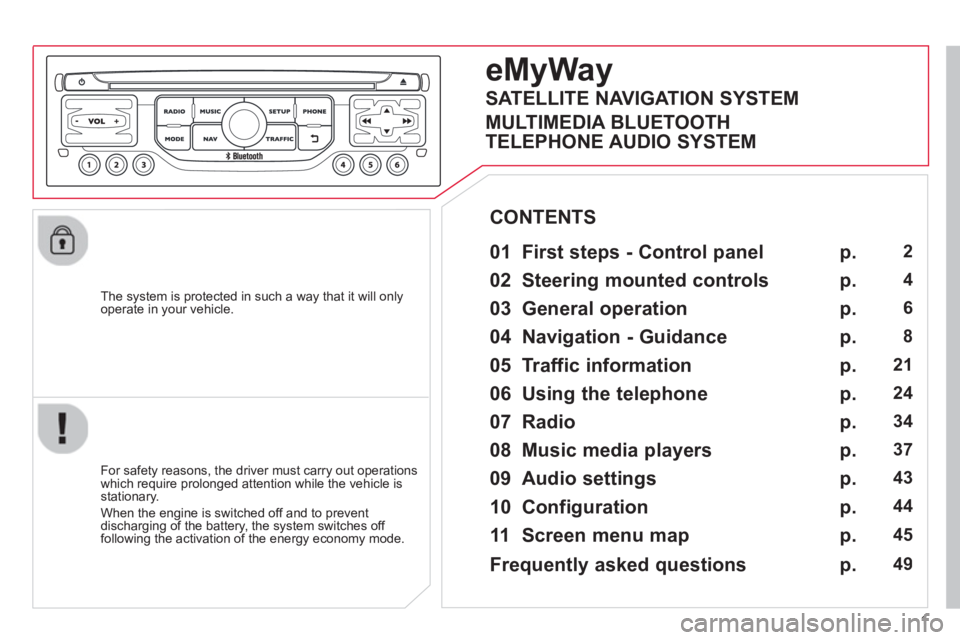
eMyWay
01 First steps - Control panel
For safety reasons, the driver must carry out operations
which require prolonged attention while the vehicle is stationary.
When the en
gine is switched off and to prevent
discharging of the battery, the system switches off following the activation of the energy economy mode.
CONTENTS
02 Steerin
g mounted controls
03 General o
peration
04 Navi
gation - Guidance
05 Traffic information
06 Usin
g the telephone
07 Radio
08 Music media pla
yers
09 Audio settin
gs
10 Confi
guration
11 Screen menu ma
p
p.
p.
p.
p.
p.
p.
p.
p.
p.
p.
p.
2
4
6
8
21
24
34
37
43
44
45
SATELLITE NAVIGATION SYSTEM
MULTIMEDIA BLUETOOTH
TELEPHONE AUDIO SYSTEM
Frequentl
y asked questions p. 49
Page 365 of 421
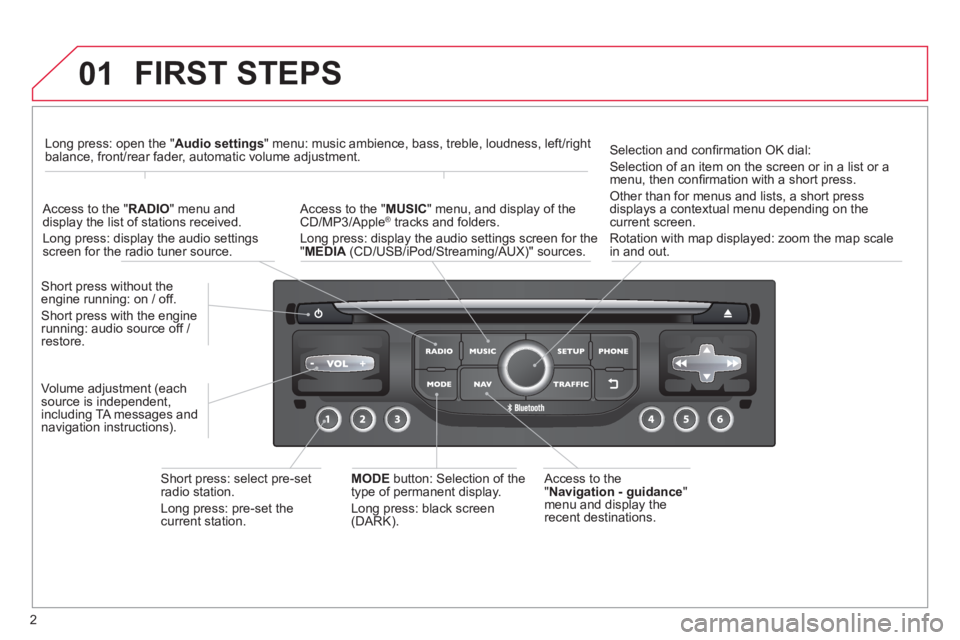
2
01 FIRST STEPS
Access to the" Navigation - guidance"
menu and display the
recent destinations. Short
press without the engine running: on / off.
Short press with the enginerunning: audio source off / restore.
Short press: select pre-set radio station.
Lon
g press: pre-set thecurrent station.
MODE
button: Selection of the
type of permanent display.
Lon
g press: black screen(DARK).
A
ccess to the " MUSIC
" menu, and display of the CD/MP3/Apple®
tracks and folders. ®
Long press: display the audio settings screen for the"MEDIA
(CD/USB/iPod/Streaming/AUX)" sources.
Long press: open the "Audio settings" menu: music ambience, bass, treble, loudness, left/right
balance, front/rear fader, automatic volume adjustment.
A
ccess to the "RADIO
" menu anddisplay the list of stations received.
Lon
g press: display the audio settingsscreen for the radio tuner source.
Selection and confi rmation OK dial:
Selection of an item on the screen or in a list or a
menu, then confi rmation with a short press.
Other than for menus and lists, a short press
displays a contextual menu depending on the current screen.
Rotation with map displa
yed: zoom the map scalein and out.
Volume ad
justment (each
source is independent,
includin
g TA messages and
navigation instructions).