AUX CITROEN DS3 CABRIO 2013 Handbook (in English)
[x] Cancel search | Manufacturer: CITROEN, Model Year: 2013, Model line: DS3 CABRIO, Model: CITROEN DS3 CABRIO 2013Pages: 421, PDF Size: 12.86 MB
Page 12 of 421
Interior
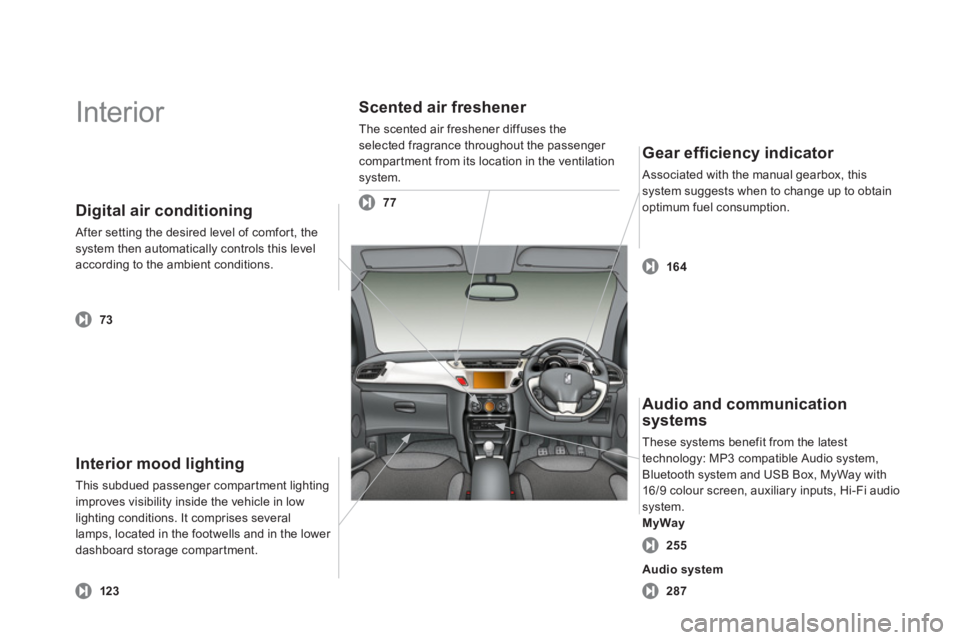
Interior mood lighting
This subdued passenger compartment lightingimproves visibility inside the vehicle in low lighting conditions. It comprises several
lamps, located in the footwells and in the lower
dashboard storage compar tment.
Digital air conditioning
After setting the desired level of comfort, the system then automatically controls this levelaccording to the ambient conditions.
Scented air freshener
The scented air freshener diffuses theselected fragrance throughout the passenger compartment from its location in the ventilation
system.
Gear effi ciency indicator
Associated with the manual gearbox, this system suggests when to change up to obtain
optimum fuel consumption.
12
3
73
77
164
287
Audio and communication
systems
These systems benefit from the latest
technology: MP3 compatible Audio system,
Bluetooth system and USB Box, MyWay with
16/9 colour screen, auxiliary inputs, Hi-Fi audio system.MyWay
255
Audio system
Page 14 of 421
Instruments and controls
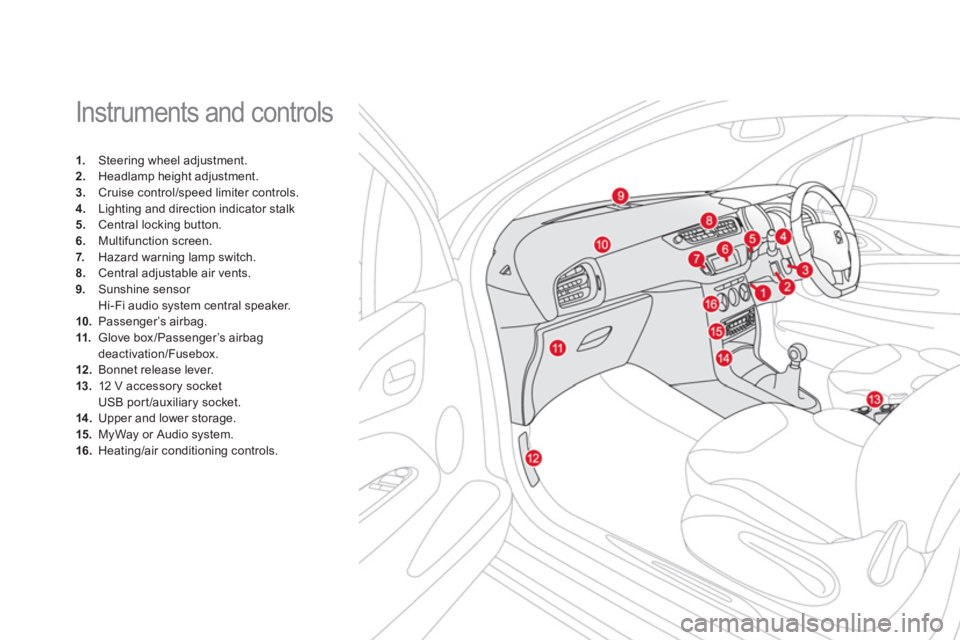
1. Steering wheel adjustment. 2.
Headlamp height adjustment. 3.
Cruise control/speed limiter controls. 4.
Lighting and direction indicator stalk5.
Central locking button.
6.Multifunction screen.
7. Hazard warning lamp switch.8.Central adjustable air vents.9.
Sunshine sensor
Hi-Fi audio system central speaker. 10.Passenger’s airbag. 11.
Glove box/Passenger’s airbag
deactivation/Fusebox. 12.Bonnet release lever.13.12 V accessory socket
USB por t /auxiliary socket.14 .Upper and lower storage.15. MyWay or Audio system. 16.
Heating/air conditioning controls.
Page 128 of 421
Interior fi ttings
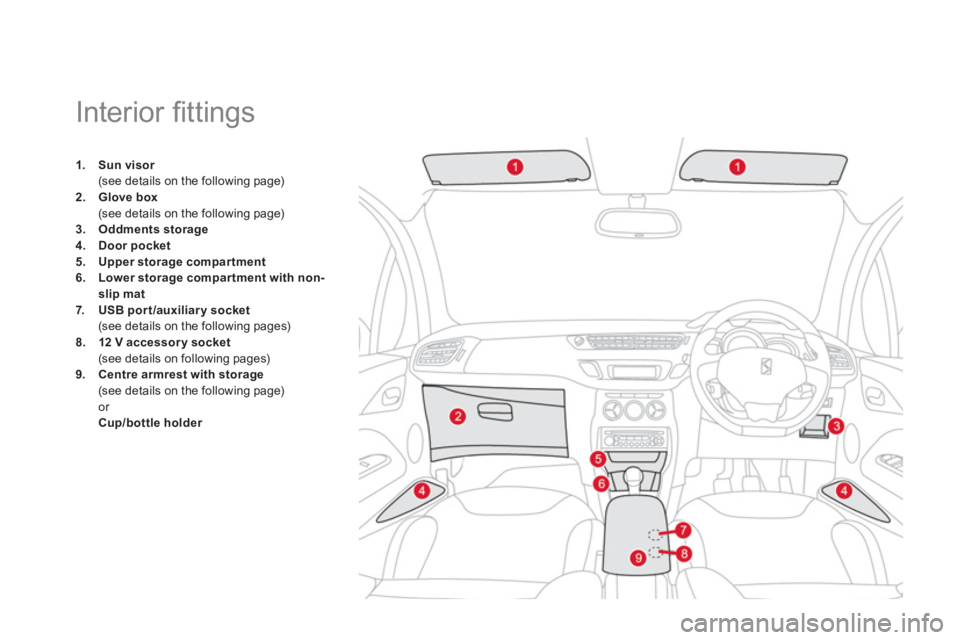
1.Sun visorr(see details on the following page) 2.Glove box(see details on the following page)
3.Oddments storage4.Doorpocket5.
Upper storage compar tment6.Lower storage compar tment with non-
slip mat7.USB port/auxiliary socket(see details on the following pages) 8.12 Vaccessorysocket(see details on following pages)9.Centre armrest with storage(see details on the following page) or
Cup/bottle holder
Page 129 of 421
Fittings
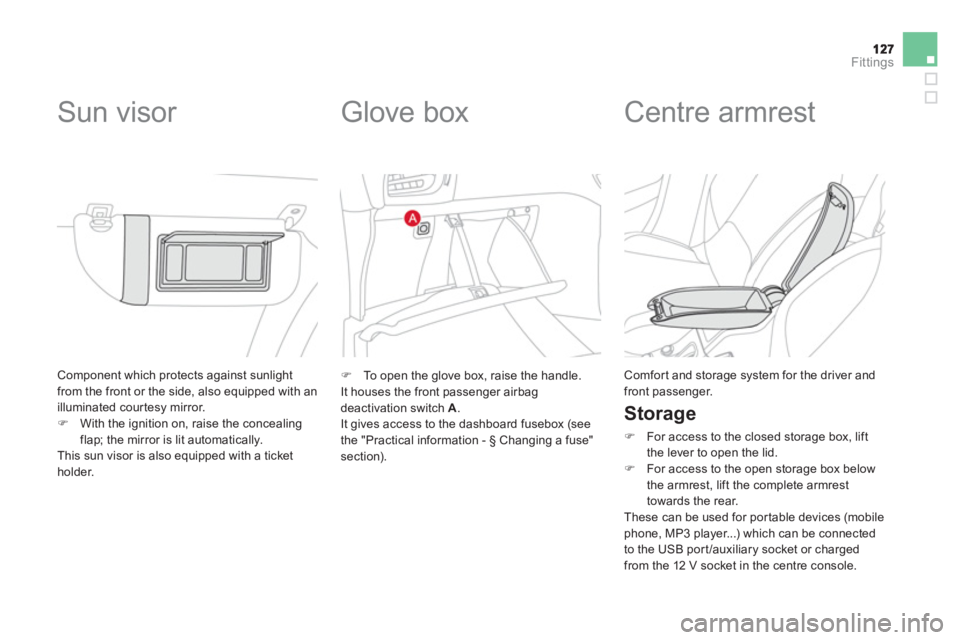
Component which protects against sunlightfrom the front or the side, also equipped with an
illuminated courtesy mirror.)With the ignition on, raise the concealingflap; the mirror is lit automatically.
This sun visor is also equipped with a ticket
holder.
Sun visor
Glove box
)
To open the glove box, raise the handle.
It houses the front passenger airbagdeactivation switch A
.
It gives access to the dashboard fusebox (see
the "Practical information -
§ Changing a fuse"
section).
Centre armrest
Storage
)
For access to the closed storage box, lift
the lever to open the lid.) For access to the open storage box below
the armrest, lift the complete armrest
t
owards the rear.
These can be used for por table devices (mobile
phone, MP3 player...) which can be connected
to the USB por t/auxiliary socket or charged from the 12 V socket in the centre console.
Comfor t and storage system for the driver andfront passenger.
Page 130 of 421
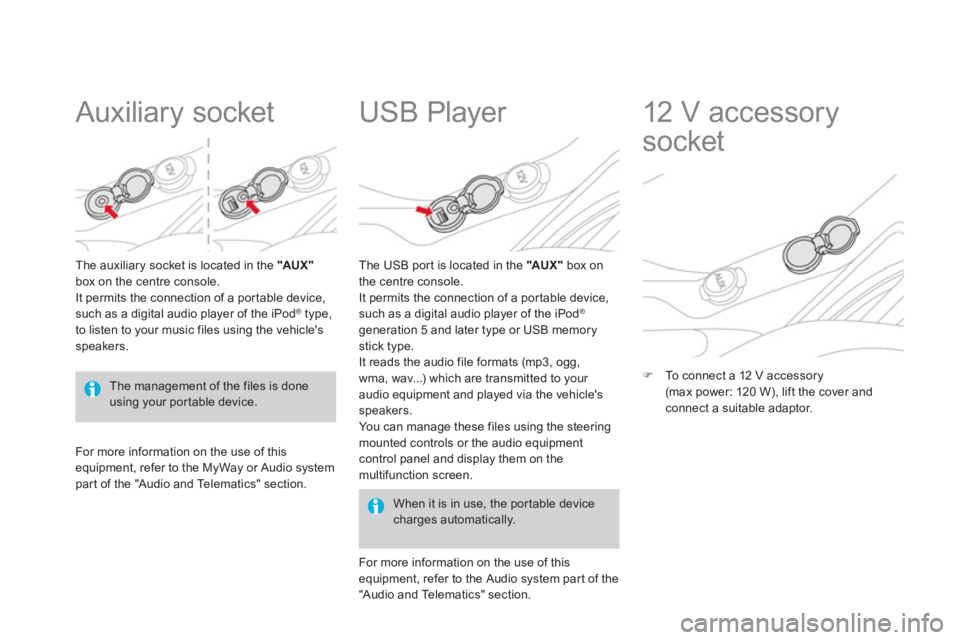
Auxiliary socket
The auxiliary socket is located in the " AUX "box on the centre console.
It permits the connection of a por table device,such as a digital audio player of the iPod ®type,
to listen to your music files using the vehicle'sspeakers.
USB Player
For more information on the use of this equipment, refer to the MyWay or Audio systempar t of the "Audio and Telematics" section.
When it is in use, the por table devicecharges automatically.
The U
SB por t is located in the "AU X "box on
the centre console.
It permits the connection of a por table device,
such as a digital audio player of the iPod®
generation 5 and later type or USB memory
stick type.
It reads the audio file formats (mp3, ogg,
wma, wav...) which are transmitted to your
audio equipment and played via the vehicle's
speakers.
You can manage these files using the steering
mounted controls or the audio equipmentcontrol panel and display them on the
multifunction screen.
F
or more information on the use of thisequipment, refer to the Audio system par t of the
"Audio and Telematics" section.
12 V accessory
socket
)To connect a 12 V accessory(max power: 120 W), lift the cover and connect a suitable adaptor.
The management of the files is doneusing your por table device.
Page 252 of 421

013
Audio and telematics
This section covers emergency and assistance calls, as well as
the functions of the audio-navigation units, such as MP3 -compatibleplayer, USB player, Bluetooth system, MyWay with 16/9 colour screen,auxiliary inputs, Hi-Fi audio system.
Page 276 of 421
07
43 1
2
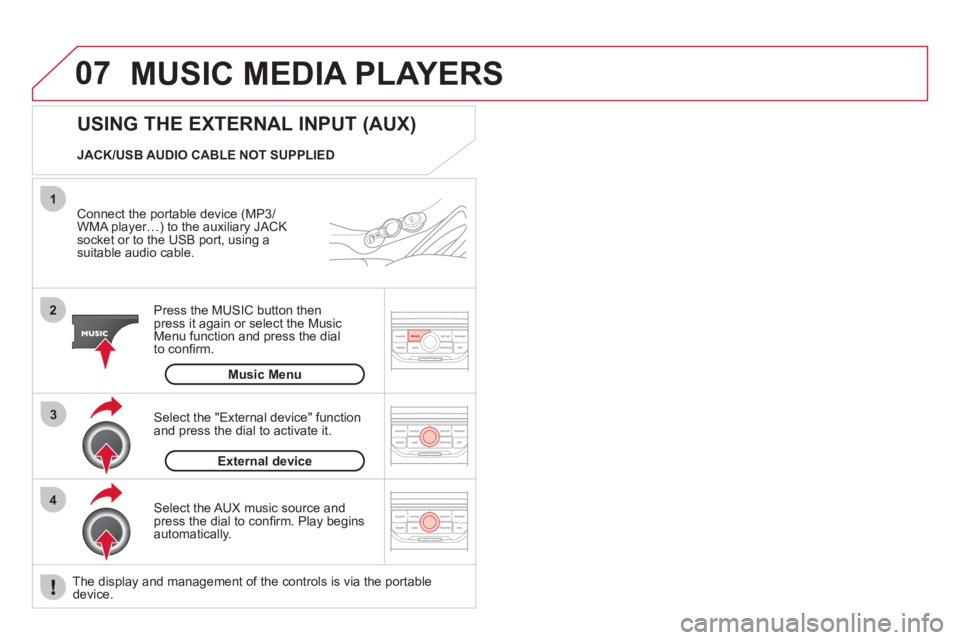
MUSIC MEDIA PLAYERS
Connect the portable device (MP3/
WMA player…) to the auxiliary JACK socket or to the USB port, using asuitable audio cable.
Press the M
USIC button then
press it again or select the Music Menu function and press the dial
to confi rm.
Select the AUX music source and
press the dial to confi rm. Play beginsautomatically.
Select the "External device" functionand press the dial to activate it.
External device
USING THE EXTERNAL INPUT (AUX)
Music Menu JACK/USB AUDIO CABLE NOT SUPPLIED
The displa
y and management of the controls is via the portabledevice.
Page 290 of 421
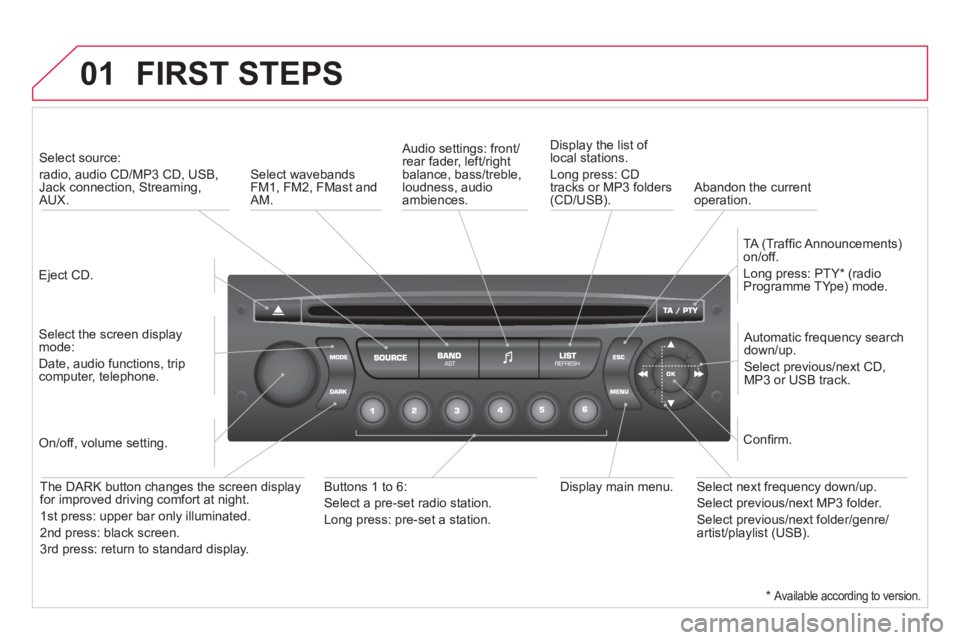
01 FIRST STEPS
Eject CD.
Select source:
radio, audio CD/MP3 CD, USB, Jack connection, Streaming,AUX.
Select the screen displaymode:
Date, audio functions, tripcomputer, telephone.
Automatic frequency search
down/up.
Select previous/next CD,MP3 or USB track.
Audio settings: front/rear fader, left/right
balance, bass/treble, loudness, audio ambiences. Displa
y the list of local stations.
Lon
g press: CD
tracks or MP3 folders(CD/USB).
TA
(Traffi c Announcements)
on/off.
Lon
g press: PTY * (radio
Programme TYpe) mode.
Display main menu. The DARK button changes the screen display
for improved driving comfort at night.
1
st press: upper bar only illuminated.
2
nd press: black screen.
3 rd press: return to standard displa
y.
On/off, volume setting.
Buttons 1 to 6:
Select a pre-set radio station.
Lon
g press: pre-set a station.
Select next frequency down/up.
Select previous/next MP3 folder.
Select previous/next folder/genre/artist/playlist (USB).
Confi rm.
Select wavebandsFM1, FM2, FMast and AM.
Abandon the current
operation.
*
Available according to version.
Page 296 of 421
05
1
1
2
3
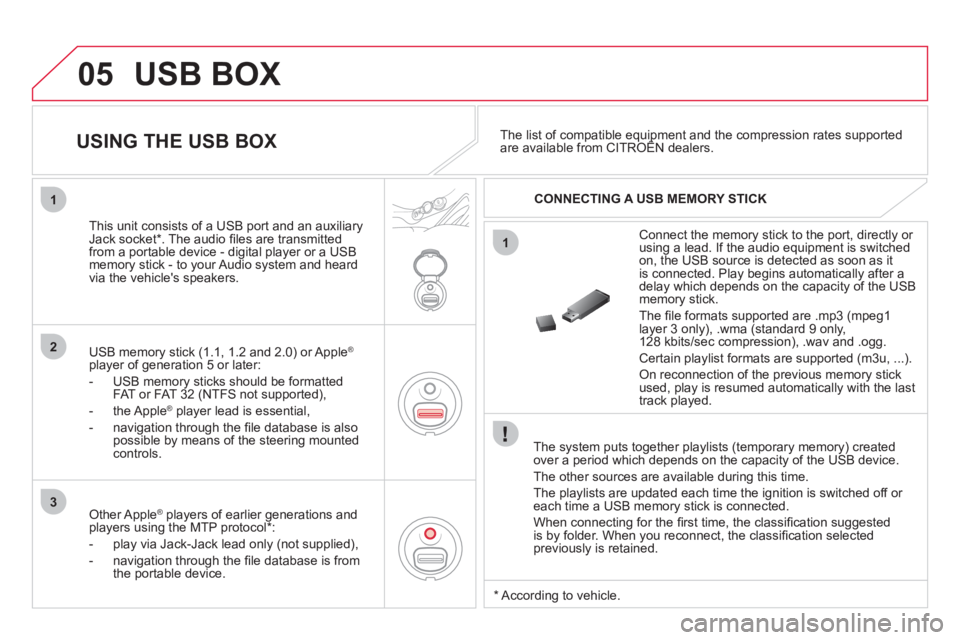
USB BOX
The system puts together playlists (temporary memory) createdover a period which depends on the capacity of the USB device.
The other sources are available durin
g this time.
The pla
ylists are updated each time the ignition is switched off or each time a USB memory stick is connected.
When connectin
g for the fi rst time, the classifi cation suggested
is by folder. When you reconnect, the classifi cation selected
previously is retained.
Connect the memory stick to the port, directly or using a lead. If the audio equipment is switched
on, the USB source is detected as soon as it
is connected. Pla
y begins automatically after a
delay which depends on the capacity of the USB memory stick.
The
fi le formats supported are .mp3 (mpeg1 layer 3 only), .wma (standard 9 only,
128 kbits/sec compression), .wav and .ogg.
Certain playlist formats are supported (m3u, ...).
On reconnection of the previous memory stickused, play is resumed automatically with the last
track played.
This unit consists o
f a USB port and an auxiliaryJack socket * . The audio fi les are transmitted
from a portable device - digital player or a USBmemory stick - to your Audio system and heard
via the vehicle's speakers.
USB memor
y stick (1.1, 1.2 and 2.0) or Apple®
player of generation 5 or later:
- U
SB memory sticks should be formattedFAT or FAT 32 (NTFS not supported),
- the Apple ®player lead is essential,
- navi
gation through the fi le database is also
possible by means of the steering mountedcontrols.
The list of compatible equipment and the compression rates supported are available from CITROËN dealers. pqpp
USING THE USB BOX
CONNECTING A USB MEMORY STICK
Other Apple®
players of earlier generations and®
players using the MTP protocol * :
- pla
y via Jack-Jack lead only (not supplied),
- navi
gation through the fi le database is from
the portable device.
*
Accordin
g to vehicle.
Page 298 of 421
05
1
21
2
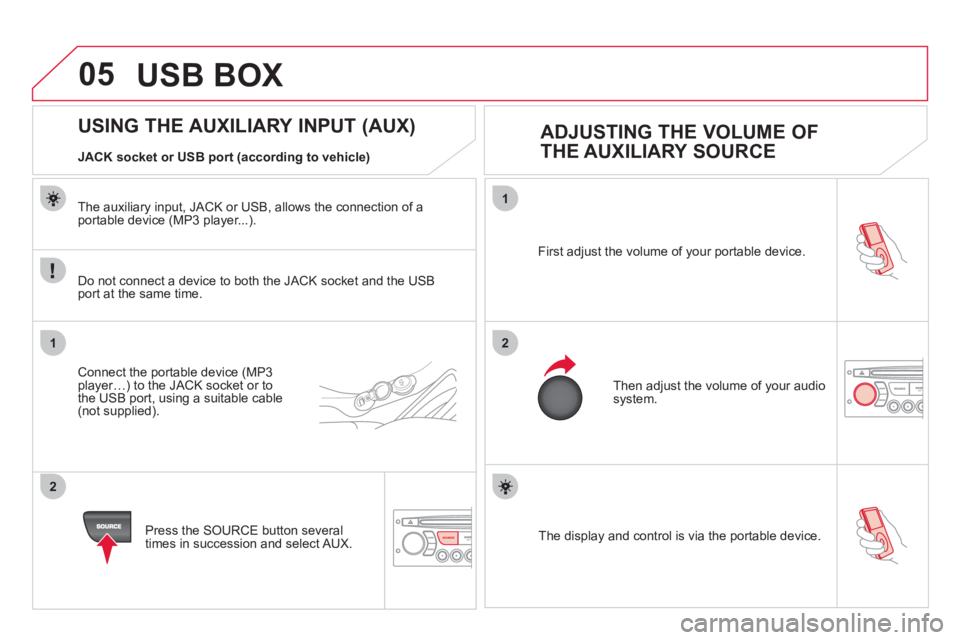
SOURCE The display and control is via the portable device. First ad
just the volume of your portable device.
Then ad
just the volume of your audio system.
USING THE AUXILIARY INPUT (AUX)
ADJUSTING THE VOLUME OF
THE AUXILIARY SOURCE
JACK socket or USB port (according to vehicle)
Do not connect a device to both the
JACK socket and the USB port at the same time.
Connect the portable device (MP3 player…) to the JACK socket or to
the USB port, using a suitable cable(not supplied).
Pr
ess the SOURCE button several
times in succession and select AUX.
The auxiliar
y input, JACK or USB, allows the connection of a portable device (MP3 player...).
USB BOX