audio CITROEN DS3 CABRIO DAG 2017 Handbook (in English)
[x] Cancel search | Manufacturer: CITROEN, Model Year: 2017, Model line: DS3 CABRIO DAG, Model: CITROEN DS3 CABRIO DAG 2017Pages: 444, PDF Size: 14.09 MB
Page 329 of 444
4
5
6
7
8
12
13
14
15
16
17
18
9
10
11
3
2
327
DS3_en_Chap11c_SMEGplus_ed02-2015
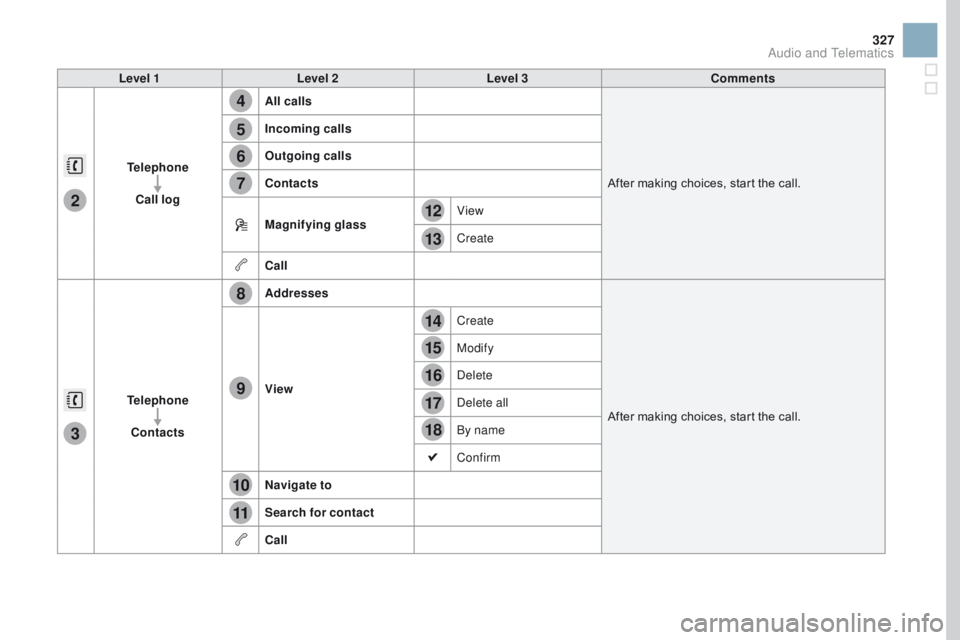
Level 1Level 2 Level 3 Comments
Telephone Call log All calls
After
m
aking
c
hoices,
s
tart
t
he
c
all.
Incoming calls
Outgoing calls
Contacts
Magnifying glass
View
Create
Call
Telephone Contacts Addresses
After
m
aking
c
hoices,
s
tart
t
he
c
all.
View Create
Modify
Delete
Delete all
By name
Confirm
na
vigate to
Search for contact
Call
Audio and Telematics
Page 331 of 444

1
1
1
19
20
21
22
23
24
25
26
329
DS3_en_Chap11c_SMEGplus_ed02-2015
Level 1Level 2 Level 3 Comments
Telephone
connection
Secondary page Bluetooth
connection Search
Start the search for another peripheral device to
connect.
Connect / Disconnect Start or stop the Bluetooth connection to the
selected
per
ipheral
de
vice.
Update Import the contacts from the selected telephone
to
s
tore
t
hem
i
n
t
he
a
udio
s
ystem.
Delete Delete
t
he
s
elected
t
elephone.
Confirm Save
t
he
s
ettings.
Telephone
conn ection
Secondary page Search for devices Devices detected
Telephone
Start
t
he
s
earch
f
or
p
eripheral
d
evices.
Audio
st
reaming
Internet
Telephone
connection
Secondary page
Telephone Options Put on hold
Cut the microphone temporarily so that the
contact cannot hear your conversation with a
passenger.
Update Import the contacts from the selected telephone
to
s
ave
t
hen
i
n
t
he
a
udio
s
ystem.
Ringtones Choose
t
he
t
elephone
r
ingtone
a
nd
v
olume.
Memory info. Contact
r
ecords
u
sed
a
nd
f
ree,
p
ercentage
o
f
st
orage
s
pace
u
sed
b
y
i
nternal
c
ontacts
a
nd
Blu
etooth
co
ntacts.
Confirm Save
t
he
s
ettings.
Audio and Telematics
Page 332 of 444
1
19
DS3_en_Chap11c_SMEGplus_ed02-2015
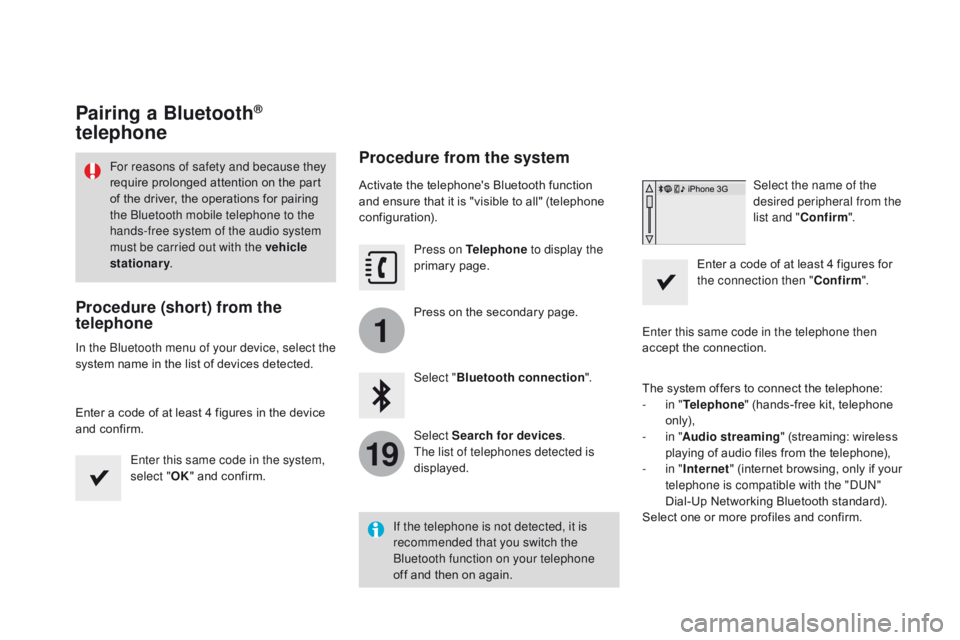
Pairing a Bluetooth®
telephone
Procedure (short) from the
telephone
In the Bluetooth menu of your device, select the
system n
ame i n t he l ist o f d evices d etected.
Enter
a c
ode
o
f
a
t
l
east
4 f
igures
i
n
t
he
d
evice
an
d
c
onfirm.Enter this same code in the system,
select " OK"
a
nd
c
onfirm.
Procedure from the system
Activate the telephone's Bluetooth function and e nsure t hat i t i s " visible t o a ll" ( telephone con
figuration). Press on Telephone to display the
primary
page
.
Press
o
n
t
he
s
econdary
p
age.
Select " Bluetooth connection ".
Select Search for devices .
The list of telephones detected is
displayed. Select the name of the
desired peripheral from the
list and "
Confirm ".
Enter
a c
ode
o
f
a
t
l
east
4 f
igures
f
or
th
e connection then "Confirm".
Enter this same code in the telephone then
accept
t
he
c
onnection.
The
s
ystem
o
ffers
t
o
c
onnect
t
he
t
elephone:
-
in " T
elephone"
(
hands-free
k
it,
t
elephone
on
ly),
-
in " A
udio streaming"
(
streaming:
w
ireless
pl
aying
o
f
a
udio
f
iles
f
rom
t
he
t
elephone),
-
in " In
ternet"
(
internet
b
rowsing,
o
nly
i
f
y
our
te
lephone is compatible with the "DUN"
Dial-Up
N
etworking
B
luetooth
s
tandard).
Select
o
ne
o
r
m
ore
p
rofiles
a
nd
c
onfirm.
If the telephone is not detected, it is
recommended that you switch the
Bluetooth function on your telephone
off
a
nd
t
hen
o
n
a
gain.
For reasons of safety and because they
require p
rolonged a
ttention o
n t
he p
art of t
he d
river, t
he o
perations f
or p
airing th
e Bluetooth mobile telephone to the
hands-free system of the audio system
must be carried out with the vehicle
stationary .
Page 333 of 444
1
19
331
DS3_en_Chap11c_SMEGplus_ed02-2015
The services available depend on
the network, t he S IM c ard a nd t he co
mpatibility of the Bluetooth telephone
used.
C
heck
t
he
t
elephone
m
anual
a
nd
wi
th
y
our
n
etwork
p
rovider
f
or
d
etails
o
f
th
e
s
ervices
a
vailable
t
o
y
ou.
The ability of the system to connect
with only one profile depends on the
telephone.
T
he
t
hree
p
rofiles
m
ay
a
ll
co
nnect
b
y
d
efault.
Visit
w
ww.citroen.co.uk
f
or
m
ore
i
nformation
(c
ompatibility,
a
dditional
h
elp,
.
..).
The
r
ecognised
t
elephone
ap
pears
i
n
t
he
l
ist.
Depending
o
n
y
our
t
elephone,
y
ou
m
ay
b
e
as
ked
t
o
a
ccept
a
utomatic
c
onnection
e
very
ti
me
t
he
i
gnition
i
s
s
witched
o
n.On return to the vehicle, if the last telephone
connected
i
s
p
resent
a
gain,
i
t
i
s
r
econnected
au
tomatically and within around 30 seconds
after
s
witching
o
n
t
he
i
gnition
t
he
p
airing
i
s
do
ne without any action on your part, with
(Bluetooth
ac
tivated).
To modify the automatic connection mode,
select the telephone in the list then select the
desired
pr
ofile.
Depending o
n t he t ype o f t elephone, th
e s ystem w ill a sk y ou t o a ccept o r n ot th
e
t
ransfer
o
f
y
our
c
ontacts.
If not, select " Update".
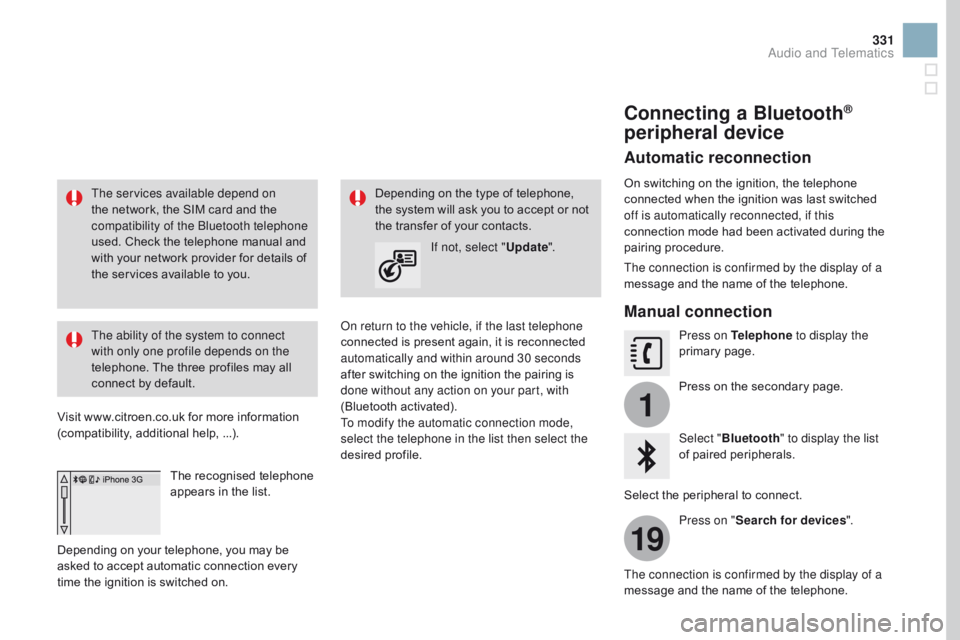
Connecting a Bluetooth®
peripheral device
Automatic reconnection
On switching on the ignition, the telephone co
nnected w hen t he i gnition w as l ast s witched of
f is automatically reconnected, if this
connection
m
ode
h
ad
b
een
a
ctivated
d
uring
t
he
pair
ing
pr
ocedure.
The connection is confirmed by the display of a
message
a
nd
t
he
n
ame
o
f
t
he
t
elephone.
Manual connection
Press on Telephone to display the
primary page .
Press
o
n
t
he
s
econdary
p
age.
Select " Bluetooth " to display the list
of
p
aired
p
eripherals.
Select
t
he
p
eripheral
t
o
c
onnect.
Press on " Search for devices ".
The connection is confirmed by the display of a
message
a
nd
t
he
n
ame
o
f
t
he
t
elephone.
Audio and Telematics
Page 335 of 444
3
2
3
9
14
15
16
17
18
333
DS3_en_Chap11c_SMEGplus_ed02-2015
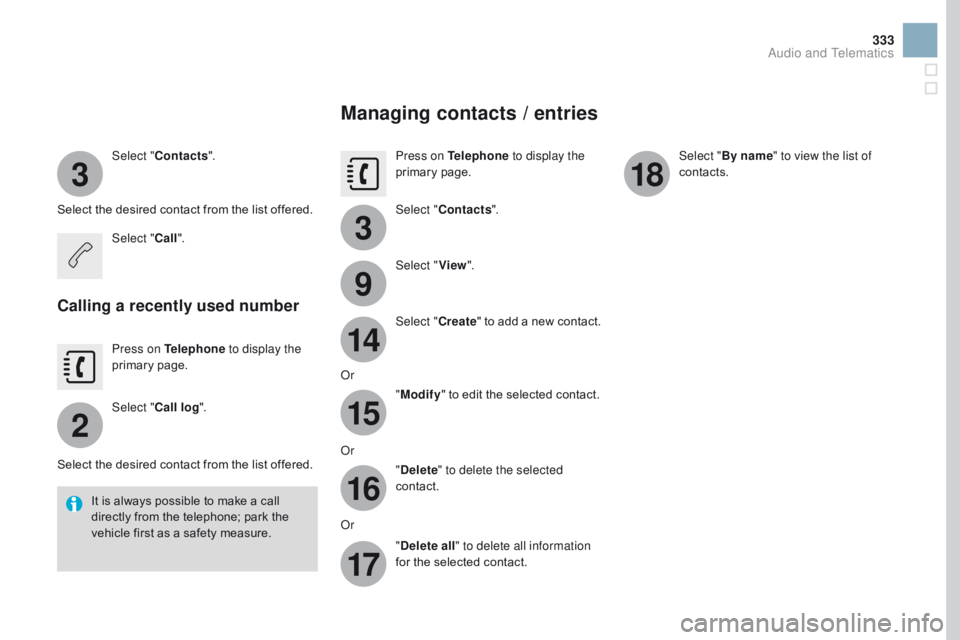
Select "Contacts ".
Select
t
he
d
esired
c
ontact
f
rom
t
he
l
ist
o
ffered.
Select " Call".
Calling a recently used number
Press on Telephone to display the
primary page .
Select " Call log ".
Select
t
he
d
esired
c
ontact
f
rom
t
he
l
ist
o
ffered.
It
i
s
a
lways
p
ossible
t
o
m
ake
a c
all
di
rectly
f
rom
t
he
t
elephone;
p
ark
t
he
ve
hicle
f
irst
a
s
a s
afety
m
easure.
Managing contacts / entries
Press on Telephone to display the
primary page .
Select " Contacts ".
Select " View".
Select " Create"
t
o
a
dd
a n
ew
c
ontact.
Or "Modify "
t
o
e
dit
t
he
s
elected
c
ontact.
Or "Delete " to delete the selected
contact.
Or "Delete all " to delete all information
for
t
he
s
elected
c
ontact. Select "
By name" to view the list of
contacts.
Audio and Telematics
Page 336 of 444

DS3_en_Chap11c_SMEGplus_ed02-2015
Frequently asked questions
The table below gives answers to the most frequently asked questions on your audio system.
QUE STIO
nAnSWE
RSOLUTIO
n
Th
e route calculation is
not
s
uccessful. The
n
avigation
s
ettings
m
ay
c
onflict
w
ith
t
he
c
urrent
l
ocation
(e
xclusion
o
f
t
oll
r
oads
o
n
a t
oll
m
otor way).Check
t
he
s
ettings
i
n
t
he
"
Navigation"
m
enu.
The
P
OIs
d
o
n
ot
a
ppear. The
P
OIs
h
ave
n
ot
b
een
s
elected.Select
t
he
P
OIs
i
n
t
he
l
ist
o
f
P
OIs.
The
R
isk
a
reas
a
udible
wa
rning
d
oes
n
ot
w
ork.The
a
udible
w
arning
i
s
n
ot
a
ctive.Activate
a
udible
w
arnings
i
n
t
he
"
Navigation"
me
nu.
The system does not
suggest
a d
etour
a
round
an i
ncident
o
n
t
he
r
oute.The
g
uidance
c
riteria
d
o
n
ot
t
ake
a
ccount
o
f
T
MC
m
essages.Select the "Information" function in the list of
guidance
cr
iteria.
I
r
eceive
a R
isk
a
reas
a
lert
wh
ich
i
s
n
ot
o
n
m
y
r
oute.Other
t
han
g
uidance,
t
he
s
ystem
a
nnounces
a
ll
R
isk
a
reas
po
sitioned
i
n
a c
one
l
ocated
i
n
f
ront
o
f
t
he
v
ehicle.
I
t
m
ay
p
rovide
an a
lert
f
or
R
isk
a
reas
l
ocated
o
n
n
earby
o
r
p
arallel
r
oads.Zoom
i
n
o
n
t
he
m
ap
t
o
v
iew
t
he
e
xact
p
osition
o
f
th
e
R
isk
a
reas.
S
elect
"
On
t
he
r
oute"
t
o
n
o
l
onger
re
ceive
a
lerts
o
ther
t
han
g
uidance
o
r
t
o
r
educe
th
e
t
ime
f
or
t
he
a
nnouncement.
navigation
Page 337 of 444
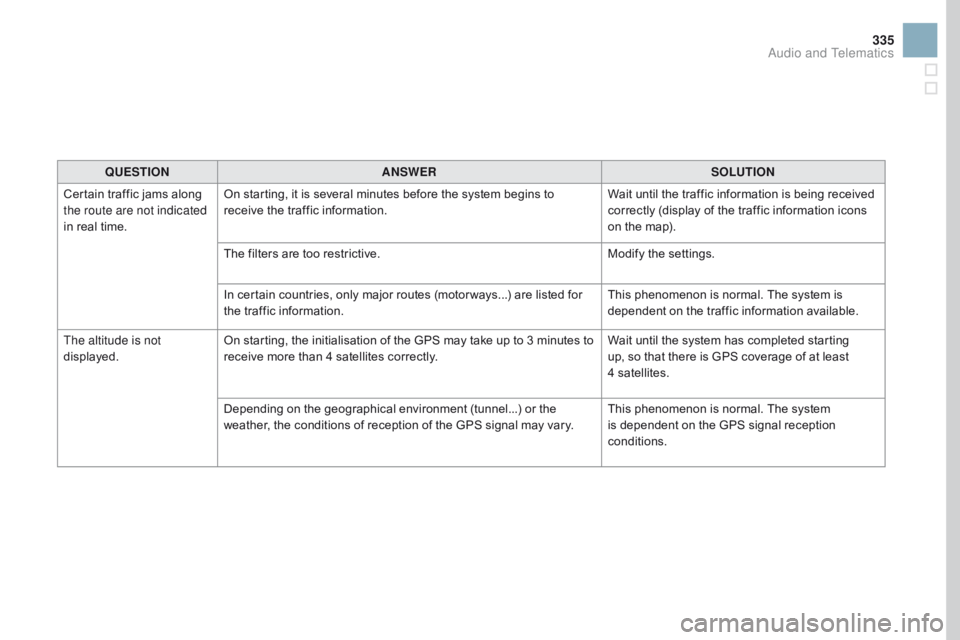
335
DS3_en_Chap11c_SMEGplus_ed02-2015
QUESTIOnAnSWERSOLUTIOn
Ce
rtain
t
raffic
j
ams
a
long
th
e route are not indicated
in
r
eal
t
ime. On
s
tarting,
i
t
i
s
s
everal
m
inutes
b
efore
t
he
s
ystem
b
egins
t
o
re
ceive
t
he
t
raffic
i
nformation. Wait
u
ntil
t
he
t
raffic
i
nformation
i
s
b
eing
r
eceived
co
rrectly
(
display
o
f
t
he
t
raffic
i
nformation
i
cons
on t
he
m
ap).
The
f
ilters
a
re
t
oo
r
estrictive. Modify
t
he
s
ettings.
In
c
ertain
c
ountries,
o
nly
m
ajor
r
outes
(
motor ways...)
a
re
l
isted
f
or
th
e
t
raffic
i
nformation. This
p
henomenon
i
s
n
ormal.
T
he
s
ystem
i
s
de
pendent
o
n
t
he
t
raffic
i
nformation
a
vailable.
The altitude is not
displayed. On
s
tarting,
t
he
i
nitialisation
o
f
t
he
G
PS
m
ay
t
ake
u
p
t
o
3 m
inutes
t
o
re
ceive
m
ore
t
han
4 s
atellites
c
orrectly.Wait
u
ntil
t
he
s
ystem
h
as
c
ompleted
s
tarting
up
,
s
o
t
hat
t
here
i
s
G
PS
c
overage
o
f
a
t
l
east
4
satellites.
Depending
o
n
t
he
g
eographical
e
nvironment
(
tunnel...)
o
r
t
he
we
ather,
t
he
c
onditions
o
f
r
eception
o
f
t
he
G
PS
s
ignal
m
ay
v
ary.This
p
henomenon
i
s
n
ormal.
T
he
s
ystem
is d
ependent
o
n
t
he
G
PS
s
ignal
r
eception
con
ditions.
Audio and Telematics
Page 339 of 444
337
DS3_en_Chap11c_SMEGplus_ed02-2015
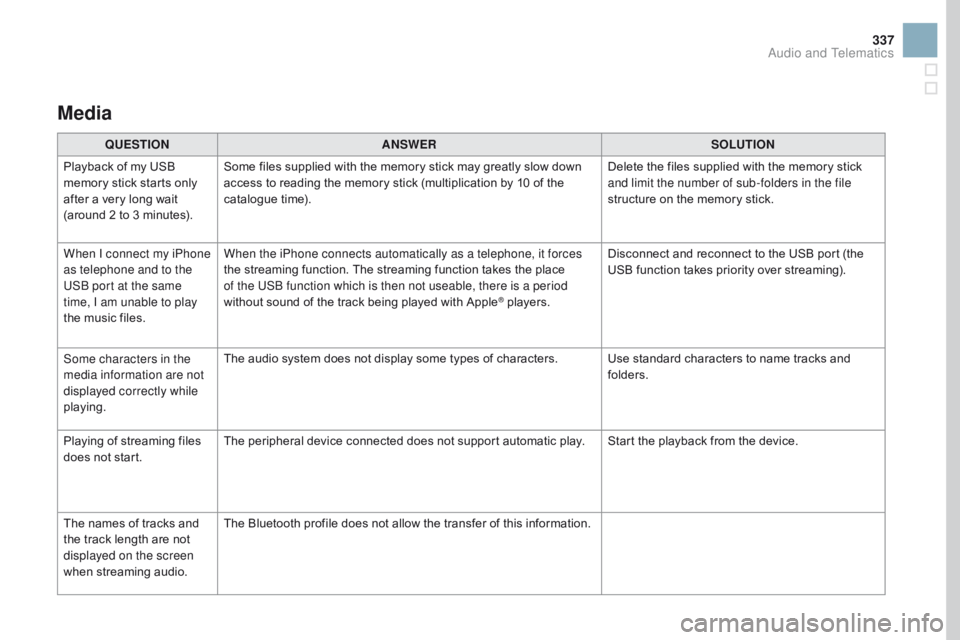
Media
QUESTIOnAnSWERSOLUTIOn
Pl
ayback
o
f
m
y
U
SB
me
mory
s
tick
s
tarts
o
nly
af
ter
a v
ery
l
ong
w
ait
(a
round
2 t
o
3 m
inutes). Some
f
iles
s
upplied
w
ith
t
he
m
emory
s
tick
m
ay
g
reatly
s
low
d
own
ac
cess
t
o
r
eading
t
he
m
emory
s
tick
(
multiplication
b
y
1
0
o
f
t
he
ca
talogue
t
ime). Delete
t
he
f
iles
s
upplied
w
ith
t
he
m
emory
s
tick
an
d limit the number of sub-folders in the file
structure
o
n
t
he
m
emory
s
tick.
When I connect my iPhone
as telephone and to the
USB port at the same
time, I am unable to play
the
m
usic
f
iles. When the iPhone connects automatically as a telephone, it forces
the
s
treaming
f
unction.
T
he
s
treaming
f
unction
t
akes
t
he
p
lace
of t
he USB function which is then not useable, there is a period
without
s
ound
o
f
t
he
t
rack
b
eing
p
layed
w
ith
A
pple
® players.Di sconnect
a
nd
r
econnect
t
o
t
he
U
SB
p
ort
(
the
US
B
f
unction
t
akes
p
riority
o
ver
s
treaming).
Some characters in the
media information are not
displayed correctly while
playing. The
a
udio
s
ystem
d
oes
n
ot
d
isplay
s
ome
t
ypes
o
f
c
haracters. Use
s
tandard
c
haracters
t
o
n
ame
t
racks
a
nd
fo
lders.
Playing
o
f
s
treaming
f
iles
do
es
n
ot
s
tart. The
p
eripheral
d
evice
c
onnected
d
oes
n
ot
s
upport
a
utomatic
p
lay. Start
t
he
p
layback
f
rom
t
he
d
evice.
The
n
ames
o
f
t
racks
a
nd
th
e
t
rack
l
ength
a
re
n
ot
di
splayed on the screen
when
st
reaming
aud
io. The
B
luetooth
p
rofile
d
oes
n
ot
a
llow
t
he
t
ransfer
o
f
t
his
i
nformation.
Audio and Telematics
Page 341 of 444
339
DS3_en_Chap11c_SMEGplus_ed02-2015
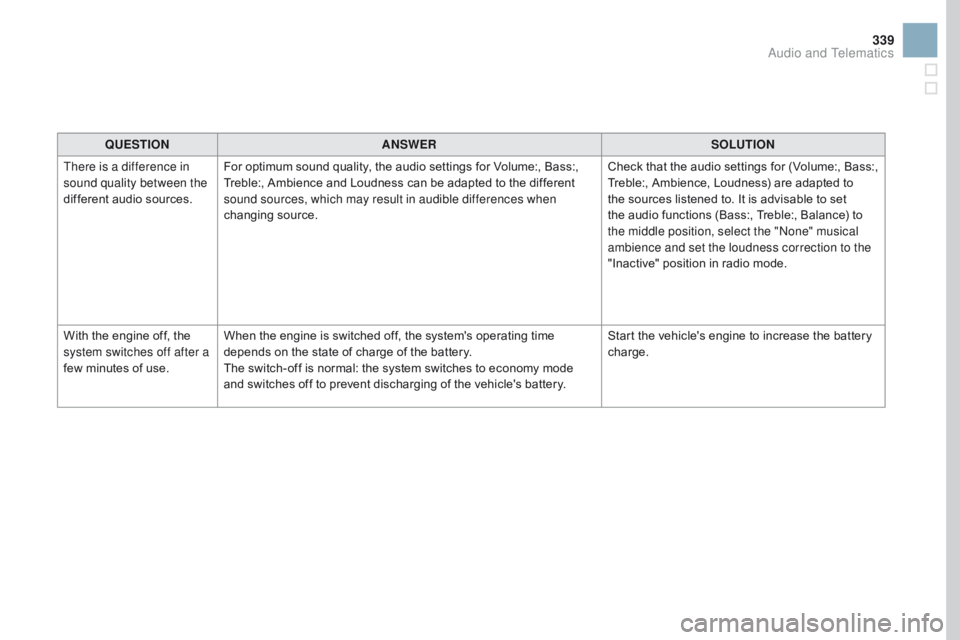
QUESTIOnAnSWERSOLUTIOn
Th
ere is a difference in
sound quality between the
different
a
udio
s
ources. For
o
ptimum
s
ound
q
uality,
t
he
a
udio
s
ettings
f
or
V
olume:,
B
ass:,
Tr
eble:,
A
mbience
a
nd
L
oudness
c
an
b
e
a
dapted
t
o
t
he
d
ifferent
so
und sources, which may result in audible differences when
changing
so
urce. Check
t
hat
t
he
a
udio
s
ettings
f
or
(
Volume:,
B
ass:,
Tr
eble:,
A
mbience,
L
oudness)
a
re
a
dapted
t
o
th
e
s
ources
l
istened
t
o.
I
t
i
s
a
dvisable
t
o
s
et
th
e
a
udio
f
unctions
(
Bass:,
T
reble:,
B
alance)
t
o
th
e middle position, select the "None" musical
ambience and set the loudness correction to the
"Inactive"
p
osition
i
n
r
adio
m
ode.
With
t
he
e
ngine
o
ff,
t
he
sy
stem switches off after a
few
m
inutes
o
f
u
se. When
t
he
e
ngine
i
s
s
witched
o
ff,
t
he
s
ystem's
o
perating
t
ime
de
pends
o
n
t
he
s
tate
o
f
c
harge
o
f
t
he
b
attery.
The
s
witch-off
i
s
n
ormal:
t
he
s
ystem
s
witches
t
o
e
conomy
m
ode
an
d
s
witches
o
ff
t
o
p
revent
d
ischarging
o
f
t
he
v
ehicle's
b
attery.Start
t
he
v
ehicle's
e
ngine
t
o
i
ncrease
t
he
b
attery
char
ge.
Audio and Telematics
Page 342 of 444
DS3_en_Chap11c_SMEGplus_ed02-2015
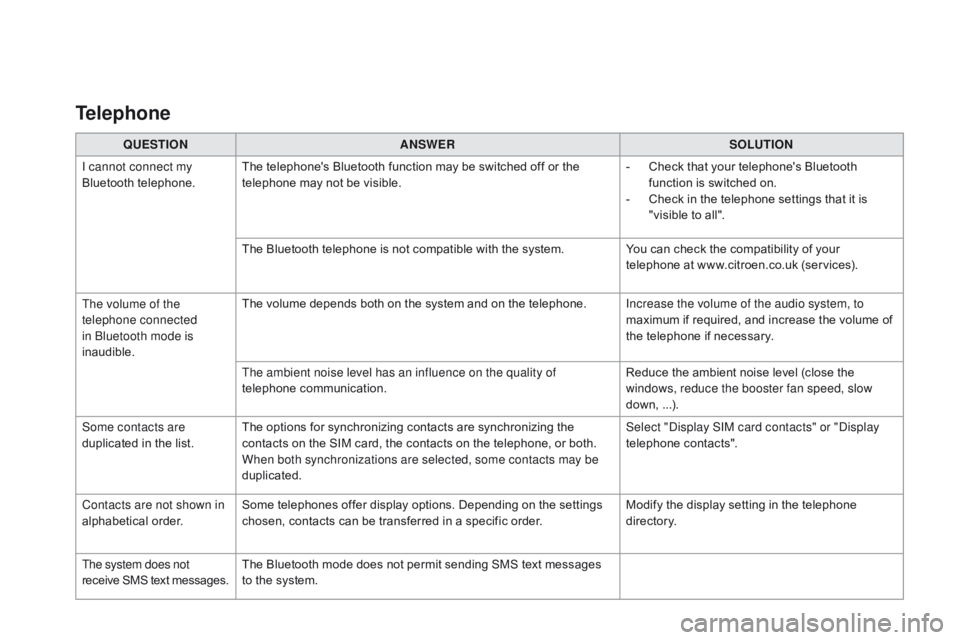
QUESTIOnAnSWERSOLUTIOn
I ca
nnot connect my
Bluetooth
te
lephone. The
t
elephone's
B
luetooth
f
unction
m
ay
b
e
s
witched
o
ff
o
r
t
he
te
lephone
m
ay
n
ot
b
e
v
isible. -
Ch
eck
t
hat
y
our
t
elephone's
B
luetooth
fu
nction
i
s
s
witched
o
n.
-
Ch
eck
i
n
t
he
t
elephone
s
ettings
t
hat
i
t
i
s
"v
isible
t
o
a
ll".
The
B
luetooth
t
elephone
i
s
n
ot
c
ompatible
w
ith
t
he
s
ystem.You
c
an
c
heck
t
he
c
ompatibility
o
f
y
our
te
lephone
a
t
w
ww.citroen.co.uk
(
services).
The volume of the
telephone connected
in Bluetooth mode is
inaudible. The
v
olume
d
epends
b
oth
o
n
t
he
s
ystem
a
nd
o
n
t
he
t
elephone.Increase the volume of the audio system, to
maximum
i
f
r
equired,
a
nd
i
ncrease
t
he
v
olume
o
f
th
e
t
elephone
i
f
n
ecessary.
The ambient noise level has an influence on the quality of
telephone
co
mmunication. Reduce
t
he
a
mbient
n
oise
l
evel
(
close
t
he
wi
ndows, reduce the booster fan speed, slow
down,
...)
.
Some contacts are
duplicated
i
n
t
he
l
ist. The
o
ptions
f
or
s
ynchronizing
c
ontacts
a
re
s
ynchronizing
t
he
co
ntacts
o
n
t
he
S
IM
c
ard,
t
he
c
ontacts
o
n
t
he
t
elephone,
o
r
b
oth.
Wh
en both synchronizations are selected, some contacts may be
duplicated. Select "Display SIM card contacts" or "Display
telephone
co
ntacts".
Contacts are not shown in
alphabetical
or
der. Some
t
elephones
o
ffer
d
isplay
o
ptions.
D
epending
o
n
t
he
s
ettings
ch
osen,
c
ontacts
c
an
b
e
t
ransferred
i
n
a s
pecific
o
rder.Modify
t
he
d
isplay
s
etting
i
n
t
he
t
elephone
di
r e c to r y.
The system does not
receive
S
MS
t
ext
m
essages. The
B
luetooth
m
ode
d
oes
n
ot
p
ermit
s
ending
S
MS
t
ext
m
essages
to t
he
s
ystem.
Telephone