door lock CITROEN DS3 CROSSBACK 2020 Owner's Manual
[x] Cancel search | Manufacturer: CITROEN, Model Year: 2020, Model line: DS3 CROSSBACK, Model: CITROEN DS3 CROSSBACK 2020Pages: 244, PDF Size: 7.7 MB
Page 75 of 244
73Safety05
braking. Refit the head restraint once the child
seat has been removed.
Installing a booster seat
The chest part of the seat belt must be
positioned on the child's shoulder without
touching the neck.
Ensure that the lap part of the seat belt passes
correctly over the child's thighs.
Use a booster seat with backrest, equipped
with a belt guide at shoulder level.
Additional protections
To prevent accidental opening of the
doors and rear windows, use the "Child lock".
Take care not to open the rear windows by
more than one third.
To protect young children from the rays of the
sun, fit side blinds on the rear windows.
As a safety precaution, do not leave:
–
a child alone and una
ttended in a vehicle,
–
a child or an animal in a v
ehicle which is
exposed to the sun, with the windows closed,
–
the k
eys within reach of children inside the
vehicle.
Child seat at the rear
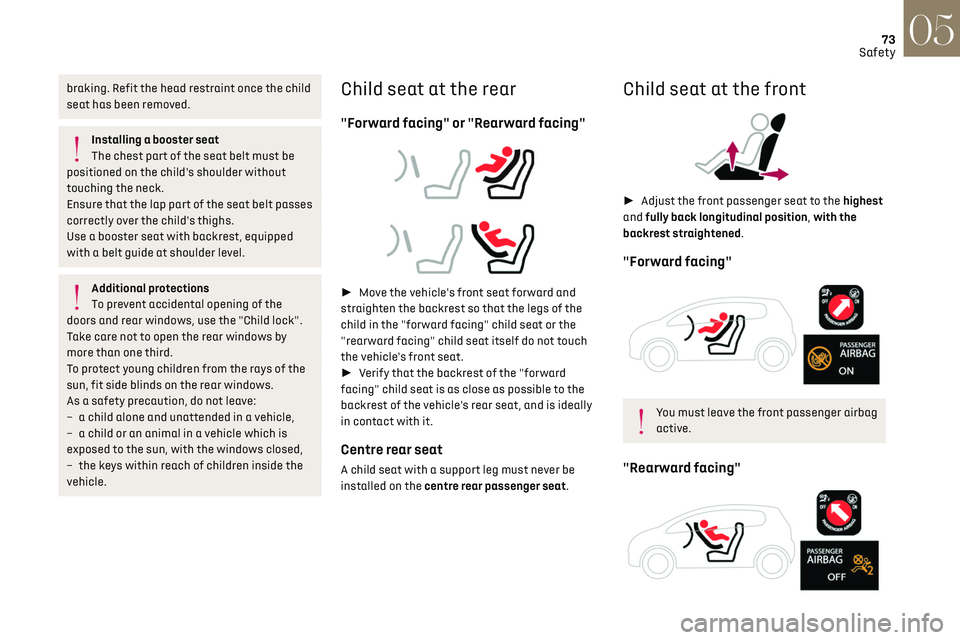
"Forward facing" or "Rearward facing"
► Move the vehicle's front seat forward and
straighten the backrest so that the legs of the
child in the "forward facing" child seat or the
"rearward facing" child seat itself do not touch
the vehicle's front seat.
► Verify that the backrest of the "forward
facing" child seat is as close as possible to the
backrest of the vehicle's rear seat, and is ideally
in contact with it.
Centre rear seat
A child seat with a support leg must never be
installed on the centre rear passenger seat.
Child seat at the front
► Adjust the front passenger seat to the highest
and fully back longitudinal position, with the
backrest straightened.
"Forward facing"
You must leave the front passenger airbag
active.
"Rearward facing"
Page 80 of 244
78Safety05
– F2X: ISOFIX child seat for toddlers.
– F2: ISOFIX reduced height child seat.
– F3: ISOFIX full height child seat.
Child booster seat.
ISOFIX "carrycot" type child seat:
– L1: head to the left.
– L2: head to the right.
Manual child lock
This system prevents opening of a rear door using
its interior handle.
The control, red in colour, is located on the edge of
each rear door (marked by a label).
Locking / Unlocking
► To lock, turn the red control as far as it will go
using the integral key: • To the right on the left-hand rear door.
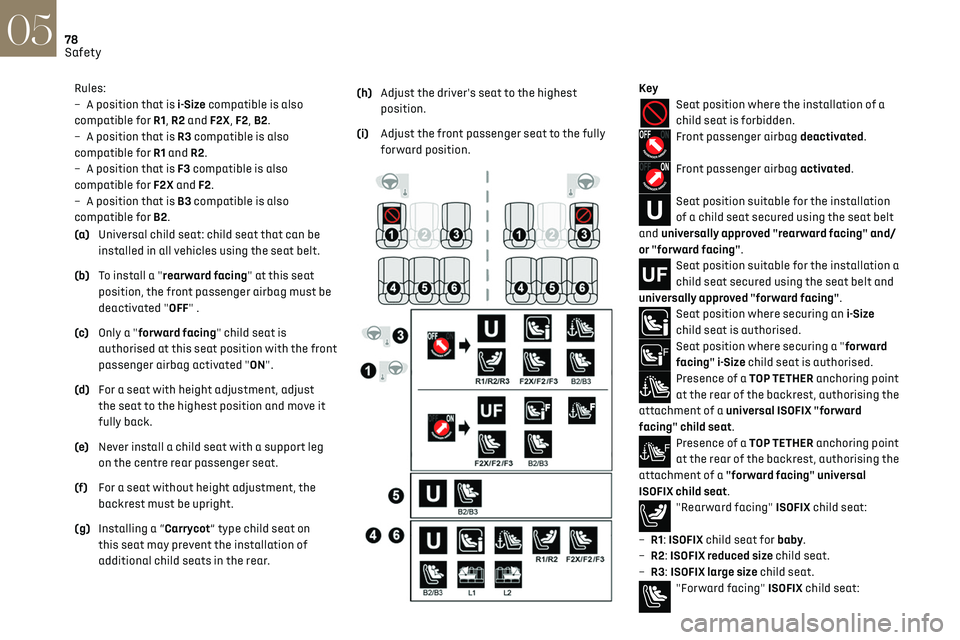
Rules:
–
A po sition that is i-Size compatible is also
compatible for R1, R2 and F2X, F2, B2.
–
A po
sition that is R3 compatible is also
compatible for R1 and R2.
–
A po
sition that is F3 compatible is also
compatible for F2X and F2.
–
A po
sition that is B3 compatible is also
compatible for B2.
(a) Universal child seat: child seat that can be
installed in all vehicles using the seat belt.
(b) To install a "rearward facing" at this seat
position, the front passenger airbag must be
deactivated "OFF" .
(c) Only a "forward facing" child seat is
authorised at this seat position with the front
passenger airbag activated "ON".
(d) For a seat with height adjustment, adjust
the seat to the highest position and move it
fully back.
(e) Never install a child seat with a support leg
on the centre rear passenger seat.
(f) For a seat without height adjustment, the
backrest must be upright.
(g) Installing a “Carrycot” type child seat on
this seat may prevent the installation of
additional child seats in the rear. (h)
Adjust the driver's seat to the highest
position.
(i) Adjust the front passenger seat to the fully
forward position.
KeySeat position where the installation of a
child seat is forbidden.
Front passenger airbag deactivated.
Front passenger airbag activated.
Seat position suitable for the installation
of a child seat secured using the seat belt
and universally approved "rearward facing" and/
or "forward facing".
Seat position suitable for the installation a
child seat secured using the seat belt and
universally approved "forward facing".
Seat position where securing an i-Size
child seat is authorised.
Seat position where securing a "forward
facing" i-Size child seat is authorised.
Presence of a TOP TETHER anchoring point
at the rear of the backrest, authorising the
attachment of a universal ISOFIX "forward
facing" child seat.
Presence of a TOP TETHER anchoring point
at the rear of the backrest, authorising the
attachment of a "forward facing" universal
ISOFIX child seat.
"Rearward facing" ISOFIX child seat:
–
R1
: ISOFIX child seat for baby.
–
R2
: ISOFIX reduced size child seat.
–
R3
: ISOFIX large size child seat.
"Forward facing" ISOFIX child seat:
Page 81 of 244
79Safety05
– F2X: ISOFIX child seat for toddlers.
– F2 : ISOFIX reduced height child seat.
–
F3
: ISOFIX full height child seat.
Child booster seat.
ISOFIX "carrycot" type child seat:
–
L
1: head to the left.
–
L2: head t
o the right.
Manual child lock
This system prevents opening of a rear door using
its interior handle.
The control, red in colour, is located on the edge of
each rear door (marked by a label).
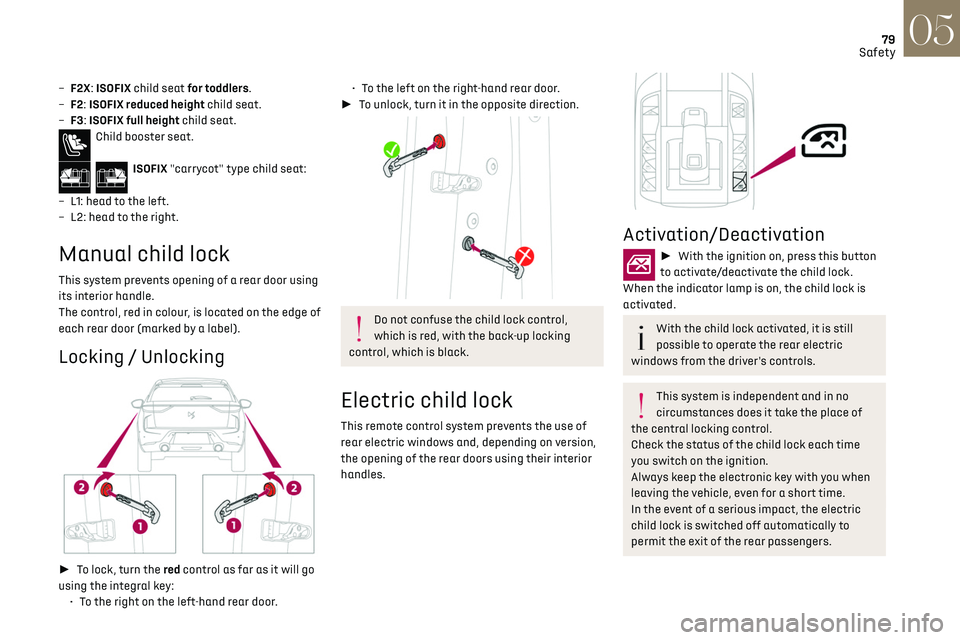
Locking / Unlocking
► To lock, turn the red control as far as it will go
using the integral key: •
T
o the right on the left-hand rear door.
• To the left on the right-hand rear door.
► To unlock, turn it in the opposite direction.
Do not confuse the child lock control,
which is red, with the back-up locking
control, which is black.
Electric child lock
This remote control system prevents the use of
rear electric windows and, depending on version,
the opening of the rear doors using their interior
handles.
Activation/Deactivation
► With the ignition on, press this button
to activate/deactivate the child lock.
When the indicator lamp is on, the child lock is
activated.
With the child lock activated, it is still
possible to operate the rear electric
windows from the driver's controls.
This system is independent and in no
circumstances does it take the place of
the central locking control.
Check the status of the child lock each time
you switch on the ignition.
Always keep the electronic key with you when
leaving the vehicle, even for a short time.
In the event of a serious impact, the electric
child lock is switched off automatically to
permit the exit of the rear passengers.
Page 84 of 244
82Driving06
The lighting state of the "START/STOP"
button indicates the presence or absence
of the electronic key in the passenger
compartment.
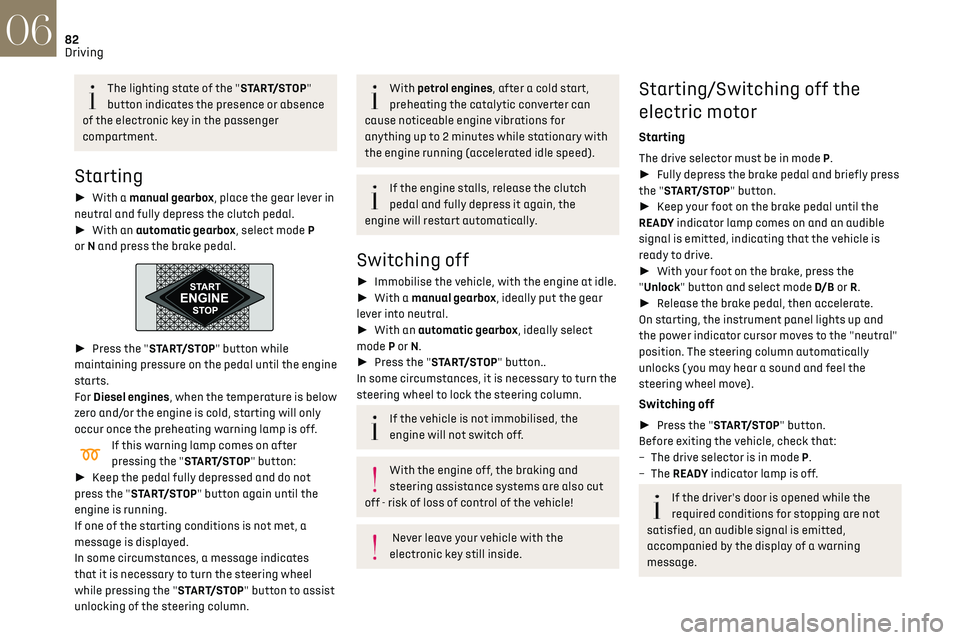
Starting
► With a manual gearbox, place the gear lever in
neutral and fully depress the clutch pedal.
► With an automatic gearbox, select mode P
or N and press the brake pedal.
► Press the "START/STOP" button while
maintaining pressure on the pedal until the engine
starts.
For Diesel engines, when the temperature is below
zero and/or the engine is cold, starting will only
occur once the preheating warning lamp is off.
If this warning lamp comes on after
pressing the "START/STOP" button:
► Keep the pedal fully depressed and do not
press the "START/STOP" button again until the
engine is running.
If one of the starting conditions is not met, a
message is displayed.
In some circumstances, a message indicates
that it is necessary to turn the steering wheel
while pressing the "START/STOP" button to assist
unlocking of the steering column.
With petrol engines, after a cold start,
preheating the catalytic converter can
cause noticeable engine vibrations for
anything up to 2 minutes while stationary with
the engine running (accelerated idle speed).
If the engine stalls, release the clutch
pedal and fully depress it again, the
engine will restart automatically.
Switching off
► Immobilise the vehicle, with the engine at idle.
► With a manual gearbox, ideally put the gear
lever into neutral.
► With an automatic gearbox, ideally select
mode P or N.
► Press the "START/STOP" button..
In some circumstances, it is necessary to turn the
steering wheel to lock the steering column.
If the vehicle is not immobilised, the
engine will not switch off.
With the engine off, the braking and
steering assistance systems are also cut
off - risk of loss of control of the vehicle!
Never leave your vehicle with the
electronic key still inside.
Starting/Switching off the
electric motor
Starting
The drive selector must be in mode P.
► Fully depress the brake pedal and briefly press
the "START/STOP" button.
► Keep your foot on the brake pedal until the
READY indicator lamp comes on and an audible
signal is emitted, indicating that the vehicle is
ready to drive.
► With your foot on the brake, press the
"Unlock" button and select mode D/B or R.
► Release the brake pedal, then accelerate.
On starting, the instrument panel lights up and
the power indicator cursor moves to the "neutral"
position. The steering column automatically
unlocks ( you may hear a sound and feel the
steering wheel move).
Switching off
► Press the "START/STOP" button.
Before exiting the vehicle, check that:
–
The driv
e selector is in mode P.
–
The READY indicator lamp is off.
If the driver's door is opened while the
required conditions for stopping are not
satisfied, an audible signal is emitted,
accompanied by the display of a warning
message.
Switching on the ignition
without starting the engine
With the electronic key in the passenger
compartment, pressing the “START/STOP” button,
without pressing any of the pedals, allows the
ignition to be switched on without starting the
engine.
► Press this button again to switch off the
ignition and allow the vehicle to be locked.
Key not detected
Back-up starting
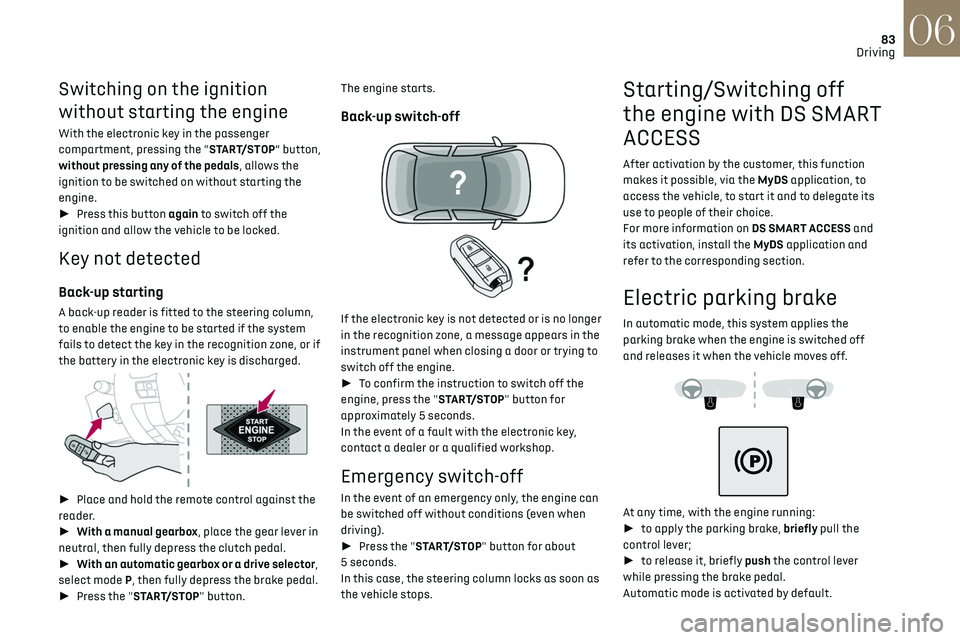
A back-up reader is fitted to the steering column,
to enable the engine to be started if the system
fails to detect the key in the recognition zone, or if
the battery in the electronic key is discharged.
► Place and hold the remote control against the
reader.
► With a manual gearbox, place the gear lever in
neutral, then fully depress the clutch pedal.
► With an automatic gearbox or a drive selector,
select mode P, then fully depress the brake pedal.
► Press the "START/STOP" button.
Page 85 of 244
83Driving06
Switching on the ignition
without starting the engine
With the electronic key in the passenger
compartment, pressing the “START/STOP” button,
without pressing any of the pedals, allows the
ignition to be switched on without starting the
engine.
► Press this button again to switch off the
ignition and allow the vehicle to be locked.
Key not detected
Back-up starting
A back-up reader is fitted to the steering column,
to enable the engine to be started if the system
fails to detect the key in the recognition zone, or if
the battery in the electronic key is discharged.
► Place and hold the remote control against the
reader.
► With a manual gearbox, place the gear lever in
neutral, then fully depress the clutch pedal.
► With an automatic gearbox or a drive selector,
select mode P, then fully depress the brake pedal.
► Press the "START/STOP" button. The engine starts.
Back-up switch-off
If the electronic key is not detected or is no longer
in the recognition zone, a message appears in the
instrument panel when closing a door or trying to
switch off the engine.
►
To confirm the instruction to switch off the
engine, press the "START/STOP" button for
approximately 5 seconds.
In the event of a fault with the electronic key,
contact a dealer or a qualified workshop.
Emergency switch-off
In the event of an emergency only, the engine can
be switched off without conditions (even when
driving).
► Press the "START/STOP" button for about
5 seconds.
In this case, the steering column locks as soon as
the vehicle stops.
Starting/Switching off
the engine with DS SMART
ACCESS
After activation by the customer, this function
makes it possible, via the MyDS application, to
access the vehicle, to start it and to delegate its
use to people of their choice.
For more information on DS SMART ACCESS and
its activation, install the MyDS application and
refer to the corresponding section.
Electric parking brake
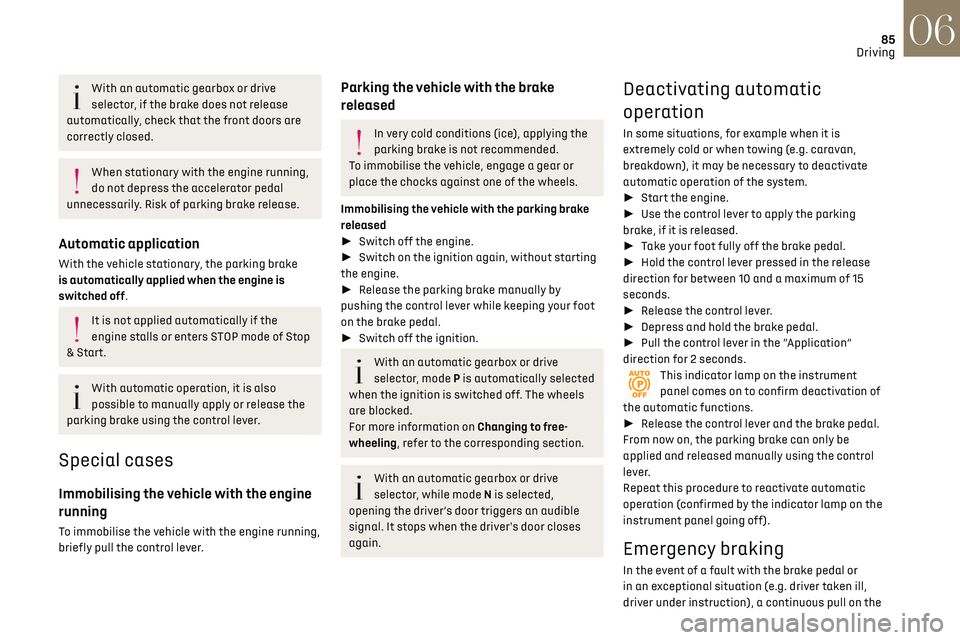
In automatic mode, this system applies the
parking brake when the engine is switched off
and releases it when the vehicle moves off.
At any time, with the engine running:
► to apply the parking brake, briefly pull the
control lever;
► to release it, briefly push the control lever
while pressing the brake pedal.
Automatic mode is activated by default.
Page 87 of 244
85
Driving06
With an automatic gearbox or drive
selector, if the brake does not release
automatically, check that the front doors are
correctly closed.
When stationary with the engine running,
do not depress the accelerator pedal
unnecessarily. Risk of parking brake release.
Automatic application
With the vehicle stationary, the parking brake
is automatically applied when the engine is
switched off.
It is not applied automatically if the
engine stalls or enters STOP mode of Stop
& Start.
With automatic operation, it is also
possible to manually apply or release the
parking brake using the control lever.
Special cases
Immobilising the vehicle with the engine
running
To immobilise the vehicle with the engine running,
briefly pull the control lever.
Parking the vehicle with the brake
released
In very cold conditions (ice), applying the
parking brake is not recommended.
To immobilise the vehicle, engage a gear or
place the chocks against one of the wheels.
Immobilising the vehicle with the parking brake
released
► Switch off the engine.
► Switch on the ignition again, without starting
the engine.
► Release the parking brake manually by
pushing the control lever while keeping your foot
on the brake pedal.
► Switch off the ignition.
With an automatic gearbox or drive
selector, mode P is automatically selected
when the ignition is switched off. The wheels
are blocked.
For more information on Changing to free-
wheeling, refer to the corresponding section.
With an automatic gearbox or drive
selector, while mode N is selected,
opening the driver’s door triggers an audible
signal. It stops when the driver's door closes
again.
Deactivating automatic
operation
In some situations, for example when it is
extremely cold or when towing (e.g. caravan,
breakdown), it may be necessary to deactivate
automatic operation of the system.
► Start the engine.
► Use the control lever to apply the parking
brake, if it is released.
► Take your foot fully off the brake pedal.
► Hold the control lever pressed in the release
direction for between 10 and a maximum of 15
seconds.
► Release the control lever.
► Depress and hold the brake pedal.
► Pull the control lever in the “Application”
direction for 2 seconds.
This indicator lamp on the instrument
panel comes on to confirm deactivation of
the automatic functions.
► Release the control lever and the brake pedal.
From now on, the parking brake can only be
applied and released manually using the control
lever.
Repeat this procedure to reactivate automatic
operation (confirmed by the indicator lamp on the
instrument panel going off).
Emergency braking
In the event of a fault with the brake pedal or
in an exceptional situation (e.g. driver taken ill,
driver under instruction), a continuous pull on the
Page 89 of 244
87
Driving06
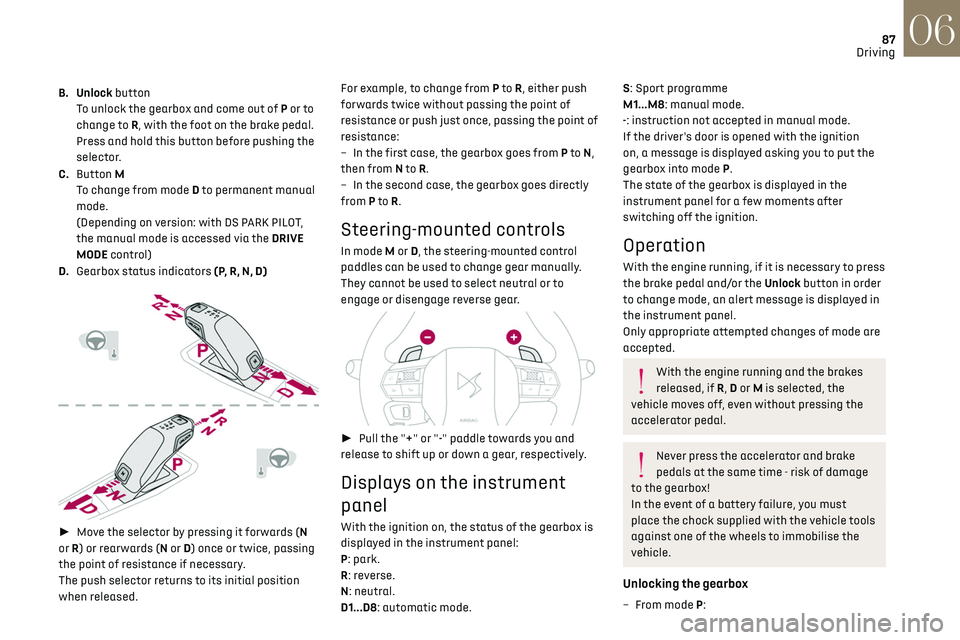
B. Unlock button
To unlock the gearbox and come out of P or to
change to R, with the foot on the brake pedal.
Press and hold this button before pushing the
selector.
C. Button M
To change from mode D to permanent manual
mode.
(Depending on version: with DS PARK PILOT,
the manual mode is accessed via the DRIVE
MODE control)
D. Gearbox status indicators (P, R, N, D)
► Move the selector by pressing it forwards (N
or R) or rearwards (N or D) once or twice, passing
the point of resistance if necessary.
The push selector returns to its initial position
when released. For example, to change from P to
R, either push
forwards twice without passing the point of
resistance or push just once, passing the point of
resistance:
–
In the first c
ase, the gearbox goes from P to
N,
then from N to R.
–
In the sec
ond case, the gearbox goes directly
from P to R.
Steering-mounted controls
In mode M or D, the steering-mounted control
paddles can be used to change gear manually.
They cannot be used to select neutral or to
engage or disengage reverse gear.
► Pull the "+" or "-" paddle towards you and
release to shift up or down a gear, respectively.
Displays on the instrument
panel
With the ignition on, the status of the gearbox is
displayed in the instrument panel:
P: park.
R: reverse.
N: neutral.
D1...D8: automatic mode.
S: Sport programme
M1...M8: manual mode.
-: instruction not accepted in manual mode.
If the driver's door is opened with the ignition
on, a message is displayed asking you to put the
gearbox into mode P.
The state of the gearbox is displayed in the
instrument panel for a few moments after
switching off the ignition.
Operation
With the engine running, if it is necessary to press
the brake pedal and/or the Unlock button in order
to change mode, an alert message is displayed in
the instrument panel.
Only appropriate attempted changes of mode are
accepted.
With the engine running and the brakes
released, if R, D or M is selected, the
vehicle moves off, even without pressing the
accelerator pedal.
Never press the accelerator and brake
pedals at the same time - risk of damage
to the gearbox!
In the event of a battery failure, you must
place the chock supplied with the vehicle tools
against one of the wheels to immobilise the
vehicle.
Unlocking the gearbox
– From mode P:
Page 90 of 244
88
Driving06
► Fully depress the brake pedal.
► Press the Unlock button.
► While continuing to press the brake pedal
and the Unlock button, select another mode.
–
F
rom neutral N, at a speed below 3 mph
(5 km/h): ► Fully depress the brake pedal.
► While continuing to depress the brake pedal,
select another mode.
Engaging reverse gear
► Slow down until you come to a stop.
► Depress the brake pedal, then press the
Unlock button.
► While maintaining the presses, select mode R.
Permanent manual mode
Entering the mode:
With EAT8 without DS PARK PILOT button:
► With mode D initially selected.
► Press button M; the green indicator lamp in
the button comes on.
With EAT8 and DS PARK PILOT button:
► Press the DRIVE MODE control.
► Select "Manual" mode, which is displayed on
the instrument panel.
Exiting the mode:
► Push forwards once to return to D.
or
► Press button M; the indicator lamp in the
button goes off.
or
► Select another mode using the DRIVE MODE
control.
Switching off the ignition
To switch off the ignition, the vehicle must be
stationary.
Changing to free-wheeling
For more information on Changing to free-
wheeling, refer to the corresponding section.
If you open the driver's door while mode N
is engaged, an audible signal will sound. It
will stop when you close the driver's door
again.
Special aspects of automatic mode
The gearbox selects the gear that offers optimum
performance, taking account of the outside
temperature, the road profile, the vehicle load and
the driving style.
For maximum acceleration, press the accelerator
fully down (kick-down). The gearbox changes
down automatically or holds the selected gear
until the maximum engine speed is reached.
Steering mounted controls allow the driver to
temporarily select a gear, if the vehicle speed and
engine speed conditions permit.
Special aspects of manual mode
The change from one gear to another takes place
only if the road speed and engine speed permit.
Starting the vehicle
From mode P:
► Fully depress the brake pedal.
► Start the engine.
► Maintaining pressure on the brake pedal,
press the Unlock button.
► Push once or twice rearwards to select
the automatic mode D, or forwards to engage
reverse R.
From neutral N:
► Fully depress the brake pedal.
► Start the engine.
► Maintaining pressure on the brake pedal,
push rearwards to select the automatic mode D,
or forwards, while pressing the Unlock button to
engage reverse R.
Then, from D or R:
► Release the brake pedal.
► Accelerate gradually to automatically release
the electric parking brake.
The vehicle moves off immediately.
With an automatic gearbox, never try to
start the engine by pushing the vehicle.
Stopping the vehicle
Whatever the state of the gearbox, when the
ignition is switched off, mode P is engaged
automatically and immediately.
However, in mode N, mode P will be engaged after
a delay of 5 seconds (allowing for the process of
putting the vehicle into free-wheeling mode).
Check that mode P has been engaged and
that the electric parking brake was applied
automatically; if not, apply it manually.
The corresponding indicator lamps in the
selector and the electric parking brake
control lever must be on, as well as those in the
instrument panel.
Operating faults
Gearbox malfunction
This warning lamp comes on, accompanied
by an audible signal and the display of a
message.
Visit a dealer or a qualified workshop.
Do not drive faster than 62 mph (100 km/h),
keeping to the speed limit.
The gearbox switches to back-up mode: mode D
is locked in third gear, the steering-mounted
control paddles are inoperative, mode M is no
longer available. You may feel a significant jolt on
engaging reverse gear. This will not damage the
gearbox.
Selector malfunction
Minor malfunction
This warning lamp comes on, accompanied
by the display of a message and an audible
signal.
Drive cautiously and visit a dealer or a qualified
workshop.
In certain cases, the selector indicator lamps may
no longer come on, but the gearbox state is still
displayed on the instrument panel.
Page 92 of 244
90
Driving06
B. Unlock buttonTo unlock the selector and come out of P or
change to R, with the foot on the brake pedal.
Press and hold this button before pushing the
selector.
C. Selector state indicators (R, N, D/B)
► Move the selector by pushing it forwards (N or
R) or backwards (N or D/B ) once or twice, passing
the point of resistance if necessary.
The push selector returns to its initial position
when released.
For example, to change from P to R, either push
forwards twice without passing the point of
resistance or push just once, passing the point of
resistance:
–
In the first c
ase, the selector goes from P to N,
then from N to R.
–
In the sec
ond case, the selector goes directly
from P to R.
Regenerative braking
The regenerative braking function emulates
engine braking, slowing the vehicle with no
need to depress the brake pedal. The vehicle
slows more quickly when the driver releases the
accelerator pedal.
When the accelerator pedal is released,
mechanical energy is recovered and used to
partially recharge the battery.
► While in mode D/B , pushing the pulse selector
backwards activates/deactivates the function.
The D on the instrument panel is replaced with
a B.
The state of the function is not saved when the
ignition is switched off.
If the battery is almost fully charged, the
braking effect when the accelerator pedal
is released may be limited.
Driving modes
The number and type of driving modes available
depend on the vehicle’s engine and equipment.
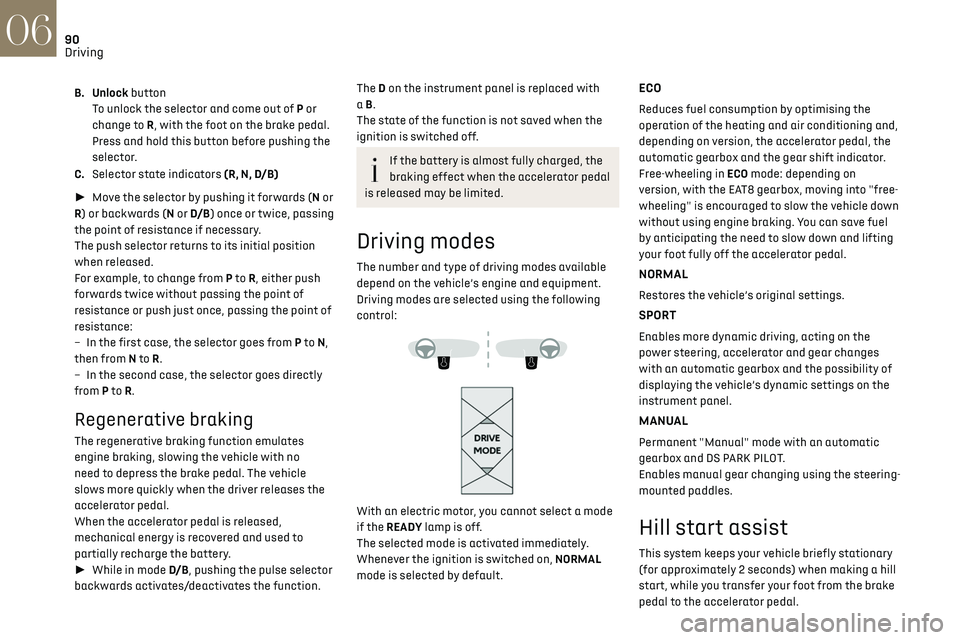
Driving modes are selected using the following
control:
With an electric motor, you cannot select a mode
if the READY lamp is off.
The selected mode is activated immediately.
Whenever the ignition is switched on, NORMAL
mode is selected by default.
ECO
Reduces fuel consumption by optimising the
operation of the heating and air conditioning and,
depending on version, the accelerator pedal, the
automatic gearbox and the gear shift indicator.
Free-wheeling in ECO mode: depending on
version, with the EAT8 gearbox, moving into "free-
wheeling" is encouraged to slow the vehicle down
without using engine braking. You can save fuel
by anticipating the need to slow down and lifting
your foot fully off the accelerator pedal.
NORMAL
Restores the vehicle’s original settings.
SPORT
Enables more dynamic driving, acting on the
power steering, accelerator and gear changes
with an automatic gearbox and the possibility of
displaying the vehicle’s dynamic settings on the
instrument panel.
MANUAL
Permanent "Manual" mode with an automatic
gearbox and DS PARK PILOT.
Enables manual gear changing using the steering-
mounted paddles.
Hill start assist
This system keeps your vehicle briefly stationary
(for approximately 2 seconds) when making a hill
start, while you transfer your foot from the brake
pedal to the accelerator pedal.
This system is only active when:
– The vehicle is completely stationary, with your
foot on the brake pedal.
– Certain slope conditions are met.
– The driver’s door is closed.
Do not leave the vehicle while it is being
held temporarily by hill start assist.
If someone needs to get out of the vehicle with
the engine running, apply the parking brake
manually. After that, ensure that the parking
brake indicator lamp and the indicator lamp P
in the electric parking brake control lever are
on fixed.
The hill start assist function cannot be
deactivated. However, use of the parking
brake to immobilise the vehicle interrupts its
operation.
Operation
Page 138 of 244

136
Practical information07
The red indicator lamp in the flap comes on to
indicate that the nozzle is locked.
If charging has finished but the cable is
still connected, opening the driver's door
restarts charging for around 20 seconds.
Accelerated charging
► Follow the instructions for use of the
accelerated charging unit (Wallbox).
► Remove the protective cover from the
charging nozzle.
► Insert the nozzle into the charging connector.
The start of charging is confirmed when the
charging indicator lamp in the flap flashes green.
If this is not the case, charging has not started;
restart the procedure, ensuring that the nozzle is
inserted correctly.
The red indicator lamp in the flap comes on to
indicate that the nozzle is locked.
Fast charging
► Depending on version, remove the protective
cover from the base.
► Connect the charging cable to the vehicle
connector, following the instructions for use of
the fast public charger.
The start of charging is confirmed when the
charging indicator lamp in the flap flashes green.
If this is not the case, charging has not started;
restart the procedure, ensuring that the
connection is correct.
The red indicator lamp in the flap comes on to
indicate that the nozzle is locked.
Disconnection
Before disconnecting the nozzle from the
charging connector:
► If the vehicle is unlocked, lock it and then
unlock it.
► If the vehicle is locked, unlock it. The red indicator lamp in the flap goes out to
confirm that the charging nozzle is unlocked.
►
Within 30 seconds, remove the charging
nozzle.
Domestic charging
When charging is complete, the green CHARGE
indicator lamp on the control unit comes on fixed.
► Replace the protective cover on the charging
nozzle and close the charging flap.
► Disconnect the control unit end of the
charging cable from the domestic socket.
Accelerated charging
The end of charging is indicated by the charging
control unit and by the fixed lighting of the green
indicator lamp in the flap.
► Hang up the nozzle on the charging unit and
close the charging flap.
Fast charging
The end of charging is indicated by the charger
and by the fixed lighting of the green indicator
lamp in the flap.
► Hang up the nozzle on the charging station.
► Depending on version, replace the protective
cover on the base and close the charging flap.
Towing device
Load distribution
► Distribute the load in the trailer so that
the heaviest items are as close as possible to
the axle, and the nose weight approaches the
maximum permitted without exceeding it.
Air density decreases with altitude, thus reducing
engine performance. The maximum load which
can be towed must be reduced by 10% per
1,000 metres of altitude.
Use towing devices and their genuine
wiring harnesses approved by the
Manufacturer. It is recommended that the