brakes DODGE DURANGO 2020 Owner's Guide
[x] Cancel search | Manufacturer: DODGE, Model Year: 2020, Model line: DURANGO, Model: DODGE DURANGO 2020Pages: 464, PDF Size: 22.14 MB
Page 352 of 464
350
TECHNICAL SPECIFICATIONS
IDENTIFICATION DATA
VEHICLE IDENTIFICATION NUMBER
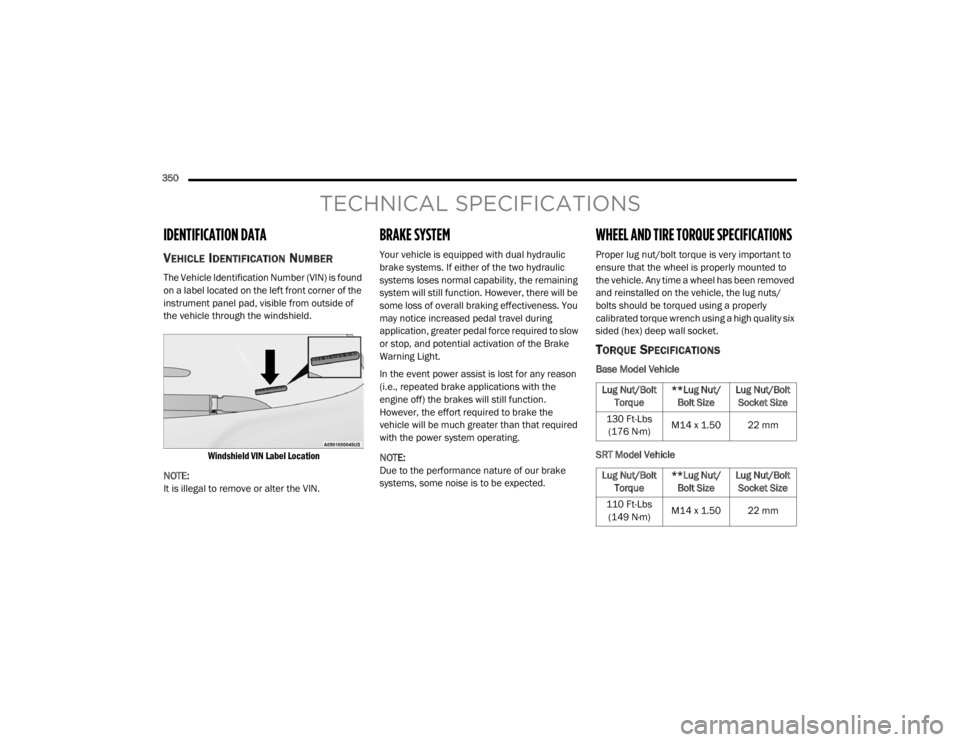
The Vehicle Identification Number (VIN) is found
on a label located on the left front corner of the
instrument panel pad, visible from outside of
the vehicle through the windshield.
Windshield VIN Label Location
NOTE:
It is illegal to remove or alter the VIN.
BRAKE SYSTEM
Your vehicle is equipped with dual hydraulic
brake systems. If either of the two hydraulic
systems loses normal capability, the remaining
system will still function. However, there will be
some loss of overall braking effectiveness. You
may notice increased pedal travel during
application, greater pedal force required to slow
or stop, and potential activation of the Brake
Warning Light.
In the event power assist is lost for any reason
(i.e., repeated brake applications with the
engine off) the brakes will still function.
However, the effort required to brake the
vehicle will be much greater than that required
with the power system operating.
NOTE:
Due to the performance nature of our brake
systems, some noise is to be expected.
WHEEL AND TIRE TORQUE SPECIFICATIONS
Proper lug nut/bolt torque is very important to
ensure that the wheel is properly mounted to
the vehicle. Any time a wheel has been removed
and reinstalled on the vehicle, the lug nuts/
bolts should be torqued using a properly
calibrated torque wrench using a high quality six
sided (hex) deep wall socket.
TORQUE SPECIFICATIONS
Base Model Vehicle
SRT Model Vehicle
Lug Nut/Bolt Torque **Lug Nut/
Bolt Size Lug Nut/Bolt
Socket Size
130 Ft-Lbs (176 N·m) M14 x 1.50 22 mm
Lug Nut/Bolt Torque **Lug Nut/
Bolt Size Lug Nut/Bolt
Socket Size
110 Ft-Lbs (149 N·m) M14 x 1.50 22 mm
20_WD_OM_EN_USC_t.book Page 350
Page 369 of 464
MULTIMEDIA367
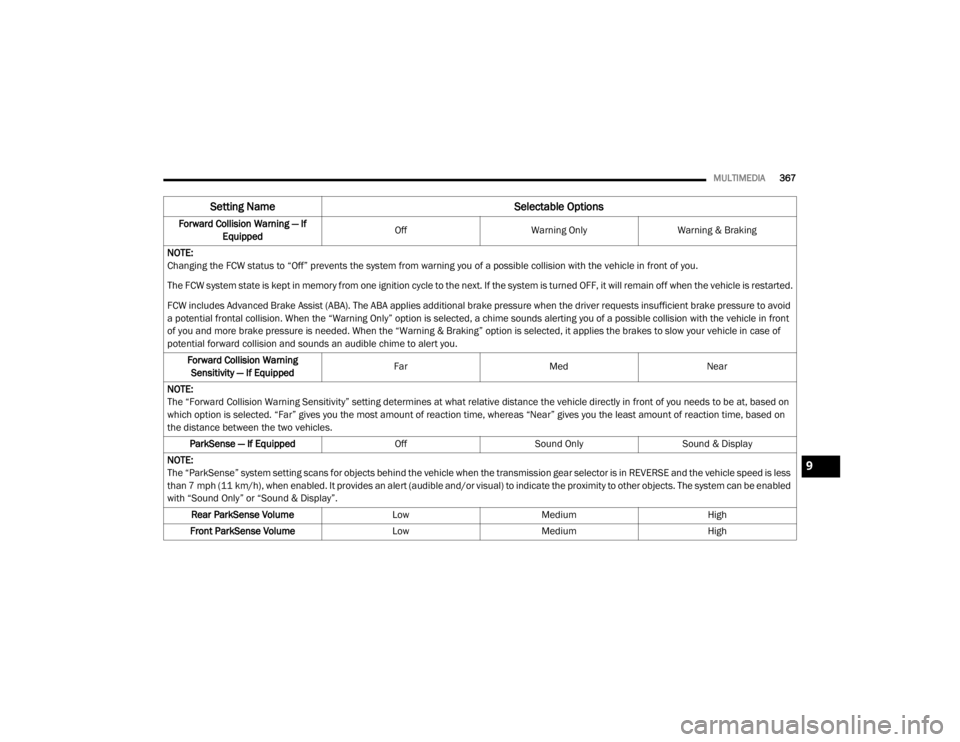
Forward Collision Warning — If
Equipped Off
Warning Only Warning & Braking
NOTE:
Changing the FCW status to “Off” prevents the system from warning you of a possible collision with the vehicle in front of you.
The FCW system state is kept in memory from one ignition cycle to the next. If the system is turned OFF, it will remain off when the vehicle is restarted.
FCW includes Advanced Brake Assist (ABA). The ABA applies additional brake pressure when the driver requests insufficient brake pressure to avoid
a potential frontal collision. When the “Warning Only” option is selected, a chime sounds alerting you of a possible collision with the vehicle in front
of you and more brake pressure is needed. When the “Warning & Braking” option is selected, it applies the brakes to slow your vehicle in case of
potential forward collision and sounds an audible chime to alert you. Forward Collision Warning Sensitivity — If Equipped Far
Med Near
NOTE:
The “Forward Collision Warning Sensitivity” setting determines at what relative distance the vehicle directly in front of you needs to be at, based on
which option is selected. “Far” gives you the most amount of reaction time, whereas “Near” gives you the least amount of reaction time, based on
the distance between the two vehicles. ParkSense — If Equipped OffSound Only Sound & Display
NOTE:
The “ParkSense” system setting scans for objects behind the vehicle when the transmission gear selector is in REVERSE and the vehicle speed is less
than 7 mph (11 km/h), when enabled. It provides an alert (audible and/or visual) to indicate the proximity to other objects. The system can be enabled
with “Sound Only” or “Sound & Display”. Rear ParkSense Volume LowMedium High
Front ParkSense Volume LowMedium High
Setting Name Selectable Options
9
20_WD_OM_EN_USC_t.book Page 367
Page 383 of 464
MULTIMEDIA381
Safety & Driving Assistance
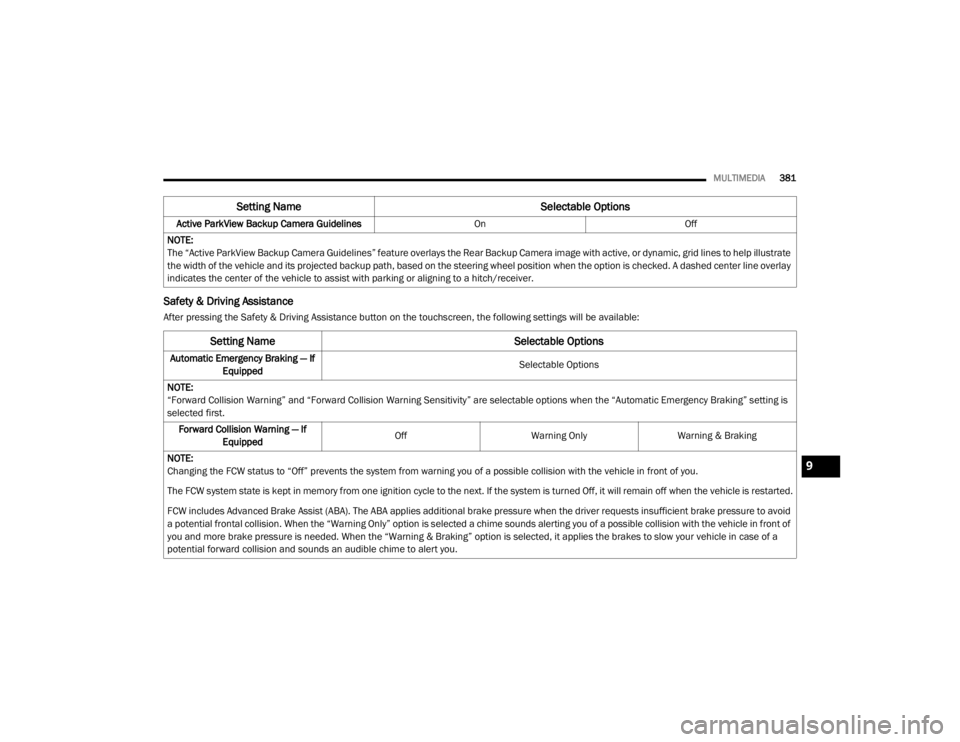
After pressing the Safety & Driving Assistance button on the touchscreen, the following settings will be available:Active ParkView Backup Camera Guidelines
OnOff
NOTE:
The “Active ParkView Backup Camera Guidelines” feature overlays the Rear Backup Camera image with active, or dynamic, grid lines to help illustrate
the width of the vehicle and its projected backup path, based on the steering wheel position when the option is checked. A dashed center line overlay
indicates the center of the vehicle to assist with parking or aligning to a hitch/receiver.
Setting Name Selectable Options
Setting NameSelectable Options
Automatic Emergency Braking — If
Equipped Selectable Options
NOTE:
“Forward Collision Warning” and “Forward Collision Warning Sensitivity” are selectable options when the “Automatic Emergency Braking” setting is
selected first. Forward Collision Warning — If Equipped Off
Warning Only Warning & Braking
NOTE:
Changing the FCW status to “Off” prevents the system from warning you of a possible collision with the vehicle in front of you.
The FCW system state is kept in memory from one ignition cycle to the next. If the system is turned Off, it will remain off when the vehicle is restarted.
FCW includes Advanced Brake Assist (ABA). The ABA applies additional brake pressure when the driver requests insufficient brake pressure to avoid
a potential frontal collision. When the “Warning Only” option is selected a chime sounds alerting you of a possible collision with the vehicle in front of
you and more brake pressure is needed. When the “Warning & Braking” option is selected, it applies the brakes to slow your vehicle in case of a
potential forward collision and sounds an audible chime to alert you.
9
20_WD_OM_EN_USC_t.book Page 381
Page 450 of 464

448
INDEX
A
About Your Brakes......................................... 350Adaptive Cruise Control (ACC)
(Cruise Control).............................................. 208Adding Engine Coolant (Antifreeze)............... 322Adding Fuel.................................................... 238Additives, Fuel............................................... 352Adjust
Down.................................................... 38, 39Forward................................................ 38, 39Rearward.............................................. 38, 39Up......................................................... 38, 39Air BagAir Bag Operation...................................... 156Air Bag Warning Light................................ 153Driver Knee Air Bag................................... 157Enhanced Accident Response......... 161, 293Event Data Recorder (EDR)....................... 293If Deployment Occurs................................ 160Knee Impact Bolsters................................ 156Maintaining Your Air Bag System.............. 161Maintenance............................................. 161Redundant Air Bag Warning Light.............154Side Air Bags............................................. 157Transporting Pets...................................... 180Air Bag Light............................... 110, 153, 181
Air Cleaner, Engine (Engine Air Cleaner
Filter)............................................................ 311Air Conditioner Maintenance........................ 313Air Conditioner Refrigerant........................... 313Air Conditioner System................................. 313Air Conditioning................................................ 68Rear............................................................. 66Air Conditioning Filter.................... 70, 311, 314Air Conditioning System................................... 69Air Conditioning, Operating Tips....................... 69Air Filter........................................................ 311Air PressureTires......................................................... 336AlarmArm The System................................... 23, 24Disarm The System..................................... 24Rearm The System...................................... 24Security Alarm.......................................... 113Alarm SystemSecurity Alarm............................................. 23All Wheel Drive (AWD)................................... 199Alterations/ModificationsVehicle......................................................... 11Android Auto................................................. 442Antifreeze (Engine Coolant)........ 322, 355, 356Disposal................................................... 323
Anti-Lock Brake System (ABS)....................... 122Anti-Lock Warning Light................................ 116Apple CarPlay................................................ 442Arming SystemSecurity Alarm.............................................23Assist, Hill Start............................................. 128Audio Settings............................................... 402Audio Systems (Radio).................................. 361Auto Down Power Windows..............................71Automatic Headlights.......................................52Automatic High Beams.....................................51Automatic Temperature Control (ATC)..............69Automatic Transmission....................... 184, 193Adding Fluid..................................... 326, 360Fluid And Filter Change............................. 326Fluid Change............................................. 326Fluid Level Check...................................... 326Fluid Type............................... 326, 358, 360Special Additives...................................... 326Automatic Transmission Limp Home Mode... 197Aux Mode...................................................... 405Auxiliary Driving Systems.............................. 131Auxiliary Electrical Outlet (Power Outlet)..........87Auxiliary Power Outlet......................................87Axle Fluid....................................................... 358Axle Lubrication............................................ 360
20_WD_OM_EN_USC_t.book Page 448
Page 455 of 464

453
Locks Child Protection
........................................... 29Manual........................................................ 24Power Door.................................................. 25Lubrication, Body........................................... 316Lug Nuts/Bolts.............................................. 350Luggage Carrier............................................... 90
M
Maintenance................................................... 74Maintenance Free Battery............................. 307Maintenance Schedule........................ 294, 298Malfunction Indicator Light
(Check Engine).................................... 113, 121ManualService...................................................... 447Memory Feature (Memory Seats).................... 30Memory Seat................................................... 30Memory Seats And Radio................................ 30Methanol....................................................... 353Mirrors............................................................. 47Electric Remote........................................... 49Exterior Folding........................................... 48Heated........................................................ 49Outside........................................................ 48Rearview..................................... 47, 48, 261Vanity.......................................................... 50Modifications/AlterationsVehicle........................................................ 11
Monitor, Tire Pressure System...................... 138Mopar Parts.................................................. 446Multi-Function Control Lever............................ 50
N
New Vehicle Break-In Period......................... 188
O
Occupant Restraints..................................... 143Octane Rating, Gasoline (Fuel)............ 351, 359Oil Change Indicator..................................... 101Reset........................................................ 101Oil Filter, Change.......................................... 311Oil Filter, Selection........................................ 311Oil Pressure Light.......................................... 112Oil, Engine............................................ 308, 359Capacity........................................... 355, 356Change Interval............................... 308, 309Dipstick.................................................... 307Disposal................................................... 311Filter................................................ 311, 359Filter Disposal........................................... 311Identification Logo.................................... 310Materials Added To.................................. 311Pressure Warning Light............................ 112Recommendation................... 309, 355, 356Synthetic.................................................. 311Viscosity........................ 309, 310, 355, 356
Onboard Diagnostic System.......................... 120Opener, Garage Door (Homelink).....................78Operating Precautions.................................. 120Operator ManualOwner's Manual................................. 10, 447Outside Rearview Mirrors.................................48Overheating, Engine...................................... 287
P
Paint Care..................................................... 346Parking Brake............................................... 190ParkSense System, Rear...................... 221, 227Passive Entry....................................................26Performance................................................. 104Pets............................................................... 180Pinch Protection...............................................74Placard, Tire And Loading Information.......... 332PowerBrakes...................................................... 350Distribution Center (Fuses)....................... 270Door Locks...................................................25Inverter........................................................90Liftgate........................................................75Mirrors.........................................................49Outlet (Auxiliary Electrical Outlet).................87Seats...........................................................37Steering........................................... 202, 358Sunroof........................................................73Tilt/Telescoping Steering Column................46Windows......................................................71
11
20_WD_OM_EN_USC_t.book Page 453