steering DODGE JOURNEY 2020 Owner's Manual
[x] Cancel search | Manufacturer: DODGE, Model Year: 2020, Model line: JOURNEY, Model: DODGE JOURNEY 2020Pages: 396, PDF Size: 25.53 MB
Page 140 of 396
138 SAFETY
(Continued)
Your vehicle may also be designed to perform
any of these other functions in response to the
Enhanced Accident Response System:
Turn off the Fuel Filter Heater, Turn off the
HVAC Blower Motor, Close the HVAC Circula-
tion Door
Cut off battery power to the:
Engine
Electric Motor (if equipped)
Electric power steering
Brake booster
Electric park brake
Automatic transmission gear selector
Horn
Front wiper
Headlamp washer pump NOTE:
After an accident, remember to cycle the ignition
t o
the STOP (OFF/LOCK) position and remove the
key from the ignition switch to avoid draining the
battery. Carefully check the vehicle for fuel leaks
in the engine compartment and on the ground
near the engine compartment and fuel tank
before resetting the system and starting the
engine. If there are no fuel leaks or damage to
the vehicle electrical devices (e.g. headlights)
after an accident, reset the system by following
the procedure described below. If you have any
doubt, contact an authorized dealer.
Enhanced Accident Response System
Reset Procedure
In order to reset the Enhanced Accident
Response System functions after an event, the
ignition switch must be changed from ignition
START or ON/RUN to ignition OFF. Carefully
check the vehicle for fuel leaks in the engine
compartment and on the ground near the
engine compartment and fuel tank before
resetting the system and starting the engine.
Maintaining Your Air Bag System
WARNING!
Modifications to any part of the air bag
system could cause it to fail when you need
it. You could be injured if the air bag system
is not there to protect you. Do not modify
the components or wiring, including adding
any kind of badges or stickers to the
steering wheel hub trim cover or the upper
passenger side of the instrument panel.
Do not modify the front bumper, vehicle
bo
dy structure, or add aftermarket side
steps or running boards.
It is dangerous to try to repair any part of
the air bag system yourself. Be sure to tell
anyone who works on your vehicle that it
has an air bag system.
Page 170 of 396
168 STARTING AND OPERATING
POWER STEERING
The standard power steering system will give
you good vehicle response and increased ease
of maneuverability in tight spaces. The system
will provide mechanical steering capability if
power assist is lost.
If for some reason the power assist is
in
terrupted, it will still be possible to steer
your vehicle. Under these conditions, you will
o b
serve a substantial increase in steering
effort, especially at very low vehicle speeds
and during parking maneuvers.
NOTE:
Increased noise levels at the end of the
steering wheel travel are considered normal
and do not indicate that there is a problem
with the power steering system.
Upon initial start-up in cold weather, the
power steering pump may make noise for a
short amount of time. This is due to the cold,
thick fluid in the steering system. This noise
should be considered normal, and it does not
in any way damage the steering system.
POWER STEERING FLUID CHECK
Checking the power steering fluid level at a
defined service interval is not required. The fluid
should only be checked if a leak is suspected,
abnormal noises are apparent, and/or the
system is not functioning as anticipated.
Coordinate inspection efforts through an
authorized dealer. If necessary, add fluid to restore to the proper
in
dicated level. With a clean cloth, wipe any
spilled fluid from all surfaces. Refer to “Fluids
And Lubricants” in “Technical Specifications”
for the correct fluid type.
SPEED CONTROL — IF EQUIPPED
When engaged, the Speed Control takes over
accelerator operations at speeds greater than
25 mph (40 km/h).
The Speed Control buttons are located on the
r i
ght side of the steering wheel.
CAUTION!
Prolonged operation of the steering system at
the end of the steering wheel travel will
increase the steering fluid temperature and it
should be avoided when possible. Damage to
the power steering pump may occur.
WARNING!
Fluid level should be checked on a level
surface and with the engine off to prevent
injury from moving parts and to ensure
accurate fluid level reading. Do not overfill.
Use only manufacturer's recommended
power steering fluid.
CAUTION!
Do not use chemical flushes in your power
steering system as the chemicals can
damage your power steering components.
Such damage is not covered by the New
Vehicle Limited Warranty.
Page 181 of 396
STARTING AND OPERATING 179
Gross Trailer Weight (GTW)
The GTW is the weight of the trailer plus the
weight of all cargo, consumables, and
equipment (permanent or temporary) loaded in
or on the trailer in its "loaded and ready for
operation" condition.
The recommended way to measure GTW is to
pu
t your fully loaded trailer on a vehicle scale.
The entire weight of the trailer must be
supported by the scale.
Gross Combination Weight Rating (GCWR)
The GCWR is the total allowable weight of your
vehicle and trailer when weighed in
combination.
Gross Axle Weight Rating (GAWR)
The GAWR is the maximum capacity of the front
and rear axles. Distribute the load over the front
and rear axles evenly. Make sure that you do
not exceed either front or rear GAWR. Refer to
“Vehicle Loading/Vehicle Certification Label” in
“Starting And Operating” for further
information.
Tongue Weight (TW)
The Tongue Weight is the downward force
exerted on the hitch ball by the trailer. You must
consider this as part of the load on your vehicle.
Trailer Frontal Area
The frontal area is the maximum height multiplied
by the maximum width of the front of a trailer.
Trailer Sway Control — Electronic
Refer to “Safety Features/Trailer Sway Control
(TSC)” in “Safety” for further information.
Trailer Sway Control — Mechanical
The Trailer Sway Control (TSC) is a telescoping
link that can be installed between the hitch
receiver and the trailer tongue that typically
provides adjustable friction associated with the
telescoping motion to dampen any unwanted
trailer swaying motions while traveling.
Weight-Carrying Hitch
A weight-carrying hitch supports the trailer
Tongue Weight, just as if it were luggage located
at a hitch ball or some other connecting point of
the vehicle. These kinds of hitches are the most
popular on the market today and they are
commonly used to tow small and medium sized
trailers.
Weight-Distributing Hitch
A weight-distributing system works by applying
leverage through spring (load) bars. They are
typically used for heavier loads to distribute
trailer Tongue Weight to the tow vehicle's front
axle and the trailer axle(s). When used in
accordance with the manufacturer's directions, it
provides for a more level ride, offering more
consistent steering and brake control thereby
enhancing towing safety. The addition of a
friction/hydraulic sway control also dampens
sway caused by traffic and crosswinds and
contributes positively to tow vehicle and trailer
stability. Trailer sway control and a weight
distributing (load equalizing) hitch are
recommended for heavier Tongue Weights (TW)
and may be required depending on vehicle and
trailer configuration/loading to comply with Gross
Axle Weight Rating (GAWR) requirements.
WARNING!
It is important that you do not exceed the
maximum front or rear GAWR. A dangerous
driving condition can result if either rating is
exceeded. You could lose control of the
vehicle and have a collision.
5
Page 184 of 396
182 STARTING AND OPERATING
(Continued)
Consider the following items when computing
the weight on the rear axle of the vehicle:
The Tongue Weight of the trailer.
The weight of any other type of cargo or
equipment put in or on your vehicle.
The weight of the driver and all passengers.
NOTE:
Remember that everything put into or on
the trailer adds to the load on your vehicle.
Also, additional factory-installed options or
d e
aler-installed options must be considered as
part of the total load on your vehicle. Refer to
the “Tire And Loading Information” placard for
the maximum combined weight of occupants
and cargo for your vehicle.
TOWING REQUIREMENTS
To promote proper break-in of your new vehicle
drivetrain components the following guidelines
are recommended:
WARNING!
Improper towing can lead to a collision. Follow
these guidelines to make your trailer towing
as safe as possible:
Make certain that the load is secured in the
trailer and that it will not shift during travel.
When trailering cargo that is not fully
secured, dynamic load shifts can occur that
may be difficult for the driver to control. You
could lose control of your vehicle and have
a collision.
When hauling cargo or towing a trailer, do
not overload your vehicle or trailer. Over -
loading can cause a loss of control, poor
p e
rformance, or damage to brakes, axle,
engine, transmission, steering, suspension,
chassis structure, or tires.
Safety chains must always be used
between your vehicle and trailer. Always
connect the chains to the frame or hook
retainers of the vehicle hitch. Cross the
chains under the trailer tongue and allow
enough slack for turning corners.
Vehicles with trailers should not be parked
on a grade. When parking, apply the
parking brake on the tow vehicle. Put the
tow vehicle automatic transmission in
PARK. Always block or "chock" the trailer
wheels.
Total weight must be distributed between
the tow vehicle and the trailer such that the
following four ratings are not exceeded:
GVWR
GCWR
GAWR
Tongue weight rating for the trailer
hitch utilized.
WARNING! (Continued)
Page 194 of 396
192 IN CASE OF EMERGENCY
Front Fog Lamp
NOTE:
Turn the steering wheel to the right if replacing
t h
e left front fog lamp or to the left if replacing
the right front fog lamp to allow for easier
access to the front of the wheel well.
1. Remove the fasteners retaining the front l
ower wheel well access panel and remove
the access panel.
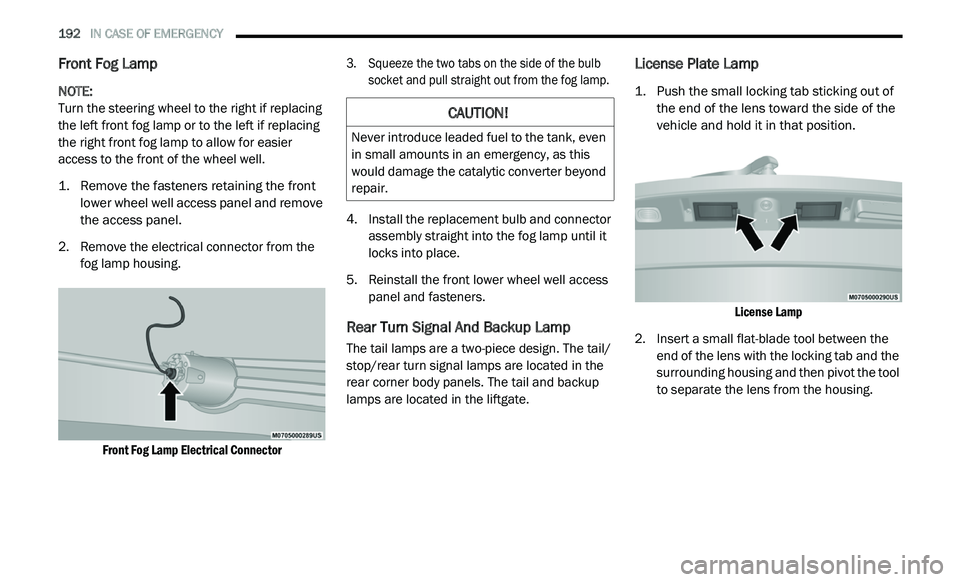
2. R emove the electrical connector from the
f
og lamp housing.
Front Fog Lamp Electrical Connector
3. S
queeze the two tabs on the side of the bulb
s
ocket and pull straight out from the fog lamp.
4. I nstall the replacement bulb and connector
a
ssembly straight into the fog lamp until it
locks into place.
5. R einstall the front lower wheel well access
p
anel and fasteners.
Rear Turn Signal And Backup Lamp
The tail lamps are a two-piece design. The tail/
stop/rear turn signal lamps are located in the
rear corner body panels. The tail and backup
lamps are located in the liftgate.
License Plate Lamp
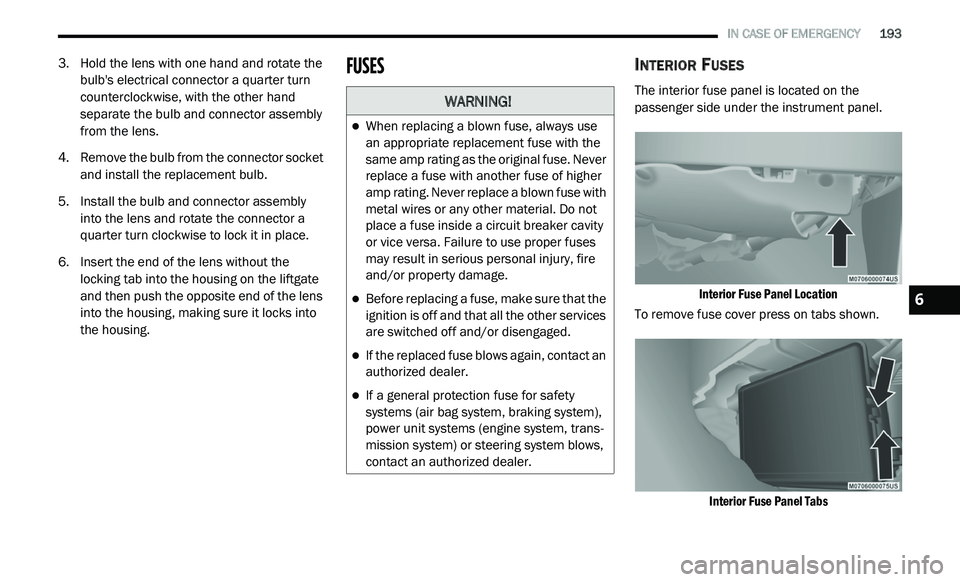
1. Push the small locking tab sticking out of the end of the lens toward the side of the
vehicle and hold it in that position.
License Lamp
2. I nsert a small flat-blade tool between the
e
nd of the lens with the locking tab and the
surrounding housing and then pivot the tool
to separate the lens from the housing.
CAUTION!
Never introduce leaded fuel to the tank, even
in small amounts in an emergency, as this
would damage the catalytic converter beyond
repair.
Page 195 of 396
IN CASE OF EMERGENCY 193
3. Hold the lens with one hand and rotate the
bulb's electrical connector a quarter turn
counterclockwise, with the other hand
separate the bulb and connector assembly
from the lens.
4. R emove the bulb from the connector socket
a
nd install the replacement bulb.
5. I nstall the bulb and connector assembly
i
nto the lens and rotate the connector a
quarter turn clockwise to lock it in place.
6. I nsert the end of the lens without the
l
ocking tab into the housing on the liftgate
and then push the opposite end of the lens
into the housing, making sure it locks into
the housing.
FUSESINTERIOR FUSES
The interior fuse panel is located on the
passenger side under the instrument panel.
Interior Fuse Panel Location
To remove fuse cover press on tabs shown.
Interior Fuse Panel Tabs
WARNING!
When replacing a blown fuse, always use
an appropriate replacement fuse with the
same amp rating as the original fuse. Never
replace a fuse with another fuse of higher
amp rating. Never replace a blown fuse with
metal wires or any other material. Do not
place a fuse inside a circuit breaker cavity
or vice versa. Failure to use proper fuses
may result in serious personal injury, fire
and/or property damage.
Before replacing a fuse, make sure that the
ignition is off and that all the other services
are switched off and/or disengaged.
If the replaced fuse blows again, contact an
authorized dealer.
If a general protection fuse for safety
systems (air bag system, braking system),
power unit systems (engine system, trans -
mission system) or steering system blows,
c o
ntact an authorized dealer.
6
Page 197 of 396
IN CASE OF EMERGENCY 195
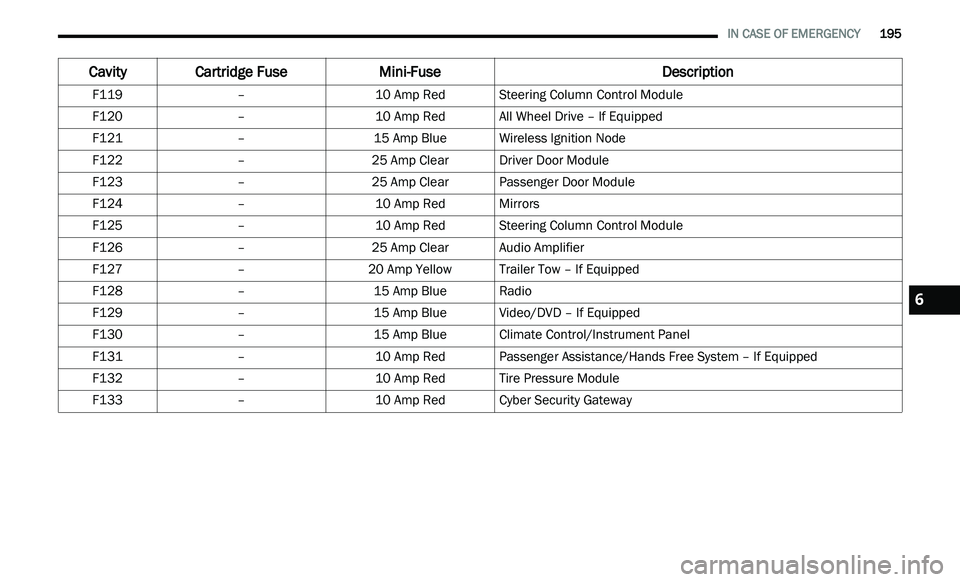
F119 –10 Amp RedSteering Column Control Module
F120 –10 Amp RedAll Wheel Drive – If Equipped
F121 –15 Amp BlueWireless Ignition Node
F122 –25 Amp ClearDriver Door Module
F123 –25 Amp ClearPassenger Door Module
F124 –10 Amp RedMirrors
F125 –10 Amp RedSteering Column Control Module
F126 –25 Amp ClearAudio Amplifier
F127 –20 Amp Yellow Trailer Tow – If Equipped
F128 –15 Amp BlueRadio
F129 –15 Amp BlueVideo/DVD – If Equipped
F130 –15 Amp BlueClimate Control/Instrument Panel
F131 –10 Amp RedPassenger Assistance/Hands Free System – If Equipped
F132 –10 Amp RedTire Pressure Module
F133 –10 Amp RedCyber Security Gateway
Cavity Cartridge Fuse Mini-FuseDescription
6
Page 200 of 396
198 IN CASE OF EMERGENCY
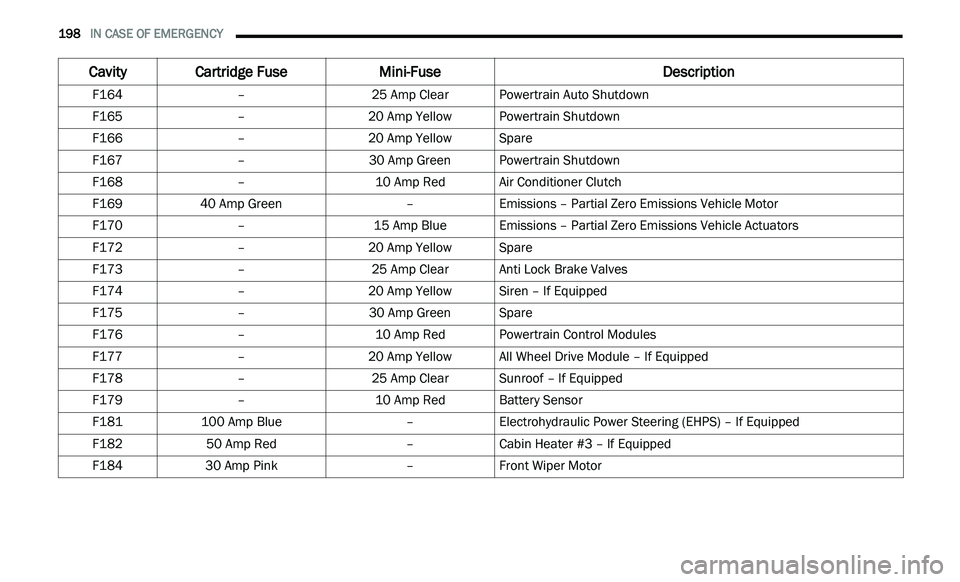
F164 –25 Amp ClearPowertrain Auto Shutdown
F165 –20 Amp Yellow Powertrain Shutdown
F166 –20 Amp Yellow Spare
F167 –30 Amp GreenPowertrain Shutdown
F168 –10 Amp RedAir Conditioner Clutch
F169 40 Amp Green –Emissions – Partial Zero Emissions Vehicle Motor
F170 –15 Amp BlueEmissions – Partial Zero Emissions Vehicle Actuators
F172 –20 Amp Yellow Spare
F173 –25 Amp ClearAnti Lock Brake Valves
F174 –20 Amp Yellow Siren – If Equipped
F175 –30 Amp GreenSpare
F176 –10 Amp RedPowertrain Control Modules
F177 –20 Amp Yellow All Wheel Drive Module – If Equipped
F178 –25 Amp ClearSunroof – If Equipped
F179 –10 Amp RedBattery Sensor
F181 100 Amp Blue –Electrohydraulic Power Steering (EHPS) – If Equipped
F182 50 Amp Red –Cabin Heater #3 – If Equipped
F184 30 Amp Pink –Front Wiper Motor
Cavity Cartridge Fuse Mini-FuseDescription
Page 213 of 396
IN CASE OF EMERGENCY 211
FREEING A STUCK VEHICLE
If your vehicle becomes stuck in mud, sand, or
snow, it can often be moved using a rocking motion.
Turn the steering wheel right and left to clear the
area around the front wheels. Then, shift back and
forth between DRIVE (D) and REVERSE (R) while
gently pressing the accelerator. Use the least
amount of accelerator pedal pressure that will
maintain the rocking motion, without spinning the
wheels or racing the engine.
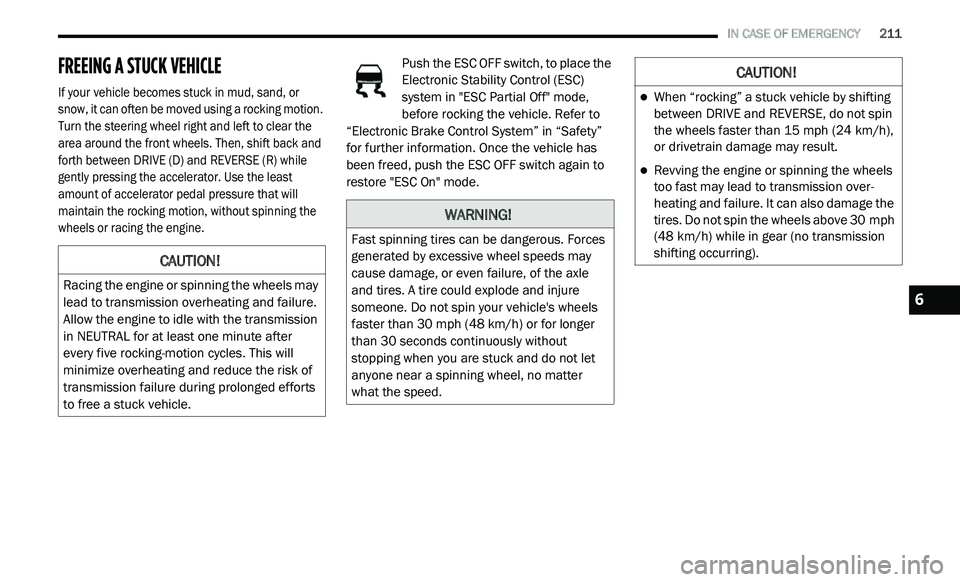
Push the ESC OFF switch, to place the
Electronic Stability Control (ESC)
s
y
stem in "ESC Partial Off" mode,
before rocking the vehicle. Refer to
“Electronic Brake Control System” in “Safety”
for further information. Once the vehicle has
been freed, push the ESC OFF switch again to
restore "ESC On" mode.
CAUTION!
Racing the engine or spinning the wheels may
lead to transmission overheating and failure.
Allow the engine to idle with the transmission
in NEUTRAL for at least one minute after
every five rocking-motion cycles. This will
minimize overheating and reduce the risk of
transmission failure during prolonged efforts
to free a stuck vehicle.
WARNING!
Fast spinning tires can be dangerous. Forces
generated by excessive wheel speeds may
cause damage, or even failure, of the axle
and tires. A tire could explode and injure
someone. Do not spin your vehicle's wheels
faster than 30
mph (48 km/h) or for longer
t h
an 30 seconds continuously without
stopping when you are stuck and do not let
anyone near a spinning wheel, no matter
what the speed.
CAUTION!
When “rocking” a stuck vehicle by shifting
between DRIVE and REVERSE, do not spin
the wheels faster than 15 mph (24 km/h),
o r
drivetrain damage may result.
Revving the engine or spinning the wheels
too fast may lead to transmission over -
heating and failure. It can also damage the
t i
res. Do not spin the wheels above 30 mph
( 4
8 km/h) while in gear (no transmission
s h
ifting occurring).
6
Page 218 of 396
216
SERVICING AND MAINTENANCE
SCHEDULED SERVICING
Your vehicle is equipped with an automatic
oil change indicator system. The oil change
i n
dicator system will remind you that it is time to
take your vehicle in for scheduled maintenance.
Based on engine operation conditions, the
oil change indicator message will illuminate.
This means that service is required for your
v e
hicle. Operating conditions such as frequent
short-trips, trailer tow, extremely hot or cold
ambient temperatures, and E-85 fuel usage will
influence when the “Change Oil” or “Oil Change
Required” message is displayed. Severe
operating conditions can cause the change oil
message to illuminate as early as 3,500 miles
(5,600 km) since last reset. Have your vehicle
s e
rviced as soon as possible, within the next
500 miles (805 km).
An authorized dealer will reset the oil change
i
n
dicator message after completing the
scheduled oil change. If a scheduled oil change
is performed by someone other than an
authorized dealer, the message can be reset
by referring to the steps described under
“ I
nstrument Cluster Display” in “Getting To
Know Your Instrument Panel” for further
information.
NOTE:
Under no circumstances should oil change
i n
tervals exceed 10,000 miles (16,000 km),
1 2
months or 350 hours of engine run time,
w h
ichever comes first. The 350 hours of engine
run or idle time is generally only a concern for
fleet customers.
Severe Duty All Models
Change engine oil at 4,000 miles (6,500 km) or
3 5
0 hours of engine run time if the vehicle is
operated in a dusty and off road environment or
is operated predominately at idle or only very
low engine RPM. This type of vehicle use is
considered Severe Duty. Once A Month Or Before A Long Trip:
Check engine oil level.
Check windshield washer fluid level.
Check tire pressure and look for unusual
wear or damage. Rotate tires at the first sign
of irregular wear, even if it occurs before the
oil indicator system turns on.
Check the fluid levels of the coolant reservoir,
brake master cylinder, power steering, and
transmission (4-speed only) and fill as
needed.
Check function of all interior and exterior
lights.