oil DODGE RAM 1500 1998 2.G Workshop Manual
[x] Cancel search | Manufacturer: DODGE, Model Year: 1998, Model line: RAM 1500, Model: DODGE RAM 1500 1998 2.GPages: 2627
Page 2228 of 2627

FRONT AND REAR CASES
Inspect the cases for wear and damage.
Check case condition. If leaks were a problem, look
for gouges and severe scoring of case sealing sur-
faces. Also make sure the front case mounting studs
are in good condition.
Check the front case mounting studs and vent
tube. The tube can be secured with LoctiteŸ 271 or
680 if loose. The stud threads can be cleaned up with
a die if necessary. Also check condition of the fill/
drain plug threads in the rear case. The threads can
be repaired with a thread chaser or tap if necessary.
Or the threads can be repaired with Helicoiltstain-
less steel inserts if required.
OIL PUMP/OIL PICKUP
Examine the oil pump pickup parts. Replace the
pump if any part appears to be worn or damaged. Do
not disassemble the pump as individual parts are not
available. The pump is only available as a complete
assembly. The pickup screen, hose, and tube are the
only serviceable parts and are available separately.
ASSEMBLY
BEARINGS AND SEALS
(1) Remove the input shaft bearing (Fig. 42) from
the front case with suitable snap-ring pliers.
(2) Transfer the retaining ring to the new bearing
if necessary and install the bearing into the front
case.
(3) Remove the front output shaft bearing retain-
ing ring from inside the front case half.
(4) Using Installer 6436 and Handle C-4171,
remove front output shaft bearing.(5) Start front output shaft bearing in case. Then
seat bearing with Handle C-4171 and Installer 6953
(Fig. 43).
(6) Install front output shaft bearing retaining
ring.
(7) Remove the front output shaft rear bearing
with the screw and jaws from Remover L-4454 and
Cup 8148 (Fig. 44).
Fig. 42 Remove Input Gear Bearing
1 - INPUT GEAR BEARING
2 - FRONT CASE
Fig. 43 Install Front Output Shaft Bearing
1 - FRONT CASE
2 - INSTALLER 6953
3 - HANDLE C-4171
Fig. 44 Front Output Shaft Rear Bearing Removal
1 - REAR CASE
2 - SPECIAL TOOL L-4454-1 AND L-4454-3
3 - SPECIAL TOOL 8148
DRTRANSFER CASE - NV244 GENII 21 - 525
TRANSFER CASE - NV244 GENII (Continued)
Page 2236 of 2627

OIL PUMP AND REAR CASE
Lubricate the oil pump components with transmis-
sion fluid before installation. Prime the oil pickup
tube by pouring a little oil into the tube before instal-
lation.
CAUTION: Do not remove the bolts holding the oil
pump cover to the rear case half. The oil pump
cover is aligned to the rear output shaft inner bear-
ing race and will become mis-aligned if the bolts
are loosened. If the transfer case failure has gener-
ated any debris which may have become trapped in
the oil pump. the rear case and oil pump assembly
MUST be replaced.
(1) Install new o-ring in pickup tube inlet of oil
pump, if necessary.
(2) Insert oil pickup tube into the oil pump.
(3) Apply bead of MopartGasket Maker, or equiv-
alent, to mating surface of front case. Keep sealer
bead width to maximum of 3/16 inch. Do not use
excessive amount of sealer as excess will be displaced
into case interior.
(4) Align oil pump with mainshaft and align shift
rail with bore in rear case. Then install rear case and
oil pump assembly (Fig. 73).
(5) Install rear output bearing snap-ring (Fig. 74)
to output shaft.
(6) Install 4-5 rear case-to front case bolts (Fig. 75)
to hold rear case in position. Tighten bolts snug but
not to specified torque at this time.
CAUTION: Verify that shift rail, and case alignment
dowels are seated before installing any bolts. Case
could be cracked if shaft rail or dowels are mis-
aligned.(7) Apply MopartLock 'n Seal Adhesive to remain-
der of rear case-to-front case bolt threads and install
bolts. Tighten bolts to 25-28 N´m (18-21 ft. lbs.),
Fig. 73 Install Rear Case
1 - REAR CASE
2 - FRONT CASE
Fig. 74 Install Output Shaft Retaining Ring
1 - REAR OUTPUT SHAFT
2 - OUTPUT SHAFT BEARING
3 - RETAINING RING
4 - TRANSFER CASE
Fig. 75 Install Case Bolts
1 - REAR CASE
2 - FRONT CASE
3 - BOLT
DRTRANSFER CASE - NV244 GENII 21 - 533
TRANSFER CASE - NV244 GENII (Continued)
Page 2238 of 2627
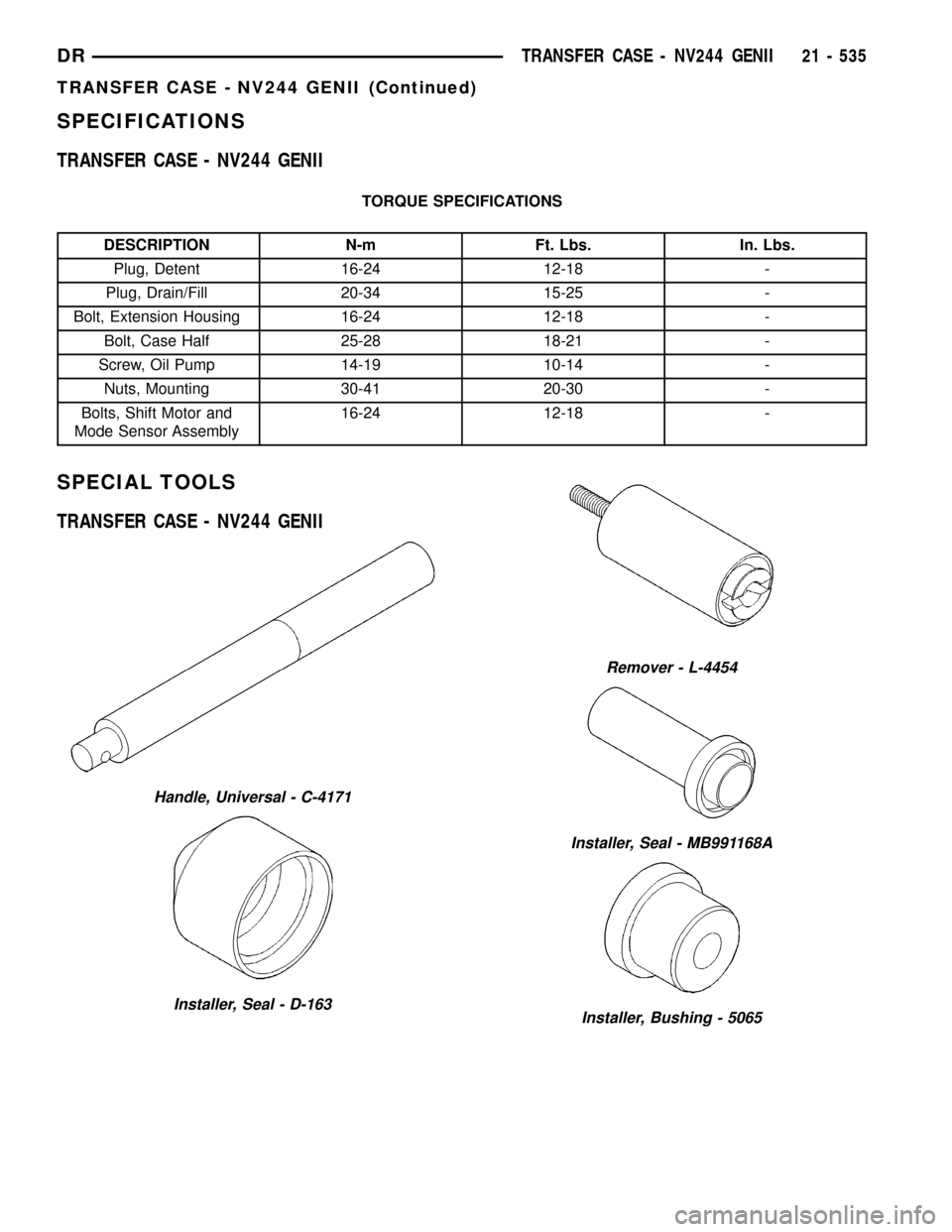
SPECIFICATIONS
TRANSFER CASE - NV244 GENII
TORQUE SPECIFICATIONS
DESCRIPTION N-m Ft. Lbs. In. Lbs.
Plug, Detent 16-24 12-18 -
Plug, Drain/Fill 20-34 15-25 -
Bolt, Extension Housing 16-24 12-18 -
Bolt, Case Half 25-28 18-21 -
Screw, Oil Pump 14-19 10-14 -
Nuts, Mounting 30-41 20-30 -
Bolts, Shift Motor and
Mode Sensor Assembly16-24 12-18 -
SPECIAL TOOLS
TRANSFER CASE - NV244 GENII
Handle, Universal - C-4171
Installer, Seal - D-163
Remover - L-4454
Installer, Seal - MB991168A
Installer, Bushing - 5065
DRTRANSFER CASE - NV244 GENII 21 - 535
TRANSFER CASE - NV244 GENII (Continued)
Page 2249 of 2627

(8) Remove rear extension housing (Fig. 6). Tap
extension once or twice with a plastic mallet to break
sealer bead and loosen it.
OIL PUMP AND REAR CASE
(1) Disengage the oil pump pick-up tube (Fig. 7)
from the oil pump.
NOTE: The oil pump pick-up tube seals to the oil
pump with an o-ring. Verify that the o-ring was
removed with the tube and is in good condition.
Replace the o-ring if necessary.(2) Remove the oil pump (Fig. 8).
(3) Remove rear case-to-front case bolts (Fig. 9).
Fig. 7 Disengage The Oil Pick-up From Oil Pump
1 - OIL PUMP
2 - OIL PICK-UP TUBE
Fig. 6 Remove Extension Housing
1 - REAR CASE HALF
2 - EXTENSION HOUSING
Fig. 8 Remove Oil Pump
1 - REAR CASE HALF
2 - REAR OUTPUT SHAFT
3 - OIL PUMP
Fig. 9 Remove Case Half Bolts
1 - FRONT CASE HALF
2 - REAR CASE HALF
3 - BOLTS
21 - 546 TRANSFER CASE - NV273DR
TRANSFER CASE - NV273 (Continued)
Page 2251 of 2627

FRONT OUTPUT SHAFT AND DRIVE CHAIN
(1) Remove the oil pick-up tube (Fig. 14) and
screen from the front case half.
(2) Remove the front output shaft drive sprocket
retaining ring (Fig. 15).
(3) Remove the rear output shaft drive sprocket
retaining ring (Fig. 16).(4) Pull front sprocket (Fig. 17), rear sprocket, and
chain upward until clear of the front and rear output
shaft sprocket splines.
(5) Remove chain and sprockets as an assembly.
Fig. 14 Remove Oil Pick-Up Tube and Screen
1 - FRONT CASE HALF
2 - OIL SCREEN
3 - PICK-UP TUBE
Fig. 15 Remove Front Output Shaft Sprocket
Retaining Ring
1 - FRONT OUTPUT SHAFT
2 - DRIVE SPROCKET
3 - RETAINING RING
Fig. 16 Remove Rear Output Shaft Sprocket
Retaining Ring
1 - REAR OUTPUT SHAFT
2 - DRIVE SPROCKET
3 - RETAINING RING
Fig. 17 Remove Drive Chain and Sprockets
1 - FRONT CASE HALF
2 - CHAIN
3 - DRIVE SPROCKETS
21 - 548 TRANSFER CASE - NV273DR
TRANSFER CASE - NV273 (Continued)
Page 2257 of 2627

(8) Remove bottom tabbed thrust washer from low
range planetary (Fig. 38).
CLEANING
Clean the transfer case parts with a standard
parts cleaning solvent. Remove all traces of sealer
from the cases and retainers with a scraper and
3MŸ all purpose cleaner. Use compressed air to
remove solvent residue from oil feed passages in the
case halves, retainers, gears, and shafts.
INSPECTION
MAINSHAFT/SPROCKET/HUB INSPECTION
Inspect the splines on the hub and shaft and the
teeth on the sprocket. Minor nicks and scratches can
be smoothed with an oilstone. However, replace any
part that is damaged.
Check the contact surfaces in the sprocket bore
and on the mainshaft. Minor nicks and scratches can
be smoothed with 320-400 grit emery cloth but do not
try to salvage the shaft if nicks or wear is severe.
INPUT GEAR AND PLANETARY CARRIER
Check the teeth on the gear (Fig. 39). Minor nicks
can be dressed off with an oilstone but replace the
gear if any teeth are broken, cracked, or chipped. The
bearing surface on the gear can be smoothed with
300-400 grit emery cloth if necessary.
Examine the carrier body and pinion gears for
wear or damage. Check the pinion gear thrust wash-
ers on the pinon pins for damage. The carrier will
have to be replaced as an assembly if the body, pin-
ion pins, or pinion gears are damaged.
Check the lock ring and both thrust washers for
wear or cracks. Replace them if necessary. Also
replace the lock retaining ring if bent, distorted, or
broken.
Fig. 39 Input Gear And Carrier Components
1 - PLANETARY CARRIER 4 - CARRIER LOCK RING
2 - REAR THRUST WASHER 5 - CARRIER LOCK RETAINING RING
3 - FRONT THRUST WASHER 6 - INPUT GEAR
Fig. 38 Remove Bottom Input Gear Thrust Plate
1 - PLANETARY
2 - THRUST PLATE
21 - 554 TRANSFER CASE - NV273DR
TRANSFER CASE - NV273 (Continued)
Page 2258 of 2627

SHIFT FORKS/HUBS/SLEEVES
Check condition of the shift forks and mode fork
shift rail (Fig. 40). Minor nicks on the shift rail can
be smoothed with 320-400 grit emery cloth.
Inspect the shift fork wear pads (Fig. 41). The
mode and range fork pads are serviceable and can be
replaced if necessary.
Check both of the sleeves for wear or damage,
especially on the interior teeth. Replace the sleeves if
wear or damage is evident.
REAR EXTENSION HOUSING
Inspect the extension housing seal and bushing.
Replace both components if either show any sign of
wear or damage.
FRONT OUTPUT SHAFT AND DRIVE CHAIN
Inspect the shaft threads, sprocket teeth, and bear-
ing surfaces. Minor nicks on the teeth can be
smoothed with an oilstone. Use 320-400 grit emery to
smooth minor scratches on the shaft bearing sur-
faces. Rough threads on the shaft can be chased if
necessary. Replace the shaft if the threads are dam-
aged, bearing surfaces are scored, or if any sprocket
teeth are cracked or broken.
Examine the drive chain and shaft bearings.
Replace the chain and both sprockets if the chain is
stretched, distorted, or if any of the links bind.
Replace the bearings if rough, or noisy.
LOW RANGE ANNULUS GEAR
Inspect annulus gear condition carefully. The gear
is only serviced as part of the front case. If the gear
is damaged, it will be necessary to replace the gear
and front case as an assembly. Do not attempt to
remove the gear (Fig. 42)
FRONT AND REAR CASES
Inspect the cases for wear and damage.
Check case condition. If leaks were a problem, look
for gouges and severe scoring of case sealing sur-
faces. Also make sure the front case mounting studs
are in good condition.
Fig. 40 Shift Forks
1 - RANGE FORK
2 - MODE FORK AND RAIL
3 - MODE SPRING
Fig. 41 Shift Fork And Wear Pad Locations
1 - RANGE FORK
2 - MODE FORK
3 - WEAR PADS (SERVICEABLE)
4 - WEAR PADS (SERVICEABLE)
Fig. 42 Low Range Annulus Gear
1 - FRONT CASE
2 - LOW RANGE ANNULUS GEAR
DRTRANSFER CASE - NV273 21 - 555
TRANSFER CASE - NV273 (Continued)
Page 2259 of 2627

Check the front case mounting studs and vent
tube. The tube can be secured with LoctiteŸ 271 or
680 if loose. The stud threads can be cleaned up with
a die if necessary. Also check condition of the fill/
drain plug threads in the rear case. The threads can
be repaired with a thread chaser or tap if necessary.
Or the threads can be repaired with Helicoiltstain-
less steel inserts if required.
OIL PUMP/OIL PICKUP
Examine the oil pump pickup parts. Replace the
pump if any part appears to be worn or damaged. Do
not disassemble the pump as individual parts are not
available. The pump is only available as a complete
assembly. The pickup screen, hose, and tube are the
only serviceable parts and are available separately.
ASSEMBLY
BEARINGS AND SEALS
(1) Remove the input shaft bearing snap-ring from
the front case half with suitable snap-ring pliers.
(2) Remove the input shaft bearing from the front
case half with Installer 6953 and Handle C-4171
(Fig. 43).
(3) Install the input shaft bearing into the front
case half with Installer 8151 inverted on Handle
C-4171 (Fig. 44).
(4) Install the input shaft bearing snap-ring into
the front case half with suitable snap-ring pliers.(5) Remove the front output shaft front bearing
snap-ring from the front case half.
(6) Using Installer 6953 and Handle C-4171 (Fig.
45), remove the front output shaft front bearing.
Fig. 45 Remove Front Output Shaft Front Bearing
1 - FRONT CASE HALF
2 - HANDLE C-4171
3 - INSTALLER 6953Fig. 43 Remove Input Gear Bearing
1 - FRONT CASE HALF
2 - HANDLE C-4171
3 - INSTALLER 6953
Fig. 44 Install Input Gear Bearing
1 - FRONT CASE HALF
2 - HANDLE C-4171
3 - INSTALLER 8151 (INVERTED)
21 - 556 TRANSFER CASE - NV273DR
TRANSFER CASE - NV273 (Continued)
Page 2261 of 2627

(12) Install new bearing with Tool Handle C-4171
and Installer 8128 (Fig. 49). The bearing bore is
chamfered at the top. Install the bearing so it is
flush with the lower edge of this chamfer (Fig. 50).(13) Remove seal from oil pump with suitable pry
tool.
(14) Install new seal in oil pump with Installer
7888 (Fig. 51).
(15) Remove the rear output shaft bearing snap-
ring (Fig. 52) from the rear case half.
Fig. 52 Remove Rear Output Bearing Outer
Snap-Ring
1 - REAR CASE HALF
2 - REAR OUTPUT SHAFT BEARING
3 - SNAP-RING
Fig. 49 Install Front Output Shaft Rear Bearing
1 - REAR CASE HALF
2 - HANDLE C-4171
3 - INSTALLER 8128
Fig. 50 Output Shaft Rear Bearing Installation Depth
1 - BEARING (SEATED) AT LOWER EDGE OF CHAMFER
2 - CHAMFER
Fig. 51 Oil Pump Seal Installation
1 - HOUSING SEAL
2 - SPECIAL TOOL 7888
3 - OIL PUMP FEED HOUSING
21 - 558 TRANSFER CASE - NV273DR
TRANSFER CASE - NV273 (Continued)
Page 2264 of 2627

(7) Install snap-ring to hold input/low range gear
into front bearing (Fig. 61).
(8) Install a new input gear seal using Installer
8841 and Handle C-4171.
(9) Install a new input gear oil seal with Installer
9036 and Handle C-4171.
SHIFT FORKS AND MAINSHAFT
(1) Lubricate mainshaft splines with recommended
transmission fluid.
(2) Coat the interior of the drive sprocket hub with
ATF+4 and install the drive sprocket drive hub (Fig.
62) onto the mainshaft.(3) Install the mode hub (Fig. 63) onto the main-
shaft.
(4) Install the mode hub retaining ring (Fig. 64)
onto the mainshaft.
Fig. 61 Install Input Gear Retaining Ring
1 - INPUT GEAR
2 - RETAINING RING
Fig. 62 Install the Drive Sprocket Drive Hub
1 - MAINSHAFT
2 - DRIVE SPROCKET DRIVE HUB
Fig. 63 Install Mode Hub
1 - MAINSHAFT
2 - MODE HUB
Fig. 64 Install Mode Hub Retaining Ring
1 - MAINSHAFT
2 - MODE HUB
3 - RETAINING RING
DRTRANSFER CASE - NV273 21 - 561
TRANSFER CASE - NV273 (Continued)