reset DODGE RAM SRT-10 2006 Service Owner's Manual
[x] Cancel search | Manufacturer: DODGE, Model Year: 2006, Model line: RAM SRT-10, Model: DODGE RAM SRT-10 2006Pages: 5267, PDF Size: 68.7 MB
Page 1458 of 5267
When Monitored:
With the ignition on. Battery voltage greater than 10.4 volts.
Set Condition:
No BUS messages recieved from the BCM for 20 seconds.
Possible Causes
(D25) PCI BUS CIRCUIT OPEN
PCM
Always perform the Pre-Diagnostic Troubleshooting procedure before proceeding. (Refer to 9 - ENGINE -
DIAGNOSIS AND TESTING)
Diagnostic Test
1.DTC RESET
Ignition on, engine not running.
With the scan tool, erase DTCs.
Cycle the ignition key on and off several times. Leaving the ignition on forat least 20 seconds.
With the scan tool, read DTCs.
Does the DTC reset?
Ye s>>
Go To 2
No>>
Refer to the INTERMITTENT CONDITION Diagnostic Procedure.
Perform the POWERTRAIN VERIFICATION TEST. (Refer to 9 - ENGINE - STANDARD PROCEDURE)
2.COMMUNICATE WITH FCM
With the scan tool, attempt to communicate with the FCM.
Can communication be established with the BCM?
Ye s>>
Go To 3
No>>
Refer to the Communication Category and perform the appropriate symptom related to no communica-
tion with FCM.
Perform the POWERTRAIN VERIFICATION TEST. (Refer to 9 - ENGINE - STANDARD PROCEDURE)
Page 1485 of 5267
NOTE: If this vehicle is equipped with an Electronic Throttle Control system, and the APP Sensors, PCM, or
Throttle Body Assembly have been replaced, use the scan tool to perform theETC RELEARN function.
14. If the indicator ball shows a leak present, perform the smoke test indicated in the previous test and identify the
leak and repair. Perform this verification test when the repair is complete.
Didtheindicatorballindicatethealeakispresent?
Ye s>>
Repeat the DTC test to identify the leak and repair.
No>>
Repair is complete.
5.POWERTRAIN VERIFICATION TEST 4
NOTE: 1. After completing the Powertrain Verification Test the Transmission Verification Test must be per-
formed.
NOTE: 2. If the PCM has been replaced and the correct VIN and mileage have notbeen programmed, a DTC
will set in the ABS Module, Airbag Module and the SKIM/SKREEM.
NOTE: 3. If the vehicle is equipped with a Sentry Key Remote Entry, Secret Key data must be updated. Refer
to the Service Information for the PCM, SKIM/SKREEM and the Transponder (ignition key) for programming
information. Using the scan tool, program the Secret Key information intothe PCM using the PCM replaced
function under the WCM menu.
NOTE: 4. If this vehicle is equipped with an Electronic Throttle Control system, and the APP Sensors, PCM,
or Throttle Body Assembly have been replaced, use the scan tool to perform the ETC RELEARN function.
NOTE: 5. When replacing an O2 Sensor, the PCM RAM memory must be cleared, either by disconnecting the
PCM C1 connector or momentarily disconnecting the Battery negative terminal.
6. The NGC learns the characteristics of each O2 heater element and these old values should be cleared when
installing a new O2 sensor. The customermay experience driveability issues if this is not performed.
7. Inspect the vehicle to make sure that all engine components are properlyinstalled and connected. Reassemble
and reconnect components as necessary.
8. Connect the scan tool to the data link connector.
9. Make sure the fuel tank has at least a quarter tank of fuel. Turn off all accessories.
10. If the Catalyst was replaced, with the scan tool go to the MiscellaneousMenu Option
Catalyst Replacedand
press enter.
11. If a Comprehensive Component DTC was repaired, perform steps 12 - 14. Ifa Major OBDII Monitor DTC was
repaired skip those steps and continue verification.
12. After the ignition has been off for at least 10 seconds, restart the vehicle and run 2 minutes.
13. With the scan tool, monitor the appropriate pre-test enabling conditions until all conditions have been met. Once
the conditions have been met, switch screen to the appropriate OBDII monitor, (Audible beeps when the monitor is
running).
14. If the repaired OBDII trouble code has reset or was seen in the monitor while on the road test, the repair is not
complete. Check for any related technical service bulletins or flash updates and return to Engine Electrical Diag-
nostic List.
15. If the conditions cannot be duplicated, erase all DTCs with the Scan tool.
16. If another DTC has set, return to the Engine Electrical Diagnostic Listand follow the path specified for that DTC.
Did the OBDII Monitor run successfully and has the Good Trip Counter changed to one or more?
Ye s>>
Repair is complete.
No>>
Check for any related Technical Service Bulletins and/or refer to the appropriate Diagnostic Procedure.
Page 1523 of 5267
CAMSHAFT
DESCRIPTION
The camshafts consist of powdered metal steel lobes which are sinter-bonded to a steel tube. Four bearing journals
are machined into the camshaft. Camshaft end play is controlled by two thrust walls that border the nose piece
journal.
REMOVAL
CAUTION: When the timing chain is removed and the cylinder heads are still installed, DO NOT forcefully
rotate the camshafts or crankshaft independently of each other. Severe valve and/or piston damage can
occur.
CAUTION: When removing the cam sprocket, timing chains or camshaft, Failure to use Special Tool 8379
will result in hydraulic tensioner ratchet over extension, requiring timing chain cover removal to reset the
tensioner ratchet.
1. Remove cylinder head cover (Refer to 9 - ENGINE/CYLINDER HEAD/CYLINDERHEAD COVER(S) -
REMOVAL).
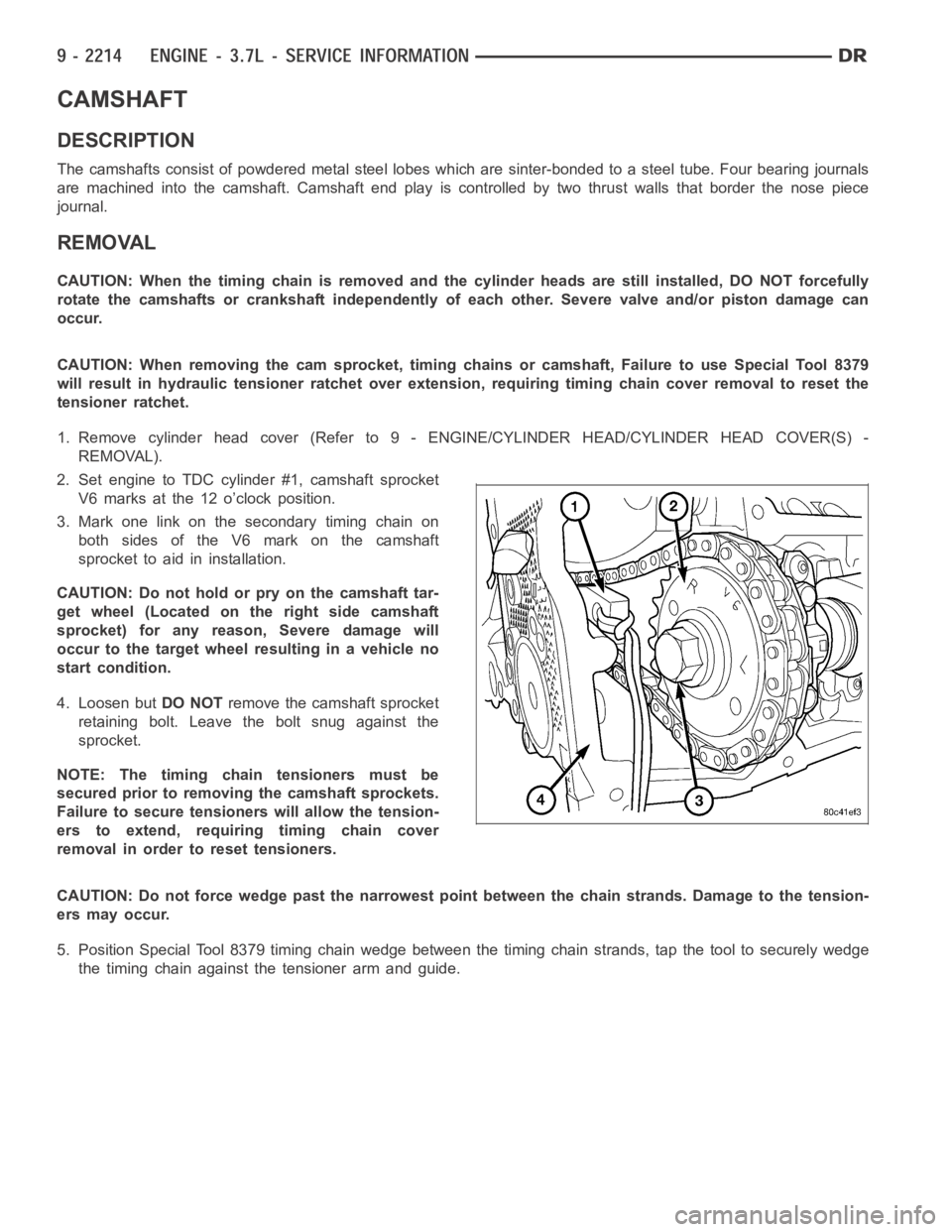
2. Set engine to TDC cylinder #1, camshaft sprocket
V6 marks at the 12 o’clock position.
3. Mark one link on the secondary timing chain on
both sides of the V6 mark on the camshaft
sprocket to aid in installation.
CAUTION: Do not hold or pry on the camshaft tar-
get wheel (Located on the right side camshaft
sprocket) for any reason, Severe damage will
occur to the target wheel resulting in a vehicle no
start condition.
4. Loosen butDO NOTremove the camshaft sprocket
retaining bolt. Leave the bolt snug against the
sprocket.
NOTE: The timing chain tensioners must be
secured prior to removing the camshaft sprockets.
Failure to secure tensioners will allow the tension-
erstoextend,requiringtimingchaincover
removal in order to reset tensioners.
CAUTION: Do not force wedge past the narrowest point between the chain strands. Damage to the tension-
ers may occur.
5. Position Special Tool 8379 timing chain wedge between the timing chain strands, tap the tool to securely wedge
the timing chain against the tensioner arm and guide.
Page 1544 of 5267
CAUTION: Do not hold or pry on the camshaft tar-
get wheel for any reason, Severe damage will
occur to the target wheel. A damaged target wheel
could cause a vehicle no start condition.
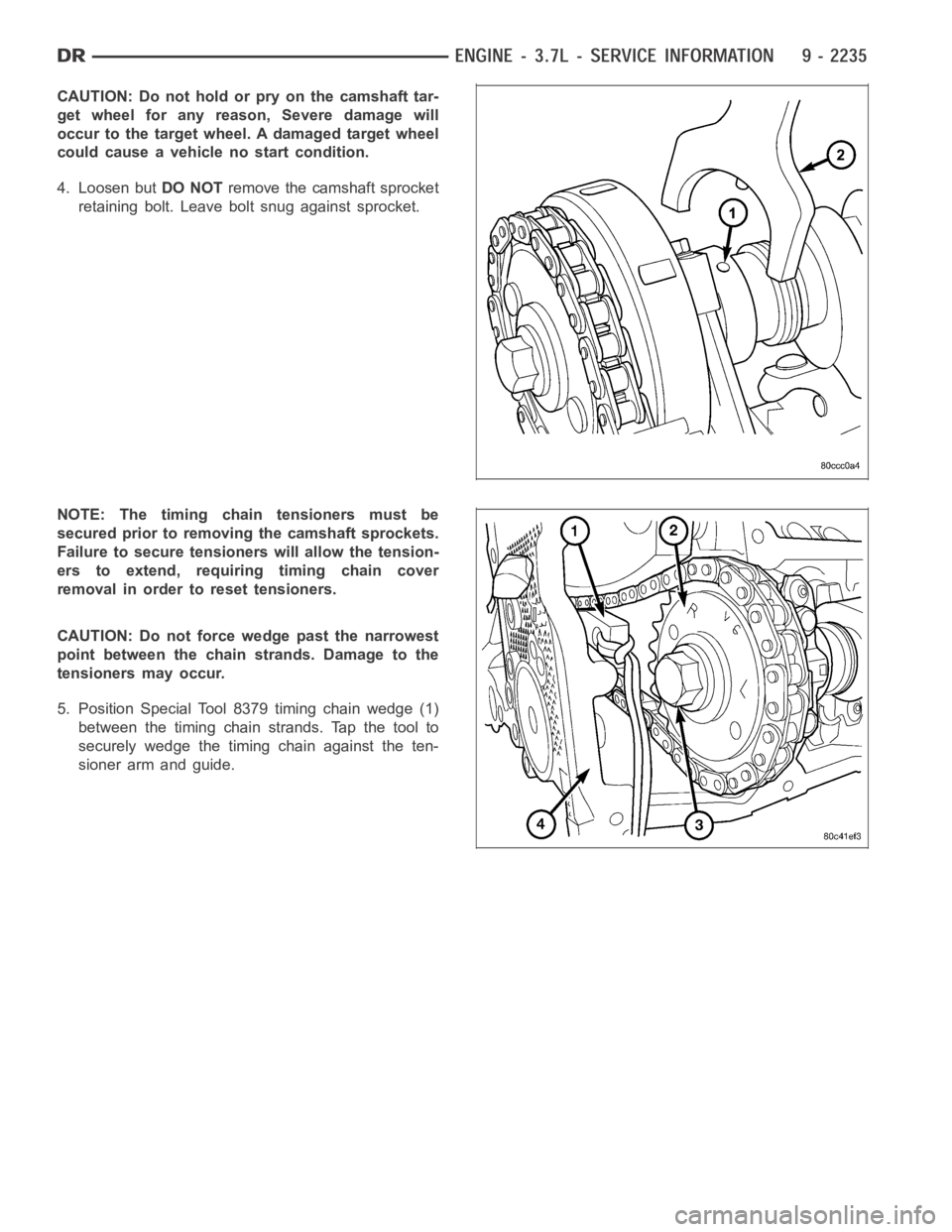
4. Loosen butDO NOTremove the camshaft sprocket
retaining bolt. Leave bolt snug against sprocket.
NOTE: The timing chain tensioners must be
secured prior to removing the camshaft sprockets.
Failure to secure tensioners will allow the tension-
erstoextend,requiringtimingchaincover
removal in order to reset tensioners.
CAUTION: Do not force wedge past the narrowest
point between the chain strands. Damage to the
tensioners may occur.
5. Position Special Tool 8379 timing chain wedge (1)
between the timing chain strands. Tap the tool to
securely wedge the timing chain against the ten-
sioner arm and guide.
Page 1666 of 5267
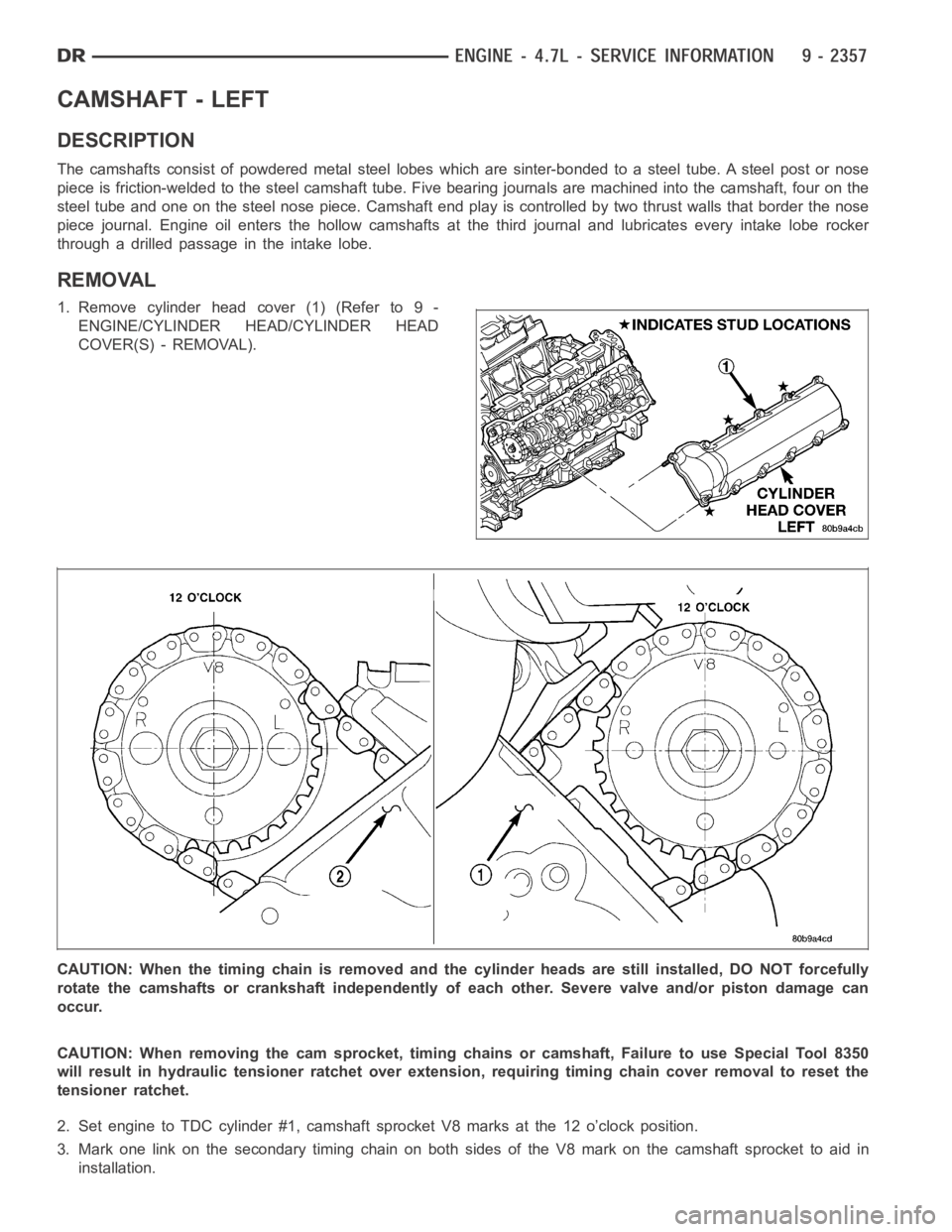
CAMSHAFT - LEFT
DESCRIPTION
The camshafts consist of powdered metal steel lobes which are sinter-bonded to a steel tube. A steel post or nose
piece is friction-welded to the steel camshaft tube. Five bearing journals are machined into the camshaft, four on the
steel tube and one on the steel nose piece. Camshaft end play is controlled by two thrust walls that border the nose
piece journal. Engine oil enters the hollow camshafts at the third journaland lubricates every intake lobe rocker
throughadrilledpassageintheintakelobe.
REMOVAL
1. Remove cylinder head cover (1) (Refer to 9 -
ENGINE/CYLINDER HEAD/CYLINDER HEAD
COVER(S) - REMOVAL).
CAUTION: When the timing chain is removed and the cylinder heads are still installed, DO NOT forcefully
rotate the camshafts or crankshaft independently of each other. Severe valve and/or piston damage can
occur.
CAUTION: When removing the cam sprocket, timing chains or camshaft, Failure to use Special Tool 8350
will result in hydraulic tensioner ratchet over extension, requiring timing chain cover removal to reset the
tensioner ratchet.
2. Set engine to TDC cylinder #1, camshaft sprocket V8 marks at the 12 o’clock position.
3. Mark one link on the secondary timing chain on both sides of the V8 mark on the camshaft sprocket to aid in
installation.
Page 1667 of 5267
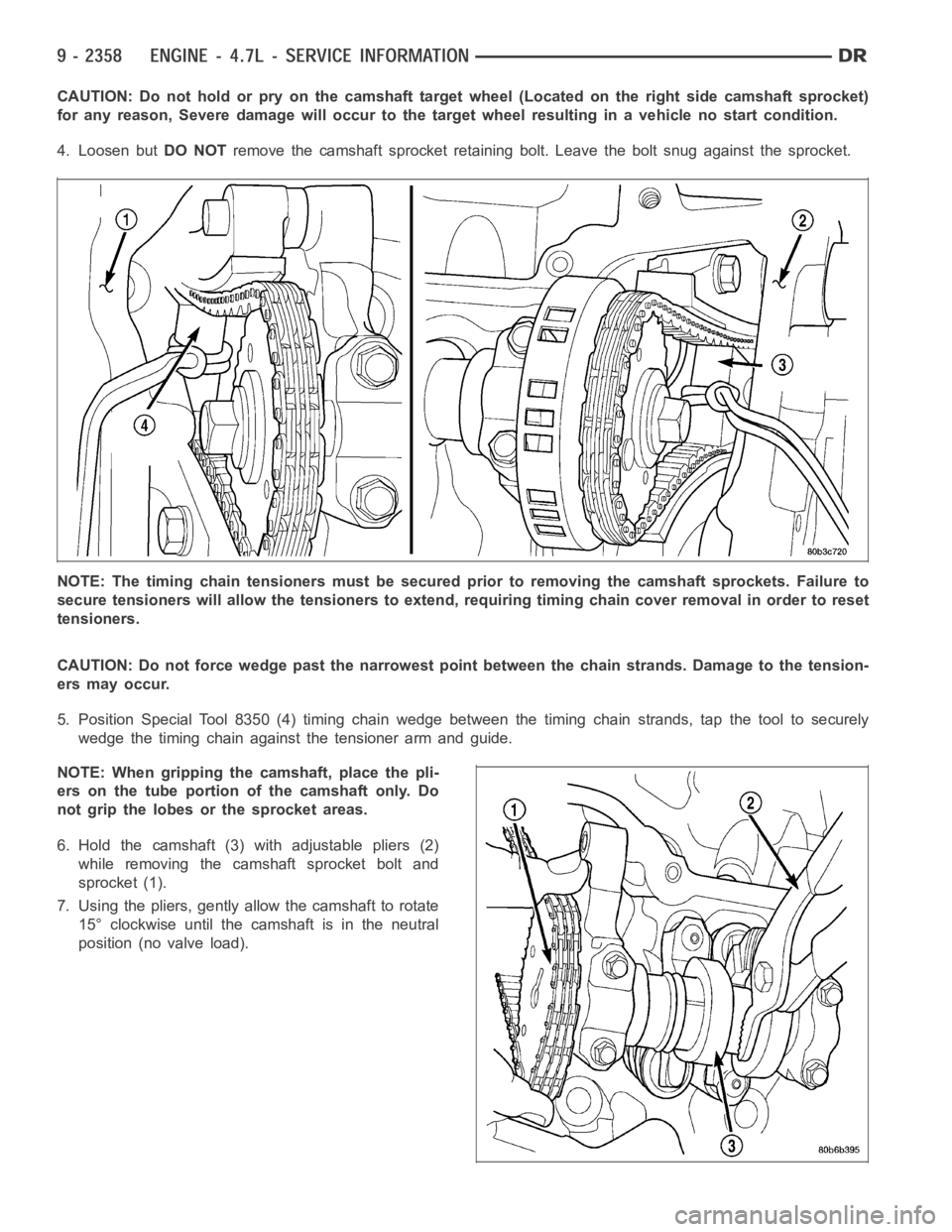
CAUTION: Do not hold or pry on the camshaft target wheel (Located on the right side camshaft sprocket)
for any reason, Severe damage will occur to the target wheel resulting in a vehicle no start condition.
4. Loosen butDO NOTremove the camshaft sprocket retaining bolt. Leave the bolt snug against the sprocket.
NOTE: The timing chain tensioners must be secured prior to removing the camshaft sprockets. Failure to
secure tensioners will allow the tensioners to extend, requiring timing chain cover removal in order to reset
tensioners.
CAUTION: Do not force wedge past the narrowest point between the chain strands. Damage to the tension-
ers may occur.
5. Position Special Tool 8350 (4) timing chain wedge between the timing chain strands, tap the tool to securely
wedge the timing chain against the tensioner arm and guide.
NOTE: When gripping the camshaft, place the pli-
ers on the tube portion of the camshaft only. Do
not grip the lobes or the sprocket areas.
6. Hold the camshaft (3) with adjustable pliers (2)
while removing the camshaft sprocket bolt and
sprocket (1).
7. Using the pliers, gently allow the camshaft to rotate
15° clockwise until the camshaft is in the neutral
position (no valve load).
Page 1672 of 5267
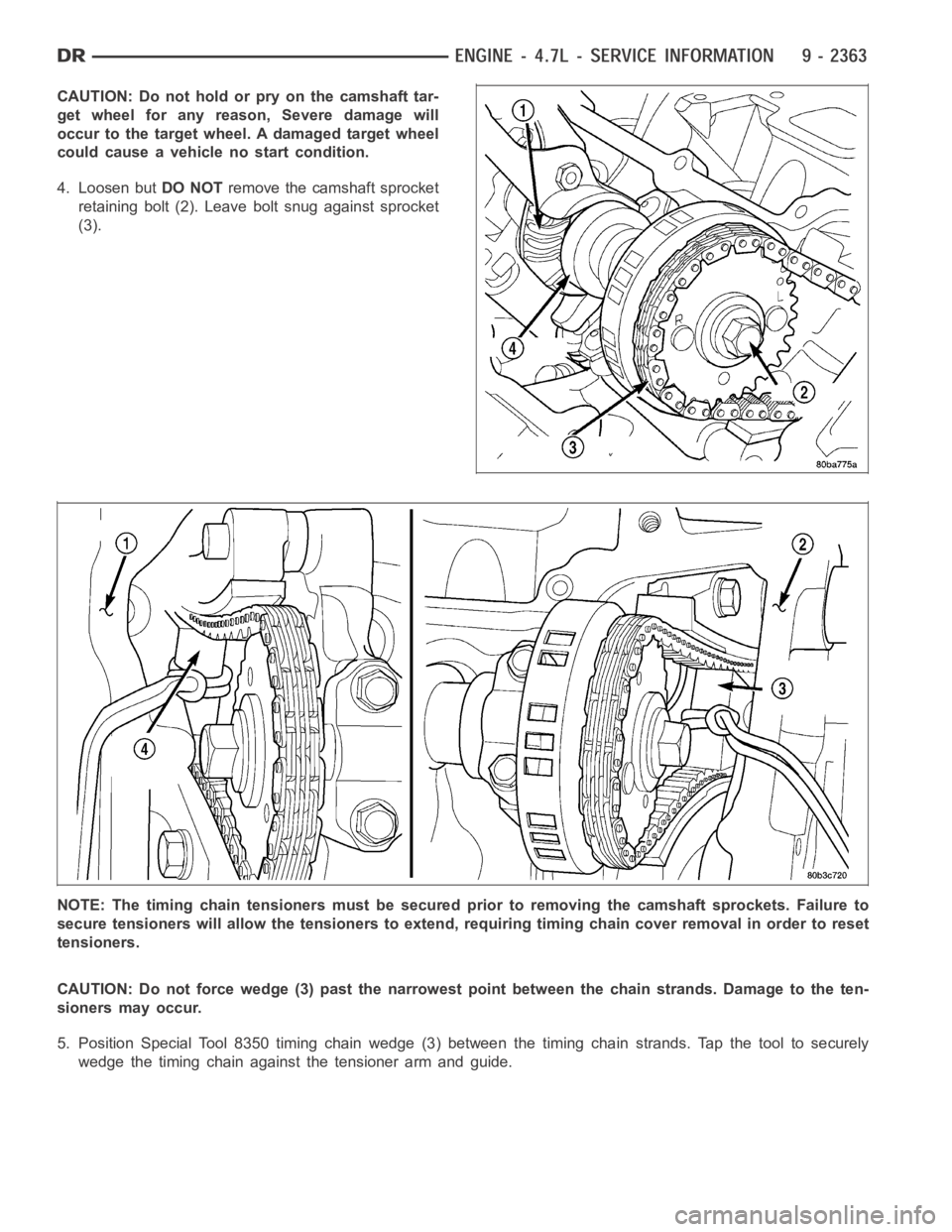
CAUTION: Do not hold or pry on the camshaft tar-
get wheel for any reason, Severe damage will
occur to the target wheel. A damaged target wheel
could cause a vehicle no start condition.
4. Loosen butDO NOTremove the camshaft sprocket
retaining bolt (2). Leave bolt snug against sprocket
(3).
NOTE: The timing chain tensioners must be secured prior to removing the camshaft sprockets. Failure to
secure tensioners will allow the tensioners to extend, requiring timing chain cover removal in order to reset
tensioners.
CAUTION: Do not force wedge (3) past the narrowest point between the chain strands. Damage to the ten-
sioners may occur.
5. Position Special Tool 8350 timing chain wedge (3) between the timing chain strands. Tap the tool to securely
wedge the timing chain against the tensioner arm and guide.
Page 1919 of 5267
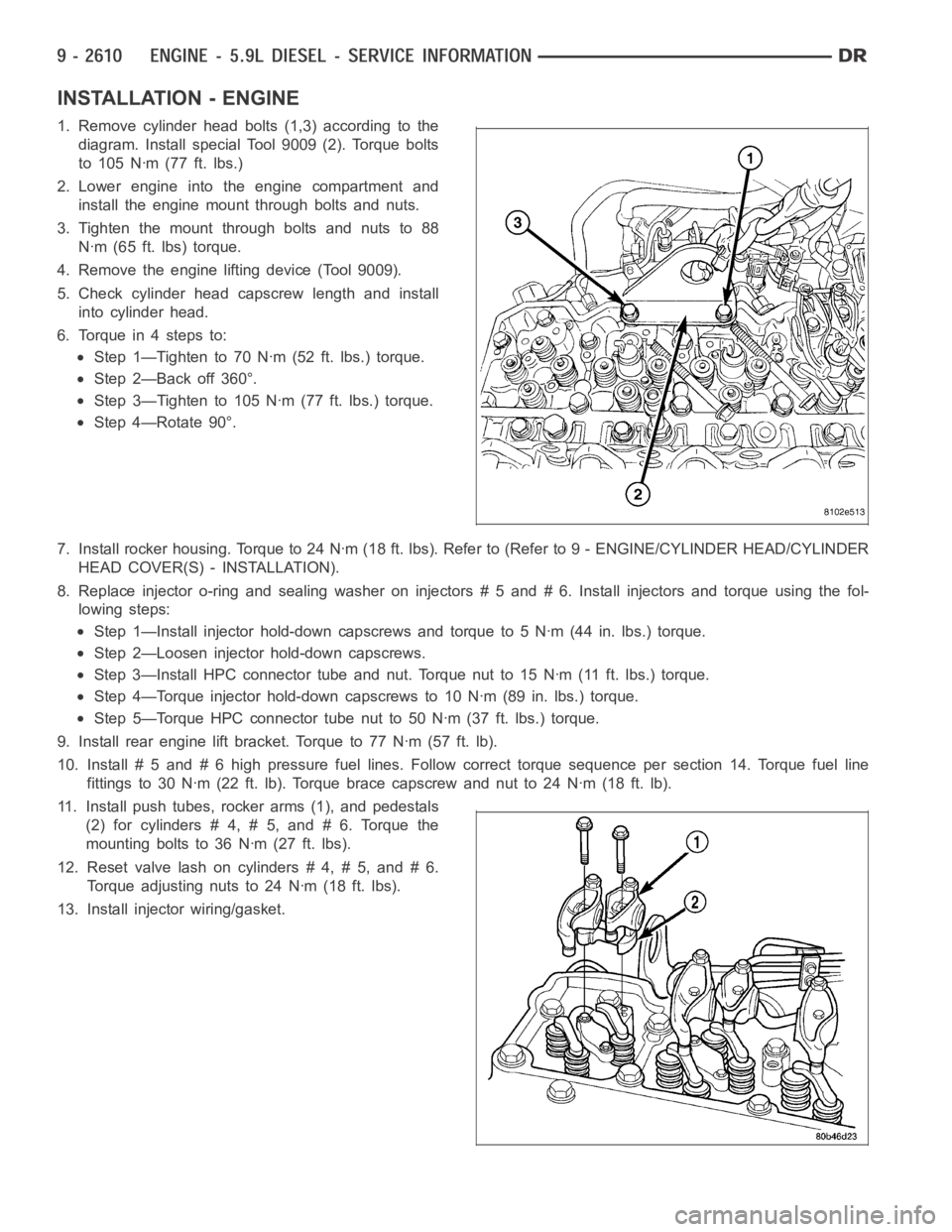
INSTALLATION - ENGINE
1. Remove cylinder head bolts (1,3) according to the
diagram. Install special Tool 9009 (2). Torque bolts
to 105 Nꞏm (77 ft. lbs.)
2. Lower engine into the engine compartment and
install the engine mount through bolts and nuts.
3. Tighten the mount through bolts and nuts to 88
Nꞏm (65 ft. lbs) torque.
4. Remove the engine lifting device (Tool 9009).
5. Check cylinder head capscrew length and install
into cylinder head.
6. Torque in 4 steps to:
Step 1—Tighten to 70 Nꞏm (52 ft. lbs.) torque.
Step 2—Back off 360°.
Step 3—Tighten to 105 Nꞏm (77 ft. lbs.) torque.
Step 4—Rotate 90°.
7. Install rocker housing. Torque to 24 Nꞏm (18 ft. lbs). Refer to (Refer to 9- ENGINE/CYLINDER HEAD/CYLINDER
HEAD COVER(S) - INSTALLATION).
8. Replace injector o-ring and sealing washer on injectors # 5 and # 6. Install injectors and torque using the fol-
lowing steps:
Step 1—Install injector hold-down capscrews and torque to 5 Nꞏm (44 in. lbs.) torque.
Step 2—Loosen injector hold-down capscrews.
Step 3—Install HPC connector tube and nut. Torque nut to 15 Nꞏm (11 ft. lbs.)torque.
Step 4—Torque injector hold-down capscrews to 10 Nꞏm (89 in. lbs.) torque.
Step 5—Torque HPC connector tube nut to 50 Nꞏm (37 ft. lbs.) torque.
9. Install rear engine lift bracket. Torque to 77 Nꞏm (57 ft. lb).
10. Install # 5 and # 6 high pressure fuel lines. Follow correct torque sequence per section 14. Torque fuel line
fittings to 30 Nꞏm (22 ft. lb). Torque brace capscrew and nut to 24 Nꞏm (18 ft.lb).
11. Install push tubes, rocker arms (1), and pedestals
(2) for cylinders # 4, # 5, and # 6. Torque the
mounting bolts to 36 Nꞏm (27 ft. lbs).
12. Reset valve lash on cylinders # 4, # 5, and # 6.
Torque adjusting nuts to 24 Nꞏm (18 ft. lbs).
13. Install injector wiring/gasket.
Page 1930 of 5267
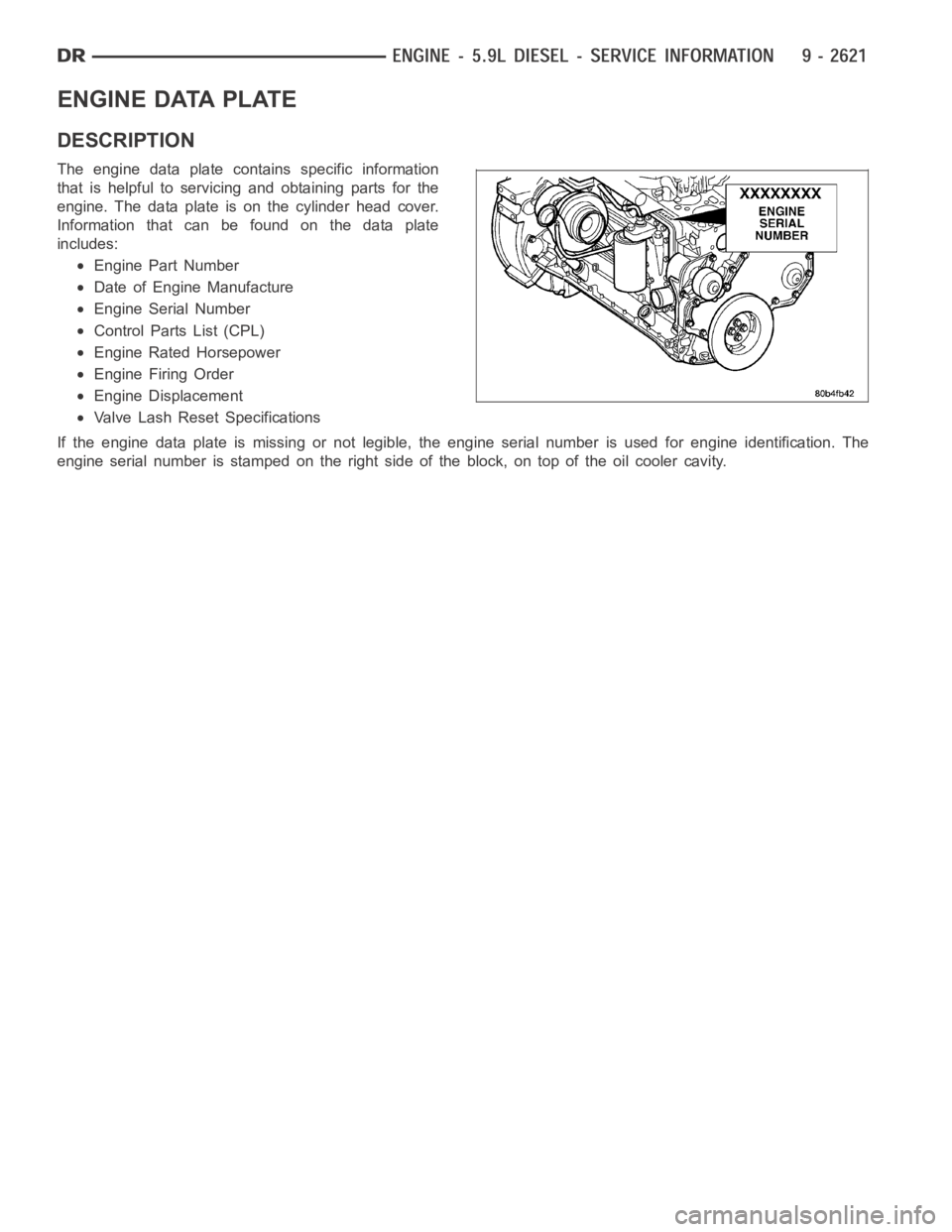
ENGINE DATA PLATE
DESCRIPTION
The engine data plate contains specific information
that is helpful to servicing and obtaining parts for the
engine. The data plate is on the cylinder head cover.
Information that can be found on the data plate
includes:
Engine Part Number
Date of Engine Manufacture
Engine Serial Number
Control Parts List (CPL)
Engine Rated Horsepower
Engine Firing Order
Engine Displacement
Valve Lash Reset Specifications
If the engine data plate is missing or not legible, the engine serial numberis used for engine identification. The
engine serial number is stamped on the right side of the block, on top of the oil cooler cavity.
Page 1931 of 5267
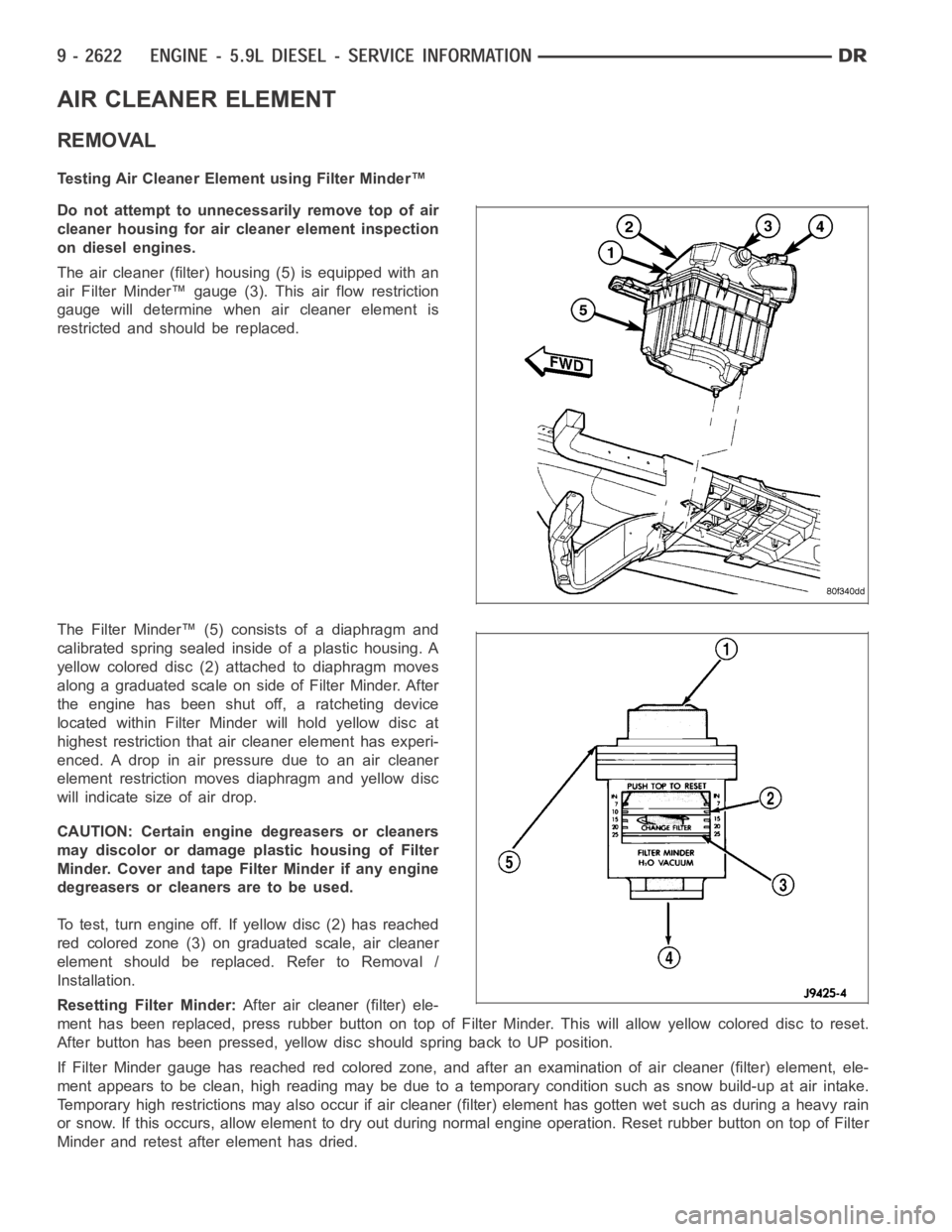
AIR CLEANER ELEMENT
REMOVAL
Testing Air Cleaner Element using Filter Minder™
Do not attempt to unnecessarily remove top of air
cleaner housing for air cleaner element inspection
on diesel engines.
The air cleaner (filter) housing (5) is equipped with an
air Filter Minder™ gauge (3). This air flow restriction
gauge will determine when air cleaner element is
restricted and should be replaced.
The Filter Minder™ (5) consists of a diaphragm and
calibrated spring sealed inside of a plastic housing. A
yellow colored disc (2) attached to diaphragm moves
along a graduated scale on side of Filter Minder. After
the engine has been shut off, a ratcheting device
located within Filter Minder will hold yellow disc at
highest restriction that air cleaner element has experi-
enced. A drop in air pressure due to an air cleaner
element restriction moves diaphragm and yellow disc
will indicate size of air drop.
CAUTION: Certain engine degreasers or cleaners
may discolor or damage plastic housing of Filter
Minder. Cover and tape Filter Minder if any engine
degreasers or cleaners are to be used.
To test, turn engine off. If yellow disc (2) has reached
red colored zone (3) on graduated scale, air cleaner
element should be replaced. Refer to Removal /
Installation.
Resetting Filter Minder:After air cleaner (filter) ele-
ment has been replaced, press rubber button on top of Filter Minder. This will allow yellow colored disc to reset.
After button has been pressed, yellow disc should spring back to UP position.
If Filter Minder gauge has reached red colored zone, and after an examination of air cleaner (filter) element, ele-
ment appears to be clean, high reading may be due to a temporary condition such as snow build-up at air intake.
Temporary high restrictions may also occur if air cleaner (filter) element has gotten wet such as during a heavy rain
or snow. If this occurs, allow element to dry out during normal engine operation. Reset rubber button on top of Filter
Minder and retest after element has dried.