warning FIAT BRAVO 2014 2.G Workshop Manual
[x] Cancel search | Manufacturer: FIAT, Model Year: 2014, Model line: BRAVO, Model: FIAT BRAVO 2014 2.GPages: 275, PDF Size: 3.95 MB
Page 55 of 275
Air flow distribution between footwell
diffusers and windscreen and front side
window defrosting/demisting diffusers. This
distribution setting allows the passenger
compartment to be warmed effectively and
prevents the windows from misting.Air flow distribution between footwell
diffusers (hotter air) and centre/side
dashboard diffusers and rear diffuser (cooler
air).Air flow distribution between centre/side
dashboard diffusers, rear diffuser and
windscreen and front side window
demisting/defrosting diffusers. This
distribution setting ventilates the passenger
compartment well and prevents the windows
from misting up.
IMPORTANT For the climate control system to
function, at least one of the buttons
/
/
must
be operated. The system does not allow the
deactivation of all the buttons
/
/
.
IMPORTANT Push the OFF button to turn the
climate control system back on: in this way, all
operating conditions memorised before switching off
are restored.
To restore automatic control of the air distribution
after a manual selection, press the AUTO button.ADDITIONAL HEATER
(for versions/markets, where provided)
This device warms up the passenger compartment
more quickly when it is very cold and the engine
coolant temperature is low.
In these conditions, the device comes on
automatically when the engine is started and the fan
is on.
The heater switches off automatically when the
required comfort conditions are achieved.
IMPORTANT The heater will not turn on if the
battery voltage is too low.
SWITCHING OFF THE CLIMATE CONTROL
SYSTEM
Press the OFF button.
The following information is shown on the display:
❒OFF;
❒outside temperature indication;
❒internal air recirculation on indication (LED on
button
lit).
51GETTING TO
KNOW YOUR CARSAFETY
STARTING AND
DRIVING
WARNING LIGHTS
AND MESSAGES
IN AN EMERGENCY
SERVICING AND
MAINTENANCE
TECHNICAL
SPECIFICATIONS
INDEX
Page 56 of 275
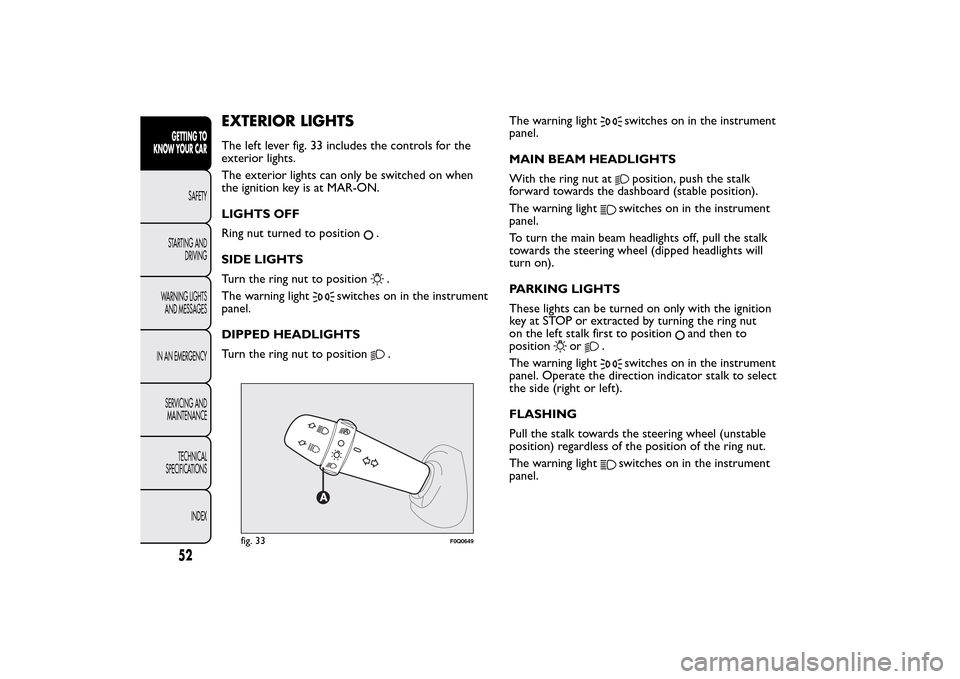
EXTERIOR LIGHTSThe left lever fig. 33 includes the controls for the
exterior lights.
The exterior lights can only be switched on when
the ignition key is at MAR-ON.
LIGHTS OFF
Ring nut turned to position
.
SIDE LIGHTS
Turn the ring nut to position.
The warning light
switches on in the instrument
panel.
DIPPED HEADLIGHTS
Turn the ring nut to position
.The warning light
switches on in the instrument
panel.
MAIN BEAM HEADLIGHTS
With the ring nut atposition, push the stalk
forward towards the dashboard (stable position).
The warning light
switches on in the instrument
panel.
To turn the main beam headlights off, pull the stalk
towards the steering wheel (dipped headlights will
turn on).
PARKING LIGHTS
These lights can be turned on only with the ignition
key at STOP or extracted by turning the ring nut
on the left stalk first to position
and then to
position
or
.
The warning light
switches on in the instrument
panel. Operate the direction indicator stalk to select
the side (right or left).
FLASHING
Pull the stalk towards the steering wheel (unstable
position) regardless of the position of the ring nut.
The warning lightswitches on in the instrument
panel.
fig. 33
F0Q0649
52GETTING TO
KNOW YOUR CAR
SAFETY
STARTING AND
DRIVING
WARNING LIGHTS
AND MESSAGES
IN AN EMERGENCY
SERVICING AND
MAINTENANCE
TECHNICAL
SPECIFICATIONS
INDEX
Page 57 of 275
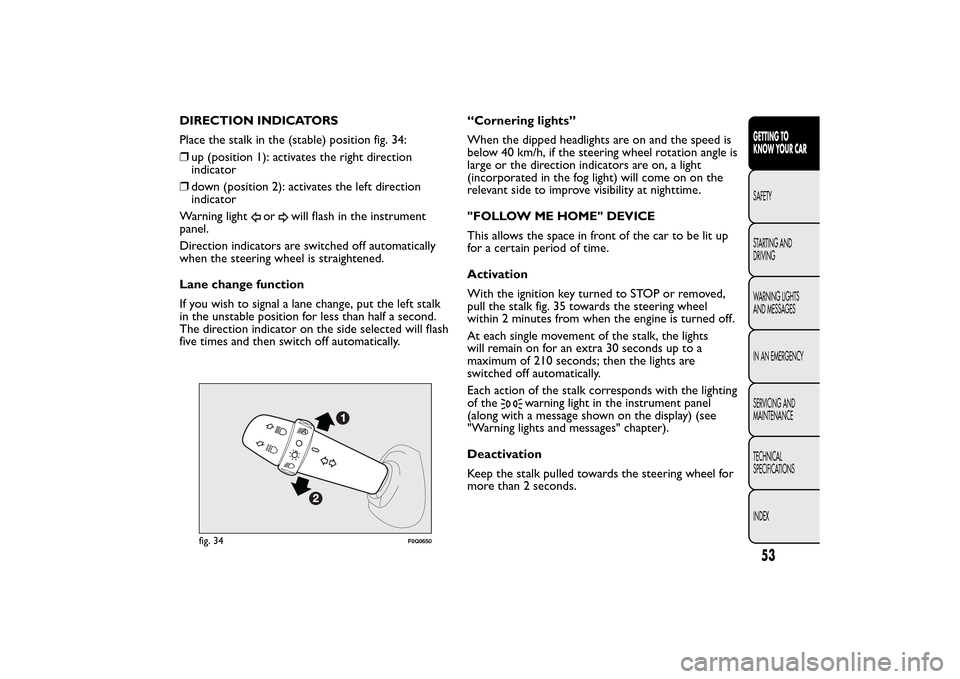
DIRECTION INDICATORS
Place the stalk in the (stable) position fig. 34:
❒up (position 1): activates the right direction
indicator
❒down (position 2): activates the left direction
indicator
Warning light
or
will flash in the instrument
panel.
Direction indicators are switched off automatically
when the steering wheel is straightened.
Lane change function
If you wish to signal a lane change, put the left stalk
in the unstable position for less than half a second.
The direction indicator on the side selected will flash
five times and then switch off automatically.“Cornering lights”
When the dipped headlights are on and the speed is
below 40 km/h, if the steering wheel rotation angle is
large or the direction indicators are on, a light
(incorporated in the fog light) will come on on the
relevant side to improve visibility at nighttime.
"FOLLOW ME HOME" DEVICE
This allows the space in front of the car to be lit up
for a certain period of time.
Activation
With the ignition key turned to STOP or removed,
pull the stalk fig. 35 towards the steering wheel
within 2 minutes from when the engine is turned off.
At each single movement of the stalk, the lights
will remain on for an extra 30 seconds up to a
maximum of 210 seconds; then the lights are
switched off automatically.
Each action of the stalk corresponds with the lighting
of the
warning light in the instrument panel
(along with a message shown on the display) (see
"Warning lights and messages" chapter).
Deactivation
Keep the stalk pulled towards the steering wheel for
more than 2 seconds.
fig. 34
F0Q0650
53GETTING TO
KNOW YOUR CARSAFETY
STARTING AND
DRIVING
WARNING LIGHTS
AND MESSAGES
IN AN EMERGENCY
SERVICING AND
MAINTENANCE
TECHNICAL
SPECIFICATIONS
INDEX
Page 58 of 275
AUTOMATIC HEADLIGHT SENSOR
(dusk sensor)
(for versions/markets, where provided)
It detects variations in brightness outside the vehicle
depending on the light sensitivity setting: the greater
the sensitivity, the less outside light needed to
activate the exterior lights being turned on.
The sensitivity of the dusk sensor may be adjusted by
means of the "Setup menu" on the instrument panel.
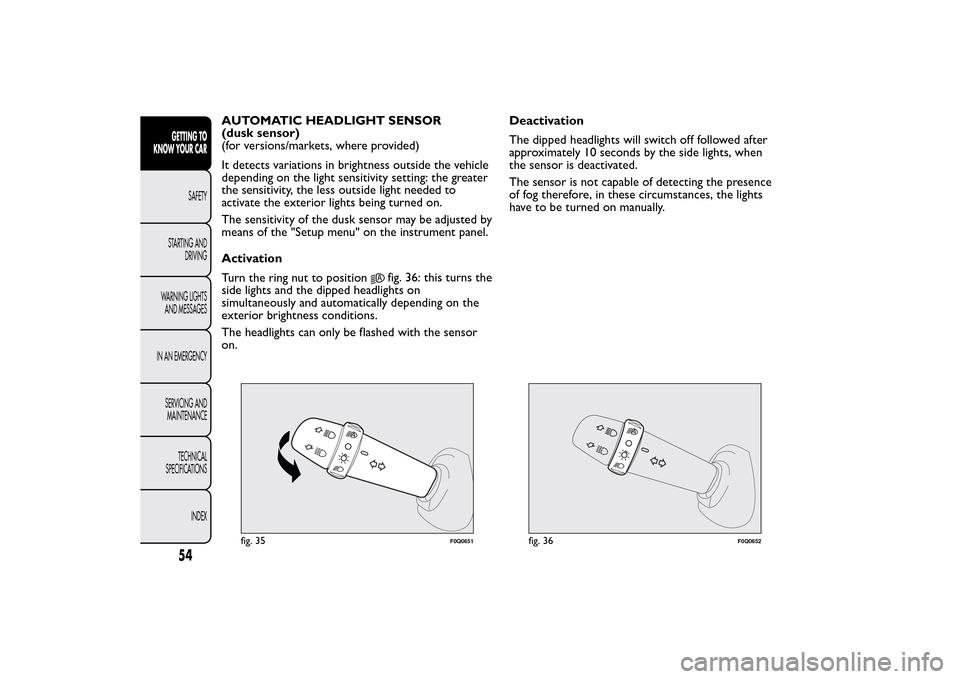
Activation
Turn the ring nut to position
fig. 36: this turns the
side lights and the dipped headlights on
simultaneously and automatically depending on the
exterior brightness conditions.
The headlights can only be flashed with the sensor
on.Deactivation
The dipped headlights will switch off followed after
approximately 10 seconds by the side lights, when
the sensor is deactivated.
The sensor is not capable of detecting the presence
of fog therefore, in these circumstances, the lights
have to be turned on manually.
fig. 35
F0Q0651
fig. 36
F0Q0652
54GETTING TO
KNOW YOUR CAR
SAFETY
STARTING AND
DRIVING
WARNING LIGHTS
AND MESSAGES
IN AN EMERGENCY
SERVICING AND
MAINTENANCE
TECHNICAL
SPECIFICATIONS
INDEX
Page 59 of 275
WINDOW CLEANINGWINDSCREEN WASHER/WIPER
They can be operated only with the ignition key
turned to MAR-ON.
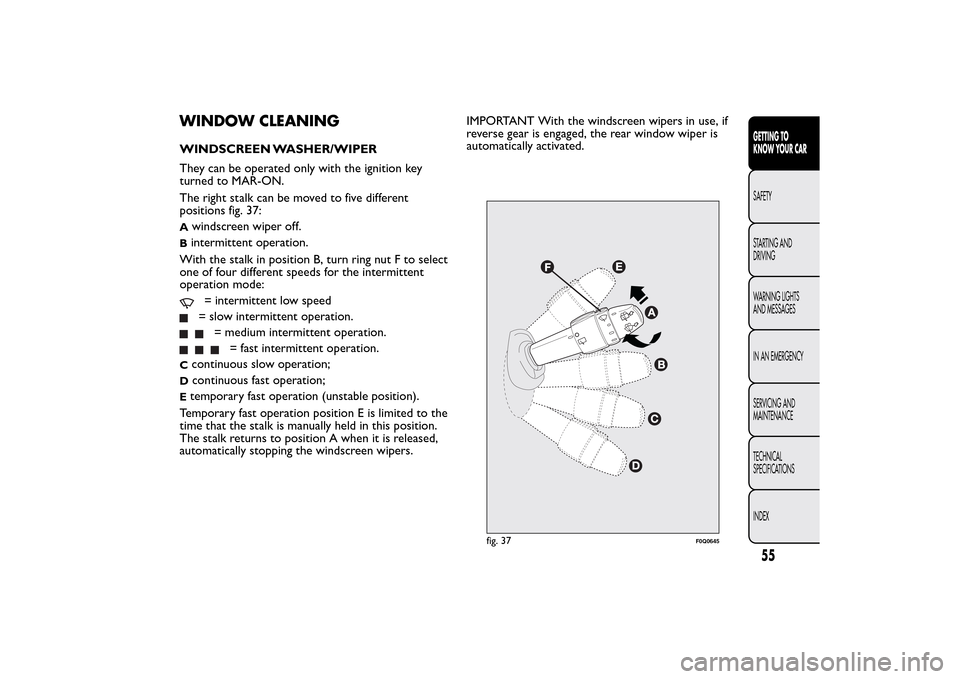
The right stalk can be moved to five different
positions fig. 37:A
windscreen wiper off.
Bintermittent operation.
With the stalk in position B, turn ring nut F to select
one of four different speeds for the intermittent
operation mode:
= intermittent low speed= slow intermittent operation.
= medium intermittent operation.
= fast intermittent operation.
C
continuous slow operation;
D
continuous fast operation;
Etemporary fast operation (unstable position).
Temporary fast operation position E is limited to the
time that the stalk is manually held in this position.
The stalk returns to position A when it is released,
automatically stopping the windscreen wipers.IMPORTANT With the windscreen wipers in use, if
reverse gear is engaged, the rear window wiper is
automatically activated.
fig. 37
F0Q0645
55GETTING TO
KNOW YOUR CARSAFETY
STARTING AND
DRIVING
WARNING LIGHTS
AND MESSAGES
IN AN EMERGENCY
SERVICING AND
MAINTENANCE
TECHNICAL
SPECIFICATIONS
INDEX
Page 60 of 275
Never use the windscreen wipers to
remove layers of snow or ice from the
windscreen. In such conditions, the
windscreen wipers may be subjected to excessive
stress and the motor protection, which prevents
operation for a few seconds, may intervene. If
operation is not restored, contact a Fiat
Dealership.
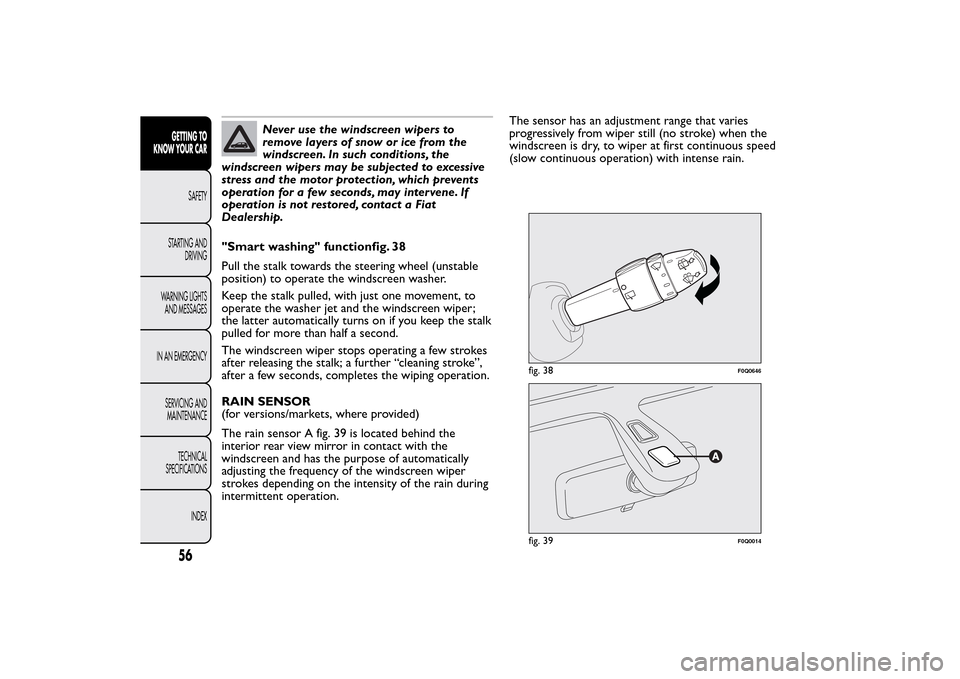
"Smart washing" functionfig. 38
Pull the stalk towards the steering wheel (unstable
position) to operate the windscreen washer.
Keep the stalk pulled, with just one movement, to
operate the washer jet and the windscreen wiper;
the latter automatically turns on if you keep the stalk
pulled for more than half a second.
The windscreen wiper stops operating a few strokes
after releasing the stalk; a further “cleaning stroke”,
after a few seconds, completes the wiping operation.
RAIN SENSOR
(for versions/markets, where provided)
The rain sensor A fig. 39 is located behind the
interior rear view mirror in contact with the
windscreen and has the purpose of automatically
adjusting the frequency of the windscreen wiper
strokes depending on the intensity of the rain during
intermittent operation.The sensor has an adjustment range that varies
progressively from wiper still (no stroke) when the
windscreen is dry, to wiper at first continuous speed
(slow continuous operation) with intense rain.
fig. 38
F0Q0646
fig. 39
F0Q0014
56GETTING TO
KNOW YOUR CAR
SAFETY
STARTING AND
DRIVING
WARNING LIGHTS
AND MESSAGES
IN AN EMERGENCY
SERVICING AND
MAINTENANCE
TECHNICAL
SPECIFICATIONS
INDEX
Page 61 of 275
Activation
Move the right stalk down by one click.
The activation of the sensor is signalled by a "stroke"
to show that the command has been acquired.
IMPORTANT Keep the glass in the sensor area clean.
By turning ring nut F fig. 37 is it possible to increase
the sensitivity of the rain sensor to obtain a more
rapid variation between wiper still (no stroke) when
the windscreen is dry, to wiper at first continuous
speed (slow continuous operation).
The increasing of the rain sensor sensitivity is also
signalled by a stroke of the wipers.
If the windscreen washer is used with the rain sensor
activated, the normal washing cycle is performed,
after which the rain sensor resumes its normal
automatic operation.
Deactivation
Turn the ignition key to STOP.
At the next start-up (key at MAR-ON), the sensor
will not be reactivated even if the stalk is at B fig. 37.
To activate the sensor, move the stalk to position
A or C and then back to position B.
Rain sensor activation will be indicated by at least
one wiper “stroke” even if the windscreen is dry.
Do not activate the rain sensor when
washing the car in an automatic car wash.
Make sure the device is switched off if
there is ice on the windscreen.
WARNING
Make sure the device is switched off
whenever the windscreen is being
cleaned.
REAR WINDOW WASHER/WIPER
It can be operated only with the ignition key turned
to MAR-ON. The function stops when the stalk is
released.
Turning the stalk ring nut A fig. 40 from position
to position
will operate the rear window wiper
as follows:
❒in intermittent mode when the rear window wiper
is not operating;
❒in synchronous mode (at half the speed of the
windscreen wiper) when the windscreen wiper
is operating;
❒in continuous mode with reverse gear engaged and
the control active.
With the windscreen wiper on and reverse gear
engaged the rear window wiper is activated in
continuous mode. Pushing the stalk towards the
dashboard (unstable position) will activate the rear
window washer jet.
57GETTING TO
KNOW YOUR CARSAFETY
STARTING AND
DRIVING
WARNING LIGHTS
AND MESSAGES
IN AN EMERGENCY
SERVICING AND
MAINTENANCE
TECHNICAL
SPECIFICATIONS
INDEX
Page 62 of 275
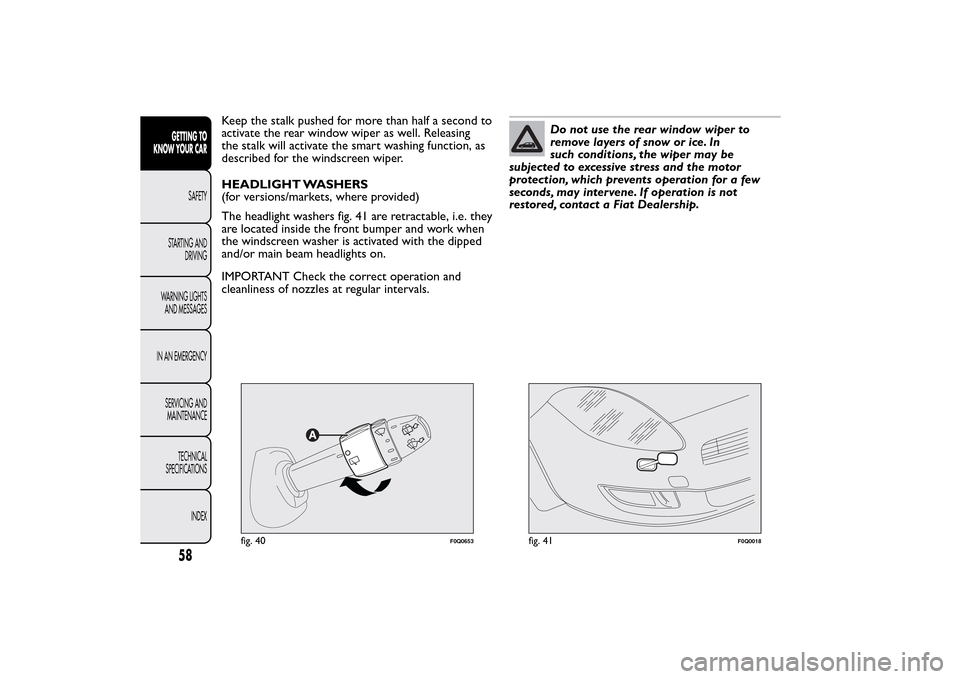
Keep the stalk pushed for more than half a second to
activate the rear window wiper as well. Releasing
the stalk will activate the smart washing function, as
described for the windscreen wiper.
HEADLIGHT WASHERS
(for versions/markets, where provided)
The headlight washers fig. 41 are retractable, i.e. they
are located inside the front bumper and work when
the windscreen washer is activated with the dipped
and/or main beam headlights on.
IMPORTANT Check the correct operation and
cleanliness of nozzles at regular intervals.
Do not use the rear window wiper to
removelayersofsnoworice.In
such conditions, the wiper may be
subjected to excessive stress and the motor
protection, which prevents operation for a few
seconds, may intervene. If operation is not
restored, contact a Fiat Dealership.
fig. 40
F0Q0653
fig. 41
F0Q0018
58GETTING TO
KNOW YOUR CAR
SAFETY
STARTING AND
DRIVING
WARNING LIGHTS
AND MESSAGES
IN AN EMERGENCY
SERVICING AND
MAINTENANCE
TECHNICAL
SPECIFICATIONS
INDEX
Page 63 of 275
CRUISE CONTROL(constant speed regulator)
(for versions/markets, where provided)
This is an electronically controlled driving assistance
device which allows the car to be driven at a chosen
speed above 30 km/h on long stretches of dry,
straight roads with few variations (e.g. motorways),
without having to depress the accelerator pedal.
The use of this device on extra-urban roads with
traffic is not therefore recommended. Do not use
the device in town.
TURNING THE DEVICE ON
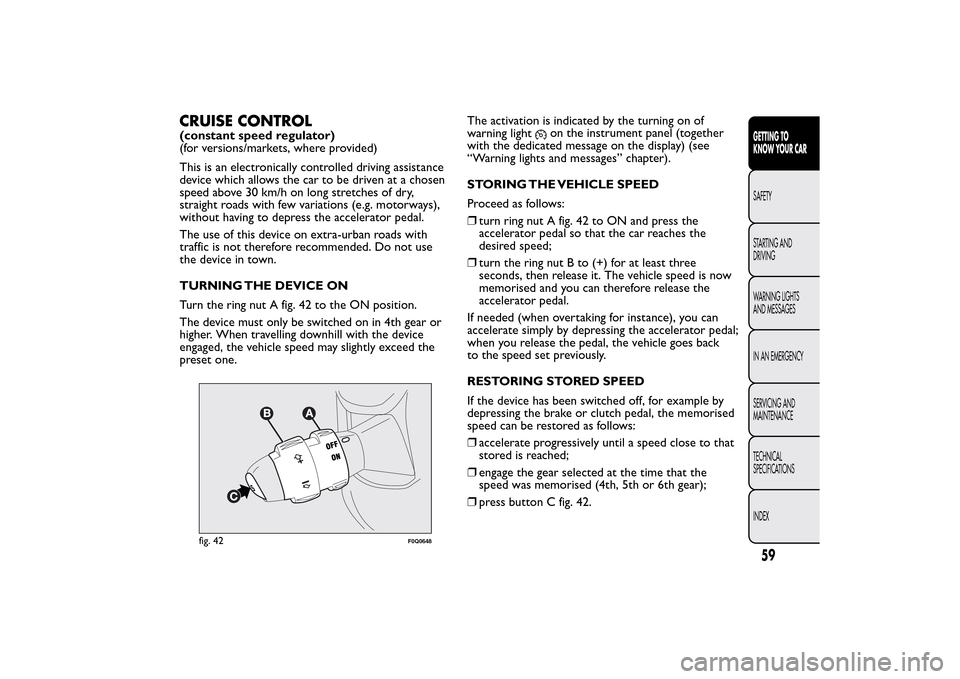
Turn the ring nut A fig. 42 to the ON position.
The device must only be switched on in 4th gear or
higher. When travelling downhill with the device
engaged, the vehicle speed may slightly exceed the
preset one.The activation is indicated by the turning on of
warning light
on the instrument panel (together
with the dedicated message on the display) (see
“Warning lights and messages” chapter).
STORING THE VEHICLE SPEED
Proceed as follows:
❒turn ring nut A fig. 42 to ON and press the
accelerator pedal so that the car reaches the
desired speed;
❒turn the ring nut B to (+) for at least three
seconds, then release it. The vehicle speed is now
memorised and you can therefore release the
accelerator pedal.
If needed (when overtaking for instance), you can
accelerate simply by depressing the accelerator pedal;
when you release the pedal, the vehicle goes back
to the speed set previously.
RESTORING STORED SPEED
If the device has been switched off, for example by
depressing the brake or clutch pedal, the memorised
speed can be restored as follows:
❒accelerate progressively until a speed close to that
stored is reached;
❒engage the gear selected at the time that the
speed was memorised (4th, 5th or 6th gear);
❒press button C fig. 42.
fig. 42
F0Q0648
59GETTING TO
KNOW YOUR CARSAFETY
STARTING AND
DRIVING
WARNING LIGHTS
AND MESSAGES
IN AN EMERGENCY
SERVICING AND
MAINTENANCE
TECHNICAL
SPECIFICATIONS
INDEX
Page 64 of 275
INCREASING THE STORED SPEED
This can be done in two ways:
❒by pressing the accelerator and memorising the
new speed reached;
or
❒by temporarily turning ring nut B fig. 42 to (+).
Each movement of the ring nut will correspond to a
slight increase in speed (about 1 km/h), while keeping
the ring nut turned will correspond to a continuous
speed increase.
REDUCING THE STORED SPEED
This can be done in two ways:
❒by switching off the device and then memorising
the new speed;
or
❒by keeping ring nut B fig. 42 turned to (–) until the
new speed is reached; it will then be memorised
automatically.
Each movement of the ring nut will correspond to a
slight reduction in speed (about 1 km/h), while
keeping the ring nut turned will correspond to a
continuous reduction in speed.TURNING THE DEVICE OFF
Turn the ring nut A fig. 42 to OFF or turn the
ignition key to STOP. The device is automatically
turned off in one of the following cases:
❒when the brake or clutch pedal is pressed;
❒if the ASR or ESP system cuts in (for versions/
markets, where provided);
❒if the gear is shifted in versions with Dualogic
gearbox (for versions/markets, where provided) in
Manual mode;
❒if the Dualogic gearbox lever (where provided) is
inadvertently shifted to N or R.
WARNING
Whilst driving with the device on, never
place the gear lever in neutral and do
not move the Dualogic gearbox lever into
position N or R.
WARNING
If the device is faulty, turn ring nut A
fig. 42 to OFF, check the condition of the
protective fuse and contact a Fiat Dealership.
60GETTING TO
KNOW YOUR CAR
SAFETY
STARTING AND
DRIVING
WARNING LIGHTS
AND MESSAGES
IN AN EMERGENCY
SERVICING AND
MAINTENANCE
TECHNICAL
SPECIFICATIONS
INDEX