red light FIAT DUCATO 2014 3.G User Guide
[x] Cancel search | Manufacturer: FIAT, Model Year: 2014, Model line: DUCATO, Model: FIAT DUCATO 2014 3.GPages: 367, PDF Size: 20.39 MB
Page 45 of 367
IMPORTANT Pay attention to the
daylight saving time/standard time
setting.
Reading the current
time
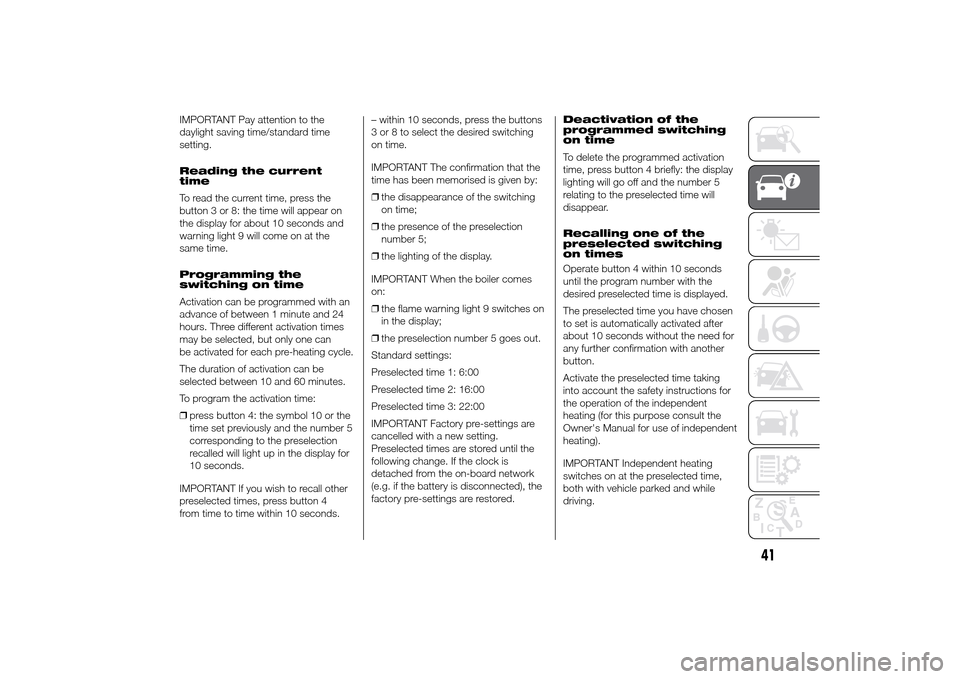
To read the current time, press the
button 3 or 8: the time will appear on
the display for about 10 seconds and
warning light 9 will come on at the
same time.
Programming the
switching on time
Activation can be programmed with an
advance of between 1 minute and 24
hours. Three different activation times
may be selected, but only one can
be activated for each pre-heating cycle.
The duration of activation can be
selected between 10 and 60 minutes.
To program the activation time:
❒press button 4: the symbol 10 or the
time set previously and the number 5
corresponding to the preselection
recalled will light up in the display for
10 seconds.
IMPORTANT If you wish to recall other
preselected times, press button 4
from time to time within 10 seconds.– within 10 seconds, press the buttons
3 or 8 to select the desired switching
on time.
IMPORTANT The confirmation that the
time has been memorised is given by:
❒the disappearance of the switching
on time;
❒the presence of the preselection
number 5;
❒the lighting of the display.
IMPORTANT When the boiler comes
on:
❒the flame warning light 9 switches on
in the display;
❒the preselection number 5 goes out.
Standard settings:
Preselected time 1: 6:00
Preselected time 2: 16:00
Preselected time 3: 22:00
IMPORTANT Factory pre-settings are
cancelled with a new setting.
Preselected times are stored until the
following change. If the clock is
detached from the on-board network
(e.g. if the battery is disconnected), the
factory pre-settings are restored.Deactivation of the
programmed switching
on time
To delete the programmed activation
time, press button 4 briefly: the display
lighting will go off and the number 5
relating to the preselected time will
disappear.
Recalling one of the
preselected switching
on times
Operate button 4 within 10 seconds
until the program number with the
desired preselected time is displayed.
The preselected time you have chosen
to set is automatically activated after
about 10 seconds without the need for
any further confirmation with another
button.
Activate the preselected time taking
into account the safety instructions for
the operation of the independent
heating (for this purpose consult the
Owner's Manual for use of independent
heating).
IMPORTANT Independent heating
switches on at the preselected time,
both with vehicle parked and while
driving.
41
Page 46 of 367
IMPORTANT The programmed
switching on time can be altered or
cancelled by following the instructions
given previously.
Operation duration
setting
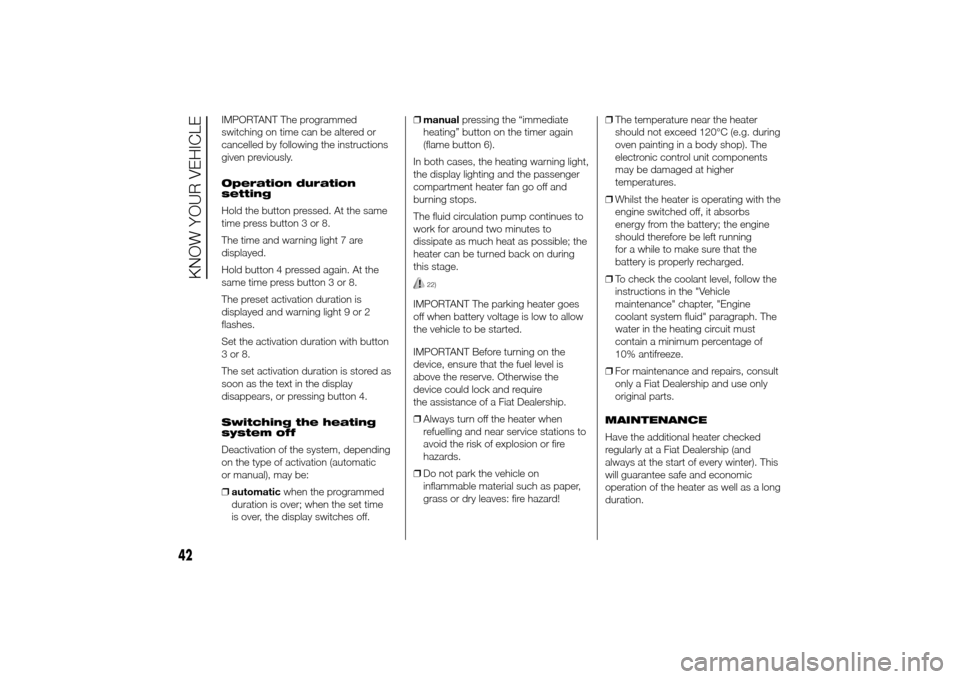
Hold the button pressed. At the same
time press button 3 or 8.
The time and warning light 7 are
displayed.
Hold button 4 pressed again. At the
same time press button 3 or 8.
The preset activation duration is
displayed and warning light 9 or 2
flashes.
Set the activation duration with button
3or8.
The set activation duration is stored as
soon as the text in the display
disappears, or pressing button 4.
Switching the heating
system off
Deactivation of the system, depending
on the type of activation (automatic
or manual), may be:
❒automaticwhen the programmed
duration is over; when the set time
is over, the display switches off.❒manualpressing the “immediate
heating” button on the timer again
(flame button 6).
In both cases, the heating warning light,
the display lighting and the passenger
compartment heater fan go off and
burning stops.
The fluid circulation pump continues to
work for around two minutes to
dissipate as much heat as possible; the
heater can be turned back on during
this stage.
22)
IMPORTANT The parking heater goes
off when battery voltage is low to allow
the vehicle to be started.
IMPORTANT Before turning on the
device, ensure that the fuel level is
above the reserve. Otherwise the
device could lock and require
the assistance of a Fiat Dealership.
❒Always turn off the heater when
refuelling and near service stations to
avoid the risk of explosion or fire
hazards.
❒Do not park the vehicle on
inflammable material such as paper,
grass or dry leaves: fire hazard!❒The temperature near the heater
should not exceed 120°C (e.g. during
oven painting in a body shop). The
electronic control unit components
may be damaged at higher
temperatures.
❒Whilst the heater is operating with the
engine switched off, it absorbs
energy from the battery; the engine
should therefore be left running
for a while to make sure that the
battery is properly recharged.
❒To check the coolant level, follow the
instructions in the "Vehicle
maintenance" chapter, "Engine
coolant system fluid" paragraph. The
water in the heating circuit must
contain a minimum percentage of
10% antifreeze.
❒For maintenance and repairs, consult
only a Fiat Dealership and use only
original parts.
MAINTENANCE
Have the additional heater checked
regularly at a Fiat Dealership (and
always at the start of every winter). This
will guarantee safe and economic
operation of the heater as well as a long
duration.
42
KNOW YOUR VEHICLE
Page 53 of 367
The rain sensor is located behind the
rear view mirror in contact with the
windscreen and has the purpose of
automatically adjusting the frequency of
the windscreen wiper strokes
depending on the intensity of the rain
during intermittent operation.
IMPORTANT Keep the glass in the
sensor area clean.
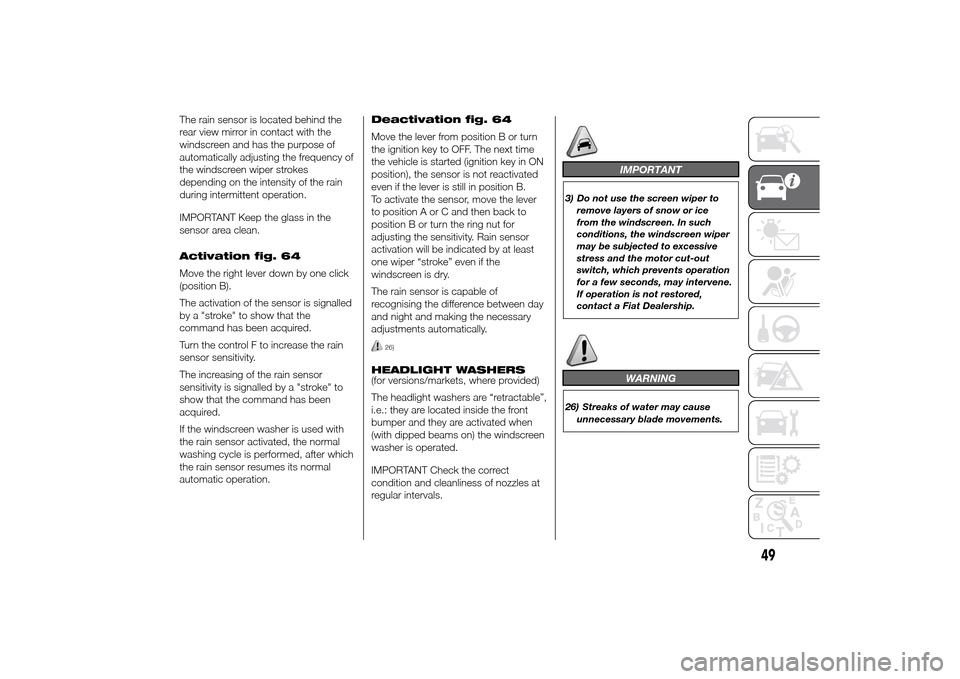
Activation fig. 64
Move the right lever down by one click
(position B).
The activation of the sensor is signalled
by a "stroke" to show that the
command has been acquired.
Turn the control F to increase the rain
sensor sensitivity.
The increasing of the rain sensor
sensitivity is signalled by a "stroke" to
show that the command has been
acquired.
If the windscreen washer is used with
the rain sensor activated, the normal
washing cycle is performed, after which
the rain sensor resumes its normal
automatic operation.Deactivation fig. 64
Move the lever from position B or turn
the ignition key to OFF. The next time
the vehicle is started (ignition key in ON
position), the sensor is not reactivated
even if the lever is still in position B.
To activate the sensor, move the lever
to position A or C and then back to
position B or turn the ring nut for
adjusting the sensitivity. Rain sensor
activation will be indicated by at least
one wiper “stroke” even if the
windscreen is dry.
The rain sensor is capable of
recognising the difference between day
and night and making the necessary
adjustments automatically.
26)
HEADLIGHT WASHERS
(for versions/markets, where provided)
The headlight washers are “retractable”,
i.e.: they are located inside the front
bumper and they are activated when
(with dipped beams on) the windscreen
washer is operated.
IMPORTANT Check the correct
condition and cleanliness of nozzles at
regular intervals.
IMPORTANT
3) Do not use the screen wiper to
remove layers of snow or ice
from the windscreen. In such
conditions, the windscreen wiper
may be subjected to excessive
stress and the motor cut-out
switch, which prevents operation
for a few seconds, may intervene.
If operation is not restored,
contact a Fiat Dealership.
WARNING
26) Streaks of water may cause
unnecessary blade movements.
49
Page 54 of 367
CRUISE CONTROL(for versions/markets, where provided)
IN BRIEF
This is an electronic driving aid that
allows you to drive at a speed of
above 30 km/h on long and straight
dry roads with few driving changes
(e.g. motorways) at a preset speed
without having to press the
accelerator pedal. It is therefore not
recommended to use this device
on extra-urban roads with traffic. Do
not use it in town.
Switching the device on
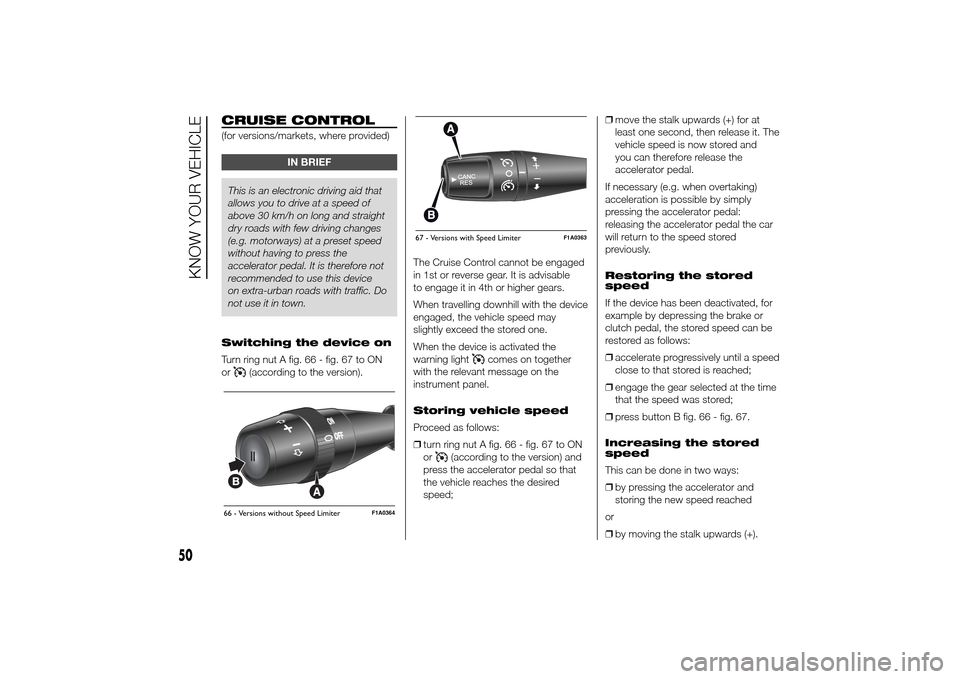
Turn ring nut A fig. 66 - fig. 67 to ON
or
(according to the version).The Cruise Control cannot be engaged
in 1st or reverse gear. It is advisable
to engage it in 4th or higher gears.
When travelling downhill with the device
engaged, the vehicle speed may
slightly exceed the stored one.
When the device is activated the
warning light
comes on together
with the relevant message on the
instrument panel.
Storing vehicle speed
Proceed as follows:
❒turn ring nut A fig. 66 - fig. 67 to ON
or
(according to the version) and
press the accelerator pedal so that
the vehicle reaches the desired
speed;❒move the stalk upwards (+) for at
least one second, then release it. The
vehicle speed is now stored and
you can therefore release the
accelerator pedal.
If necessary (e.g. when overtaking)
acceleration is possible by simply
pressing the accelerator pedal:
releasing the accelerator pedal the car
will return to the speed stored
previously.
Restoring the stored
speed
If the device has been deactivated, for
example by depressing the brake or
clutch pedal, the stored speed can be
restored as follows:
❒accelerate progressively until a speed
close to that stored is reached;
❒engage the gear selected at the time
that the speed was stored;
❒press button B fig. 66 - fig. 67.
Increasing the stored
speed
This can be done in two ways:
❒by pressing the accelerator and
storing the new speed reached
or
❒by moving the stalk upwards (+).
66 - Versions without Speed Limiter
F1A0364
67 - Versions with Speed Limiter
F1A0363
50
KNOW YOUR VEHICLE
Page 55 of 367
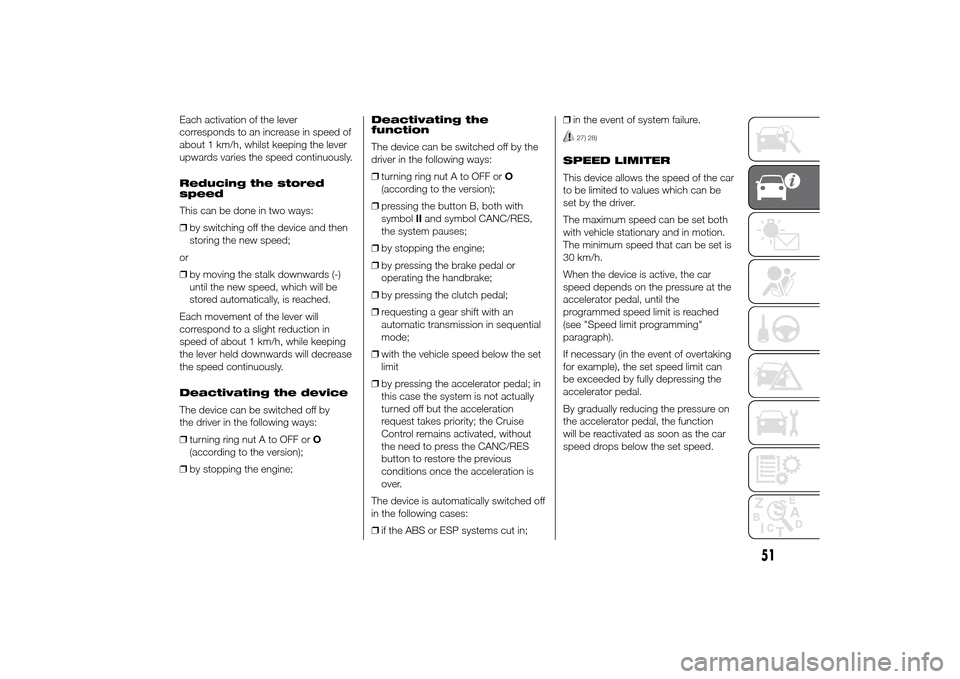
Each activation of the lever
corresponds to an increase in speed of
about 1 km/h, whilst keeping the lever
upwards varies the speed continuously.
Reducing the stored
speed
This can be done in two ways:
❒by switching off the device and then
storing the new speed;
or
❒by moving the stalk downwards (-)
until the new speed, which will be
stored automatically, is reached.
Each movement of the lever will
correspond to a slight reduction in
speed of about 1 km/h, while keeping
the lever held downwards will decrease
the speed continuously.
Deactivating the device
The device can be switched off by
the driver in the following ways:
❒turning ring nut A to OFF orO
(according to the version);
❒by stopping the engine;Deactivating the
function
The device can be switched off by the
driver in the following ways:
❒turning ring nut A to OFF orO
(according to the version);
❒pressing the button B, both with
symbolIIand symbol CANC/RES,
the system pauses;
❒by stopping the engine;
❒by pressing the brake pedal or
operating the handbrake;
❒by pressing the clutch pedal;
❒requesting a gear shift with an
automatic transmission in sequential
mode;
❒with the vehicle speed below the set
limit
❒by pressing the accelerator pedal; in
this case the system is not actually
turned off but the acceleration
request takes priority; the Cruise
Control remains activated, without
the need to press the CANC/RES
button to restore the previous
conditions once the acceleration is
over.
The device is automatically switched off
in the following cases:
❒if the ABS or ESP systems cut in;❒in the event of system failure.
27) 28)
SPEED LIMITER
This device allows the speed of the car
to be limited to values which can be
set by the driver.
The maximum speed can be set both
with vehicle stationary and in motion.
The minimum speed that can be set is
30 km/h.
When the device is active, the car
speed depends on the pressure at the
accelerator pedal, until the
programmed speed limit is reached
(see "Speed limit programming"
paragraph).
If necessary (in the event of overtaking
for example), the set speed limit can
be exceeded by fully depressing the
accelerator pedal.
By gradually reducing the pressure on
the accelerator pedal, the function
will be reactivated as soon as the car
speed drops below the set speed.
51
Page 56 of 367
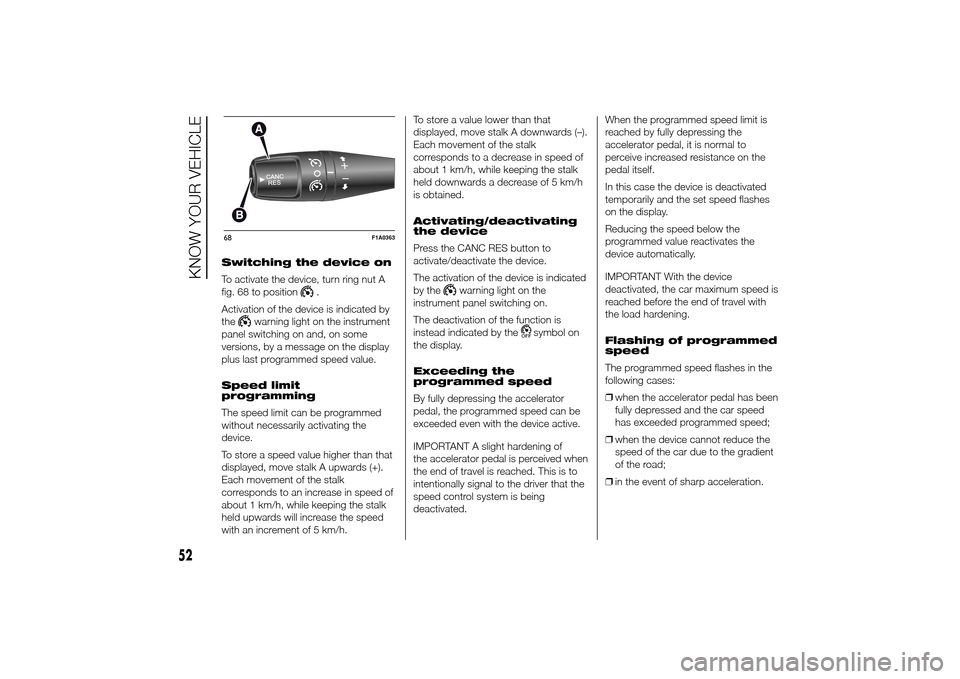
Switching the device on
To activate the device, turn ring nut A
fig. 68 to position
.
Activation of the device is indicated by
the
warning light on the instrument
panel switching on and, on some
versions, by a message on the display
plus last programmed speed value.
Speed limit
programming
The speed limit can be programmed
without necessarily activating the
device.
To store a speed value higher than that
displayed, move stalk A upwards (+).
Each movement of the stalk
corresponds to an increase in speed of
about 1 km/h, while keeping the stalk
held upwards will increase the speed
with an increment of 5 km/h.To store a value lower than that
displayed, move stalk A downwards (–).
Each movement of the stalk
corresponds to a decrease in speed of
about 1 km/h, while keeping the stalk
held downwards a decrease of 5 km/h
is obtained.
Activating/deactivating
the device
Press the CANC RES button to
activate/deactivate the device.
The activation of the device is indicated
by the
warning light on the
instrument panel switching on.
The deactivation of the function is
instead indicated by the
symbol on
the display.
Exceeding the
programmed speed
By fully depressing the accelerator
pedal, the programmed speed can be
exceeded even with the device active.
IMPORTANT A slight hardening of
the accelerator pedal is perceived when
the end of travel is reached. This is to
intentionally signal to the driver that the
speed control system is being
deactivated.When the programmed speed limit is
reached by fully depressing the
accelerator pedal, it is normal to
perceive increased resistance on the
pedal itself.
In this case the device is deactivated
temporarily and the set speed flashes
on the display.
Reducing the speed below the
programmed value reactivates the
device automatically.
IMPORTANT With the device
deactivated, the car maximum speed is
reached before the end of travel with
the load hardening.
Flashing of programmed
speed
The programmed speed flashes in the
following cases:
❒when the accelerator pedal has been
fully depressed and the car speed
has exceeded programmed speed;
❒when the device cannot reduce the
speed of the car due to the gradient
of the road;
❒in the event of sharp acceleration.
68
F1A0363
52
KNOW YOUR VEHICLE
Page 69 of 367
During the adjustment the LED located
on the button (A or B) corresponding
to the direction of travel, flashes.
If, after selecting a button, the LED
remains lit up (for about 5 seconds)
rather than flashing, this means that the
adjustment is temporarily unavailable.
Possible causes may be as follows:
❒insufficient air reserve: the function is
restored by starting the engine;
❒the system has reached a threshold
working temperature: wait a few
minutes to let it cool down before
operating the buttons again.
The level selected with the vehicle
stationary is maintained up to a speed
of about 20 km/h; when this speed
is exceeded, the system will
automatically restore the normal level:
“ride 0”.
IMPORTANT
4) Before manually adjusting with
doors open, make sure there is
enough space around the vehicle
for this kind of operation.
DOORSDOOR CENTRAL
LOCKING/UNLOCKING
Locking doors from the
outside
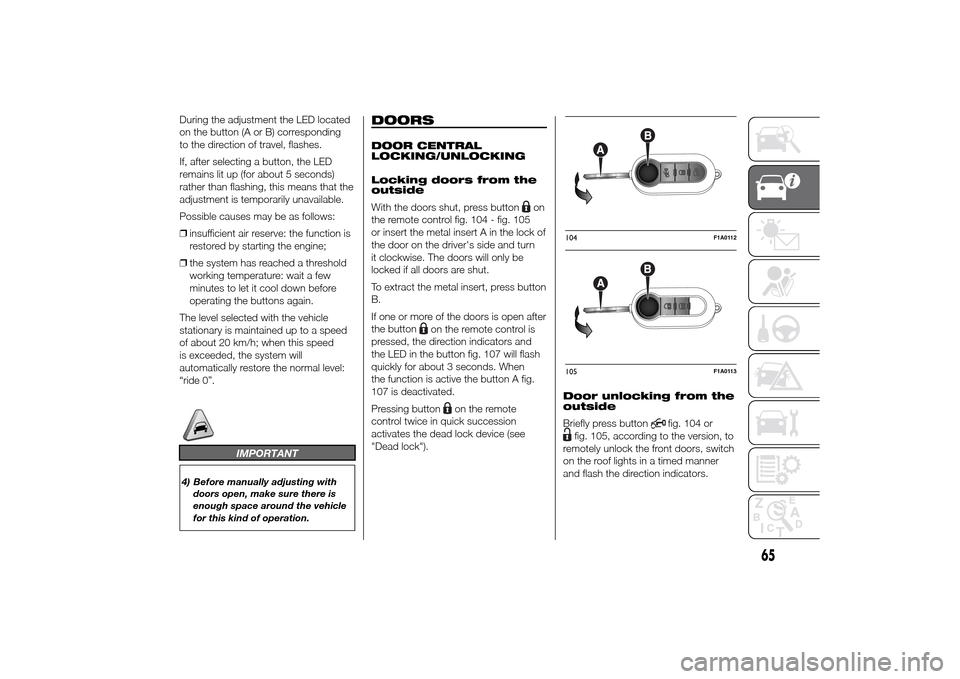
With the doors shut, press button
on
the remote control fig. 104 - fig. 105
or insert the metal insert A in the lock of
the door on the driver's side and turn
it clockwise. The doors will only be
locked if all doors are shut.
To extract the metal insert, press button
B.
If one or more of the doors is open after
the button
on the remote control is
pressed, the direction indicators and
the LED in the button fig. 107 will flash
quickly for about 3 seconds. When
the function is active the button A fig.
107 is deactivated.
Pressing button
on the remote
control twice in quick succession
activates the dead lock device (see
"Dead lock").Door unlocking from the
outside
Briefly press button
fig. 104 or
fig. 105, according to the version, to
remotely unlock the front doors, switch
on the roof lights in a timed manner
and flash the direction indicators.104
F1A0112
105
F1A0113
65
Page 78 of 367
ADJUSTING THE
HEADLIGHTS WHEN
ABROAD
The dipped beam headlights are
aligned for operation in the country
where the vehicle was originally
purchased. When in countries where
you drive on the other side of the road,
you need to alter the beam direction
by affixing a specially designed
self-adhesive film in order not to dazzle
the vehicles travelling in the opposite
direction. Such film is provided by
Lineaccessori Fiat and is available at
Fiat Dealerships.
ABSThis is an integral part of the braking
system, which prevents one or more
wheels from locking or slipping
regardless of the road surface
conditions and braking intensity,
ensuring control of the vehicle even
during emergency braking.
The system intervenes when braking
and the wheels are about to lock,
typically in emergency braking or
low-grip conditions, when locking may
be more frequent.
The ABS ensures the direction of the
vehicle while braking and optimises the
braking distances at the same time.
The system also improves control and
stability of the car when braking on a
surface where the grip of the left and
right wheels varies, or when braking on
corners.
The system is completed by EBD
(Electronic Braking Force Distribution),
which distributes the braking action
between the front and rear wheels.
IMPORTANT To obtain the maximum
efficiency of the braking system, a
bedding-in period of about 500 km is
needed: during this period it is better to
avoid sharp, repeated and prolonged
braking.
46)
SYSTEM INTERVENTION
The driver can feel that the ABS has
come into action because the brake
pedal pulsates slightly and the system
gets noisier: it means that the car
speed should be altered to suit the type
of road surface.
47) 48) 48) 49) 50) 51) 52) 53)
MSR SYSTEM
(Motor Schleppmoment Regelung)
This system is an integral part of the
ABS and intervenes, if there is sudden
downshifting, restoring torque to the
engine, thereby preventing excessive
drive at the drive wheels which,
especially in poor grip conditions, could
lead to a loss in stability of the vehicle.
WARNING
46) The ABS exploits the grip
available to the full, but it cannot
improve it. Therefore, you should
take great care when driving on
slippery surfaces, without taking
unnecessary risks.
74
KNOW YOUR VEHICLE
Page 80 of 367
❒ASR
❒HBA
❒DST
❒ERM
54) 55) 56)
SYSTEM INTERVENTION
This is signalled by the flashing of
warning light
in the instrument panel,
to inform the driver that the vehicle is
in critical stability and grip conditions.
SYSTEM ACTIVATION
The ESC system switches on
automatically when the engine is
started and cannot be switched off.
HILL HOLDER SYSTEM
This system is an integral part of the
ESC system and facilitates starting on
slopes.
It is automatically activated in the
following conditions:
❒uphill: vehicle stationary on a road
with a gradient higher than 5%,
engine running, brake pressed and
gearbox in neutral or gear (other than
reverse) engaged;❒downhill: vehicle stationary on a road
with a gradient higher than 5%,
engine running, brake pressed and
reverse gear engaged.
When setting off, the ESC system
control unit maintains the braking
pressure on the wheels until the torque
necessary for starting is reached, or
in any case for a maximum of 2
seconds, allowing your right foot to be
moved easily from the brake pedal to
the accelerator.
When two seconds have elapsed,
without starting, the system is
automatically deactivated, gradually
releasing the braking pressure. During
this release stage, the typical brake
disengagement noise indicating that the
vehicle is going to move imminently
will be heard.
IMPORTANT The Hill Holder system is
not a parking brake; therefore, never
leave the vehicle without having
engaged the handbrake, turned the
engine off and engaged first gear,
so that it is parked in safe conditions
(for further information read the
"Parking" paragraph in the "Starting
and driving" chapter).ASR (AntiSlip
Regulation) SYSTEM
It is an integral part of the ESC system.
It automatically operates in the event
of one or both drive wheels slipping,
loss of grip on wet roads (aquaplaning)
and acceleration on slippery, snowy
or icy roads, etc.
Depending on the slipping conditions,
two different control systems are
activated:
❒if the slipping involves both drive
wheels, the ASR intervenes reducing
the power transmitted by the engine;
❒if the slipping only involves one of the
drive wheels, it intervenes
automatically braking the wheel that
is slipping.
58)
Engagement/ disengagement of the
ASR system
The ASR system switches on
automatically each time the engine is
started.
Whilst driving, the ASR can be switched
off and subsequently switched on
again by pressing the ASR OFF button
fig. 124.
57)
76
KNOW YOUR VEHICLE
Page 85 of 367
The tyre pressure also increases while
driving the vehicle: this is a normal
condition and does not require any
adjustment of the pressure.
The TPMS continues to advise the
driver of the low tyre pressure condition
until this is corrected; the warning
continues until the pressure
corresponds or exceeds the pressure
prescribed for the cold tyres. When the
tyre low pressure control warning
light
switches on constantly, the
inflation pressure must be adjusted until
it reaches the pressure prescribed for
cold tyres. After the automatic update
of the system, the tyre pressure control
warning light switches off. You may
need to drive the vehicle for about 20
minutes at a speed higher than 20
km/h to allow the TPMS to receive this
information.
NOTE
❒The TPMS does not replace the
normal tyre maintenance service and
does not indicate any fault in a tyre.
❒Therefore, the TPMS should not be
used as pressure switch while
adjusting the tyre inflation pressure.❒Driving with insufficient tyre pressure
causes their overheating and can
result in tyre failure. The low inflation
pressure reduces fuel efficiency
and tyre tread life and may also affect
handling and braking performance
of the vehicle.
❒The TPMS does not replace the
correct tyre maintenance. It is up to
the driver to maintain the correct tyre
pressure level measuring it with a
suitable pressure switch. This is
necessary even if the decrease in the
inflation pressure value does not
cause the tyre pressure control
warning light to switch on.
❒The TPMS warns the driver of any
condition of insufficient tyre pressure
If this drops below the insufficient
pressure limit for any reason including
low temperature and normal
pressure loss of the tyre.
❒The seasonal temperature changes
affect tyre pressure.
The TPMS uses wireless devices with
electronic sensors mounted on the
wheel rims to constantly monitor the
value of tyre pressure. The sensors
mounted on each wheel as part of the
valve stem transmit various information
of the tyres to the receiver module, in
order to calculate the pressure.WARNING Monitoring and maintaining
the correct pressure in all four tyres
are particularly important.
Tyre pressure
monitoring system low
pressure warnings
The system warns the driver if one or
more tyres are flat by switching on
the warning light
on the instrument
panel (together with a warning message
and an acoustic signal).
In this case, stop the vehicle as soon as
possible, check the inflation pressure
of each tyre and inflate to the cold tyre
pressure value prescribed for the
vehicle. The system will automatically
update and after receiving the tyre
pressure update the tyre pressure
control warning light switches off. You
may need to drive the vehicle for about
20 minutes at a speed higher than 20
km/h to allow the system to receive this
information.
TPMS operation faults
The system fault is indicated by
warning light
which first flashes for
75 seconds and then stays on steadily.
This can occur in any of the following
situations:
81