automatic transmission FIAT TIPO 5DOORS STATION WAGON 2020 Owner handbook (in English)
[x] Cancel search | Manufacturer: FIAT, Model Year: 2020, Model line: TIPO 5DOORS STATION WAGON, Model: FIAT TIPO 5DOORS STATION WAGON 2020Pages: 304, PDF Size: 9.12 MB
Page 203 of 304
AUTOMATIC
TRANSMISSION / DUAL
CLUTCH AUTOMATIC
TRANSMISSION
ACTUATION SYSTEM OIL
(where provided)
4)
The transmission control oil level should
only be checked at a Fiat Dealership.
BATTERY
173) 174) 175)
76)
5)
The battery does not require the
electrolyte to be topped up with distilled
water.
A periodic check carried out at a Fiat
Dealership is, however, necessary to
check efficiency.
Replacing the battery
If necessary, replace the battery with
another original battery with the same
specifications. Follow the battery
Manufacturer’s instructions for
maintenance.
USEFUL ADVICE FOR
EXTENDING THE LIFE OF
YOUR BATTERY
Useful advice for extending the life
of your battery
To avoid draining your battery and
make it last longer, observe the
following instructions:
when you park the car, ensure that
the doors, tailgate and bonnet are
closed properly, to prevent any lights
from remaining on inside the
passenger's compartment;
switch off all roof lights inside the car:
the car is however equipped with a
system which switches all internal lights
off automatically;
do not keep accessories (e.g. radio,
hazard warning lights, etc.) switched on
for a long time when the engine is not
running;
before performing any operation on
the electrical system, disconnect the
negative battery cable.
If, after purchasing the vehicle, you wish
to install electrical accessories which
require permanent electrical supply (e.g.
alarm, etc.) or accessories which
influence the electrical supply
requirements, contact a Fiat Dealership,
whose qualified staff will evaluate the
overall electrical consumption.
78)
IMPORTANT After the battery is
disconnected, the steering must be
initialised. The
warning light on the
instrument panel (or symbol on the
display) switches on to indicate this. To
carry out this procedure, simply turn the
steering wheel all the way from one end
to the other or drive in a straight line for
about a hundred metres.
IMPORTANT If the charge level remains
under 50% for a long time, the battery
is damaged by sulphation, reducing its
capacity and efficiency at start-up. The
battery is also more prone to the risk of
freezing (at temperatures as high as
-10°C). Refer to the "Vehicle inactivity"
paragraph in "Starting and driving"
chapter if the vehicle is left parked for a
long time.
WARNING
165)Never smoke while working in the
engine compartment: gas and inflammable
vapours may be present, with the risk of
fire.
166)Be very careful when working in the
engine compartment when the engine is
hot: you may get burned. Do not get too
close to the radiator cooling fan: the
electric fan may start; danger of injury.
Scarves, ties and other loose clothing
might be pulled by moving parts.
201
Page 234 of 304
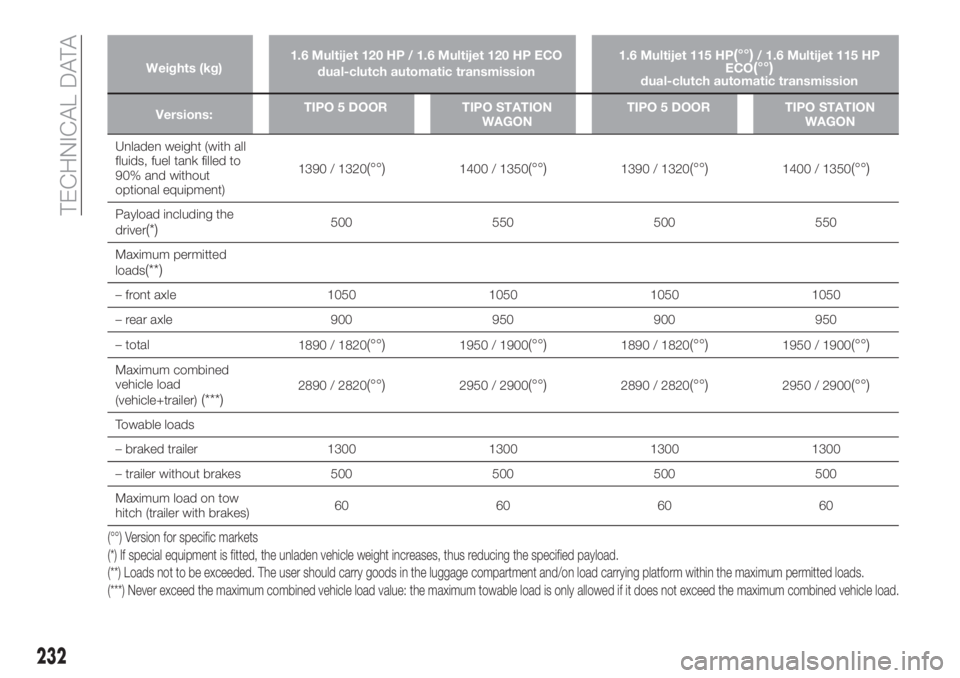
Weights (kg)1.6 Multijet 120 HP / 1.6 Multijet 120 HP ECO
dual-clutch automatic transmission1.6 Multijet 115 HP(°°)/ 1.6 Multijet 115 HP
ECO(°°)dual-clutch automatic transmission
Versions:TIPO 5 DOOR TIPO STATION
WAGONTIPO 5 DOOR TIPO STATION
WAGON
Unladen weight (with all
fluids, fuel tank filled to
90% and without
optional equipment)1390 / 1320
(°°)1400 / 1350(°°)1390 / 1320(°°)1400 / 1350(°°)
Payload including the
driver(*)500 550 500 550
Maximum permitted
loads
(**)
– front axle 1050 1050 1050 1050
– rear axle 900 950 900 950
– total
1890 / 1820
(°°)1950 / 1900(°°)1890 / 1820(°°)1950 / 1900(°°)
Maximum combined
vehicle load
(vehicle+trailer)
(***)2890 / 2820(°°)2950 / 2900(°°)2890 / 2820(°°)2950 / 2900(°°)
Towable loads
– braked trailer 1300 1300 1300 1300
– trailer without brakes 500 500 500 500
Maximum load on tow
hitch (trailer with brakes)60 60 60 60
(°°) Version for specific markets
(*) If special equipment is fitted, the unladen vehicle weight increases, thus reducing the specified payload.
(**) Loads not to be exceeded. The user should carry goods in the luggage compartment and/on load carrying platform within the maximum permitted loads.
(***) Never exceed the maximum combined vehicle load value: the maximum towable load is only allowed if it does not exceed the maximum combined vehicleload.
232
TECHNICAL DATA
Page 235 of 304
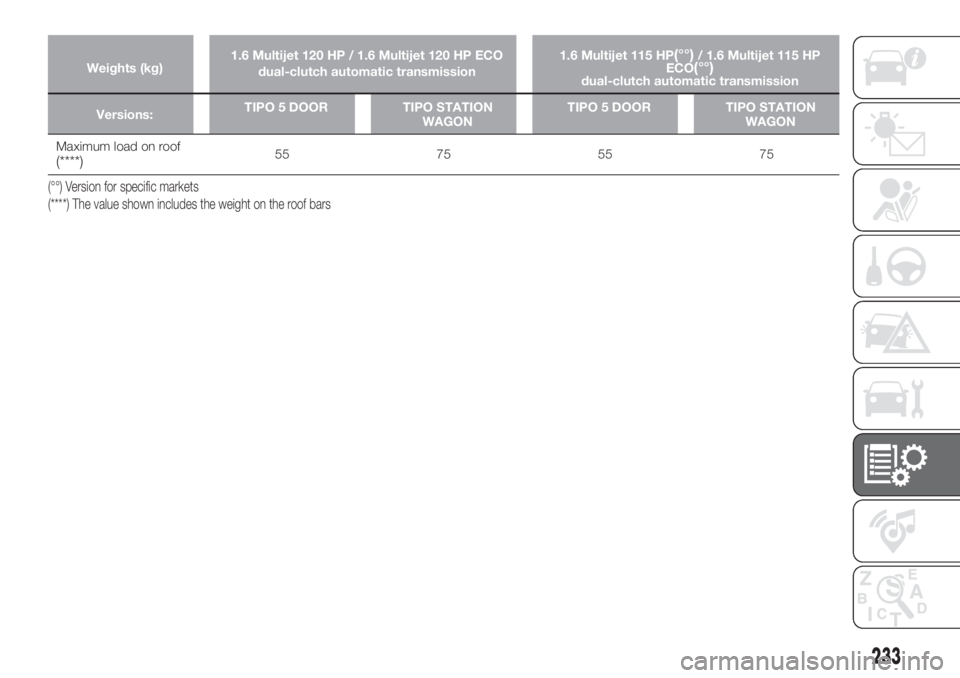
Weights (kg)1.6 Multijet 120 HP / 1.6 Multijet 120 HP ECO
dual-clutch automatic transmission1.6 Multijet 115 HP(°°)/ 1.6 Multijet 115 HP
ECO(°°)dual-clutch automatic transmission
Versions:TIPO 5 DOOR TIPO STATION
WAGONTIPO 5 DOOR TIPO STATION
WAGON
Maximum load on roof(****)55 75 55 75
(°°) Version for specific markets
(****) The value shown includes the weight on the roof bars
233
Page 242 of 304
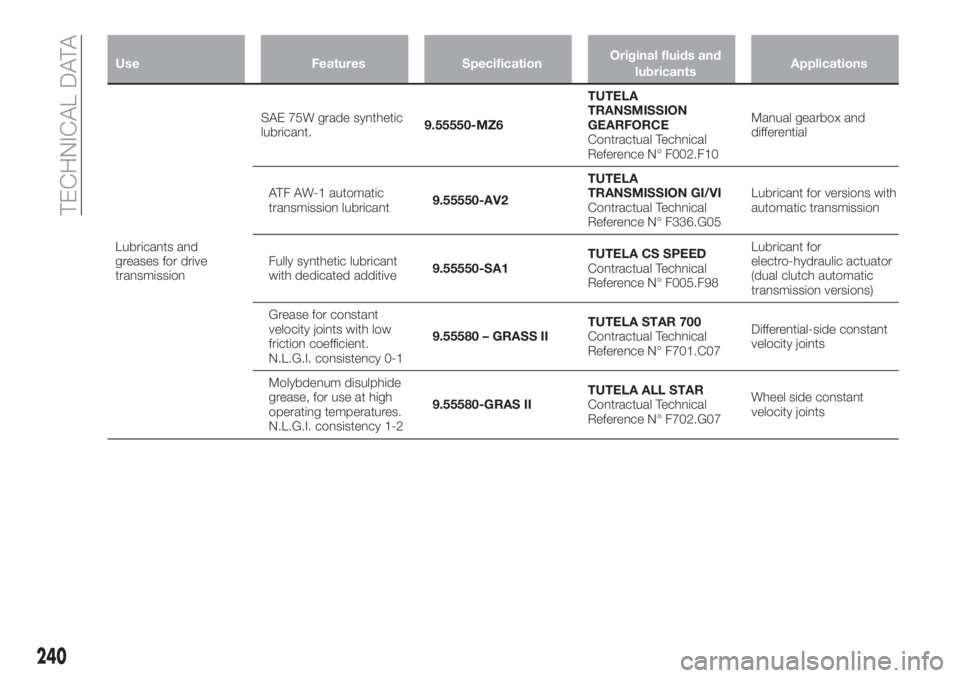
Use Features SpecificationOriginal fluids and
lubricantsApplications
Lubricants and
greases for drive
transmissionSAE 75W grade synthetic
lubricant.9.55550-MZ6TUTELA
TRANSMISSION
GEARFORCE
Contractual Technical
Reference N° F002.F10Manual gearbox and
differential
ATF AW-1 automatic
transmission lubricant9.55550-AV2TUTELA
TRANSMISSION GI/VI
Contractual Technical
Reference N° F336.G05Lubricant for versions with
automatic transmission
Fully synthetic lubricant
with dedicated additive9.55550-SA1TUTELA CS SPEED
Contractual Technical
Reference N° F005.F98Lubricant for
electro-hydraulic actuator
(dual clutch automatic
transmission versions)
Grease for constant
velocity joints with low
friction coefficient.
N.L.G.I. consistency 0-19.55580 – GRASS IITUTELA STAR 700
Contractual Technical
Reference N° F701.C07Differential-side constant
velocity joints
Molybdenum disulphide
grease, for use at high
operating temperatures.
N.L.G.I. consistency 1-29.55580-GRAS IITUTELA ALL STAR
Contractual Technical
Reference N° F702.G07Wheel side constant
velocity joints
240
TECHNICAL DATA
Page 244 of 304
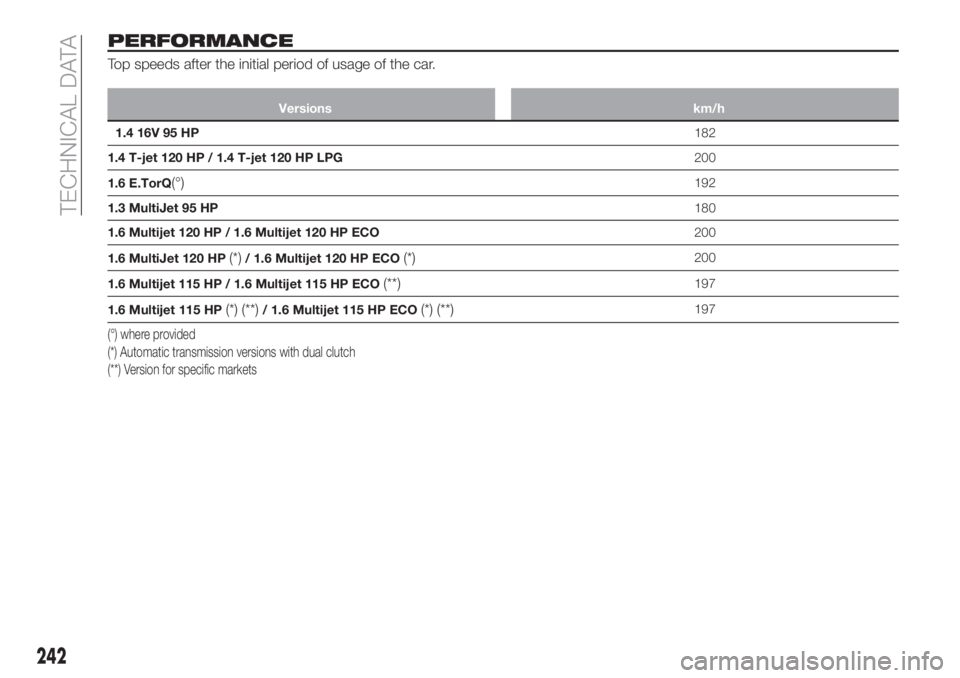
PERFORMANCE
Top speeds after the initial period of usage of the car.
Versions km/h
1.4 16V 95 HP182
1.4 T-jet 120 HP / 1.4 T-jet 120 HP LPG200
1.6 E.TorQ
(°)192
1.3 MultiJet 95 HP180
1.6 Multijet 120 HP / 1.6 Multijet 120 HP ECO200
1.6 MultiJet 120 HP
(*)/ 1.6 Multijet 120 HP ECO(*)200
1.6 Multijet 115 HP / 1.6 Multijet 115 HP ECO
(**)197
1.6 Multijet 115 HP
(*) (**)/ 1.6 Multijet 115 HP ECO(*) (**)197
(°) where provided
(*) Automatic transmission versions with dual clutch
(**) Version for specific markets
242
TECHNICAL DATA
Page 257 of 304
Fast forward/rewind through tracks
Press and hold down the
button to
fast forward the selected track or keep
the
button pressed to fast rewind
the track.
Track selection (browse)
Use this function to scroll through and
select the tracks on the active device.
The choices available depend on the
device connected. For example, on a
USB device, you can also use the
BROWSE ENTER button/knob to scroll
through the list of artists, genres and
albums available on the device,
depending on the information available
in the tracks.
Within each alphabetical list, theA-B-C
button on the front panel allows the
user to skip to the desired letter in the
list.
NOTE This button might be disabled
for someApple®
devices.
Press the BROWSE ENTER button to
activate this function on the source
being played. Turn the BROWSE
ENTER button/knob to select the
desired category and then press the
button/knob to confirm the selection.
Press the
button to cancel the
function.
NOTE The BROWSE ENTER button
does not allow any operation on an
AUX device (where provided).
Track information display
Press theINFObutton to select the
information displayed while playing
(Artist, Album, Genre, Name, Folder, File
name). Press the
button to exit the
screen.
Shuffle
Press the
button to play the tracks
on USB in a random order. Press again
to deactivate the function.
Repeat
To listen to the track again, press the
button. Press again to deactivate
the function.
TheUconnect™system may not
support some USB keys: in this case, it
may not automatically switch from
“Radio” mode to “Media” mode. If the
device used does not play, verify its
compatibility by selecting Media mode:
a dedicated message will appear on the
Uconnect™system display.
USB SOURCE
To activate USB mode, insert a suitable
USB device into the car USB port.
If a USB device is inserted with the
system on, it will start playing the tracks
found on the device.
IMPORTANT When connecting a USB
device to the USB port, make sure that
it does not obstruct the operation of the
handbrake lever.
NOTE TheUconnect™system may
not support some USB keys: in this
case, it will not automatically switch
from “Radio” mode to “Media” mode. If
the device used does not play, verify its
compatibility by selecting Media mode:
a dedicated message will appear on the
Uconnect™system display.
IMPORTANT After using a USB
recharging socket, we recommend
disconnecting the device (smartphone),
always removing the cable from the
vehicle socket first, never from the
device fig. 229. Cables left flying or
connected incorrectly could
compromise correct recharging and/or
the USB socket condition
NOTE The USB port handles data
transmission from the Pen
Drive/Smartphone, etc. and slow
recharging, which is not guaranteed as
it depends on the device type/brand of
the external device itself.
255
Page 266 of 304
Bluetooth®SOURCE
This mode is activated by pairing a
Bluetooth®
device containing music
tracks with the system.
PAIRING A Bluetooth®AUDIO
DEVICE
To pair aBluetooth®
audio device,
proceed as follows:
activate theBluetooth®
function on
the device;
press the MEDIA button on the front
panel;
if the "Media" source is active, press
the "Source" button;
select theBluetooth®
Media
source;
press the "Add Device" button;
search forUconnect™on the
Bluetooth®
audio device (during the
pairing stage a screen is displayed
showing the progress of the operation);
when requested by the audio device,
enter the PIN code shown on the
system display or confirm on the device
the PIN displayed;
if the pairing procedure is completed
successfully, a screen is displayed.
Answer "Yes" to the question to pair the
Bluetooth®
audio device as favourite
(the device will have priority over all
other devices to be paired
subsequently). If "No" is selected, the
priority is determined according to the
order of connection.The last device connected will have the
highest priority;
an audio device can also be paired
by pressing the PHONE button on the
front panel and by selecting "Settings"
or, from the "Settings" menu, selecting
"Phone/Bluetooth".
WARNING If the
Bluetooth®
connection between mobile phone and
system is lost, consult the mobile
phone handbook.
USB SOURCE
To activate the USB mode, insert the
corresponding USB device into the
USB port on the central console.
When a USB device is inserted with the
radio on, it starts to play the tracks on
the device if the “AutoPlay” is set to ON
in the “Audio” menu.
NOTE TheUconnect™system may
not support some USB keys: in this
case, it will not automatically switch
from “Radio” mode to “Media” mode. If
the device used does not play, verify its
compatibility by selecting Media mode:
a dedicated message will appear on the
Uconnect™system display.
IMPORTANT After using a USB
recharging socket, we recommend
disconnecting the device (smartphone),
always removing the cable from the
vehicle socket first, never from the
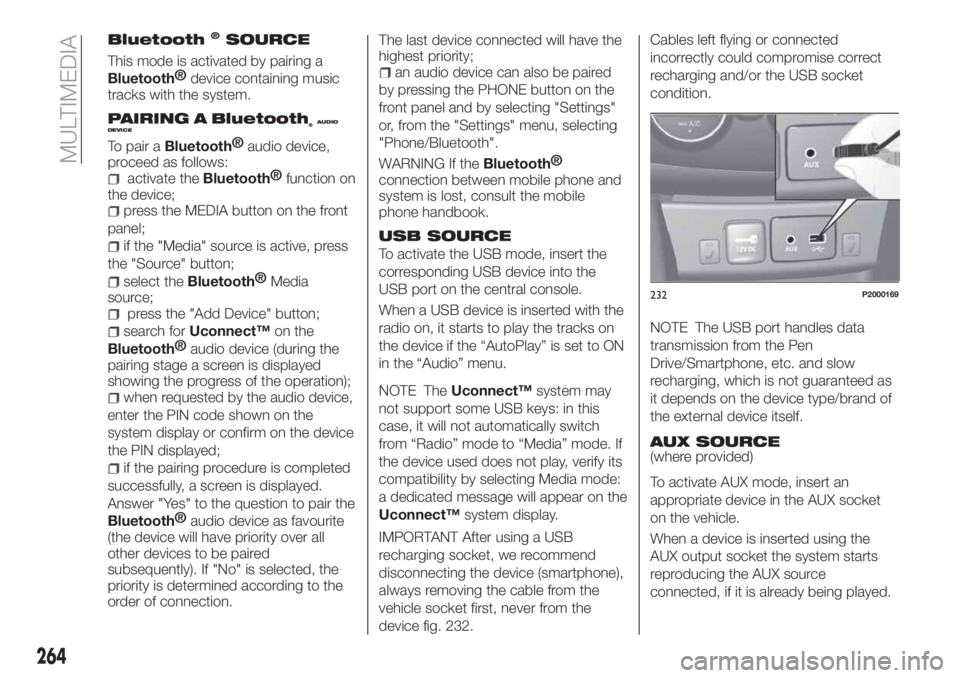
device fig. 232.Cables left flying or connected
incorrectly could compromise correct
recharging and/or the USB socket
condition.
NOTE The USB port handles data
transmission from the Pen
Drive/Smartphone, etc. and slow
recharging, which is not guaranteed as
it depends on the device type/brand of
the external device itself.
AUX SOURCE
(where provided)
To activate AUX mode, insert an
appropriate device in the AUX socket
on the vehicle.
When a device is inserted using the
AUX output socket the system starts
reproducing the AUX source
connected, if it is already being played.
232P2000169
264
MULTIMEDIA
Page 281 of 304
NOTE The Radio may change the track
being played by modifying the
name-device in the Bluetooth settings
of the phone (where provided), if the
device is connected via USB after the
Bluetooth connection.
NOTE TheUconnect™system may
not support some USB keys: in this
case, it will not automatically switch
from “Radio” mode to “Media” mode. If
the device used does not play, verify its
compatibility by selecting Media mode:
a dedicated message will appear on the
Uconnect™system display.
IMPORTANT After using a USB
recharging socket, we recommend
disconnecting the device (smartphone),
always removing the cable from the
vehicle socket first, never from the
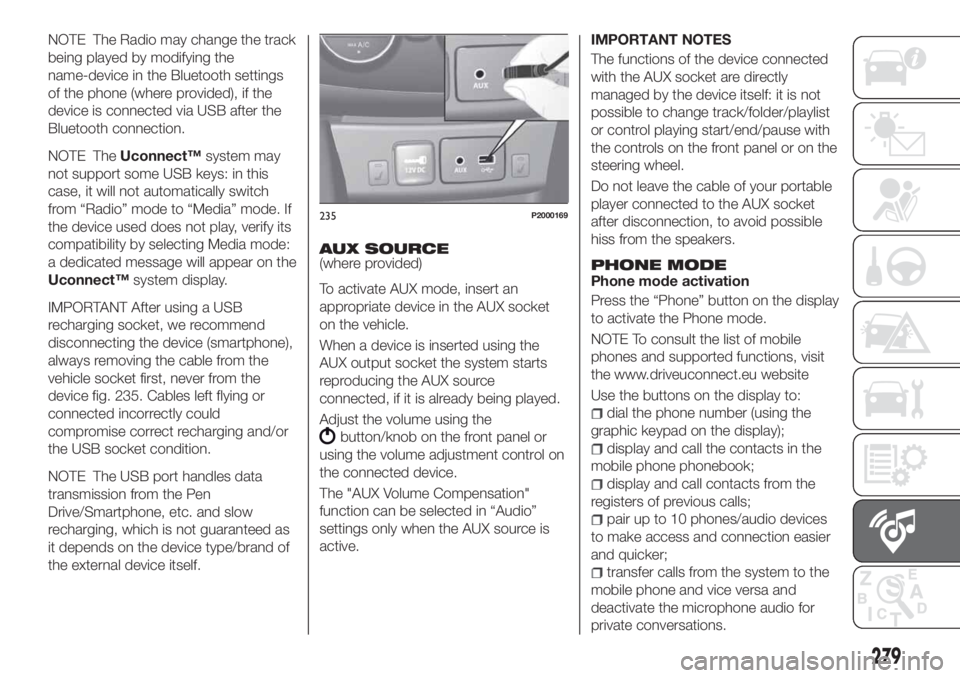
device fig. 235. Cables left flying or
connected incorrectly could
compromise correct recharging and/or
the USB socket condition.
NOTE The USB port handles data
transmission from the Pen
Drive/Smartphone, etc. and slow
recharging, which is not guaranteed as
it depends on the device type/brand of
the external device itself.AUX SOURCE
(where provided)
To activate AUX mode, insert an
appropriate device in the AUX socket
on the vehicle.
When a device is inserted using the
AUX output socket the system starts
reproducing the AUX source
connected, if it is already being played.
Adjust the volume using the
button/knob on the front panel or
using the volume adjustment control on
the connected device.
The "AUX Volume Compensation"
function can be selected in “Audio”
settings only when the AUX source is
active.IMPORTANT NOTES
The functions of the device connected
with the AUX socket are directly
managed by the device itself: it is not
possible to change track/folder/playlist
or control playing start/end/pause with
the controls on the front panel or on the
steering wheel.
Do not leave the cable of your portable
player connected to the AUX socket
after disconnection, to avoid possible
hiss from the speakers.
PHONE MODEPhone mode activation
Press the “Phone” button on the display
to activate the Phone mode.
NOTE To consult the list of mobile
phones and supported functions, visit
the www.driveuconnect.eu website
Use the buttons on the display to:
dial the phone number (using the
graphic keypad on the display);
display and call the contacts in the
mobile phone phonebook;
display and call contacts from the
registers of previous calls;
pair up to 10 phones/audio devices
to make access and connection easier
and quicker;
transfer calls from the system to the
mobile phone and vice versa and
deactivate the microphone audio for
private conversations.
235P2000169
279
Page 299 of 304
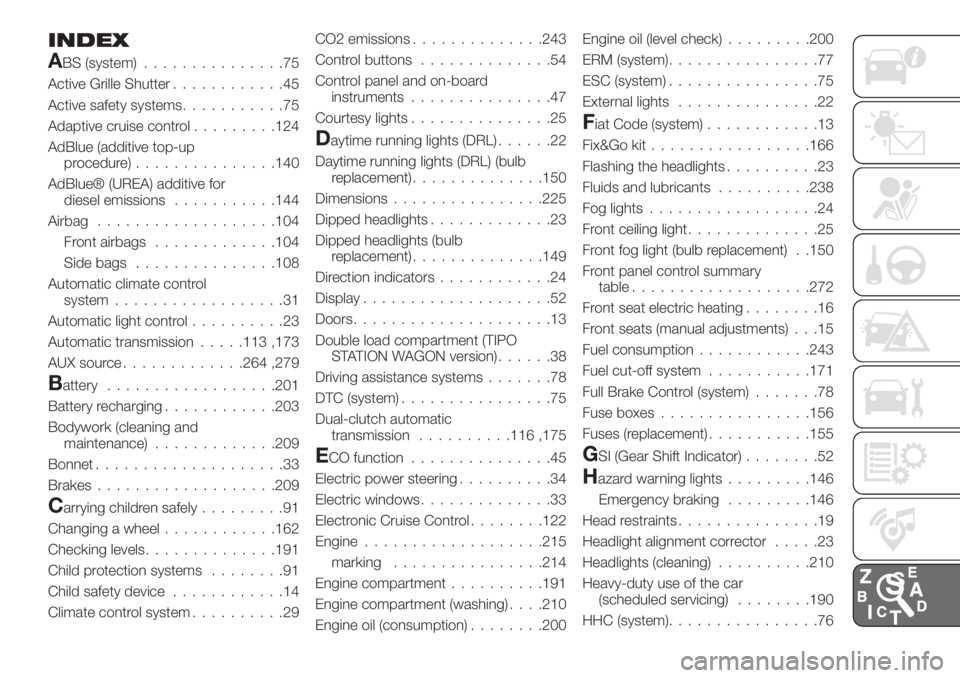
INDEX
ABS (system)...............75
Active Grille Shutter............45
Active safety systems...........75
Adaptive cruise control.........124
AdBlue (additive top-up
procedure)...............140
AdBlue® (UREA) additive for
diesel emissions...........144
Airbag...................104
Front airbags.............104
Side bags...............108
Automatic climate control
system..................31
Automatic light control..........23
Automatic transmission.....113 ,173
AUX source.............264 ,279
Battery..................201
Battery recharging............203
Bodywork (cleaning and
maintenance).............209
Bonnet....................33
Brakes...................209
Carrying children safely.........91
Changing a wheel............162
Checking levels..............191
Child protection systems........91
Child safety device............14
Climate control system..........29CO2 emissions..............243
Control buttons..............54
Control panel and on-board
instruments...............47
Courtesy lights...............25
Daytime running lights (DRL)......22
Daytime running lights (DRL) (bulb
replacement)..............150
Dimensions................225
Dipped headlights.............23
Dipped headlights (bulb
replacement)..............149
Direction indicators............24
Display....................52
Doors.....................13
Double load compartment (TIPO
STATION WAGON version)......38
Driving assistance systems.......78
DTC (system)................75
Dual-clutch automatic
transmission..........116 ,175
ECO function...............45
Electric power steering..........34
Electric windows..............33
Electronic Cruise Control........122
Engine...................215
marking................214
Engine compartment..........191
Engine compartment (washing). . . .210
Engine oil (consumption)........200Engine oil (level check).........200
ERM (system)................77
ESC (system)................75
External lights...............22
Fiat Code (system)............13
Fix&Go kit.................166
Flashing the headlights..........23
Fluids and lubricants..........238
Fog lights..................24
Front ceiling light..............25
Front fog light (bulb replacement) . .150
Front panel control summary
table...................272
Front seat electric heating........16
Front seats (manual adjustments) . . .15
Fuel consumption............243
Fuel cut-off system...........171
Full Brake Control (system).......78
Fuse boxes................156
Fuses (replacement)...........155
GSI (Gear Shift Indicator)........52
Hazard warning lights.........146
Emergency braking.........146
Head restraints...............19
Headlight alignment corrector.....23
Headlights (cleaning)..........210
Heavy-duty use of the car
(scheduled servicing)........190
HHC (system)................76
Page 300 of 304
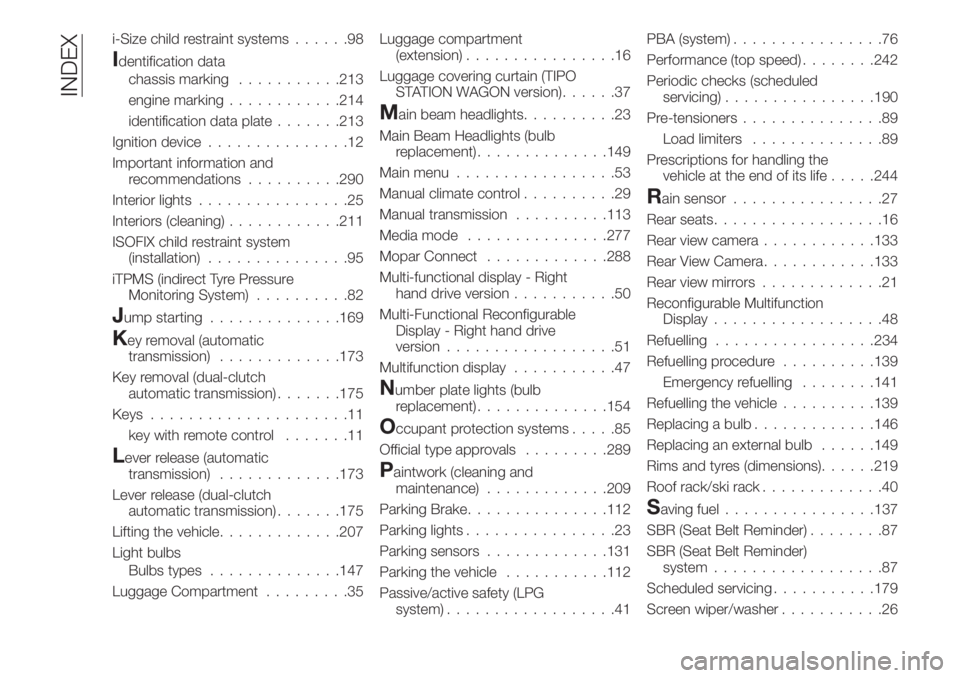
i-Size child restraint systems......98
Identification data
chassis marking...........213
engine marking............214
identification data plate.......213
Ignition device...............12
Important information and
recommendations..........290
Interior lights................25
Interiors (cleaning)............211
ISOFIX child restraint system
(installation)...............95
iTPMS (indirect Tyre Pressure
Monitoring System)..........82
Jump starting..............169
Key removal (automatic
transmission).............173
Key removal (dual-clutch
automatic transmission).......175
Keys.....................11
key with remote control.......11
Lever release (automatic
transmission).............173
Lever release (dual-clutch
automatic transmission).......175
Lifting the vehicle.............207
Light bulbs
Bulbs types..............147
Luggage Compartment.........35Luggage compartment
(extension)................16
Luggage covering curtain (TIPO
STATION WAGON version)......37
Main beam headlights..........23
Main Beam Headlights (bulb
replacement)..............149
Main menu.................53
Manual climate control..........29
Manual transmission..........113
Media mode...............277
Mopar Connect.............288
Multi-functional display - Right
hand drive version...........50
Multi-Functional Reconfigurable
Display - Right hand drive
version..................51
Multifunction display...........47
Number plate lights (bulb
replacement)..............154
Occupant protection systems.....85
Official type approvals.........289
Paintwork (cleaning and
maintenance).............209
Parking Brake...............112
Parking lights................23
Parking sensors.............131
Parking the vehicle...........112
Passive/active safety (LPG
system)..................41PBA (system)................76
Performance (top speed)........242
Periodic checks (scheduled
servicing)................190
Pre-tensioners...............89
Load limiters..............89
Prescriptions for handling the
vehicle at the end of its life.....244
Rain sensor................27
Rear seats..................16
Rear view camera............133
Rear View Camera............133
Rear view mirrors.............21
Reconfigurable Multifunction
Display..................48
Refuelling.................234
Refuelling procedure..........139
Emergency refuelling........141
Refuelling the vehicle..........139
Replacing a bulb.............146
Replacing an external bulb......149
Rims and tyres (dimensions)......219
Roof rack/ski rack.............40
Saving fuel................137
SBR (Seat Belt Reminder)........87
SBR (Seat Belt Reminder)
system..................87
Scheduled servicing...........179
Screen wiper/washer...........26
INDEX