steering wheel controls FORD BRONCO 2022 Owners Manual
[x] Cancel search | Manufacturer: FORD, Model Year: 2022, Model line: BRONCO, Model: FORD BRONCO 2022Pages: 562, PDF Size: 73 MB
Page 6 of 562
Front Passenger Sensing System...........63
Crash Sensors and Airbag Indicator......66
Disposing of Airbags....................................67
911 Assist
What Is 911 Assist.........................................68
Emergency Call Requirements................68
Emergency Call Limitations......................68
Keys and Remote Controls
Remote Control Limitations.....................69
Using the Remote Control.........................69
Removing the Key Blade............................70
Sounding the Panic Alarm.........................70
Locating Your Vehicle..................................70
Changing the Remote Control Battery...........................................................................70
Replacing a Lost Key or Remote Control............................................................................71
Programming the Remote Control.........72
Keys and Remote Controls –Troubleshooting.........................................73
MyKey™
What Is MyKey................................................74
MyKey Settings...............................................74
Creating a MyKey...........................................75
Programming a MyKey................................75
Clearing All MyKeys......................................75
Checking MyKey System Status..............76
Using MyKey With Remote StartSystems........................................................76
MyKey – Troubleshooting..........................76
Doors and Locks
Operating the Doors From Outside YourVehicle...........................................................78
Operating the Doors From Inside YourVehicle...........................................................78
Autounlock.......................................................78
Autolock............................................................79
Mislock...............................................................79
Doors and Locks – Troubleshooting...........................................................................79
Keyless Entry
Keyless Entry Limitations...........................82
Keyless Entry Settings.................................82
Using Keyless Entry......................................82
Keyless Entry – Troubleshooting............83
Tailgate
Opening the Tailgate...................................84
Closing the Tailgate.....................................84
Locking and Unlocking the Tailgate.......84
Tailgate – Troubleshooting.......................86
Security
Passive Anti-Theft System........................87
Security – Troubleshooting.......................87
Steering Wheel
Adjusting the Steering Wheel..................89
Horn...................................................................89
Switching the Heated Steering WheelOn and Off..................................................89
Wipers and Washers
Wipers...............................................................90
Switching the Rear Window Wiper Onand Off.........................................................90
Reverse Wipe.................................................90
Checking the Wiper Blades........................91
Replacing the Front Wiper Blades...........91
Replacing the Rear Wiper Blades...........92
Washers............................................................92
Wipers and Washers – Troubleshooting..........................................................................93
Exterior Lighting
Exterior Lighting Control............................94
2
2022 Bronco (TG1) Canada/United States of America, enUSA, Edition date: 202109, First-PrintingTable of Contents
Page 30 of 562
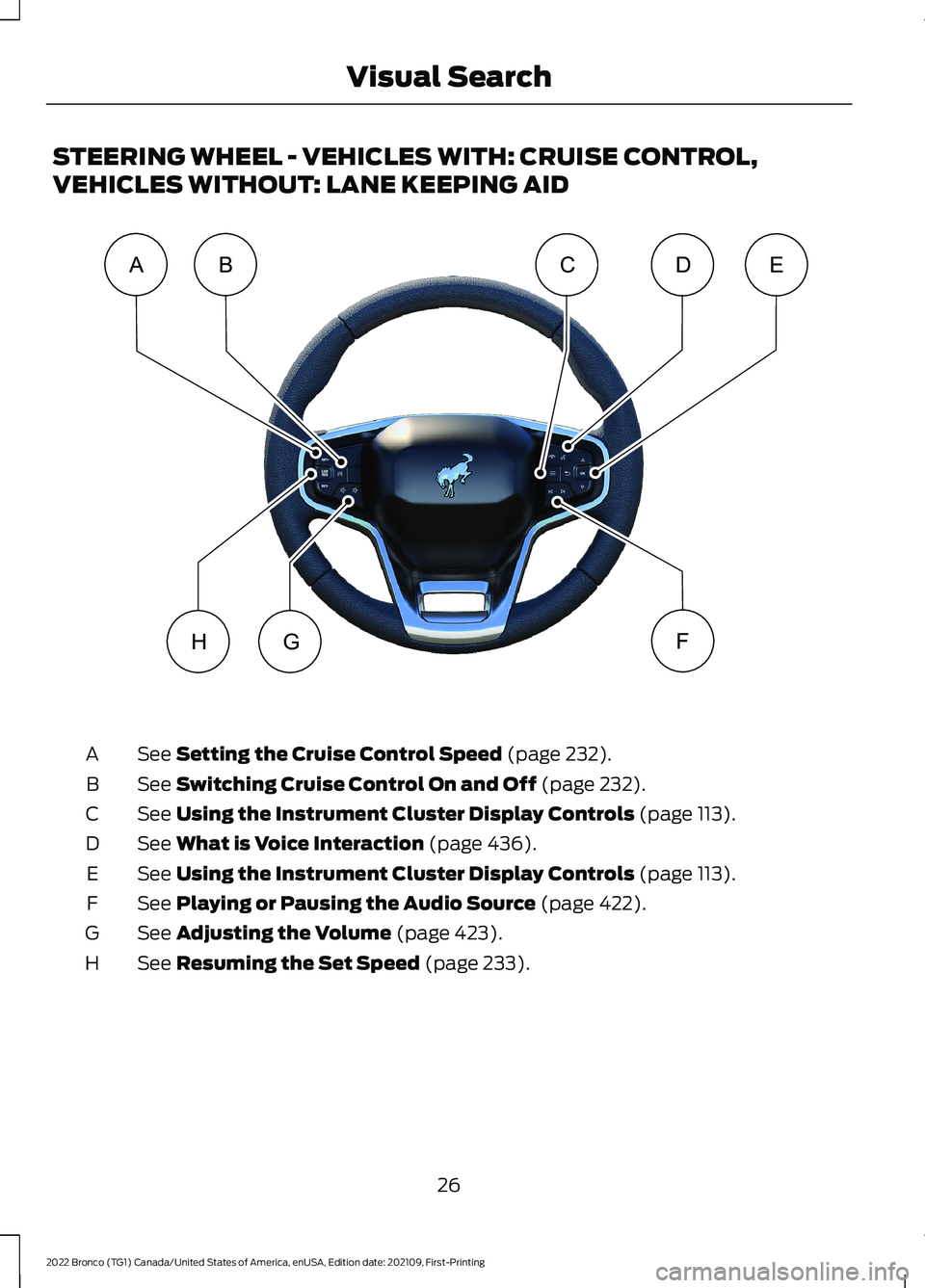
STEERING WHEEL - VEHICLES WITH: CRUISE CONTROL,
VEHICLES WITHOUT: LANE KEEPING AID
See Setting the Cruise Control Speed (page 232).A
See Switching Cruise Control On and Off (page 232).B
See Using the Instrument Cluster Display Controls (page 113).C
See What is Voice Interaction (page 436).D
See Using the Instrument Cluster Display Controls (page 113).E
See Playing or Pausing the Audio Source (page 422).F
See Adjusting the Volume (page 423).G
See Resuming the Set Speed (page 233).H
26
2022 Bronco (TG1) Canada/United States of America, enUSA, Edition date: 202109, First-PrintingVisual SearchABEDCFGHE331277
Page 31 of 562
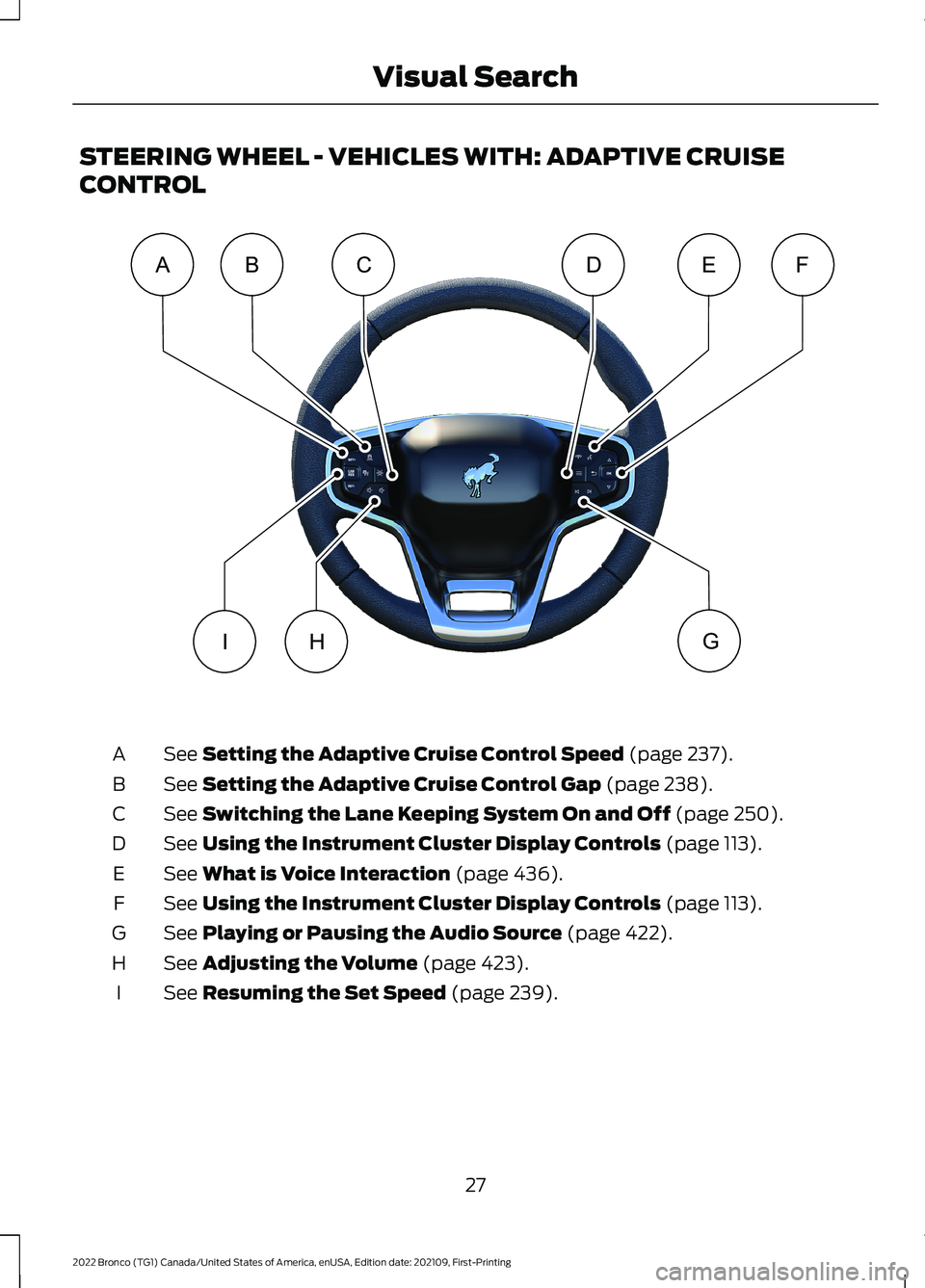
STEERING WHEEL - VEHICLES WITH: ADAPTIVE CRUISE
CONTROL
See Setting the Adaptive Cruise Control Speed (page 237).A
See Setting the Adaptive Cruise Control Gap (page 238).B
See Switching the Lane Keeping System On and Off (page 250).C
See Using the Instrument Cluster Display Controls (page 113).D
See What is Voice Interaction (page 436).E
See Using the Instrument Cluster Display Controls (page 113).F
See Playing or Pausing the Audio Source (page 422).G
See Adjusting the Volume (page 423).H
See Resuming the Set Speed (page 239).I
27
2022 Bronco (TG1) Canada/United States of America, enUSA, Edition date: 202109, First-PrintingVisual SearchACBFEDGHIE347990
Page 32 of 562
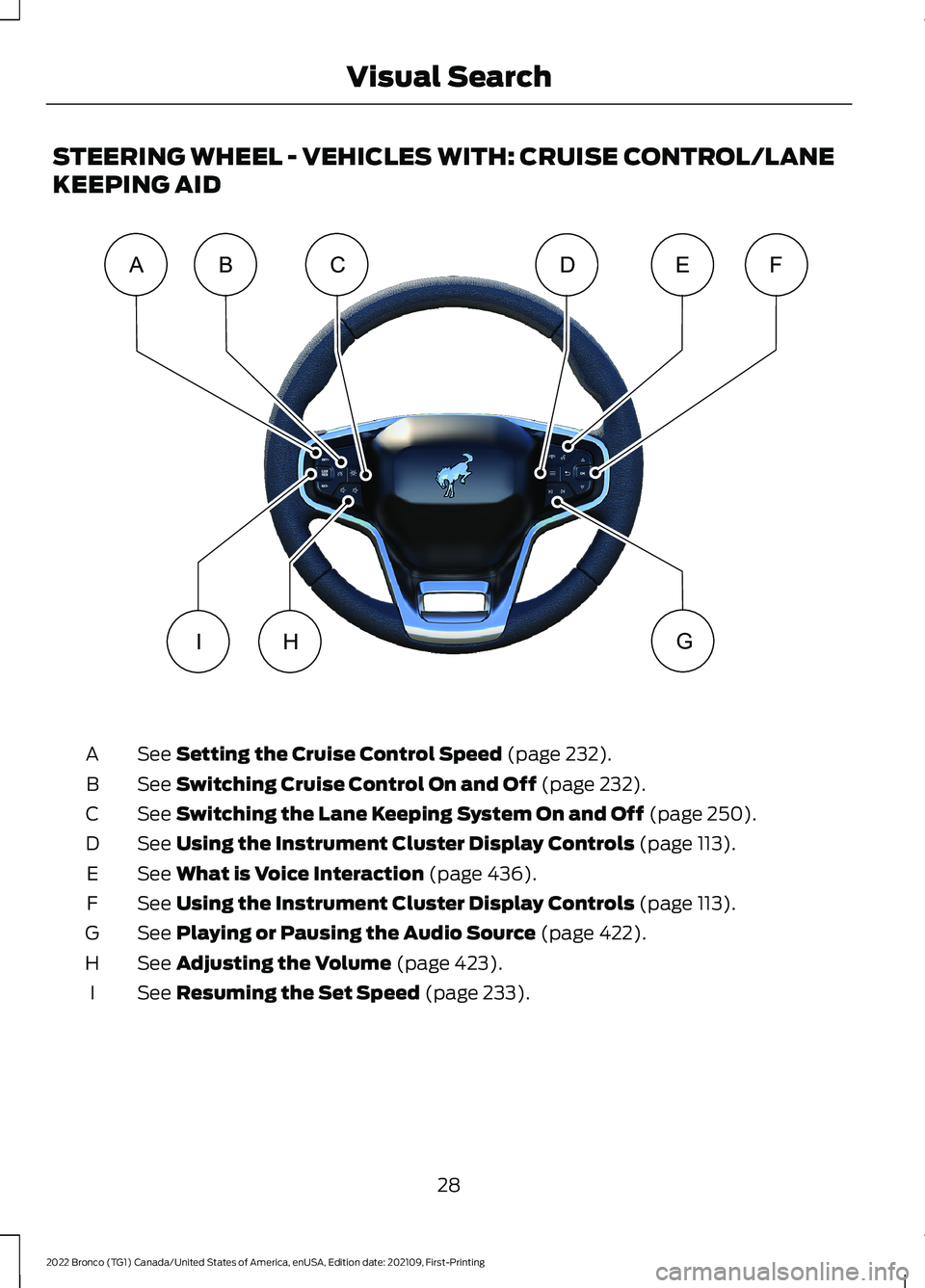
STEERING WHEEL - VEHICLES WITH: CRUISE CONTROL/LANE
KEEPING AID
See Setting the Cruise Control Speed (page 232).A
See Switching Cruise Control On and Off (page 232).B
See Switching the Lane Keeping System On and Off (page 250).C
See Using the Instrument Cluster Display Controls (page 113).D
See What is Voice Interaction (page 436).E
See Using the Instrument Cluster Display Controls (page 113).F
See Playing or Pausing the Audio Source (page 422).G
See Adjusting the Volume (page 423).H
See Resuming the Set Speed (page 233).I
28
2022 Bronco (TG1) Canada/United States of America, enUSA, Edition date: 202109, First-PrintingVisual SearchACBFEDGHIE347991
Page 59 of 562
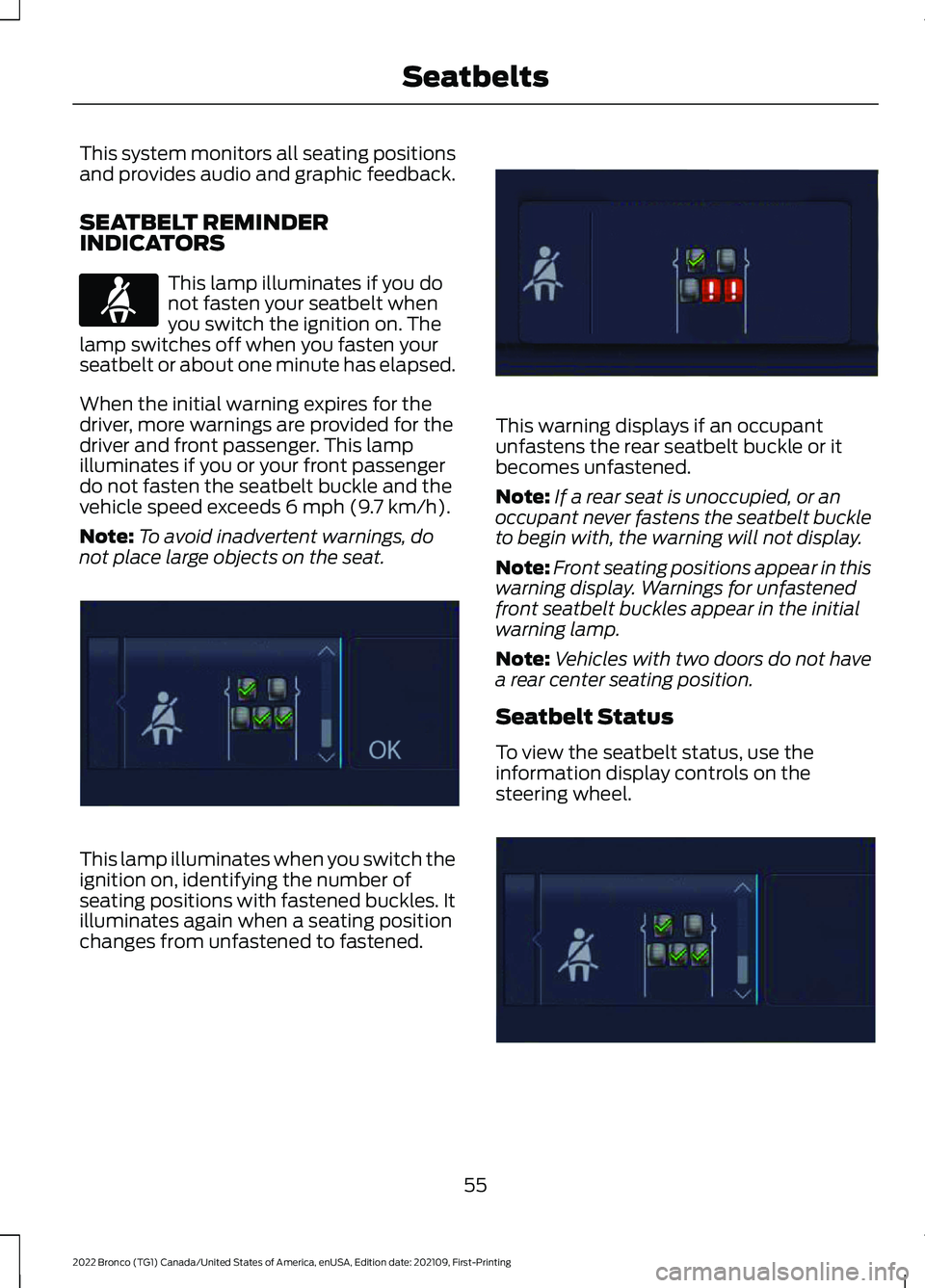
This system monitors all seating positionsand provides audio and graphic feedback.
SEATBELT REMINDERINDICATORS
This lamp illuminates if you donot fasten your seatbelt whenyou switch the ignition on. Thelamp switches off when you fasten yourseatbelt or about one minute has elapsed.
When the initial warning expires for thedriver, more warnings are provided for thedriver and front passenger. This lampilluminates if you or your front passengerdo not fasten the seatbelt buckle and thevehicle speed exceeds 6 mph (9.7 km/h).
Note:To avoid inadvertent warnings, donot place large objects on the seat.
This lamp illuminates when you switch theignition on, identifying the number ofseating positions with fastened buckles. Itilluminates again when a seating positionchanges from unfastened to fastened.
This warning displays if an occupantunfastens the rear seatbelt buckle or itbecomes unfastened.
Note:If a rear seat is unoccupied, or anoccupant never fastens the seatbelt buckleto begin with, the warning will not display.
Note:Front seating positions appear in thiswarning display. Warnings for unfastenedfront seatbelt buckles appear in the initialwarning lamp.
Note:Vehicles with two doors do not havea rear center seating position.
Seatbelt Status
To view the seatbelt status, use theinformation display controls on thesteering wheel.
55
2022 Bronco (TG1) Canada/United States of America, enUSA, Edition date: 202109, First-PrintingSeatbeltsE71880 E352172 E352170 E352171
Page 117 of 562
USING THE INSTRUMENT
CLUSTER DISPLAY CONTROLS
WARNING: Driving while distractedcan result in loss of vehicle control, crashand injury. We strongly recommend thatyou use extreme caution when using anydevice that may take your focus off theroad. Your primary responsibility is thesafe operation of your vehicle. Werecommend against the use of anyhand-held device while driving andencourage the use of voice-operatedsystems when possible. Make sure youare aware of all applicable local lawsthat may affect the use of electronicdevices while driving.
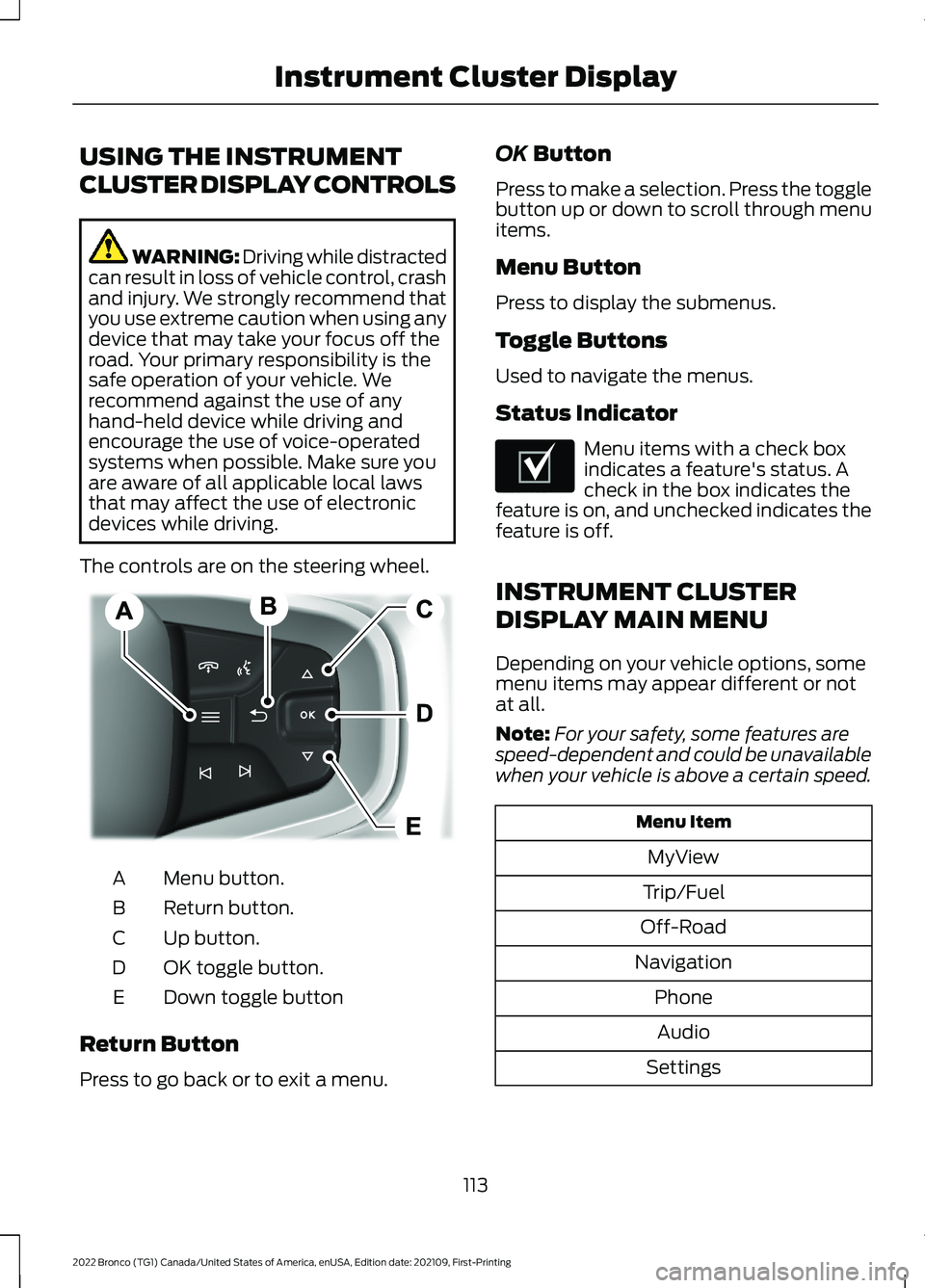
The controls are on the steering wheel.
Menu button.A
Return button.B
Up button.C
OK toggle button.D
Down toggle buttonE
Return Button
Press to go back or to exit a menu.
OK Button
Press to make a selection. Press the togglebutton up or down to scroll through menuitems.
Menu Button
Press to display the submenus.
Toggle Buttons
Used to navigate the menus.
Status Indicator
Menu items with a check boxindicates a feature's status. Acheck in the box indicates thefeature is on, and unchecked indicates thefeature is off.
INSTRUMENT CLUSTER
DISPLAY MAIN MENU
Depending on your vehicle options, somemenu items may appear different or notat all.
Note:For your safety, some features arespeed-dependent and could be unavailablewhen your vehicle is above a certain speed.
Menu Item
MyView
Trip/Fuel
Off-Road
Navigation
Phone
Audio
Settings
113
2022 Bronco (TG1) Canada/United States of America, enUSA, Edition date: 202109, First-PrintingInstrument Cluster DisplayE326969 E204495
Page 120 of 562
REMOTE START REMOTE
CONTROL INDICATORS (IF
EQUIPPED)
Remote Control Feedback
An LED on the remote control providesstatus feedback of remote start or stopcommands.
StatusLED
Remote startsuccessful.Solid green.
Remote stopsuccessful.Solid red.
Request failed orstatus not received.Blinking red.
Status incomplete.Blinking green.
REMOTE START SETTINGS
SWITCHING CLIMATE CONTROLAUTO MODE ON AND OFF
1.Using the information display controlson the steering wheel, select Settings.
2.Select Vehicle.
3.Select Remote Start.
4.Select Climate Control.
5.Switch Auto on or off.
Note:If you switch the auto mode on, thesystem attempts to heat or cool the interiorto 72°F (22°C).
Note:When you switch the ignition on, theclimate control system returns to the lastused settings.
Note:The heated windshield, heated rearwindow, heated mirrors, heated seats andheated steering wheel could turn on in coldweather.
SWITCHING CLIMATE CONTROLLAST SETTINGS ON AND OFF
1.Using the information display controlson the steering wheel, select Settings.
2.Select Vehicle.
3.Select Remote Start.
4.Select Climate Control.
5.Switch Last Settings on or off.
Note:If you switch the last settings on, thesystem remembers the last used settings.
SWITCHING THE HEATED SEATSETTINGS ON AND OFF (If Equipped)
1.Using the information display controlson the steering wheel, select Settings.
2.Select Vehicle.
3.Select Remote Start.
4.Select Front Seats.
5.Select Auto or Off.
Note:If you switch the heated seat settingson, the heated seats turn on during coldweather.
Note:You cannot adjust the heated seatsettings when you have remotely startedthe engine.
SWITCHING THE HEATEDSTEERING WHEEL SETTINGS ONAND OFF (If Equipped)
1.Using the information display controlson the steering wheel, select Settings.
2.Select Vehicle.
3.Select Remote Start.
4.Select Front Seats & Wheel.
5.Select Auto or Off.
Note:If you switch the heated steeringwheel settings on, the heated steering wheelturns on during cold weather.
116
2022 Bronco (TG1) Canada/United States of America, enUSA, Edition date: 202109, First-PrintingRemote Start (If Equipped)
Page 121 of 562
Note:You cannot adjust the heatedsteering wheel settings when you haveremotely started the engine.
SETTING THE REMOTE STARTDURATION
You can set a duration for the vehicle torun.
Note:Wait a few seconds before remotelystarting the engine after the engine stopsrunning.
1.Using the information display controlson the steering wheel, select Settings.
2.Select Vehicle.
3.Select Remote Start.
4.Select Duration.
117
2022 Bronco (TG1) Canada/United States of America, enUSA, Edition date: 202109, First-PrintingRemote Start (If Equipped)
Page 208 of 562
HOW DOES STABILITY
CONTROL WORK
WARNING: Vehicle modificationsinvolving braking system, aftermarketroof racks, suspension, steering system,tire construction and wheel and tire sizemay change the handling characteristicsof your vehicle and may adversely affectthe performance of the electronicstability control system. In addition,installing any stereo speakers mayinterfere with and adversely affect theelectronic stability control system.Reducing the effectiveness of theelectronic stability control system couldlead to an increased risk of loss of vehiclecontrol, vehicle rollover, personal injuryand death.
WARNING: Remember that evenadvanced technology cannot defy thelaws of physics. It's always possible tolose control of a vehicle due toinappropriate driver input for theconditions. Aggressive driving on anyroad condition can cause you to losecontrol of your vehicle increasing the riskof personal injury or property damage.Activation of the electronic stabilitycontrol system is an indication that atleast some of the tires have exceededtheir ability to grip the road; this couldreduce the operator's ability to controlthe vehicle potentially resulting in a lossof vehicle control, vehicle rollover,personal injury and death.
WARNING: You are responsible forcontrolling your vehicle at all times. Thesystem is designed to be an aid and doesnot relieve you of your responsibility todrive with due care and attention. Failureto follow this instruction could result inthe loss of control of your vehicle,personal injury or death.
If a driving condition activates either thestability control or the traction controlsystem you may experience the followingconditions:
•The stability and traction control lightflashes.
•Your vehicle slows down.
•Reduced engine power.
The stability control system has severalfeatures built into it to help you maintaincontrol of your vehicle:
Electronic Stability Control
Electronic stability control enhances yourvehicle’s ability to prevent skids or lateralslides by applying brakes to one or moreof the wheels individually and, if necessary,reducing engine power.
Roll Stability Control
Roll stability control enhances yourvehicle’s ability to prevent rollovers bydetecting your vehicle’s roll motion andthe rate at which it changes by applyingthe brakes to one or more wheelsindividually.
Curve Control
Curve control enhances your vehicle’sability to follow the road when corneringseverely or avoiding objects in the roadway.Curve control operates by reducing enginepower and, if necessary, applying brakesto one or more of the wheels individually.
204
2022 Bronco (TG1) Canada/United States of America, enUSA, Edition date: 202109, First-PrintingStability Control
Page 236 of 562
WHAT IS CRUISE CONTROL
Cruise control lets you maintain a setspeed without keeping your foot on theaccelerator pedal.
Requirements
Use cruise control when the vehicle speedis greater than 15 mph in imperial units and20 km/h in metric units.
SWITCHING CRUISE CONTROL
ON AND OFF
WARNING: Do not use cruisecontrol on winding roads, in heavy trafficor when the road surface is slippery. Thiscould result in loss of vehicle control,serious injury or death.
The cruise controls are on the steeringwheel.
Switching Cruise Control On
Press the button to activate thesystem. When the systemactivates, the set speed is equalto whichever is greater, the current vehiclespeed, or 15 mph when in imperial units or20 km/h when in metric units. If the speedis too low, or other conditions are notcorrect for cruise control activation, thesystem will instead enter standby mode.
Switching Cruise Control Off
Press the button when thesystem is active or switch theignition off.
Note:When you switch cruise control off,the set speed clears.
SETTING THE CRUISE
CONTROL SPEED
WARNING: When you are goingdownhill, your vehicle speed couldincrease above the set speed. Thesystem does not apply the brakes.
Drive to the speed you prefer.
Press either the SET+ or SET-buttons to set the current speed.
Take your foot off the accelerator pedal.
Note:The indicator changes color in theinformation display.
Changing the Set Speed
Press the SET+ button toincrease the set speed in smallincrements. Press and hold theSET+ button to accelerate. Release thebutton when you have reached yourpreferred speed.
Press the SET- button todecrease the set speed in smallincrements. Press and hold theSET- button to decelerate. Release thebutton when you have reached yourpreferred speed.
Note: If you accelerate by pressing theaccelerator pedal, the set speed does notchange. When you release the acceleratorpedal, your vehicle returns to the speed thatyou previously set.
232
2022 Bronco (TG1) Canada/United States of America, enUSA, Edition date: 202109, First-PrintingCruise Control (If Equipped)E332905 E332905