tire pressure reset FORD BRONCO 2023 Owners Manual
[x] Cancel search | Manufacturer: FORD, Model Year: 2023, Model line: BRONCO, Model: FORD BRONCO 2023Pages: 642, PDF Size: 14.71 MB
Page 25 of 642
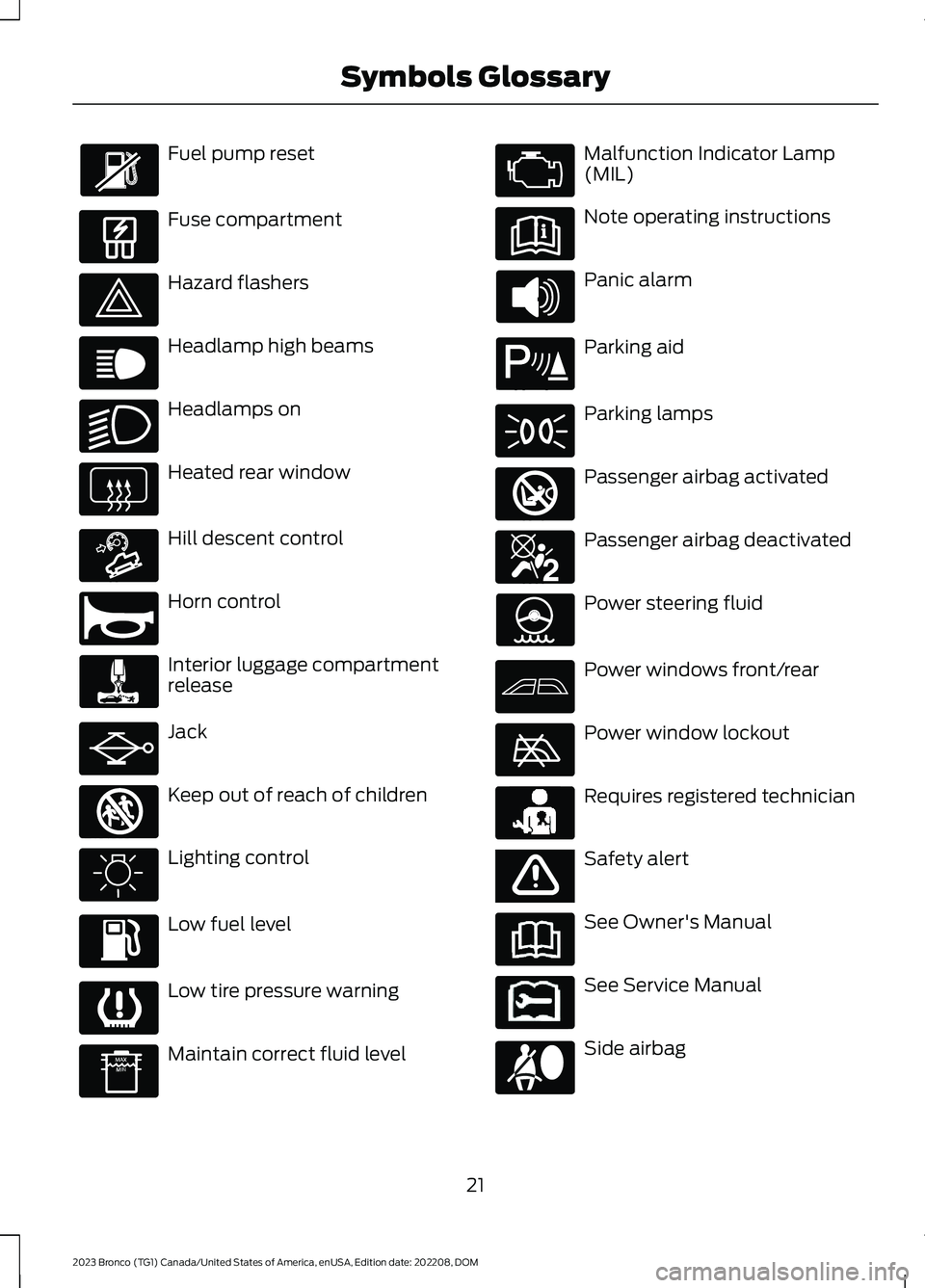
Fuel pump reset
Fuse compartment
Hazard flashers
Headlamp high beams
Headlamps on
Heated rear window
Hill descent control
Horn control
Interior luggage compartmentrelease
Jack
Keep out of reach of children
Lighting control
Low fuel level
Low tire pressure warning
Maintain correct fluid level
Malfunction Indicator Lamp(MIL)
Note operating instructions
Panic alarm
Parking aid
Parking lamps
Passenger airbag activated
Passenger airbag deactivated
Power steering fluid
Power windows front/rear
Power window lockout
Requires registered technician
Safety alert
See Owner's Manual
See Service Manual
Side airbag
21
2023 Bronco (TG1) Canada/United States of America, enUSA, Edition date: 202208, DOMSymbols Glossary E139214 E75790 E67019 E270968 E163171 E270945 E139231 E161353 E139232 E139229 E67028 E72343 E139213 E71341 E270849 E270850 E139216 E139225 E231159 E65963 E72021 E231158
Page 27 of 642
WARNING: Do not connectwireless plug-in devices to the data linkconnector. Unauthorized third partiescould gain access to vehicle data andimpair the performance of safety relatedsystems. Only allow repair facilities thatfollow our service and repair instructionsto connect their equipment to the datalink connector.
We respect your privacy and arecommitted to protecting it. Theinformation contained in this publicationwas correct at the time of release, but astechnology rapidly changes, werecommend that you visit the local Fordwebsite for the latest information.
Your vehicle has electronic control unitsthat have data recording functionality andthe ability to permanently or temporarilystore data. This data could includeinformation on the condition and status ofyour vehicle, vehicle maintenancerequirements, events and malfunctions.The types of data that can be recorded aredescribed in this section. Some of the datarecorded is stored in event logs or errorlogs.
Note:Error logs are reset following a serviceor repair.
Note:We may provide information inresponse to requests from law enforcement,other government authorities and thirdparties acting with lawful authority orthrough a legal process. Such informationcould be used by them in legal proceedings.
Data recorded includes, for example:
•Operating states of systemcomponents, for example fuel level,tire pressure and battery charge level.
•Vehicle and component status, forexample wheel speed, deceleration,lateral acceleration and seatbeltstatus.
•Events or errors in essential systems,for example headlamps and brakes.
•System responses to driving situations,for example airbag deployment andstability control.
•Environmental conditions, for exampletemperature.
Some of this data, when used incombination with other information, forexample an accident report, damage to avehicle or eyewitness statements, couldbe associated with a specific person.
Services That We Provide
If you use our services, we collect and usedata, for example account information,vehicle location and driving characteristics,that could identify you. We transmit thisdata through a dedicated, protectedconnection. We only collect and use datato enable your use of our services to whichyou have subscribed, with your consent orwhere permitted by law. For additionalinformation, see the terms and conditionsof the services to which you havesubscribed.
For additional information about ourprivacy policy, refer to the local Fordwebsite.
Services That Third PartiesProvide
We recommend that you review the termsand conditions and data privacyinformation for any services equipped withyour vehicle or to which you subscribe. Wetake no responsibility for services that thirdparties provide.
Where equipped, SiriusXM with 360L coulduse the modem. To disable, turn off theSiriusXM with 360L or Vehicle Connectivitysetting. See Enabling and Disabling theModem (page 483).
23
2023 Bronco (TG1) Canada/United States of America, enUSA, Edition date: 202208, DOMData Privacy
Page 447 of 642
Highway Hazards
No matter how carefully you drive,there is always the possibility thatyou could eventually have a flattire on the highway. Drive slowlyto the closest safe area out oftraffic. This could further damagethe flat tire, but your safety ismore important.
If you feel a sudden vibration orride disturbance while driving, oryou suspect your tire or vehiclehas been damaged, immediatelyreduce your speed. Drive withcaution until you can safely pulloff the road. Stop and inspect thetires for damage. If a tire isunder-inflated or damaged,deflate it, remove the wheel andreplace it with your spare tire andwheel. If you cannot detect acause, have the vehicle towed tothe nearest repair facility or tiredealer to have the vehicleinspected.
Tire and Wheel Alignment
A bad jolt from hitting a curb orpothole can cause the front endof your vehicle to becomemisaligned or cause damage toyour tires. If your vehicle seems topull to one side when you aredriving, the wheels could be out ofalignment. Have an authorizeddealer check the wheel alignmentperiodically.
Wheel misalignment in the frontor the rear can cause uneven andrapid treadwear of your tires andshould be corrected by anauthorized dealer.
INSPECTING THE WHEEL
VALVE STEMS
Check the valve stems for holes,cracks, or cuts that could permitair leakage.
TIRE ROTATION
WARNING: If the tire labelshows different tire pressures forthe front and rear tires and thevehicle has a tire pressuremonitoring system, then youneed to update the settings forthe system sensors. Alwaysperform the system resetprocedure after tire rotation. Ifyou do not reset the system, itmay not provide a low tirepressure warning whennecessary.
Note:If your tires show unevenwear ask an authorized dealer tocheck for and correct any wheelmisalignment, tire imbalance ormechanical problem involvedbefore tire rotation.
Note:After having your tiresrotated, inflation pressure must bechecked and adjusted to the
vehicle requirements.
443
2023 Bronco (TG1) Canada/United States of America, enUSA, Edition date: 202208, DOMTire Care
Page 630 of 642
Setting a Destination........................................515Waypoints.............................................................515Normal Scheduled Maintenance...........531
O
Off-Road Driving...........................................318After Driving Your Vehicle Off-Road...........325Basic Off-Road Driving Techniques.............318Driving Off-Road.................................................319Driving Through Water Limitations.............323Driving Your Vehicle at High Speeds...........323Off-Road Driving Aids......................................324Off-Road Driving Precautions.......................318What Is Off-Road Driving................................318Opening and Closing the Hood..............349Opening and Closing the Hood -Raptor...........................................................350Opening and Closing the Windows........113Opening the Tailgate....................................93Opening the Tailgate From Outside YourVehicle.................................................................93Operating the Doors From Inside YourVehicle............................................................88Opening the Doors From Inside YourVehicle.................................................................88Unlocking and Locking the Doors Using theCentral Locking................................................88Operating the Doors From Outside YourVehicle............................................................88Unlocking and Locking the Doors Using theRemote Control...............................................88Ordering a Canadian French Owner'sManual..........................................................539OTASee: Software Update Settings.....................517See: Vehicle Software Updates.....................517Overriding the Set Speed..........................257Over the airSee: Software Update Settings.....................517Over-the-airSee: Software Update Settings.....................517See: Vehicle Software Updates.....................517See: Vehicle Software Updates.....................517
P
Parking Aid Indicators................................243
Parking Aid Precautions............................240Parking Aids...................................................240Front Parking Aid.................................................241Parking Aids – Troubleshooting...................243Rear Parking Aid..................................................241Parking Aids – Troubleshooting.............243Parking Aids – InformationMessages.........................................................243Passive Anti-Theft System.........................97How Does the Passive Anti-Theft SystemWork.....................................................................97What Is the Passive Anti-TheftSystem.................................................................97Perchlorate.....................................................582Performing a System Reset......................519Personalized Settings.................................128Changing the Instrument Cluster DisplayLanguage..........................................................128Changing the Measurement Unit.................128Changing the Temperature Unit...................128Changing the Tire Pressure Unit...................128Personal Safety SystemComponents.................................................67Personal Safety System™..........................67Phone Menu..................................................505Phone..............................................................505Phone Precautions.....................................505Playing Media Using Bluetooth®...........510Playing Media Using the USB Port........156Playing or Pausing the AudioSource..........................................................488Post-Crash Alert System...........................331How Does the Post-Crash Alert SystemWork....................................................................331Post-Crash Alert System Limitations..........331Switching the Post-Crash Alert SystemOff........................................................................331What Is the Post-Crash Alert System.........331Post Impact Braking....................................331How Does Post Impact Braking Work.........331Overriding Post Impact Braking...................332Post Impact Braking Indicators....................332Post Impact Braking Limitations..................331Power Outlet Indicators.............................158Power Outlet..................................................158Power Outlet Precautions.........................158Power Seats....................................................143Adjusting the Head Restraint.........................143
626
2023 Bronco (TG1) Canada/United States of America, enUSA, Edition date: 202208, DOMIndex
Page 637 of 642
Trail One Pedal Drive Precautions...............223What Is Trail One Pedal Drive........................223Trail One Pedal Drive –Troubleshooting........................................225Trail One Pedal Drive – InformationMessages.........................................................225Trail Turn Assist Indicators........................227Trail Turn Assist Limitations.....................227Trail Turn Assist Precautions....................227Trail Turn Assist.............................................227Trail Turn Assist – Troubleshooting............228Trail Turn Assist –Troubleshooting........................................228Trail Turn Assist – Frequently AskedQuestions.........................................................228Trail Turn Assist – InformationMessages.........................................................228Transfer Case Fluid Capacity andSpecification..............................................200Transmission Fluid TemperatureGauge..............................................................119Transporting the Vehicle...........................335Trip Computer.................................................127Accessing the Trip Computer.........................127Resetting the Individual Trip Values.............127Resetting the Trip Computer..........................127Turbo Boost Gauge - 2.3LEcoBoost™...................................................119
U
Under Floor Storage....................................163Locating the Luggage Compartment UnderFloor Storage...................................................163Under Hood Fuse Box.................................341Accessing the Under Hood Fuse Box..........341Identifying the Fuses in the Under HoodFuse Box...........................................................342Locating the Under Hood Fuse Box.............341Under Hood Overview - 2.3LEcoBoost™..................................................351Under Hood Overview - 2.7LEcoBoost™.................................................352Under Hood Overview - 3.0LEcoBoost™.................................................353Unique Features..............................................47USB Ports........................................................156Using Alexa Built-In....................................503
Using Keyless Entry........................................91Using MyKey With Remote StartSystems..........................................................86Using Snow Chains.....................................439Using Start in Gear........................................172Using the Instrument Cluster DisplayControls.........................................................126Using the Remote Control..........................79Using This Publication..................................19
V
Vehicle Care....................................................421Cleaning the Exterior........................................422Cleaning the Interior.........................................424Vehicle Identification Number................482Locating the Vehicle IdentificationNumber............................................................482Vehicle Identification NumberOverview..........................................................482Vehicle Identification.................................482Vehicle Identification Number......................482Vehicle Interior - 2-Door..............................38Vehicle Interior - 4-Door, Excluding:Raptor..............................................................36Vehicle Interior - Raptor...............................37Vehicle Software Updates.........................517Vehicle System Reset.................................519Vehicle Wi-Fi Hotspot –Troubleshooting........................................487Vehicle Wi-Fi Hotspot – Frequently AskedQuestions........................................................487Vehicle Wi-Fi Hotspot...............................486Vehicle Wi-Fi Hotspot –Troubleshooting............................................487VentilationSee: Climate Control - Vehicles With:Automatic Temperature Control...............131See: Climate Control - Vehicles With: ManualTemperature Control....................................136Viewing the Tire Pressures.......................447Visual Search...................................................28Voice Interaction...........................................501Ford Assistant.....................................................501
W
Warranty Information.................................610
633
2023 Bronco (TG1) Canada/United States of America, enUSA, Edition date: 202208, DOMIndex