steering wheel FORD ECOSPORT 2019 Service Manual
[x] Cancel search | Manufacturer: FORD, Model Year: 2019, Model line: ECOSPORT, Model: FORD ECOSPORT 2019Pages: 458, PDF Size: 16.79 MB
Page 323 of 458
Privacy Information
When you connect a cellular phone toSYNC 3, the system creates a profile withinyour vehicle that links to that cellularphone. This profile helps in offering youmore cellular features and operating moreefficiently. Among other things, this profilemay contain data about your cellularphone book, text messages (read andunread), and call history, including historyof calls when your cell phone was notconnected to the system. In addition, if youconnect a media device, the systemcreates and retains an index of supportedmedia content. The system also records ashort diagnostic log of approximately 10minutes of all recent system activity. Thelog profile and other system data may beused to improve the system and helpdiagnose any problems that may occur.
The cellular profile, media device index,and diagnostic log remain in your vehicleunless you delete them and are generallyaccessible only in your vehicle when thecellular phone or media player isconnected.
If you sell or transfer your vehicle, werecommend you perform a Master Resetto erase all stored information. You canfind more information about the MasterReset in General Settings. See Settings(page 354). System data cannot beaccessed without special equipment andaccess to your vehicle's SYNC 3 module.Ford Motor Company and Ford of Canadado not access the system data for anypurpose other than as described absentconsent, a court order, or where requiredby law enforcement, other governmentauthorities, or other third parties actingwith lawful authority. Other parties mayseek to access the informationindependently of Ford Motor Company andFord of Canada.
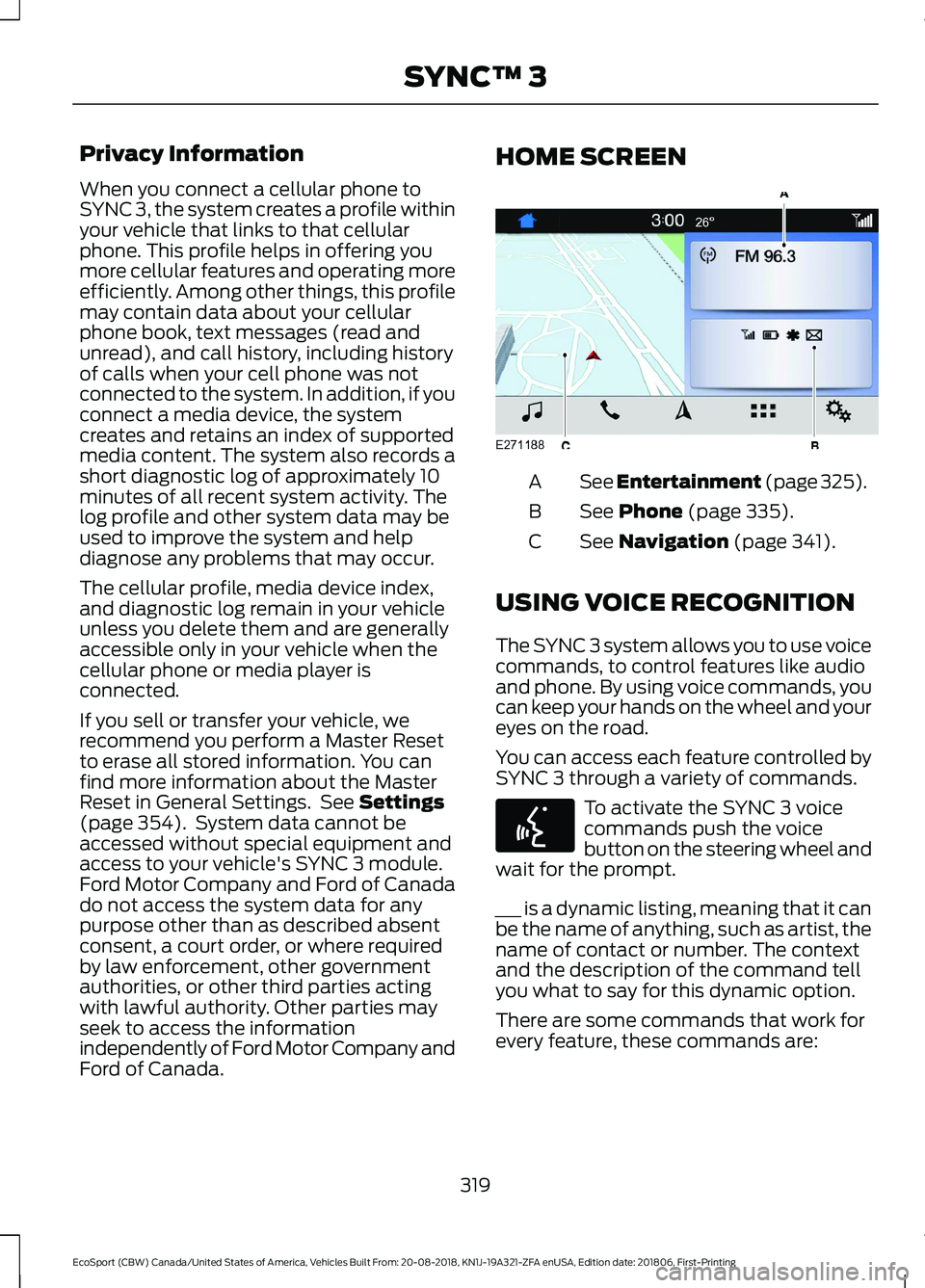
HOME SCREEN
See Entertainment (page 325).A
See Phone (page 335).B
See Navigation (page 341).C
USING VOICE RECOGNITION
The SYNC 3 system allows you to use voicecommands, to control features like audioand phone. By using voice commands, youcan keep your hands on the wheel and youreyes on the road.
You can access each feature controlled bySYNC 3 through a variety of commands.
To activate the SYNC 3 voicecommands push the voicebutton on the steering wheel andwait for the prompt.
___ is a dynamic listing, meaning that it canbe the name of anything, such as artist, thename of contact or number. The contextand the description of the command tellyou what to say for this dynamic option.
There are some commands that work forevery feature, these commands are:
319
EcoSport (CBW) Canada/United States of America, Vehicles Built From: 20-08-2018, KN1J-19A321-ZFA enUSA, Edition date: 201806, First-PrintingSYNC™ 3
Page 342 of 458
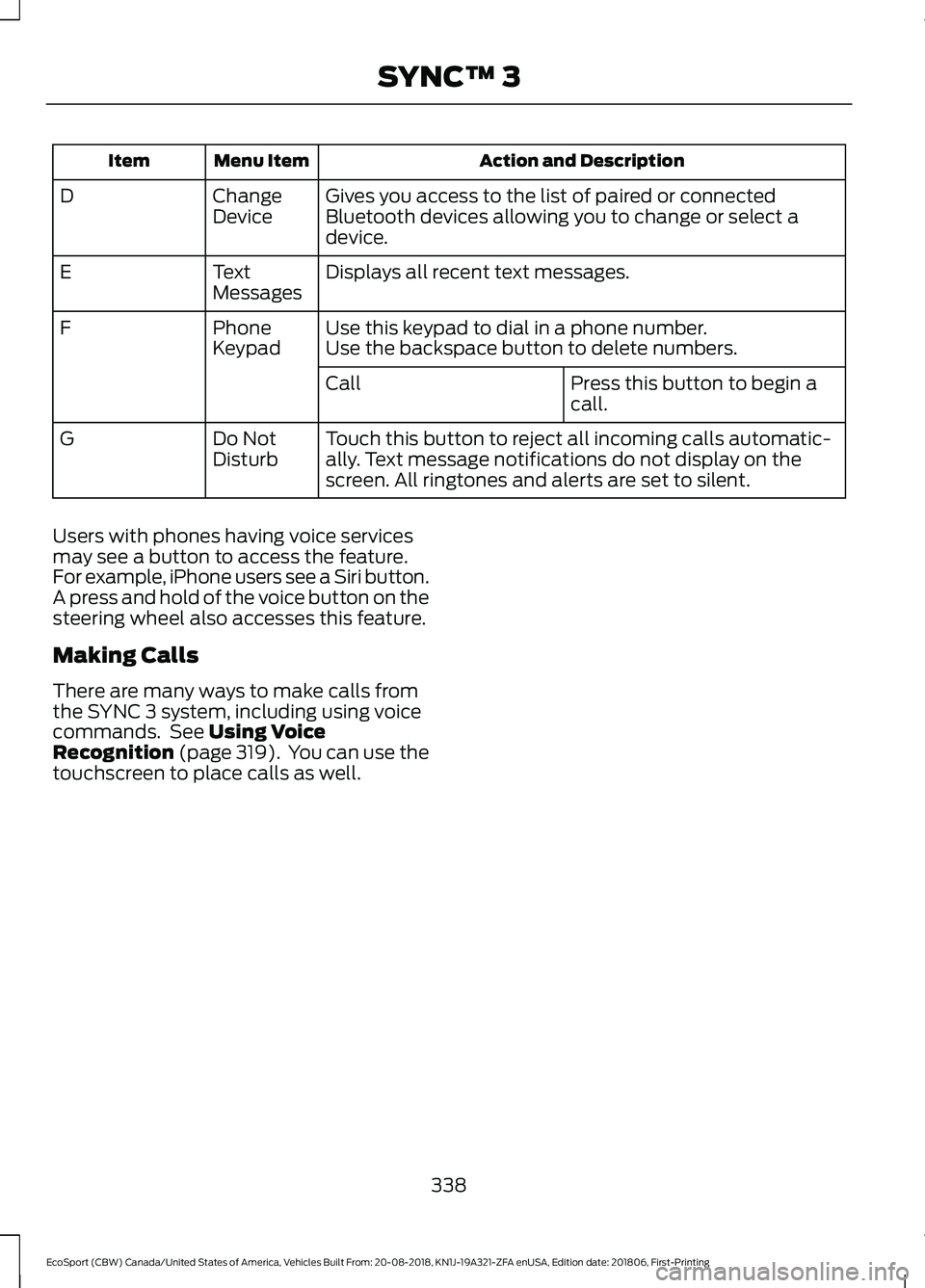
Action and DescriptionMenu ItemItem
Gives you access to the list of paired or connectedBluetooth devices allowing you to change or select adevice.
ChangeDeviceD
Displays all recent text messages.TextMessagesE
Use this keypad to dial in a phone number.PhoneKeypadFUse the backspace button to delete numbers.
Press this button to begin acall.Call
Touch this button to reject all incoming calls automatic-ally. Text message notifications do not display on thescreen. All ringtones and alerts are set to silent.
Do NotDisturbG
Users with phones having voice servicesmay see a button to access the feature.For example, iPhone users see a Siri button.A press and hold of the voice button on thesteering wheel also accesses this feature.
Making Calls
There are many ways to make calls fromthe SYNC 3 system, including using voicecommands. See Using VoiceRecognition (page 319). You can use thetouchscreen to place calls as well.
338
EcoSport (CBW) Canada/United States of America, Vehicles Built From: 20-08-2018, KN1J-19A321-ZFA enUSA, Edition date: 201806, First-PrintingSYNC™ 3
Page 343 of 458
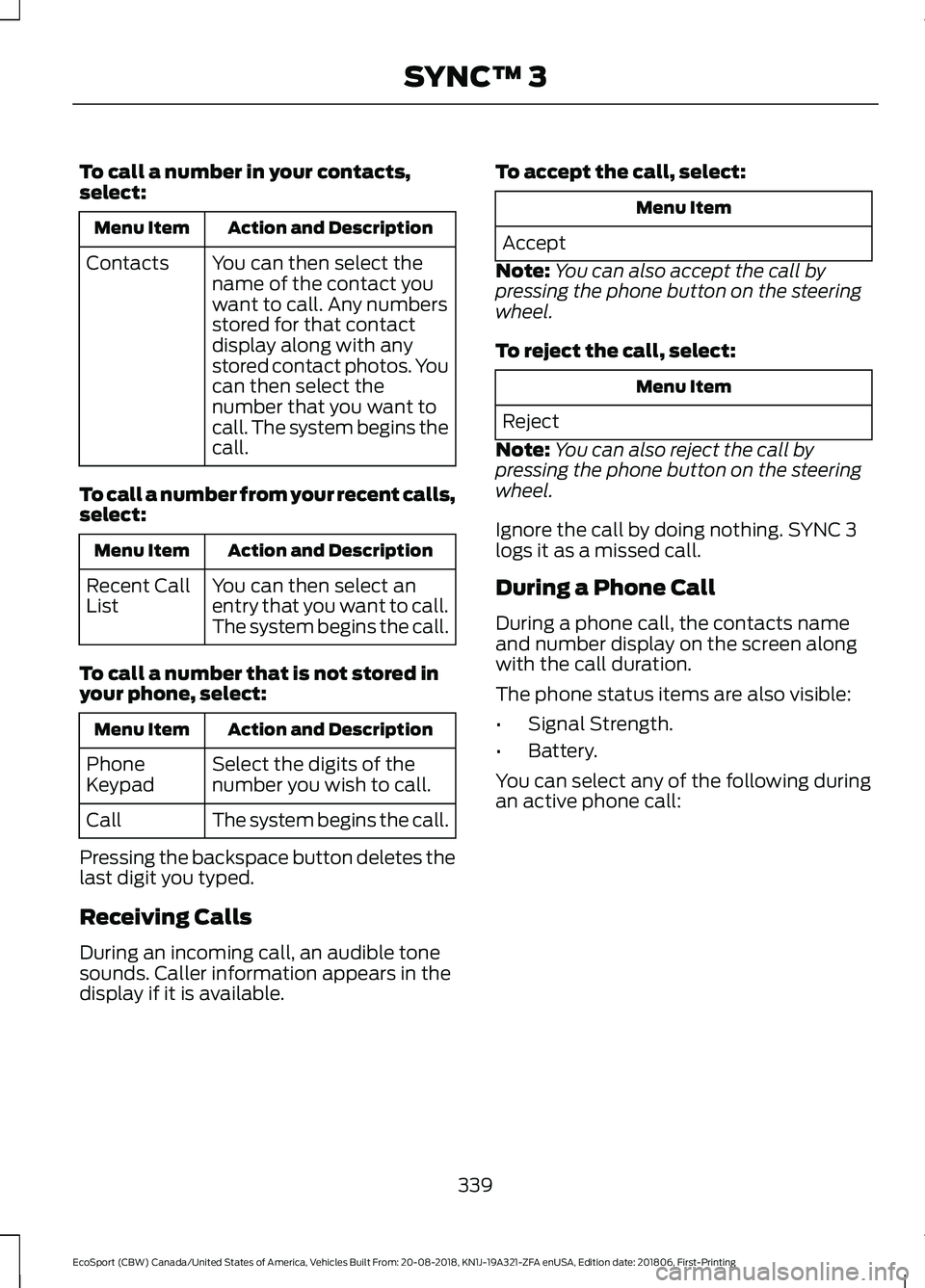
To call a number in your contacts,select:
Action and DescriptionMenu Item
You can then select thename of the contact youwant to call. Any numbersstored for that contactdisplay along with anystored contact photos. Youcan then select thenumber that you want tocall. The system begins thecall.
Contacts
To call a number from your recent calls,select:
Action and DescriptionMenu Item
You can then select anentry that you want to call.The system begins the call.
Recent CallList
To call a number that is not stored inyour phone, select:
Action and DescriptionMenu Item
Select the digits of thenumber you wish to call.PhoneKeypad
The system begins the call.Call
Pressing the backspace button deletes thelast digit you typed.
Receiving Calls
During an incoming call, an audible tonesounds. Caller information appears in thedisplay if it is available.
To accept the call, select:
Menu Item
Accept
Note:You can also accept the call bypressing the phone button on the steeringwheel.
To reject the call, select:
Menu Item
Reject
Note:You can also reject the call bypressing the phone button on the steeringwheel.
Ignore the call by doing nothing. SYNC 3logs it as a missed call.
During a Phone Call
During a phone call, the contacts nameand number display on the screen alongwith the call duration.
The phone status items are also visible:
•Signal Strength.
•Battery.
You can select any of the following duringan active phone call:
339
EcoSport (CBW) Canada/United States of America, Vehicles Built From: 20-08-2018, KN1J-19A321-ZFA enUSA, Edition date: 201806, First-PrintingSYNC™ 3
Page 344 of 458
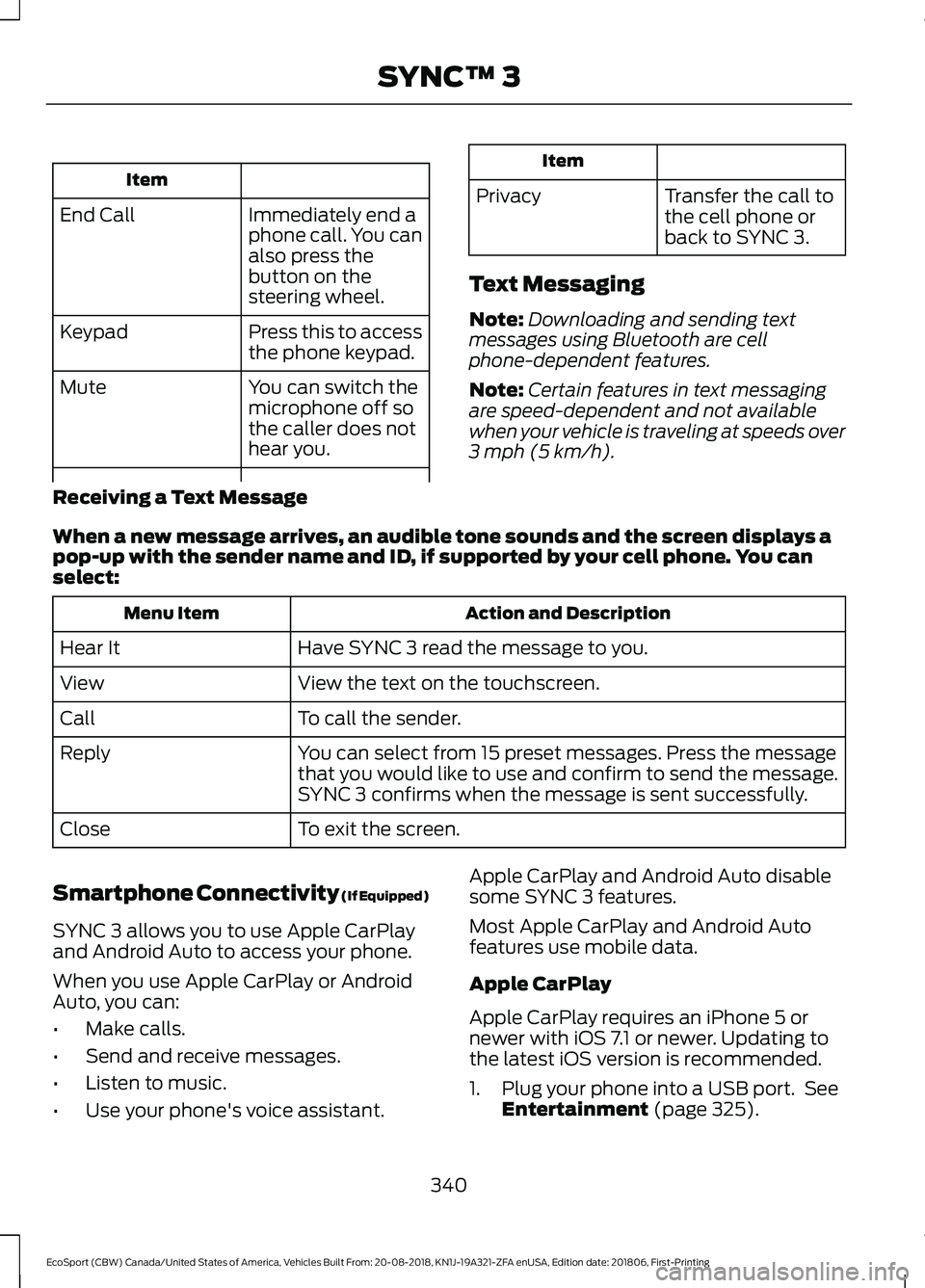
Item
Immediately end aphone call. You canalso press thebutton on thesteering wheel.
End Call
Press this to accessthe phone keypad.Keypad
You can switch themicrophone off sothe caller does nothear you.
Mute
Item
PrivacyTransfer the call tothe cell phone orback to SYNC 3.
Text Messaging
Note:Downloading and sending textmessages using Bluetooth are cellphone-dependent features.
Note:Certain features in text messagingare speed-dependent and not availablewhen your vehicle is traveling at speeds over3 mph (5 km/h).
Receiving a Text Message
When a new message arrives, an audible tone sounds and the screen displays apop-up with the sender name and ID, if supported by your cell phone. You canselect:
Action and DescriptionMenu Item
Have SYNC 3 read the message to you.Hear It
View the text on the touchscreen.View
To call the sender.Call
You can select from 15 preset messages. Press the messagethat you would like to use and confirm to send the message.SYNC 3 confirms when the message is sent successfully.
Reply
To exit the screen.Close
Smartphone Connectivity (If Equipped)
SYNC 3 allows you to use Apple CarPlayand Android Auto to access your phone.
When you use Apple CarPlay or AndroidAuto, you can:
•Make calls.
•Send and receive messages.
•Listen to music.
•Use your phone's voice assistant.
Apple CarPlay and Android Auto disablesome SYNC 3 features.
Most Apple CarPlay and Android Autofeatures use mobile data.
Apple CarPlay
Apple CarPlay requires an iPhone 5 ornewer with iOS 7.1 or newer. Updating tothe latest iOS version is recommended.
1.Plug your phone into a USB port. SeeEntertainment (page 325).
340
EcoSport (CBW) Canada/United States of America, Vehicles Built From: 20-08-2018, KN1J-19A321-ZFA enUSA, Edition date: 201806, First-PrintingSYNC™ 3
Page 355 of 458
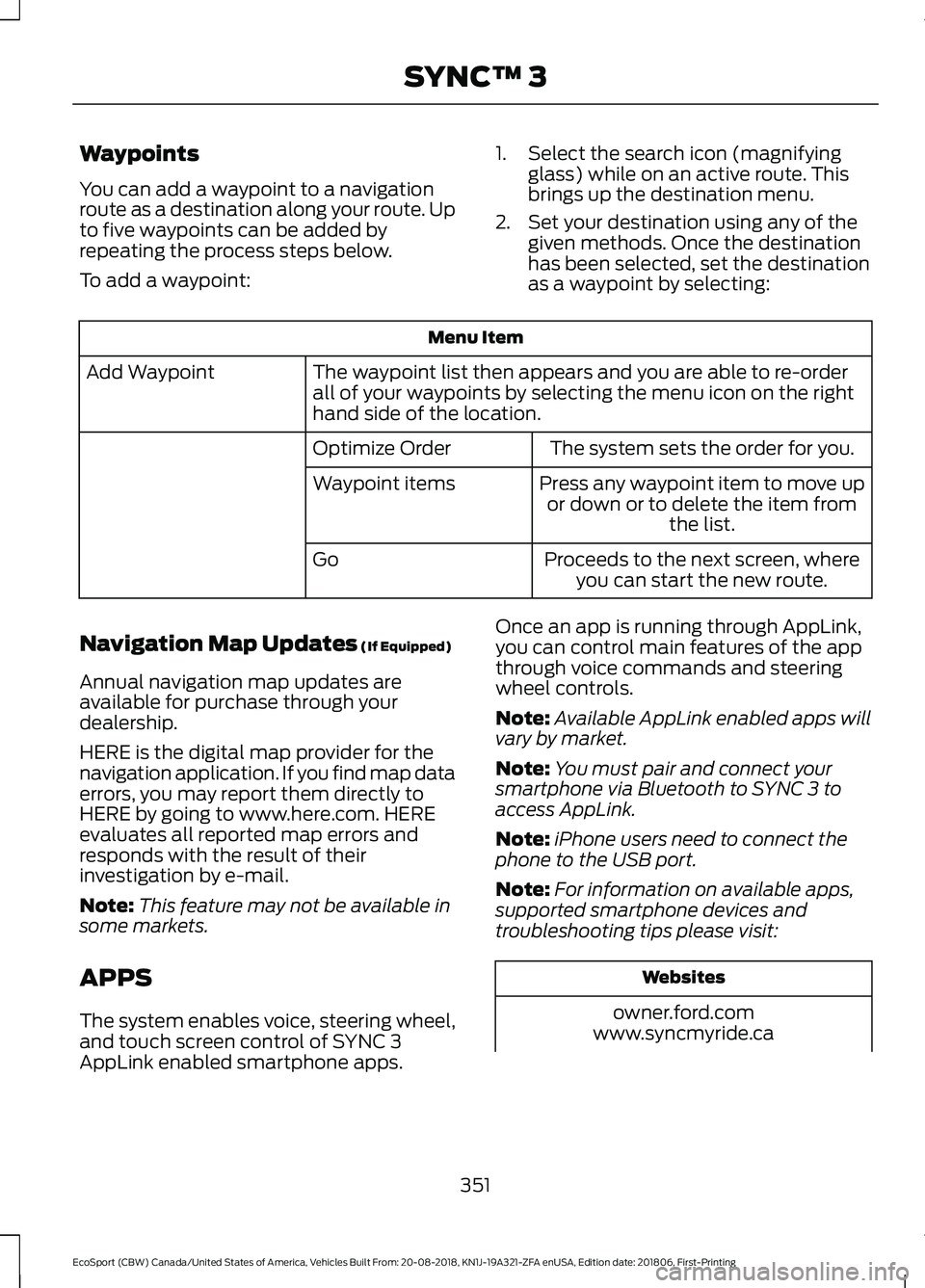
Waypoints
You can add a waypoint to a navigationroute as a destination along your route. Upto five waypoints can be added byrepeating the process steps below.
To add a waypoint:
1.Select the search icon (magnifyingglass) while on an active route. Thisbrings up the destination menu.
2.Set your destination using any of thegiven methods. Once the destinationhas been selected, set the destinationas a waypoint by selecting:
Menu Item
The waypoint list then appears and you are able to re-orderall of your waypoints by selecting the menu icon on the righthand side of the location.
Add Waypoint
The system sets the order for you.Optimize Order
Press any waypoint item to move upor down or to delete the item fromthe list.
Waypoint items
Proceeds to the next screen, whereyou can start the new route.Go
Navigation Map Updates (If Equipped)
Annual navigation map updates areavailable for purchase through yourdealership.
HERE is the digital map provider for thenavigation application. If you find map dataerrors, you may report them directly toHERE by going to www.here.com. HEREevaluates all reported map errors andresponds with the result of theirinvestigation by e-mail.
Note:This feature may not be available insome markets.
APPS
The system enables voice, steering wheel,and touch screen control of SYNC 3AppLink enabled smartphone apps.
Once an app is running through AppLink,you can control main features of the appthrough voice commands and steeringwheel controls.
Note:Available AppLink enabled apps willvary by market.
Note:You must pair and connect yoursmartphone via Bluetooth to SYNC 3 toaccess AppLink.
Note:iPhone users need to connect thephone to the USB port.
Note:For information on available apps,supported smartphone devices andtroubleshooting tips please visit:
Websites
owner.ford.comwww.syncmyride.ca
351
EcoSport (CBW) Canada/United States of America, Vehicles Built From: 20-08-2018, KN1J-19A321-ZFA enUSA, Edition date: 201806, First-PrintingSYNC™ 3
Page 393 of 458
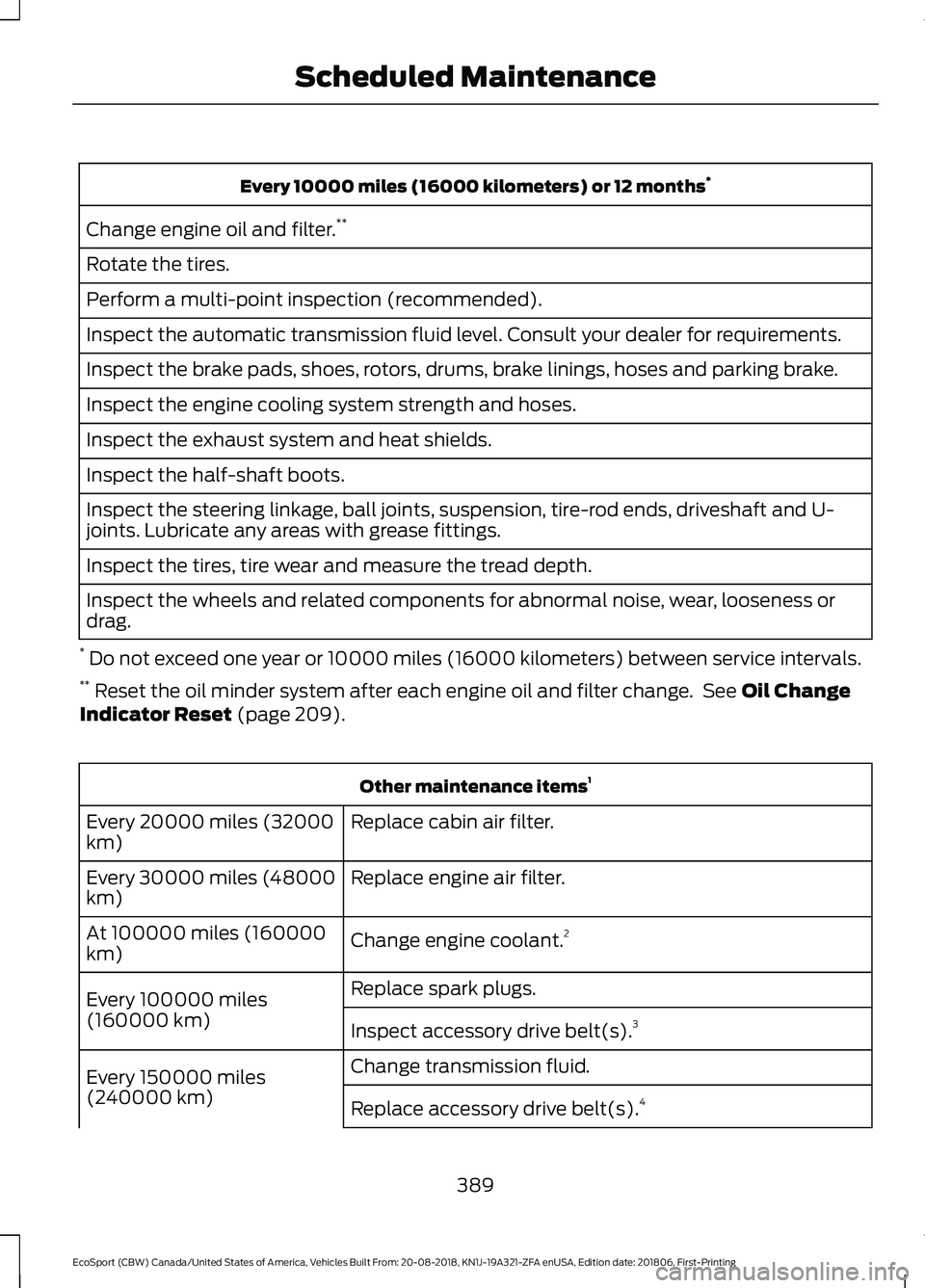
Every 10000 miles (16000 kilometers) or 12 months*
Change engine oil and filter.**
Rotate the tires.
Perform a multi-point inspection (recommended).
Inspect the automatic transmission fluid level. Consult your dealer for requirements.
Inspect the brake pads, shoes, rotors, drums, brake linings, hoses and parking brake.
Inspect the engine cooling system strength and hoses.
Inspect the exhaust system and heat shields.
Inspect the half-shaft boots.
Inspect the steering linkage, ball joints, suspension, tire-rod ends, driveshaft and U-joints. Lubricate any areas with grease fittings.
Inspect the tires, tire wear and measure the tread depth.
Inspect the wheels and related components for abnormal noise, wear, looseness ordrag.
* Do not exceed one year or 10000 miles (16000 kilometers) between service intervals.** Reset the oil minder system after each engine oil and filter change. See Oil ChangeIndicator Reset (page 209).
Other maintenance items1
Replace cabin air filter.Every 20000 miles (32000km)
Replace engine air filter.Every 30000 miles (48000km)
Change engine coolant.2At 100000 miles (160000km)
Replace spark plugs.Every 100000 miles(160000 km)Inspect accessory drive belt(s).3
Change transmission fluid.Every 150000 miles(240000 km)Replace accessory drive belt(s).4
389
EcoSport (CBW) Canada/United States of America, Vehicles Built From: 20-08-2018, KN1J-19A321-ZFA enUSA, Edition date: 201806, First-PrintingScheduled Maintenance
Page 445 of 458
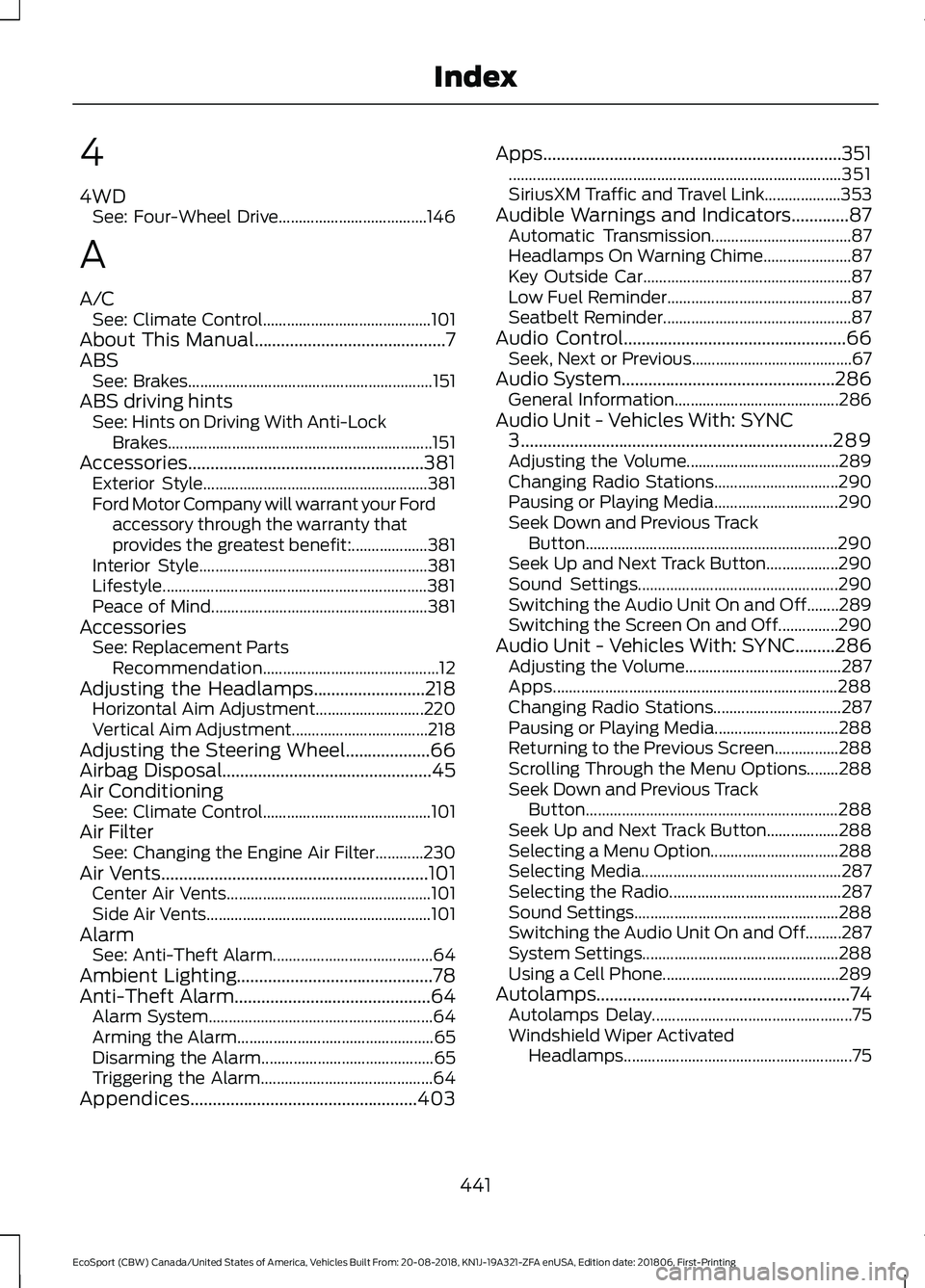
4
4WDSee: Four-Wheel Drive.....................................146
A
A/CSee: Climate Control..........................................101About This Manual...........................................7ABSSee: Brakes.............................................................151ABS driving hintsSee: Hints on Driving With Anti-LockBrakes..................................................................151Accessories.....................................................381Exterior Style........................................................381Ford Motor Company will warrant your Fordaccessory through the warranty thatprovides the greatest benefit:...................381Interior Style.........................................................381Lifestyle..................................................................381Peace of Mind......................................................381AccessoriesSee: Replacement PartsRecommendation............................................12Adjusting the Headlamps.........................218Horizontal Aim Adjustment...........................220Vertical Aim Adjustment..................................218Adjusting the Steering Wheel...................66Airbag Disposal...............................................45Air ConditioningSee: Climate Control..........................................101Air FilterSee: Changing the Engine Air Filter............230Air Vents............................................................101Center Air Vents...................................................101Side Air Vents........................................................101AlarmSee: Anti-Theft Alarm........................................64Ambient Lighting............................................78Anti-Theft Alarm............................................64Alarm System........................................................64Arming the Alarm.................................................65Disarming the Alarm...........................................65Triggering the Alarm...........................................64Appendices...................................................403
Apps...................................................................351...................................................................................351SiriusXM Traffic and Travel Link...................353Audible Warnings and Indicators.............87Automatic Transmission...................................87Headlamps On Warning Chime......................87Key Outside Car....................................................87Low Fuel Reminder..............................................87Seatbelt Reminder...............................................87Audio Control..................................................66Seek, Next or Previous........................................67Audio System................................................286General Information.........................................286Audio Unit - Vehicles With: SYNC3......................................................................289Adjusting the Volume......................................289Changing Radio Stations...............................290Pausing or Playing Media...............................290Seek Down and Previous TrackButton...............................................................290Seek Up and Next Track Button..................290Sound Settings..................................................290Switching the Audio Unit On and Off........289Switching the Screen On and Off...............290Audio Unit - Vehicles With: SYNC.........286Adjusting the Volume.......................................287Apps.......................................................................288Changing Radio Stations................................287Pausing or Playing Media...............................288Returning to the Previous Screen................288Scrolling Through the Menu Options........288Seek Down and Previous TrackButton...............................................................288Seek Up and Next Track Button..................288Selecting a Menu Option................................288Selecting Media..................................................287Selecting the Radio...........................................287Sound Settings...................................................288Switching the Audio Unit On and Off.........287System Settings.................................................288Using a Cell Phone............................................289Autolamps.........................................................74Autolamps Delay..................................................75Windshield Wiper ActivatedHeadlamps.........................................................75
441
EcoSport (CBW) Canada/United States of America, Vehicles Built From: 20-08-2018, KN1J-19A321-ZFA enUSA, Edition date: 201806, First-PrintingIndex
Page 449 of 458
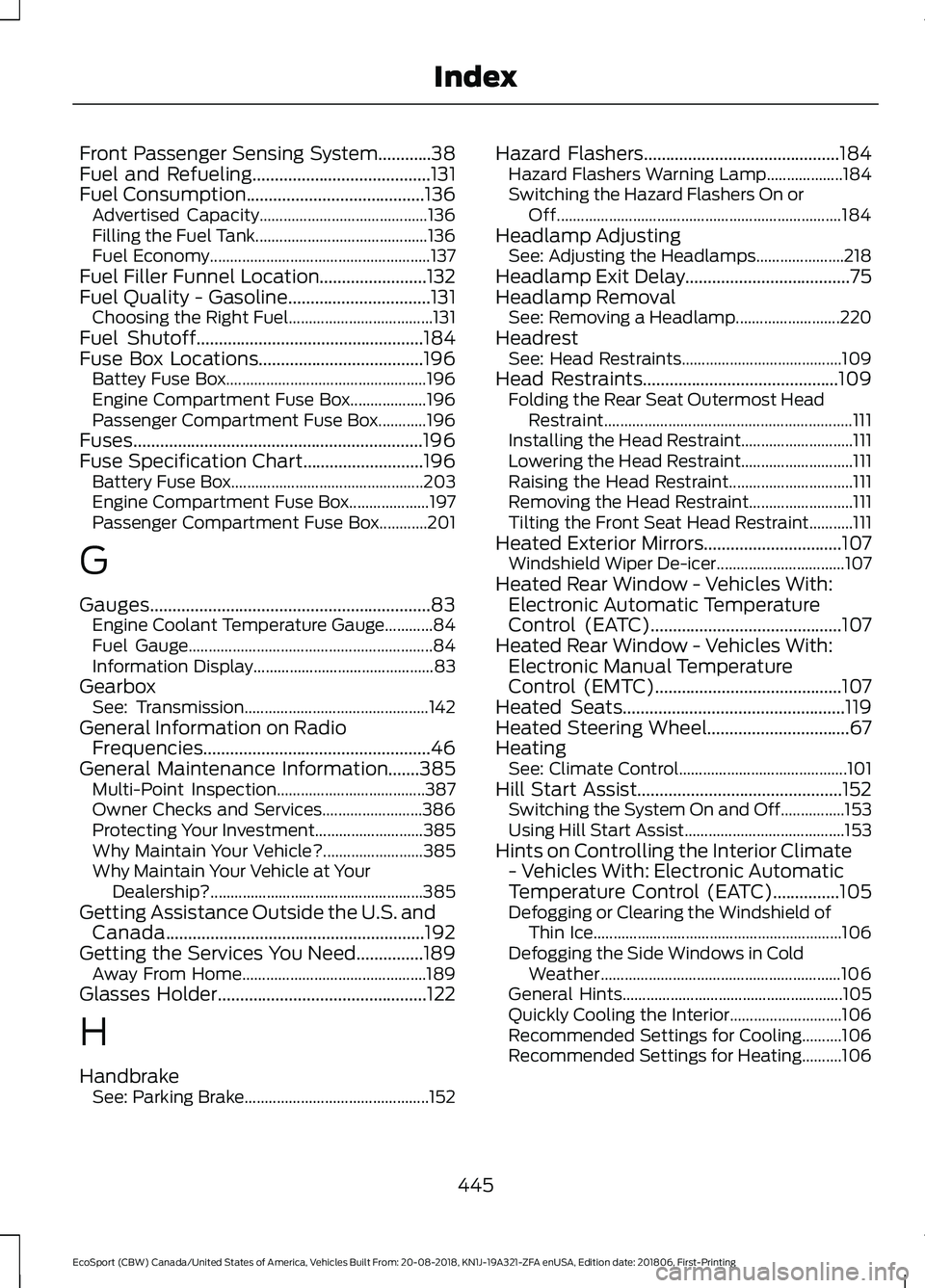
Front Passenger Sensing System............38Fuel and Refueling........................................131Fuel Consumption........................................136Advertised Capacity..........................................136Filling the Fuel Tank...........................................136Fuel Economy.......................................................137Fuel Filler Funnel Location........................132Fuel Quality - Gasoline................................131Choosing the Right Fuel....................................131Fuel Shutoff...................................................184Fuse Box Locations.....................................196Battey Fuse Box..................................................196Engine Compartment Fuse Box...................196Passenger Compartment Fuse Box............196Fuses.................................................................196Fuse Specification Chart...........................196Battery Fuse Box................................................203Engine Compartment Fuse Box....................197Passenger Compartment Fuse Box............201
G
Gauges...............................................................83Engine Coolant Temperature Gauge............84Fuel Gauge.............................................................84Information Display.............................................83GearboxSee: Transmission..............................................142General Information on RadioFrequencies...................................................46General Maintenance Information.......385Multi-Point Inspection.....................................387Owner Checks and Services.........................386Protecting Your Investment...........................385Why Maintain Your Vehicle?.........................385Why Maintain Your Vehicle at YourDealership?.....................................................385Getting Assistance Outside the U.S. andCanada..........................................................192Getting the Services You Need...............189Away From Home..............................................189Glasses Holder...............................................122
H
HandbrakeSee: Parking Brake..............................................152
Hazard Flashers............................................184Hazard Flashers Warning Lamp...................184Switching the Hazard Flashers On orOff.......................................................................184Headlamp AdjustingSee: Adjusting the Headlamps......................218Headlamp Exit Delay.....................................75Headlamp RemovalSee: Removing a Headlamp..........................220HeadrestSee: Head Restraints........................................109Head Restraints............................................109Folding the Rear Seat Outermost HeadRestraint..............................................................111Installing the Head Restraint............................111Lowering the Head Restraint............................111Raising the Head Restraint...............................111Removing the Head Restraint..........................111Tilting the Front Seat Head Restraint...........111Heated Exterior Mirrors...............................107Windshield Wiper De-icer................................107Heated Rear Window - Vehicles With:Electronic Automatic TemperatureControl (EATC)...........................................107Heated Rear Window - Vehicles With:Electronic Manual TemperatureControl (EMTC)..........................................107Heated Seats..................................................119Heated Steering Wheel................................67HeatingSee: Climate Control..........................................101Hill Start Assist..............................................152Switching the System On and Off................153Using Hill Start Assist........................................153Hints on Controlling the Interior Climate- Vehicles With: Electronic AutomaticTemperature Control (EATC)...............105Defogging or Clearing the Windshield ofThin Ice..............................................................106Defogging the Side Windows in ColdWeather............................................................106General Hints.......................................................105Quickly Cooling the Interior............................106Recommended Settings for Cooling..........106Recommended Settings for Heating..........106
445
EcoSport (CBW) Canada/United States of America, Vehicles Built From: 20-08-2018, KN1J-19A321-ZFA enUSA, Edition date: 201806, First-PrintingIndex
Page 453 of 458
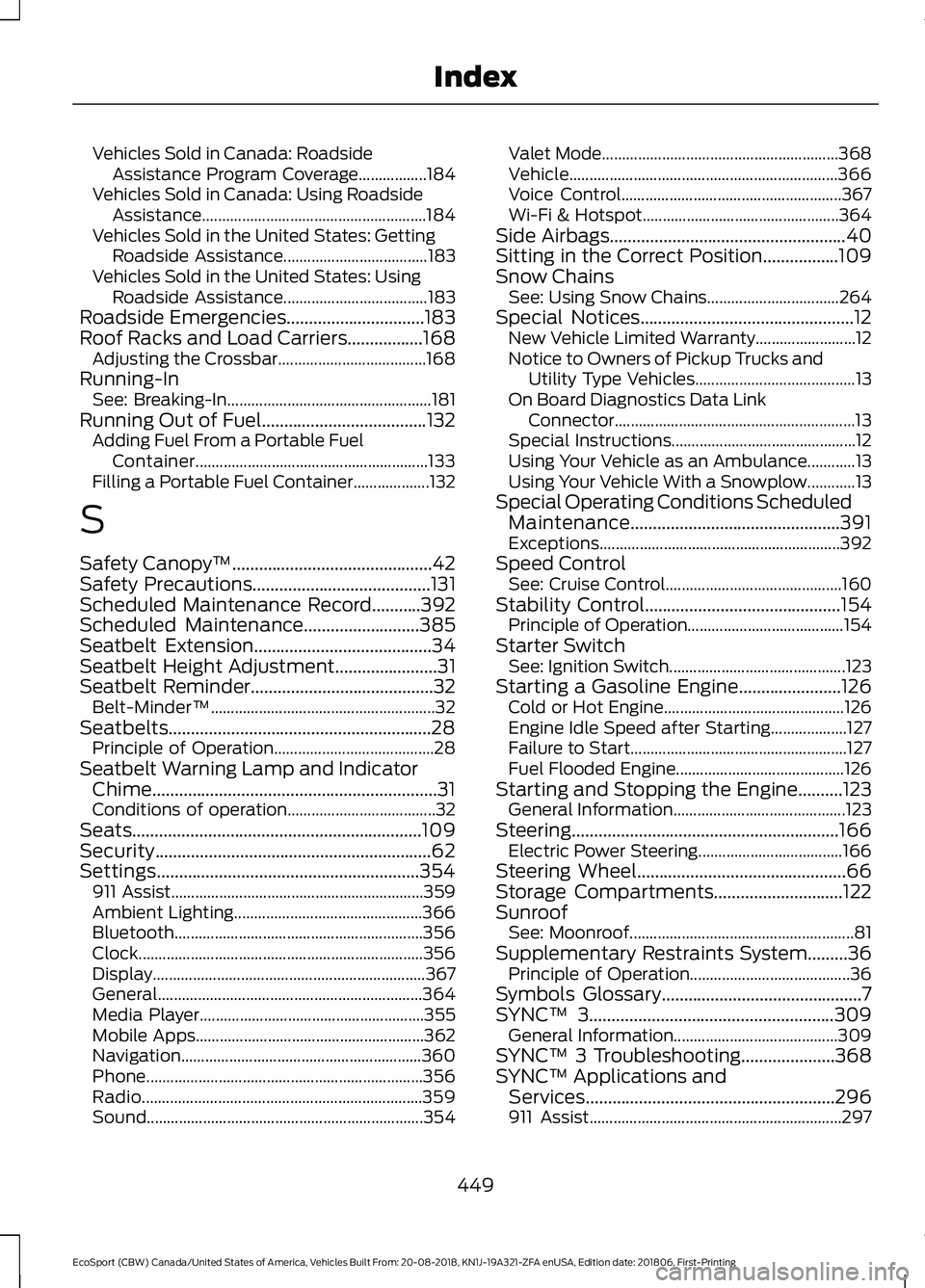
Vehicles Sold in Canada: RoadsideAssistance Program Coverage.................184Vehicles Sold in Canada: Using RoadsideAssistance........................................................184Vehicles Sold in the United States: GettingRoadside Assistance....................................183Vehicles Sold in the United States: UsingRoadside Assistance....................................183Roadside Emergencies...............................183Roof Racks and Load Carriers.................168Adjusting the Crossbar.....................................168Running-InSee: Breaking-In...................................................181Running Out of Fuel.....................................132Adding Fuel From a Portable FuelContainer..........................................................133Filling a Portable Fuel Container...................132
S
Safety Canopy™.............................................42Safety Precautions........................................131Scheduled Maintenance Record...........392Scheduled Maintenance..........................385Seatbelt Extension........................................34Seatbelt Height Adjustment.......................31Seatbelt Reminder.........................................32Belt-Minder™........................................................32Seatbelts...........................................................28Principle of Operation........................................28Seatbelt Warning Lamp and IndicatorChime................................................................31Conditions of operation.....................................32Seats.................................................................109Security..............................................................62Settings...........................................................354911 Assist...............................................................359Ambient Lighting...............................................366Bluetooth..............................................................356Clock.......................................................................356Display....................................................................367General..................................................................364Media Player........................................................355Mobile Apps.........................................................362Navigation............................................................360Phone.....................................................................356Radio......................................................................359Sound.....................................................................354
Valet Mode...........................................................368Vehicle...................................................................366Voice Control.......................................................367Wi-Fi & Hotspot.................................................364Side Airbags.....................................................40Sitting in the Correct Position.................109Snow ChainsSee: Using Snow Chains.................................264Special Notices................................................12New Vehicle Limited Warranty.........................12Notice to Owners of Pickup Trucks andUtility Type Vehicles........................................13On Board Diagnostics Data LinkConnector............................................................13Special Instructions..............................................12Using Your Vehicle as an Ambulance............13Using Your Vehicle With a Snowplow............13Special Operating Conditions ScheduledMaintenance...............................................391Exceptions............................................................392Speed ControlSee: Cruise Control............................................160Stability Control............................................154Principle of Operation.......................................154Starter SwitchSee: Ignition Switch............................................123Starting a Gasoline Engine.......................126Cold or Hot Engine.............................................126Engine Idle Speed after Starting...................127Failure to Start......................................................127Fuel Flooded Engine..........................................126Starting and Stopping the Engine..........123General Information...........................................123Steering............................................................166Electric Power Steering....................................166Steering Wheel...............................................66Storage Compartments.............................122SunroofSee: Moonroof........................................................81Supplementary Restraints System.........36Principle of Operation........................................36Symbols Glossary.............................................7SYNC™ 3.......................................................309General Information.........................................309SYNC™ 3 Troubleshooting.....................368SYNC™ Applications andServices........................................................296911 Assist...............................................................297
449
EcoSport (CBW) Canada/United States of America, Vehicles Built From: 20-08-2018, KN1J-19A321-ZFA enUSA, Edition date: 201806, First-PrintingIndex