turn signal FORD ESCAPE 2016 3.G User Guide
[x] Cancel search | Manufacturer: FORD, Model Year: 2016, Model line: ESCAPE, Model: FORD ESCAPE 2016 3.GPages: 393, PDF Size: 5.85 MB
Page 319 of 393
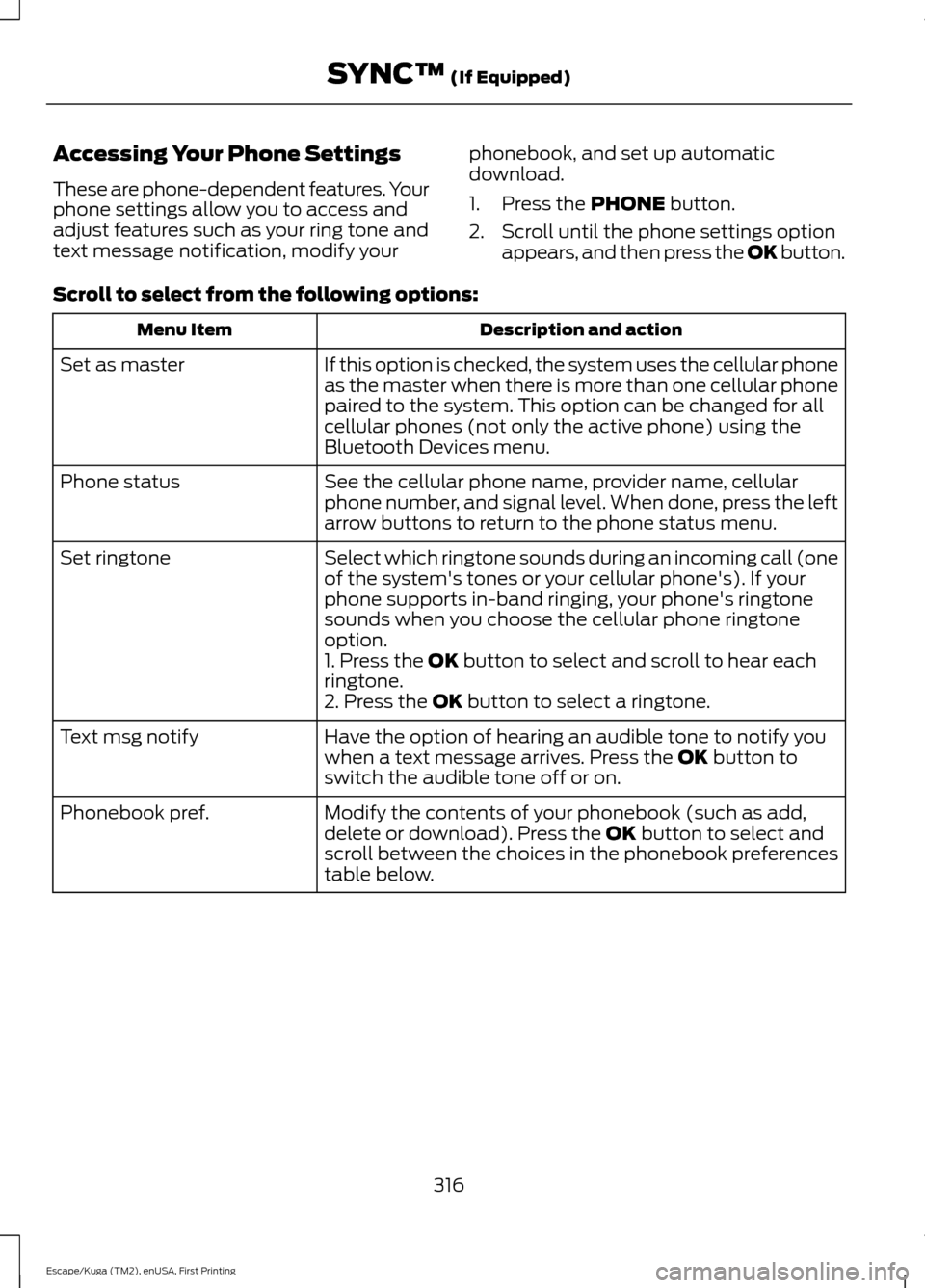
Accessing Your Phone Settings
These are phone-dependent features. Your
phone settings allow you to access and
adjust features such as your ring tone and
text message notification, modify your
phonebook, and set up automatic
download.
1. Press the PHONE button.
2. Scroll until the phone settings option appears, and then press the OK button.
Scroll to select from the following options: Description and action
Menu Item
If this option is checked, the system uses the cellular phone
as the master when there is more than one cellular phone
paired to the system. This option can be changed for all
cellular phones (not only the active phone) using the
Bluetooth Devices menu.
Set as master
See the cellular phone name, provider name, cellular
phone number, and signal level. When done, press the left
arrow buttons to return to the phone status menu.
Phone status
Select which ringtone sounds during an incoming call (one
of the system's tones or your cellular phone's). If your
phone supports in-band ringing, your phone's ringtone
sounds when you choose the cellular phone ringtone
option.
Set ringtone
1. Press the
OK button to select and scroll to hear each
ringtone.
2. Press the
OK button to select a ringtone.
Have the option of hearing an audible tone to notify you
when a text message arrives. Press the
OK button to
switch the audible tone off or on.
Text msg notify
Modify the contents of your phonebook (such as add,
delete or download). Press the
OK button to select and
scroll between the choices in the phonebook preferences
table below.
Phonebook pref.
316
Escape/Kuga (TM2), enUSA, First Printing SYNC™
(If Equipped)
Page 371 of 393
TRADEMARKS: This EULA does not grant
you any rights in connection with any
trademarks or service marks of FORD
MOTOR COMPANY, its affiliates, and third
party software and service providers.
PRODUCT SUPPORT: Please refer to
FORD MOTOR COMPANY instructions
provided in the documentation for the
DEVICES product support, such as the
vehicle owner guide.
Should you have any questions concerning
this EULA, or if you desire to contact FORD
MOTOR COMPANY for any other reason,
please refer to the address provided in the
documentation for the DEVICES.
No Liability for Certain Damages:
EXCEPT AS PROHIBITED BY LAW, FORD
MOTOR COMPANY, ANY THIRD PARTY
SOFTWARE OR SERVICES SUPPLIERS,
AND THEIR AFFILIATES SHALL HAVE NO
LIABILITY FOR ANY INDIRECT, SPECIAL,
CONSEQUENTIAL OR INCIDENTAL
DAMAGES ARISING FROM OR IN
CONNECTION WITH THE USE OR
PERFORMANCE OF THE SOFTWARE. THIS
LIMITATION SHALL APPLY EVEN IF ANY
REMEDY FAILS OF ITS ESSENTIAL
PURPOSE. THERE ARE NO WARRANTIES
OTHER THAN THOSE THAT MAY BE
EXPRESSLY PROVIDED FOR YOUR NEW
VEHICLE.
SYNC® Automotive Important Safety
Information Read and follow
instructions:
• Before using your SYNC® system, read
and follow all instructions and safety
information provided in this end user
manual ("Owner Guide".) Not
following precautions found in the
Owner Guide can lead to an accident
or other serious injuries. General Operation
•
Voice Command Control
: Certain
functions within the SYNC® system
may be accomplished using voice
commands. Using voice commands
while driving helps you to operate the
system without removing your hands
from the wheel or eyes from the road.
• Prolonged Views of Screen:
Do not
access any function requiring a
prolonged view of the screen while you
are driving. Pull over in a safe and legal
manner before attempting to access a
function of the system requiring
prolonged attention.
• Volume Setting:
Do not raise the
volume excessively. Keep the volume
at a level where you can still hear
outside traffic and emergency signals
while driving. Driving while unable to
hear these sounds could cause an
accident.
• Navigation Features:
Any navigation
features included in the system are
intended to provide turn by turn
instructions to get you to a desired
destination. Please make certain all
persons using this system carefully
read and follow instructions and safety
information fully.
• Distraction Hazard:
Any navigation
features may require manual
(non-verbal) setup. Attempting to
perform such set-up or insert data
while driving can distract your attention
and could cause an accident or other
serious injury. Stop the vehicle in a safe
and legal manner before attempting
these operations.
• Let Your Judgment Prevail:
Any
navigation features are provided only
as an aid. Make your driving decisions
based on your observations of local
conditions and existing traffic
regulations. Any such feature is not a
368
Escape/Kuga (TM2), enUSA, First Printing Appendices
Page 385 of 393
B
Blind Spot Information System..............162
Switching the System Off and On...............164
System Errors....................................................... 164
Using the System................................................ 162
Bonnet Lock See: Opening and Closing the Hood............212
Booster Seats..................................................22
Types of Booster Seats...................................... 23
Brake Fluid Check
.........................................221
Brakes...............................................................146 General Information.......................................... 146
Breaking-In.....................................................188
Bulb Specification Chart
..........................230
C
Cabin Air Filter................................................107
California Proposition 65..............................11
Capacities and Specifications - 1.6L EcoBoost™..................................................275
Specifications...................................................... 275
Capacities and Specifications - 2.0L EcoBoost™.................................................278
Specifications...................................................... 279
Capacities and Specifications - 2.5L.................................................................282
Specifications..................................................... 283
Capacities and Specifications...............268
Car Wash See: Cleaning the Exterior.............................. 234
Center Console..............................................123
Changing a Bulb
...........................................226
Lamp Assembly Condensation.................... 226
Replacing Fog, Park and Turn Signal Bulbs.................................................................. 228
Replacing Headlamp Bulbs............................ 227
Replacing HID Headlamp Bulbs.................. 228
Replacing High-Mount Brake Lamp Bulb.................................................................... 230
Replacing License Plate Lamp Bulb..........230
Replacing Reverse Lamp Assembly...........229
Replacing Side Marker Bulbs........................ 228
Replacing Tail, Brake and Turn Signal Bulbs.................................................................. 229
Changing a Fuse.............................................211 Fuses........................................................................\
. 211Changing a Road Wheel...........................262
Dissimilar Spare Wheel and Tire Assembly
Information..................................................... 262
Tire Change Procedure.................................... 263
Changing the 12V Battery..........................222
Changing the Engine Air Filter.................232 1.6L and 2.0L EcoBoost Engines.................. 232
2.5L Engine........................................................... 233
Changing the Wiper Blades.....................223 Front Wiper Blades............................................ 223
Rear Wiper Blade............................................... 224
Checking MyKey System Status...............52
Checking the Wiper Blades......................223
Child Restraint and Safety Belt Maintenance.................................................33
Child Safety
.......................................................15
General Information............................................. 15
Child Safety Locks
..........................................25
Left-Hand Side...................................................... 26
Right-Hand Side................................................... 26
Child Seat Positioning..................................24
Cleaning Leather Seats..............................237
Cleaning Products
.......................................234
Cleaning the Alloy Wheels.......................238
Cleaning the Engine....................................235
Cleaning the Exterior..................................234 Exterior Chrome Parts...................................... 234
Exterior Plastic Parts........................................ 235
Stripes or Graphics............................................ 235
Underbody............................................................ 235
Cleaning the Instrument Panel and Instrument Cluster Lens.........................237
Cleaning the Interior...................................236
Cleaning the Windows and Wiper Blades...........................................................236
Clearing All MyKeys.......................................50
Climate Control..............................................101
Coolant Check See: Engine Coolant Check............................. 218
Crash Sensors and Airbag Indicator........42
Creating a MyKey
...........................................50
Programming/Changing Configurable
Settings............................................................... 50
382
Escape/Kuga (TM2), enUSA, First Printing Index