light FORD EXPEDITION 2023 Repair Manual
[x] Cancel search | Manufacturer: FORD, Model Year: 2023, Model line: EXPEDITION, Model: FORD EXPEDITION 2023Pages: 658, PDF Size: 16.16 MB
Page 332 of 658
WHAT IS PRE-COLLISION
ASSIST
Pre-collision assist detects and warns ofapproaching hazards in the roadway. Thesystem provides multiple levels ofassistance to help avoid a collision if yourvehicle is rapidly approaching anotherstationary vehicle, a vehicle traveling in thesame direction as yours, or a pedestrian orcyclist within your driving path.
HOW DOES PRE-COLLISION
ASSIST WORK
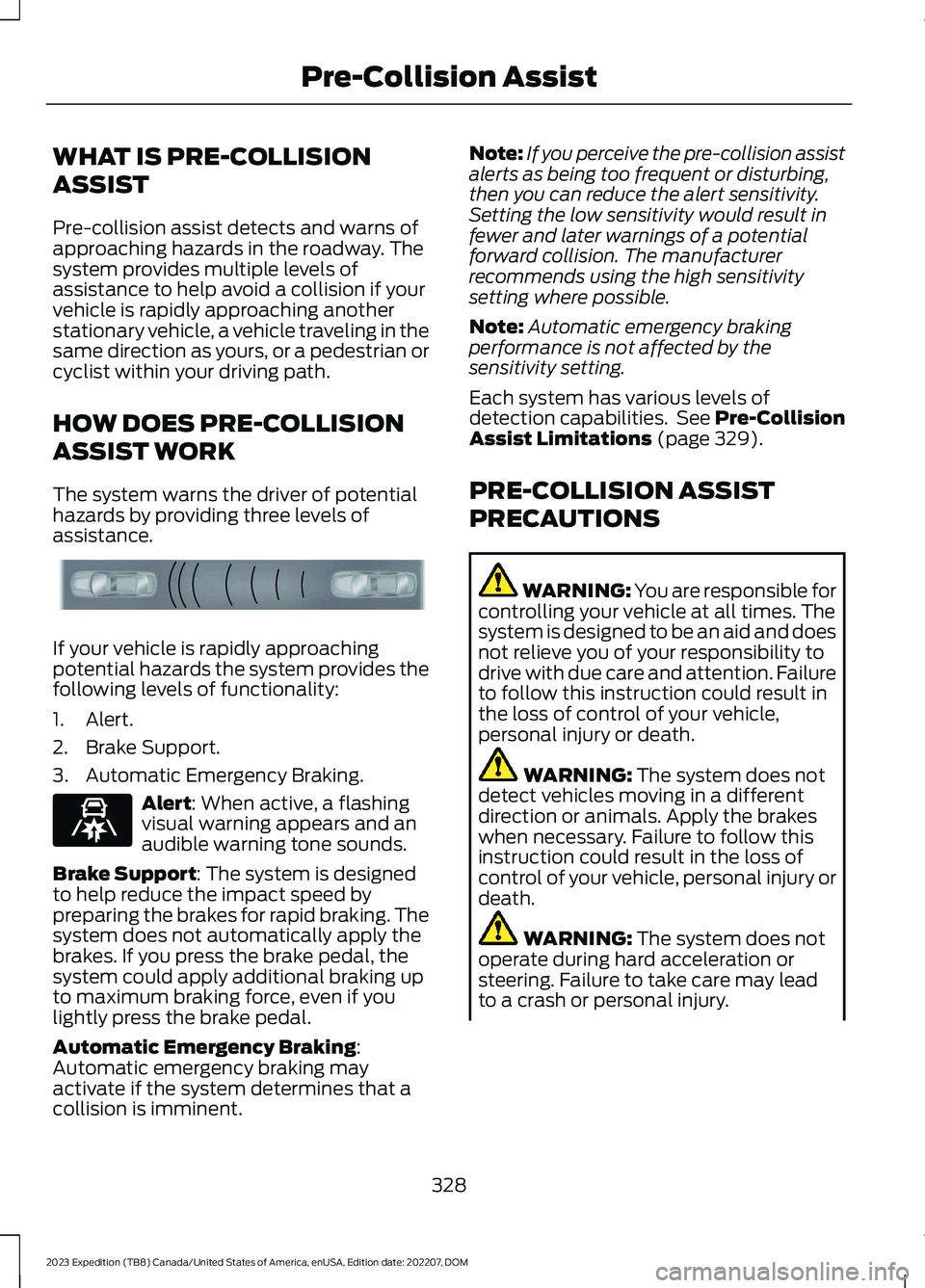
The system warns the driver of potentialhazards by providing three levels ofassistance.
If your vehicle is rapidly approachingpotential hazards the system provides thefollowing levels of functionality:
1.Alert.
2.Brake Support.
3.Automatic Emergency Braking.
Alert: When active, a flashingvisual warning appears and anaudible warning tone sounds.
Brake Support: The system is designedto help reduce the impact speed bypreparing the brakes for rapid braking. Thesystem does not automatically apply thebrakes. If you press the brake pedal, thesystem could apply additional braking upto maximum braking force, even if youlightly press the brake pedal.
Automatic Emergency Braking:Automatic emergency braking mayactivate if the system determines that acollision is imminent.
Note:If you perceive the pre-collision assistalerts as being too frequent or disturbing,then you can reduce the alert sensitivity.Setting the low sensitivity would result infewer and later warnings of a potentialforward collision. The manufacturerrecommends using the high sensitivitysetting where possible.
Note:Automatic emergency brakingperformance is not affected by thesensitivity setting.
Each system has various levels ofdetection capabilities. See Pre-CollisionAssist Limitations (page 329).
PRE-COLLISION ASSIST
PRECAUTIONS
WARNING: You are responsible forcontrolling your vehicle at all times. Thesystem is designed to be an aid and doesnot relieve you of your responsibility todrive with due care and attention. Failureto follow this instruction could result inthe loss of control of your vehicle,personal injury or death.
WARNING: The system does notdetect vehicles moving in a differentdirection or animals. Apply the brakeswhen necessary. Failure to follow thisinstruction could result in the loss ofcontrol of your vehicle, personal injury ordeath.
WARNING: The system does notoperate during hard acceleration orsteering. Failure to take care may leadto a crash or personal injury.
328
2023 Expedition (TB8) Canada/United States of America, enUSA, Edition date: 202207, DOMPre-Collision AssistE156130 E329466
Page 333 of 658
WARNING: The system mayoperate with reduced function duringcold and inclement weather conditions.Snow, ice, rain, spray and fog canadversely affect the system. Keep thefront camera and radar free of snow andice. Failure to follow this instruction mayresult in the loss of control of yourvehicle, serious personal injury or death.
WARNING: Take additional care ifyour vehicle is heavily loaded or you aretowing a trailer. These conditions couldresult in reduced performance of thissystem. Failure to follow this instructioncould result in the loss of control of yourvehicle, personal injury or death.
WARNING: The system cannothelp prevent all crashes. Do not rely onthis system to replace driver judgmentand the need to maintain a safe distanceand speed.
WARNING: System performancecould be reduced in situations where thevehicle camera has limited detectioncapability. These situations include butare not limited to direct or low sunlight,vehicles at night without tail lights,unconventional vehicle types,pedestrians or cyclists with complexbackgrounds, running pedestrians or fastmoving cyclists, partly obscuredpedestrians or cyclists, pedestrians orcyclists that the system cannotdistinguish from a group. Failure to takecare may result in the loss of control ofyour vehicle, personal injury or death.
PRE-COLLISION ASSIST
LIMITATIONS
Pre-collision assist depends on thedetection ability of its camera and sensors.Any obstructions or damage to these areascan limit detection or prevent the systemfrom functioning. See Locating thePre-Collision Assist Sensors (page 331).
The system is active at 3 mph (5 km/h)and above.
Note:The pre-collision assist systemautomatically disables when you selectfour-wheel drive low or manually disableAdvanceTrac™.
Note:Brake support and automaticemergency braking are active at speeds upto 80 mph (130 km/h). If your vehicle has aradar sensor included with adaptive cruisecontrol, then brake support and automaticemergency braking are active up to themaximum speed of your vehicle.
Pedestrian Detection Limitations
Pedestrian detection is active at speedsup to 50 mph (80 km/h).
Pedestrian detection operates optimallywhen detected hazards are clearlyidentifiable. System performance mayreduce in situations where pedestrians arerunning, partly obscured, have a complexbackground, or cannot be distinguishedfrom a group.
Cyclist Detection Limitations
Cyclist detection is active at speeds up to50 mph (80 km/h).
Cyclist detection functions optimally whendetected hazards are clearly identifiable.System performance may reduce insituations where cyclists are fast-moving,partly obscured, have a complexbackground, or cannot be distinguishedfrom a group.
329
2023 Expedition (TB8) Canada/United States of America, enUSA, Edition date: 202207, DOMPre-Collision Assist
Page 359 of 658
HOOKING UP A TRAILER USING AWEIGHT-DISTRIBUTING HITCH
WARNING: Do not adjust the springbars so that your vehicle's rear bumperis higher than before attaching the trailer.Doing so will defeat the function of theweight-distributing hitch, which maycause unpredictable handling, and couldresult in serious personal injury.
A weight-distributing hitch helps distributetongue load to all towing vehicle and trailerwheels. For more information, visit the linksin the following table.
WebsiteMarket
https://www.fleet.ford.com/towing-guides/
United States ofAmerica
https://www.fleet.ford.ca/towing-guides/
Canada
CONNECTING A TRAILER
Recognizing a Trailer
1.Attach the trailer and wiring connectorto your vehicle.
2.Switch on your vehicle.
3.Set up a profile for the trailer using thetouchscreen.
Note:If your vehicle does not recognize thetrailer, press and hold the brake pedal for afew seconds.
Note:Trailer profiles store trailer types,dimensions, preferences, trailer specificmileage and fuel economy.
Note:Disabling the trailer detectionnotification makes the default trailer profileactive when a connection is detected.
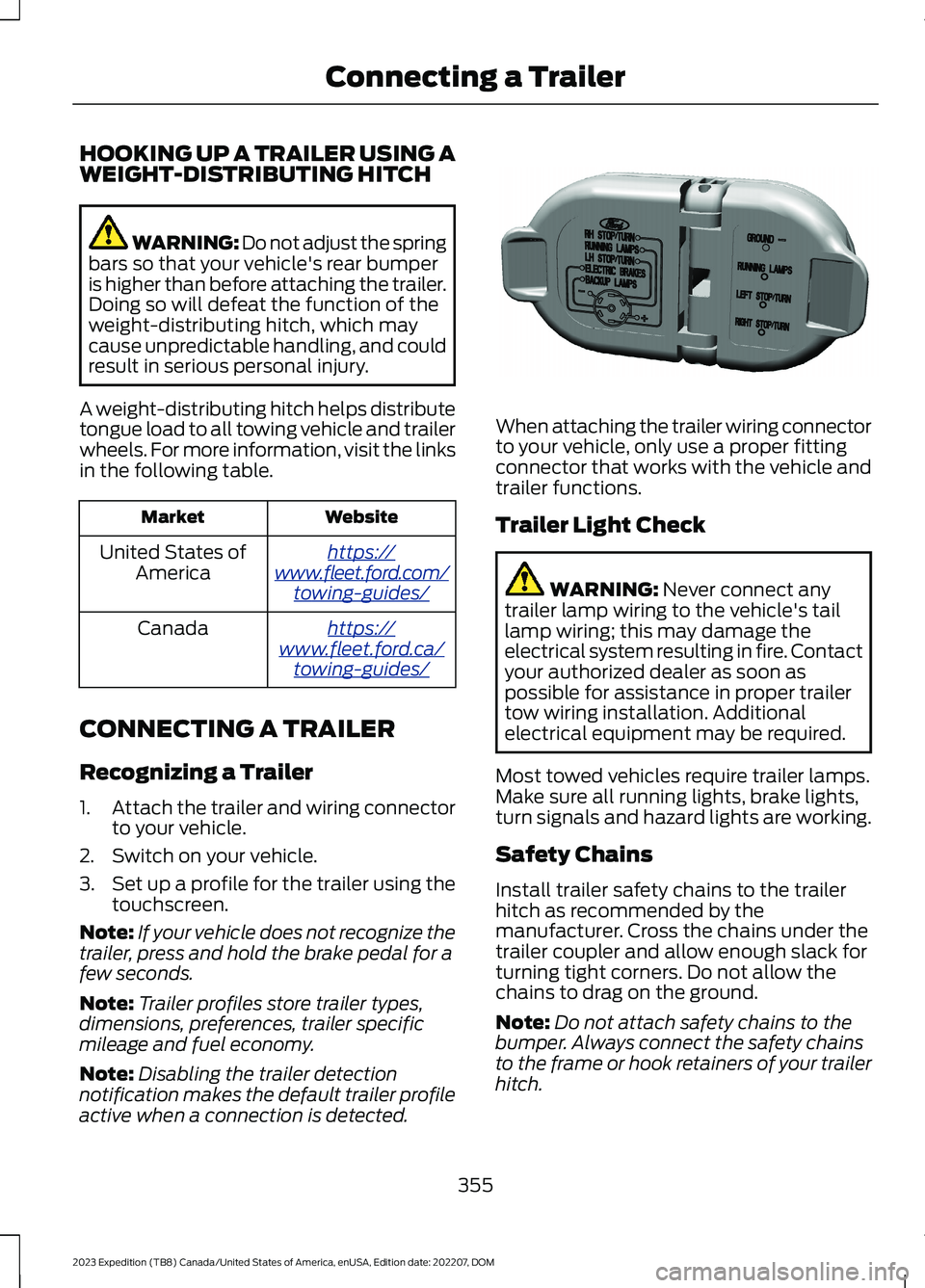
When attaching the trailer wiring connectorto your vehicle, only use a proper fittingconnector that works with the vehicle andtrailer functions.
Trailer Light Check
WARNING: Never connect anytrailer lamp wiring to the vehicle's taillamp wiring; this may damage theelectrical system resulting in fire. Contactyour authorized dealer as soon aspossible for assistance in proper trailertow wiring installation. Additionalelectrical equipment may be required.
Most towed vehicles require trailer lamps.Make sure all running lights, brake lights,turn signals and hazard lights are working.
Safety Chains
Install trailer safety chains to the trailerhitch as recommended by themanufacturer. Cross the chains under thetrailer coupler and allow enough slack forturning tight corners. Do not allow thechains to drag on the ground.
Note:Do not attach safety chains to thebumper. Always connect the safety chainsto the frame or hook retainers of your trailerhitch.
355
2023 Expedition (TB8) Canada/United States of America, enUSA, Edition date: 202207, DOMConnecting a TrailerE163167
Page 363 of 658
Certain states require functioning trailerbrakes for trailers over a specified weight.Be sure to check state regulations for thisspecified weight.
Ford Motor Company recommendsseparate functioning brake systems fortrailers weighing more than 1,500 lb(680 kg) when loaded.
TOWING A TRAILER
LIMITATIONS
The vehicle's load capacitydesignation is by weight, not byvolume, so you cannot necessarilyuse all available space whenloading a vehicle or trailer.
Note:Your vehicle could havereduced performance whenoperating at high altitudes andwhen heavily loaded or towing a
trailer. When driving at elevation,to match driving performance asperceived at sea level, reduce grossvehicle weight and grosscombination weight by 2% per1,000 ft (300 m) elevation.
LOADING YOUR TRAILER
To help minimize how trailermovement affects your vehiclewhen driving:
•Load the heaviest items closestto the trailer floor.
•Load the heaviest itemscentered between the left andright side trailer tires.
•Load the heaviest items abovethe trailer axles or just slightlyforward toward the trailertongue. Do not allow the finaltrailer tongue weight to goabove or below 10-15% of theloaded trailer weight. Thetrailer tongue weight shouldnever exceed 10% of themaximum towing capacity.
•Select a ball mount with thecorrect rise or drop. When boththe loaded vehicle and trailerare connected, the trailer frameshould be level, or slightlyangled down toward yourvehicle, when viewed from theside.
TRAILER TOWING HINTS
Towing a trailer places an extra load onyour vehicle's engine, transmission, axle,brakes, tires and suspension. Periodicallyinspect these components during and afterany towing operation.
When driving with a trailer or payload, aslight takeoff vibration or shudder may bepresent due to the increased payloadweight.
Your vehicle may have a temporary orconventional spare tire. A temporary sparetire is different in diameter or width,tread-type, or is from a differentmanufacturer than the road tires on yourvehicle. Consult information on the tirelabel or Safety Compliance label forlimitations when using.
359
2023 Expedition (TB8) Canada/United States of America, enUSA, Edition date: 202207, DOMTowing a Trailer
Page 367 of 658
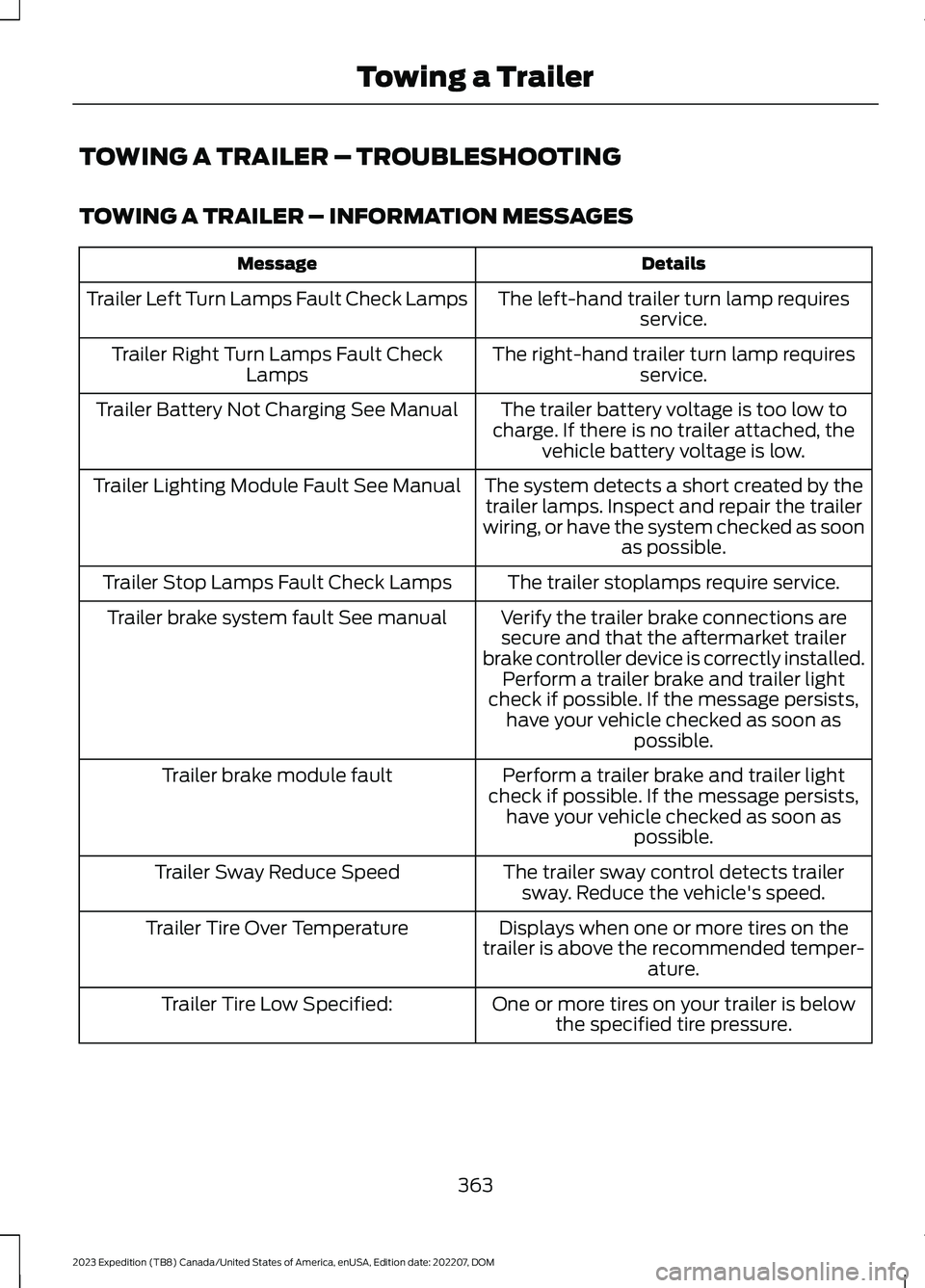
TOWING A TRAILER – TROUBLESHOOTING
TOWING A TRAILER – INFORMATION MESSAGES
DetailsMessage
The left-hand trailer turn lamp requiresservice.Trailer Left Turn Lamps Fault Check Lamps
The right-hand trailer turn lamp requiresservice.Trailer Right Turn Lamps Fault CheckLamps
The trailer battery voltage is too low tocharge. If there is no trailer attached, thevehicle battery voltage is low.
Trailer Battery Not Charging See Manual
The system detects a short created by thetrailer lamps. Inspect and repair the trailerwiring, or have the system checked as soonas possible.
Trailer Lighting Module Fault See Manual
The trailer stoplamps require service.Trailer Stop Lamps Fault Check Lamps
Verify the trailer brake connections aresecure and that the aftermarket trailerbrake controller device is correctly installed.Perform a trailer brake and trailer lightcheck if possible. If the message persists,have your vehicle checked as soon aspossible.
Trailer brake system fault See manual
Perform a trailer brake and trailer lightcheck if possible. If the message persists,have your vehicle checked as soon aspossible.
Trailer brake module fault
The trailer sway control detects trailersway. Reduce the vehicle's speed.Trailer Sway Reduce Speed
Displays when one or more tires on thetrailer is above the recommended temper-ature.
Trailer Tire Over Temperature
One or more tires on your trailer is belowthe specified tire pressure.Trailer Tire Low Specified:
363
2023 Expedition (TB8) Canada/United States of America, enUSA, Edition date: 202207, DOMTowing a Trailer
Page 383 of 658
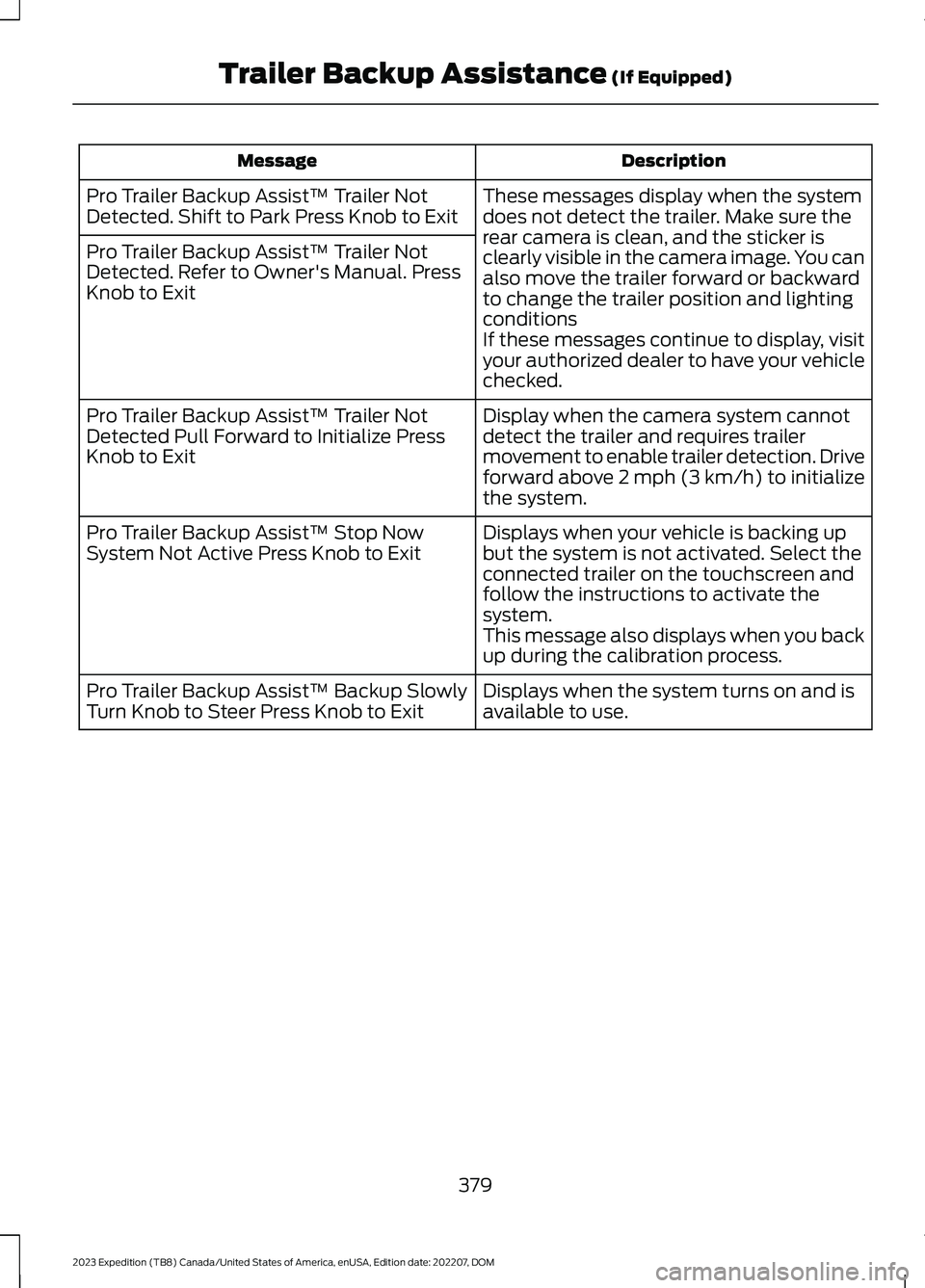
DescriptionMessage
These messages display when the systemdoes not detect the trailer. Make sure therear camera is clean, and the sticker isclearly visible in the camera image. You canalso move the trailer forward or backwardto change the trailer position and lightingconditionsIf these messages continue to display, visityour authorized dealer to have your vehiclechecked.
Pro Trailer Backup Assist™ Trailer NotDetected. Shift to Park Press Knob to Exit
Pro Trailer Backup Assist™ Trailer NotDetected. Refer to Owner's Manual. PressKnob to Exit
Display when the camera system cannotdetect the trailer and requires trailermovement to enable trailer detection. Driveforward above 2 mph (3 km/h) to initializethe system.
Pro Trailer Backup Assist™ Trailer NotDetected Pull Forward to Initialize PressKnob to Exit
Displays when your vehicle is backing upbut the system is not activated. Select theconnected trailer on the touchscreen andfollow the instructions to activate thesystem.This message also displays when you backup during the calibration process.
Pro Trailer Backup Assist™ Stop NowSystem Not Active Press Knob to Exit
Displays when the system turns on and isavailable to use.Pro Trailer Backup Assist™ Backup SlowlyTurn Knob to Steer Press Knob to Exit
379
2023 Expedition (TB8) Canada/United States of America, enUSA, Edition date: 202207, DOMTrailer Backup Assistance (If Equipped)
Page 384 of 658
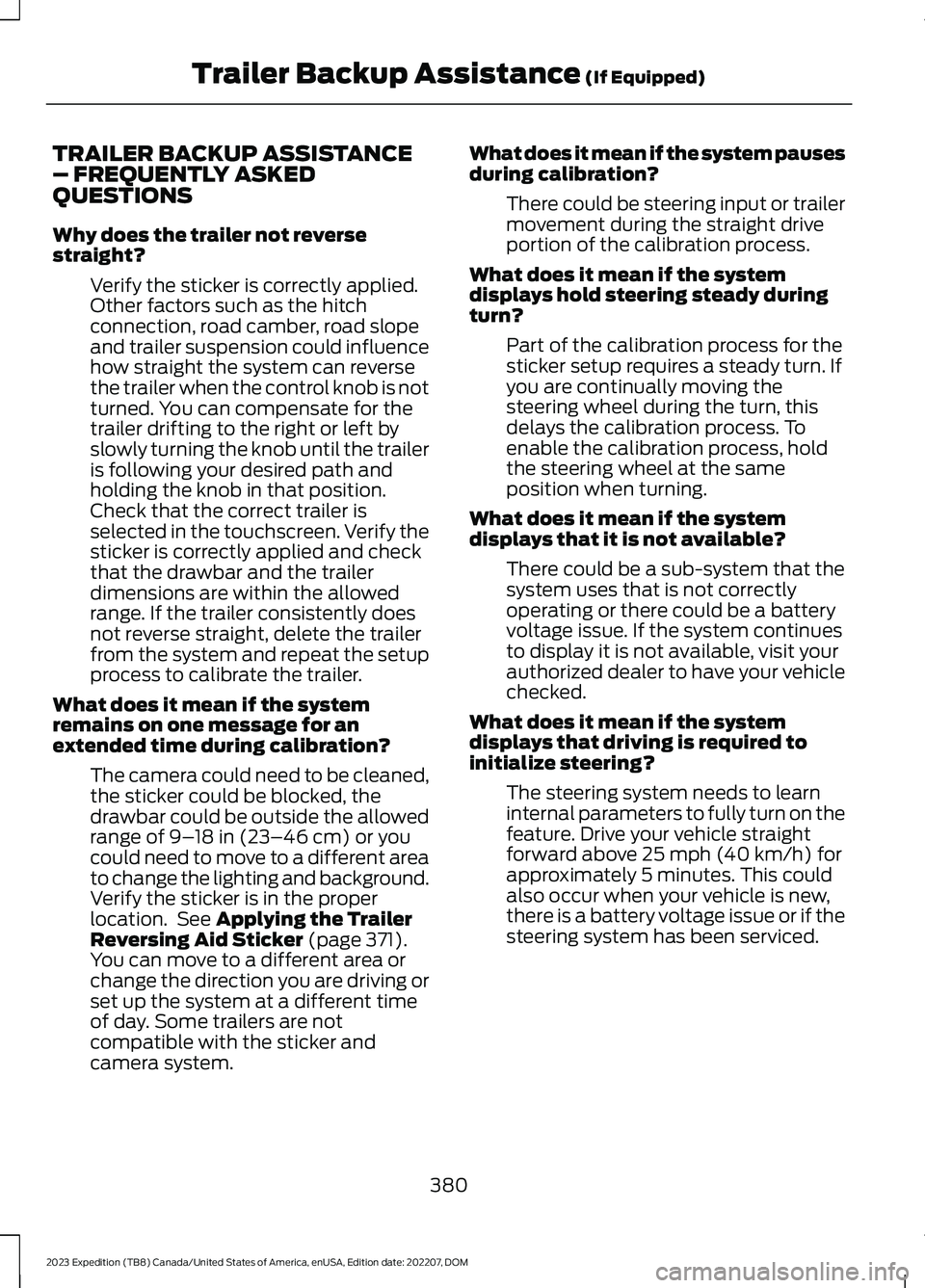
TRAILER BACKUP ASSISTANCE– FREQUENTLY ASKEDQUESTIONS
Why does the trailer not reversestraight?
Verify the sticker is correctly applied.Other factors such as the hitchconnection, road camber, road slopeand trailer suspension could influencehow straight the system can reversethe trailer when the control knob is notturned. You can compensate for thetrailer drifting to the right or left byslowly turning the knob until the traileris following your desired path andholding the knob in that position.Check that the correct trailer isselected in the touchscreen. Verify thesticker is correctly applied and checkthat the drawbar and the trailerdimensions are within the allowedrange. If the trailer consistently doesnot reverse straight, delete the trailerfrom the system and repeat the setupprocess to calibrate the trailer.
What does it mean if the systemremains on one message for anextended time during calibration?
The camera could need to be cleaned,the sticker could be blocked, thedrawbar could be outside the allowedrange of 9–18 in (23–46 cm) or youcould need to move to a different areato change the lighting and background.Verify the sticker is in the properlocation. See Applying the TrailerReversing Aid Sticker (page 371).You can move to a different area orchange the direction you are driving orset up the system at a different timeof day. Some trailers are notcompatible with the sticker andcamera system.
What does it mean if the system pausesduring calibration?
There could be steering input or trailermovement during the straight driveportion of the calibration process.
What does it mean if the systemdisplays hold steering steady duringturn?
Part of the calibration process for thesticker setup requires a steady turn. Ifyou are continually moving thesteering wheel during the turn, thisdelays the calibration process. Toenable the calibration process, holdthe steering wheel at the sameposition when turning.
What does it mean if the systemdisplays that it is not available?
There could be a sub-system that thesystem uses that is not correctlyoperating or there could be a batteryvoltage issue. If the system continuesto display it is not available, visit yourauthorized dealer to have your vehiclechecked.
What does it mean if the systemdisplays that driving is required toinitialize steering?
The steering system needs to learninternal parameters to fully turn on thefeature. Drive your vehicle straightforward above 25 mph (40 km/h) forapproximately 5 minutes. This couldalso occur when your vehicle is new,there is a battery voltage issue or if thesteering system has been serviced.
380
2023 Expedition (TB8) Canada/United States of America, enUSA, Edition date: 202207, DOMTrailer Backup Assistance (If Equipped)
Page 385 of 658
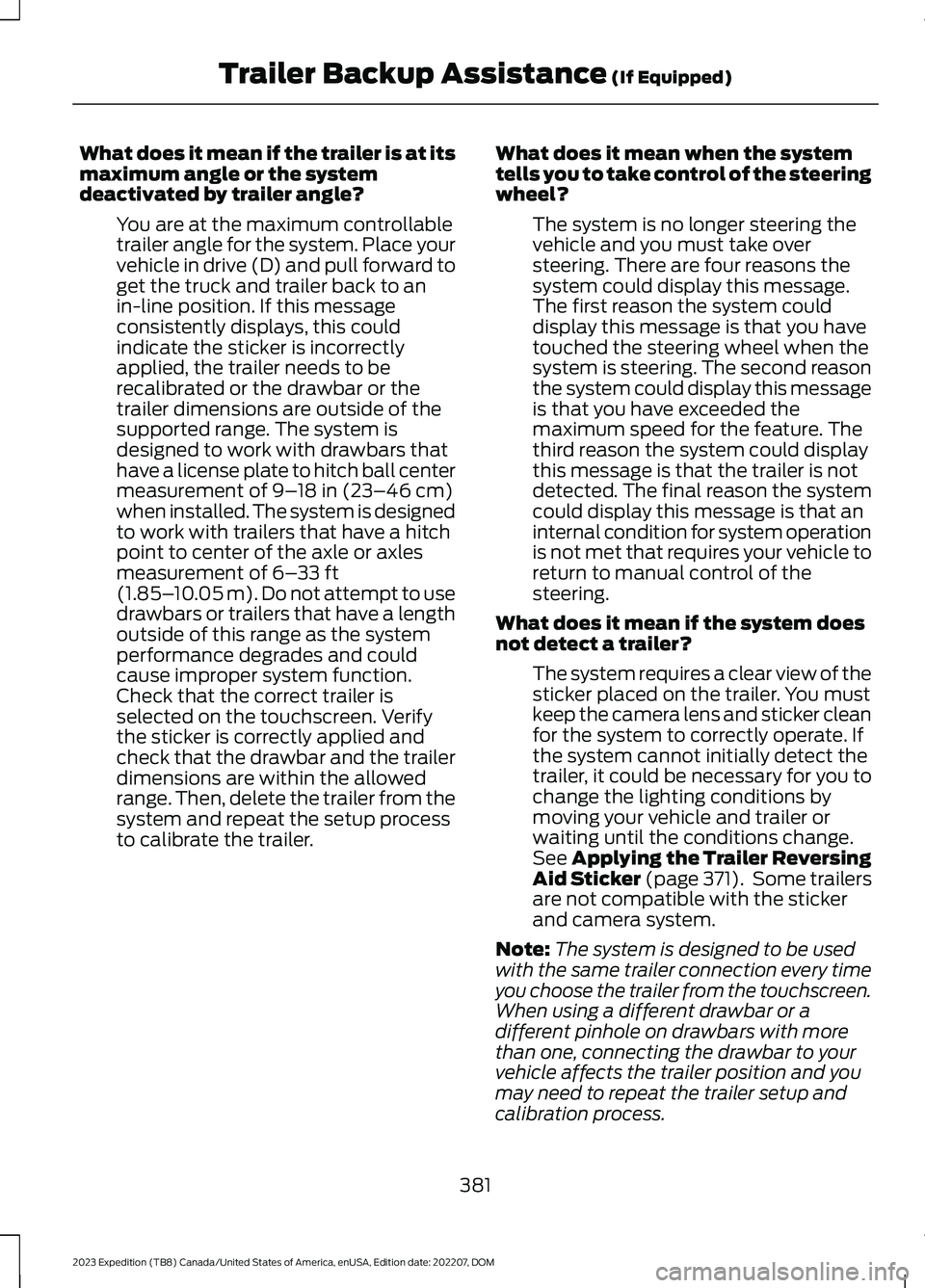
What does it mean if the trailer is at itsmaximum angle or the systemdeactivated by trailer angle?
You are at the maximum controllabletrailer angle for the system. Place yourvehicle in drive (D) and pull forward toget the truck and trailer back to anin-line position. If this messageconsistently displays, this couldindicate the sticker is incorrectlyapplied, the trailer needs to berecalibrated or the drawbar or thetrailer dimensions are outside of thesupported range. The system isdesigned to work with drawbars thathave a license plate to hitch ball centermeasurement of 9–18 in (23–46 cm)when installed. The system is designedto work with trailers that have a hitchpoint to center of the axle or axlesmeasurement of 6–33 ft(1.85–10.05 m). Do not attempt to usedrawbars or trailers that have a lengthoutside of this range as the systemperformance degrades and couldcause improper system function.Check that the correct trailer isselected on the touchscreen. Verifythe sticker is correctly applied andcheck that the drawbar and the trailerdimensions are within the allowedrange. Then, delete the trailer from thesystem and repeat the setup processto calibrate the trailer.
What does it mean when the systemtells you to take control of the steeringwheel?
The system is no longer steering thevehicle and you must take oversteering. There are four reasons thesystem could display this message.The first reason the system coulddisplay this message is that you havetouched the steering wheel when thesystem is steering. The second reasonthe system could display this messageis that you have exceeded themaximum speed for the feature. Thethird reason the system could displaythis message is that the trailer is notdetected. The final reason the systemcould display this message is that aninternal condition for system operationis not met that requires your vehicle toreturn to manual control of thesteering.
What does it mean if the system doesnot detect a trailer?
The system requires a clear view of thesticker placed on the trailer. You mustkeep the camera lens and sticker cleanfor the system to correctly operate. Ifthe system cannot initially detect thetrailer, it could be necessary for you tochange the lighting conditions bymoving your vehicle and trailer orwaiting until the conditions change.See Applying the Trailer ReversingAid Sticker (page 371). Some trailersare not compatible with the stickerand camera system.
Note:The system is designed to be usedwith the same trailer connection every timeyou choose the trailer from the touchscreen.When using a different drawbar or adifferent pinhole on drawbars with morethan one, connecting the drawbar to yourvehicle affects the trailer position and youmay need to repeat the trailer setup andcalibration process.
381
2023 Expedition (TB8) Canada/United States of America, enUSA, Edition date: 202207, DOMTrailer Backup Assistance (If Equipped)
Page 390 of 658
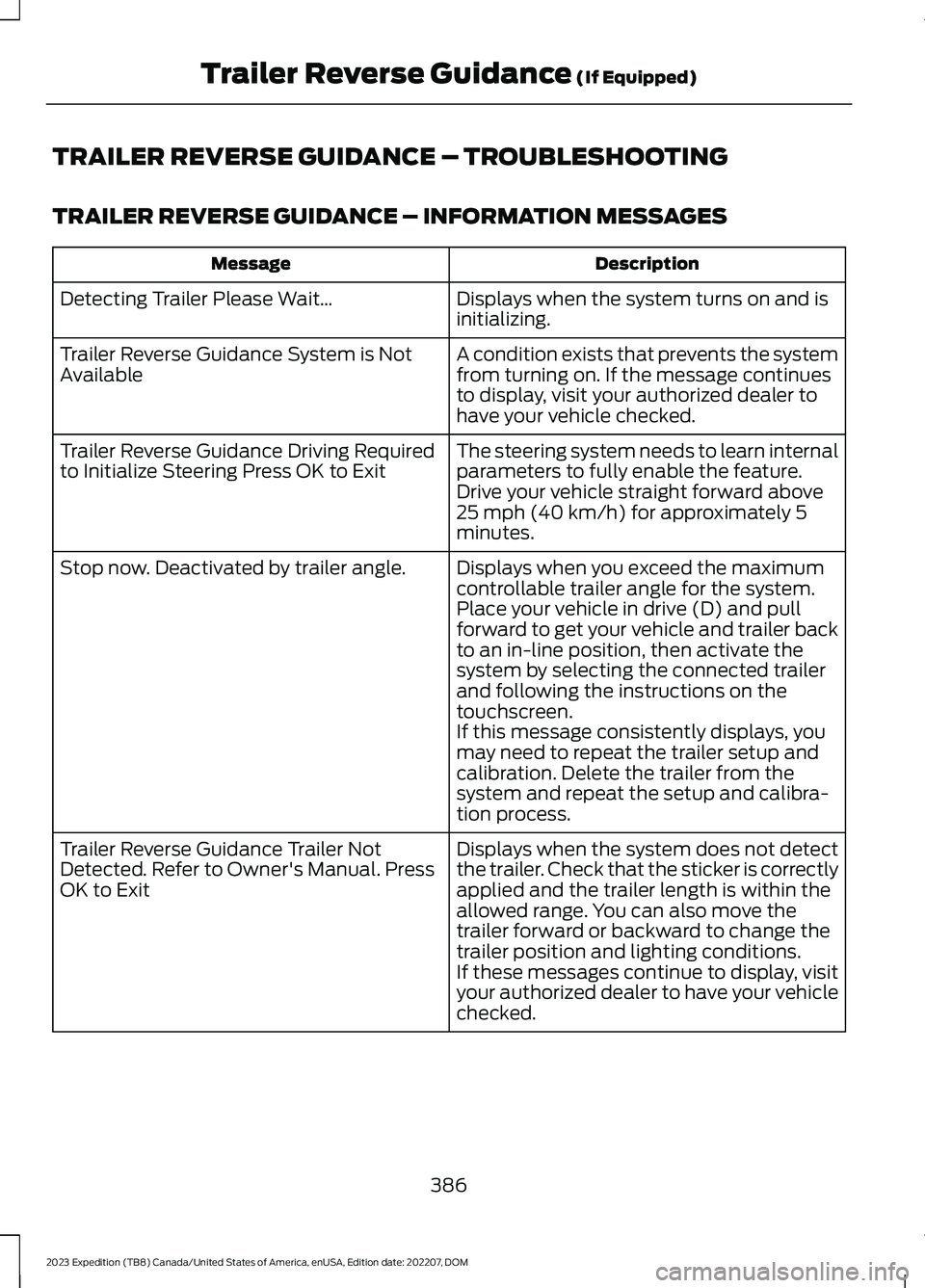
TRAILER REVERSE GUIDANCE – TROUBLESHOOTING
TRAILER REVERSE GUIDANCE – INFORMATION MESSAGES
DescriptionMessage
Displays when the system turns on and isinitializing.Detecting Trailer Please Wait…
A condition exists that prevents the systemfrom turning on. If the message continuesto display, visit your authorized dealer tohave your vehicle checked.
Trailer Reverse Guidance System is NotAvailable
The steering system needs to learn internalparameters to fully enable the feature.Drive your vehicle straight forward above25 mph (40 km/h) for approximately 5minutes.
Trailer Reverse Guidance Driving Requiredto Initialize Steering Press OK to Exit
Displays when you exceed the maximumcontrollable trailer angle for the system.Place your vehicle in drive (D) and pullforward to get your vehicle and trailer backto an in-line position, then activate thesystem by selecting the connected trailerand following the instructions on thetouchscreen.
Stop now. Deactivated by trailer angle.
If this message consistently displays, youmay need to repeat the trailer setup andcalibration. Delete the trailer from thesystem and repeat the setup and calibra-tion process.
Displays when the system does not detectthe trailer. Check that the sticker is correctlyapplied and the trailer length is within theallowed range. You can also move thetrailer forward or backward to change thetrailer position and lighting conditions.
Trailer Reverse Guidance Trailer NotDetected. Refer to Owner's Manual. PressOK to Exit
If these messages continue to display, visityour authorized dealer to have your vehiclechecked.
386
2023 Expedition (TB8) Canada/United States of America, enUSA, Edition date: 202207, DOMTrailer Reverse Guidance (If Equipped)
Page 392 of 658
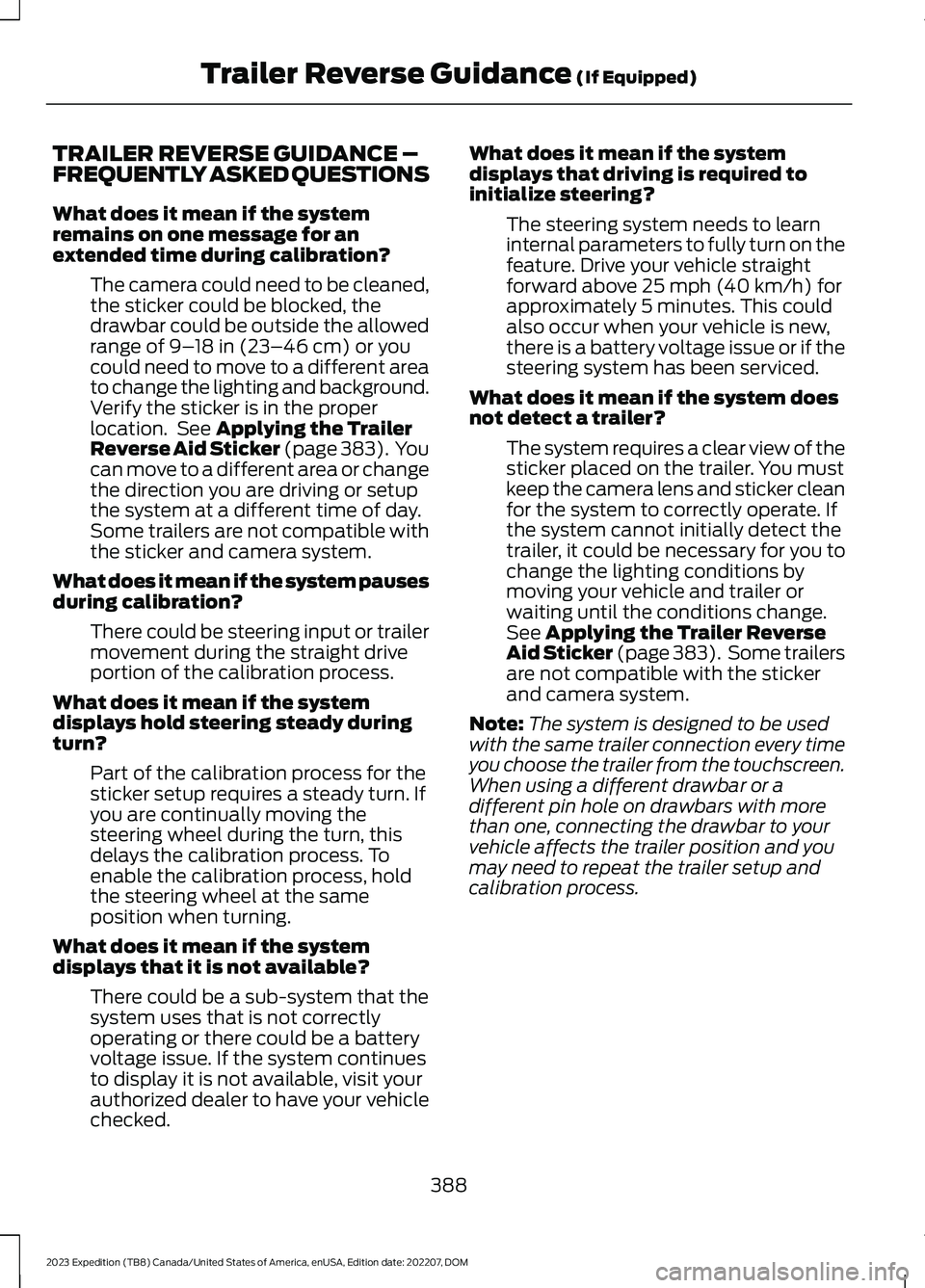
TRAILER REVERSE GUIDANCE –FREQUENTLY ASKED QUESTIONS
What does it mean if the systemremains on one message for anextended time during calibration?
The camera could need to be cleaned,the sticker could be blocked, thedrawbar could be outside the allowedrange of 9–18 in (23–46 cm) or youcould need to move to a different areato change the lighting and background.Verify the sticker is in the properlocation. See Applying the TrailerReverse Aid Sticker (page 383). Youcan move to a different area or changethe direction you are driving or setupthe system at a different time of day.Some trailers are not compatible withthe sticker and camera system.
What does it mean if the system pausesduring calibration?
There could be steering input or trailermovement during the straight driveportion of the calibration process.
What does it mean if the systemdisplays hold steering steady duringturn?
Part of the calibration process for thesticker setup requires a steady turn. Ifyou are continually moving thesteering wheel during the turn, thisdelays the calibration process. Toenable the calibration process, holdthe steering wheel at the sameposition when turning.
What does it mean if the systemdisplays that it is not available?
There could be a sub-system that thesystem uses that is not correctlyoperating or there could be a batteryvoltage issue. If the system continuesto display it is not available, visit yourauthorized dealer to have your vehiclechecked.
What does it mean if the systemdisplays that driving is required toinitialize steering?
The steering system needs to learninternal parameters to fully turn on thefeature. Drive your vehicle straightforward above 25 mph (40 km/h) forapproximately 5 minutes. This couldalso occur when your vehicle is new,there is a battery voltage issue or if thesteering system has been serviced.
What does it mean if the system doesnot detect a trailer?
The system requires a clear view of thesticker placed on the trailer. You mustkeep the camera lens and sticker cleanfor the system to correctly operate. Ifthe system cannot initially detect thetrailer, it could be necessary for you tochange the lighting conditions bymoving your vehicle and trailer orwaiting until the conditions change.See Applying the Trailer ReverseAid Sticker (page 383). Some trailersare not compatible with the stickerand camera system.
Note:The system is designed to be usedwith the same trailer connection every timeyou choose the trailer from the touchscreen.When using a different drawbar or adifferent pin hole on drawbars with morethan one, connecting the drawbar to yourvehicle affects the trailer position and youmay need to repeat the trailer setup andcalibration process.
388
2023 Expedition (TB8) Canada/United States of America, enUSA, Edition date: 202207, DOMTrailer Reverse Guidance (If Equipped)