headlamp FORD EXPLORER 2014 5.G User Guide
[x] Cancel search | Manufacturer: FORD, Model Year: 2014, Model line: EXPLORER, Model: FORD EXPLORER 2014 5.GPages: 586, PDF Size: 9.07 MB
Page 208 of 586
D (Drive) with Overdrive
The normal driving position for the best fuel economy. Transmission
operates in gears one through six.
The automatic transmission shift strategy has the ability to detect hilly
terrain or mountainous areas and will provide a limited amount of grade
assist features automatically. Refer toD(Drive) with Grade assist or
SelectShift for more information.
D (Drive) with Tow on
Press theTOWswitch located on the instrument panel by the headlamp
control to activate tow. TheTOW/HAULmessage will illuminate in the
instrument cluster.
The tow feature improves transmission operation when towing a trailer
or a heavy load. All transmission gear ranges are available when using
tow.
The tow feature delays upshifts to reduce frequency of transmission
shifting. Tow also provides engine braking in all forward gears when the
transmission is in theD(Overdrive) position. This engine braking will
slow the vehicle and assist the driver in controlling the vehicle when
descending a grade. Depending on driving conditions and load
conditions, the transmission may downshift, slow the vehicle and control
the vehicle speed when descending a hill, without the accelerator pedal
being pressed. The amount of downshift braking provided will vary based
upon the amount the brake pedal is depressed.
Press theTOWbutton to deactivate the tow feature and return to
normal driving mode. The tow light will no longer be illuminated.
When you shut-off and restart the engine, the transmission will
automatically return to normalD(Overdrive) mode (tow off).
D (Drive) with Grade Assist
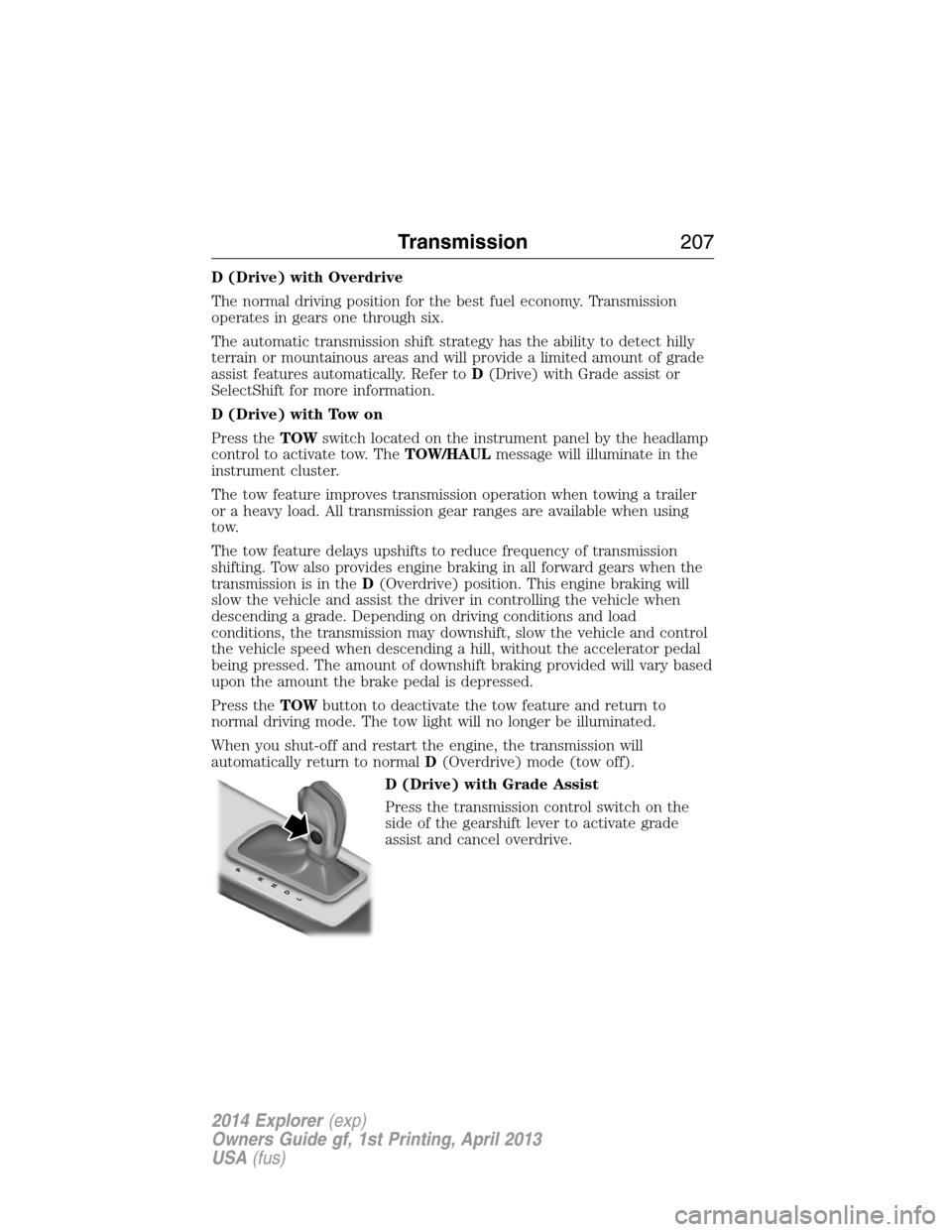
Press the transmission control switch on the
side of the gearshift lever to activate grade
assist and cancel overdrive.
PRNDL
Transmission207
2014 Explorer(exp)
Owners Guide gf, 1st Printing, April 2013
USA(fus)
Page 255 of 586
System Display
When you switch the system on, an overhead graphic of a
vehicle with lane markings will be displayed in the left
instrument cluster display.
If the aid mode is selected after you switch the system on,
arrows will be displayed with the lane markings.
When you switch the system off, the lane marking graphics will no longer
be displayed.
Note:The overhead vehicle graphic may still be displayed if adaptive
cruise control is enabled.
While the system is on, the color of the lane markings will change to
indicate the system status.
Gray: Indicates that the system is temporarily unable to provide a
warning or intervention on the indicated side(s). This may be because:
•the vehicle is under the activation speed
•the turn indicator is active
•the vehicle is in a dynamic maneuver
•the road has no or poor lane markings in the camera field-of-view
•the camera is obscured or unable to detect the lane markings due to
environmental conditions (e.g. significant sun angles or shadows,
snow, heavy rain, fog), traffic conditions (e.g. following a large
vehicle that is blocking or shadowing the lane), or vehicle conditions
(e.g. poor headlamp illumination).
SeeTroubleshootingfor additional information.
Green: Indicates that the system is available or ready to provide a
warning or intervention, on the indicated side(s).
Yellow: Indicates that the system is providing or has just provided a lane
keeping aid intervention.
Red: Indicates that the system is providing or has just provided a lane
keeping alert warning.
The system can be temporarily disabled at any time by the following:
•Quick braking
•Fast acceleration
•Using the turn signal indicator
•Evasive steering maneuver
254Driving Aids
2014 Explorer(exp)
Owners Guide gf, 1st Printing, April 2013
USA(fus)
Page 265 of 586
System Limitations
WARNING:The collision warning system’s brake support can
only help reduce the speed at which a collision occurs if the
driver applies the vehicle’s brakes. The brake pedal must be pressed
just like any typical braking situation.
Due to the nature of radar technology, there may be certain instances
where vehicles do not provide a collision warning. These include:
•Stationary vehicles or vehicles moving below 6 mph (10 km/h).
•Pedestrians or objects in the roadway.
•Oncoming vehicles in the same lane.
•Severe weather conditions (see blocked sensor section).
•Debris build-up on the grille near the headlamps (see blocked sensor
section).
•Small distance to vehicle ahead.
•Steering wheel and pedal movements are large (very active driving
style).
•High interior temperatures, which may deactivate the illumination or
the warning lamps until the interior temperature reduces (audible
warning still sounds).
Certain conditions may reduce the visibility of the warning lamp;
therefore, it is recommended to keep the audible warning on.
If the front end of the vehicle is hit or damaged, the radar sensing zone
may be altered causing missed or false collision warnings. See your
authorized dealer to have your collision warning radar checked for
proper coverage and operation.
STEERING
Electric Power Steering
WARNING:The electric power steering system has diagnostic
checks that continuously monitor the system to ensure proper
operation. When a system error is detected a steering message will
appear in the information display.
264Driving Aids
2014 Explorer(exp)
Owners Guide gf, 1st Printing, April 2013
USA(fus)
Page 307 of 586
Fuse or relay
numberFuse amp
ratingProtected components
55 — Wiper relay
56 15A* Transmission control module
57 20A* Left high-intensity discharge
headlamps
58 10A* Alternator sensor
59 10A* Brake on/off switch
60 10A* Trailer tow back-up lamps
61 20A* Second row seat release
62 10A* Air conditioning clutch
63 15A* Trailer tow stop/turn lamps
64 15A* Rear wipers
65 30A* Fuel pump
66 — Powertrain control module relay
67 20A* Vehicle power #2 (emission
related powertrain components)
68 20A* Vehicle power #4 (ignition coils)
69 20A* Vehicle power #1 (powertrain
control module)
70 10A* Vehicle power #3 (coil),
All-wheel drive module, Air
conditioning variable compressor
control
71 — Not used
72 — Not used
73 — Not used
74 — Not used
75 — Not used
76 — Not used
77 — Trailer tow park lamps relay
78 20A* Right high-intensity discharge
headlamps
79 5A* Adaptive cruise control
306Fuses
2014 Explorer(exp)
Owners Guide gf, 1st Printing, April 2013
USA(fus)
Page 310 of 586
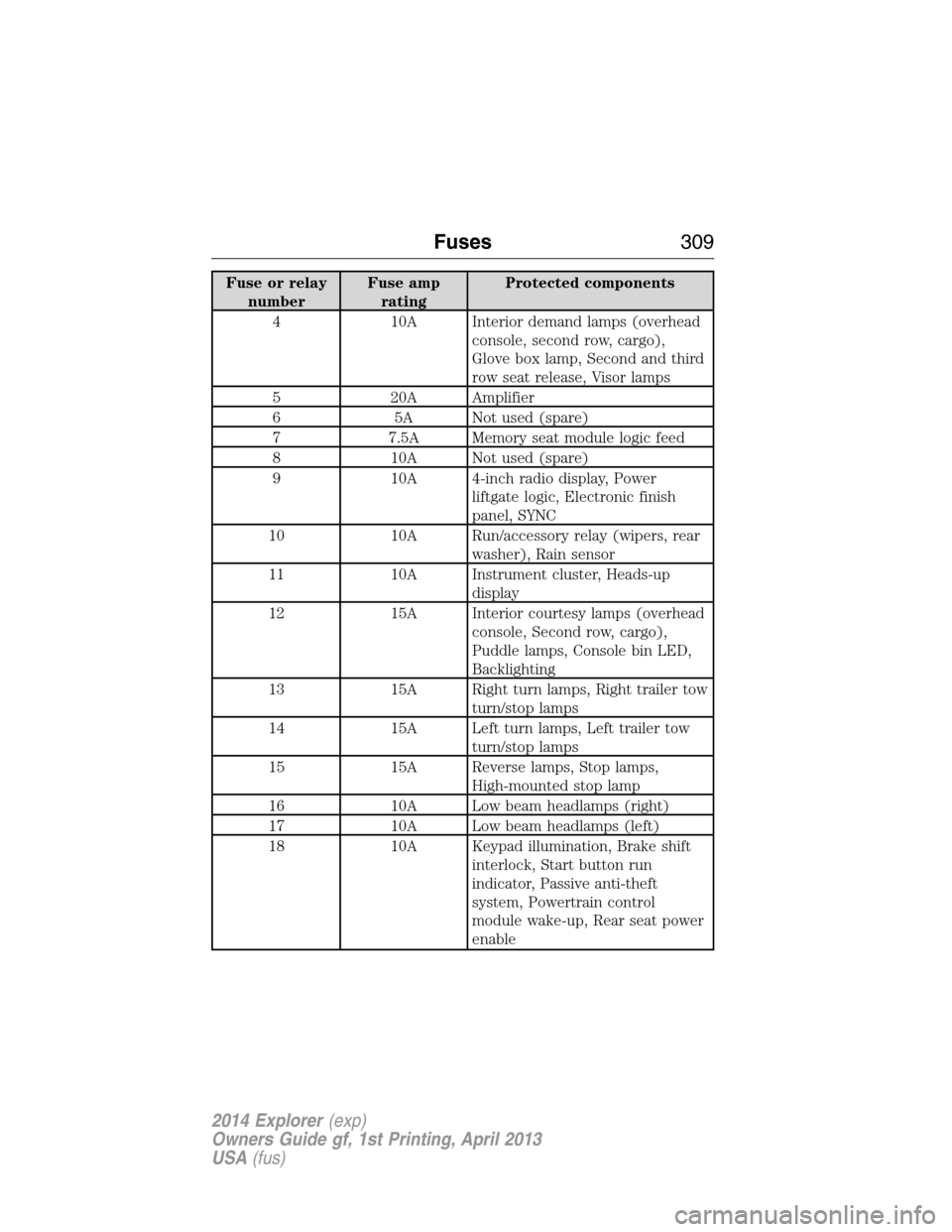
Fuse or relay
numberFuse amp
ratingProtected components
4 10A Interior demand lamps (overhead
console, second row, cargo),
Glove box lamp, Second and third
row seat release, Visor lamps
5 20A Amplifier
6 5A Not used (spare)
7 7.5A Memory seat module logic feed
8 10A Not used (spare)
9 10A 4-inch radio display, Power
liftgate logic, Electronic finish
panel, SYNC
10 10A Run/accessory relay (wipers, rear
washer), Rain sensor
11 10A Instrument cluster, Heads-up
display
12 15A Interior courtesy lamps (overhead
console, Second row, cargo),
Puddle lamps, Console bin LED,
Backlighting
13 15A Right turn lamps, Right trailer tow
turn/stop lamps
14 15A Left turn lamps, Left trailer tow
turn/stop lamps
15 15A Reverse lamps, Stop lamps,
High-mounted stop lamp
16 10A Low beam headlamps (right)
17 10A Low beam headlamps (left)
18 10A Keypad illumination, Brake shift
interlock, Start button run
indicator, Passive anti-theft
system, Powertrain control
module wake-up, Rear seat power
enable
Fuses309
2014 Explorer(exp)
Owners Guide gf, 1st Printing, April 2013
USA(fus)
Page 311 of 586
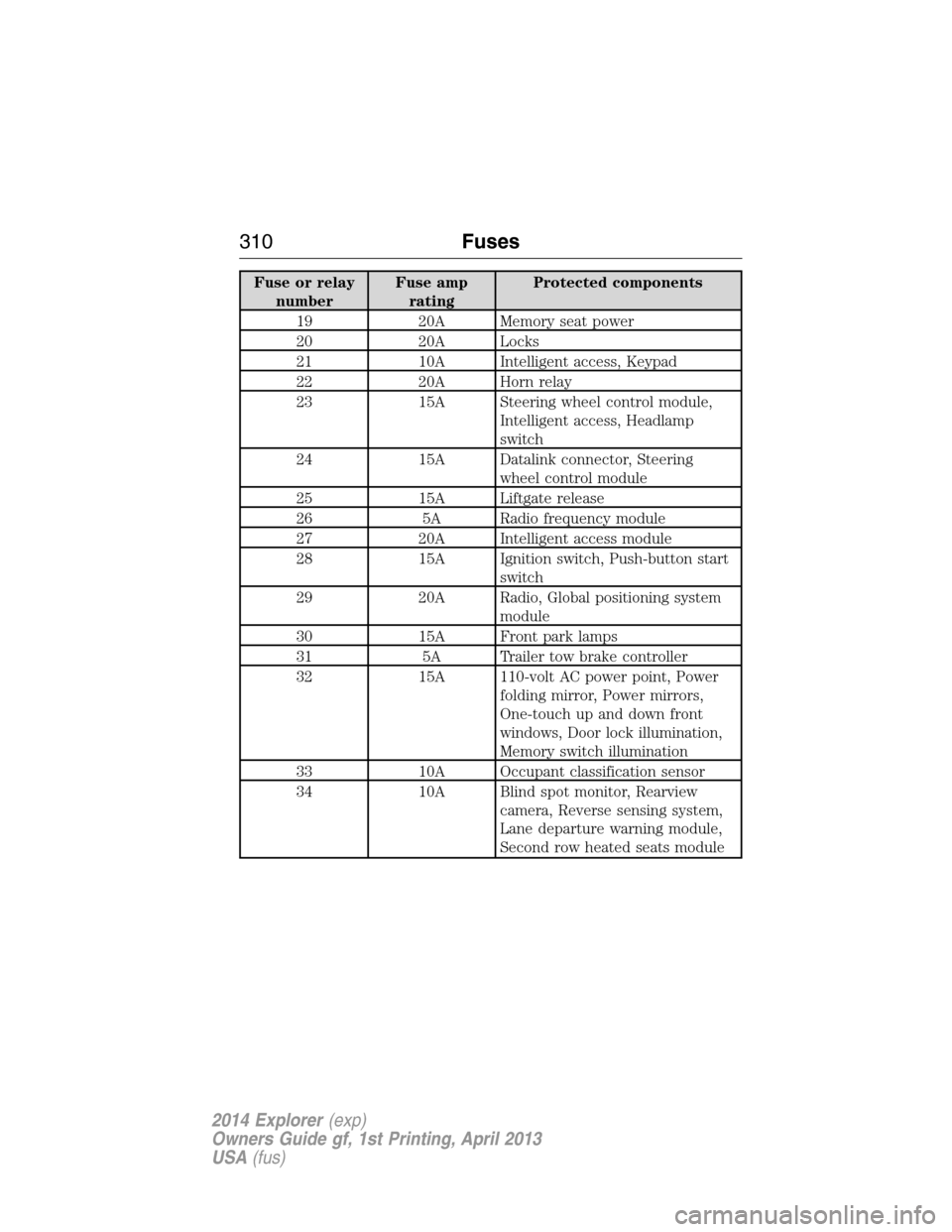
Fuse or relay
numberFuse amp
ratingProtected components
19 20A Memory seat power
20 20A Locks
21 10A Intelligent access, Keypad
22 20A Horn relay
23 15A Steering wheel control module,
Intelligent access, Headlamp
switch
24 15A Datalink connector, Steering
wheel control module
25 15A Liftgate release
26 5A Radio frequency module
27 20A Intelligent access module
28 15A Ignition switch, Push-button start
switch
29 20A Radio, Global positioning system
module
30 15A Front park lamps
31 5A Trailer tow brake controller
32 15A 110-volt AC power point, Power
folding mirror, Power mirrors,
One-touch up and down front
windows, Door lock illumination,
Memory switch illumination
33 10A Occupant classification sensor
34 10A Blind spot monitor, Rearview
camera, Reverse sensing system,
Lane departure warning module,
Second row heated seats module
310Fuses
2014 Explorer(exp)
Owners Guide gf, 1st Printing, April 2013
USA(fus)
Page 312 of 586
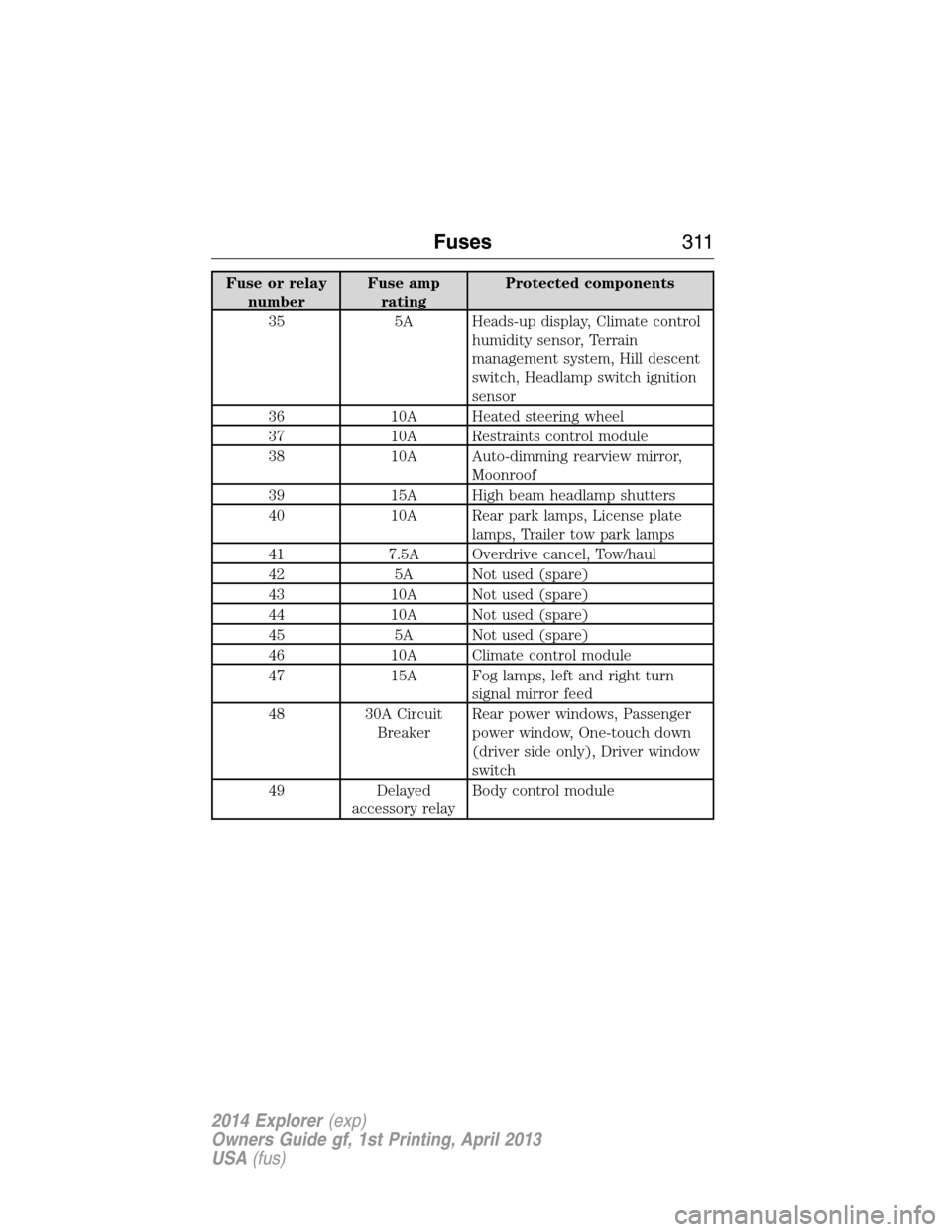
Fuse or relay
numberFuse amp
ratingProtected components
35 5A Heads-up display, Climate control
humidity sensor, Terrain
management system, Hill descent
switch, Headlamp switch ignition
sensor
36 10A Heated steering wheel
37 10A Restraints control module
38 10A Auto-dimming rearview mirror,
Moonroof
39 15A High beam headlamp shutters
40 10A Rear park lamps, License plate
lamps, Trailer tow park lamps
41 7.5A Overdrive cancel, Tow/haul
42 5A Not used (spare)
43 10A Not used (spare)
44 10A Not used (spare)
45 5A Not used (spare)
46 10A Climate control module
47 15A Fog lamps, left and right turn
signal mirror feed
48 30A Circuit
BreakerRear power windows, Passenger
power window, One-touch down
(driver side only), Driver window
switch
49 Delayed
accessory relayBody control module
Fuses311
2014 Explorer(exp)
Owners Guide gf, 1st Printing, April 2013
USA(fus)
Page 336 of 586
3. Carefully separate the cover from the housing.
4. Remove the air filter element from the housing.
5. Wipe the cover and the housing clean to remove any dirt or debris and
to make sure the cover seals to the housing.
6. Install a new air filter element. Be careful not to crimp the filter
element edges between the housing and the cover. This could cause filter
damage and allow unfiltered air to enter the engine if not properly
seated.
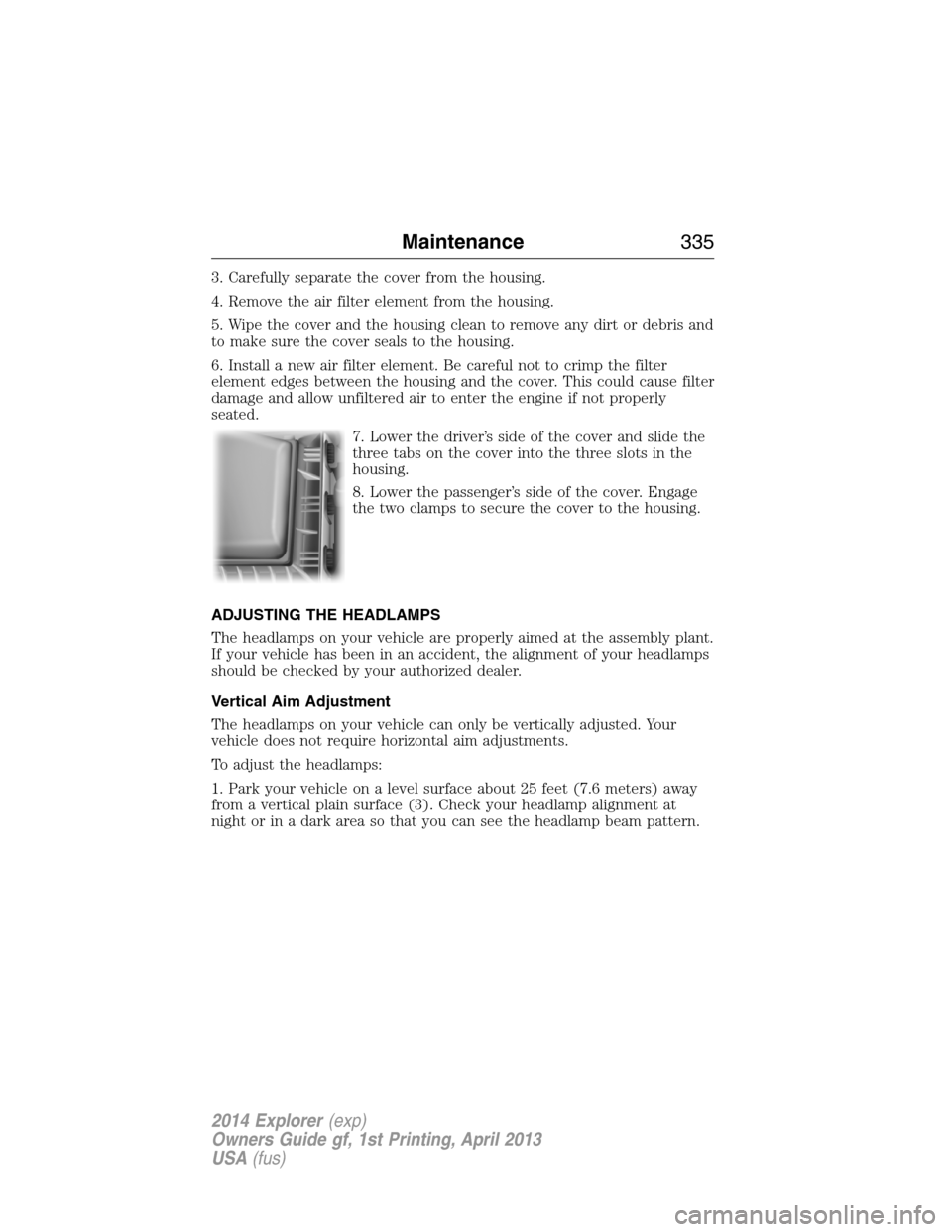
7. Lower the driver’s side of the cover and slide the
three tabs on the cover into the three slots in the
housing.
8. Lower the passenger’s side of the cover. Engage
the two clamps to secure the cover to the housing.
ADJUSTING THE HEADLAMPS
The headlamps on your vehicle are properly aimed at the assembly plant.
If your vehicle has been in an accident, the alignment of your headlamps
should be checked by your authorized dealer.
Vertical Aim Adjustment
The headlamps on your vehicle can only be vertically adjusted. Your
vehicle does not require horizontal aim adjustments.
To adjust the headlamps:
1. Park your vehicle on a level surface about 25 feet (7.6 meters) away
from a vertical plain surface (3). Check your headlamp alignment at
night or in a dark area so that you can see the headlamp beam pattern.
Maintenance335
2014 Explorer(exp)
Owners Guide gf, 1st Printing, April 2013
USA(fus)
Page 337 of 586
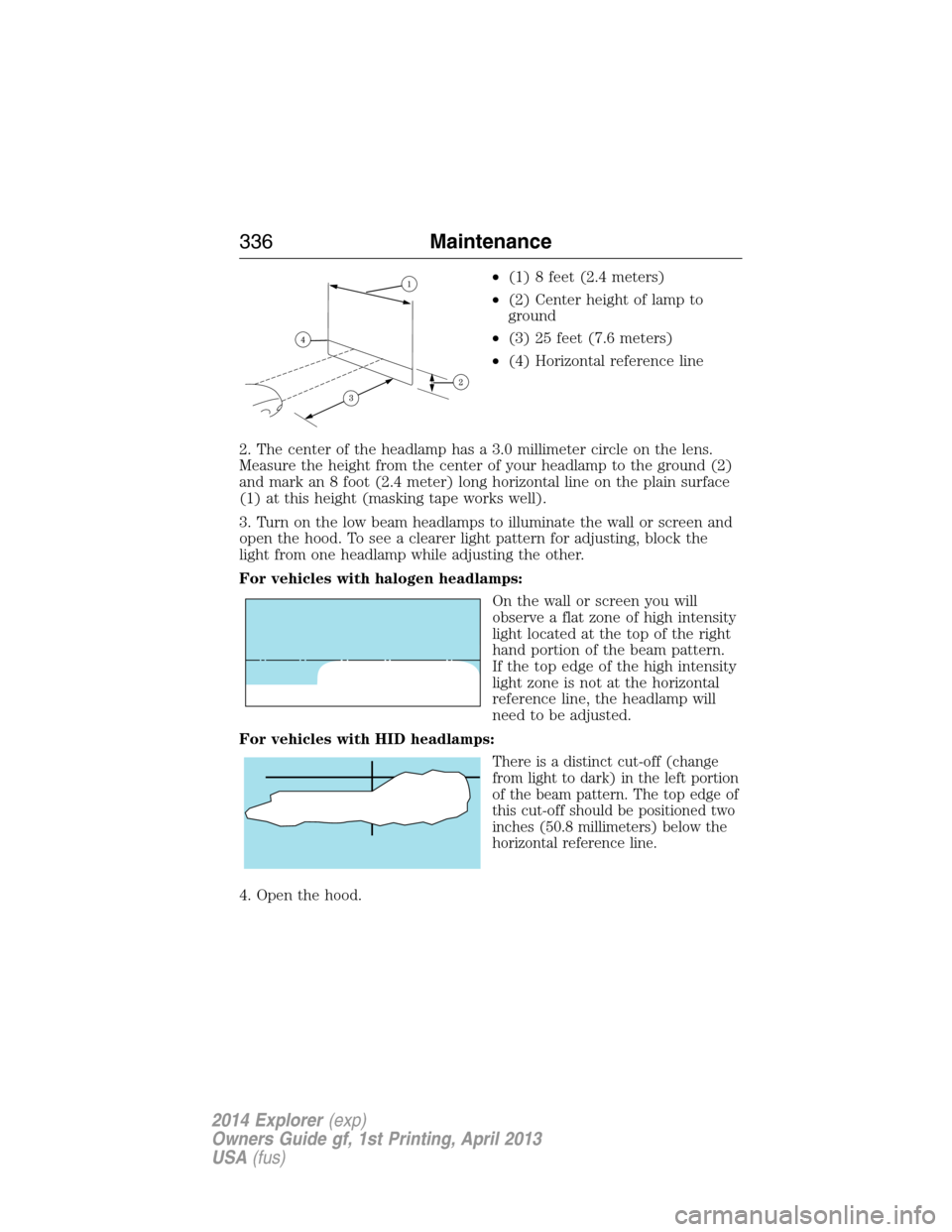
•(1) 8 feet (2.4 meters)
•(2) Center height of lamp to
ground
•(3) 25 feet (7.6 meters)
•(4) Horizontal reference line
2. The center of the headlamp has a 3.0 millimeter circle on the lens.
Measure the height from the center of your headlamp to the ground (2)
and mark an 8 foot (2.4 meter) long horizontal line on the plain surface
(1) at this height (masking tape works well).
3. Turn on the low beam headlamps to illuminate the wall or screen and
open the hood. To see a clearer light pattern for adjusting, block the
light from one headlamp while adjusting the other.
For vehicles with halogen headlamps:
On the wall or screen you will
observe a flat zone of high intensity
light located at the top of the right
hand portion of the beam pattern.
If the top edge of the high intensity
light zone is not at the horizontal
reference line, the headlamp will
need to be adjusted.
For vehicles with HID headlamps:
There is a distinct cut-off (change
from light to dark) in the left portion
of the beam pattern. The top edge of
this cut-off should be positioned two
inches (50.8 millimeters) below the
horizontal reference line.
4. Open the hood.
336Maintenance
2014 Explorer(exp)
Owners Guide gf, 1st Printing, April 2013
USA(fus)
Page 338 of 586
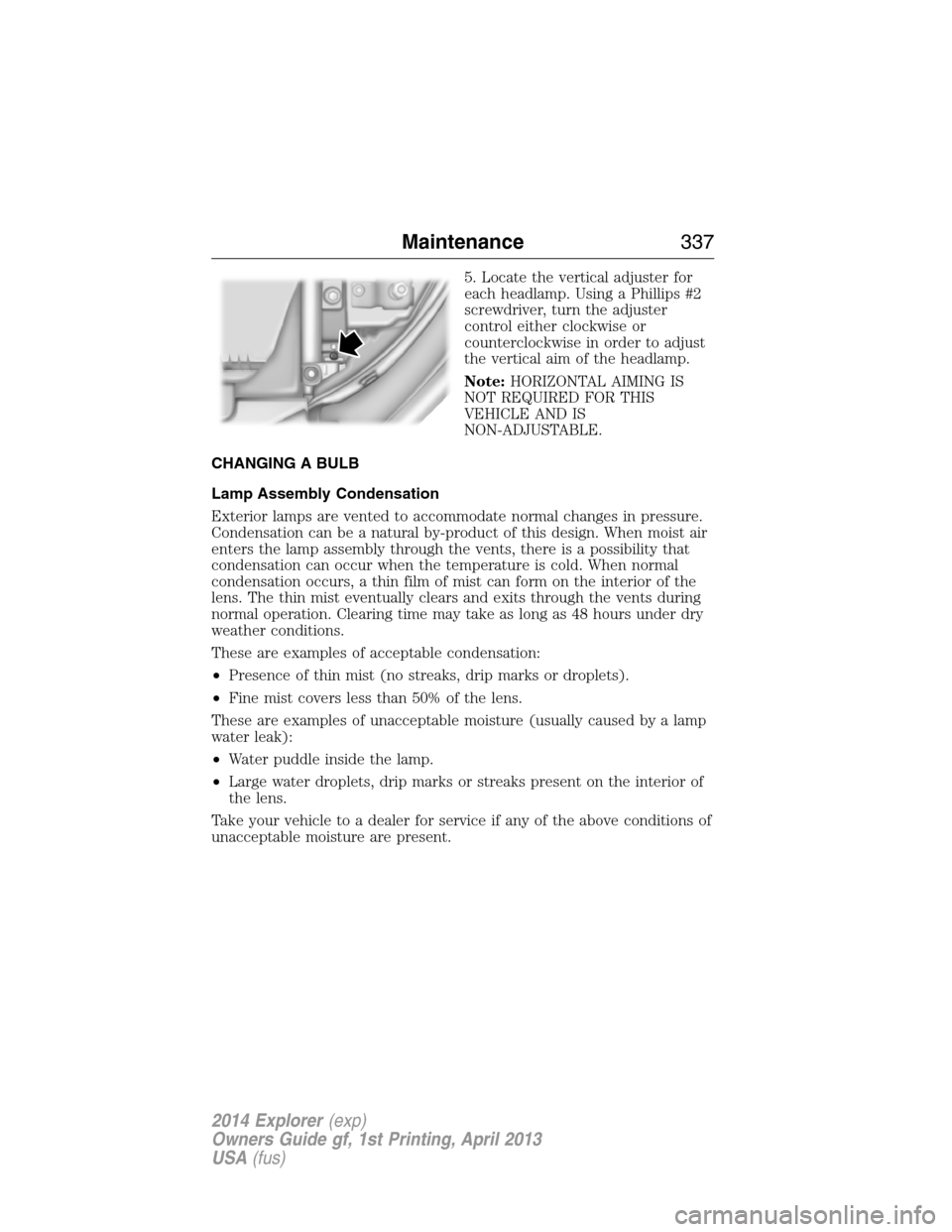
5. Locate the vertical adjuster for
each headlamp. Using a Phillips #2
screwdriver, turn the adjuster
control either clockwise or
counterclockwise in order to adjust
the vertical aim of the headlamp.
Note:HORIZONTAL AIMING IS
NOT REQUIRED FOR THIS
VEHICLE AND IS
NON-ADJUSTABLE.
CHANGING A BULB
Lamp Assembly Condensation
Exterior lamps are vented to accommodate normal changes in pressure.
Condensation can be a natural by-product of this design. When moist air
enters the lamp assembly through the vents, there is a possibility that
condensation can occur when the temperature is cold. When normal
condensation occurs, a thin film of mist can form on the interior of the
lens. The thin mist eventually clears and exits through the vents during
normal operation. Clearing time may take as long as 48 hours under dry
weather conditions.
These are examples of acceptable condensation:
•Presence of thin mist (no streaks, drip marks or droplets).
•Fine mist covers less than 50% of the lens.
These are examples of unacceptable moisture (usually caused by a lamp
water leak):
•Water puddle inside the lamp.
•Large water droplets, drip marks or streaks present on the interior of
the lens.
Take your vehicle to a dealer for service if any of the above conditions of
unacceptable moisture are present.
Maintenance337
2014 Explorer(exp)
Owners Guide gf, 1st Printing, April 2013
USA(fus)