sensor FORD EXPLORER 2014 5.G User Guide
[x] Cancel search | Manufacturer: FORD, Model Year: 2014, Model line: EXPLORER, Model: FORD EXPLORER 2014 5.GPages: 586, PDF Size: 9.07 MB
Page 60 of 586
CRASH SENSORS AND AIRBAG INDICATOR
WARNING:Modifying or adding equipment to the front end of
your vehicle (including frame, bumper, front end body structure
and tow hooks) may affect the performance of the airbag system,
increasing the risk of injury. Do not modify the front end of your
vehicle.
Your vehicle has a collection of crash and occupant sensors which
provide information to the restraints control module which deploys
(activates) the front safety belt pretensioners, rear inflatable safety belts,
driver airbag, passenger airbag, passenger knee airbag, seat mounted side
airbags, and the Safety Canopy. Based on the type of accident (frontal
impact, side impact or rollover) the restraints control module will deploy
the appropriate safety devices.
The restraints control module also monitors the readiness of the above
safety devices plus the crash and occupant sensors. The readiness of the
safety system is indicated by a warning indicator light in the instrument
cluster or by a backup tone if the warning light is not working. See the
Instrument Clusterchapter. Routine maintenance of the airbag is not
required.
A difficulty with the system is indicated by one or more of the following:
•The readiness light will either flash or stay lit.
•The readiness light will not illuminate immediately after the
ignition is turned on.
•A series of five beeps will be heard. The tone pattern will repeat
periodically until the problem or light is repaired.
If any of these things happen, even intermittently, have the supplemental
restraint system serviced at an authorized dealer immediately. Unless
serviced, the system may not function properly in the event of a crash.
The safety belt pretensioners, rear inflatable safety belts and the airbag
supplemental restraint system are designed to activate when the vehicle
sustains frontal or sideways deceleration sufficient to cause the restraints
control module to deploy a safety device or when a certain likelihood of
a rollover event is detected by the rollover sensor.
The fact that the safety belt pretensioners or airbags did not activate for
both front seat occupants in a crash does not mean that something is
wrong with the system. Rather, it means the restraints control module
determined the accident conditions (such as crash severity, belt usage)
were not appropriate to activate these safety devices.
Supplementary Restraints System59
2014 Explorer(exp)
Owners Guide gf, 1st Printing, April 2013
USA(fus)
Page 75 of 586
Note:If any door or the luggage compartment is open, or if the hood is
open on vehicles with an anti-theft alarm or remote start, the horn
sounds twice and the lamps will not flash.
Power Liftgate (If Equipped)
WARNING:Make sure all persons are clear of the liftgate area
before using power liftgate control.
WARNING:Make sure to close and latch the liftgate to prevent
drawing exhaust fumes into your vehicle. This will also prevent
passengers and cargo from falling out. If you must drive with the
liftgate open, keep the vents or windows open so outside air comes into
your vehicle. Failure to follow this warning could result in serious
personal injury.
Note:Be careful when opening or closing the liftgate in a garage or
other enclosed area to avoid damaging the liftgate.
Press twice within three seconds to open or close the liftgate,
or to reverse the movement.
Activating Intelligent Access (If Equipped)
You must have the intelligent access key within 3 feet (1 meter) of your
vehicle.
At the Front Doors
Pull a front exterior door handle to unlock and open the door.
Press and hold the door handle lock
sensor to lock your vehicle. To avoid
unlocking the door inadvertently,
make sure to only touch the lock
sensor and not other areas of the
door handle.
Note:Keep the door handle surface clean to avoid issues with operation.
74Locks
2014 Explorer(exp)
Owners Guide gf, 1st Printing, April 2013
USA(fus)
Page 98 of 586
Keep the outside of the windshield clean, especially the area around the
interior mirror where the sensor is located, or sensor performance may
be affected.
WINDSHIELD WASHERS
Note:Do not operate the wipers on a dry windshield. This may scratch
the glass, damage the wiper blades or cause the wiper motor to burn out.
Always use the windshield washer before wiping a dry windshield.
Note:Do not operate the washer when the washer reservoir is empty.
This may cause the washer pump to overheat.
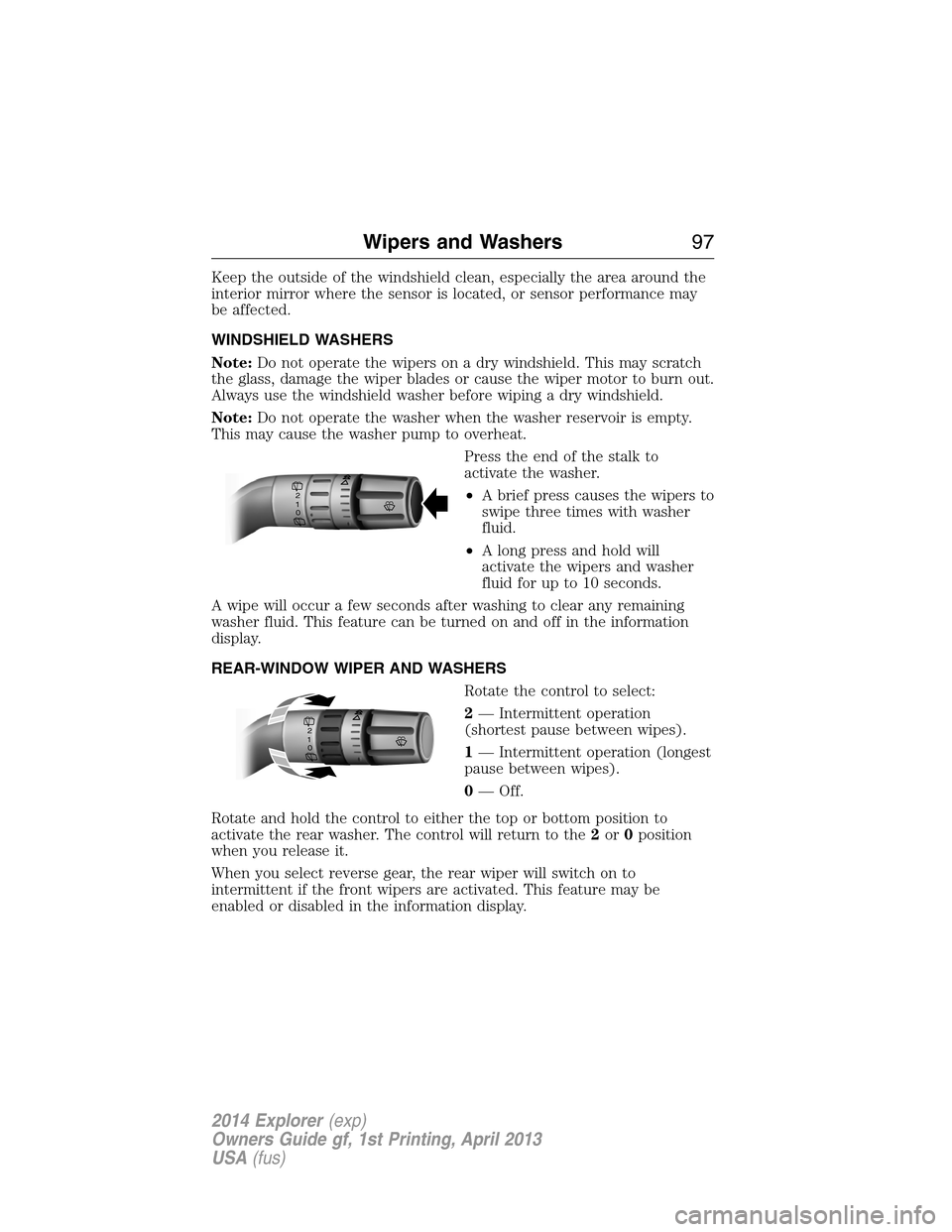
Press the end of the stalk to
activate the washer.
•A brief press causes the wipers to
swipe three times with washer
fluid.
•A long press and hold will
activate the wipers and washer
fluid for up to 10 seconds.
A wipe will occur a few seconds after washing to clear any remaining
washer fluid. This feature can be turned on and off in the information
display.
REAR-WINDOW WIPER AND WASHERS
Rotate the control to select:
2— Intermittent operation
(shortest pause between wipes).
1— Intermittent operation (longest
pause between wipes).
0— Off.
Rotate and hold the control to either the top or bottom position to
activate the rear washer. The control will return to the2or0position
when you release it.
When you select reverse gear, the rear wiper will switch on to
intermittent if the front wipers are activated. This feature may be
enabled or disabled in the information display.
2
1
0
2
1
0
Wipers and Washers97
2014 Explorer(exp)
Owners Guide gf, 1st Printing, April 2013
USA(fus)
Page 102 of 586
Note:If a blockage is detected (e.g. bird dropping, bug splatter, snow, or
ice) and no changes are observed, the system will go into low beam
mode until the blockage is cleared. A message may also appear in the
instrument cluster display noting the front camera is blocked.
Note:Typical road dust, dirt and water spots will not affect the
automatic high beam system’s performance. However, in cold or
inclement weather conditions, the automatic high beam system’s
availability may be decreased. If the driver wants to change the beam
state independently of the system, the driver may turn the high beams
on or off using the multifunction switch stalk. Automatic control will
resume when conditions are correct.
Note:Modification of the vehicle ride height (e.g. using much larger
tires) may degrade feature performance.
A camera sensor is centrally mounted behind the windshield of the
vehicle, and monitors the conditions to decide when to switch the high
beams off and on.
Once the system is active the high beams will switch on if:
•The ambient light level is low enough that high beams are needed.
•There is no traffic in front of the vehicle.
•Vehicle speed is greater than 25 mph (40 km/h).
•Severe weather is not detected.
The high beams will switch off if:
•An approaching vehicle’s headlights or a preceding vehicle’s tail lamps
are detected.
•The vehicle speed falls below 19 mph (30 km/h).
•The ambient light level is high enough that high beams are not
needed.
•Severe rain, snow or fog is detected.
•The camera is blocked.
Lighting101
2014 Explorer(exp)
Owners Guide gf, 1st Printing, April 2013
USA(fus)
Page 111 of 586
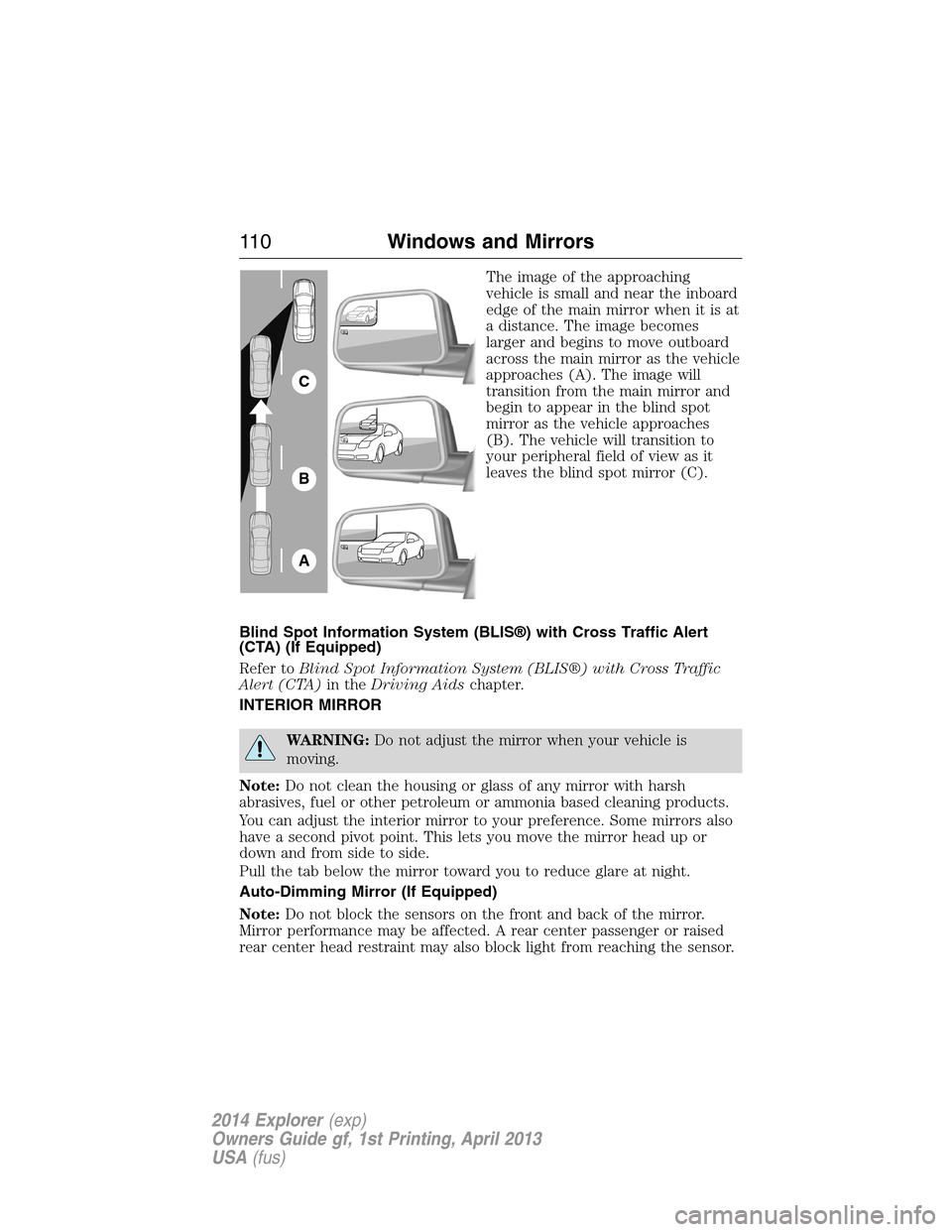
The image of the approaching
vehicle is small and near the inboard
edge of the main mirror when it is at
a distance. The image becomes
larger and begins to move outboard
across the main mirror as the vehicle
approaches (A). The image will
transition from the main mirror and
begin to appear in the blind spot
mirror as the vehicle approaches
(B). The vehicle will transition to
your peripheral field of view as it
leaves the blind spot mirror (C).
Blind Spot Information System (BLIS®) with Cross Traffic Alert
(CTA) (If Equipped)
Refer toBlind Spot Information System (BLIS®) with Cross Traffic
Alert (CTA)in theDriving Aidschapter.
INTERIOR MIRROR
WARNING:Do not adjust the mirror when your vehicle is
moving.
Note:Do not clean the housing or glass of any mirror with harsh
abrasives, fuel or other petroleum or ammonia based cleaning products.
You can adjust the interior mirror to your preference. Some mirrors also
have a second pivot point. This lets you move the mirror head up or
down and from side to side.
Pull the tab below the mirror toward you to reduce glare at night.
Auto-Dimming Mirror (If Equipped)
Note:Do not block the sensors on the front and back of the mirror.
Mirror performance may be affected. A rear center passenger or raised
rear center head restraint may also block light from reaching the sensor.
A
B
C
11 0Windows and Mirrors
2014 Explorer(exp)
Owners Guide gf, 1st Printing, April 2013
USA(fus)
Page 134 of 586
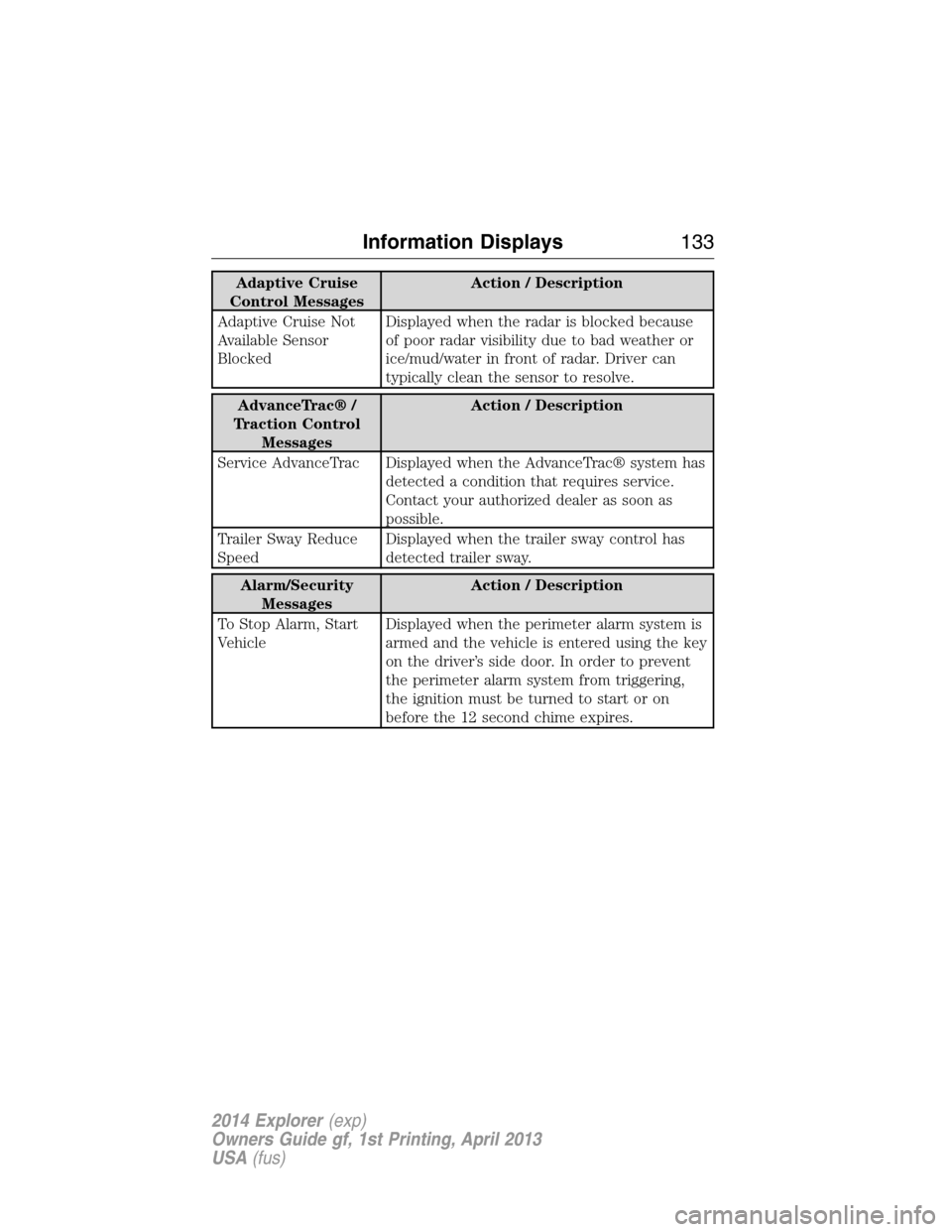
Adaptive Cruise
Control MessagesAction / Description
Adaptive Cruise Not
Available Sensor
BlockedDisplayed when the radar is blocked because
of poor radar visibility due to bad weather or
ice/mud/water in front of radar. Driver can
typically clean the sensor to resolve.
AdvanceTrac® /
Traction Control
MessagesAction / Description
Service AdvanceTrac Displayed when the AdvanceTrac® system has
detected a condition that requires service.
Contact your authorized dealer as soon as
possible.
Trailer Sway Reduce
SpeedDisplayed when the trailer sway control has
detected trailer sway.
Alarm/Security
MessagesAction / Description
To Stop Alarm, Start
VehicleDisplayed when the perimeter alarm system is
armed and the vehicle is entered using the key
on the driver’s side door. In order to prevent
the perimeter alarm system from triggering,
the ignition must be turned to start or on
before the 12 second chime expires.
Information Displays133
2014 Explorer(exp)
Owners Guide gf, 1st Printing, April 2013
USA(fus)
Page 136 of 586
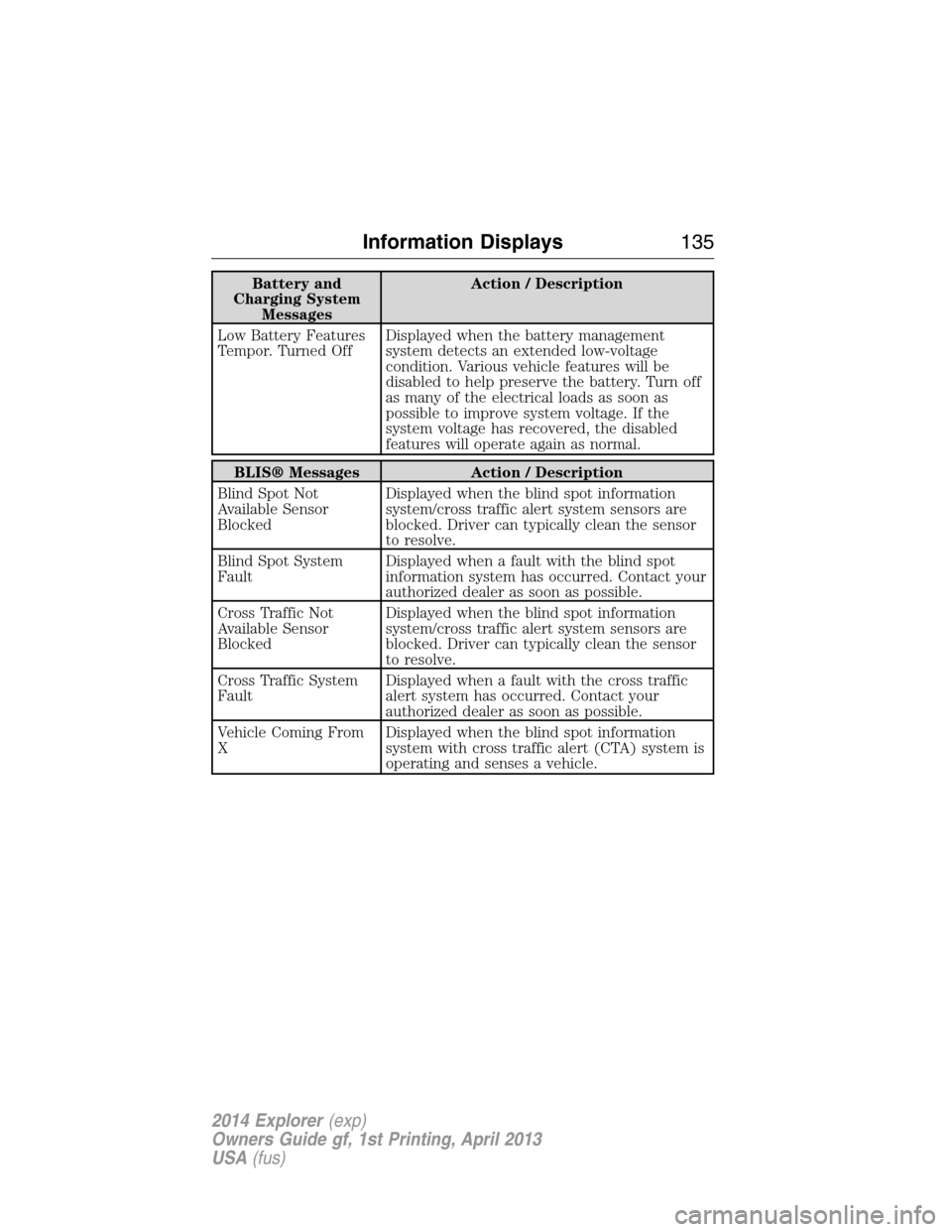
Battery and
Charging System
MessagesAction / Description
Low Battery Features
Tempor. Turned OffDisplayed when the battery management
system detects an extended low-voltage
condition. Various vehicle features will be
disabled to help preserve the battery. Turn off
as many of the electrical loads as soon as
possible to improve system voltage. If the
system voltage has recovered, the disabled
features will operate again as normal.
BLIS® Messages Action / Description
Blind Spot Not
Available Sensor
BlockedDisplayed when the blind spot information
system/cross traffic alert system sensors are
blocked. Driver can typically clean the sensor
to resolve.
Blind Spot System
FaultDisplayed when a fault with the blind spot
information system has occurred. Contact your
authorized dealer as soon as possible.
Cross Traffic Not
Available Sensor
BlockedDisplayed when the blind spot information
system/cross traffic alert system sensors are
blocked. Driver can typically clean the sensor
to resolve.
Cross Traffic System
FaultDisplayed when a fault with the cross traffic
alert system has occurred. Contact your
authorized dealer as soon as possible.
Vehicle Coming From
XDisplayed when the blind spot information
system with cross traffic alert (CTA) system is
operating and senses a vehicle.
Information Displays135
2014 Explorer(exp)
Owners Guide gf, 1st Printing, April 2013
USA(fus)
Page 137 of 586
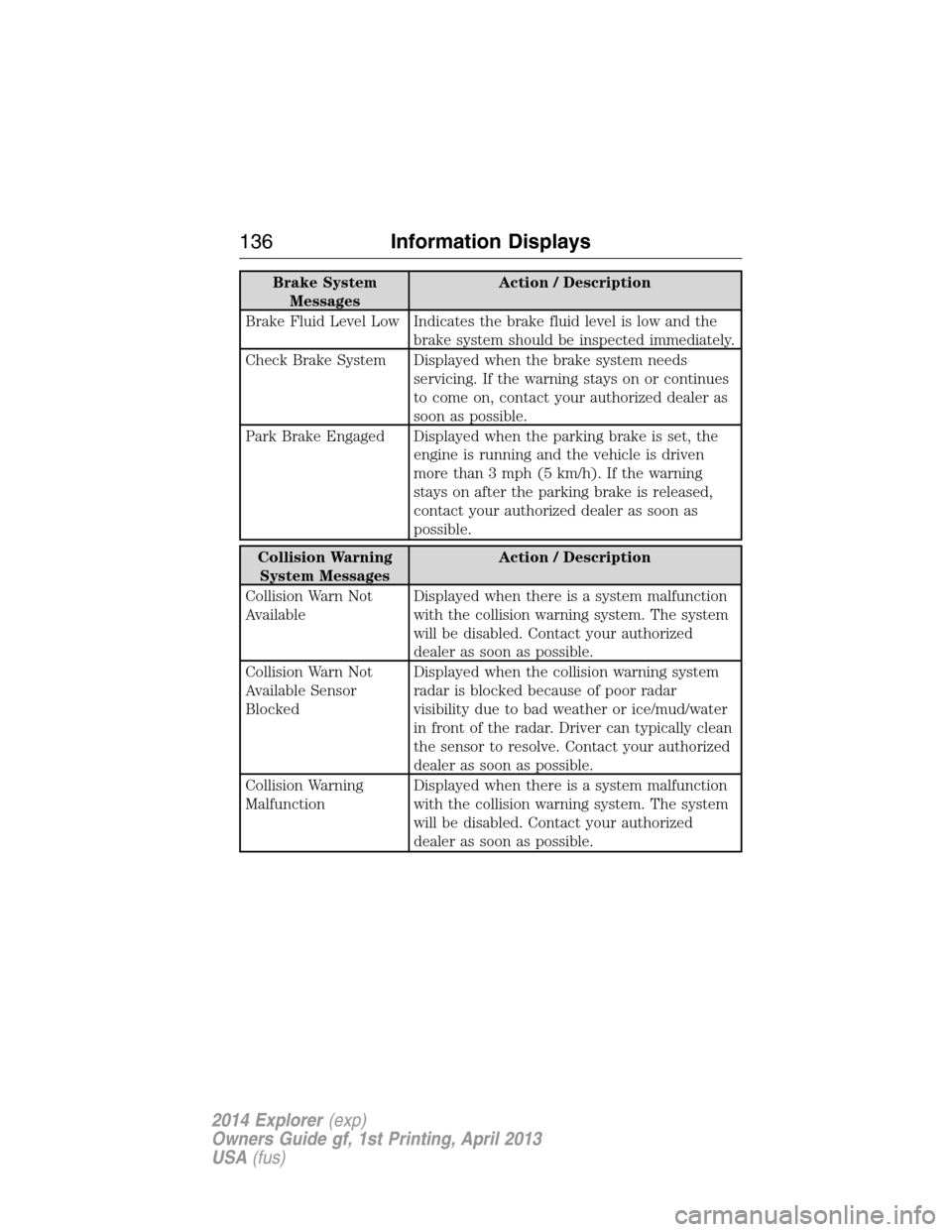
Brake System
MessagesAction / Description
Brake Fluid Level Low Indicates the brake fluid level is low and the
brake system should be inspected immediately.
Check Brake System Displayed when the brake system needs
servicing. If the warning stays on or continues
to come on, contact your authorized dealer as
soon as possible.
Park Brake Engaged Displayed when the parking brake is set, the
engine is running and the vehicle is driven
more than 3 mph (5 km/h). If the warning
stays on after the parking brake is released,
contact your authorized dealer as soon as
possible.
Collision Warning
System MessagesAction / Description
Collision Warn Not
AvailableDisplayed when there is a system malfunction
with the collision warning system. The system
will be disabled. Contact your authorized
dealer as soon as possible.
Collision Warn Not
Available Sensor
BlockedDisplayed when the collision warning system
radar is blocked because of poor radar
visibility due to bad weather or ice/mud/water
in front of the radar. Driver can typically clean
the sensor to resolve. Contact your authorized
dealer as soon as possible.
Collision Warning
MalfunctionDisplayed when there is a system malfunction
with the collision warning system. The system
will be disabled. Contact your authorized
dealer as soon as possible.
136Information Displays
2014 Explorer(exp)
Owners Guide gf, 1st Printing, April 2013
USA(fus)
Page 144 of 586
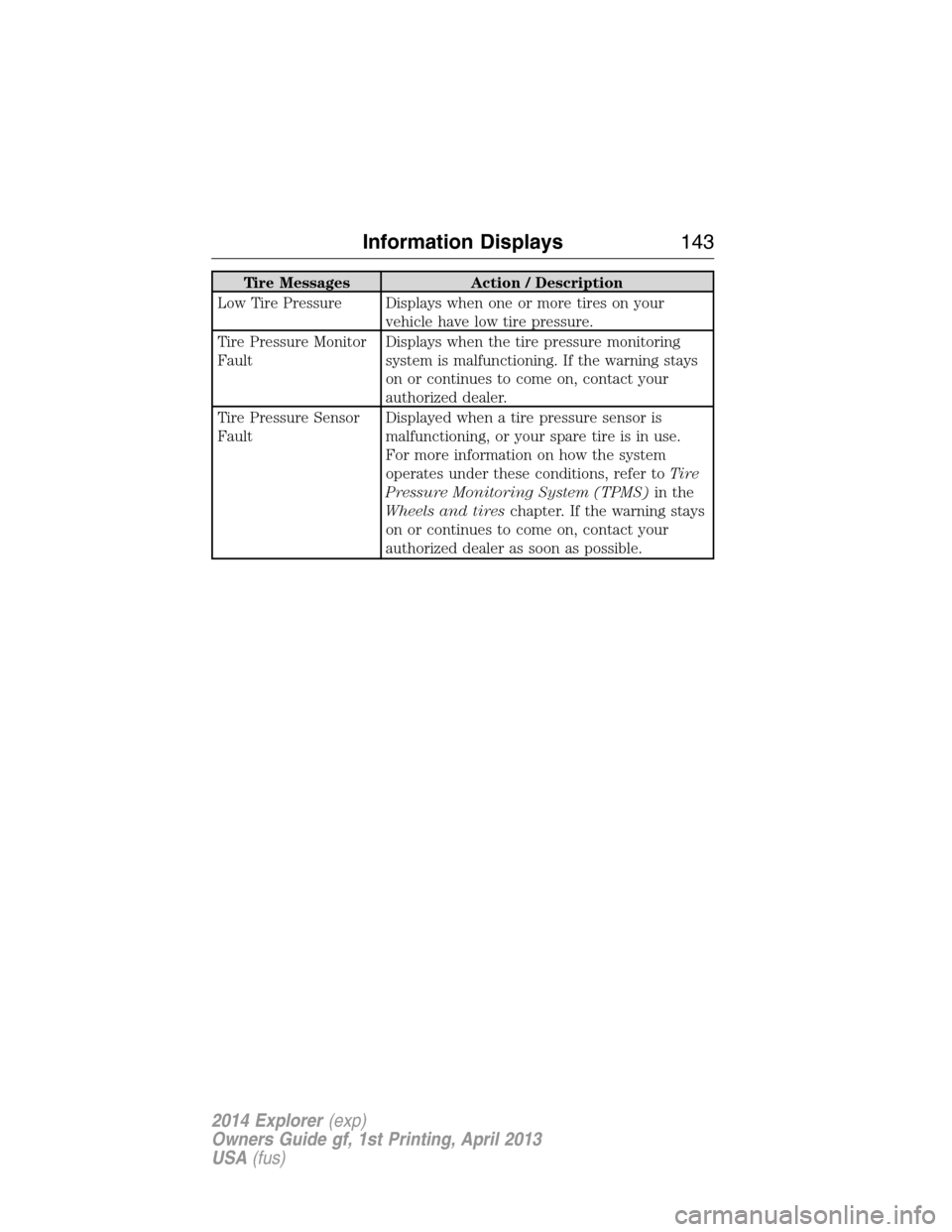
Tire Messages Action / Description
Low Tire Pressure Displays when one or more tires on your
vehicle have low tire pressure.
Tire Pressure Monitor
FaultDisplays when the tire pressure monitoring
system is malfunctioning. If the warning stays
on or continues to come on, contact your
authorized dealer.
Tire Pressure Sensor
FaultDisplayed when a tire pressure sensor is
malfunctioning, or your spare tire is in use.
For more information on how the system
operates under these conditions, refer toTi r e
Pressure Monitoring System (TPMS)in the
Wheels and tireschapter. If the warning stays
on or continues to come on, contact your
authorized dealer as soon as possible.
Information Displays143
2014 Explorer(exp)
Owners Guide gf, 1st Printing, April 2013
USA(fus)
Page 185 of 586
110 Volt AC Power Point (If Equipped)
WARNING:Do not keep electrical devices plugged in the power
point whenever the device is not in use. Do not use any
extension cord with the 110 volt AC power point, since it will defeat
the safety protection design. Doing so may cause the power point to
overload due to powering multiple devices that can reach beyond the
150–watt load limit and could result in fire or serious injury.
Note:The cap should always be closed whenever the power point outlet
is not in use.
Note:The power point will turn off after 13 minutes if the ignition is on
without the engine running. Keep the engine running to use the power
point.
The 110–volt AC power point outlet is used for powering electrical
devices that require up to 150 watts. Exceeding the 150–watt limit will
cause the power point to cut off the power temporarily to provide
overload protection.
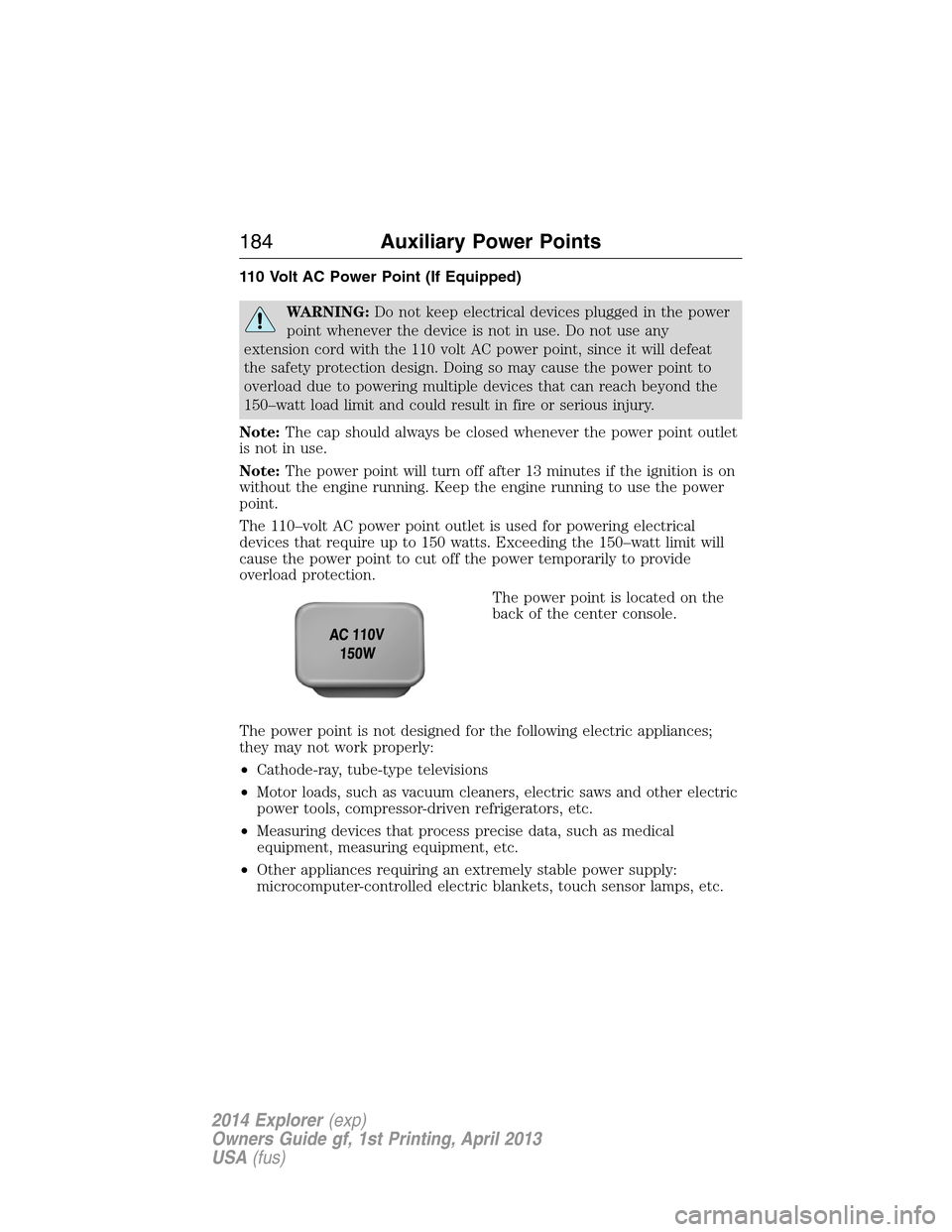
The power point is located on the
back of the center console.
The power point is not designed for the following electric appliances;
they may not work properly:
•Cathode-ray, tube-type televisions
•Motor loads, such as vacuum cleaners, electric saws and other electric
power tools, compressor-driven refrigerators, etc.
•Measuring devices that process precise data, such as medical
equipment, measuring equipment, etc.
•Other appliances requiring an extremely stable power supply:
microcomputer-controlled electric blankets, touch sensor lamps, etc.
184Auxiliary Power Points
2014 Explorer(exp)
Owners Guide gf, 1st Printing, April 2013
USA(fus)