COLLISION FORD EXPLORER 2019 User Guide
[x] Cancel search | Manufacturer: FORD, Model Year: 2019, Model line: EXPLORER, Model: FORD EXPLORER 2019Pages: 571, PDF Size: 6.8 MB
Page 240 of 571
running pedestrians, partly obscured
pedestrians, or pedestrians that the
system cannot distinguish from a group.
Failure to take care may result in the loss
of control of your vehicle, serious
personal injury or death.
WARNING: The pre-collision assist
system's brake support reduces collision
speed only if you brake your vehicle
before any collision. You must press your
brake pedal as you would in any typical
braking situation. WARNING: The system cannot
help prevent all crashes. Do not rely on
this system to replace driver judgment
and the need to maintain a safe distance
and speed.
Note: The system does not detect, warn or
respond to potential collisions with vehicles
to the rear or sides of your vehicle.
Using the Pre-Collision Assist
System
The system is active at speeds above
approximately
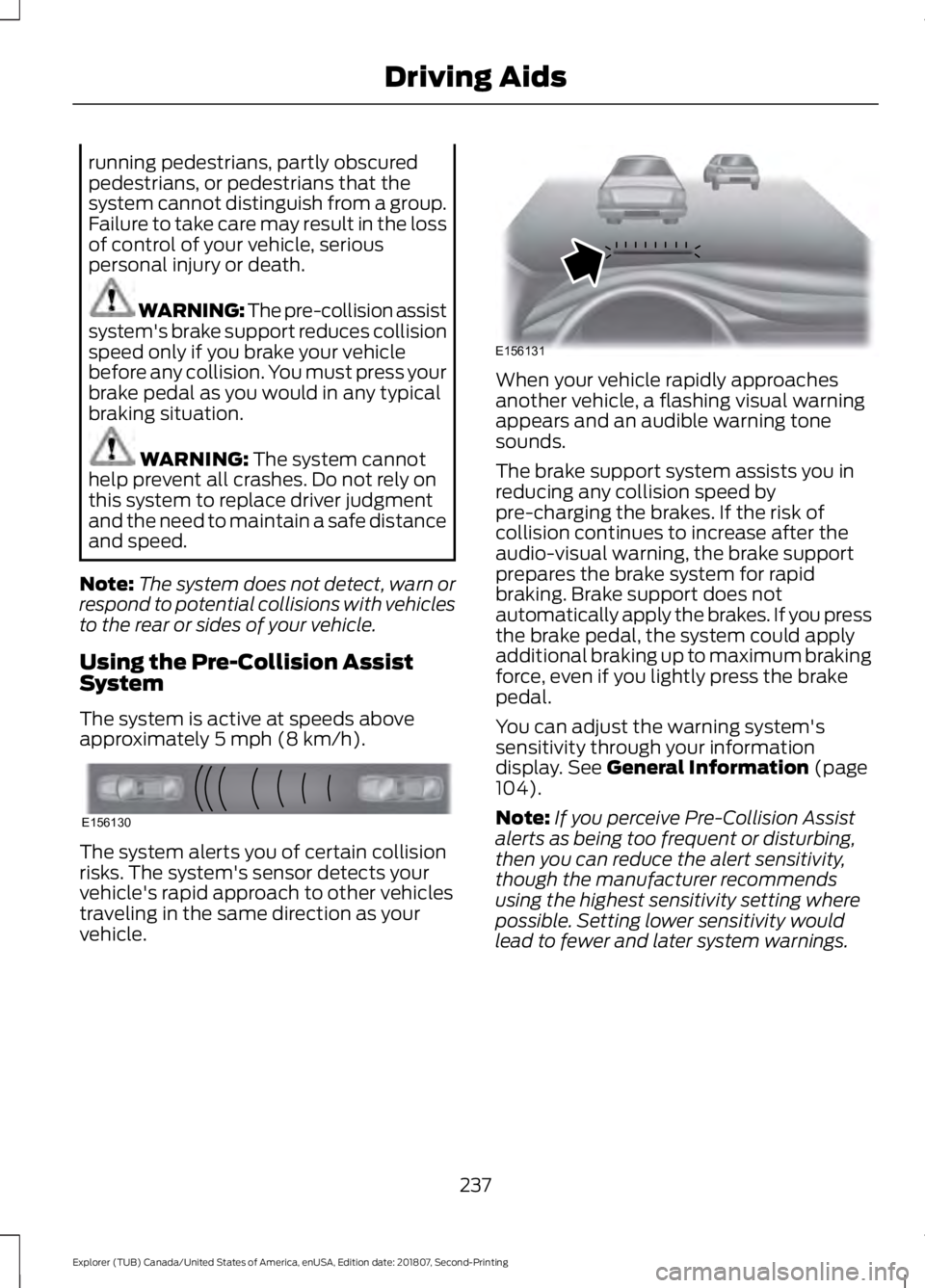
5 mph (8 km/h). The system alerts you of certain collision
risks. The system's sensor detects your
vehicle's rapid approach to other vehicles
traveling in the same direction as your
vehicle. When your vehicle rapidly approaches
another vehicle, a flashing visual warning
appears and an audible warning tone
sounds.
The brake support system assists you in
reducing any collision speed by
pre-charging the brakes. If the risk of
collision continues to increase after the
audio-visual warning, the brake support
prepares the brake system for rapid
braking. Brake support does not
automatically apply the brakes. If you press
the brake pedal, the system could apply
additional braking up to maximum braking
force, even if you lightly press the brake
pedal.
You can adjust the warning system's
sensitivity through your information
display.
See General Information (page
104).
Note: If you perceive Pre-Collision Assist
alerts as being too frequent or disturbing,
then you can reduce the alert sensitivity,
though the manufacturer recommends
using the highest sensitivity setting where
possible. Setting lower sensitivity would
lead to fewer and later system warnings.
237
Explorer (TUB) Canada/United States of America, enUSA, Edition date: 201807, Second-Printing Driving AidsE156130 E156131
Page 241 of 571
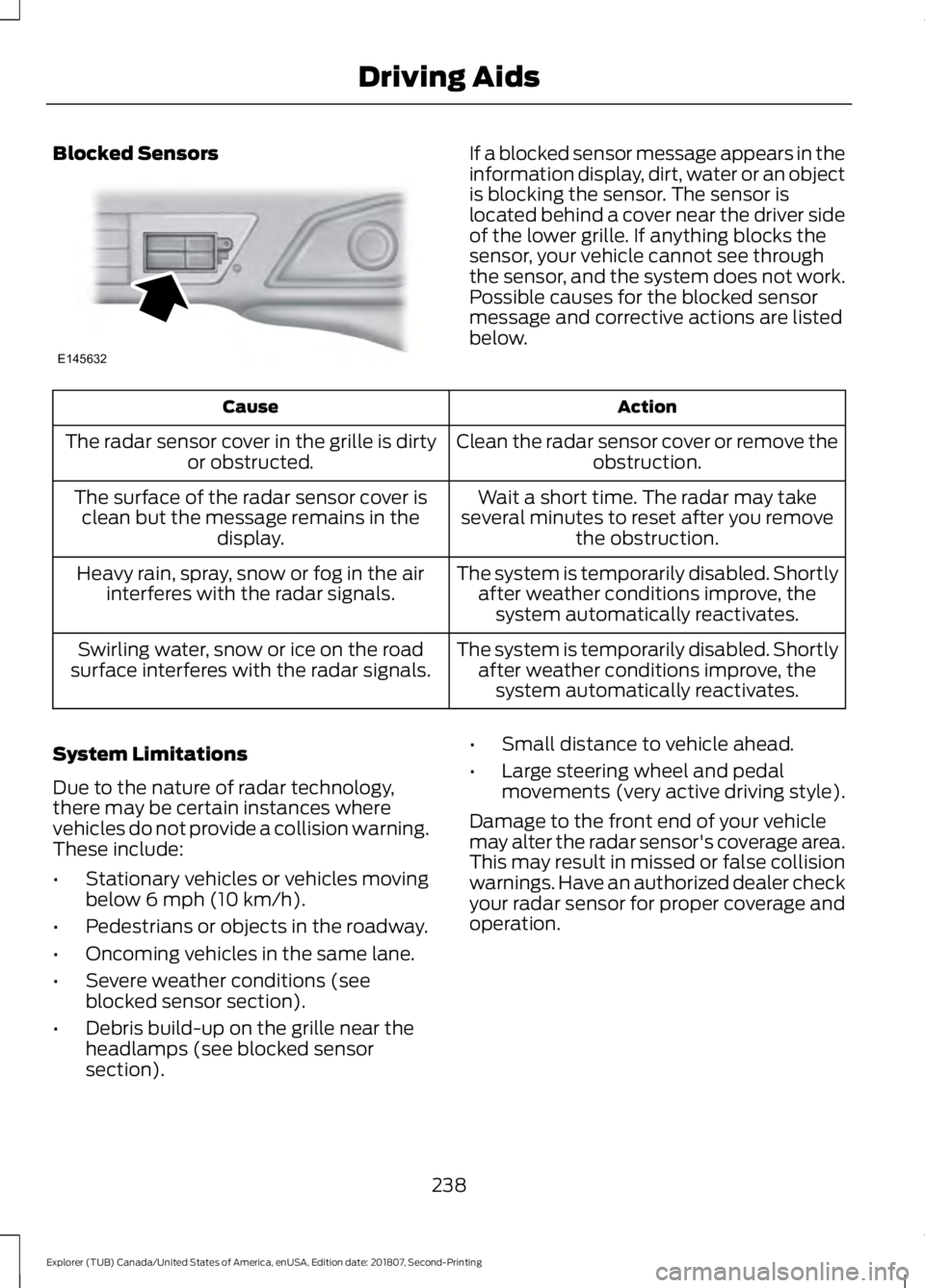
Blocked Sensors If a blocked sensor message appears in the
information display, dirt, water or an object
is blocking the sensor. The sensor is
located behind a cover near the driver side
of the lower grille. If anything blocks the
sensor, your vehicle cannot see through
the sensor, and the system does not work.
Possible causes for the blocked sensor
message and corrective actions are listed
below.
Action
Cause
Clean the radar sensor cover or remove theobstruction.
The radar sensor cover in the grille is dirty
or obstructed.
Wait a short time. The radar may take
several minutes to reset after you remove the obstruction.
The surface of the radar sensor cover is
clean but the message remains in the display.
The system is temporarily disabled. Shortlyafter weather conditions improve, thesystem automatically reactivates.
Heavy rain, spray, snow or fog in the air
interferes with the radar signals.
The system is temporarily disabled. Shortlyafter weather conditions improve, thesystem automatically reactivates.
Swirling water, snow or ice on the road
surface interferes with the radar signals.
System Limitations
Due to the nature of radar technology,
there may be certain instances where
vehicles do not provide a collision warning.
These include:
• Stationary vehicles or vehicles moving
below 6 mph (10 km/h).
• Pedestrians or objects in the roadway.
• Oncoming vehicles in the same lane.
• Severe weather conditions (see
blocked sensor section).
• Debris build-up on the grille near the
headlamps (see blocked sensor
section). •
Small distance to vehicle ahead.
• Large steering wheel and pedal
movements (very active driving style).
Damage to the front end of your vehicle
may alter the radar sensor's coverage area.
This may result in missed or false collision
warnings. Have an authorized dealer check
your radar sensor for proper coverage and
operation.
238
Explorer (TUB) Canada/United States of America, enUSA, Edition date: 201807, Second-Printing Driving AidsE145632
Page 242 of 571
REAR UNDER FLOOR
STORAGE (IF EQUIPPED)
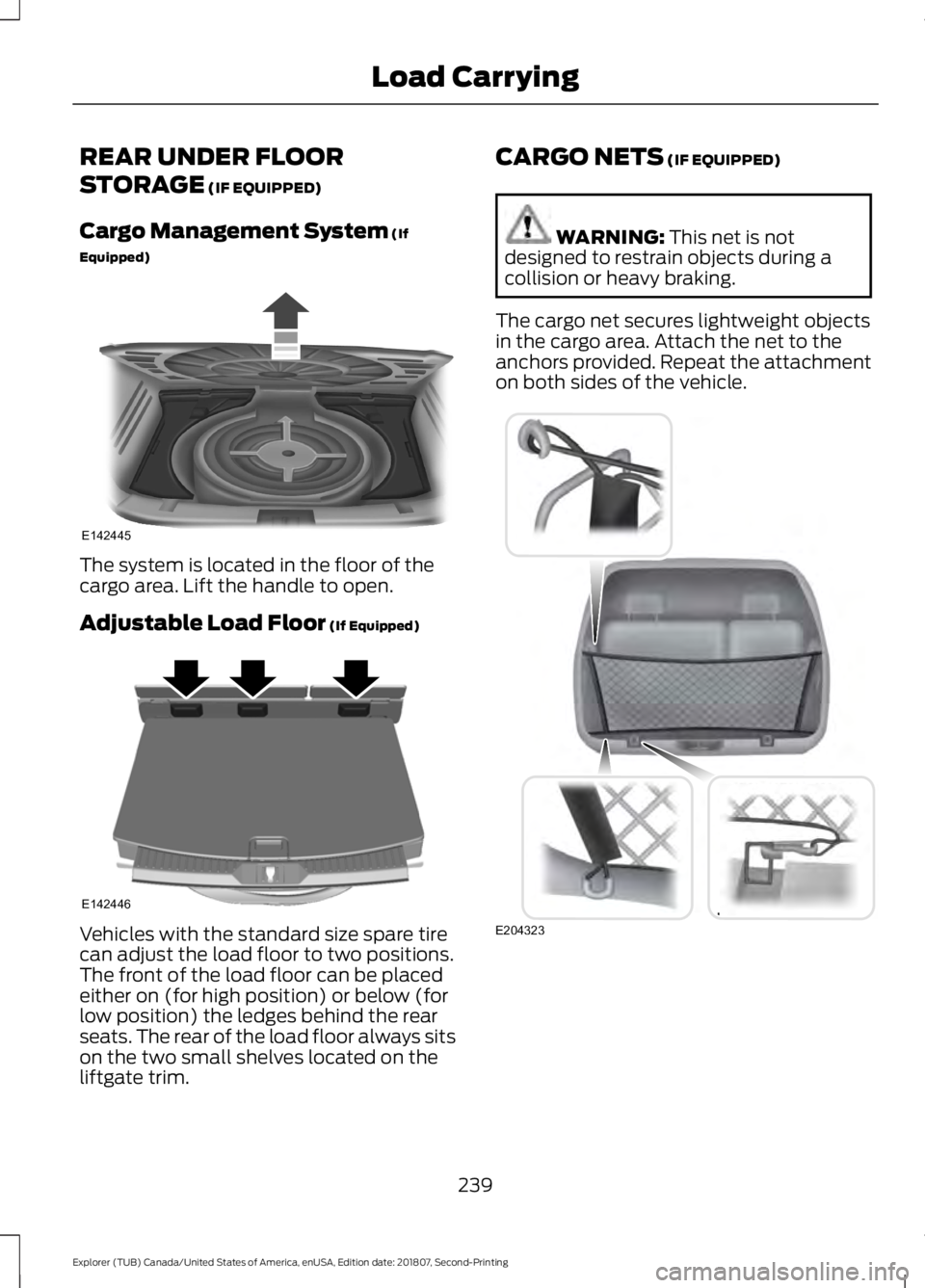
Cargo Management System
(If
Equipped) The system is located in the floor of the
cargo area. Lift the handle to open.
Adjustable Load Floor
(If Equipped)
Vehicles with the standard size spare tire
can adjust the load floor to two positions.
The front of the load floor can be placed
either on (for high position) or below (for
low position) the ledges behind the rear
seats. The rear of the load floor always sits
on the two small shelves located on the
liftgate trim. CARGO NETS
(IF EQUIPPED) WARNING:
This net is not
designed to restrain objects during a
collision or heavy braking.
The cargo net secures lightweight objects
in the cargo area. Attach the net to the
anchors provided. Repeat the attachment
on both sides of the vehicle. 239
Explorer (TUB) Canada/United States of America, enUSA, Edition date: 201807, Second-Printing Load CarryingE142445 E142446 E204323
Page 254 of 571
Trailer Brakes
WARNING: Do not connect a
trailer's hydraulic brake system directly
to your vehicle's brake system. Your
vehicle may not have enough braking
power and your chances of having a
collision greatly increase.
Electric brakes and manual, automatic or
surge-type trailer brakes are safe if you
install them properly and adjust them to
the manufacturer's specifications. The
trailer brakes must meet local and federal
regulations.
The rating for the tow vehicle's braking
system operation is at the gross vehicle
weight rating, not the gross combined
weight rating.
Separate functioning brake systems are
required for safe control of towed vehicles
and trailers weighing more than
1,500 lb
(680 kg) when loaded.
Trailer Lamps WARNING:
Never connect any
trailer lamp wiring to the vehicle's tail
lamp wiring; this may damage the
electrical system resulting in fire. Contact
your authorized dealer as soon as
possible for assistance in proper trailer
tow wiring installation. Additional
electrical equipment may be required.
Trailer lamps are required on most towed
vehicles. Make sure all running lights, brake
lights, turn signals and hazard lights are
working. Before Towing a Trailer
Practice turning, stopping and backing up
to get the feel of your vehicle-trailer
combination before starting on a trip.
When turning, make wider turns so the
trailer wheels clear curbs and other
obstacles.
When Towing a Trailer
•
Do not drive faster than
70 mph
(113 km/h) during the first 500 mi
(800 km).
• Do not make full-throttle starts.
• Check your hitch, electrical connections
and trailer wheel lug nuts thoroughly
after you have traveled 50 mi (80 km).
• When stopped in congested or heavy
traffic during hot weather, place the
gearshift in park (P) to aid engine and
transmission cooling and to help A/C
performance.
• Turn off the speed control with heavy
loads or in hilly terrain. The speed
control may turn off automatically
when you are towing on long, steep
grades.
• Shift to a lower gear when driving down
a long or steep hill. Do not apply the
brakes continuously, as they may
overheat and become less effective.
• If your transmission is equipped with a
Grade Assist or Tow/Haul feature, use
this feature when towing. This provides
engine braking and helps eliminate
excessive transmission shifting for
optimum fuel economy and
transmission cooling.
• Allow more distance for stopping with
a trailer attached. Anticipate stops and
brake gradually.
• Avoid parking on a grade. However, if
you must park on a grade:
1. Turn the steering wheel to point your vehicle tires away from traffic flow.
251
Explorer (TUB) Canada/United States of America, enUSA, Edition date: 201807, Second-Printing Towing
Page 498 of 571
GENERAL MAINTENANCE
INFORMATION
Why Maintain Your Vehicle?
Carefully following the maintenance
schedule helps protect against major repair
expenses resulting from neglect or
inadequate maintenance and may help to
increase the value of your vehicle when
you sell or trade it. Keep all receipts for
completed maintenance with your vehicle.
We have established regular maintenance
intervals for your vehicle based upon
rigorous testing. It is important that you
have your vehicle serviced at the proper
times. These intervals serve two purposes;
one is to maintain the reliability of your
vehicle and the second is to keep your cost
of owning your vehicle down.
It is your responsibility to have all
scheduled maintenance performed and to
make sure that the materials used meet
the specifications identified in this owner's
manual. See Capacities and
Specifications (page 340).
Failure to perform scheduled maintenance
invalidates warranty coverage on parts
affected by the lack of maintenance.
Why Maintain Your Vehicle at Your
Dealership?
Factory-Trained Technicians
Service technicians participate in extensive
factory-sponsored certification training to
help them become experts on the
operation of your vehicle. Ask your
dealership about the training and
certification their technicians have
received. Genuine Ford and Motorcraft®
Replacement Parts
Dealerships stock Ford, Motorcraft and
Ford-authorized branded re-manufactured
replacement parts. These parts meet or
exceed our specifications. Parts installed
at your dealership carry a nationwide
24-month or unlimited mile (kilometer)
parts and labor limited warranty.
If you do not use Ford authorized parts they
may not meet our specifications and
depending on the part, it could affect
emissions compliance.
Convenience
Many dealerships have extended evening
and Saturday hours to make your service
visit more convenient and they offer one
stop shopping. They can perform any
services that are required on your vehicle,
from general maintenance to collision
repairs.
Note:
Not all dealers have extended hours
or body shops. Please contact your dealer
for details.
Protecting Your Investment
Maintenance is an investment that pays
dividends in the form of improved
reliability, durability and resale value. To
maintain the proper performance of your
vehicle and its emission control systems,
make sure you have scheduled
maintenance performed at the designated
intervals.
Your vehicle is equipped with the
Intelligent Oil-Life Monitor system, which
displays a message in the information
display at the proper oil change interval.
This interval may be up to one year or
10,000 mi (16,000 km)
.
495
Explorer (TUB) Canada/United States of America, enUSA, Edition date: 201807, Second-Printing Scheduled Maintenance
Page 564 of 571
Hints on Controlling the Interior
Climate..........................................................134
Defogging the Side Windows in Cold Weather............................................................. 136
General Hints....................................................... 134
Quickly Cooling the Interior............................. 135
Quickly Heating the Interior............................ 135
Recommended Settings for Cooling...........136
Recommended Settings for Heating..........135
Hints on Driving With Anti-Lock Brakes............................................................193
Home Screen................................................426
Hood Lock See: Opening and Closing the Hood..........282
I
Ignition Switch
...............................................166
In California (U.S. Only)............................265
Information Display Control......................80
Information Displays
...................................104
General Information.......................................... 104
Information Messages
.................................115
4WD........................................................................\
.. 116
Adaptive Cruise Control.................................... 116
AdvanceTrac ™..................................................... 116
Alarm........................................................................\
117
Automatic Engine Shutdown.......................... 117
Automatic High Beam Control........................ 117
Battery and Charging System......................... 118
Blind Spot Information and Cross Traffic Alert System..................................................... 118
Brake System........................................................ 119
Doors and Locks.................................................. 119
Driver Alert.............................................................. 119
Electronic Stability Control............................. 120
Engine..................................................................... 120
Fuel........................................................................\
.. 120
Hill Descent Control.......................................... 120
Hill Start Assist..................................................... 121
Keys and Intelligent Access............................. 121
Lane Keeping System........................................ 122
Maintenance......................................................... 122
MyKey...................................................................... 123
Park Aid.................................................................. 124
Park Brake.............................................................. 124
Power Steering.................................................... 124
Pre-Collision Assist............................................ 125Remote Start........................................................
125
Seats........................................................................\
125
Starting System.................................................. 126
Terrain Management System......................... 126
Tire Pressure Monitoring System.................. 126
Traction Control................................................... 127
Trailer....................................................................... 127
Transmission......................................................... 127
Installing Child Restraints............................19 Child Seats............................................................... 19
Using Lap and Shoulder Belts......................... 20
Using Lower Anchors and Tethers for CHildren (LATCH)............................................ 25
Using Tether Straps............................................. 27
Instrument Cluster........................................96
Instrument Lighting Dimmer
.....................85
Instrument Panel Overview........................16
Interior Lamps
.................................................88
Battery Saver......................................................... 89
Dome Lamp........................................................... 88
Front Interior Lamps........................................... 89
Rear Interior Lamps............................................ 89
Interior Mirror...................................................94 Automatic Dimming Mirror............................... 94
Manual Dimming Mirror..................................... 94
Introduction.........................................................7
J
Jump Starting the Vehicle........................260 Connecting the Jumper Cables.................... 260
Jump Starting....................................................... 261
Preparing Your Vehicle.................................... 260
Removing the Jumper Cables........................ 261
K
Keyless Entry
...................................................68
SECURICODE™ Keyless Entry
Keypad................................................................ 68
Keyless Starting
............................................166
Ignition Modes...................................................... 167
Keys and Remote Controls.........................53
L
Lane Keeping System................................226 Switching the System On and Off...............227
561
Explorer (TUB) Canada/United States of America, enUSA, Edition date: 201807, Second-Printing Index
Page 566 of 571
N
Navigation......................................................452
cityseeker............................................................. 459
Destination Mode.............................................. 454
Map Mode............................................................ 452
Navigation Map Updates............................... 460
Navigation Menu................................................ 457
SiriusXM Traffic and Travel Link.................. 460
SYNC AppLink.................................................... 459
Waypoints............................................................ 458
Normal Scheduled Maintenance..........498 Intelligent Oil-Life Monitor™........................ 498
Normal Maintenance Intervals.................... 499
O
Oil Change Indicator Reset......................288
Oil Check See: Engine Oil Check...................................... 287
Opening and Closing the Hood..............282 Closing the Hood............................................... 283
Opening the Hood............................................. 282
Ordering Additional Owner's Literature.....................................................269
Obtaining a French Owner ’s Manual.........269
Overhead Console.......................................165
P
Parking Aids...................................................202 Principle of Operation...................................... 202
Parking Brake.................................................194
Passenger Knee Airbag................................49
Passive Anti-Theft System.........................75 SecuriLock®........................................................... 75
PATS See: Passive Anti-Theft System..................... 75
Pedals..................................................................81
Perchlorate.........................................................11
Personal Safety System ™..........................43
How Does the Personal Safety System
Work?.................................................................. 43
Phone..............................................................446 During a Phone Call.......................................... 450
Making Calls........................................................ 449
Pairing Your Cell Phone for the First Time.................................................................. 446Phone Menu.........................................................
447
Receiving Calls................................................... 450
Smartphone Connectivity............................... 451
Text Messaging.................................................... 451
Post-Crash Alert System
..........................262
Power Door Locks See: Locking and Unlocking............................. 65
Power Liftgate...................................................71 Hands-Free Feature............................................. 73
Obstacle Detection.............................................. 73
Opening and Closing the Liftgate.................... 71
Setting the Liftgate Open Height................... 72
Stopping the Liftgate Movement................... 72
Power Seats
....................................................143
Adjusting the Lumbar Support..................... 144
Adjusting the Multi-Contour Front Seats With Active Motion ...................................... 144
Power Steering Fluid Check....................296
Power Windows.............................................90 Accessory Delay..................................................... 91
Bounce-Back......................................................... 90
One-Touch Down................................................ 90
One-Touch Up...................................................... 90
Window Lock.......................................................... 91
Pre-Collision Assist
.....................................236
Using the Pre-Collision Assist
System............................................................... 237
Protecting the Environment........................15
Puncture See: Changing a Road Wheel....................... 334
R
Rear Parking Aid...........................................202 Obstacle Distance Indicator.......................... 203
Rear Passenger Climate Controls..........136 Directing Air to the Overhead Air
Vents.................................................................. 136
Directing Air to the Rear Footwell Air Vents.................................................................. 136
Rear Climate Control Lock Indicator...........136
Setting the Rear Blower Motor Speed........137
Setting the Rear Temperature........................ 137
Switching the Rear Heated Seats On and Off........................................................................\
137
Rear Seats
........................................................147
Adjusting the Rear Seats.................................. 147
563
Explorer (TUB) Canada/United States of America, enUSA, Edition date: 201807, Second-Printing Index
Page 567 of 571
Rear Under Floor Storage.........................239
Adjustable Load Floor...................................... 239
Cargo Management System......................... 239
Rear View Camera........................................212 Camera Guidelines............................................. 213
Manual Zoom....................................................... 215
Obstacle Distance Indicator........................... 214
Rear Camera Delay............................................ 215
Using the Rear View Camera System.........213
Rear View Camera See: Rear View Camera.................................... 212
Rear Window Wiper and Washers...........83 Rear Camera Washer.......................................... 83
Rear Window Washer......................................... 83
Rear Window Wiper Blade............................... 83
Recommended Towing Weights...........248
Refueling..........................................................176 Refueling System Overview............................ 176
Refueling System Warning.............................. 178
Refueling Your Vehicle....................................... 177
Remote Control..............................................53 Car Finder................................................................ 58
Integrated Keyhead Transmitter..................... 53
Intelligent Access Key......................................... 54
Memory Feature.................................................... 57
Remote Start......................................................... 58
Replacing the Battery......................................... 55
Sounding the Panic Alarm................................ 58
Remote Start
.................................................138
Automatic Settings............................................ 138
Heated and Cooled Features......................... 138
Last Settings........................................................ 138
Repairing Minor Paint Damage.................311
Replacement Parts Recommendation........................................12
Collision Repairs.................................................... 12
Scheduled Maintenance and Mechanical Repairs.................................................................. 12
Warranty on Replacement Parts..................... 12
Replacing a Lost Key or Remote Control............................................................59
Reporting Safety Defects (Canada Only)..............................................................269
Reporting Safety Defects (U.S. Only)..............................................................269
Roadside Assistance..................................258 Vehicles Sold in Canada: Getting Roadside
Assistance....................................................... 259Vehicles Sold in the United States: Getting
Roadside Assistance................................... 258
Vehicles Sold in the United States: Using Roadside Assistance................................... 258
Roadside Emergencies
..............................258
Roof Racks and Load Carriers................240
Adjusting the Crossbar..................................... 241
Thumbwheel Kit.................................................. 241
Running-In See: Breaking-In................................................. 255
Running Out of Fuel.....................................174 Adding Fuel From a Portable Fuel
Container........................................................... 175
Filling a Portable Fuel Container................... 175
S
Safety Canopy ™
............................................49
Safety Precautions.......................................172
Satellite Radio
...............................................372
Satellite Radio Electronic Serial Number
(ESN)................................................................. 373
Satellite Radio Reception Factors...............373
SiriusXM Satellite Radio Service.................. 373
Troubleshooting................................................. 374
Scheduled Maintenance Record...........503
Scheduled Maintenance
..........................495
Seatbelt Extension........................................42
Seatbelt Height Adjustment......................39
Seatbelt Reminder
........................................40
Belt-Minder™....................................................... 40
Seatbelts...........................................................35 Principle of Operation......................................... 35
Seatbelt Warning Lamp and Indicator Chime..............................................................40
Conditions of operation.................................... 40
Seats.................................................................139
Security...............................................................75
Settings...........................................................463 911 Assist.............................................................. 468
Ambient Lighting................................................ 475
Bluetooth.............................................................. 465
Clock...................................................................... 465
Display.................................................................... 476
General................................................................... 473
Media Player....................................................... 464
Mobile Apps.......................................................... 471
Navigation............................................................ 469
564
Explorer (TUB) Canada/United States of America, enUSA, Edition date: 201807, Second-Printing Index