ECO mode FORD F150 2023 Service Manual
[x] Cancel search | Manufacturer: FORD, Model Year: 2023, Model line: F150, Model: FORD F150 2023Pages: 786, PDF Size: 23.15 MB
Page 272 of 786
•Shift to manual (M) to switch thefeature on.
•Press the upper (+) button to upshift.
•Press the lower (-) button todownshift.
•Shift to drive (D) to switch the featureoff.
SHIFTING USING THE BUTTONSON THE SELECTOR LEVER -POLICE RESPONDER
The instrument cluster displays the currentgear. The current gear flashes when yourvehicle cannot shift into the requestedgear. Your vehicle will not shift if therequested gear raises or lowers the enginespeed beyond the limit.
Your vehicle may shift when you fully pressthe accelerator or brake pedal.
Note:Prolonged driving with high enginespeed could cause vehicle damage notcovered by the vehicle warranty.
Note:Drive modes could affect when thevehicle shifts into the requested gear.
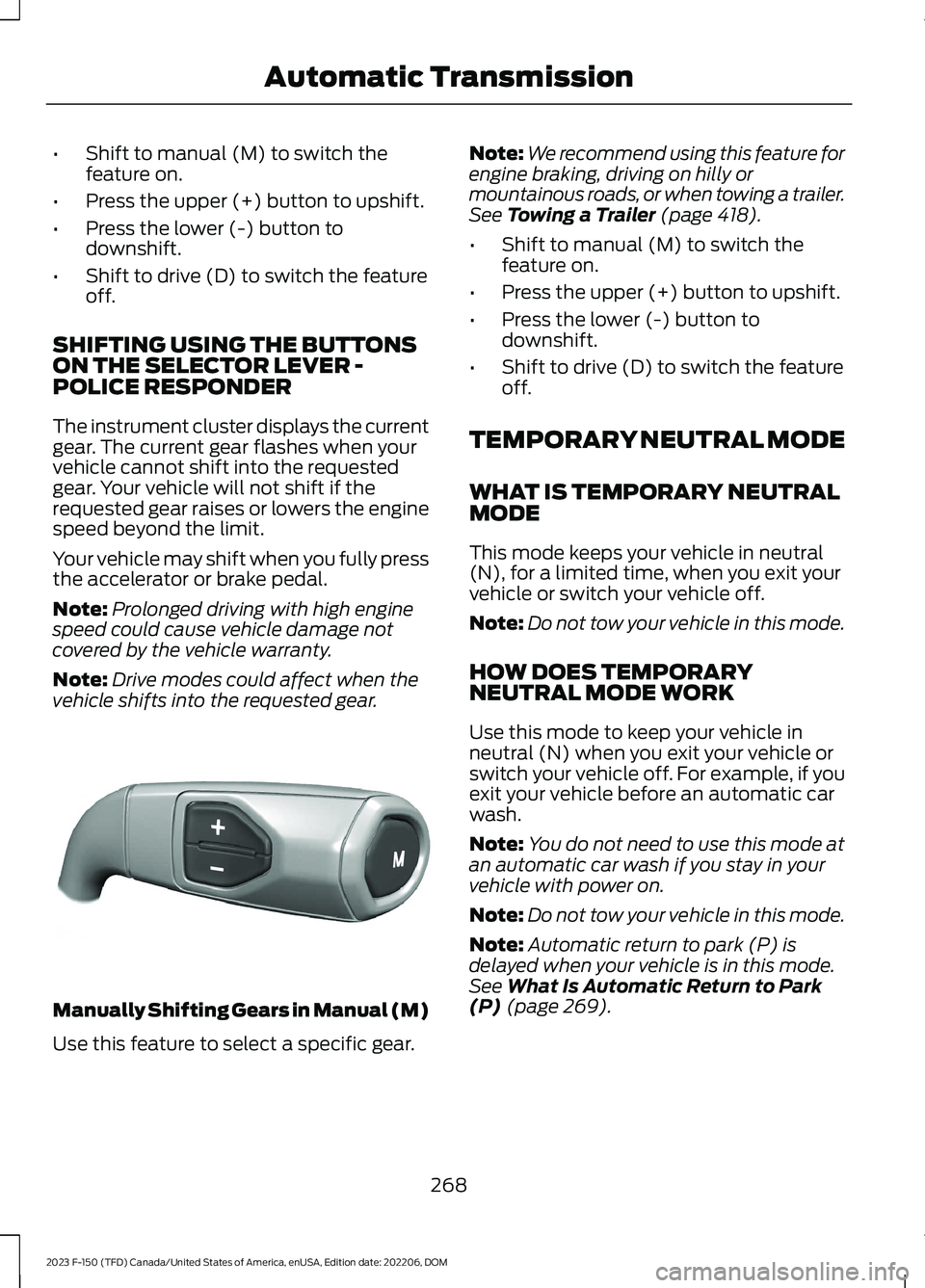
Manually Shifting Gears in Manual (M)
Use this feature to select a specific gear.
Note:We recommend using this feature forengine braking, driving on hilly ormountainous roads, or when towing a trailer.See Towing a Trailer (page 418).
•Shift to manual (M) to switch thefeature on.
•Press the upper (+) button to upshift.
•Press the lower (-) button todownshift.
•Shift to drive (D) to switch the featureoff.
TEMPORARY NEUTRAL MODE
WHAT IS TEMPORARY NEUTRALMODE
This mode keeps your vehicle in neutral(N), for a limited time, when you exit yourvehicle or switch your vehicle off.
Note:Do not tow your vehicle in this mode.
HOW DOES TEMPORARYNEUTRAL MODE WORK
Use this mode to keep your vehicle inneutral (N) when you exit your vehicle orswitch your vehicle off. For example, if youexit your vehicle before an automatic carwash.
Note:You do not need to use this mode atan automatic car wash if you stay in yourvehicle with power on.
Note:Do not tow your vehicle in this mode.
Note:Automatic return to park (P) isdelayed when your vehicle is in this mode.See What Is Automatic Return to Park(P) (page 269).
268
2023 F-150 (TFD) Canada/United States of America, enUSA, Edition date: 202206, DOMAutomatic TransmissionE327267
Page 276 of 786
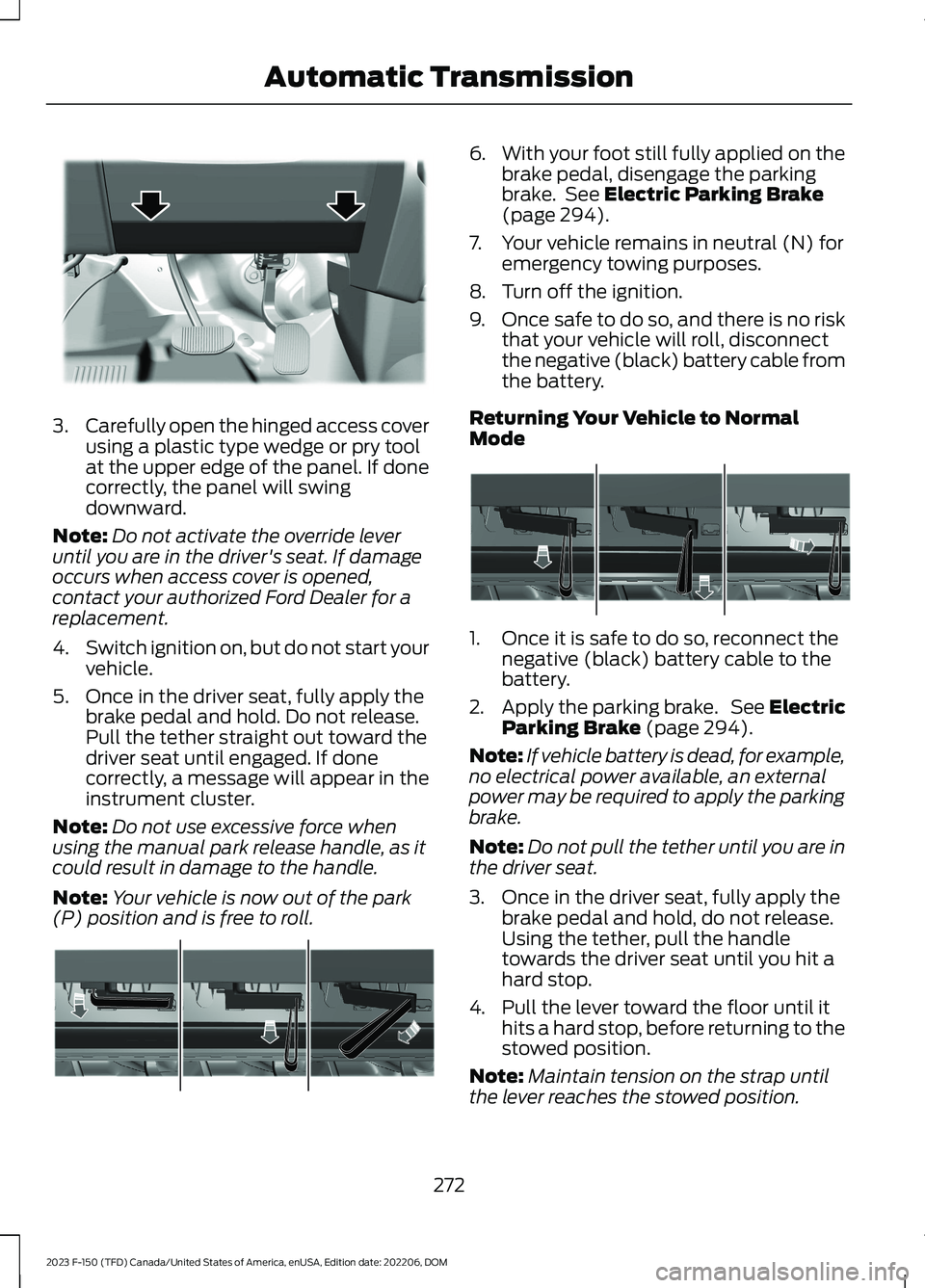
3.Carefully open the hinged access coverusing a plastic type wedge or pry toolat the upper edge of the panel. If donecorrectly, the panel will swingdownward.
Note:Do not activate the override leveruntil you are in the driver's seat. If damageoccurs when access cover is opened,contact your authorized Ford Dealer for areplacement.
4.Switch ignition on, but do not start yourvehicle.
5.Once in the driver seat, fully apply thebrake pedal and hold. Do not release.Pull the tether straight out toward thedriver seat until engaged. If donecorrectly, a message will appear in theinstrument cluster.
Note:Do not use excessive force whenusing the manual park release handle, as itcould result in damage to the handle.
Note:Your vehicle is now out of the park(P) position and is free to roll.
6.With your foot still fully applied on thebrake pedal, disengage the parkingbrake. See Electric Parking Brake(page 294).
7.Your vehicle remains in neutral (N) foremergency towing purposes.
8.Turn off the ignition.
9.Once safe to do so, and there is no riskthat your vehicle will roll, disconnectthe negative (black) battery cable fromthe battery.
Returning Your Vehicle to NormalMode
1.Once it is safe to do so, reconnect thenegative (black) battery cable to thebattery.
2.Apply the parking brake. See ElectricParking Brake (page 294).
Note:If vehicle battery is dead, for example,no electrical power available, an externalpower may be required to apply the parkingbrake.
Note:Do not pull the tether until you are inthe driver seat.
3.Once in the driver seat, fully apply thebrake pedal and hold, do not release.Using the tether, pull the handletowards the driver seat until you hit ahard stop.
4.Pull the lever toward the floor until ithits a hard stop, before returning to thestowed position.
Note:Maintain tension on the strap untilthe lever reaches the stowed position.
272
2023 F-150 (TFD) Canada/United States of America, enUSA, Edition date: 202206, DOMAutomatic TransmissionE336473 E315156 E315157
Page 279 of 786
conditions like deep sand, steep slopes, orpulling heavy objects. Additionally, thesystem is capable of recreational flattowing by putting the transfer case intoneutral (N). See Recreationally TowingYour Vehicle (page 485).
There is further information on driving inunique driving conditions. See Off-RoadDriving (page 466).
FOUR-WHEEL DRIVE
PRECAUTIONS
WARNING: Vehicles with a highercenter of gravity (utility and four-wheeldrive vehicles) handle differently thanvehicles with a lower center of gravity(passenger cars). Avoid sharp turns,excessive speed and abrupt steering inthese vehicles. Failure to drive cautiouslyincreases the risk of losing control of yourvehicle, vehicle rollover, personal injuryand death.
WARNING: Do not becomeoverconfident in the ability of four-wheeldrive vehicles. Although a four-wheeldrive vehicle may accelerate better thana two-wheel drive vehicle in low tractionsituations, it won't stop any faster thantwo-wheel drive vehicles. Always driveat a safe speed.
Truck and utility vehicles can differ fromsome other vehicles. Your vehicle could behigher to allow it to travel over roughterrain without getting stuck or damagingunderbody components. The differencesthat make your vehicle so versatile alsomake it handle differently than an ordinarypassenger car. Always maintain steeringwheel control, especially in rough terrain.Since sudden changes in terrain can resultin abrupt steering wheel motion, make sureyou grip the steering wheel from the
outside. Do not grip the spokes. Drivecautiously to avoid vehicle damage fromconcealed objects such as rocks andstumps. Drive slower in strong crosswindswhich can affect the normal steeringcharacteristics of your vehicle. Beextremely careful when driving onpavement made slippery by loose sand,water, gravel, snow or ice.
Note:Do not use four-wheel drive high orfour-wheel drive low mode on dry, hardsurfaced roads. Doing so can produceexcessive noise, increase tire wear and candamage drive components.
FOUR-WHEEL DRIVE
LIMITATIONS
Operating Four-Wheel Drive witha Spare or Mismatched Tires (If
Equipped)
On four-wheel drive vehicles, the size ofthe spare tire can affect the four-wheeldrive system. If there is a significantdifference between the size of the sparetire and the remaining tires, you could havelimited four-wheel drive functionality.When driving with the full-size dissimilarspare wheel and tire assembly, werecommend that you do not:
•Exceed 50 mph (80 km/h) with afour-wheel drive mode turned on.
•Turn on a four-wheel drive modeunless the vehicle is stationary.
•Use a four-wheel drive mode on drypavement.
Driving with the full-size dissimilar sparewheel and tire assembly can limitfour-wheel drive functionality, especiallywhen driving in a mechanically lockedfour-wheel drive mode. You can experiencethe following:
275
2023 F-150 (TFD) Canada/United States of America, enUSA, Edition date: 202206, DOMFour-Wheel Drive (If Equipped)
Page 281 of 786
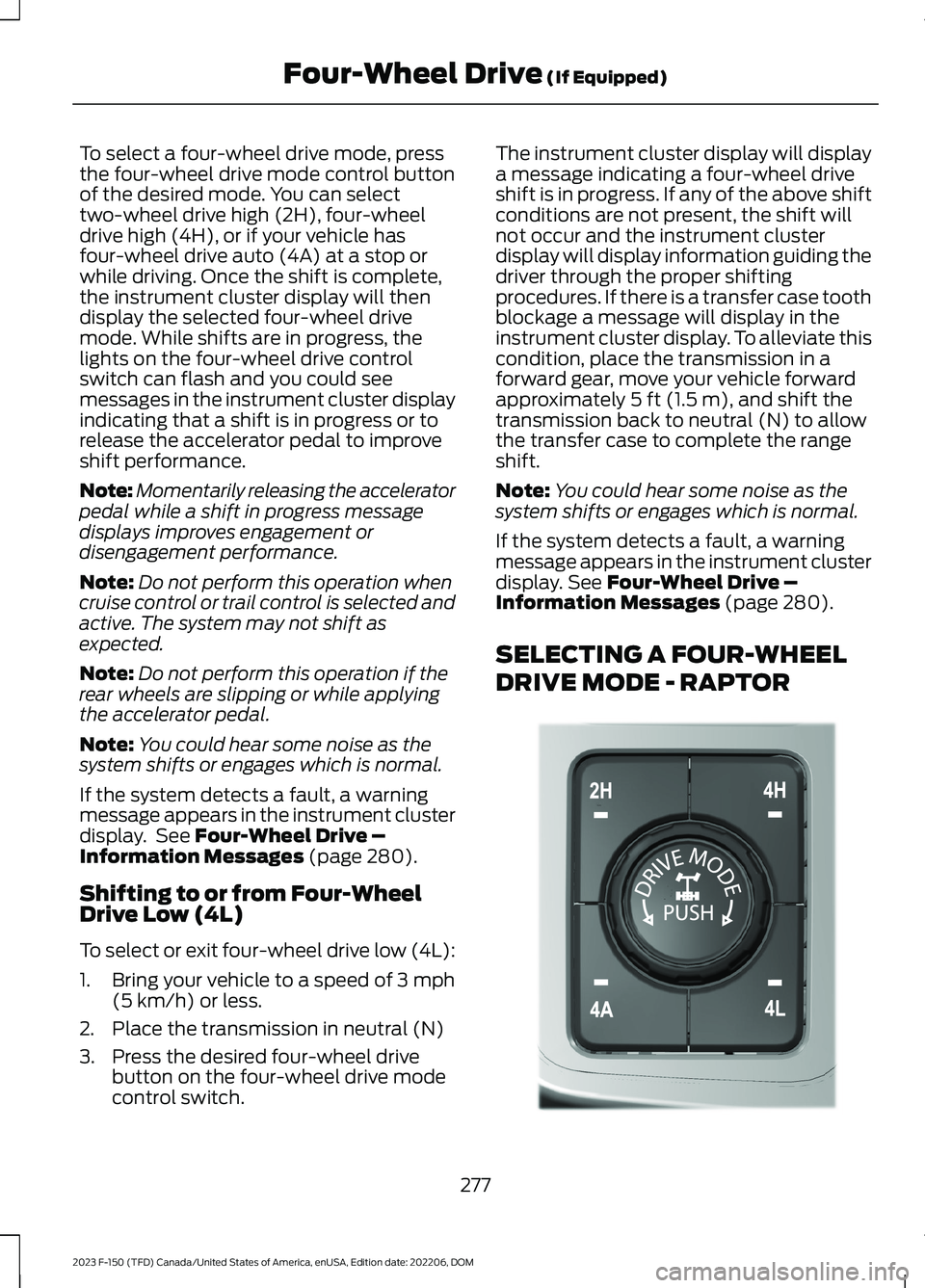
To select a four-wheel drive mode, pressthe four-wheel drive mode control buttonof the desired mode. You can selecttwo-wheel drive high (2H), four-wheeldrive high (4H), or if your vehicle hasfour-wheel drive auto (4A) at a stop orwhile driving. Once the shift is complete,the instrument cluster display will thendisplay the selected four-wheel drivemode. While shifts are in progress, thelights on the four-wheel drive controlswitch can flash and you could seemessages in the instrument cluster displayindicating that a shift is in progress or torelease the accelerator pedal to improveshift performance.
Note:Momentarily releasing the acceleratorpedal while a shift in progress messagedisplays improves engagement ordisengagement performance.
Note:Do not perform this operation whencruise control or trail control is selected andactive. The system may not shift asexpected.
Note:Do not perform this operation if therear wheels are slipping or while applyingthe accelerator pedal.
Note:You could hear some noise as thesystem shifts or engages which is normal.
If the system detects a fault, a warningmessage appears in the instrument clusterdisplay. See Four-Wheel Drive –Information Messages (page 280).
Shifting to or from Four-WheelDrive Low (4L)
To select or exit four-wheel drive low (4L):
1.Bring your vehicle to a speed of 3 mph(5 km/h) or less.
2.Place the transmission in neutral (N)
3.Press the desired four-wheel drivebutton on the four-wheel drive modecontrol switch.
The instrument cluster display will displaya message indicating a four-wheel driveshift is in progress. If any of the above shiftconditions are not present, the shift willnot occur and the instrument clusterdisplay will display information guiding thedriver through the proper shiftingprocedures. If there is a transfer case toothblockage a message will display in theinstrument cluster display. To alleviate thiscondition, place the transmission in aforward gear, move your vehicle forwardapproximately 5 ft (1.5 m), and shift thetransmission back to neutral (N) to allowthe transfer case to complete the rangeshift.
Note:You could hear some noise as thesystem shifts or engages which is normal.
If the system detects a fault, a warningmessage appears in the instrument clusterdisplay. See Four-Wheel Drive –Information Messages (page 280).
SELECTING A FOUR-WHEEL
DRIVE MODE - RAPTOR
277
2023 F-150 (TFD) Canada/United States of America, enUSA, Edition date: 202206, DOMFour-Wheel Drive (If Equipped)E308146
Page 282 of 786
The four-wheel drive mode control is onthe instrument panel.
To select a four-wheel drive mode, pressthe four-wheel drive mode control buttonof the desired mode. You can selecttwo-wheel drive high (2H), four-wheeldrive high (4H), or four-wheel drive auto(4A) at a stop or while driving. Once theshift is complete, the instrument clusterdisplay will then display the selectedfour-wheel drive mode. While shifts are inprogress, the lights on the four-wheel drivecontrol switch can flash and you could seemessages in the instrument cluster displayindicating that a shift is in progress or torelease the accelerator pedal to improveshift performance.
Note:Momentarily releasing the acceleratorpedal when a shift in progress messagedisplays improves engagement anddisengagement performance.
Note:Do not perform this operation whenyou have cruise control or trail controlselected and active. The system may notshift as expected.
Note:Do not perform this operation if therear wheels are slipping or while applyingthe accelerator pedal.
Note:You could hear some noise as thesystem shifts or engages, which is normal.
If the system detects a fault, a warningmessage appears in the instrument clusterdisplay. See Four-Wheel Drive –Information Messages (page 280).
Shifting to or from Four-WheelDrive Low (4L)
To select or exit four-wheel drive low (4L):
1.Bring your vehicle to a speed of 3 mph(5 km/h) or less.
2.Place the transmission in neutral (N).
3.Press the desired four-wheel drivebutton on the four-wheel drive modecontrol switch.
The instrument cluster display will displaya message indicating a four-wheel driveshift is in progress. If any of the above shiftconditions are not present, the shift doesnot occur and the instrument clusterdisplay will display information guiding thedriver through the proper shiftingprocedures. If there is a transfer case toothblockage, a message displays in theinstrument cluster display. To alleviate thiscondition, place the transmission in aforward gear, move your vehicle forwardapproximately 5 ft (1.5 m), and shift thetransmission back to neutral (N) to allowthe transfer case to complete the rangeshift.
Note:You could hear some noise as thesystem shifts or engages, which is normal.
If the system detects a fault, a warningmessage appears in the instrument clusterdisplay. See Four-Wheel Drive –Information Messages (page 280).
FOUR-WHEEL DRIVE MODES
TWO-WHEEL DRIVE HIGH
Two-wheel drive high is for generalon-road driving. Power is sent to the rearwheels only.
Note:Two-wheel drive high can turn on oroff based on Drive Mode selection See DriveMode Control (page 362).
278
2023 F-150 (TFD) Canada/United States of America, enUSA, Edition date: 202206, DOMFour-Wheel Drive (If Equipped)
Page 285 of 786
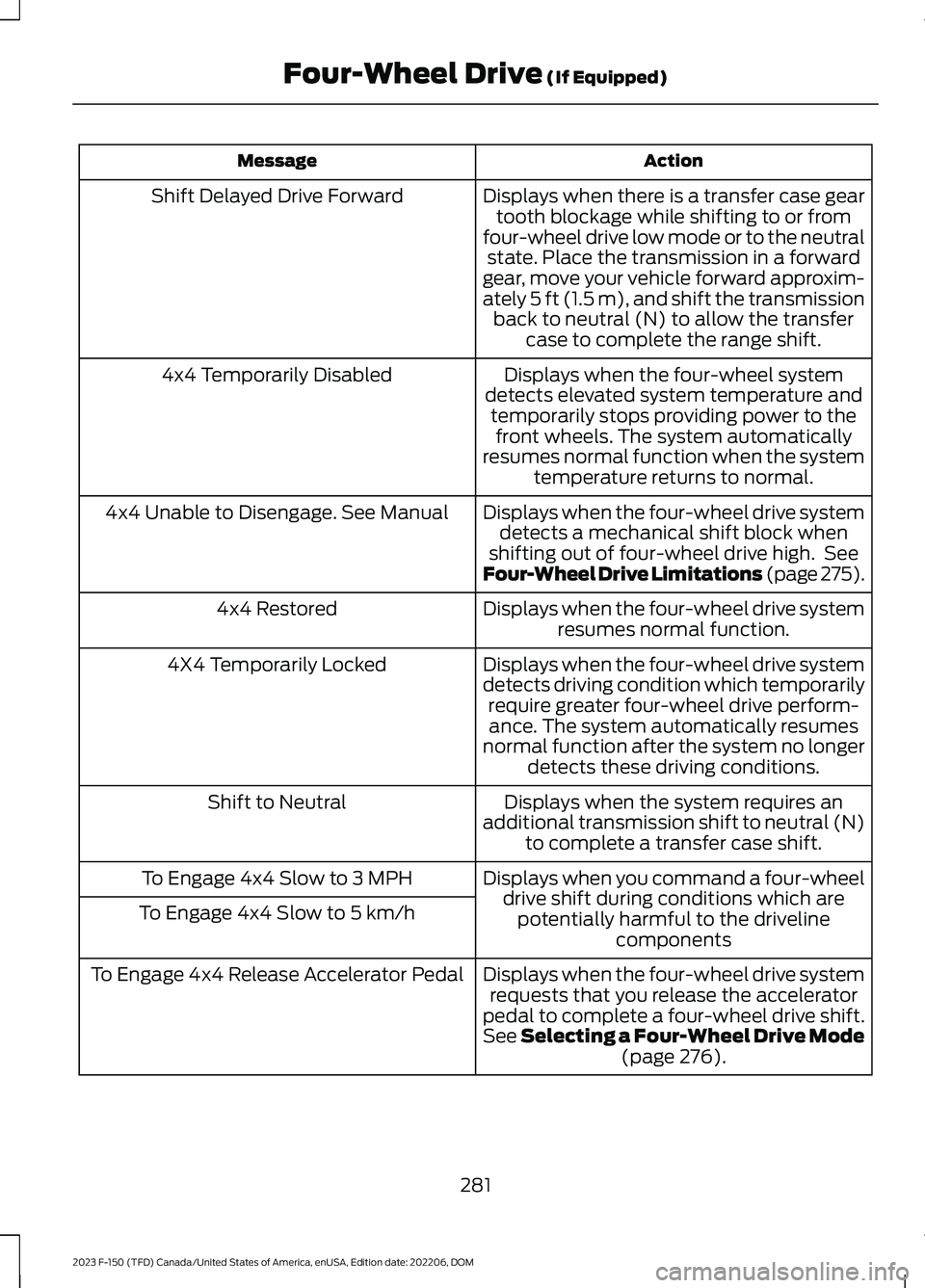
ActionMessage
Displays when there is a transfer case geartooth blockage while shifting to or fromfour-wheel drive low mode or to the neutralstate. Place the transmission in a forwardgear, move your vehicle forward approxim-ately 5 ft (1.5 m), and shift the transmissionback to neutral (N) to allow the transfercase to complete the range shift.
Shift Delayed Drive Forward
Displays when the four-wheel systemdetects elevated system temperature andtemporarily stops providing power to thefront wheels. The system automaticallyresumes normal function when the systemtemperature returns to normal.
4x4 Temporarily Disabled
Displays when the four-wheel drive systemdetects a mechanical shift block whenshifting out of four-wheel drive high. SeeFour-Wheel Drive Limitations (page 275).
4x4 Unable to Disengage. See Manual
Displays when the four-wheel drive systemresumes normal function.4x4 Restored
Displays when the four-wheel drive systemdetects driving condition which temporarilyrequire greater four-wheel drive perform-ance. The system automatically resumesnormal function after the system no longerdetects these driving conditions.
4X4 Temporarily Locked
Displays when the system requires anadditional transmission shift to neutral (N)to complete a transfer case shift.
Shift to Neutral
Displays when you command a four-wheeldrive shift during conditions which arepotentially harmful to the drivelinecomponents
To Engage 4x4 Slow to 3 MPH
To Engage 4x4 Slow to 5 km/h
Displays when the four-wheel drive systemrequests that you release the acceleratorpedal to complete a four-wheel drive shift.See Selecting a Four-Wheel Drive Mode(page 276).
To Engage 4x4 Release Accelerator Pedal
281
2023 F-150 (TFD) Canada/United States of America, enUSA, Edition date: 202206, DOMFour-Wheel Drive (If Equipped)
Page 287 of 786
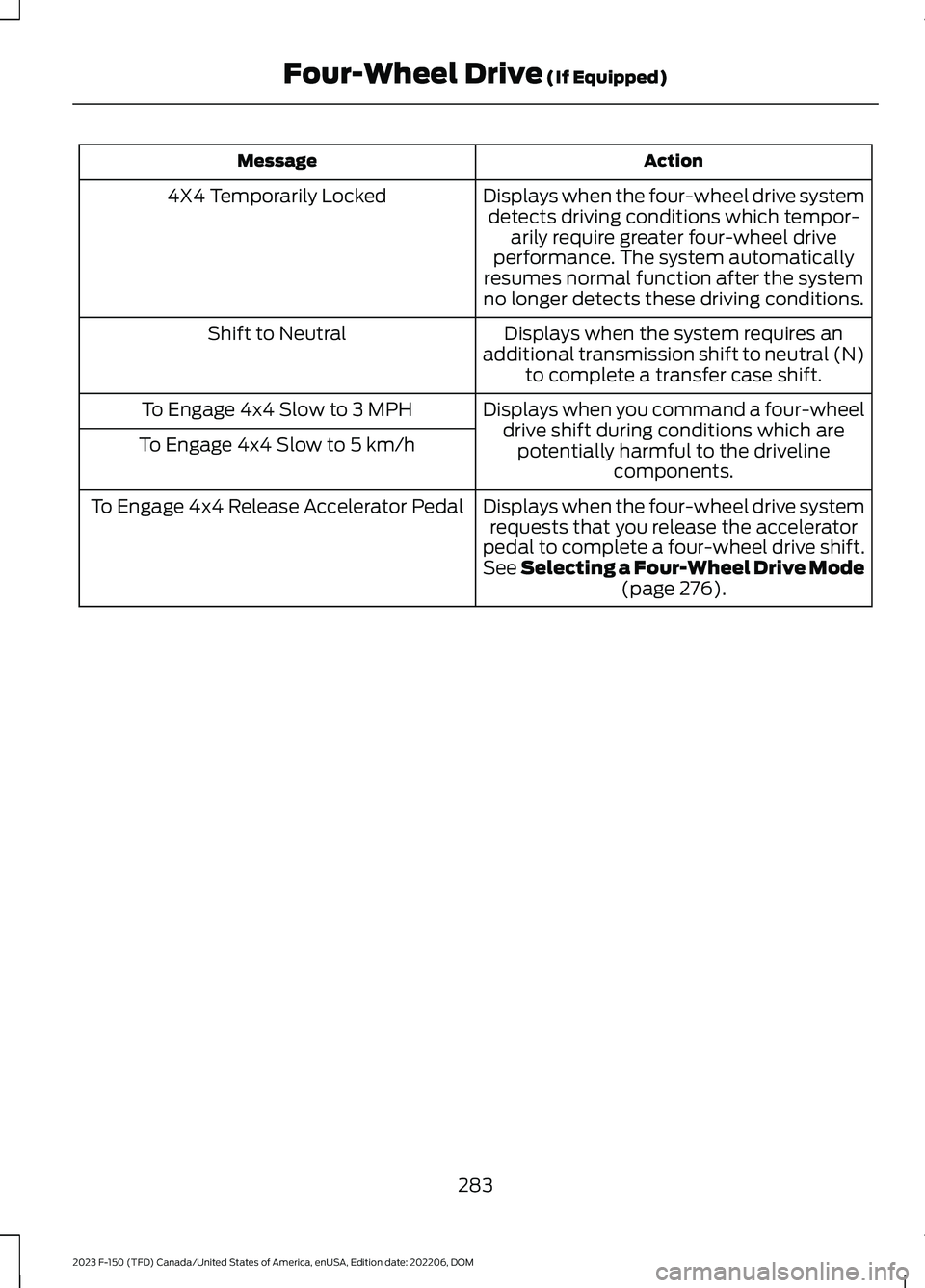
ActionMessage
Displays when the four-wheel drive systemdetects driving conditions which tempor-arily require greater four-wheel driveperformance. The system automaticallyresumes normal function after the systemno longer detects these driving conditions.
4X4 Temporarily Locked
Displays when the system requires anadditional transmission shift to neutral (N)to complete a transfer case shift.
Shift to Neutral
Displays when you command a four-wheeldrive shift during conditions which arepotentially harmful to the drivelinecomponents.
To Engage 4x4 Slow to 3 MPH
To Engage 4x4 Slow to 5 km/h
Displays when the four-wheel drive systemrequests that you release the acceleratorpedal to complete a four-wheel drive shift.See Selecting a Four-Wheel Drive Mode(page 276).
To Engage 4x4 Release Accelerator Pedal
283
2023 F-150 (TFD) Canada/United States of America, enUSA, Edition date: 202206, DOMFour-Wheel Drive (If Equipped)
Page 289 of 786
ELECTRONIC LOCKING
DIFFERENTIAL PRECAUTIONS
Operating the Electronic LockingDifferential with a Spare orMismatched Tires
On vehicles with an electronic lockingdifferential, the size of the spare tire canaffect performance of the system. If thereis a significant difference between the tworear tires, you may have limited electroniclocking differential functionality. If thesystem has difficulty disengaging, releasethe accelerator pedal and turn the steeringwheel in the opposite direction whenrolling. We recommend engaging anddisengaging the electronic lockingdifferential at a stop when you mount aspare on the rear axle.
SWITCHING THE ELECTRONIC
LOCKING DIFFERENTIAL ON
AND OFF - 4X4, EXCLUDING:
RAPTOR
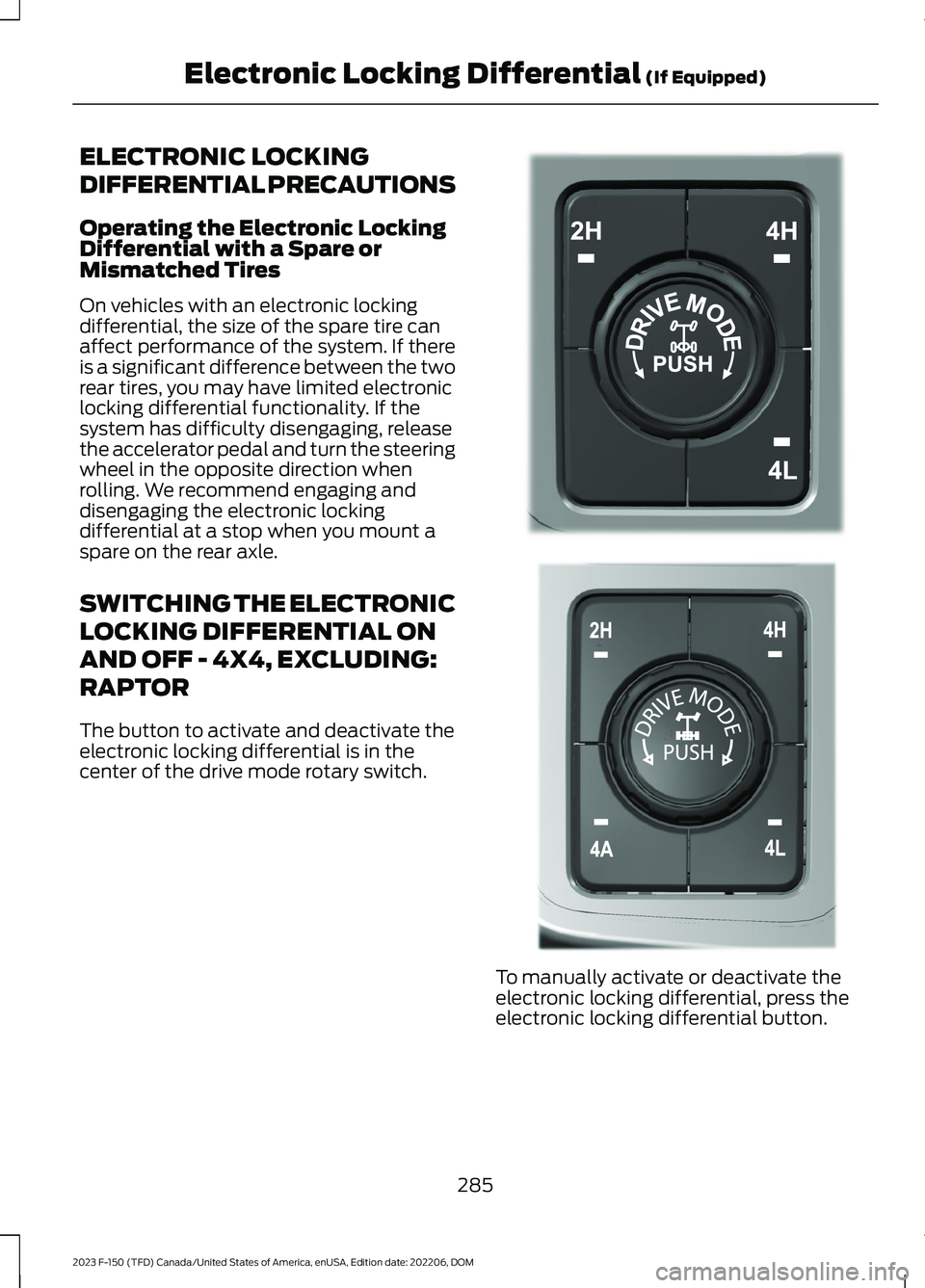
The button to activate and deactivate theelectronic locking differential is in thecenter of the drive mode rotary switch.
To manually activate or deactivate theelectronic locking differential, press theelectronic locking differential button.
285
2023 F-150 (TFD) Canada/United States of America, enUSA, Edition date: 202206, DOMElectronic Locking Differential (If Equipped)E323655 E308146
Page 290 of 786
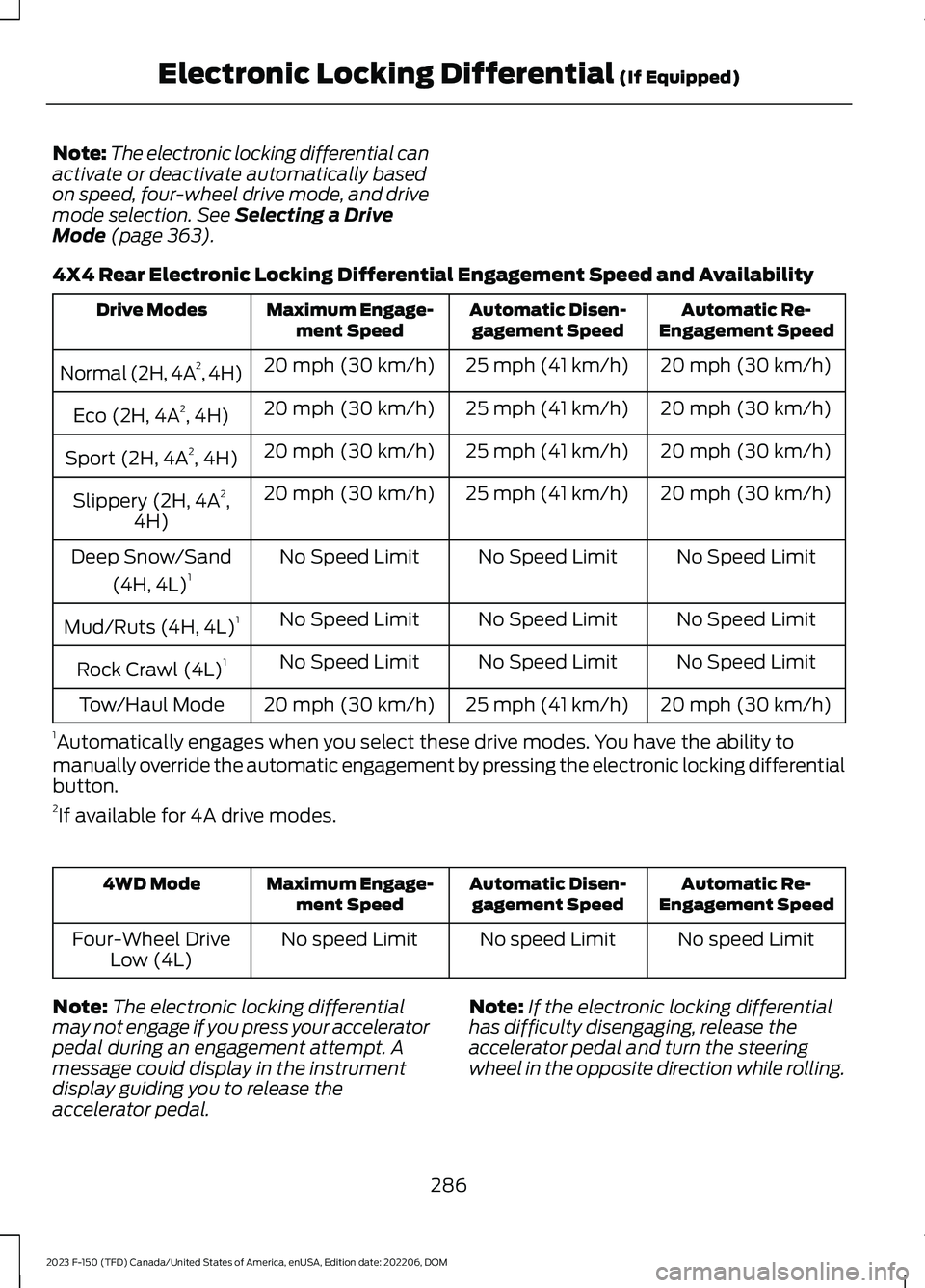
Note:The electronic locking differential canactivate or deactivate automatically basedon speed, four-wheel drive mode, and drivemode selection. See Selecting a DriveMode (page 363).
4X4 Rear Electronic Locking Differential Engagement Speed and Availability
Automatic Re-Engagement SpeedAutomatic Disen-gagement SpeedMaximum Engage-ment SpeedDrive Modes
20 mph (30 km/h)25 mph (41 km/h)20 mph (30 km/h)Normal (2H, 4A2, 4H)
20 mph (30 km/h)25 mph (41 km/h)20 mph (30 km/h)Eco (2H, 4A2, 4H)
20 mph (30 km/h)25 mph (41 km/h)20 mph (30 km/h)Sport (2H, 4A2, 4H)
20 mph (30 km/h)25 mph (41 km/h)20 mph (30 km/h)Slippery (2H, 4A2,4H)
No Speed LimitNo Speed LimitNo Speed LimitDeep Snow/Sand
(4H, 4L)1
No Speed LimitNo Speed LimitNo Speed LimitMud/Ruts (4H, 4L)1
No Speed LimitNo Speed LimitNo Speed LimitRock Crawl (4L)1
20 mph (30 km/h)25 mph (41 km/h)20 mph (30 km/h)Tow/Haul Mode
1Automatically engages when you select these drive modes. You have the ability tomanually override the automatic engagement by pressing the electronic locking differentialbutton.2If available for 4A drive modes.
Automatic Re-Engagement SpeedAutomatic Disen-gagement SpeedMaximum Engage-ment Speed4WD Mode
No speed LimitNo speed LimitNo speed LimitFour-Wheel DriveLow (4L)
Note:The electronic locking differentialmay not engage if you press your acceleratorpedal during an engagement attempt. Amessage could display in the instrumentdisplay guiding you to release theaccelerator pedal.
Note:If the electronic locking differentialhas difficulty disengaging, release theaccelerator pedal and turn the steeringwheel in the opposite direction while rolling.
286
2023 F-150 (TFD) Canada/United States of America, enUSA, Edition date: 202206, DOMElectronic Locking Differential (If Equipped)
Page 295 of 786
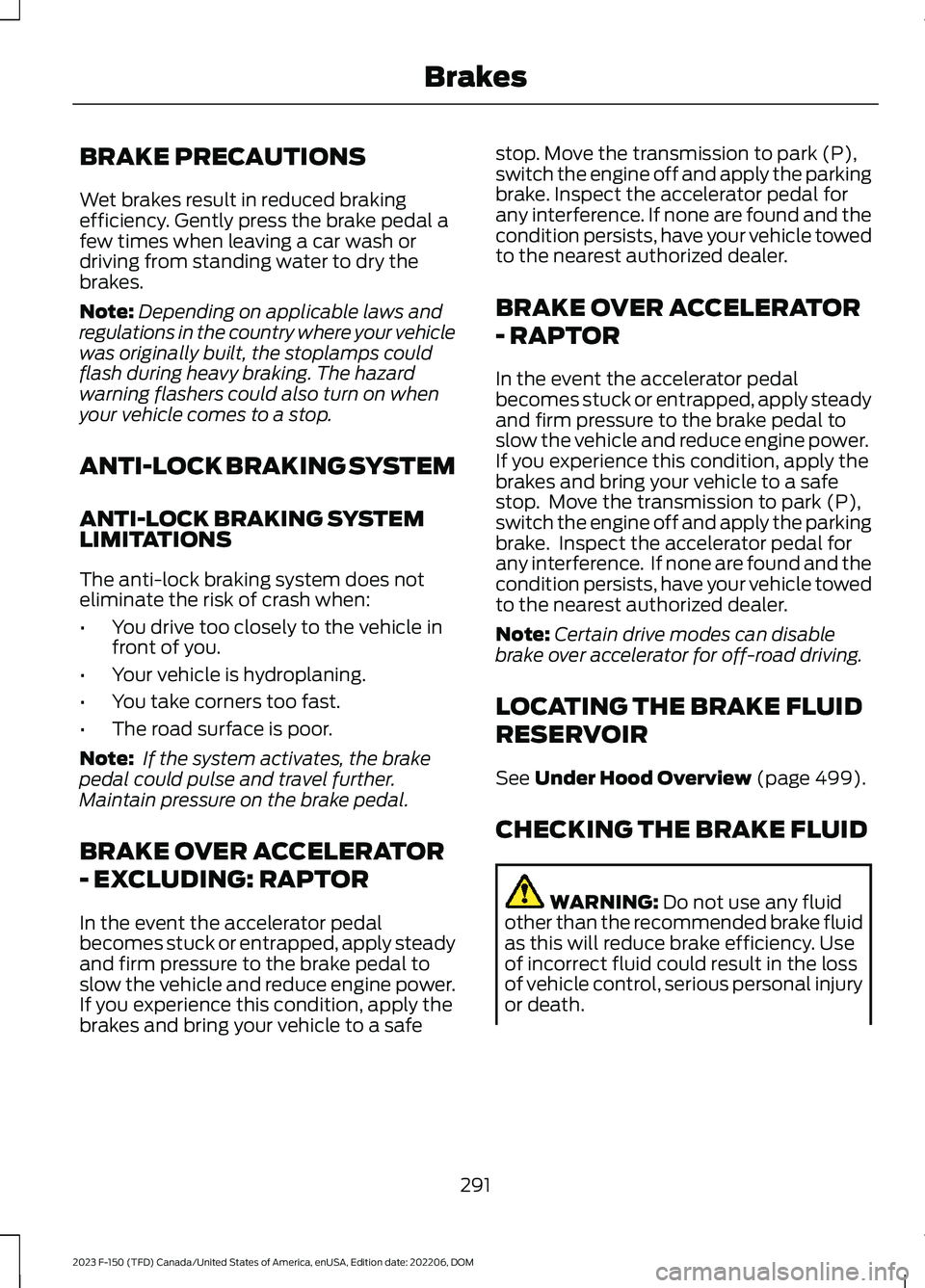
BRAKE PRECAUTIONS
Wet brakes result in reduced brakingefficiency. Gently press the brake pedal afew times when leaving a car wash ordriving from standing water to dry thebrakes.
Note:Depending on applicable laws andregulations in the country where your vehiclewas originally built, the stoplamps couldflash during heavy braking. The hazardwarning flashers could also turn on whenyour vehicle comes to a stop.
ANTI-LOCK BRAKING SYSTEM
ANTI-LOCK BRAKING SYSTEMLIMITATIONS
The anti-lock braking system does noteliminate the risk of crash when:
•You drive too closely to the vehicle infront of you.
•Your vehicle is hydroplaning.
•You take corners too fast.
•The road surface is poor.
Note: If the system activates, the brakepedal could pulse and travel further.Maintain pressure on the brake pedal.
BRAKE OVER ACCELERATOR
- EXCLUDING: RAPTOR
In the event the accelerator pedalbecomes stuck or entrapped, apply steadyand firm pressure to the brake pedal toslow the vehicle and reduce engine power.If you experience this condition, apply thebrakes and bring your vehicle to a safe
stop. Move the transmission to park (P),switch the engine off and apply the parkingbrake. Inspect the accelerator pedal forany interference. If none are found and thecondition persists, have your vehicle towedto the nearest authorized dealer.
BRAKE OVER ACCELERATOR
- RAPTOR
In the event the accelerator pedalbecomes stuck or entrapped, apply steadyand firm pressure to the brake pedal toslow the vehicle and reduce engine power.If you experience this condition, apply thebrakes and bring your vehicle to a safestop. Move the transmission to park (P),switch the engine off and apply the parkingbrake. Inspect the accelerator pedal forany interference. If none are found and thecondition persists, have your vehicle towedto the nearest authorized dealer.
Note:Certain drive modes can disablebrake over accelerator for off-road driving.
LOCATING THE BRAKE FLUID
RESERVOIR
See Under Hood Overview (page 499).
CHECKING THE BRAKE FLUID
WARNING: Do not use any fluidother than the recommended brake fluidas this will reduce brake efficiency. Useof incorrect fluid could result in the lossof vehicle control, serious personal injuryor death.
291
2023 F-150 (TFD) Canada/United States of America, enUSA, Edition date: 202206, DOMBrakes