radio controls FORD F250 2013 Owners Manual
[x] Cancel search | Manufacturer: FORD, Model Year: 2013, Model line: F250, Model: FORD F250 2013Pages: 577, PDF Size: 7.74 MB
Page 4 of 577
Instrument Cluster 97
Gauges.............................................97
Warning lamps and indicators.............................99
Audible warnings and indicators..........................103
Information Displays 104
Controls............................................104
Information messages..................................119
Audio System 134
AM/FMstereo........................................136
AM/FM/CD with SYNC.................................137
Auxiliary input jack...................................141
USBport...........................................142
Satellite radio information...............................143
Climate Control 146
Manual heating and air conditioning........................146
Dual automatic temperature control........................148
Rear window defroster.................................152
Seats 154
Sitting in the correct position............................154
Head restraints.......................................155
Manual seats........................................157
Power seats.........................................159
Memory function.....................................160
Rear seats..........................................161
Heated and cooled seats................................165
Universal Garage Door Opener (If Equipped) 168
Car2U® home automation system.........................168
HomeLink® wireless control system.......................173
Table of Contents3
2013 F-250/350/450/550(f23)
Owners Guide gf, 3rd Printing, December 2012
USA(fus)
Page 62 of 577
GENERAL INFORMATION ON RADIO FREQUENCIES
This device complies with part 15 of the FCC Rules and with Industry
Canada license-exempt RSS standard(s). Operation is subject to the
following two conditions: (1) This device may not cause harmful
interference, and (2) This device must accept any interference received,
including interference that may cause undesired operation.
Note:Changes or modifications not expressly approved by the party
responsible for compliance could void the user’s authority to operate
the equipment. The termICbefore the radio certification number only
signifies that Industry Canada technical specifications were met.
The typical operating range for your transmitter is approximately 33 feet
(10 meters). Vehicles with the remote start feature will have a greater
range. A decrease in operating range could be caused by:
•weather conditions
•nearby radio towers
•structures around your vehicle
•other vehicles parked next to your vehicle.
The radio frequency used by your remote control can also be used by
other short-distance radio transmissions, for example amateur radios,
medical equipment, wireless headphones, remote controls and alarm
systems. If the frequencies are jammed, you will not be able to use your
remote control. You can lock and unlock the doors with the key.
Note:Make sure your vehicle is locked before leaving it unattended.
Note:If you are in range, the remote control will operate if you press
any button unintentionally.
Keys and Remote Control61
2013 F-250/350/450/550(f23)
Owners Guide gf, 3rd Printing, December 2012
USA(fus)
Page 141 of 577
AM/FM/CD SONY AUDIO SYSTEM
WARNING:Driving while distracted can result in loss of vehicle
control, crash and injury. We strongly recommend that you use
extreme caution when using any device that may take your focus off
the road. Your primary responsibility is the safe operation of your
vehicle. We recommend against the use of any hand-held device while
driving and encourage the use of voice-operated systems when possible.
Make sure you are aware of all applicable local laws that may affect the
use of electronic devices while driving.
Note:The MyFord Touch system controls most of the audio features.
See theMyFord Touchchapter for more information.
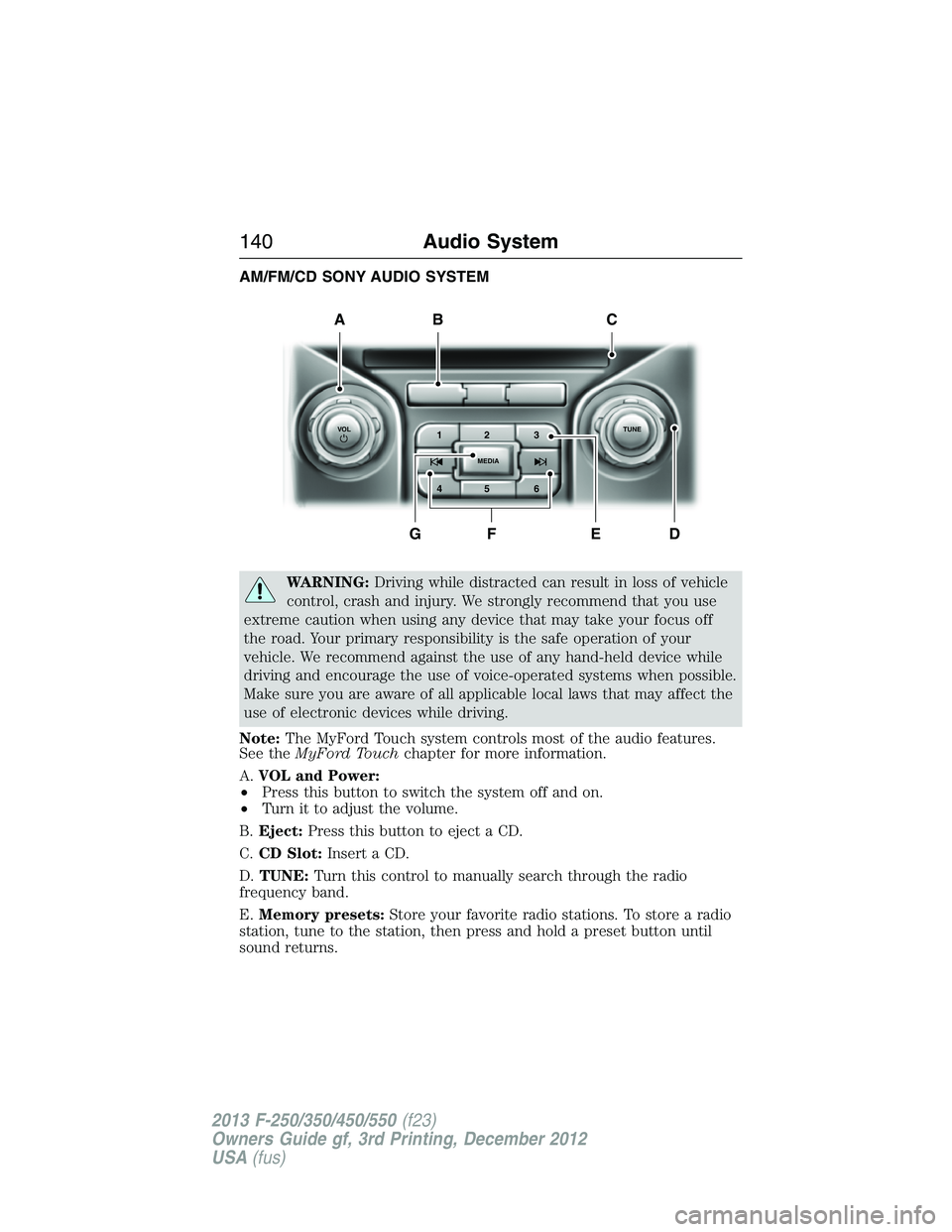
A.VOL and Power:
•Press this button to switch the system off and on.
•Turn it to adjust the volume.
B.Eject:Press this button to eject a CD.
C.CD Slot:Insert a CD.
D.TUNE:Turn this control to manually search through the radio
frequency band.
E.Memory presets:Store your favorite radio stations. To store a radio
station, tune to the station, then press and hold a preset button until
sound returns.
A
DFEG
BC
1VOLTUNE
MEDIA23
45 6
140Audio System
2013 F-250/350/450/550(f23)
Owners Guide gf, 3rd Printing, December 2012
USA(fus)
Page 143 of 577
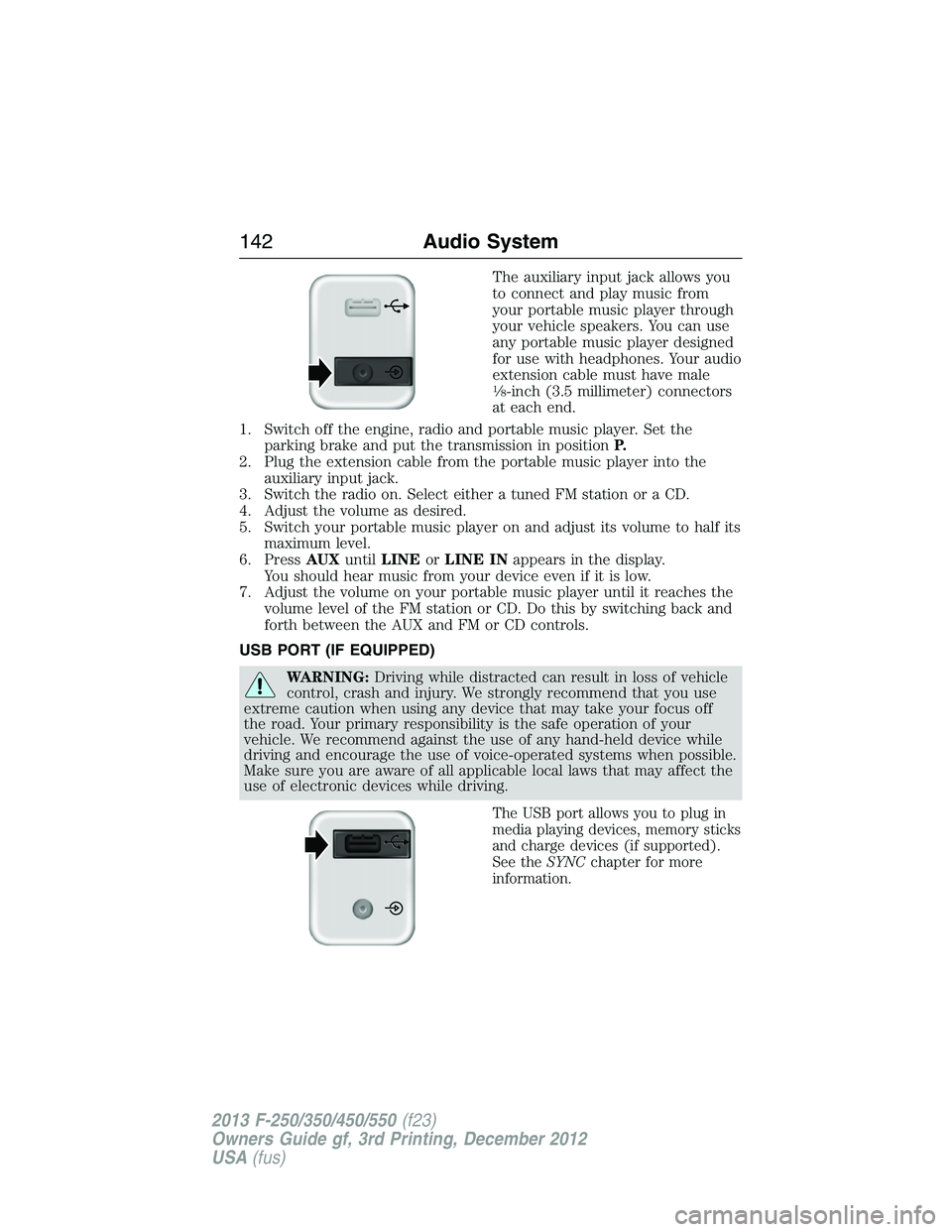
The auxiliary input jack allows you
to connect and play music from
your portable music player through
your vehicle speakers. You can use
any portable music player designed
for use with headphones. Your audio
extension cable must have male
18-inch (3.5 millimeter) connectors
at each end.
1. Switch off the engine, radio and portable music player. Set the
parking brake and put the transmission in positionP.
2. Plug the extension cable from the portable music player into the
auxiliary input jack.
3. Switch the radio on. Select either a tuned FM station or a CD.
4. Adjust the volume as desired.
5. Switch your portable music player on and adjust its volume to half its
maximum level.
6. PressAUXuntilLINEorLINE INappears in the display.
You should hear music from your device even if it is low.
7. Adjust the volume on your portable music player until it reaches the
volume level of the FM station or CD. Do this by switching back and
forth between the AUX and FM or CD controls.
USB PORT (IF EQUIPPED)
WARNING:Driving while distracted can result in loss of vehicle
control, crash and injury. We strongly recommend that you use
extreme caution when using any device that may take your focus off
the road. Your primary responsibility is the safe operation of your
vehicle. We recommend against the use of any hand-held device while
driving and encourage the use of voice-operated systems when possible.
Make sure you are aware of all applicable local laws that may affect the
use of electronic devices while driving.
The USB port allows you to plug in
media playing devices, memory sticks
and charge devices (if supported).
See theSYNCchapter for more
information.
142Audio System
2013 F-250/350/450/550(f23)
Owners Guide gf, 3rd Printing, December 2012
USA(fus)
Page 470 of 577
Using the Touch-sensitive Controls on Your System
To turn a feature on and off, just touch the graphic with your finger.
To get the best performance from the touch-sensitive controls:
•Do not press hard on the controls. They are sensitive to light touch.
•Use your bare finger to touch the center of a touch-control graphic.
Touching off-center of the graphic may affect operation of a nearby
control.
•Make sure your hands are clean and dry.
•
Keep metal and other conductive material away from the surface of the
touchscreen as this may cause electronic interference (for example,
inadvertently turning on a feature other than the one you meant to
turn on).
Depending on your vehicle and option package, you may also have these
controls on your bezel:
•Power: Switch the media or climate features off and on.
•VOL:Control the volume of playing media.
•Fan: Control the speed of the climate system fan.
•Seek and Tune buttons: Use as you normally would in media modes.
•Eject: Eject a CD from the entertainment system.
•Radio preset buttons: Located below the touchscreen, you can use
these buttons to enter a radio preset in addition to using the
touchscreen.
•MEDIA:Touch the word repeatedly to see all available media modes.
The screen does not change, but you see the media change in the
lower left status bar.
•Hazard flasher: Switch the hazard flashers off and on.
Cleaning the Touchscreen Display
Use a clean, soft cloth such as one used for cleaning glasses. If dirt or
fingerprints are still visible, apply a small amount of alcohol to the cloth.
Do not pour or spray alcohol onto the display. Do not use detergent or
any type of solvent to clean the display.
Support
The SYNC support team is available to help you with any questions you
aren’t able to answer on your own.
Monday-Saturday, 8:30 am-8pm EST
In the United States, call: 1–888–270–1055
In Canada, call: 1–800–565–3673
Times are subject to change due to holidays.
MyFord Touch® (If Equipped)469
2013 F-250/350/450/550(f23)
Owners Guide gf, 3rd Printing, December 2012
USA(fus)
Page 480 of 577
F. Touch this button to scroll down for more options, such as:
•SD Card
•BT Stereo
•A/V In
G. These buttons change with the media mode you are in.
H. Radio memory presets and CD controls.
Note:Some features may not be available in your area. Contact an
authorized dealer for more information.
You can access these options using the touchscreen or voice commands.
Browsing Device Content
When listening to audio on a device, you can browse through other
devices without having to change sources. For example, if you are
currently listening to audio on an SD card, you can browse all the artists
that are stored on your USB device.
Press the voice icon on the steering wheel. When prompted,
you can say:
“BROWSE” within Devices
“Browse”*
“Browse
“Browse
“Browse CD track list”
“Browse Sirius channel guide”
“Browse SD card”
“Browse USB”
“Help”
*If you have said “Browse”, you can then say any commands in the
following chart.
**This command is only usable if you have an active subscription to
SIRIUS satellite radio.
MyFord Touch® (If Equipped)479
2013 F-250/350/450/550(f23)
Owners Guide gf, 3rd Printing, December 2012
USA(fus)
Page 481 of 577

“BROWSE”
“
”
“CD track list”
“SD card”
“Sirius channel guide”
“USB”
“Help”
*This command is only usable if you have an active subscription to
SIRIUS satellite radio.
**For more commands in SD card or USB mode, see the “SD card and
USB Port” section of this chapter.
For a complete list of “Browse” voice commands, seeUSB and SD card
voice commandsandBluetooth audio voice commandsin the
following sections.
Your voice system allows you to change audio sources with a simple voice
command. For example, if you are listening to music on a USB device, then
want to switch to a satellite radio channel, simply press the voice button on
the steering wheel controls and say the name of the SIRIUS station (such
as, “the Highway”). The following voice commands are available at the top
level of the voice session no matter which current audio source you are
listening to (such as a USB device or SIRIUS satellite radio).Note:This is
only available when your MyFord Touch system language is set to North
American English.
“AM <530 - 1710>” “FM <87.7 – 107.9>”
“<530 - 1710>” “<87.7 – 107.9>”
“Sirius <0-223>”
*“
“Play [genre]
“Play [artist]
“Play [album]
“Play
*
*
This command is only usable if you have an active subscription to
SIRIUS satellite radio.
**The commands that have [ ] around the word means that the word is
optional. For example, if you say, “Play Metallica”, this is the same as the
voice command, “Play [artist]
480MyFord Touch® (If Equipped)
2013 F-250/350/450/550(f23)
Owners Guide gf, 3rd Printing, December 2012
USA(fus)
Page 500 of 577
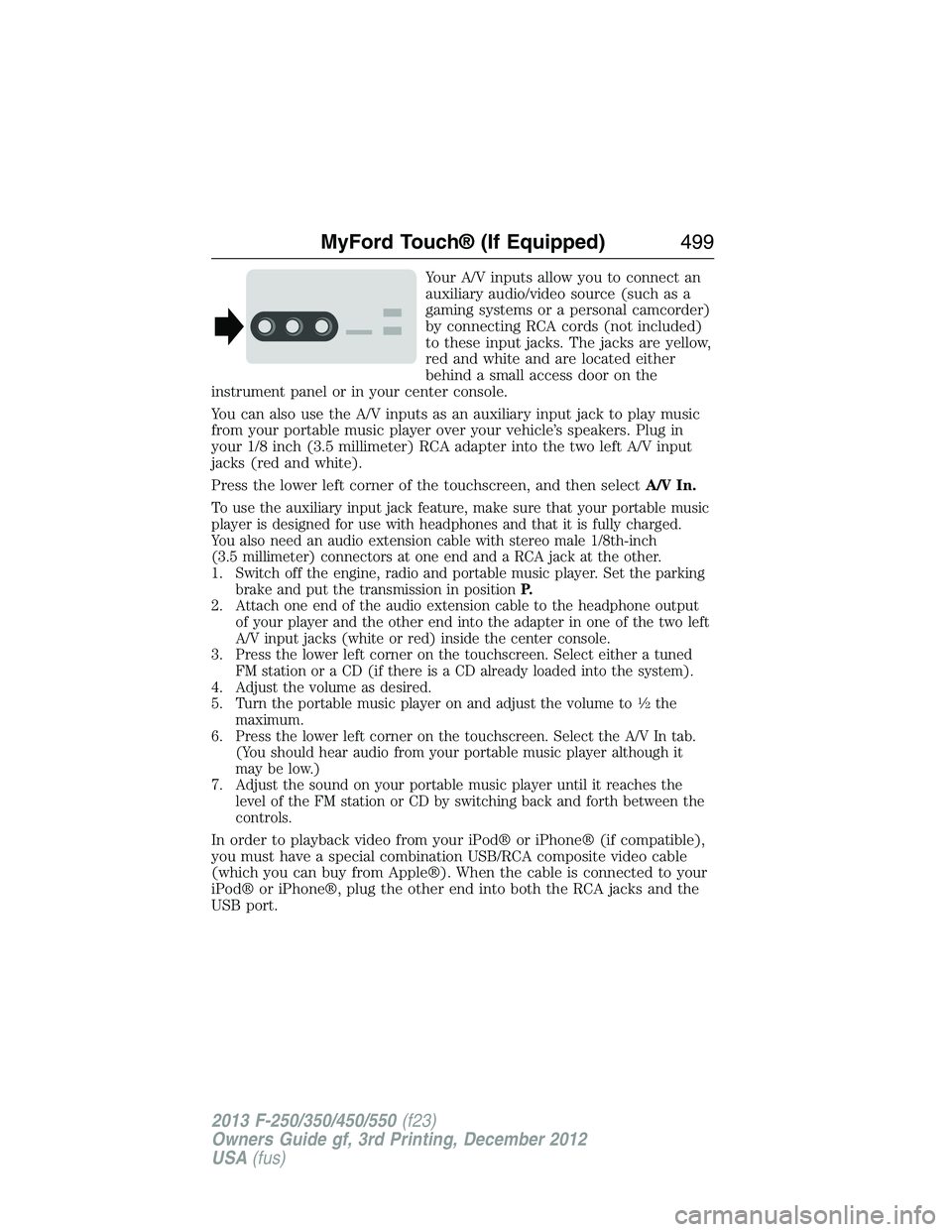
Your A/V inputs allow you to connect an
auxiliary audio/video source (such as a
gaming systems or a personal camcorder)
by connecting RCA cords (not included)
to these input jacks. The jacks are yellow,
red and white and are located either
behind a small access door on the
instrument panel or in your center console.
You can also use the A/V inputs as an auxiliary input jack to play music
from your portable music player over your vehicle’s speakers. Plug in
your 1/8 inch (3.5 millimeter) RCA adapter into the two left A/V input
jacks (red and white).
Press the lower left corner of the touchscreen, and then selectA/V In.
To use the auxiliary input jack feature, make sure that your portable music
player is designed for use with headphones and that it is fully charged.
You also need an audio extension cable with stereo male 1/8th-inch
(3.5 millimeter) connectors at one end and a RCA jack at the other.
1. Switch off the engine, radio and portable music player. Set the parking
brake and put the transmission in positionP.
2. Attach one end of the audio extension cable to the headphone output
of your player and the other end into the adapter in one of the two left
A/V input jacks (white or red) inside the center console.
3. Press the lower left corner on the touchscreen. Select either a tuned
FM station or a CD (if there is a CD already loaded into the system).
4. Adjust the volume as desired.
5. Turn the portable music player on and adjust the volume to
12the
maximum.
6. Press the lower left corner on the touchscreen. Select the A/V In tab.
(You should hear audio from your portable music player although it
may be low.)
7. Adjust the sound on your portable music player until it reaches the
level of the FM station or CD by switching back and forth between the
controls.
In order to playback video from your iPod® or iPhone® (if compatible),
you must have a special combination USB/RCA composite video cable
(which you can buy from Apple®). When the cable is connected to your
iPod® or iPhone®, plug the other end into both the RCA jacks and the
USB port.
MyFord Touch® (If Equipped)499
2013 F-250/350/450/550(f23)
Owners Guide gf, 3rd Printing, December 2012
USA(fus)
Page 503 of 577
3. If you are prompted to enter a PIN on your device, it does not
support Secure Simple Pairing. To pair, enter the PIN displayed on
the touchscreen. Skip the next step.
4. When prompted on your phone’s display, confirm that the PIN
provided by SYNC matches the PIN displayed on your cellular phone.
5. The display indicates when the pairing is successful.
SYNC may prompt you with more phone options. For more information on
your phone’s capability, see your phone’s manual and visit the website.
Pairing Subsequent Phones
Note:Put the transmission in positionP.Turn on your vehicle ignition
and the radio.
1. Press thePhonecorner of the touchscreen >Settings>BT
Devices>Add Device.
2. Make sure that Bluetooth is set toOnand that your cellular phone is
in the proper mode. See your phone’s user guide if necessary.
3. When prompted on your phone’s display, enter the six-digit PIN
provided by SYNC on the screen. The display indicates when the
pairing is successful. The system asks you if you want to download
your phonebook.
SYNC may prompt you with more phone options. For more information on
your phone’s capability, see your phone’s user guide and visit the website.
Making Calls
Press the voice button on your steering wheel controls. When
prompted, say, “Call
number.
To end the call or exit phone mode, press and hold the phone
button.
Receiving Calls
During an incoming call, an audible tone sounds. Call information
appears in the display if it is available.
Accept the call by pressingAccepton the touchscreen or by
pressing the phone button on your steering wheel controls.
Reject the call by pressingRejecton the touchscreen or by
pressing and holding the phone button on your steering wheel controls.
Ignore the call by doing nothing. SYNC logs it as a missed call.
502MyFord Touch® (If Equipped)
2013 F-250/350/450/550(f23)
Owners Guide gf, 3rd Printing, December 2012
USA(fus)
Page 576 of 577
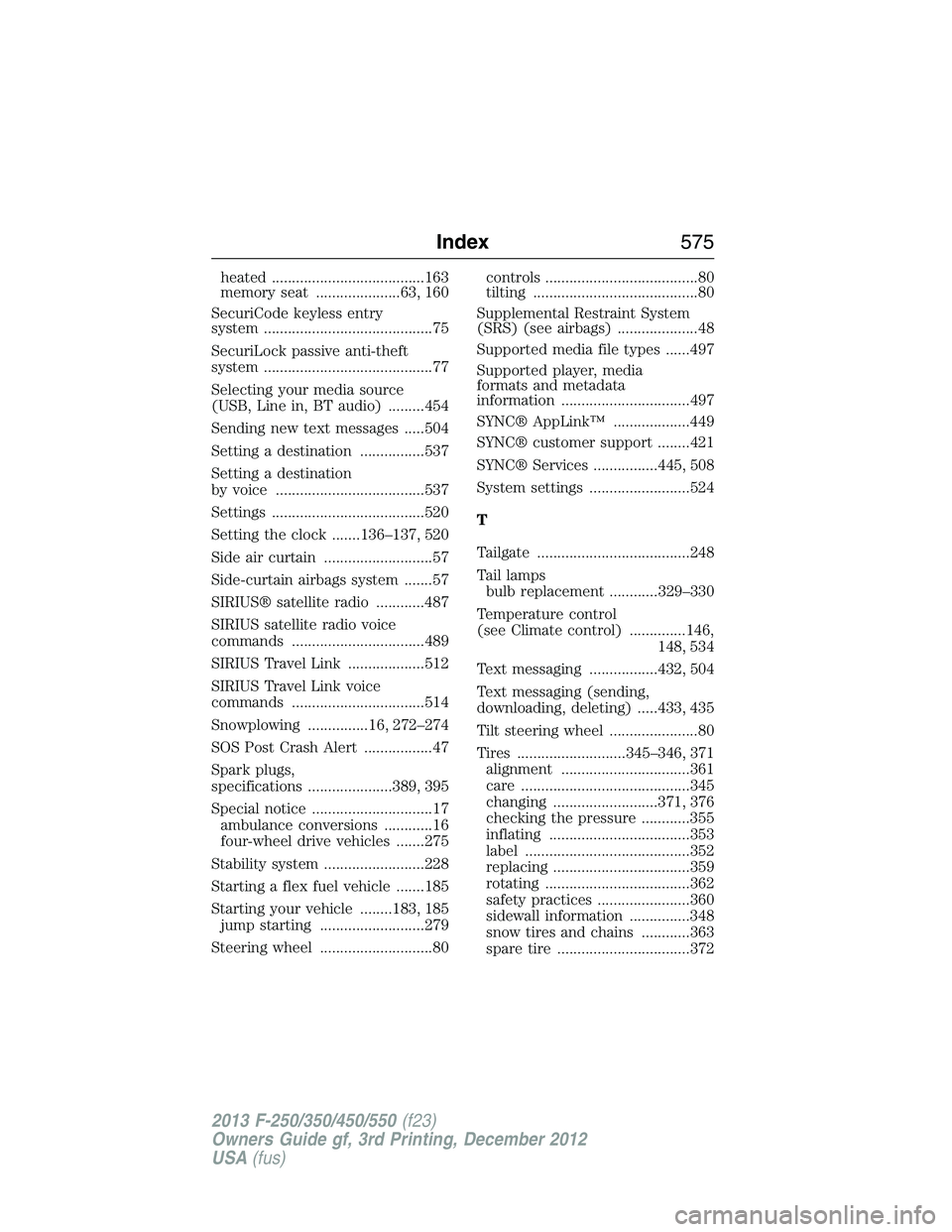
heated ......................................163
memory seat .....................63, 160
SecuriCode keyless entry
system ..........................................75
SecuriLock passive anti-theft
system ..........................................77
Selecting your media source
(USB, Line in, BT audio) .........454
Sending new text messages .....504
Setting a destination ................537
Setting a destination
by voice .....................................537
Settings ......................................520
Setting the clock .......136–137, 520
Side air curtain ...........................57
Side-curtain airbags system .......57
SIRIUS® satellite radio ............487
SIRIUS satellite radio voice
commands .................................489
SIRIUS Travel Link ...................512
SIRIUS Travel Link voice
commands .................................514
Snowplowing ...............16, 272–274
SOS Post Crash Alert .................47
Spark plugs,
specifications .....................389, 395
Special notice ..............................17
ambulance conversions ............16
four-wheel drive vehicles .......275
Stability system .........................228
Starting a flex fuel vehicle .......185
Starting your vehicle ........183, 185
jump starting ..........................279
Steering wheel ............................80controls ......................................80
tilting .........................................80
Supplemental Restraint System
(SRS) (see airbags) ....................48
Supported media file types ......497
Supported player, media
formats and metadata
information ................................497
SYNC® AppLink™ ...................449
SYNC® customer support ........421
SYNC® Services ................445, 508
System settings .........................524
T
Tailgate ......................................248
Tail lamps
bulb replacement ............329–330
Temperature control
(see Climate control) ..............146,
148, 534
Text messaging .................432, 504
Text messaging (sending,
downloading, deleting) .....433, 435
Tilt steering wheel ......................80
Tires ...........................345–346, 371
alignment ................................361
care ..........................................345
changing ..........................371, 376
checking the pressure ............355
inflating ...................................353
label .........................................352
replacing ..................................359
rotating ....................................362
safety practices .......................360
sidewall information ...............348
snow tires and chains ............363
spare tire .................................372
Index575
2013 F-250/350/450/550(f23)
Owners Guide gf, 3rd Printing, December 2012
USA(fus)