manual transmission FORD F750 2007 11.G User Guide
[x] Cancel search | Manufacturer: FORD, Model Year: 2007, Model line: F750, Model: FORD F750 2007 11.GPages: 280, PDF Size: 1.93 MB
Page 112 of 280
•Depending on the grade and vehicle load, you may or may not feel the
retarding force acting against your body when the brake is applied.
The brake’s retarding force is actually preventing the vehicle from
going much faster.
•Engine speed has a major effect on retarding performance, with higher
engine speeds permitting greater retarding ability.
•Engine brake performance is closely related to the type of
transmission your vehicle is equipped with. Downshifting of manual
transmission to the lowest gear possible, without exceeding the
maximum engine RPM limit, will maximize retarding performance.
Exhaust brakes will operate effectively with automatic transmissions,
but performance will vary with engine speed and the gear selected by
the transmission.
Make sure the exhaust brake is turned off before shutting off the engine.
Note:Installing an exhaust or auxiliary brake does not necessarily
protect the engine from exceeding maximum governed speed. The
primary brakes should be used to never allow the engine to exceed
maximum governed speed under any conditions.
TRAILER BRAKE HAND CONTROL (IF EQUIPPED)
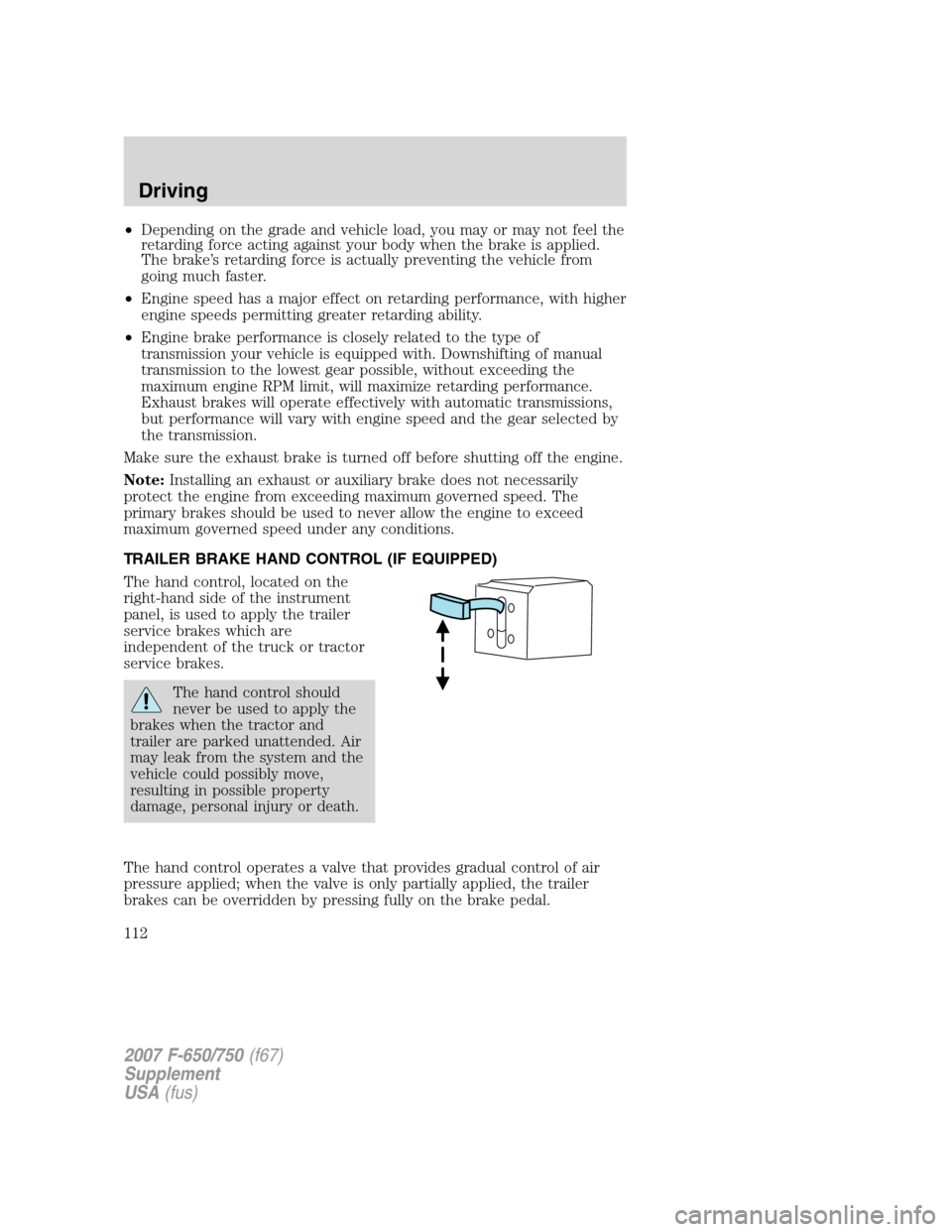
The hand control, located on the
right-hand side of the instrument
panel, is used to apply the trailer
service brakes which are
independent of the truck or tractor
service brakes.
The hand control should
never be used to apply the
brakes when the tractor and
trailer are parked unattended. Air
may leak from the system and the
vehicle could possibly move,
resulting in possible property
damage, personal injury or death.
The hand control operates a valve that provides gradual control of air
pressure applied; when the valve is only partially applied, the trailer
brakes can be overridden by pressing fully on the brake pedal.
2007 F-650/750(f67)
Supplement
USA(fus)
Driving
112
Page 121 of 280
When disconnecting the trailer:
•Lower the landing gear, then press the lower portion of the switch.
• Disconnect the brake hoses, trailer-side and rear light connectors,
then pull the release lever on the fifth wheel.
The upper portion of the switch must be pressed before operating with a
trailer or operating in the bobtail mode.
Suspension conversions
It is not recommended, or approved, that suspension conversions be
performed. However, it is understood that, on occasion, aftermarket add-on
suspensions are installed by others on the truck chassis which allow
operator control for weight transfer from other axles (i.e., air lift axles).
When operating a loaded vehicle, the driver must keep all
adjustable axles on the ground at all times, supporting their
share of the vehicle’s load. Failure to do so can overload other axles,
tires, wheels, springs, steering components, brakes and frames,
resulting in early component failure, loss of vehicle control, possible
property damage and personal injury.
AUTOMATIC TRANSMISSION OPERATION (IF EQUIPPED)
Main transmission, auxiliary transmission, transfer case and power take-off
(PTO) control shift patterns can be found on a placard or decal on the
driver’s sun visor, on the instrument panel or on the shift control itself.
The main transmission control is used to select the various gear ratios or
speeds of the transmission. Selecting D (Direct Drive), does not change
the transmission gear ratio, but is used where the gear ratios in the main
transmission are adequate to handle the vehicle operation.
If the transmission fails to shift properly, check the inline 10A fuse
located in the battery cables above the battery.
Hold the brake pedal down while you move the gearshift lever
between positions. If you don’t hold the brake pedal down, your
vehicle may move unexpectedly and cause property damage, personal
injury or death.
Allison 2200 automatic transmission with park pawl feature
Note: For Allison automatic transmission-equipped vehicles, also refer to
the separate Allison Transmission Operator’s Manual.
2007 F-650/750 (f67)
Supplement
USA (fus)
Driving
121
Page 123 of 280
RPM while maintaining adequate performance. The transmission will
automatically default to Performance mode when you start the engine.
Pressing MODE on the shifter will activate the Economy mode; this will
also illuminate the Mode ON lamp.
If the engine speed is above idle when a gear is selected using the
shifter, the vehicle will not move. To move the vehicle, the shifter must
be moved to re-select a gear after the engine speed returns to idle.
Note:For more information regarding the Allison 3000 Series, refer to
the separate Allison 3000 Series Operator’s Manual.
Torque lock
If your vehicle is parked on an incline and P (Park) is not properly
engaged (The parking brake is not applied before the transmission is
shifted into P [Park]), the weight of the vehicle may generate an
excessive amount of torque on the park pawl. In this situation, it may be
difficult to shift the transmission out of P (Park). Hold the brake pedal
down while shifting out of P (Park), then release the parking brake.
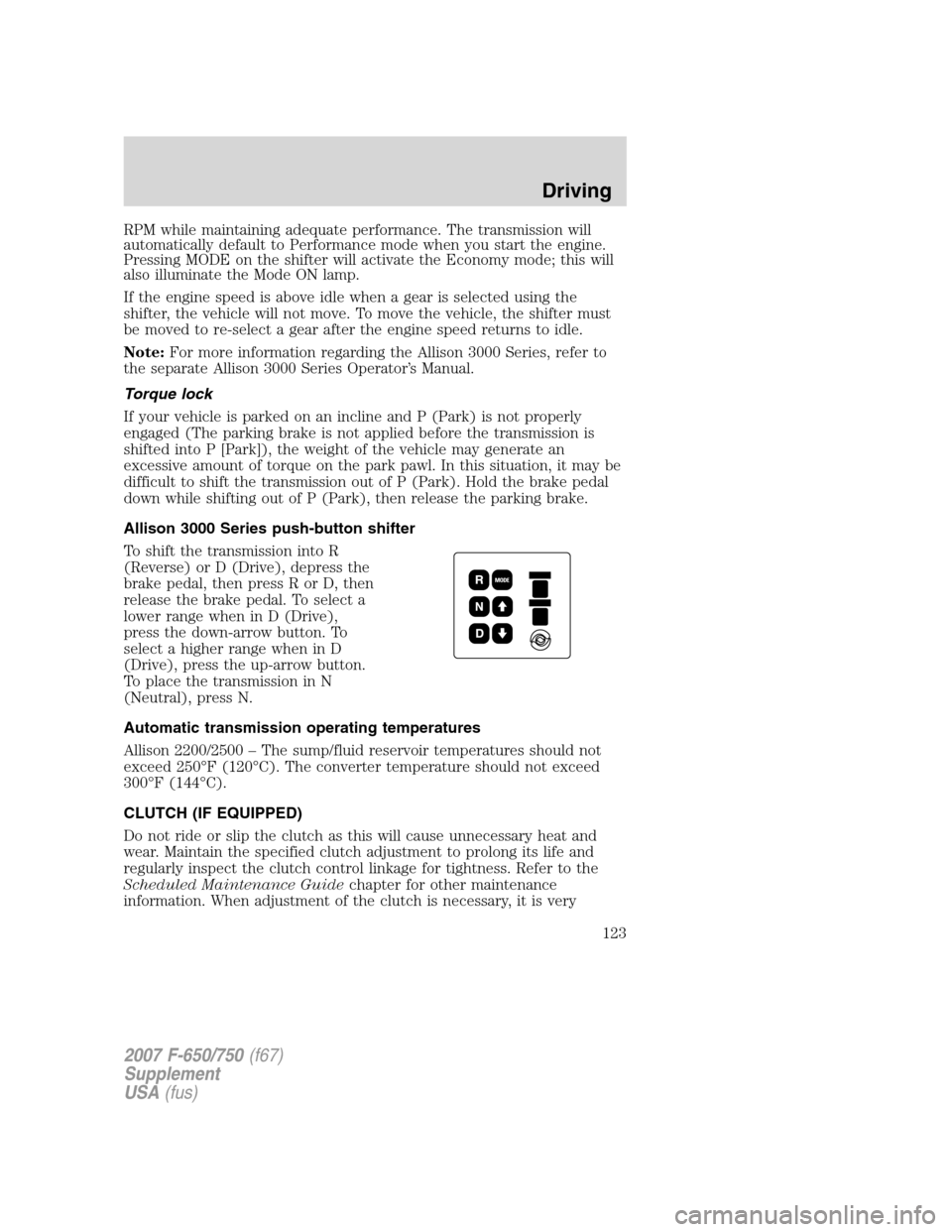
Allison 3000 Series push-button shifter
To shift the transmission into R
(Reverse) or D (Drive), depress the
brake pedal, then press R or D, then
release the brake pedal. To select a
lower range when in D (Drive),
press the down-arrow button. To
select a higher range when in D
(Drive), press the up-arrow button.
To place the transmission in N
(Neutral), press N.
Automatic transmission operating temperatures
Allison 2200/2500 – The sump/fluid reservoir temperatures should not
exceed 250°F (120°C). The converter temperature should not exceed
300°F (144°C).
CLUTCH (IF EQUIPPED)
Do not ride or slip the clutch as this will cause unnecessary heat and
wear. Maintain the specified clutch adjustment to prolong its life and
regularly inspect the clutch control linkage for tightness. Refer to the
Scheduled Maintenance Guide chapter for other maintenance
information. When adjustment of the clutch is necessary, it is very
2007 F-650/750 (f67)
Supplement
USA (fus)
Driving
123
Page 125 of 280
into one of these gears, slowly release the clutch pedal while applying
light pressure on the transmission shift lever until it shifts into gear.
Note:After engagement of 1 (First) gear, do notuse the clutch brake
for upshifting or downshifting. If you do, clutch brake life will shorten
and gear selection shift efforts may increase.
Double-clutch procedures - vehicles equipped with a
non-synchronized transmission
In order to properly upshift or downshift, perform the following steps:
1. Depress the clutch pedal to disengage the clutch.
2. Shift the transmission into neutral.
3. Release the clutch pedal.
If upshifting , wait until the engine speed matches the transmission
speed of the gear you are selecting.
If downshifting, accelerate the engine until the engine speed matches
the input speed of the gear you are selecting. Depress the clutch pedal
immediately and shift into the desired gear, then release the clutch
pedal.
MANUAL TRANSMISSION OPERATION (IF EQUIPPED)
Note: Continued use of a damaged or worn clutch, prolonged clutch
slippage or downshifting at excessive speeds can result in a failure of the
engine, transmission or clutch components.
Note: To avoid premature clutch wear and failure, do not drive with
your foot resting on the clutch pedal or use it to hold the vehicle at a
standstill on an upgrade as when waiting for a traffic light.
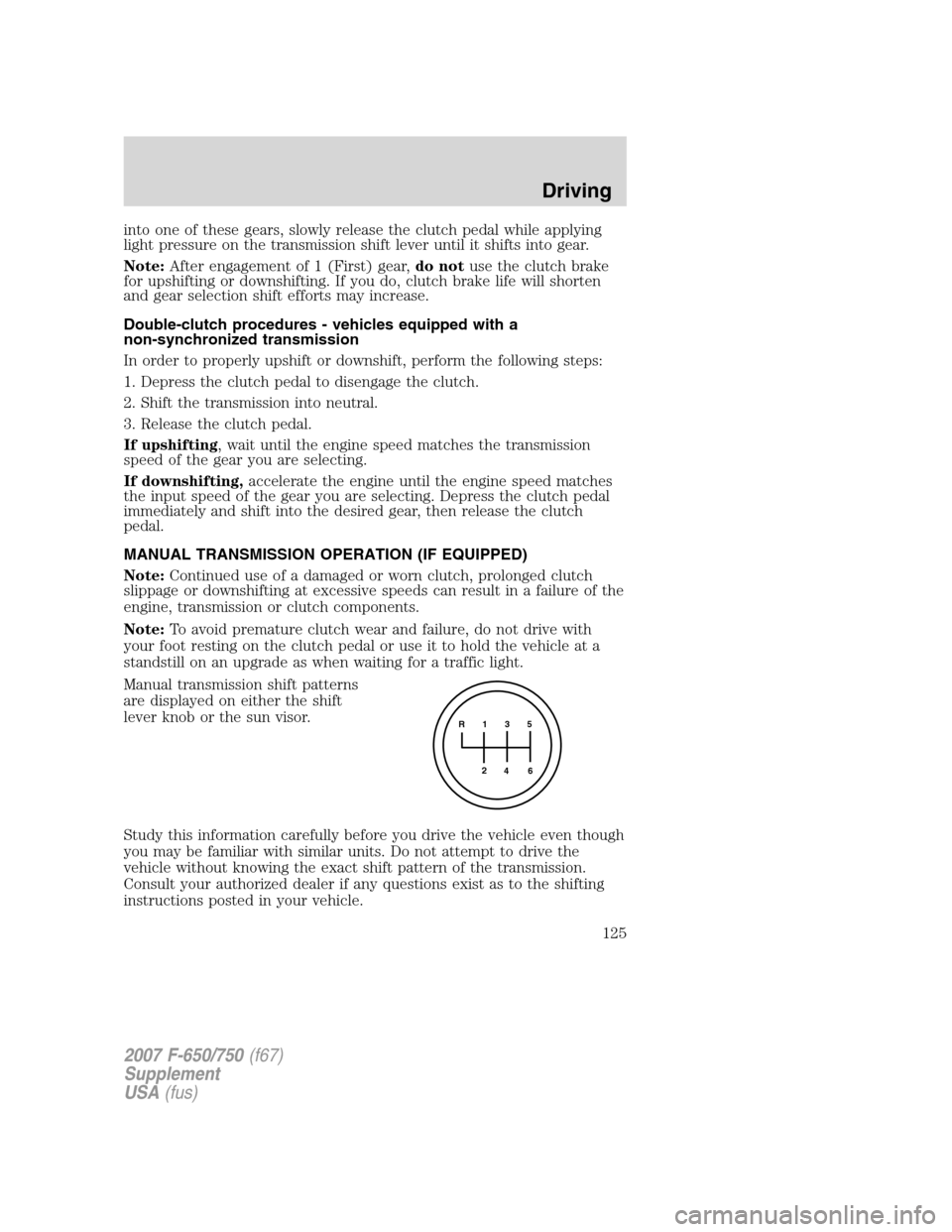
Manual transmission shift patterns
are displayed on either the shift
lever knob or the sun visor.
Study this information carefully before you drive the vehicle even though
you may be familiar with similar units. Do not attempt to drive the
vehicle without knowing the exact shift pattern of the transmission.
Consult your authorized dealer if any questions exist as to the shifting
instructions posted in your vehicle.
R 1 3 5
4
6
2
2007 F-650/750
(f67)
Supplement
USA (fus)
Driving
125
Page 126 of 280
Do not coast the vehicle with the clutch pedal depressed or with
the transmission in neutral. This practice could result in loss of
vehicle control.
Driving hints
The following driving hints are provided as a brief, general guide in
operating the different manual transmissions used in your vehicle.
• When shifting into 1 (First) or R (Reverse) with vehicle standing still,
quickly release and depress the clutch pedal (if necessary to complete
gear engagement).
• Always use the lowest (or most appropriate) gear to start the vehicle.
• Always use a gear ratio low enough to allow the engine to operate
above the minimum engine operation speed range.
• Do not lug the engine.
• Do not slam or jerk the gearshift lever into gear.
• When more power is required, shift to a lower gear and accelerate the
engine near the governed speed.
Shifting with a synchronized transmission
With the clutch pedal depressed, use 2 (Second) gear synchronizer to
stop the clutch disc rotation; this allows smooth engagement of 1 (First)
or R (Reverse) To complete the gear engagement, it may be necessary to
apply light pressure to the gearshift lever during initial engagement of
the clutch. It takes a second or two to match gear speeds; steady
pressure on the gearshift lever will help the synchronizer perform its job
more quickly. If the gearshift lever is forced into position, this action
defeats the purpose of the synchronizer by causing gear clash.
Shifting with a non-synchronized transmission
Refer to Clutch brake andDouble clutch procedures in theClutch
section of this chapter.
2007 F-650/750 (f67)
Supplement
USA (fus)
Driving
126
Page 129 of 280
After the PTO is engaged, move the range selector to N (Neutral).
Increase the engine speed until the desired power take-off operation
speed is obtained. To disengage the PTO after operation with the vehicle
standing, release the throttle, allow the drive equipment to come to a
stop, and then disengage the PTO.
When the PTO is operated with the vehicle stationary, the
transmission must be placed in N (Neutral) with the parking
brake set. If the transmission is not in N (Neutral) and is equipped
with a remote throttle control, an increase in engine speed can
overpower the parking brake and cause the vehicle to move, possibly
resulting in personal injury and/or property damage.
PTO operation while vehicle is moving
After the PTO is engaged for driven vehicle operation, shift to the
desired range and drive the vehicle. The speed of the PTO, during this
period of operation, will always maintain direct relation to vehicle speed.
PTO speed will decrease in relation to vehicle (transmission output)
speed as shifts to a higher gear occur. When operating the PTO while the
vehicle is moving, the PTO may be disengaged whenever it is no longer
required. When there is no load on the PTO gear, it can be pulled out of
engagement.
Vehicles equipped with an Allison 3000 Series automatic
transmission
The PTO drive gear is engine driven and provides direct engine power.
The PTO can be operated when the vehicle is either stationary or moving.
The PTO gear is in constant mesh with the drive gear in the torque
converter housing. A friction clutch or constant drive is used to transmit
power to the PTO.
Vehicles equipped with a Caterpillar engine
The PTO will only operate if the transmission is in N (Neutral). This
feature can be overridden by a special service tool; see your dealer or
service representative for more information.
Vehicles equipped with a manual transmission
Transmission-mounted PTO units are available for local installation on
your vehicle. See your Body Builder’s Layout Book for restrictions on
use and installation of PTO units.
To engage the PTO unit, stop the vehicle and place the transmission in N
(Neutral). Depress the clutch and allow the gears to stop rotating, then
2007 F-650/750 (f67)
Supplement
USA (fus)
Driving
129
Page 131 of 280
Failure to raise all drive wheels with this type of differential
could cause the vehicle to move unexpectedly, resulting in
property damage, personal injury or death.
Care should be taken to avoid sudden accelerations when both drive
wheels are on a slippery surface.
Sudden accelerations on slippery surfaces could cause the
wheels to spin, the vehicle to turn sideways on a crowned road
surface or in a turn, possibly resulting in loss of vehicle control and
personal injury.
Some Dana/Spicer drive axles have a driver-controlled differential lock.
The differential lock can lock or unlock the differential when the vehicle
is moving or stopped. When extra traction is required, the differential
lock will provide full power to both axles.
When the differential is locked, the vehicle’s turning radius will increase
(vehicle will “under-steer”)
The differential can be locked or unlocked when the vehicle is moving at
a constant speed of less than 25 mph (40 km/h) and while the wheels
are not slipping. The differential must not be locked when the vehicle is
traveling down steep grades and traction is minimal.
Note: Never use the differential lock at vehicle speeds above 25 mph (40
km/h).
Note: The driver-controlled differential lock function will vary with some
transmissions.
• Vehicles equipped with an Allison 3000 Series transmission: The
differential lock and differential lock light will automatically disengage
at speeds above 25 mph (40 km/h). The differential lock will remain
off until either the vehicle is restarted or the differential lock switch is
turned off then back on.
• Vehicles equipped with a 5–speed, 6–speed or 7–speed manual:
The differential lock and differential lock light will automatically
disengage at speeds above 25 mph (40 km/h). The differential lock
will remain off until either the vehicle is restarted or the differential
lock switch is turned off then back on.
Axle conversions
It is not recommended, or approved, for axle conversions to be
performed. However, it is understood that, on occasion, aftermarket
2007 F-650/750 (f67)
Supplement
USA (fus)
Driving
131
Page 132 of 280
add-on axles are installed by others on the truck chassis which allow
operator control for weight transfer from other axles (i.e., air lift axles).
When operating a loaded vehicle, the driver must keep all
adjustable axles on the ground at all times, supporting their
share of the vehicle’s load. Failure to do so can overload other axles,
tires, wheels, springs, steering components, brakes and frames,
resulting in early component failure, loss of vehicle control, possible
property damage and personal injury.
TWO-SPEED REAR AXLE (IF EQUIPPED)
A two-speed rear axle allows the driver to select a LO range for greater
pulling power and a HI range for greater road speed and fuel economy.
These ranges can also be used to provide additional steps between
transmission shifts when driving on steep grades and/or fuel economy
may be factors.
Note: Do not shift between ranges when the speed control is on.
Never shift a two-speed axle when descending a steep grade as
this may cause loss of vehicle control and result in personal injury.
Axle shifting
Manual transmissions:
•To downshift, select the next lower gear, release and depress the
accelerator pedal rapidly, or while holding the accelerator pedal down,
release and engage the clutch rapidly. Note:The clutch method is
recommended when driving at slower speeds.
• To upshift, keep the accelerator pedal down, select the next higher
gear, release the accelerator and pause until the axle upshifts. Note:
De-clutch for smoother axle upshifts when driving at slower speeds.
2007 F-650/750 (f67)
Supplement
USA (fus)
Driving
132
Page 133 of 280
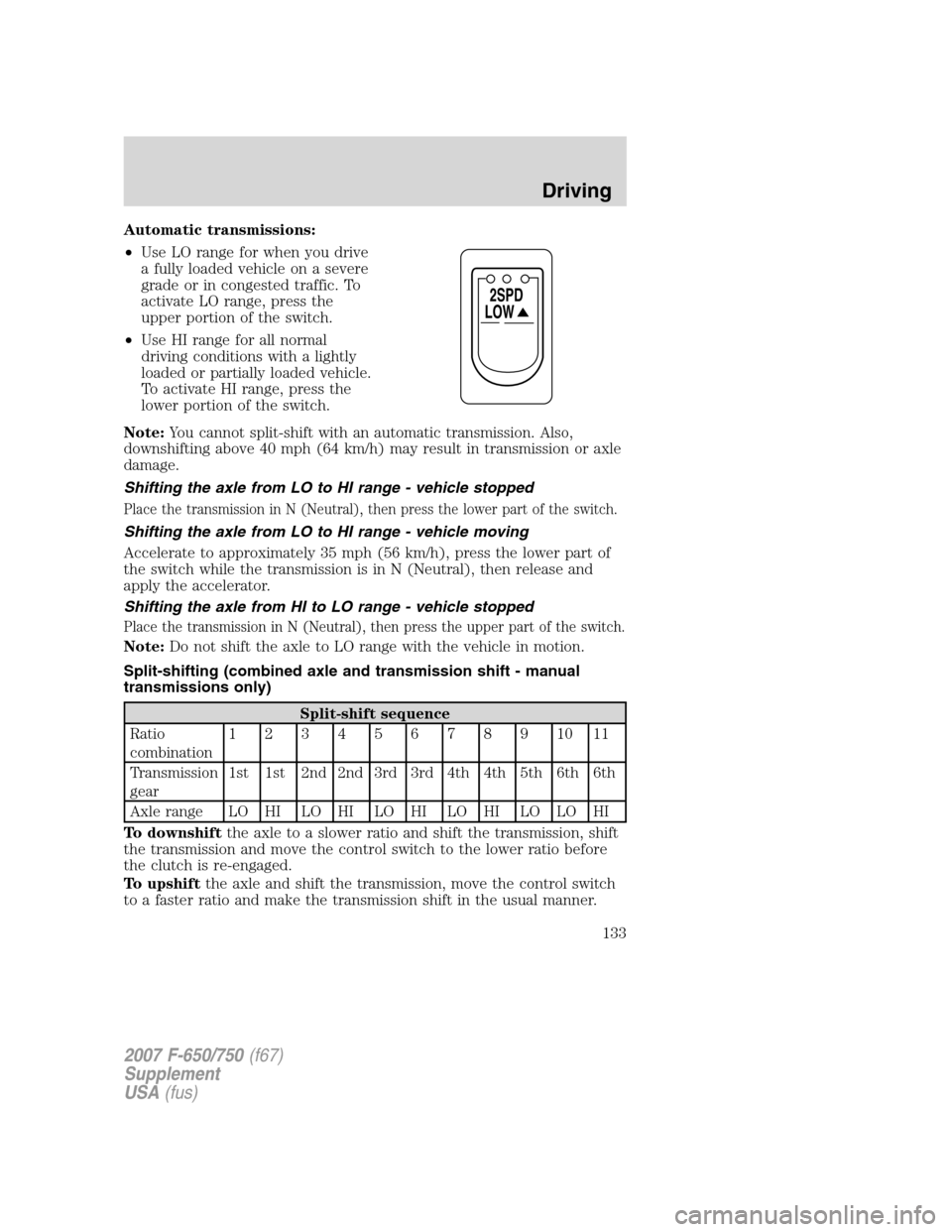
Automatic transmissions:
•Use LO range for when you drive
a fully loaded vehicle on a severe
grade or in congested traffic. To
activate LO range, press the
upper portion of the switch.
• Use HI range for all normal
driving conditions with a lightly
loaded or partially loaded vehicle.
To activate HI range, press the
lower portion of the switch.
Note: You cannot split-shift with an automatic transmission. Also,
downshifting above 40 mph (64 km/h) may result in transmission or axle
damage.
Shifting the axle from LO to HI range - vehicle stopped
Place the transmission in N (Neutral), then press the lower part of the switch.
Shifting the axle from LO to HI range - vehicle moving
Accelerate to approximately 35 mph (56 km/h), press the lower part of
the switch while the transmission is in N (Neutral), then release and
apply the accelerator.
Shifting the axle from HI to LO range - vehicle stopped
Place the transmission in N (Neutral), then press the upper part of the switch.
Note: Do not shift the axle to LO range with the vehicle in motion.
Split-shifting (combined axle and transmission shift - manual
transmissions only)
Split-shift sequence
Ratio
combination 1234567891011
Transmission
gear 1st 1st 2nd 2nd 3rd 3rd 4th 4th 5th 6th 6th
Axle range LO HI LO HI LO HI LO HI LO LO HI
To downshift the axle to a slower ratio and shift the transmission, shift
the transmission and move the control switch to the lower ratio before
the clutch is re-engaged.
To upshift the axle and shift the transmission, move the control switch
to a faster ratio and make the transmission shift in the usual manner.
LOW
2SPD
2007 F-650/750 (f67)
Supplement
USA (fus)
Driving
133
Page 136 of 280
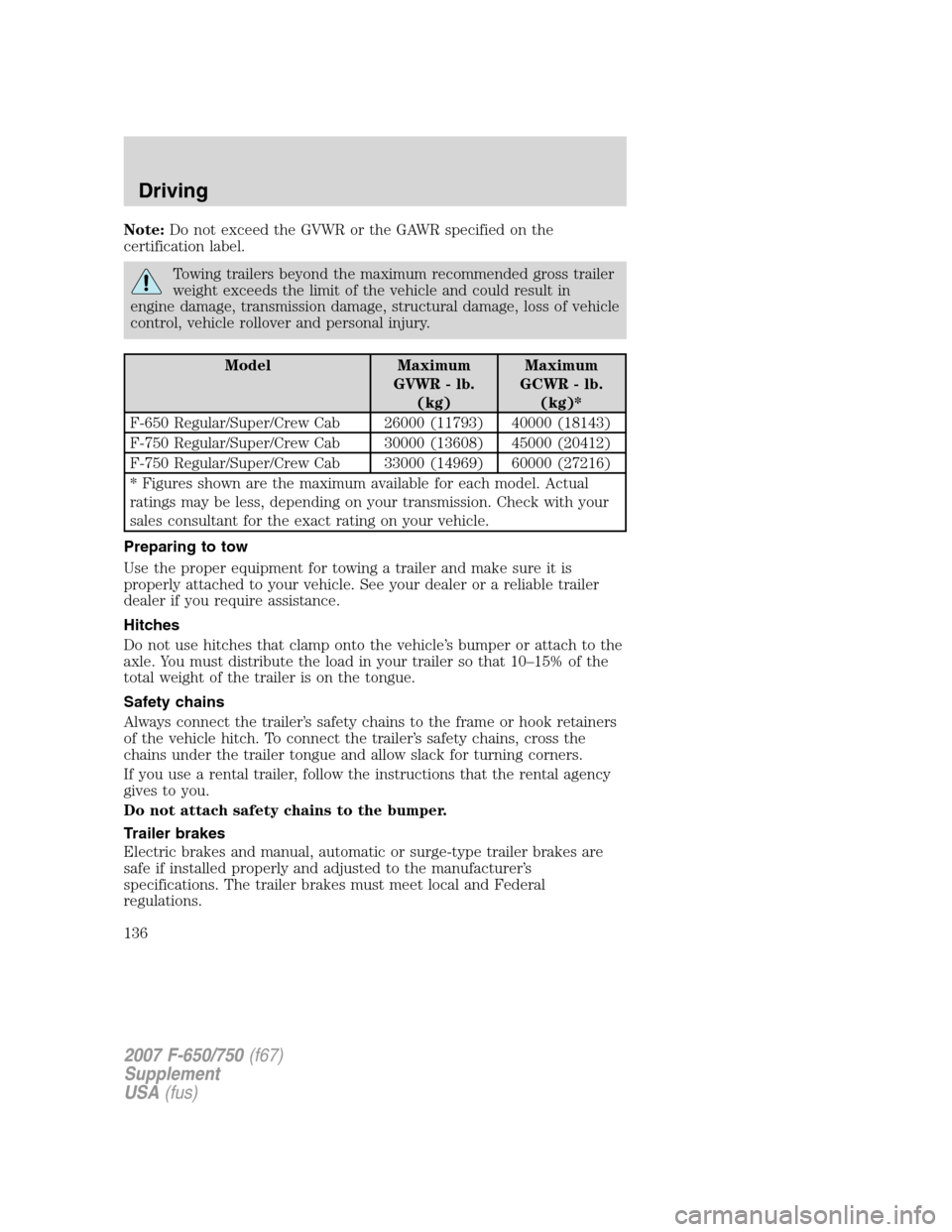
Note:Do not exceed the GVWR or the GAWR specified on the
certification label.
Towing trailers beyond the maximum recommended gross trailer
weight exceeds the limit of the vehicle and could result in
engine damage, transmission damage, structural damage, loss of vehicle
control, vehicle rollover and personal injury.
Model Maximum
GVWR - lb.(kg) Maximum
GCWR - lb. (kg)*
F-650 Regular/Super/Crew Cab 26000 (11793) 40000 (18143)
F-750 Regular/Super/Crew Cab 30000 (13608) 45000 (20412)
F-750 Regular/Super/Crew Cab 33000 (14969) 60000 (27216)
* Figures shown are the maximum available for each model. Actual
ratings may be less, depending on your transmission. Check with your
sales consultant for the exact rating on your vehicle.
Preparing to tow
Use the proper equipment for towing a trailer and make sure it is
properly attached to your vehicle. See your dealer or a reliable trailer
dealer if you require assistance.
Hitches
Do not use hitches that clamp onto the vehicle’s bumper or attach to the
axle. You must distribute the load in your trailer so that 10–15% of the
total weight of the trailer is on the tongue.
Safety chains
Always connect the trailer’s safety chains to the frame or hook retainers
of the vehicle hitch. To connect the trailer’s safety chains, cross the
chains under the trailer tongue and allow slack for turning corners.
If you use a rental trailer, follow the instructions that the rental agency
gives to you.
Do not attach safety chains to the bumper.
Trailer brakes
Electric brakes and manual, automatic or surge-type trailer brakes are
safe if installed properly and adjusted to the manufacturer’s
specifications. The trailer brakes must meet local and Federal
regulations.
2007 F-650/750 (f67)
Supplement
USA (fus)
Driving
136