Body FORD FESTIVA 1991 Owner's Guide
[x] Cancel search | Manufacturer: FORD, Model Year: 1991, Model line: FESTIVA, Model: FORD FESTIVA 1991Pages: 454, PDF Size: 9.53 MB
Page 241 of 454
A "howling" or "whining" noise from the ring and pinion gear can be caused by an improper gear pattern, gear damage, or improper bearing
preload. It can occur at various speeds and driving conditions, or it can be continuous.
Before disassembling axle to diagnose and correct gear ke sure that tires, exhaust, and vehicle trim have been checked as possible causes.
Chuckle
This is a particular rattling noise that sounds like a stick against the spokes of a spinning bicycle wheel. It occurs while decelerating from 40
MPH and usually can be heard until vehicle comes to a complete stop. The frequency varies with the speed of the vehicle.
A chuckle that occurs on the driving phase is usually caused ive clearance due to differential gear wear, or by a damaged tooth on the coast
side of the pinion or ring gear. Even a very small tooth nick or a ridge on the edge of a gear tooth is enough the cause the noise.
This condition can be corrected simply by cleaning the gear tooth nick or ridge with a small grinding wheel. If either gear is damaged or scored
badly, the gear set must be replaced. If metal has broken loose, the carrier and housing must be cleaned to remove particles that could cause
damage.
Knock
This is very similar to a chuckle, though it may be louder, and occur on acceleration or deceleration. Knock can be caused by a gear tooth that
is damaged on the drive side of the ring and pinion gears. Ring gear bolts that are hitting the carrier casting can cause knock. Knock can also be
due to excessive end play in the axle shafts.
Clunk
Clunk is a metallic noise heard when an automatic transmission is engaged in Reverse or Drive, or when throttle is applied or released. It is
caused by backlash somewhere in the driveline, but not necessarily in the axle. To determine whether driveline clunk is caused by the axle,
check the total axle backlash as follows:
1. Raise vehicle on a frame or twinpost hoist so that drive wheels are free. Clamp a bar between axle companion flange and a part of the
frame or body so that flange cannot move.
2. On conventional drive axles, lock the left wheel to keep it from turning. On all models, turn the right wheel slowly until it is felt to be in
Drive condition. Hold a chalk marker on side of tire about 12" from center of wheel. Turn wheel in the opposite direction until it is
again felt to be in Drive condition.
3. Measure the length of the chalk mark, which is the total axle backlash. If backlash is one inch or less, drive axle is not the source of
clunk noise.
Bearing Whine
Bearing whine is a high-pitched sound similar to a whistle. It is usually caused by malfunctioning pinion bearings. Pinion bearings operate at
drive shaft speed. Roller wheel bearings may whine in a similar manner if they run completely dry of lubricant. Bearing noise will occur at all
driving speeds. This distinguishes it from gear whine, which usually comes and goes as speed changes.
Bearing Rumble
Bearing rumble sounds like marbles being tumbled. It is usually caused by a malfunctioning wheel bearing. The lower pitch is because the
wheel bearing turns at only about 1/3 of drive shaft speed.
Chatter On Turns
This is a condition where the entire front or rear of vehicle vibrates when vehicle is moving. The vibration is plainly felt as well as heard. Extra
differential thrust washers installed during axle repair can cause a condition of partial lock-up that creates this chatter.
Axle Shaft Noise
Axle shaft noise is similar to gear noise and pinion bearing whine. Axle shaft bearing noise will normally distinguish itself from gear noise by
occurring in all driving modes (Drive, cruise, coast and float), and will persist with transmission in Neutral while vehicle is moving at problem
speed.
If vehicle displays this noise condition, remove suspect parts, replace wheel seals and install a new set of bearings. Re-evaluate vehicle for
noise before removing any internal components.
Vibration
Vibration is a high-frequency trembling, shaking or grinding condition (felt or heard) that may be constant or variable in level and can occur
during the total operating speed range of the vehicle.
The types of vibrations that can be felt in the vehicle can d into 3 main groups:
Vibrations of various unbalanced rotating parts of the vehicle.
Resonance vibrations of the body and frame structures caused by rotating of unbalanced parts.
Tip-in moans of resonance vibrations from stressed engine or exhaust system mounts or driveline flexing modes.
DRIVE AXLE - RWD TROUBLE SHOOTING
NOTE:This is GENERAL inform ation. This article is not intended to be specific to any unique situation or
individual vehicle configuration. T he purpose of this T rouble Shooting inform ation is to provide a list
of com m on causes to problem sym ptom s. For m odel-specific T rouble Shooting, refer to SUBJECT ,
DIAGNOST IC, or T EST ING articles available in the section(s) you are accessing. For definitions of listed
noises or sounds, see DRIVE AXLE
- NOISE DIAGNOSIS under POWERTRAIN.
Page 28 of 36 MITCHELL 1 ARTICLE - GENERAL INFORMATION Trouble Shooting - Basic Procedures
3/10/2009 http://www.eautorepair.net/app/PrintItems.asp?S0=2097152&S1=0&SG=%7B9B990D68%2D660A%2D45E9%2D8F46%2DE
...
Page 254 of 454
CLUNK
Clunk is a metallic noise heard when an automatic transmission is engaged in Reverse or Drive, or when throttle is applied or released. It is
caused by backlash somewhere in the driveline, but not necessarily in the axle. To determine whether driveline clunk is caused by the axle,
check the total axle backlash as follows:
1. Raise vehicle on a frame or twinpost hoist so that drive wheels are free. Clamp a bar between axle companion flange and a part of the
frame or body so that flange cannot move.
2. On conventional drive axles, lock the left wheel to keep it from turning. On all models, turn the right wheel slowly until it is felt to be in
drive condition. Hold a chalk marker on side of tire about 12" from center of wheel. Turn wheel in the opposite direction until it is again
felt to be in drive condition.
3. Measure the length of the chalk mark, which is the total axle backlash. If backlash is one inch or less, clunk will not be eliminated by
overhauling drive axle.
BEARING WHINE
Bearing whine is a high-pitched sound similar to a whistle. It is usually caused by malfunctioning pinion bearings. Pinion bearings operate at
driveshaft speed. Roller wheel bearings may whine in a similar manner if they run completely dry of lubricant. Bearing noise will occur at all
driving speeds. This distinguishes it from gear whine, which usually comes and goes as speed changes.
BEARING RUMBLE
Bearing rumble sounds like marbles being tumbled. It is usually caused by a malfunctioning wheel bearing. The lower pitch is because the
wheel bearing turns at only about 1/3 of driveshaft speed.
CHATTER ON TURNS
This is a condition where the whole front or rear vibrates when vehicle is moving. The vibration is easily felt and heard. Extra differential
thrust washers installed during axle repair can cause a condition of partial lock-up that creates the chatter.
AXLE SHAFT NOISE
Axle shaft noise is similar to gear noise and pinion bearing whine. Axle shaft bearing noise will normally distinguish itself from gear noise by
occurring in all driving modes. Noise will persist with transmission in neutral while vehicle is moving at problem speed.
If vehicle displays this noise condition, remove suspect axle shafts and replace axle bearings. Re-evaluate vehicle for noise before removing
any internal components.
VIB R AT ION
Vibration is a high-frequency trembling, shaking or grinding condition (felt or heard) that may be constant or variable in level and con occur
during the total operating speed range of the vehicle.
The types of vibrations that can be felt in the vehicle can be divided into 3 main groups:
Vibrations of various unbalanced rotating parts of the vehicle.
Resonance vibrations of the body and frame structures caused by rotating of unbalance parts.
Tip-in moans of resonance vibrations from stressed engine or exhaust system mounts or driveline flexing modes. NOTE:This is GENERAL inform ation. This article is not intended to be specific to any unique situation or
individual vehicle configuration. For m odel-specific inform ation see appropriate articles where
available.
NOTE:This is GENERAL inform ation. This article is not intended to be specific to any unique situation or
individual vehicle configuration. For m odel-specific inform ation see appropriate articles where
available.
NOTE:This is GENERAL inform ation. This article is not intended to be specific to any unique situation or
individual vehicle configuration. For m odel-specific inform ation see appropriate articles where
available.
NOTE:This is GENERAL inform ation. This article is not intended to be specific to any unique situation or
individual vehicle configuration. For m odel-specific inform ation see appropriate articles where
available.
NOTE:This is GENERAL inform ation. This article is not intended to be specific to any unique situation or
individual vehicle configuration. For m odel-specific inform ation see appropriate articles where
available.
NOTE:This is GENERAL inform ation. This article is not intended to be specific to any unique situation or
individual vehicle configuration. For m odel-specific inform ation see appropriate articles where
available.
Copyr ight 2009 Mitchell Repair Information Company, LLC. All Rights Reserved.
Article GUID: A00002193
Page 2 of 2 MITCHELL 1 ARTICLE - GENERAL INFORMATION Drive Axle Noise Diagnosis
3/10/2009 http://www.eautorepair.net/app/PrintItems.asp?S0=2097152&S1=0&SG=%7B9B990D68%2D660A%2D45E9%2D8F46%2DE
...
Page 259 of 454
Back To Article
GENERAL INFORMATION
Electrostatic Discharge (ESD) Warning - Basic Inform ation
* PLEASE READ THIS FIRST *
INTRODUCTION
All Electrostatic Discharge (ESD) sensitive components contain solid state circuits (transistors, diodes, semiconductors) that may become
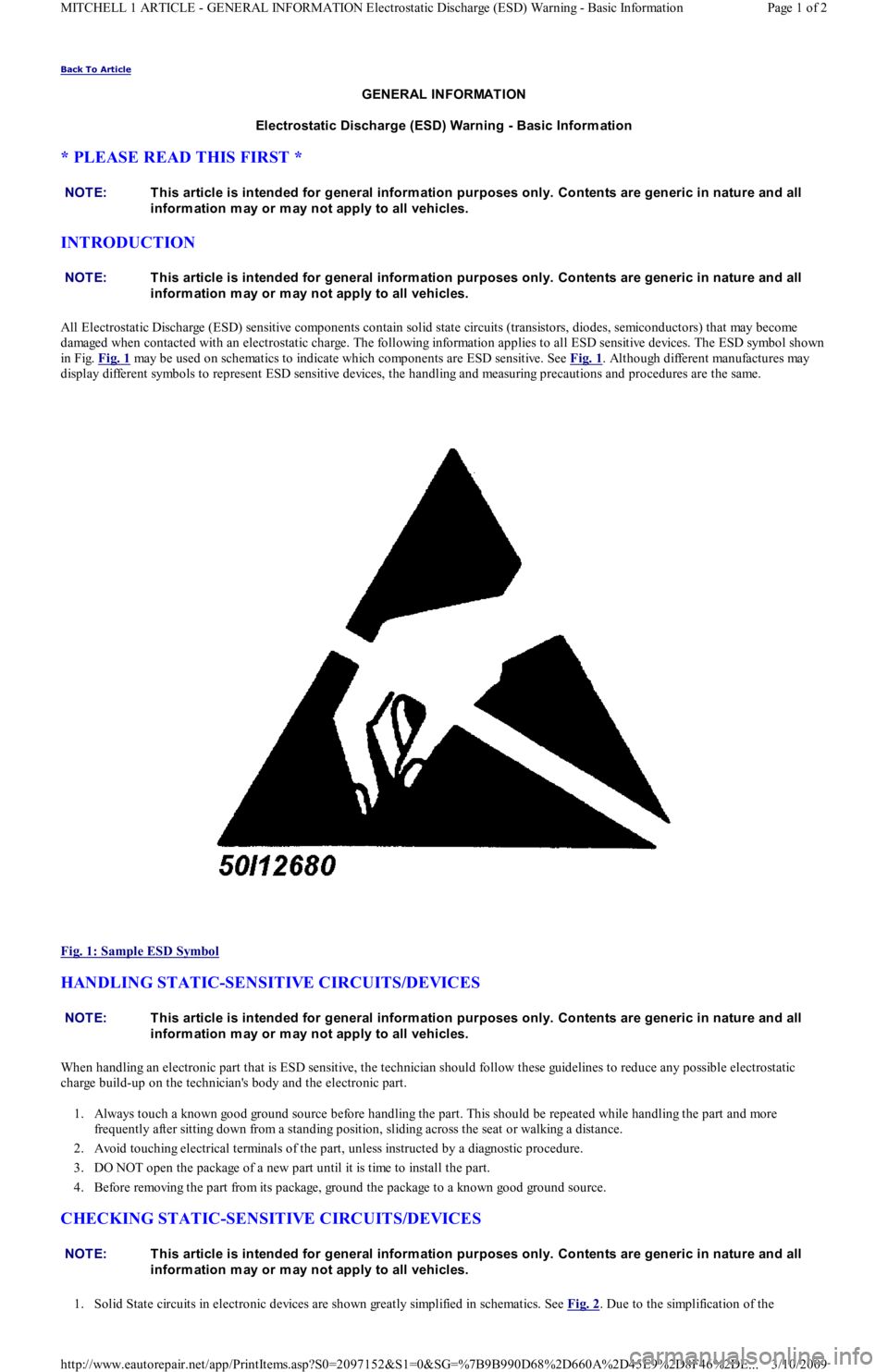
damaged when contacted with an electrostatic charge. The following information applies to all ESD sensitive devices. The ESD symbol shown
in Fig. Fig. 1
may be used on schematics to indicate which components are ESD sensitive. See Fig. 1. Although different manufactures may
display different symbols to represent ESD sensitive devices, the handling and measuring precautions and procedures are the same.
Fig. 1: Sample ESD Symbol
HANDLING STATIC-SENSITIVE CIRCUITS/DEVICES
When handling an electronic part that is ESD sensitive, the technician should follow these guidelines to reduce any possible electrostatic
charge build-up on the technician's body and the electronic part.
1. Always touch a known good ground source before handling the part. This should be repeated while handling the part and more
frequently after sitting down from a standing position, sliding across the seat or walking a distance.
2. Avoid touching electrical terminals of the part, unless instructed by a diagnostic procedure.
3. DO NOT open the package of a new part until it is time to install the part.
4. Before removing the part from its package, ground the package to a known good ground source.
CHECKING STATIC-SENSITIVE CIRCUITS/DEVICES
1. Solid State circuits in electronic devices are shown greatly simplified in schematics. See Fig. 2. Due to the simplification of the NOTE:T his article is intended for general inform ation purposes only. Contents are generic in nature and all
inform ation m ay or m ay not apply to all vehicles.
NOTE:T his article is intended for general inform ation purposes only. Contents are generic in nature and all
inform ation m ay or m ay not apply to all vehicles.
NOTE:T his article is intended for general inform ation purposes only. Contents are generic in nature and all
inform ation m ay or m ay not apply to all vehicles.
NOTE:T his article is intended for general inform ation purposes only. Contents are generic in nature and all
inform ation m ay or m ay not apply to all vehicles.
Page 1 of 2 MITCHELL 1 ARTICLE - GENERAL INFORMATION Electrostatic Discharge (ESD) Warning - Basic Information
3/10/2009 http://www.eautorepair.net/app/PrintItems.asp?S0=2097152&S1=0&SG=%7B9B990D68%2D660A%2D45E9%2D8F46%2DE
...
Page 274 of 454
Back To Article
GENERAL INFORMATION
Engine Perform ance Safety Precautions
Always refer to Emission Decal in engine compartment before servicing vehicle. If manual and decal differ, always use decal
specifications.
Do not allow or create a condition of misfire in more than one cylinder for an extended period of time. Damage to converter may occur
due to loading converter with unburned air/fuel mixture.
Always turn ignition off and disconnect negative battery cable BEFORE disconnecting or connecting computer or other electrical
components.
DO NOT drop or shock electrical components such as computer, airflow meter, etc.
DO NOT use fuel system cleaning compounds that are not recommended by the manufacturer. Damage to gaskets, diaphragm materials
and catalytic converter may result.
Before performing a compression test or cranking engine using a remote starter switch, disconnect coil wire from distributor and secure it
to a good engine ground, or disable ignition.
Before disconnecting any fuel system component, ensure fuel system pressure is released.
Use a shop towel to absorb any spilled fuel to prevent fire.
DO NOT create sparks or have an open flame near battery.
If any fuel system components such as hoses or clamps are replaced, ensure they are replaced with components designed for fuel system
use.
Always reassemble throttle body components with new gaskets, "O" rings and seals.
If equipped with an inertia switch, DO NOT reset switch until fuel system has been inspected for leaks.
We a r sa fe t y go ggl e s wh e n d r il l in g o r gr in d in g.
Wear proper clothing which protects against chemicals and other hazards.
Copyr ight 2009 Mitchell Repair Information Company, LLC. All Rights Reserved.
Article GUID: A00002342
Page 1 of 1 MITCHELL 1 ARTICLE - GENERAL INFORMATION Engine Performance Safety Precautions
3/10/2009 http://www.eautorepair.net/app/PrintItems.asp?S0=2097152&S1=0&SG=%7B9B990D68%2D660A%2D45E9%2D8F46%2DE
...
Page 278 of 454
Back To Article
GENERAL INFORMATION
Parasitic Load Explanation & T est Procedures
* PLEASE READ THIS FIRST *
GENERAL INFORMATION
The term Parasitic Load refers to electrical devices that continue to use or draw current after the ignition switch is turned to OFF position. This
small amount of continuous battery draw is expressed in milliamps (mA). On Chrysler vehicles, a typical Parasitic Load should be no more
than 30 milliamps (0.030 amps). On Ford Motor Co. and General Motors vehicles produced after 1980, a typical Parasitic Load should be no
more than 50 milliamps (0.050 amps).
Vehicles produced since 1980 have memory devices that draw current with ignition off for as long as 20 minutes before shutting down the
Parasitic Drain. When Parasitic Load exceeds normal specifications, the vehicle may exhibit dead battery and no-start condition.
Follow test procedure for checking Parasitic Loads to completion. A brief overview of a suggested test procedure is included along with some
typical Parasitic Load specifications. Refer to GENERAL MOTORS PARASITIC LOAD TABLE chart.
TESTING FOR PARASITIC LOAD
The battery circuit must be opened to connect test switch (shunt) and ammeter into the circuit. When a battery cable is removed, timer circuits
within the vehicle computer are interrupted and immediately begin to discharge. If in doubt about the condition of the ammeter fuse, test it
with an ohmmeter prior to beginning test. An open fuse will show the same reading (00.00) as no parasitic drain. Begin test sequence with the
meter installed and on the 10-amp scale. Select lower scale to read parasitic draw.
CHRYSLER IGNITION OFF DRAW (IOD) TEST
To test for excessive IOD, verify that all electrical accessories are OFF. Turn off all lights, remove ignition key, and close all doors and decklid.
If the vehicle is equipped with electronic accessories (illuminated entry, automatic load leveler, body computer, or high line radio), allow the
system to automatically shut off (time out), up to 3 minutes.
1. Raise the hood and disconnect both battery cables, negative first.
2. Reconnect the negative cable and connect a typical 12-volt test light (low wattage bulb) between the positive cable clamp and the
positive battery post. Remove the engine compartment lamp bulb. If the test light does not light, proceed to step 3
. If the test light does
light, proceed to step, 4
. The test light will indicate IOD greater than 3 amps. After higher amperage IOD has been corrected, proceed to
step 3
.
3. ith 12-volt test light still connected (not lit), connect an ammeter (milliampere scale) between the positive cable clamp and the positive
battery post, disconnect test light, refer to instructions provided with ammeter being used. A reading of 30 milliamperes or less indicates
normal electrical draw. If ammeter reads more than 30 milliamperes, excessive IOD must be corrected.
4. Locate the fuse panel and remove fuses or circuit breakers one at a time, and observe ammeter after each fuse or circuit breaker is
removed. If test light goes out and the reading drops below 30 milliamperes when a certain fuse or circuit breaker is removed, that circuit
may have a defect.
5. If IOD is detected after all fuses and circuit breakers have been removed, disconnect the 60-way connector at the Single Module Engine
Control (SMEC), located outboard of the battery.
6. If excessive IOD is detected after all fused circuits and SMEC have been verified, disconnect the B+ terminal from the alternat o r. If
reading drops below 30 milliamperes, reinstall all fuses and circuit breakers, reconnect B+ terminal at alternator, reconnect battery, and
perform alternator diagnostics.
7. Install engine compartment lamp bulb.
TEST PROCEDURE USING TEST SWITCH
1. Turn ignition off. Remove negative battery terminal cable. Install Disconnect Tool (J-38758) test switch male end to negative battery
cable. Turn test switch knob to OFF position (current through meter). Install negative battery cable to the female end of test switch. NOTE:This is GENERAL inform ation. This article is not intended to be specific to any unique situation or
individual vehicle configuration. For m odel-specific inform ation see appropriate articles where
available.
NOTE:This is GENERAL inform ation. This article is not intended to be specific to any unique situation or
individual vehicle configuration. For m odel-specific inform ation see appropriate articles where
available.
NOTE:This is GENERAL inform ation. This article is not intended to be specific to any unique situation or
individual vehicle configuration. For m odel-specific inform ation see appropriate articles where
available.
CAUT ION: Always turn ignition off when connecting or disconnecting battery cables, battery chargers or jum per
cables. DO NOT turn test switch to OFF position (which causes current to run through am m eter or
vehicle electrical system ).
NOTE:Mem ory functions of various accessories m ust be reset after the battery is reconnected.
CAUT ION: IOD greater than 3 am ps m ay dam age m illam pm eter.
Page 1 of 4 MITCHELL 1 ARTICLE - GENERAL INFORMATION Parasitic Load Explanation & Test Procedures
3/10/2009 http://www.eautorepair.net/app/PrintItems.asp?S0=2097152&S1=0&SG=%7B9B990D68%2D660A%2D45E9%2D8F46%2DE
...
Page 279 of 454
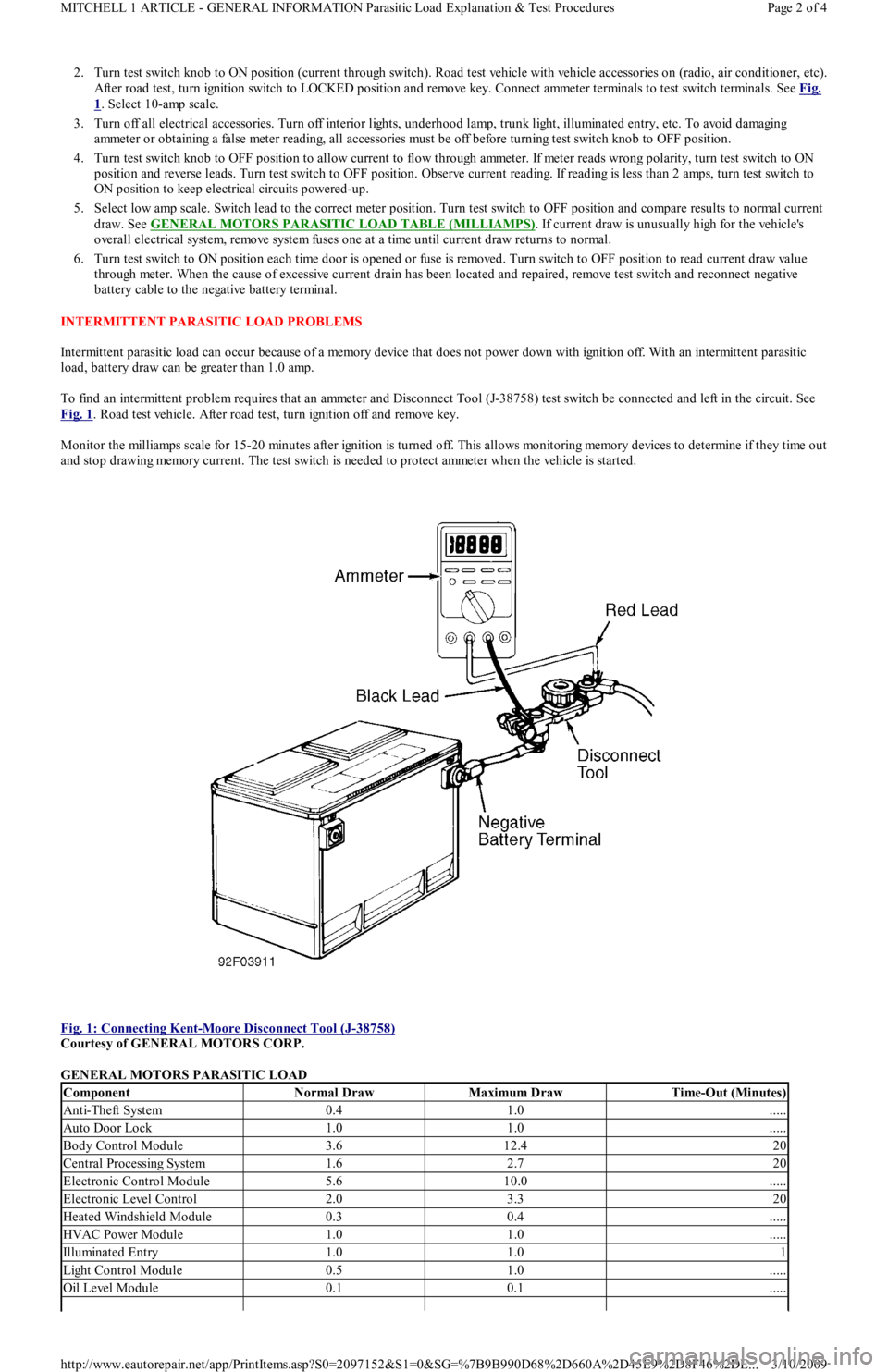
2. Turn test switch knob to ON position (current through switch). Road test vehicle with vehicle accessories on (radio, air conditioner, etc).
After road test, turn ignition switch to LOCKED position and remove key. Connect ammeter terminals to test switch terminals. See Fig.
1. Select 10-amp scale.
3. Turn off all electrical accessories. Turn off interior lights, underhood lamp, trunk light, illuminated entry, etc. To avoid damaging
ammeter or obtaining a false meter reading, all accessories must be off before turning test switch knob to OFF position.
4. Turn test switch knob to OFF position to allow current to flow through ammeter. If meter reads wrong polarity, turn test switch to ON
position and reverse leads. Turn test switch to OFF position. Observe current reading. If reading is less than 2 amps, turn test switch to
ON position to keep electrical circuits powered-up.
5. Select low amp scale. Switch lead to the correct meter position. Turn test switch to OFF position and compare results to normal current
draw. See GENERAL MOTORS PARASITIC LOAD TABLE (MILLIAMPS)
. If current draw is unusually high for the vehicle's
overall electrical system, remove system fuses one at a time until current draw returns to normal.
6. Turn test switch to ON position each time door is opened or fuse is removed. Turn switch to OFF position to read current draw va l u e
through meter. When the cause of excessive current drain has been located and repaired, remove test switch and reconnect negative
battery cable to the negative battery terminal.
INTERMITTENT PARASITIC LOAD PROBLEMS
Intermittent parasitic load can occur because of a memory device that does not power down with ignition off. With an intermittent parasitic
load, battery draw can be greater than 1.0 amp.
To find an intermittent problem requires that an ammeter and Disconnect Tool (J-38758) test switch be connected and left in the circuit. See
Fig. 1
. Road test vehicle. After road test, turn ignition off and remove key.
Monitor the milliamps scale for 15-20 minutes after ignition is turned off. This allows monitoring memory devices to determine if they time out
and stop drawing memory current. The test switch is needed to protect ammeter when the vehicle is started.
Fig. 1: Connecting Kent
-Moore Disconnect Tool (J-38758)
Courtesy of GENERAL MOTORS CORP.
GENERAL MOTORS PARASITIC LOAD
ComponentNormal DrawMaximum DrawTime-Out (Minutes)
Anti-Theft System0.41.0.....
Auto Door Lock1.01.0.....
Body Control Module3.612.420
Central Processing System1.62.720
Electronic Control Module5.610.0.....
Electronic Level Control2.03.320
Heated Windshield Module0.30.4.....
HVAC Power Module1.01.0.....
Illuminated Entry1.01.01
Light Control Module0.51.0.....
Oil Level Module0.10.1.....
Page 2 of 4 MITCHELL 1 ARTICLE - GENERAL INFORMATION Parasitic Load Explanation & Test Procedures
3/10/2009 http://www.eautorepair.net/app/PrintItems.asp?S0=2097152&S1=0&SG=%7B9B990D68%2D660A%2D45E9%2D8F46%2DE
...
Page 305 of 454
Back To Article
GENERAL INFORMATION
Manual Transmission Trouble Shooting
* PLEASE READ THIS FIRST *
INTRODUCTION
There are many times when the transmission is incorrectly blamed for shifting problems or noises that are actually caused by other reasons.
Shift difficulties are frequently caused by conditions outside of the transmission or transaxle. Typical conditions include: shift linkage, shift
cables, alignment of engine to transmission, worn engine mounts or clutch problems. Drive train noises may come from many sources such as
tires, road surfaces, wheel bearings, differentials, engine or exhaust system. Repairing or overhauling transmission will not cure these
problems.
No manufacturer makes a perfectly quiet transmission. Gear rollover noise is present in most constant mesh transmissions and will tend to
disappear when the clutch is disengaged or transmission is placed in gear. If clutch is properly adjusted, clutch release bearing noise will
disappear when release bearing is moved enough to slide release bearing away from pressure plate.
Trouble shooting can be helped by driving vehicle on a smooth level road to help eliminate tire and body noise. Note whether noise occurs on
acceleration, coasting, deceleration or steady driving conditions. Some problems may only occur when transmission is either hot or cold. Gear
lubricant that is too thick can cause hard shifting on cold mornings before engine is warm and vehicle has been driven.
MANUAL TRANSMISSION/TRANSAXLE TROUBLE SHOOTING NOTE:This is GENERAL inform ation. This article is not intended to be specific to any unique situation or
individual vehicle configuration. For m odel-specific inform ation see appropriate articles where
available.
NOTE:This is GENERAL inform ation. This article is not intended to be specific to any unique situation or
individual vehicle configuration. For m odel-specific inform ation see appropriate articles where
available.
ConditionPossible Cause
Noisy In Forward GearsLow Gear Oil Level, Loose Bellhousing Bolts, Worn Bearings Or
Gears
Clunk On Deceleration (FWD Only)Loose Engine Mounts, Worn Inboard CV Joints, Worn Differential
Pinion Shaft, Oversized Side Gear Hub Counterbore in Case
Gear Clash When Shifting Forward GearsClutch Out Of Alignment, Shift Linkage Damaged Or Out Of
Adjustment, Gears Or Synchronizers Damaged, Low Gear Oil
Level
Transmission Noisy When Moving (RWD Only); Quiet In Neutral
With Clutch EngagedWorn Rear Output Shaft Bearing
Gear RattleWorn Bearings, Worn Gear Oil, Low Gear Oil, Worn Gears
Steady Ticking At Idle (Increases With RPM)Broken Tooth On A Gear
Gear Clash When Shifting Forward GearsWorn Or Broken Synchronizers, Faulty Clutch
Loud Whine In ReverseNormal Condition (1)
Noise When Stepping On ClutchFaulty Release Bearing, Worn Pilot Bearing
Ticking Or Screeching As Clutch Is EngagedFaulty Release Bearing, Uneven Pressure Plate Fingers
Click Or Snap When Clutch Is EngagedWorn Clutch Fork, Worn Pivot Ball, Worn Or Broken Front
Bearing Retainer
Transmission Shifts HardClutch Not Releasing, Incorrect Gear Oil, Shift Mechanism
Binding, Clutch Installed Backward
Will Not Shift Into One Gear, Shifts Into All OthersBent Shift Fork, Worn Detent Balls
Locked Into Gear, Cannot ShiftClutch Adjustment, Worn Detent Balls
Transmission Jumps Out Of GearPilot Bearing Worn, Bent Shift Fork, Worn Gear Teeth Or Face,
Excessive Gear Train End Play, Worn Synchronizers, Missing
Detent Ball Spring, Shift Mechanism Worn Or Out Of Adjustment,
Engine Or Transmission Mount Bolts Loose, Transmission Not
Aligned
Shift Lever RattleWorn Detents Or Shift Lever, Worn Shift Fork, Worn
Synchronizer Sleeves
Shift Lever Hops Under AccelerationWorn Engine Or Transmission Mounts
(1)Most units use spur cut gears in Reverse and are naturally noisy.
Copyr ight 2009 Mitchell Repair Information Company, LLC. All Rights Reserved.
Article GUID: A00010942
Page 1 of 1 MITCHELL 1 ARTICLE - GENERAL INFORMATION Manual Transmission Trouble Shooting
3/10/2009 http://www.eautorepair.net/app/PrintItems.asp?S0=2097152&S1=0&SG=%7B9B990D68%2D660A%2D45E9%2D8F46%2DE
...
Page 320 of 454
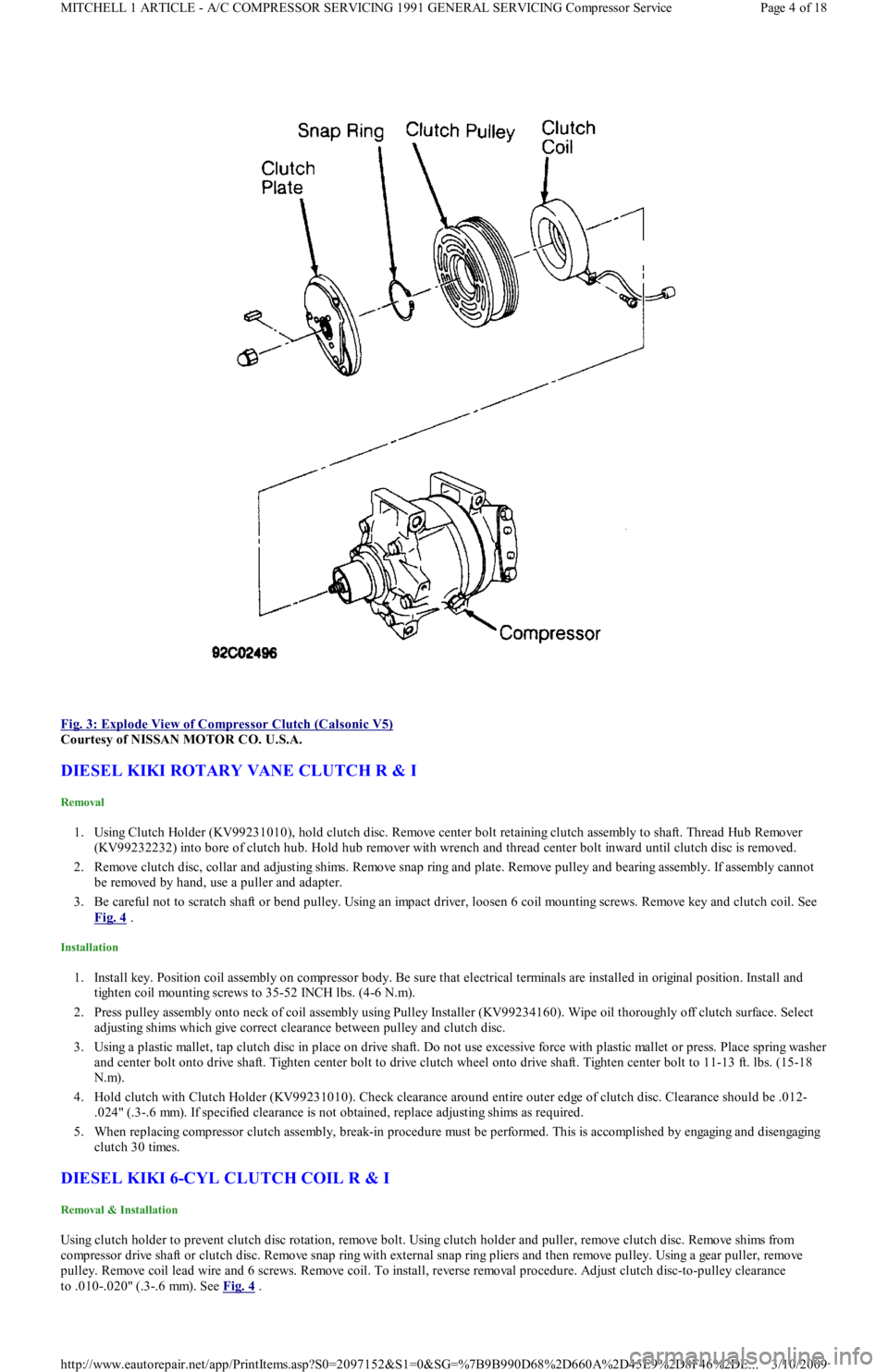
Fig. 3: Explode View of Compressor Clutch (Calsonic V5)
Courtesy of NISSAN MOTOR CO. U.S.A.
DIESEL KIKI ROTARY VANE CLUTCH R & I
Removal
1. Using Clutch Holder (KV99231010), hold clutch disc. Remove center bolt retaining clutch assembly to shaft. Thread Hub Remover
(KV99232232) into bore of clutch hub. Hold hub remover with wrench and thread center bolt inward until clutch disc is removed.
2. Remove clutch disc, collar and adjusting shims. Remove snap ring and plate. Remove pulley and bearing assembly. If assembly cannot
be removed by hand, use a puller and adapter.
3. Be careful not to scratch shaft or bend pulley. Using an impact driver, loosen 6 coil mounting screws. Remove key and clutch coil. See
Fig. 4
.
Installation
1. Install key. Position coil assembly on compressor body. Be sure that electrical terminals are installed in original position. Install and
tighten coil mounting screws to 35-52 INCH lbs. (4-6 N.m).
2. Press pulley assembly onto neck of coil assembly using Pulley Installer (KV99234160). Wipe oil thoroughly off clutch surface. Select
adjusting shims which give correct clearance between pulley and clutch disc.
3. Using a plastic mallet, tap clutch disc in place on drive shaft. Do not use excessive force with plastic mallet or press. Place spring washer
and center bolt onto drive shaft. Tighten center bolt to drive clutch wheel onto drive shaft. Tighten center bolt to 11-13 ft. lbs. (15-18
N.m).
4. Hold clutch with Clutch Holder (KV99231010). Check clearance around entire outer edge of clutch disc. Clearance should be .012-
.024" (.3-.6 mm). If specified clearance is not obtained, replace adjusting shims as required.
5. When replacing compressor clutch assembly, break-in procedure must be performed. This is accomplished by engaging and disengagin g
clutch 30 times.
DIESEL KIKI 6-CYL CLUTCH COIL R & I
Removal & Installation
Using clutch holder to prevent clutch disc rotation, remove bolt. Using clutch holder and puller, remove clutch disc. Remove shims from
compressor drive shaft or clutch disc. Remove snap ring with external snap ring pliers and then remove pulley. Using a gear puller, remove
pulley. Remove coil lead wire and 6 screws. Remove coil. To install, reverse removal procedure. Adjust clutch disc-to-pulley clearance
to .010-.020" (.3-.6 mm). See Fig. 4
.
Page 4 of 18 MITCHELL 1 ARTICLE - A/C COMPRESSOR SERVICING 1991 GENERAL SERVICING Compressor Service
3/10/2009 http://www.eautorepair.net/app/PrintItems.asp?S0=2097152&S1=0&SG=%7B9B990D68%2D660A%2D45E9%2D8F46%2DE
...
Page 323 of 454
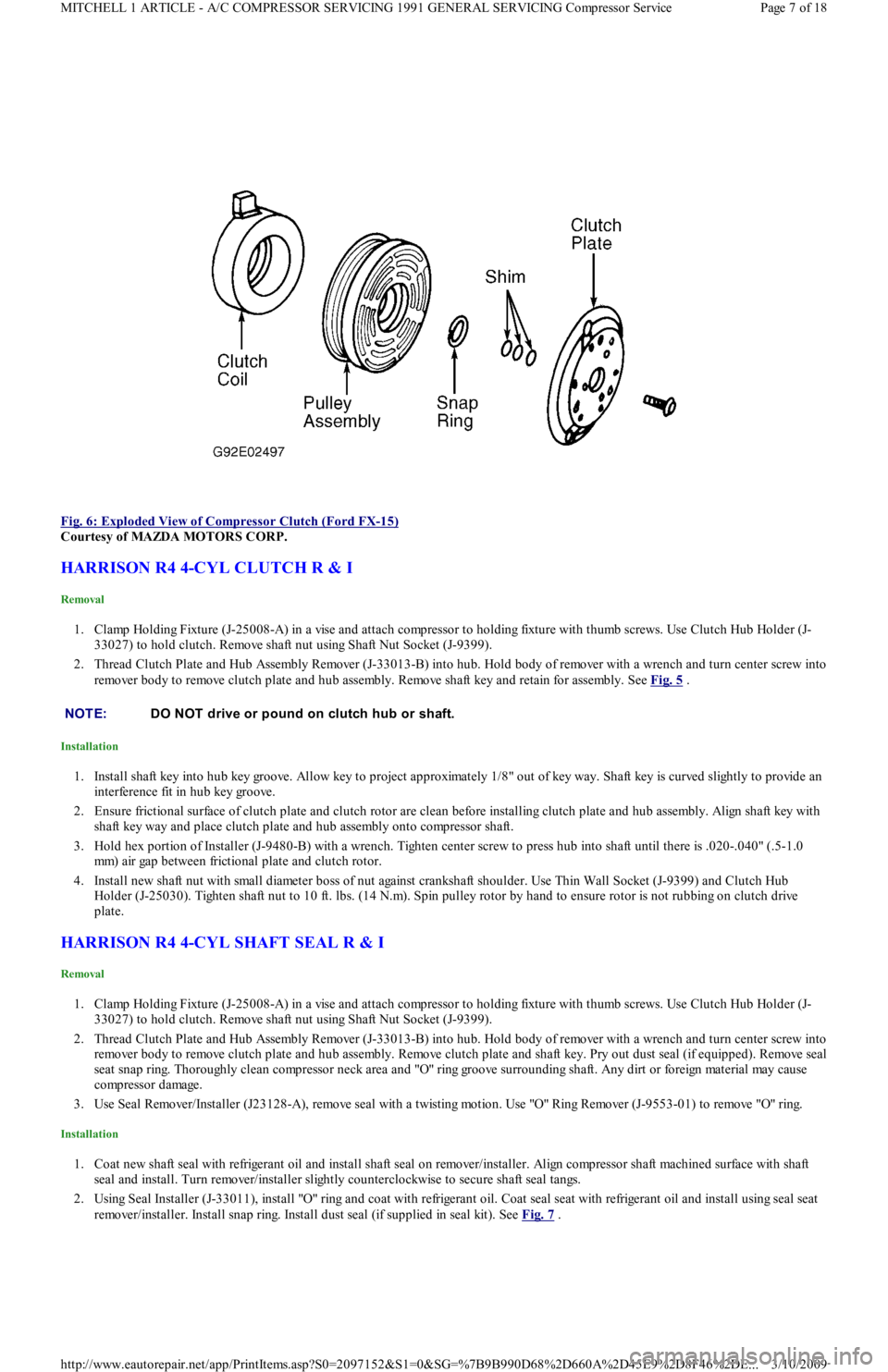
Fig. 6: Exploded View of Compressor Clutch (Ford FX
-15)
Courtesy of MAZDA MOTORS CORP.
HARRISON R4 4-CYL CLUTCH R & I
Removal
1. Clamp Holding Fixture (J-25008-A) in a vise and attach compressor to holding fixture with thumb screws. Use Clutch Hub Holder (J-
33027) to hold clutch. Remove shaft nut using Shaft Nut Socket (J-9399).
2. Thread Clutch Plate and Hub Assembly Remover (J-33013-B) into hub. Hold body of remover with a wrench and turn center screw into
remover body to remove clutch plate and hub assembly. Remove shaft key and retain for assembly. See Fig. 5
.
Installation
1. Install shaft key into hub key groove. Allow key to project approximately 1/8" out of key way. Shaft key is curved slightly to provide an
interference fit in hub key groove.
2. Ensure frictional surface of clutch plate and clutch rotor are clean before installing clutch plate and hub assembly. Align shaft key with
shaft key way and place clutch plate and hub assembly onto compressor shaft.
3. Hold hex portion of Installer (J-9480-B) with a wrench. Tighten center screw to press hub into shaft until there is .020-.040" (.5-1.0
mm) air gap between frictional plate and clutch rotor.
4. Install new shaft nut with small diameter boss of nut against crankshaft shoulder. Use Thin Wall Socket (J-9399) and Clutch Hub
Holder (J-25030). Tighten shaft nut to 10 ft. lbs. (14 N.m). Spin pulley rotor by hand to ensure rotor is not rubbing on clutch drive
plate.
HARRISON R4 4-CYL SHAFT SEAL R & I
Removal
1. Clamp Holding Fixture (J-25008-A) in a vise and attach compressor to holding fixture with thumb screws. Use Clutch Hub Holder (J-
33027) to hold clutch. Remove shaft nut using Shaft Nut Socket (J-9399).
2. Thread Clutch Plate and Hub Assembly Remover (J-33013-B) into hub. Hold body of remover with a wrench and turn center screw into
remover body to remove clutch plate and hub assembly. Remove clutch plate and shaft key. Pry out dust seal (if equipped). Remove seal
seat snap ring. Thoroughly clean compressor neck area and "O" ring groove surrounding shaft. Any dirt or foreign material may cause
compressor damage.
3. Use Seal Remover/Installer (J23128-A), remove seal with a twisting motion. Use "O" Ring Remover (J-9553-01) to remove "O" ring.
Installation
1. Coat new shaft seal with refrigerant oil and install shaft seal on remover/installer. Align compressor shaft machined surface with shaft
seal and install. Turn remover/installer slightly counterclockwise to secure shaft seal tangs.
2. Using Seal Installer (J-33011), install "O" ring and coat with refrigerant oil. Coat seal seat with refrigerant oil and install using seal seat
remover/installer. Install snap ring. Install dust seal (if supplied in seal kit). See Fig. 7
.
NOTE:DO NOT drive or pound on clutch hub or shaft.
Page 7 of 18 MITCHELL 1 ARTICLE - A/C COMPRESSOR SERVICING 1991 GENERAL SERVICING Compressor Service
3/10/2009 http://www.eautorepair.net/app/PrintItems.asp?S0=2097152&S1=0&SG=%7B9B990D68%2D660A%2D45E9%2D8F46%2DE
...
Page 324 of 454
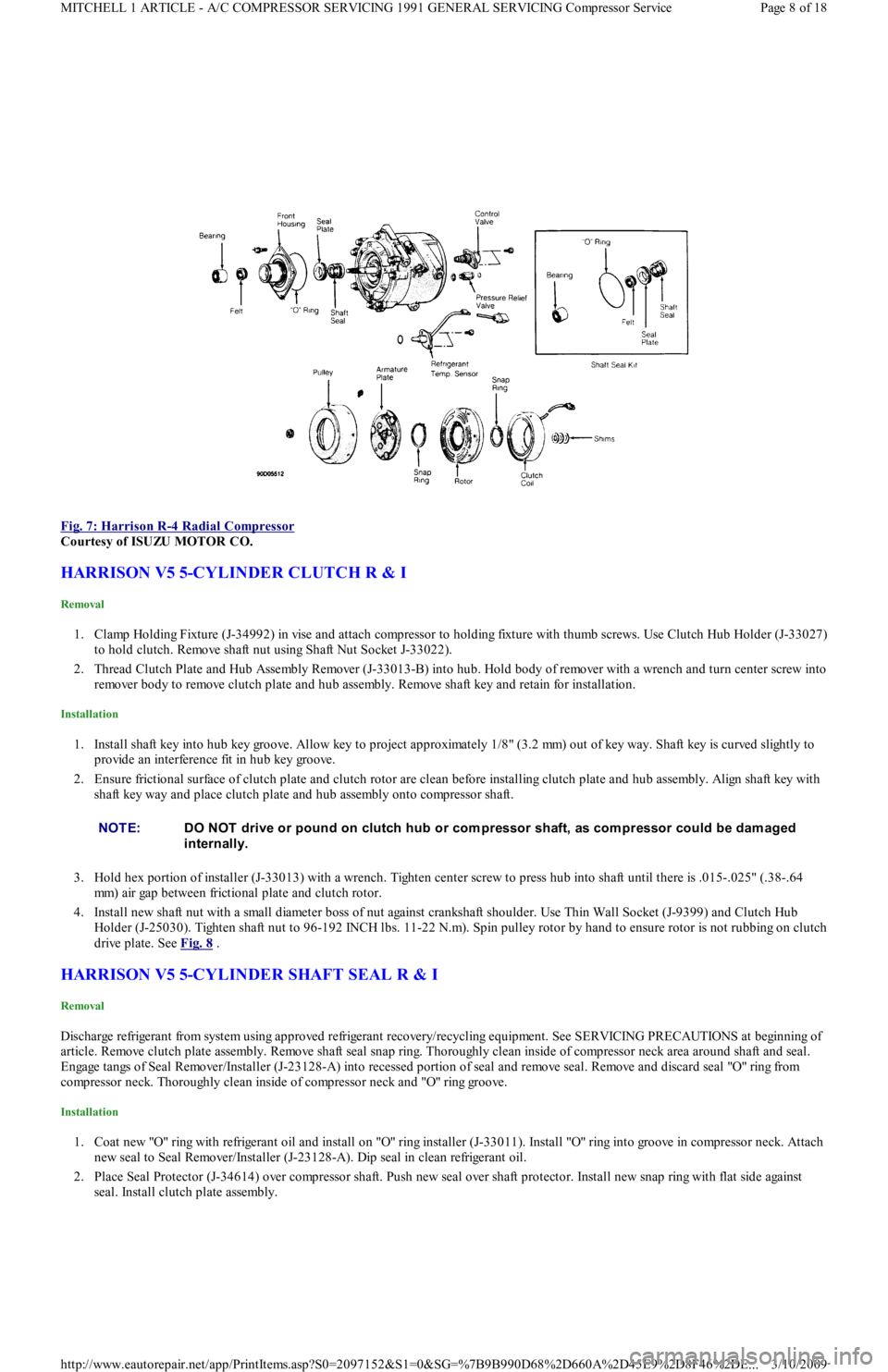
Fig. 7: Harrison R
-4 Radial Compressor
Courtesy of ISUZU MOTOR CO.
HARRISON V5 5-CYLINDER CLUTCH R & I
Removal
1. Clamp Holding Fixture (J-34992) in vise and attach compressor to holding fixture with thumb screws. Use Clutch Hub Holder (J-33027)
to hold clutch. Remove shaft nut using Shaft Nut Socket J-33022).
2. Thread Clutch Plate and Hub Assembly Remover (J-33013-B) into hub. Hold body of remover with a wrench and turn center screw into
remover body to remove clutch plate and hub assembly. Remove shaft key and retain for installation.
Installation
1. Install shaft key into hub key groove. Allow key to project approximately 1/8" (3.2 mm) out of key way. Shaft key is curved slightly to
provide an interference fit in hub key groove.
2. Ensure frictional surface of clutch plate and clutch rotor are clean before installing clutch plate and hub assembly. Align shaft key with
shaft key way and place clutch plate and hub assembly onto compressor shaft.
3. Hold hex portion of installer (J-33013) with a wrench. Tighten center screw to press hub into shaft until there is .015-.025" (.38-.64
mm) air gap between frictional plate and clutch rotor.
4. Install new shaft nut with a small diameter boss of nut against crankshaft shoulder. Use Thin Wall Socket (J-9399) and Clutch Hub
Holder (J-25030). Tighten shaft nut to 96-192 INCH lbs. 11-22 N.m). Spin pulley rotor by hand to ensure rotor is not rubbing on clutch
drive plate. See Fig. 8
.
HARRISON V5 5-CYLINDER SHAFT SEAL R & I
Removal
Discharge refrigerant from system using approved refrigerant recovery/recycling equipment. See SERVICING PRECAUTIONS at beginning of
article. Remove clutch plate assembly. Remove shaft seal snap ring. Thoroughly clean inside of compressor neck area around shaft and seal.
Engage tangs of Seal Remover/Installer (J-23128-A) into recessed portion of seal and remove seal. Remove and discard seal "O" ring from
compressor neck. Thoroughly clean inside of compressor neck and "O" ring groove.
Installation
1. Coat new "O" ring with refrigerant oil and install on "O" ring installer (J-33011). Install "O" ring into groove in compressor neck. Attach
new seal to Seal Remover/Installer (J-23128-A). Dip seal in clean refrigerant oil.
2. Place Seal Protector (J-34614) over compressor shaft. Push new seal over shaft protector. Install new snap ring with flat side against
seal. Install clutch plate assembly.
NOTE:DO NOT drive or pound on clutch hub or com pressor shaft, as com pressor could be dam aged
internally.
Page 8 of 18 MITCHELL 1 ARTICLE - A/C COMPRESSOR SERVICING 1991 GENERAL SERVICING Compressor Service
3/10/2009 http://www.eautorepair.net/app/PrintItems.asp?S0=2097152&S1=0&SG=%7B9B990D68%2D660A%2D45E9%2D8F46%2DE
...