clock FORD MUSTANG 1969 Volume One Chassis
[x] Cancel search | Manufacturer: FORD, Model Year: 1969, Model line: MUSTANG, Model: FORD MUSTANG 1969Pages: 413, PDF Size: 75.81 MB
Page 301 of 413
07-01-10
General Transmission Service
07-01-10
2.
To adjust the switch for the park
position, place the transmission selec-
tor lever in 1 and push the park reset
button (Fig. 16) to the left (counter-
clockwise) until it stops.
3.
Check the operation of the
switch in each selector lever position.
The starter should engage in only the
neutral and park positions. Be sure to
perform
the
park reset
if for any rea-
son
the
neutral switch
is
adjusted.
If,
after performing
the
switch
ad-
justments,
the
starter still will
not en-
gage
in the
neutral
or
park positions,
replace
the
switch. Never replace
the
neutral switch until
the
switch adjust-
ments have been made.
SWITCH REPLACEMENT
1.
Disconnect the neutral start
switch wires at the plug connector.
2.
Disconnect the vacuum hoses, if
so equipped.
3.
Remove the two screws securing
the neutral start switch to the steering
column and lift the switch from the
column.
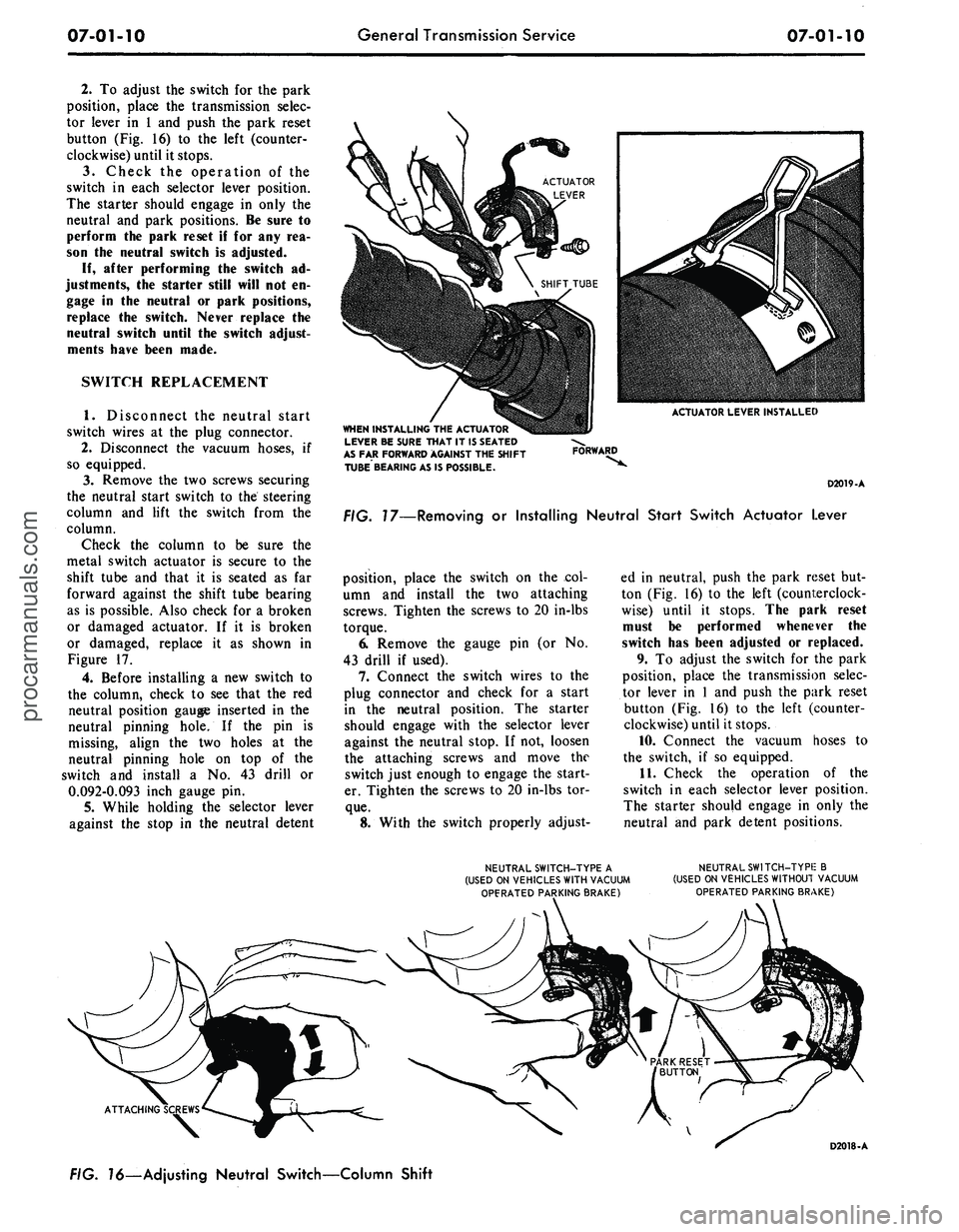
Check the column to be sure the
metal switch actuator is secure to the
shift tube and that it is seated as far
forward against the shift tube bearing
as is possible. Also check for a broken
or damaged actuator. If it is broken
or damaged, replace it as shown in
Figure 17.
4.
Before installing a new switch to
the column, check to see that the red
neutral position gauge inserted in the
neutral pinning hole. If the pin is
missing, align the two holes at the
neutral pinning hole on top of the
switch and install a No. 43 drill or
0.092-0.093 inch gauge pin.
5.
While holding the selector lever
against the stop in the neutral detent
ACTUATOR LEVER INSTALLED
WHEN INSTALLING
THE
ACTUATOR
LEVER
BE
SURE THAT
IT
1$ SEATED
AS
FAR
FORWARD AGAINST
THE
SHIFT
TUBE BEARING
AS IS
POSSIBLE.
FORWARD
D2019-A
FIG. 17—Removing
or
Installing Neutral Start Switch Actuator Lever
position, place the switch on the col-
umn and install the two attaching
screws. Tighten the screws to 20 in-lbs
torque.
6. Remove the gauge pin (or No.
43 drill if used).
7.
Connect the switch wires to the
plug connector and check for a start
in the neutral position. The starter
should engage with the selector lever
against the neutral stop. If not, loosen
the attaching screws and move the
switch just enough to engage the start-
er. Tighten the screws to 20 in-lbs tor-
que.
8. With the switch properly adjust-
ed in neutral, push the park reset but-
ton (Fig. 16) to the left (counterclock-
wise) until it stops. The park reset
must be performed whenever the
switch has been adjusted or replaced.
9. To adjust the switch for the park
position, place the transmission selec-
tor lever in 1 and push the park reset
button (Fig. 16) to the left (counter-
clockwise) until it stops.
10.
Connect the vacuum hoses to
the switch, if so equipped.
11.
Check the operation of the
switch in each selector lever position.
The starter should engage in only the
neutral and park detent positions.
NEUTRAL SWITCH-TYPE
A
(USED
ON
VEHICLES WITH VACUUM
OPFRATED PARKING BRAKE)
NEUTRAL SWITCH-TYPIE
B
(USED
ON
VEHICLES WITHOUT VACUUM
OPERATED PARKING BRAKE)
ATTACHING
FIG.
16—Ad
justing Neutral Switch—Column Shift
D2018-Aprocarmanuals.com
Page 303 of 413
07-01-12
General Transmission Service
07-01-12
the transmission,
any
metal particles
or clutch plate
or
band material that
may have been carried into
the
cooler
should
be
removed from
the
system
by
flushing
the
cooler
and
lines before
the transmission
is put
back into serv-
ice.
In no
case should
an
automatic
transmission having
a
clutch
or
band
failure
or
other internal trouble result-
ing
in
fluid contamination,
be put
back into service without first flushing
the transmission
oil
cooler.
To flush
the oil
cooler, follow
the
instruct!
on >
provided with
the
Rotun-
da Automatic Transmission Torque
Converter
and
Cooler Cleaner
LRE-
60081.
INSPECTION
TURBINE
AND
STATOR
END
PLAY CHECK
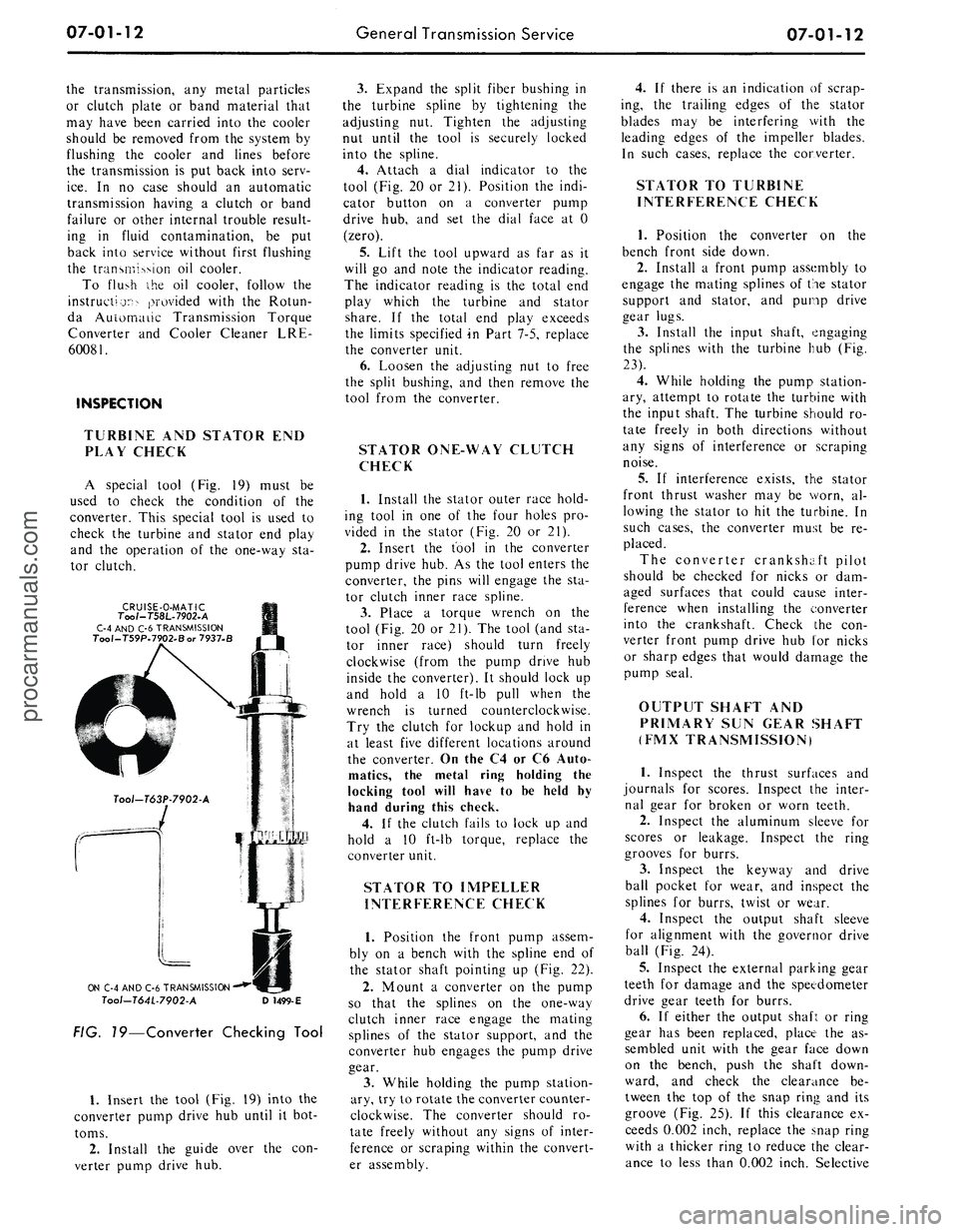
A special tool
(Fig. 19)
must
be
used
to
check
the
condition
of the
converter. This special tool
is
used
to
check
the
turbine
and
stator
end
play
and
the
operation
of the
one-way
sta-
tor clutch.
CRUISE-O-MATIC
Too/-T58L-7902-A
C-4 AND C-6 TRANSMISSION
Tool-T59P.7902.Bor 7937-B
ON C-4 AND C-6 TRANSMISSION
Tool-T64L-7902-A
D
1499-E
FIG. 19—Converter Checking Tool
1.
Insert
the
tool (Fig.
19)
into
the
converter pump drive
hub
until
it
bot-
toms.
2.
Install
the
guide over
the con-
verter pump drive
hub.
3.
Expand
the
split fiber bushing
in
the turbine spline
by
tightening
the
adjusting
nut.
Tighten
the
adjusting
nut until
the
tool
is
securely locked
into
the
spline.
4.
Attach
a
dial indicator
to the
tool (Fig.
20 or
21). Position
the
indi-
cator button
on a
converter pump
drive
hub, and set the
dial face
at 0
(zero).
5.
Lift
the
tool upward
as far as it
will
go and
note
the
indicator reading.
The indicator reading
is the
total
end
play which
the
turbine
and
stator
share.
If the
total
end
play exceeds
the limits specified
in
Part 7-5, replace
the converter unit.
6. Loosen
the
adjusting
nut to
free
the split bushing,
and
then remove
the
tool from
the
converter.
STATOR ONE-WAY CLUTCH
CHECK
1.
Install
the
stator outer race hold-
ing tool
in one of the
four holes
pro-
vided
in the
stator (Fig.
20 or 21).
2.
Insert
the
tool
in the
converter
pump drive hub.
As the
tool enters
the
converter,
the
pins will engage
the sta-
tor clutch inner race spline.
3.
Place
a
torque wrench
on the
tool (Fig.
20 or
21).
The
tool (and
sta-
tor inner race) should turn freely
clockwise (from
the
pump drive
hub
inside
the
converter).
It
should lock
up
and hold
a 10
ft-lb pull when
the
wrench
is
turned counterclockwise.
Try
the
clutch
for
lockup
and
hold
in
at least five different locations around
the converter.
On
the
C4
or C6
Auto-
matics,
the
metal ring holding
the
locking tool will have
to be
held
by
hand during this check.
4.
If the
clutch fails
to
lock
up and
hold
a 10
ft-lb torque, replace
the
converter unit.
STATOR
TO
IMPELLER
INTERFERENCE CHECK
1.
Position
the
front pump assem-
bly
on a
bench with
the
spline
end of
the stator shaft pointing
up
(Fig.
22).
2.
Mount
a
converter
on the
pump
so that
the
splines
on the
one-way
clutch inner race engage
the
mating
splines
of the
stator support,
and the
converter
hub
engages
the
pump drive
gear.
3.
While holding
the
pump station-
ary, try
to
rotate the converter counter-
clockwise.
The
converter should
ro-
tate freely without
any
signs
of
inter-
ference
or
scraping within
the
convert-
er assembly.
4.
If
there
is an
indication
of
scrap-
ing,
the
trailing edges
of the
stator
blades
may be
interfering with
the
leading edges
of the
impeller blades.
In such cases, replace
the
converter.
STATOR
TO
TURBINE
INTERFERENCE CHECK
1.
Position
the
converter
on the
bench front side down.
2.
Install
a
front pump assembly
to
engage
the
mating splines
of
the
stator
support
and
stator,
and
pump drive
gear lugs.
3.
Install
the
input shaft, engaging
the splines with
the
turbine
hub (Fig.
23).
4.
While holding
the
pump station-
ary, attempt
to
rotate
the
turbine with
the input shaft.
The
turbine should
ro-
tate freely
in
both directions without
any signs
of
interference
or
scraping
noise.
5.
If
interference exists,
the
stator
front thrust washer
may be
worn,
al-
lowing
the
stator
to hit the
turbine.
In
such cases,
the
converter must
be re-
placed.
The converter crankshaft pilot
should
be
checked
for
nicks
or dam-
aged surfaces that could cause inter-
ference when installing
the
converter
into
the
crankshaft. Check
the con-
verter front pump drive
hub for
nicks
or sharp edges that would damage
the
pump seal.
OUTPUT SHAFT
AND
PRIMARY
SUN
GEAR SHAFT
(FMX TRANSMISSION)
1.
Inspect
the
thrust surfaces
and
journals
for
scores. Inspect
the
inter-
nal gear
for
broken
or
worn teeth.
2.
Inspect
the
aluminum sleeve
for
scores
or
leakage. Inspect
the
ring
grooves
for
burrs.
3.
Inspect
the
keyway
and
drive
ball pocket
for
wear,
and
inspect
the
splines
for
burrs, twist
or
wear.
4.
Inspect
the
output shaft sleeve
for alignment with
the
governor drive
ball (Fig.
24).
5.
Inspect
the
external parking gear
teeth
for
damage
and the
speedometer
drive gear teeth
for
burrs.
6.
If
either
the
output shaft
or
ring
gear
has
been replaced, place
the as-
sembled unit with
the
gear face down
on
the
bench, push
the
shaft down-
ward,
and
check
the
clearance
be-
tween
the top of the
snap ring
and its
groove
(Fig. 25).
If
this clearance
ex-
ceeds 0.002 inch, replace
the
snap ring
with
a
thicker ring
to
reduce
the
clear-
ance
to
less than 0.002 inch. Selectiveprocarmanuals.com
Page 322 of 413
07-02-14
C4 Automatic Transmission
07-02-14
FORWARD CLUTCH
FORWARD CLUTCH FRONT PLANET CARRIER INPU^ SHELL
HUB AND
RING GEAR
SUN GEAR
REVERSE-HIGH CLUTCH
THRUST WASHER
NO.
5
FIG. 35—Forward Part of Gear Train Disassembled
D1872-A
taching bolts. Remove the front pump
by inserting a screwdriver behind the
input shell (Fig. 30). Move the input
shell forward until the front pump seal
is above the edge of the case.
Remove the front pump and gasket
from the case. If the selective thrust
washer No. 1 did not come out with
the front pump, remove it from the
top of the reverse-high clutch.
4.
Remove the intermediate and
low-reverse band adjusting screws
from the case. Rotate the intermediate
band to align the band ends with the
clearance hole in the case (Fig. 31).
Remove the intermediate band from
the case.
5.
Using a screwdriver between the
input shell and rear planet carrier
(Fig. 32), lift the input shell upward
and remove the forward part of the
gear train as an assembly (Fig. 33).
6. Place the forward part of the
gear train in the holding fixture shown
in Fig. 34.
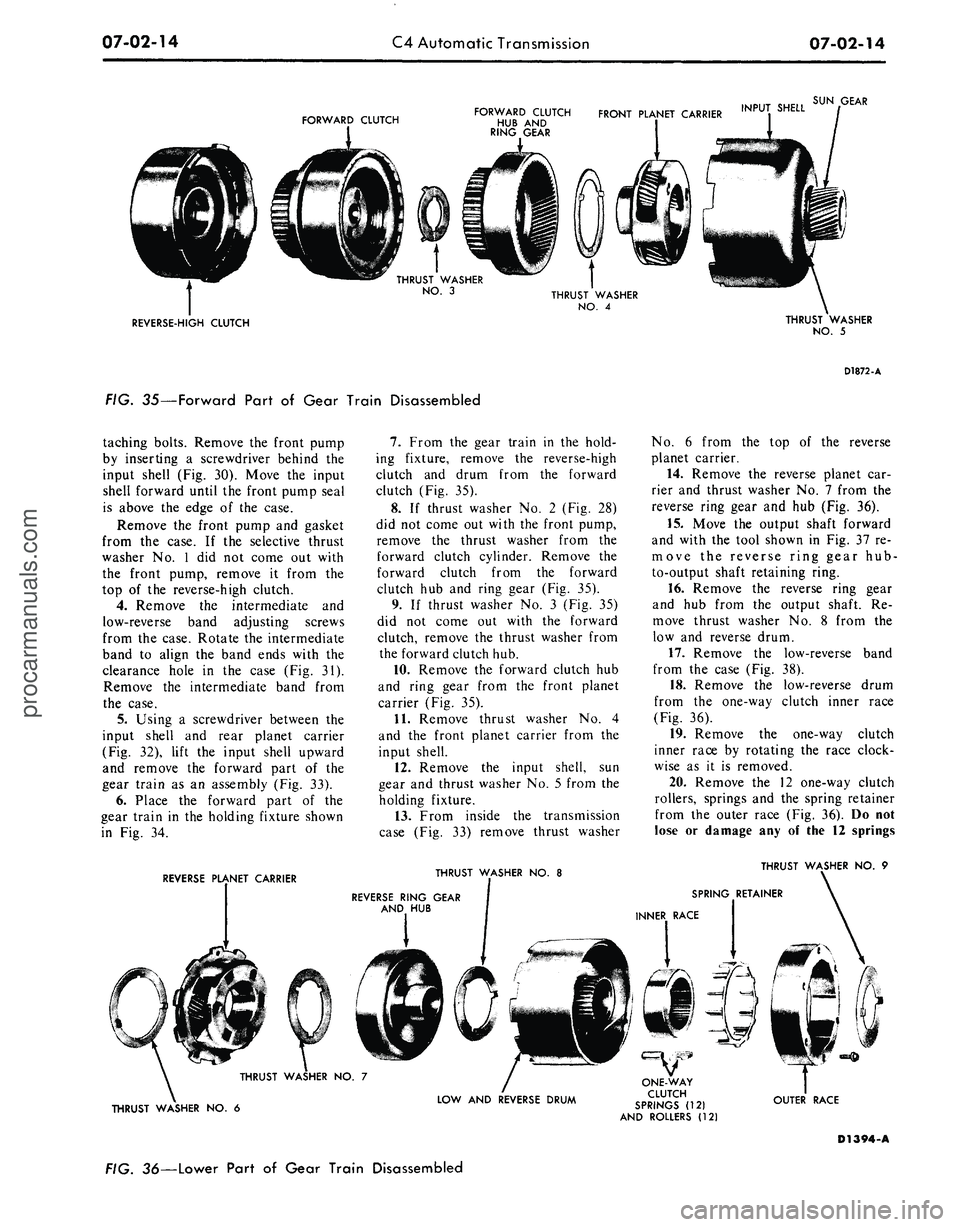
7.
From the gear train in the hold-
ing fixture, remove the reverse-high
clutch and drum from the forward
clutch (Fig. 35).
8. If thrust washer No. 2 (Fig. 28)
did not come out with the front pump,
remove the thrust washer from the
forward clutch cylinder. Remove the
forward clutch from the forward
clutch hub and ring gear (Fig. 35).
9. If thrust washer No. 3 (Fig. 35)
did not come out with the forward
clutch, remove the thrust washer from
the forward clutch hub.
10.
Remove the forward clutch hub
and ring gear from the front planet
carrier (Fig. 35).
11.
Remove thrust washer No. 4
and the front planet carrier from the
input shell.
12.
Remove the input shell, sun
gear and thrust washer No. 5 from the
holding fixture.
13.
From inside the transmission
case (Fig. 33) remove thrust washer
No.
6 from the top of the reverse
planet carrier.
14.
Remove the reverse planet car-
rier and thrust washer No. 7 from the
reverse ring gear and hub (Fig. 36).
15.
Move the output shaft forward
and with the tool shown in Fig. 37 re-
move the reverse ring gear hub-
to-output shaft retaining ring.
16.
Remove the reverse ring gear
and hub from the output shaft. Re-
move thrust washer No. 8 from the
low and reverse drum.
17.
Remove the low-reverse band
from the case (Fig. 38).
18.
Remove the low-reverse drum
from the one-way clutch inner race
(Fig. 36).
19.
Remove the one-way clutch
inner race by rotating the race clock-
wise as it is removed.
20.
Remove the 12 one-way clutch
rollers, springs and the spring retainer
from the outer race (Fig. 36). Do not
lose or damage any of the 12 springs
REVERSE PLANET CARRIER
THRUST WASHER NO. 8
THRUST WASHER NO. 9
SPRING RETAINER
INNER RACE
THRUST WASHER NO. 6
LOW AND REVERSE DRUM
ONE-WAY
CLUTCH
SPRINGS (12)
AND ROLLERS (12)
OUTER RACE
D1394-A
FIG. 36—Lower Part of Gear Train Disassembledprocarmanuals.com
Page 326 of 413
07-02-18
C4 Automatic Transmission
07-02-18
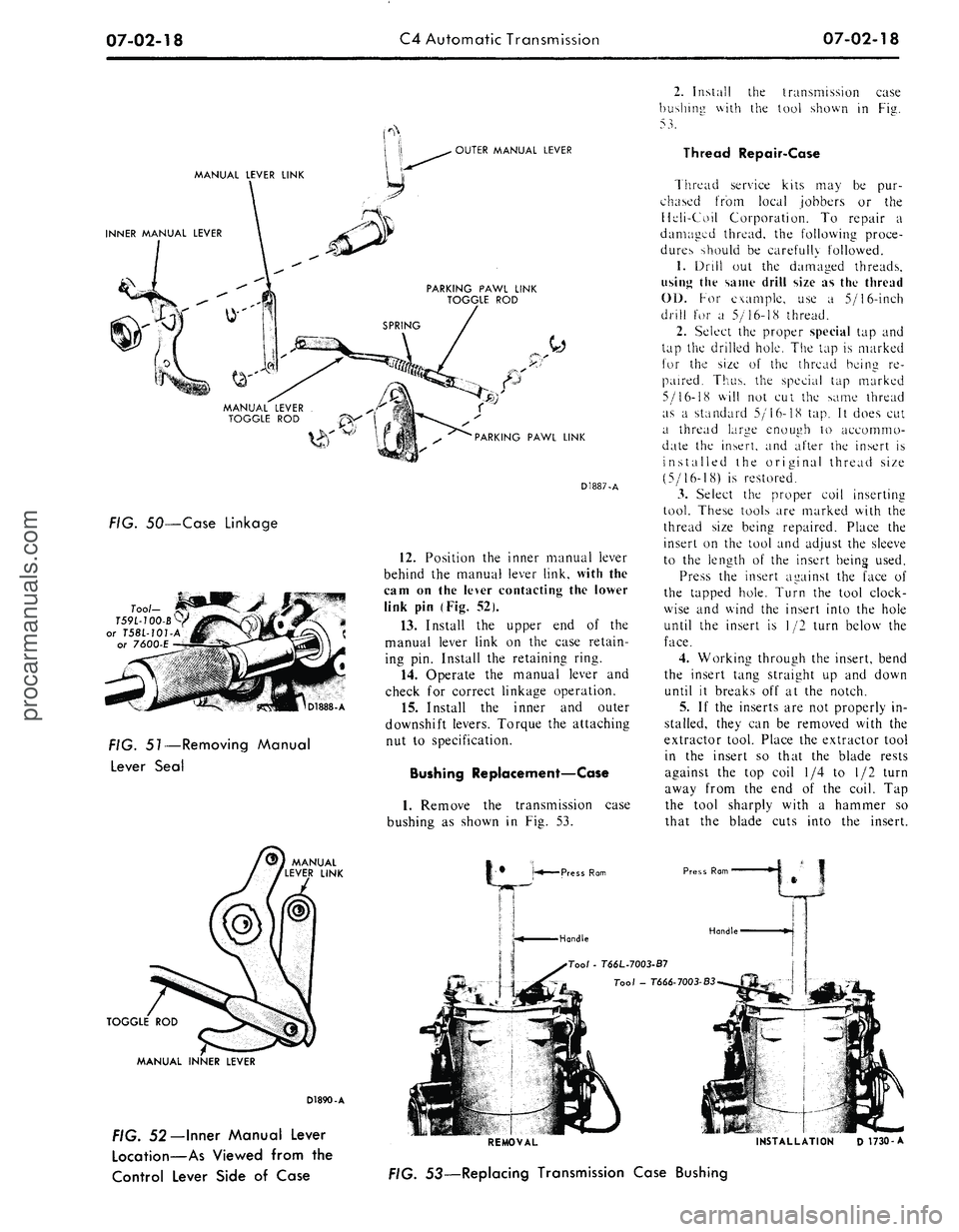
OUTER MANUAL LEVER
MANUAL LEVER LINK
INNER MANUAL LEVER
PARKING PAWL LINK
TOGGLE ROD
PARKING PAWL LINK
FIG. 50—Case Linkage
D1888-A
FIG. 51—Removing Manual
Lever Seal
TOGGLE ROD
D1887-A
12.
Position the inner manual lever
behind the manual lever link, with the
cam on the lever contacting the lower
link pin (Fig. 52).
13.
Install the upper end of the
manual lever link on the case retain-
ing pin. Install the retaining ring.
14.
Operate the manual lever and
check for correct linkage operation.
15.
Install the inner and outer
downshift levers. Torque the attaching
nut to specification.
Bushing Replacement—Case
1.
Remove the transmission case
bushing as shown in Fig. 53.
Press Ram
Handle
MANUAL INNER LEVER
D1890-A
FIG. 52— Inner Manual Lever
Location—As Viewed from the
Control Lever Side of Case
2.
Install the transmission case
bushing with the tool shown in Fig.
53.
Thread Repair-Case
Thread service kits may be pur-
chased from local jobbers or the
Heli-Coil Corporation. To repair a
damaged thread, the following proce-
dures should be carefully followed.
1.
Drill out the damaged threads,
using the same drill size as the thread
01).
For example, use a 5/16-inch
drill for a 5/16-18 thread.
2.
Select the proper special tap and
tap the drilled hole. The tap is marked
for the size of the thread being re-
paired. Thus, the special tap marked
5/16-18 will not cut the same thread
as a standard 5/16-18 tap. It does cut
a thread large enough to accommo-
date the insert, and after the insert is
installed the original thread size
(5/16-18) is restored.
3.
Select the proper coil inserting
tool. These tools are marked with the
thread size being repaired. Place the
insert on the tool and adjust the sleeve
to the length of the insert being used.
Press the insert against the face of
the tapped hole. Turn the tool clock-
wise and wind the insert into the hole
until the insert is 1/2 turn below the
face.
4.
Working through the insert, bend
the insert tang straight up and down
until it breaks off at the notch.
5.
If the inserts are not properly in-
stalled, they can be removed with the
extractor tool. Place the extractor tool
in the insert so that the blade rests
against the top coil 1/4 to 1/2 turn
away from the end of the coil. Tap
the tool sharply with a hammer so
that the blade cuts into the insert.
Press Rom
Handle
Too/
- T66L-7003-B7
Tool - T666-7003-B3
REMOVAL INSTALLATION D 1730-A
FIG. 53—Replacing Transmission Case Bushingprocarmanuals.com
Page 327 of 413
07-02-19
C4 Automatic Transmission
07-02-19
Tool-T64P-7A128-A
OIL
SCREEN
LOWER
VALVE BODY
-,
-^L*«^M*if
GASKET
UPPER
VALVE BODY
D1891-A
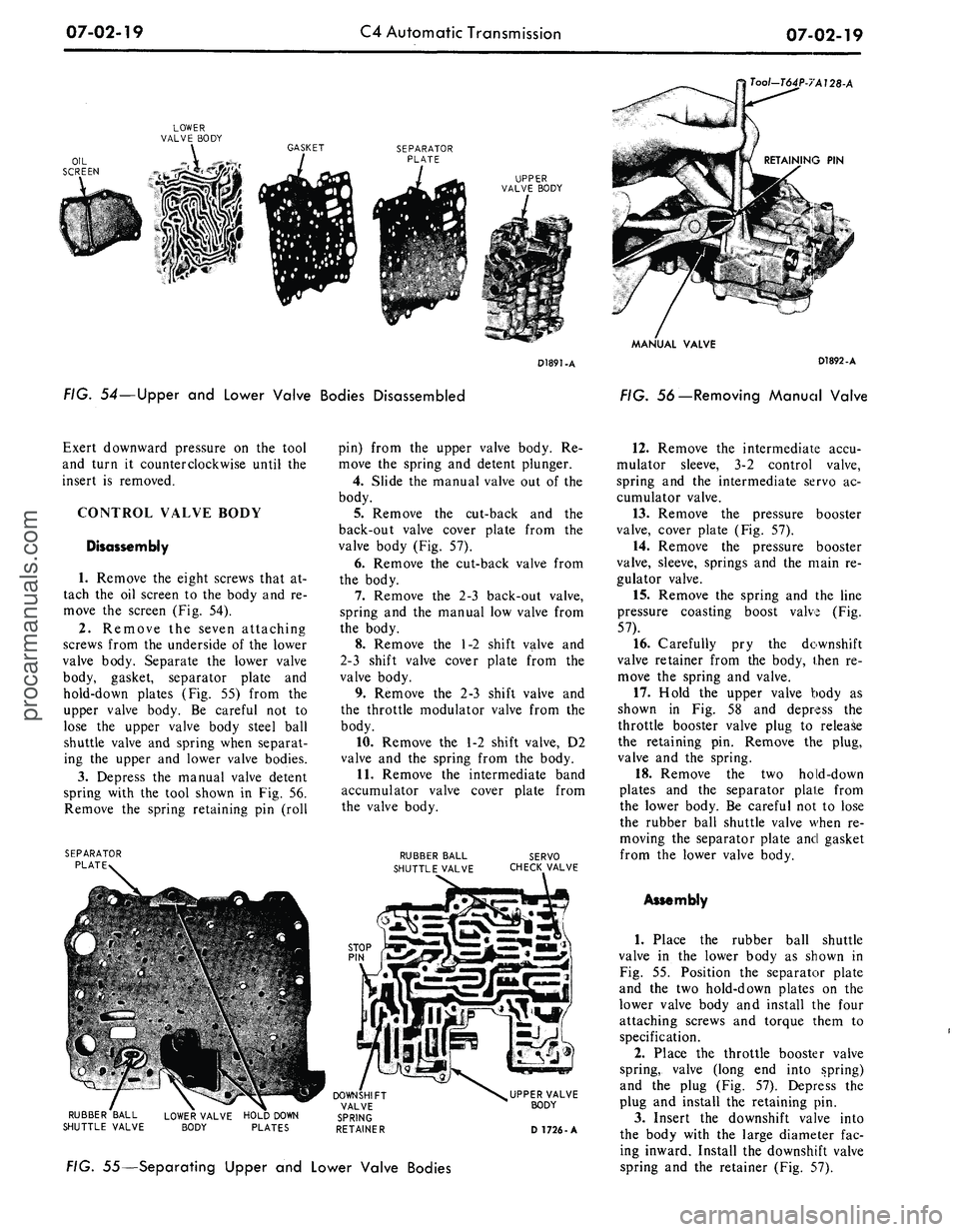
FIG. 54—Upper and Lower Valve Bodies Disassembled
MANUAL VALVE
D1892-A
FIG. 56—Removing Manual Valve
Exert downward pressure on the tool
and turn it counterclockwise until the
insert is removed.
CONTROL VALVE BODY
Disassembly
1.
Remove the eight screws that at-
tach the oil screen to the body and re-
move the screen (Fig. 54).
2.
Remove the seven attaching
screws from the underside of the lower
valve body. Separate the lower valve
body, gasket, separator plate and
hold-down plates (Fig. 55) from the
upper valve body. Be careful not to
lose the upper valve body steel ball
shuttle valve and spring when separat-
ing the upper and lower valve bodies.
3.
Depress the manual valve detent
spring with the tool shown in Fig. 56.
Remove the spring retaining pin (roll
SEPARATOR
PLATE
pin) from the upper valve body. Re-
move the spring and detent plunger.
4.
Slide the manual valve out of the
body.
5.
Remove the cut-back and the
back-out valve cover plate from the
valve body (Fig. 57).
6. Remove the cut-back valve from
the body.
7.
Remove the 2-3 back-out valve,
spring and the manual low valve from
the body.
8. Remove the 1-2 shift valve and
2-3 shift valve cover plate from the
valve body.
9. Remove the 2-3 shift valve and
the throttle modulator valve from the
body.
10.
Remove the 1-2 shift valve, D2
valve and the spring from the body.
11.
Remove the intermediate band
accumulator valve cover plate from
the valve body.
RUBBER BALL
SHUTTLE VALVE
SERVO
CHECK VALVE
RUBBER BALL
SHUTTLE VALVE
UPPER VALVE
BODY
D 1726-A
FIG. 55—Separating Upper and Lower Valve Bodies
12.
Remove the intermediate accu-
mulator sleeve, 3-2 control valve,
spring and the intermediate servo ac-
cumulator valve.
13.
Remove the pressure booster
valve, cover plate (Fig. 57).
14.
Remove the pressure booster
valve, sleeve, springs and the main re-
gulator valve.
15.
Remove the spring and the line
pressure coasting boost valve (Fig.
57).
16.
Carefully pry the downshift
valve retainer from the body, then re-
move the spring and valve.
17.
Hold the upper valve body as
shown in Fig. 58 and depress the
throttle booster valve plug to release
the retaining pin. Remove the plug,
valve and the spring.
18.
Remove the two hold-down
plates and the separator plate from
the lower body. Be careful not to lose
the rubber ball shuttle valve when re-
moving the separator plate and gasket
from the lower valve body.
Assembly
1.
Place the rubber ball shuttle
valve in the lower body as shown in
Fig. 55. Position the separator plate
and the two hold-down plates on the
lower valve body and install the four
attaching screws and torque them to
specification.
2.
Place the throttle booster valve
spring, valve (long end into spring)
and the plug (Fig. 57). Depress the
plug and install the retaining pin.
3.
Insert the downshift valve into
the body with the large diameter fac-
ing inward. Install the downshift valve
spring and the retainer (Fig. 57).procarmanuals.com
Page 335 of 413
07-02-27
C4 Automatic Transmission
07-02-27
'OIL RINGS
SNAP RING
SECONDARY
GOVERNOR VALVE
1 v s
GOVERNOR HOUSING
D1907-A
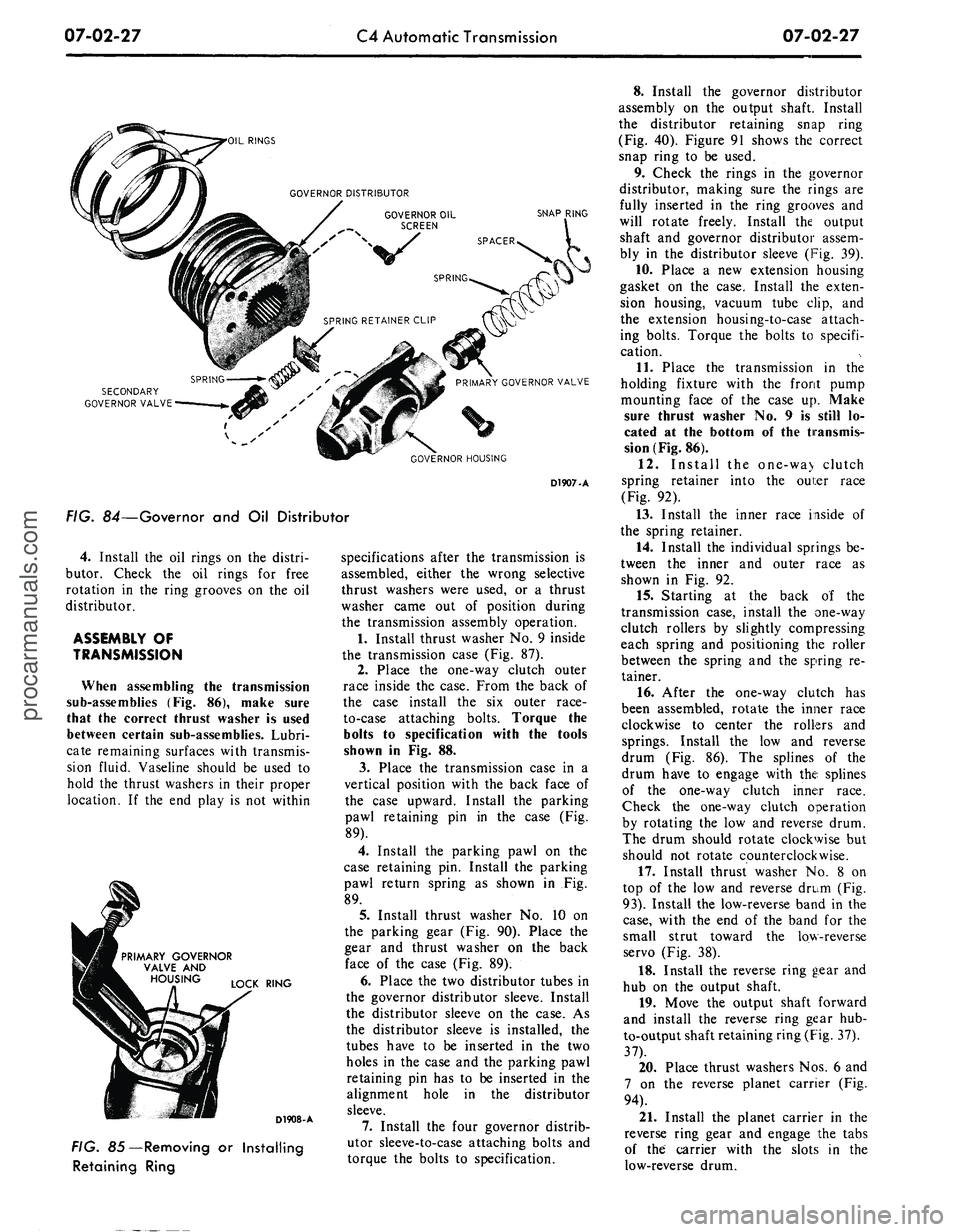
FIG. 84—Governor and Oil Distributor
4.
Install the oil rings on the distri-
butor. Check the oil rings for free
rotation in the ring grooves on the oil
distributor.
ASSEMBLY OF
TRANSMISSION
When assembling the transmission
sub-assemblies (Fig. 86), make sure
that the correct thrust washer is used
between certain sub-assemblies. Lubri-
cate remaining surfaces with transmis-
sion fluid. Vaseline should be used to
hold the thrust washers in their proper
location. If the end play is not within
PRIMARY GOVERNOR
VALVE AND
LOCK RING
D1908-A
FIG. 85—Removing or Installing
Retaining Ring
specifications after the transmission is
assembled, either the wrong selective
thrust washers were used, or a thrust
washer came out of position during
the transmission assembly operation.
1.
Install thrust washer No. 9 inside
the transmission case (Fig. 87).
2.
Place the one-way clutch outer
race inside the case. From the back of
the case install the six outer race-
to-case attaching bolts. Torque the
bolts to specification with the tools
shown in Fig. 88.
3.
Place the transmission case in a
vertical position with the back face of
the case upward. Install the parking
pawl retaining pin in the case (Fig.
89).
4.
Install the parking pawl on the
case retaining pin. Install the parking
pawl return spring as shown in Fig.
89.
5.
Install thrust washer No. 10 on
the parking gear (Fig. 90). Place the
gear and thrust washer on the back
face of the case (Fig. 89).
6. Place the two distributor tubes in
the governor distributor sleeve. Install
the distributor sleeve on the case. As
the distributor sleeve is installed, the
tubes have to be inserted in the two
holes in the case and the parking pawl
retaining pin has to be inserted in the
alignment hole in the distributor
sleeve.
7.
Install the four governor distrib-
utor sleeve-to-case attaching bolts and
torque the bolts to specification.
8. Install the governor distributor
assembly on the output shaft. Install
the distributor retaining snap ring
(Fig. 40). Figure 91 shows the correct
snap ring to be used.
9. Check the rings in the governor
distributor, making sure the rings are
fully inserted in the ring grooves and
will rotate freely. Install the output
shaft and governor distributor assem-
bly in the distributor sleeve (Fig. 39).
10.
Place a new extension housing
gasket on the case. Install the exten-
sion housing, vacuum tube clip, and
the extension housing-to-case attach-
ing bolts. Torque the bolts to specifi-
cation.
11.
Place the transmission in the
holding fixture with the front pump
mounting face of the case up. Make
sure thrust washer No. 9 is still lo-
cated at the bottom of the transmis-
sion (Fig. 86).
12.
Install the one-wa> clutch
spring retainer into the oui:er race
(Fig. 92).
13.
Install the inner race inside of
the spring retainer.
14.
Install the individual springs be-
tween the inner and outer race as
shown in Fig. 92.
15.
Starting at the back of the
transmission case, install the one-way
clutch rollers by slightly compressing
each spring and positioning the roller
between the spring and the spring re-
tainer.
16.
After the one-way clutch has
been assembled, rotate the inner race
clockwise to center the rollers and
springs. Install the low and reverse
drum (Fig. 86). The splines of the
drum have to engage with the splines
of the one-way clutch inner race.
Check the one-way clutch operation
by rotating the low and reverse drum.
The drum should rotate clockwise but
should not rotate counterclockwise.
17.
Install thrust washer No. 8 on
top of the low and reverse drum (Fig.
93).
Install the low-reverse band in the
case,
with the end of the band for the
small strut toward the low-reverse
servo (Fig. 38).
18.
Install the reverse ring gear and
hub on the output shaft.
19.
Move the output shaft forward
and install the reverse ring gear hub-
to-output shaft retaining ring (Fig. 37).
37).
20.
Place thrust washers Nos. 6 and
7 on the reverse planet carrier (Fig.
94).
21.
Install the planet carrier in the
reverse ring gear and engage the tabs
of the carrier with the slots in the
low-reverse drum.procarmanuals.com
Page 367 of 413
07-03-27
FMX Transmission
0703-27
CENTER SUPPORT
PLANETARY CLUTCH
"CAM TYPE" CLUTCH RACE
CHAMFER ON PRODUCTION
PART, ONLY-SERVICE PART NOT CHAMFERED
PLANET CARRIER
D1938-A
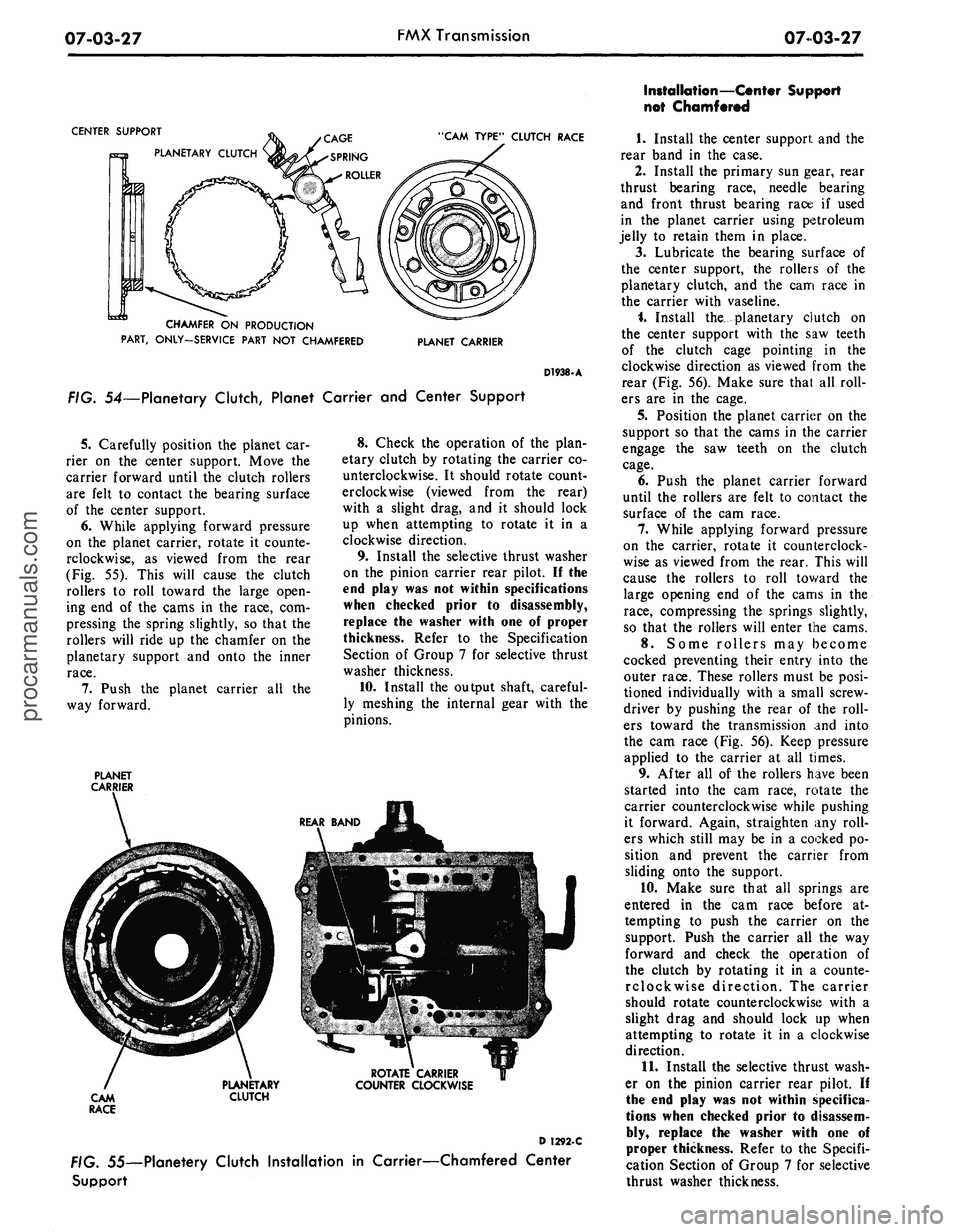
FIG. 54—Planetary Clutch, Planet Carrier and Center Support
5.
Carefully position the planet car-
rier on the center support. Move the
carrier forward until the clutch rollers
are felt to contact the bearing surface
of the center support.
6. While applying forward pressure
on the planet carrier, rotate it counte-
rclockwise, as viewed from the rear
(Fig. 55). This will cause the clutch
rollers to roll toward the large open-
ing end of the cams in the race, com-
pressing the spring slightly, so that the
rollers will ride up the chamfer on the
planetary support and onto the inner
race.
7.
Push the planet carrier all the
way forward.
PLANET
CARRIER
8. Check the operation of the plan-
etary clutch by rotating the carrier co-
unterclockwise. It should rotate count-
erclockwise (viewed from the rear)
with a slight drag, and it should lock
up when attempting to rotate it in a
clockwise direction.
9. Install the selective thrust washer
on the pinion carrier rear pilot. II the
end play was not within specifications
when checked prior to disassembly,
replace the washer with one of proper
thickness. Refer to the Specification
Section of Group 7 for selective thrust
washer thickness.
10.
Install the output shaft, careful-
ly meshing the internal gear with the
pinions.
ROTATE CARRIER
COUNTER CLOCKWISE
D 1292-C
. 55—Planetery Clutch Installation in Carrier—Chamfered Center
Support
Installation—Center Support
not Chamfered
1.
Install the center support and the
rear band in the case.
2.
Install the primary sun gear, rear
thrust bearing race, needle bearing
and front thrust bearing race if used
in the planet carrier using petroleum
jelly to retain them in place.
3.
Lubricate the bearing surface of
the center support, the rollers of the
planetary clutch, and the cam race in
the carrier with vaseline.
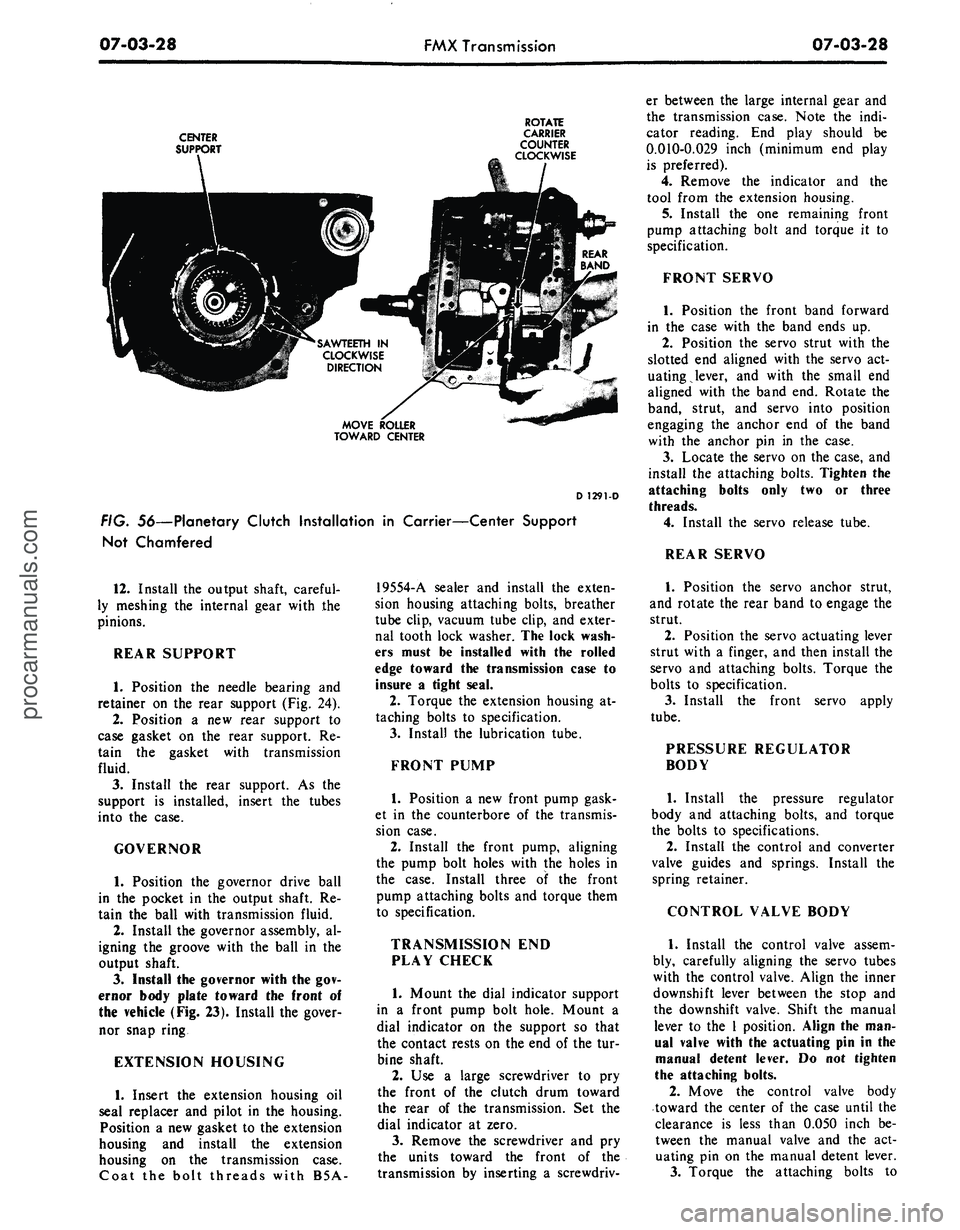
i. Install the^ planetary clutch on
the center support with the saw teeth
of the clutch cage pointing in the
clockwise direction as viewed from the
rear (Fig. 56). Make sure that all roll-
ers are in the cage.
5.
Position the planet carrier on the
support so that the cams in the carrier
engage the saw teeth on the clutch
cage.
6. Push the planet carrier forward
until the rollers are felt to contact the
surface of the cam race.
7.
While applying forward pressure
on the carrier, rotate it counterclock-
wise as viewed from the rear. This will
cause the rollers to roll toward the
large opening end of the cams in the
race,
compressing the springs slightly,
so that the rollers will enter the cams.
8. Some rollers may become
cocked preventing their entry into the
outer race. These rollers must be posi-
tioned individually with a small screw-
driver by pushing the rear of the roll-
ers toward the transmission and into
the cam race (Fig. 56). Keep pressure
applied to the carrier at all times.
9. After all of the rollers have been
started into the cam race, rotate the
carrier counterclockwise while pushing
it forward. Again, straighten any roll-
ers which still may be in a cocked po-
sition and prevent the carrier from
sliding onto the support.
10.
Make sure that all springs are
entered in the cam race before at-
tempting to push the carrier on the
support. Push the carrier all the way
forward and check the operation of
the clutch by rotating it in a counte-
rclockwise direction. The carrier
should rotate counterclockwise with a
slight drag and should lock up when
attempting to rotate it in a clockwise
direction.
11.
Install the selective thrust wash-
er on the pinion carrier rear pilot. If
the end play was not within specifica-
tions when checked prior to disassem-
bly, replace the washer with one of
proper thickness. Refer to the Specifi-
cation Section of Group 7 for selective
thrust washer thickness.procarmanuals.com
Page 368 of 413
07-03-28
FMX Transmission
07-03-28
CENTER
SUPPORT
ROTATE
CARRIER
COUNTER
CLOCKWISE
SAWTEETH IN
CLOCKWISE
DIRECTION
MOVE ROLLER
TOWARD CENTER
D 1291-D
FIG. 56—Planetary Clutch Installation in Carrier—Center Support
Not Chamfered
er between the large internal gear and
the transmission case. Note the indi-
cator reading. End play should be
0.010-0.029 inch (minimum end play
is preferred).
4.
Remove the indicator and the
tool from the extension housing.
5.
Install the one remaining front
pump attaching bolt and torque it to
specification.
FRONT SERVO
1.
Position the front band forward
in the case with the band ends up.
2.
Position the servo strut with the
slotted end aligned with the servo act-
uating lever, and with the small end
aligned with the band end. Rotate the
band, strut, and servo into position
engaging the anchor end of the band
with the anchor pin in the case.
3.
Locate the servo on the case, and
install the attaching bolts. Tighten the
attaching bolts only two or three
threads.
4.
Install the servo release tube.
REAR SERVO
12.
Install the output shaft, careful-
ly meshing the internal gear with the
pinions.
REAR SUPPORT
1.
Position the needle bearing and
retainer on the rear support (Fig. 24).
2.
Position a new rear support to
case gasket on the rear support. Re-
tain the gasket with transmission
fluid.
3.
Install the rear support. As the
support is installed, insert the tubes
into the case.
GOVERNOR
1.
Position the governor drive ball
in the pocket in the output shaft. Re-
tain the ball with transmission fluid.
2.
Install the governor assembly, al-
igning the groove with the ball in the
output shaft.
3.
Install the governor with the gov-
ernor body plate toward the front of
the vehicle (Fig. 23). Install the gover-
nor snap ring
EXTENSION HOUSING
1.
Insert the extension housing oil
seal re placer and pilot in the housing.
Position a new gasket to the extension
housing and install the extension
housing on the transmission case.
Coat the bolt threads with B5A-
19554-A sealer and install the exten-
sion housing attaching bolts, breather
tube clip, vacuum tube clip, and exter-
nal tooth lock washer. The lock wash-
ers must be installed with the rolled
edge toward the transmission case to
insure a tight seal.
2.
Torque the extension housing at-
taching bolts to specification.
3.
Install the lubrication tube.
FRONT PUMP
1.
Position a new front pump gask-
et in the counterbore of the transmis-
sion case.
2.
Install the front pump, aligning
the pump bolt holes with the holes in
the case. Install three of the front
pump attaching bolts and torque them
to specification.
TRANSMISSION END
PLAY CHECK
1.
Mount the dial indicator support
in a front pump bolt hole. Mount a
dial indicator on the support so that
the contact rests on the end of the tur-
bine shaft.
2.
Use a large screwdriver to pry
the front of the clutch drum toward
the rear of the transmission. Set the
dial indicator at zero.
3.
Remove the screwdriver and pry
the units toward the front of the
transmission by inserting a screwdriv-
1.
Position the servo anchor strut,
and rotate the rear band to engage the
strut.
2.
Position the servo actuating lever
strut with a finger, and then install the
servo and attaching bolts. Torque the
bolts to specification.
3.
Install the front servo apply
tube.
PRESSURE REGULATOR
BODY
1.
Install the pressure regulator
body and attaching bolts, and torque
the bolts to specifications.
2.
Install the control and converter
valve guides and springs. Install the
spring retainer.
CONTROL VALVE BODY
1.
Install the control valve assem-
bly, carefully aligning the servo tubes
with the control valve. Align the inner
downshift lever between the stop and
the downshift valve. Shift the manual
lever to the 1 position. Align the man-
ual valve with the actuating pin in the
manual detent lever. Do not tighten
the attaching bolts.
2.
Move the control valve body
toward the center of the case until the
clearance is less than 0.050 inch be-
tween the manual valve and the act-
uating pin on the manual detent lever.
3.
Torque the attaching bolts toprocarmanuals.com
Page 369 of 413
07-03-29
FMX Transmission
07-03-29
specification. Be sure that the rear
fluid screen retaining clip is installed
under the valve body bolt as shown in
Fig. 17.
4.
Install the large control pressure
tube in the valve body and regulator.
5.
Install the small control pressure
compensator tube in the valve body
and regulator.
6. Turn the manual valve one full
turn in each manual lever detent posi-
tion. If the manual valve binds against
the actuating pin in any detent posi-
tion, loosen the valve body attaching
bolts and move the body away from
the center of the case. Move the body
only enough to relieve the binding.
Torque the attaching bolts and check
the manual valve for binding.
7.
Torque the front servo attaching
bolts to specification.
FRONT AND REAR
BAND ADJUSTMENTS
Adjust the front and rear bands as
detailed in Section 2.
VACUUM DIAPHRAGM UNIT
1.
Position the control rod in the
bore of the vacuum diaphragm unit
and install the diaphragm unit. Make
sure the control rod enters the throttle
valve as the vacuum unit is installed.
2.
Torque the diaphragm unit to
specification.
FLUID FILTER
AND OIL PAN
1.
Position the fluid filter on the
rear clip so that the tang enters the
hole in the filter flange. Then, rotate
the filter (clockwise) until the grom-
met is over the pump inlet port of the
valve body regulator and press the fil-
ter down firmly. Install the filter re-
taining clip.
2.
Place a new gasket on the trans-
mission case and install the pan. In-
stall the attaching bolts and lock
washers and torque the bolts to speci-
fication.
If the converter and converter hous-
ing were removed from the transmis-
sion, install these components. Posi-
tion the transmission assembly on the
transmission jack, and refer to Trans-
mission Installation Procedures for in-
stalling the transmission.procarmanuals.com
Page 387 of 413
07-04-18
C-6 Automatic Transmission
07-04-18
16.
Position the manual and down-
shift control rod splash shield to the
frame side rail and secure it with the
attaching bolts.
17.
Connect the speedometer cable
to the extension housing.
18.
Connect the vacuum hose to the
vacuum diaphragm and secure with a
clamp.
19.
Connect the two oil cooler lines
to the fittings on the right side of the
case.
20.
Install the cooler lines under
the clip at the cylinder head.
21.
Position the reinforcement plate
and torque the attaching bolts.
22.
Install the equalizer and park-
ing brake cables. Install the equalizer
lever retracting spring.
23.
Install the drive shaft.
24.
Install a new seal on the filler
tube and install it in the transmission
case.
Secure the filler tube to the cyl-
inder head.
25.
Install the starting motor and
connect the cable.
26.
Install the idler arm bracket-
to-frame side rail.
27.
Lower the vehicle.
28.
Fill the transmission to the cor-
rect level with the specified fluid.
29.
Adjust the manual and throttle
linkage as required.
MAJOR REPAIR OPERATIONS
DISASSEMBLY OF
TRANSMISSION
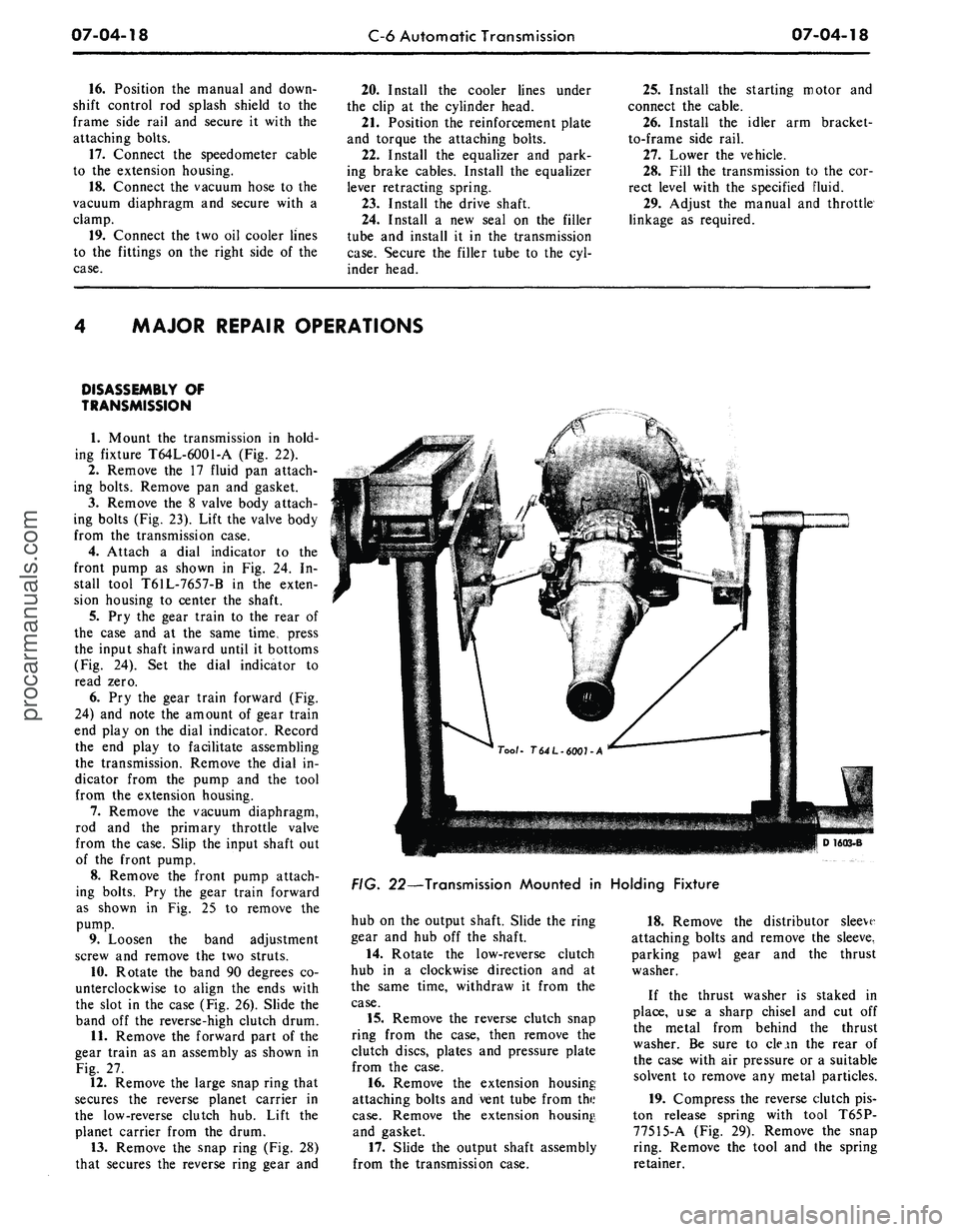
1.
Mount the transmission in hold-
ing fixture T64L-6001-A (Fig. 22).
2.
Remove the 17 fluid pan attach-
ing bolts. Remove pan and gasket.
3.
Remove the 8 valve body attach-
ing bolts (Fig. 23). Lift the valve body
from the transmission case.
4.
Attach a dial indicator to the
front pump as shown in Fig. 24. In-
stall tool T61L-7657-B in the exten-
sion housing to center the shaft.
5.
Pry the gear train to the rear of
the case and at the same time, press
the input shaft inward until it bottoms
(Fig. 24). Set the dial indicator to
read zero.
6. Pry the gear train forward (Fig.
24) and note the amount of gear train
end play on the dial indicator. Record
the end play to facilitate assembling
the transmission. Remove the dial in-
dicator from the pump and the tool
from the extension housing.
7.
Remove the vacuum diaphragm,
rod and the primary throttle valve
from the case. Slip the input shaft out
of the front pump.
8. Remove the front pump attach-
ing bolts. Pry the gear train forward
as shown in Fig. 25 to remove the
pump.
9. Loosen the band adjustment
screw and remove the two struts.
10.
Rotate the band 90 degrees co-
unterclockwise to align the ends with
the slot in the case (Fig. 26). Slide the
band off the reverse-high clutch drum.
11.
Remove the forward part of the
gear train as an assembly as shown in
Fig. 27.
12.
Remove the large snap ring that
secures the reverse planet carrier in
the low-reverse clutch hub. Lift the
planet carrier from the drum.
13.
Remove the snap ring (Fig. 28)
that secures the reverse ring gear and
D16Q3-B
FIG. 22—Transmission Mounted in Holding Fixture
hub on the output shaft. Slide the ring
gear and hub off the shaft.
14.
Rotate the low-reverse clutch
hub in a clockwise direction and at
the same time, withdraw it from the
case.
15.
Remove the reverse clutch snap
ring from the case, then remove the
clutch discs, plates and pressure plate
from the case.
16.
Remove the extension housing
attaching bolts and vent tube from the
case.
Remove the extension housing,
and gasket.
17.
Slide the output shaft assembly
from the transmission case.
18.
Remove the distributor sleeve
attaching bolts and remove the sleeve,
parking pawl gear and the thrust
washer.
If the thrust washer is staked in
place, use a sharp chisel and cut off
the metal from behind the thrust
washer. Be sure to clean the rear of
the case with air pressure or a suitable
solvent to remove any metal particles.
19.
Compress the reverse clutch pis-
ton release spring with tool T65P-
77515-A (Fig. 29). Remove the snap
ring. Remove the tool and the spring
retainer.procarmanuals.com